The Empty JSON That Bypassed a Domain Purchase
The domain purchase workflow relied on client-side validation, so replacing the availability check response with an empty JSON object let the frontend proceed. The backend then accepted requests to attach an unpurchased domain and create a DNS zone, making the domain unavailable to other users.

medium.com
Published on medium.com
Bug Bounty
The full write-up lives on its author's site
It belongs to its author, so we link to it rather than copy it. The other two tabs are our own rewrites, checked against it.
Context
The target was a public bug bounty program on HackerOne. The program covered a cloud platform that specialises in web application development, hosting and deployment, and that also offers domain management services. The feature discussed here is the platform's domain management section, where a user can add a domain to a project through two paths:
- Purchase Flow: search for a new domain, check its availability and view its price.
- Existing Domain Flow: add a domain the user already owns and connect it to their project.
The write-up starts from the existing domain flow, but the bypass is of the purchase workflow.
Setup
The testing was done against the live program with Burp Suite, used to intercept and modify HTTP requests and responses. The researcher worked from a free plan account, after noticing that many features were locked behind paid plans. A second account was later used to check the cross-account effect. The report does not give platform versions, endpoint hostnames or account details beyond the placeholders shown in the requests.
Finding it
After a few days of testing, the researcher noticed something odd: sometimes, when an HTTP response returned to the browser was tampered with, the application would send a new follow-up request, as if the original operation had succeeded.

That observation led back to features that required a higher-tier subscription. The researcher monitored their responses and tested the effect of changing the status code or values in the response body. In some cases the application continued the workflow, the backend returned a successful response, and the frontend then allowed the feature to be used even though the account was on the free plan.
The domain feature was different in impact: tampering with the validation response allowed the purchase workflow to be bypassed and a domain that was available for purchase to be assigned to a project without completing payment.
Exploitation
The researcher first searched for a domain through the purchase flow. For demonstration purposes the domain is called example.com. The platform showed that it was available for purchase and displayed its price. Instead of buying it, the researcher returned to the domain management section, chose the option for adding an existing domain, and entered the same domain. All requests below were monitored in Burp Suite.
Step 1: Check domain availability and tamper with the response
The application sent:
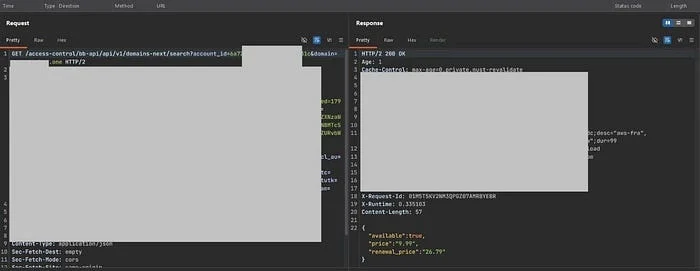
GET /access-control/bb-api/api/v1/domains-next/search?account_id=<ACCOUNT_ID>&domain=<TARGET_DOMAIN> HTTP/2
The response indicated that the domain was available for purchase and included its price and renewal cost.
Modifying response values such as available, and changing the price to 0.00, caused errors in the frontend. Replacing the entire response body with an empty JSON object ({}) while keeping the response status as 200 OK worked: the frontend continued with the workflow instead of stopping at the validation step, and the Verify stage was reachable.
Step 2: Generate the TXT verification token
Continuing through the workflow, the application sent:
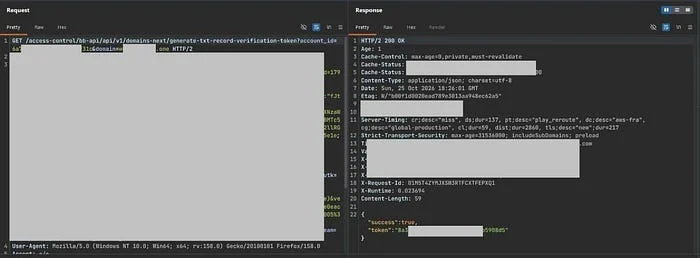
GET /access-control/bb-api/api/v1/domains-next/generate-txt-record-verification-token?account_id=<ACCOUNT_ID>&domain=<TARGET_DOMAIN> HTTP/2
The server returned a successful response containing a verification token, and the workflow proceeded to the next step without completing the purchase or publishing the TXT record.
Step 3: Attach the domain to the project
After reaching the verification stage and clicking Verify, the application sent:
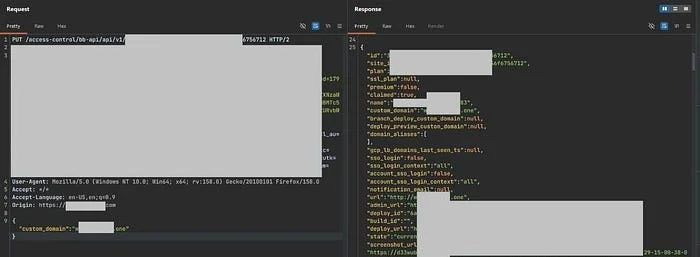
PUT /access-control/bb-api/api/v1/sites/<SITE_ID> HTTP/2Content-Type: application/json
with the body:
{ "custom_domain": "<TARGET_DOMAIN>"}
The request was forwarded without modification. The server accepted the operation, and the response confirmed that the domain had been attached to the project. The domain then appeared in the project's settings, even though the purchase had not been completed.
Step 4: Create the DNS zone
After attaching the domain, the application sent:
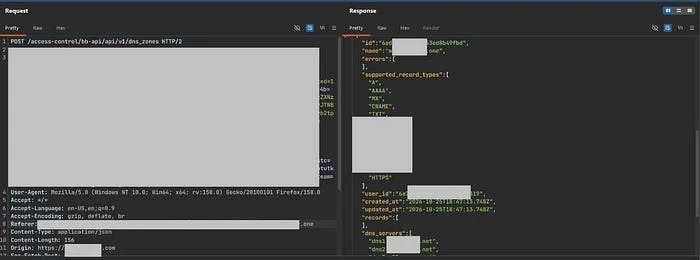
POST /access-control/bb-api/api/v1/dns_zones HTTP/2Content-Type: application/json
The visible part of the body contained the domain name:
{ "name": "<TARGET_DOMAIN>"}
The server accepted the request and returned information about the newly created DNS zone, including its ID, supported DNS record types and nameservers.
Step 5: Confirm the cross-account impact
To check that the domain had been assigned to the first account and was no longer available to other users, the researcher used a second account and searched for the same domain. It was now marked as Unavailable, although it had been available for purchase before the test. This confirmed that the impact was not limited to the frontend or a visual change in the project interface: the domain assignment affected the platform's state and prevented other accounts from reserving the domain, even though no purchase had been completed.
Root cause
The main issue was the difference between a user's permission to modify a project and their right to assign a particular domain to it. Having permission to edit a project should not automatically allow a user to attach any domain they choose. The backend should verify that the user is entitled to the domain before allowing the assignment, either through a purchase or ownership verification, depending on the workflow.
The report illustrates the problem with this TypeScript example:
async function assignDomain(siteId: string, userId: string, domain: string) { const site = await getAuthorizedSite(siteId, userId); if (!site) throw new Error("Access denied"); if (!isValidDomain(domain)) throw new Error("Invalid domain"); return updateSite(siteId, { customDomain: domain });}
This code checks whether the user is allowed to modify the project and whether the domain name is valid, but not whether the user is entitled to assign that domain. As a result, the request could pass these checks even if the user had not purchased the domain or verified ownership. The key issue is that permission to modify a project does not prove that the user is entitled to the domain.
The backend should verify entitlement before assigning the domain, as in this version:
async function assignDomain(siteId: string, userId: string, domain: string) { const site = await getAuthorizedSite(siteId, userId); if (!site) throw new Error("Access denied"); if (!isValidDomain(domain)) throw new Error("Invalid domain"); const entitled = await verifyDomainEntitlement(userId, domain); if (!entitled) throw new Error("Purchase or ownership verification required"); return reserveAndAssignDomain(siteId, userId, domain);}
The difference is that the second version checks whether the user is entitled to the domain before assigning it, instead of only checking whether the user can modify the project.
This matches what was observed during testing. Manipulating the validation response allowed the frontend to continue, after which the system accepted the domain assignment request without a completed purchase. When the result was checked from a separate account, the domain had become unavailable on the platform. The issue was therefore not just a frontend validation bypass: the domain assignment process failed to prevent the unauthorised state that had been identified.
Impact
Unauthorised domain allocation without payment. The vulnerability allowed users to bypass the purchase workflow and assign domains that were available for purchase to their projects without completing payment. This included domains with relatively high prices, which could be assigned within the platform without paying through the normal purchase process. This refers to domain assignment within the platform, not actual registration or legal ownership of the domain through a domain registrar.
Business logic denial of service. Repeatedly exploiting this behaviour across a large number of domains could allow an attacker to reserve many available domains without purchasing them, making those domains unavailable to other customers trying to register them through the platform. This could disrupt an important business function and prevent customers from registering the domains they want. The report describes this as a business logic denial of service because it targets the availability of the domain registration feature rather than attempting to crash servers or disrupt network infrastructure.
The test confirmed that assigning a single domain this way made it unavailable when searched for from a separate account. Exhausting a large number of domains remains a potential risk based on the repeatability of the behaviour, rather than the result of a large-scale test that was actually performed.
Fix
The report does not describe a specific change made by the platform. What it sets out is the fix the backend should apply: verify the user's entitlement to the domain, through a purchase or ownership verification depending on the workflow, before assigning it, and reserve and assign the domain only once that check passes. The entitlement check has to live on the server, because the frontend validation step can be bypassed by tampering with the response.
Variants to test
- Empty JSON body on validation endpoints. Replace the response body of an availability or eligibility check with
{}while keeping200 OK, then continue the workflow. A positive result is the frontend advancing to the next stage and the backend accepting the follow-up request. - Status code and value tampering. Change the status code or individual fields such as
availableor a price. A positive result is the workflow continuing without a frontend error. - Skipped payment step. Walk a purchase flow to the point just before payment, then jump directly to the step that follows it.
- Cross-account state check. After any suspected bypass, repeat the action from a second account. A positive result is the resource showing as unavailable or already taken from the second account.
- Entitlement versus permission. On any feature that attaches an external resource (domains, custom hostnames, integrations), test whether project-edit permission alone is enough.
Finally
The vulnerability was reported almost six months before publication and has since been triaged, with a bounty awarded.
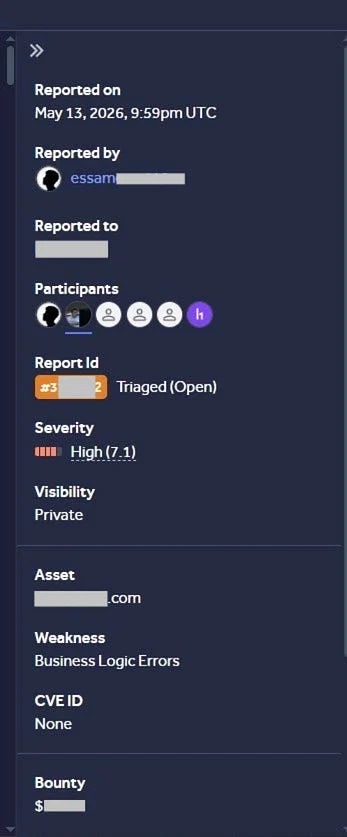
The vulnerability was discovered together with Essam Ezzat.
What happened, in plain words
A security researcher was testing a cloud platform that lets people build, host and deploy websites. The platform also sells domain names: you can search for a name like example.com, see its price, and buy it so it points at your project.
The researcher found a way to attach a domain to a project without paying for it. The trick was not a clever password guess or a broken login. It was much simpler: the website's own pages (the part you see in the browser) asked the platform's servers a question, and the researcher changed the answer on its way back to the browser. The browser believed the changed answer, carried on with the process, and the servers behind it accepted the result. The domain ended up attached to the project, and when the researcher checked from a second account, the domain showed as unavailable to everyone else, even though nobody had bought it.
This kind of bug is called a business logic flaw. "Business logic" just means the rules of how a feature is supposed to work: search, pay, then own. A logic flaw is when the software follows the steps but skips a rule it should have enforced. Nothing crashes and no alarm goes off; the feature simply does the wrong thing.
To follow the rest of this article you only need to know how to use a browser. Every technical idea is explained as it appears.
Some background you will need
Before the steps, four ideas come up again and again.
A request and a response. When you click something on a website, your browser sends a small message to a server asking for something, and the server sends a message back. The first is the request, the second is the response. Think of a restaurant: you order (request), the kitchen sends a plate back (response).
An API. Many modern websites are split in two. The pages you see are one part; behind them sits an API (Application Programming Interface), a set of addresses the page can call to get or change data. When the page needs to know whether a domain is free, it calls an API address and gets an answer, usually in a format called JSON (JavaScript Object Notation), which is just text shaped like {"key": "value"}. An empty JSON object is written {}.
HTTP status codes. Every response carries a three-digit number. 200 OK means "all good, here is your answer". 404 means "not found". 500 means "server error". The browser and the page's code often look at this number to decide what to do next.
Burp Suite. This is a tool used by security testers. It sits between your browser and the server like a post office clerk who opens every letter, lets you rewrite it, and then sends it on. That is how the researcher could change a response before the browser saw it. You do not need Burp to understand this article; just remember that "tampering with a response" means editing the server's answer in transit.
A token. A token is a short piece of text that stands in for proof of something. A cinema ticket is a token: it proves you paid. On websites, tokens are often used to prove you own an email address or a domain. The platform here uses a TXT record token, explained later.
The setup
The target was a public bug bounty program on HackerOne. A bug bounty program is a scheme where a company invites outside testers to look for security problems in its systems and pays for good findings, instead of punishing them. The program covered a cloud platform for building, hosting and deploying web applications, which also offers domain management.
The researcher worked from a free-plan account, because many features were locked behind paid plans. A second account was used later to check the effect from another user's point of view. The report does not give platform versions, server hostnames or account details beyond the placeholders you will see in the requests.
The feature in question is the platform's domain management section. There, a user can add a domain to a project in two ways:
- Purchase Flow: search for a new domain, check whether it is available, and see its price.
- Existing Domain Flow: add a domain you already own and connect it to your project.
The write-up starts from the existing domain flow, but the bypass is of the purchase workflow.
Finding it
After a few days of testing, the researcher noticed something odd. Sometimes, when an HTTP response returned to the browser was tampered with, the application would send a new follow-up request, as if the original operation had succeeded.
In plain words: the page trusted the answer it got from the server so completely that, when the answer was changed to look successful, the page behaved as if the action had really worked and moved on to the next step. That is a bit like a form at a doctor's reception: if someone hands you a stamped slip saying "approved", the receptionist does not call the doctor to check; the stamp is the proof.
That observation led the researcher back to features that required a higher-tier subscription. The responses were monitored, and the effect of changing the status code or values in the response body was tested. In some cases the application continued the workflow, the backend returned a successful response, and the frontend then allowed the feature to be used even though the account was on the free plan.
Here, frontend means the part running in your browser (the pages and their code), and backend means the servers behind it that hold the real data. The domain feature turned out to be different in impact: tampering with the validation response allowed the purchase workflow to be bypassed and a domain that was available for purchase to be assigned to a project without completing payment.
Exploitation, step by step
The researcher first searched for a domain through the purchase flow. For demonstration purposes the domain is called example.com. The platform showed that it was available for purchase and displayed its price. Instead of buying it, the researcher returned to the domain management section, chose the option for adding an existing domain, and entered the same domain. All requests below were monitored in Burp Suite.
Step 1: Check domain availability and tamper with the response
The application sent:
GET /access-control/bb-api/api/v1/domains-next/search?account_id=<ACCOUNT_ID>&domain=<TARGET_DOMAIN> HTTP/2
Line by line:
GETis the type of request. GET means "give me information", as opposed to changing something./access-control/bb-api/api/v1/domains-next/searchis the address on the server being asked. Thev1part is just a version number the platform uses.?account_id=<ACCOUNT_ID>&domain=<TARGET_DOMAIN>is the question being asked, written as key and value pairs.account_idsays which account is asking;domainsays which domain name to look up. The angle-bracket parts are placeholders: the real values were filled in during testing and are not published.HTTP/2is the version of the language the browser and server use to talk.
The response indicated that the domain was available for purchase and included its price and renewal cost.
Modifying response values such as available, and changing the price to 0.00, caused errors in the frontend. The report does not explain why these attempts caused errors in the frontend. So the researcher tried something blunter: replacing the entire response body with an empty JSON object ({}) while keeping the response status as 200 OK. This worked. The frontend continued with the workflow instead of stopping at the validation step, and the Verify stage was reachable.
An empty {} is still valid JSON, so nothing crashed, and the page moved on. The lesson for a beginner: a page saying "success" is not proof that the server really succeeded. The proof has to come from the server itself.
Step 2: Generate the TXT verification token
Continuing through the workflow, the application sent:
GET /access-control/bb-api/api/v1/domains-next/generate-txt-record-verification-token?account_id=<ACCOUNT_ID>&domain=<TARGET_DOMAIN> HTTP/2
Line by line:
- Again a
GETrequest, asking the server to produce something rather than to fetch a stored page. - The address ends in
generate-txt-record-verification-token, which describes exactly what it does: create a token for a TXT record check. - The same two parameters,
account_idanddomain, identify who is asking and for which domain.
What is a TXT record? Domain names have a public directory called DNS (Domain Name System), which is how the internet turns a name like example.com into the server that answers for it. DNS holds different types of entries, called records. A TXT record is a record that holds free text. A common way to prove you control a domain is to ask the owner to publish a specific piece of text in the domain's TXT record. Only someone who controls the domain can add it, so if the text appears, ownership is proven. It is like proving you own a house by putting a specific sign in the window: the sign is visible to anyone who looks, and only the owner can put it there.
The server returned a successful response containing a verification token, and the workflow proceeded to the next step without completing the purchase or publishing the TXT record.
This is the important part: the token was generated, but the researcher never actually placed it in any DNS record. The workflow proceeded without the TXT record ever being published.
Step 3: Attach the domain to the project
After reaching the verification stage and clicking Verify, the application sent:
PUT /access-control/bb-api/api/v1/sites/<SITE_ID> HTTP/2Content-Type: application/json
with the body:
{ "custom_domain": "<TARGET_DOMAIN>"}
Line by line:
PUTis a request type used to update or replace something on the server. Here it updates a site, which is the platform's word for a project./access-control/bb-api/api/v1/sites/<SITE_ID>points at one specific site, identified by<SITE_ID>.Content-Type: application/jsontells the server "the body of this message is in JSON format", so the server knows how to read it.- The body
{ "custom_domain": "<TARGET_DOMAIN>" }is the actual change: set this site's custom domain to the chosen domain name.custom_domainis the field name the platform uses for a domain attached to a site.
The request was forwarded without modification. The server accepted the operation, and the response confirmed that the domain had been attached to the project. The domain then appeared in the project's settings, even though the purchase had not been completed.
Notice what this means. The researcher did not need to fake this request. The page sent a perfectly normal request, and the server said yes. The only thing that had been tampered with was the earlier answer that let the page get this far. The server accepted the request even though no payment had happened.
Step 4: Create the DNS zone
After attaching the domain, the application sent:
POST /access-control/bb-api/api/v1/dns_zones HTTP/2Content-Type: application/json
The visible part of the body contained the domain name:
{ "name": "<TARGET_DOMAIN>"}
Line by line:
POSTis a request type used to create something new on the server./access-control/bb-api/api/v1/dns_zonesis the address for creating a DNS zone. A DNS zone is the set of DNS records the platform manages for a domain: the entries that tell the internet where to send visitors.Content-Type: application/jsonagain says the body is JSON.- The body
{ "name": "<TARGET_DOMAIN>" }gives the new zone its name, which is the domain.
The server accepted the request and returned information about the newly created DNS zone, including its ID, supported DNS record types and nameservers.
A nameserver is the server that answers DNS questions for a domain. Getting nameservers back means the platform really did set up a working zone, not just a label in a menu.
Step 5: Confirm the cross-account impact
To check that the domain had been assigned to the first account and was no longer available to other users, the researcher used a second account and searched for the same domain. It was now marked as Unavailable, although it had been available for purchase before the test.
This confirmed that the impact was not limited to the frontend or a visual change in the project interface. The domain assignment affected the platform's state, meaning the real stored data on the servers, and prevented other accounts from reserving the domain, even though no purchase had been completed.
Why does the second account matter so much? Because a change that only appears in your own browser could be a display glitch. A change that another, unrelated account can see is real. It is the difference between writing your name on a piece of paper at home and having it appear in the official register.
Root cause
The main issue was the difference between a user's permission to modify a project and their right to assign a particular domain to it. Having permission to edit a project should not automatically allow a user to attach any domain they choose. The backend should verify that the user is entitled to the domain before allowing the assignment, either through a purchase or ownership verification, depending on the workflow.
Think of a hotel. Being a guest gives you the right to open your own room door. Two different permissions, often confused by software.
The report illustrates the problem with this TypeScript example. TypeScript is a programming language used for web code; you do not need to know it to follow the idea.
async function assignDomain(siteId: string, userId: string, domain: string) { const site = await getAuthorizedSite(siteId, userId); if (!site) throw new Error("Access denied"); if (!isValidDomain(domain)) throw new Error("Invalid domain"); return updateSite(siteId, { customDomain: domain });}
Line by line:
async function assignDomain(...)defines a function calledassignDomain, which takes three inputs: the site's ID, the user's ID and the domain name. A function is a named block of code that does one job.const site = await getAuthorizedSite(siteId, userId);asks the system for the site, but only if this user is allowed to touch it.awaitmeans "wait for the answer before continuing".if (!site) throw new Error("Access denied");stops with an error if the user is not allowed to modify the site. This is the first check: can you edit this project?if (!isValidDomain(domain)) throw new Error("Invalid domain");stops if the domain name is not well formed. This is the second check: is this a real-looking domain name?return updateSite(siteId, { customDomain: domain });saves the domain onto the site and returns the result.
This code checks whether the user is allowed to modify the project and whether the domain name is valid, but not whether the user is entitled to assign that domain. As a result, the request could pass these checks even if the user had not purchased the domain or verified ownership. The key issue is that permission to modify a project does not prove that the user is entitled to the domain.
The backend should verify entitlement before assigning the domain, as in this version:
async function assignDomain(siteId: string, userId: string, domain: string) { const site = await getAuthorizedSite(siteId, userId); if (!site) throw new Error("Access denied"); if (!isValidDomain(domain)) throw new Error("Invalid domain"); const entitled = await verifyDomainEntitlement(userId, domain); if (!entitled) throw new Error("Purchase or ownership verification required"); return reserveAndAssignDomain(siteId, userId, domain);}
Line by line:
- The first three lines are the same as before: check the user can edit the site, and check the domain name is valid.
const entitled = await verifyDomainEntitlement(userId, domain);is the new check. It asks: has this user actually earned the right to this domain, by buying it or by proving ownership?if (!entitled) throw new Error("Purchase or ownership verification required");stops the whole thing if the answer is no.return reserveAndAssignDomain(siteId, userId, domain);only now reserves the domain and attaches it, in one step.
The difference is that the second version checks whether the user is entitled to the domain before assigning it, instead of only checking whether the user can modify the project.
This matches what was observed during testing. Manipulating the validation response allowed the frontend to continue, after which the system accepted the domain assignment request without a completed purchase. When the result was checked from a separate account, the domain had become unavailable on the platform. The issue was therefore not just a frontend validation bypass: the domain assignment process failed to prevent the unauthorised state that had been identified.
A frontend validation bypass means getting past a check that only happens in the browser. On its own that is often harmless, because the browser belongs to the user and can be changed freely. It becomes serious when the server also fails to check, which is what happened here.
Impact
Unauthorised domain allocation without payment. The vulnerability allowed users to bypass the purchase workflow and assign domains that were available for purchase to their projects without completing payment. This included domains with relatively high prices, which could be assigned within the platform without paying through the normal purchase process. This refers to domain assignment within the platform, not actual registration or legal ownership of the domain through a domain registrar.
That last sentence matters. A domain registrar is a company that officially registers domain names with the global system. The researcher did not take legal ownership of any domain; the platform's own records were changed so that the domain was attached to a project and marked as taken inside that platform.
Business logic denial of service. Repeatedly exploiting this behaviour across a large number of domains could allow an attacker to reserve many available domains without purchasing them, making those domains unavailable to other customers trying to register them through the platform. This could disrupt an important business function and prevent customers from registering the domains they want. The report describes this as a business logic denial of service because it targets the availability of the domain registration feature rather than attempting to crash servers or disrupt network infrastructure.
A denial of service normally means making a service stop working, for example by flooding it. Here the service keeps running, but the feature is denied to honest customers: the names they want are shown as taken. That is why it is called business logic denial of service.
The test confirmed that assigning a single domain this way made it unavailable when searched for from a separate account. Exhausting a large number of domains remains a potential risk based on the repeatability of the behaviour, rather than the result of a large-scale test that was actually performed.
Fix
What it sets out is the fix the backend should apply: verify the user's entitlement to the domain, through a purchase or ownership verification depending on the workflow, before assigning it, and reserve and assign the domain only once that check passes. The entitlement check has to live on the server, because the frontend validation step can be bypassed by tampering with the response.
In everyday terms: do not trust the stamp on the slip at reception. Call the doctor.
Variants to test
If you ever want to look for similar bugs, these are the patterns the report suggests trying. Each one lists what a positive result looks like, so you know when you have found something.
- Empty JSON body on validation endpoints. Replace the response body of an availability or eligibility check with
{}while keeping200 OK, then continue the workflow. A positive result is the frontend advancing to the next stage and the backend accepting the follow-up request. - Status code and value tampering. Change the status code or individual fields such as
availableor a price. A positive result is the workflow continuing without a frontend error. - Skipped payment step. Walk a purchase flow to the point just before payment, then jump directly to the step that follows it.
- Cross-account state check. After any suspected bypass, repeat the action from a second account. A positive result is the resource showing as unavailable or already taken from the second account. UI means the user interface, the part you see on screen.
- Entitlement versus permission. On any feature that attaches an external resource (domains, custom hostnames, integrations), test whether project-edit permission alone is enough.
Finally
The vulnerability was reported almost six months before publication and has since been triaged, with a bounty awarded.
Triaged means the company reviewed the report, confirmed it was a real issue, and accepted it. The vulnerability was discovered together with Essam Ezzat.
Glossary
- API: a set of addresses a website's pages can call to read or change data on the server.
- Backend: the servers behind a website that store and process the real data.
- Bug bounty program: a scheme where a company invites outside testers to find security problems and pays for good findings.
- Burp Suite: a tool that sits between browser and server and lets a tester read and edit requests and responses.
- Business logic: the rules of how a feature is meant to work, such as search, pay, then own.
- Business logic denial of service: abusing those rules so a feature becomes unusable for honest users, without crashing servers.
- Cross-account check: repeating an action from a second account to see whether a change is real and visible to others.
- DNS: the internet's directory that turns domain names into the servers that answer for them.
- DNS zone: the set of DNS records a platform manages for a domain.
- Domain registrar: a company that officially registers domain names with the global system.
- Entitlement: a user's actual right to a resource, earned by buying it or proving ownership.
- Frontend: the part of a website that runs in your browser.
- Frontend validation bypass: getting past a check that only happens in the browser, which matters when the server also fails to check.
- GET: a request type that asks the server for information.
- HackerOne: a platform that hosts bug bounty programs.
- HTTP status code: the three-digit number in a response, such as
200 OKfor success. - JSON: a text format for data, shaped like
{"key": "value"}; an empty object is{}. - Nameserver: the server that answers DNS questions for a domain.
- Permission: the right to perform an action, such as editing a project.
- POST: a request type used to create something new on the server.
- PUT: a request type used to update or replace something on the server.
- Request: the message a browser sends to a server asking for something.
- Response: the message a server sends back.
- Token: a short piece of text that stands in for proof of something, such as a ticket or a verification code.
- Triaged: reviewed and confirmed as a real issue by the company running the program.
- TXT record: a DNS entry that holds free text, often used to prove control of a domain.
- TypeScript: a programming language used for web code.
- UI: the user interface, the part of a website you see and interact with.




