The Forgotten Bucket: How a 404 Became a High-Severity Subdomain Takeover
An authentication-related subdomain pointed to an S3 bucket that no longer existed, returning a NoSuchBucket error. An attacker could potentially claim the missing bucket and serve content under the trusted subdomain, enabling phishing or impersonation.

Bug Bounty
The full write-up lives on its author's site
It belongs to its author, so we link to it rather than copy it. The other two tabs are our own rewrites, checked against it.
Context
This is a bug bounty write-up about a subdomain takeover on an authentication-related hostname. The researcher refers to the target as auth.target.tld throughout, and the real domain used during testing is not named. The hostname was live: it resolved, HTTPS worked, and traffic passed through Cloudflare. What it served was not an application but an Amazon S3 error saying the bucket it depended on did not exist.
The feature involved is not a product feature in the usual sense. It is the DNS and CDN configuration that binds a public hostname to a cloud origin. Normally, auth.target.tld would point through a CDN or proxy to an S3 bucket, and the bucket would serve the authentication application. When the bucket is deleted but the hostname configuration survives, the hostname is left pointing at a resource nobody owns, which is the precondition for a takeover.
Setup
The report does not describe a lab, accounts or specific tool versions. The tools used were Burp Suite Repeater for the initial request, curl.exe for direct checks against Amazon S3, and a small read-only Python script written by the researcher to repeat the checks. The only precondition was access to the bug bounty program and the hostname auth.target.tld.
All testing was read-only. The researcher did not create or claim the bucket, did not upload content, did not modify the target, did not set cookies, did not access customer data and did not attempt session compromise.
Finding it
The researcher sent a simple request to the hostname through Burp Suite Repeater:
GET / HTTP/2Host: auth.target.tld
The response came back as:
HTTP/2 404 Not FoundServer: cloudflareX-Amz-Request-Id: <redacted>
And inside the body:
Code: NoSuchBucketMessage: The specified bucket does not existBucketName: auth.target.tld
Three things stood out:
- The hostname was still active.
- The request was reaching infrastructure backed by Amazon S3.
- S3 was saying that the expected bucket did not exist.
A missing page and a missing cloud resource are not the same thing. If a bucket exists but is private, you will commonly see an authorization-style response such as 403 AccessDenied. Here the provider was saying NoSuchBucket. The hostname existed; the resource it depended on did not. That is the broken ownership relationship that can lead to a subdomain takeover.
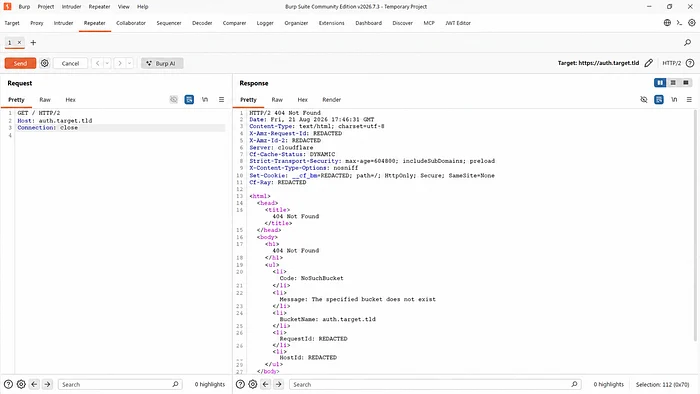
The live hostname returned an Amazon S3 NoSuchBucket response while remaining accessible through the trusted subdomain.
The infrastructure at a high level looked like this:
User | vauth.target.tld | vCloudflare | vAmazon S3 | vExpected bucket: auth.target.tld | v404 NoSuchBucket
At some point the company had apparently configured the hostname to use an S3-backed origin. Later the bucket disappeared, but the public hostname did not. That leaves a dangling cloud resource:
Company still controls the hostname | vCloud configuration expects a resource | vThat resource no longer exists
If the missing cloud resource can be claimed by another account, the hostname may begin serving content controlled by whoever owns that resource. The researcher did not want to report on one error message alone, so each part was verified independently.
Exploitation
Step 1: Confirm the live hostname returns NoSuchBucket
The first request, shown above, established that the hostname was alive, that Cloudflare fronted it, and that the origin returned an S3 NoSuchBucket error naming auth.target.tld as the expected bucket. The response carried an X-Amz-Request-Id header.
Step 2: Query Amazon S3 directly for the expected bucket
Instead of only requesting the company hostname, the researcher queried Amazon's S3 endpoints directly using the expected bucket name. The checks were equivalent to:
curl.exe -I "https://s3.amazonaws.com/auth.target.tld/"
and:
curl.exe -I "https://s3.us-east-1.amazonaws.com/auth.target.tld/"
Both returned:
HTTP/1.1 404 Not FoundServer: AmazonS3x-amz-request-id: <redacted>
Now two separate sources said the same thing: the live trusted hostname and the direct S3 verification both returned 404 Not Found. This was much stronger evidence than saying the page looks like an S3 error. The bucket itself appeared to be absent.
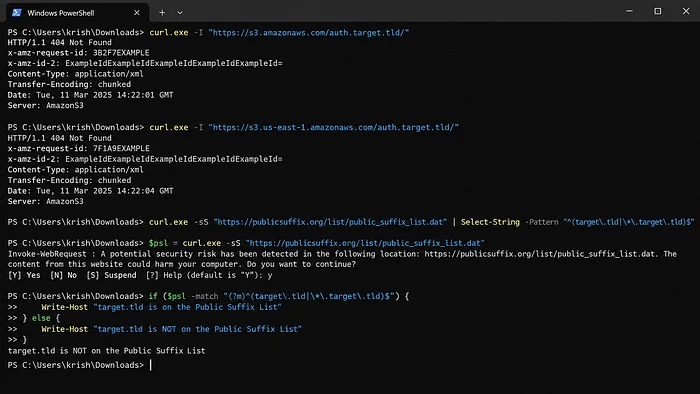
Independent checks against Amazon S3 returned 404 Not Found for the expected bucket.
Step 3: Turn the investigation into a repeatable verifier
The researcher put the conditions into a small Python script. The verifier checked:
- Does the hostname still resolve?
- Does the live host return the S3
NoSuchBucketcondition? - Do direct S3 endpoint checks show the bucket as missing?
- Is the real parent domain present on the Public Suffix List?
Each check tested a different assumption. The final chain looked like this:
Hostname is alive +S3 origin behavior is visible +Expected bucket is missing +The condition is reproducible independently =Credible takeover condition
The script eventually reached:
VERDICT: VULNERABLE(bucket unclaimed, takeover possible)
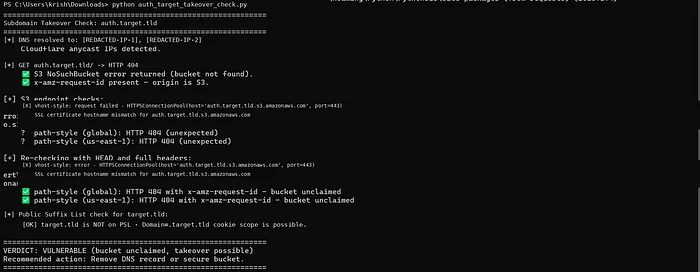
My read-only verifier reproduced the same takeover condition across the live hostname and direct S3 checks.
Step 4: Check the cookie boundary
One more detail mattered: whether control of this subdomain could interact with cookies scoped to the parent domain. To answer that, the researcher checked the real parent domain against the Public Suffix List. The actual domain used during testing was not present on the Public Suffix List, which means a configuration such as:
Domain=.target.tld
is technically possible.
The researcher was careful not to exaggerate. Cookie theft, session theft, cookie injection and account takeover were not demonstrated. The Public Suffix List check only established that parent-domain cookie scope was technically possible; whether it could become exploitable would depend on the application's actual cookie configuration. The distinction kept in the report was:
Confirmed evidence != maximum theoretical impact
For this finding:
NoSuchBucket response CONFIRMEDExpected S3 bucket missing CONFIRMEDTrusted auth hostname CONFIRMEDDangling takeover condition CONFIRMED
Cookie/session compromise NOT DEMONSTRATED
Step 5: Stop before claiming the bucket
The obvious next step would have been to create the missing bucket, upload a harmless HTML page and show it appearing on the target's subdomain. The researcher chose not to. All testing remained read-only. Specifically, the researcher did not:
create or claim the S3 bucketupload contentmodify the targetset cookiesaccess customer dataattempt session compromise
By that point there was enough evidence to establish the security problem. The principle applied was to prove the issue with the minimum necessary impact.
Root cause
The bug comes down to two pieces of infrastructure having different lifecycles. Originally:
auth.target.tld | v CDN / proxy | vS3 bucket exists | vEverything works
Then the cloud resource was deleted:
auth.target.tld | v CDN / proxy | vS3 bucket: gone
The hostname configuration survived; the resource it referenced did not. That leaves a dangling trust relationship behind. The report does not describe any control that would have caught this state, so why existing defences did not stop it is not stated;
Impact
The hostname was authentication-themed: auth.target.tld, not something like old-images.target.tld or unused-assets.target.tld. Users are trained to look at the domain before trusting a login page, and a URL such as https://auth.target.tld/login sits inside the organisation's own trusted namespace. In a successful takeover, an attacker would not need to convince a victim to trust a random domain; the content would appear under the organisation's trusted name. That creates an obvious phishing and impersonation risk.
The more useful description of the issue is: a trusted authentication-related hostname remained attached to an apparently unclaimed cloud resource. That is the security boundary that mattered.
The report does not demonstrate cookie theft, session theft, cookie injection or account takeover. The Public Suffix List result only shows that parent-domain cookie scope was technically possible, and exploitability would depend on the application's actual cookie configuration. The report was accepted as High severity.
Fix
The remediation is straightforward. If the hostname is no longer required:
If the hostname is no longer required: Remove the DNS/CDN configuration.
If the hostname is still required:
If the hostname is still required: Recreate and retain the expected resource, then make sure its ownership cannot be lost.
The difficult part is usually not remediation but noticing that the infrastructure has entered this state at all.
Variants to test
- Any hostname returning a cloud provider's missing-resource error. Send a plain request and look for
NoSuchBucket,NoSuchKeyor similar provider-specific codes naming the expected resource. A positive result is a live hostname whose origin reports the resource as absent rather than private. - Direct provider endpoint checks. Query the provider's endpoints with the expected resource name, as done here with
https://s3.amazonaws.com/auth.target.tld/andhttps://s3.us-east-1.amazonaws.com/auth.target.tld/. A positive result is a404 Not Foundfrom the provider itself, matching the live hostname's error. - Compare against a private-but-existing resource. Check what an existing private bucket returns, typically
403 AccessDenied. A positive result for takeover is the absence of that response and the presence of a missing-resource error instead. - Security-sensitive hostnames. Prioritise names such as
auth.,login.,account.orsso.over static or asset hostnames. A positive result is a dangling resource on a hostname users would trust with credentials. - Parent-domain cookie scope. Check the real parent domain against the Public Suffix List. A positive result is the parent domain not being listed, meaning a
Domain=.target.tldcookie configuration is technically possible; this alone does not prove exploitability. - Repeatability. Re-run the checks independently, ideally with a small read-only script, and confirm every observation agrees. A positive result is a consistent verdict of an unclaimed resource with takeover possible, without claiming anything.
What happened, in plain words
A security researcher was testing a bug bounty program, which is a scheme where companies invite outside people to look for security problems in their systems and report them, sometimes for a reward. While doing that, he found a web address belonging to the company that was broken in a very specific way. The address was still there and still worked, but the thing it was supposed to show had been deleted. Nobody had cleaned up the address afterwards. That left a gap that someone else could step into, and because the address was one people would use to log in, the company treated it as a serious problem.
The researcher calls the address auth.target.tld throughout. target.tld is a stand-in for the company's real domain name, and auth is the part in front of it. The real domain used during testing is not named in the report.
This article walks through the whole investigation in the order it happened, explaining each idea from scratch as it comes up. You only need to be comfortable using a browser and a computer to follow it.
The pieces you need to know first
Before the story makes sense, here are a few everyday ideas.
A domain name and a subdomain. A domain name is the address you type to reach a website, like example.com. A subdomain is a name placed in front of it, separated by a dot, like auth.example.com. Companies use subdomains to split their services up: auth. for the login system, shop. for the store, images. for pictures, and so on. To a visitor, all of them look like part of the same company.
DNS. DNS is the internet's address book. When you type a name into your browser, DNS translates that name into the location of a server that can answer. If the DNS entry exists, the name is said to resolve, meaning it points somewhere real.
A CDN or proxy. A content delivery network is a layer of servers placed between visitors and the company's real servers. It speeds things up and can filter traffic. Cloudflare is a well-known provider of this kind of service. When a request passes through it, the response often carries a header saying Server: cloudflare, which is the service announcing itself.
A header. When your browser talks to a server, it sends a small block of text called a request, and the server sends back a response. Both are made of lines. Some of those lines are headers: labelled pieces of information such as who the server is or what kind of content is being returned.
Amazon S3 and a bucket. S3 is Amazon's file storage service. You store files in a container called a bucket. Each bucket has a name, and buckets are stored in a particular region, which is a physical area such as us-east-1. A bucket can be public, meaning anyone can read from it, or private, meaning only authorised people can.
A 404 error. When a web server cannot find what you asked for, it replies with the status code 404, meaning not found. You have almost certainly seen a 404 page in a browser.
A subdomain takeover. This is the vulnerability class at the heart of the story. It happens when a company's subdomain still points at some outside service, but the company no longer owns or controls the thing on that service. If an outsider can register that same thing under their own account, the company's subdomain starts showing the outsider's content. Visitors see the company's trusted name, but the content is not the company's.
A cookie. A cookie is a small piece of data a website asks your browser to store and send back on later visits. Cookies are how sites remember that you are logged in. A cookie can be limited to one exact name or shared across a whole domain and its subdomains, which matters later in this story.
The Public Suffix List. This is a public list of domain endings under which separate people can register names, things like .com or .co.uk. It exists so that software can tell which part of a name is the shared public ending and which part belongs to one owner. It comes up near the end, when the researcher checks how far a cookie could reach.
The first clue: this was not an ordinary 404
The researcher was looking at an authentication-related subdomain, meaning one used for logging in. He sent it a simple request using a tool called Burp Suite Repeater. Burp Suite is a program security testers use to sit between their browser and a website so they can look at and change requests. Repeater is the part of it that lets you send one request by hand and read the reply.
The request was:
GET / HTTP/2Host: auth.target.tld
Line by line:
GET /means "please give me the main page of this site".GETis the standard way of asking for something, and/means the front page.HTTP/2is the version of the language the browser and server use to talk to each other.Host: auth.target.tldtells the server which name you are asking for. This matters because one server can answer for many names, and it needs to know which one you mean.
The reply came back as:
HTTP/2 404 Not FoundServer: cloudflareX-Amz-Request-Id: <redacted>
Line by line:
HTTP/2 404 Not Foundsays the request was understood but the thing asked for was not found.Server: cloudflaresays the response passed through Cloudflare, the proxy service mentioned earlier.X-Amz-Request-Id: <redacted>is an identifier Amazon attaches to each request it handles. TheX-Amzprefix is a strong hint that Amazon's systems produced this response. The actual value has been blanked out here.
And inside the body of the response, the actual content, was this:
Code: NoSuchBucketMessage: The specified bucket does not existBucketName: auth.target.tld
Line by line:
Code: NoSuchBucketis Amazon S3's way of saying "there is no bucket by that name".Message: The specified bucket does not existspells that out in a sentence.BucketName: auth.target.tldnames the bucket that was expected. Notice it is the same as the subdomain.
Three things stood out to the researcher:
- The hostname was still active, meaning the name still resolved and still answered.
- The request was reaching infrastructure backed by Amazon S3, so the company was using Amazon's storage behind this name.
- S3 was saying that the expected bucket did not exist.
Why does that matter? Because a missing page and a missing cloud resource are not the same thing. If a bucket exists but is private, you will commonly see an authorization-style response such as 403 AccessDenied, which means "this exists but you are not allowed in". Here the provider was saying NoSuchBucket, which means "this does not exist at all". The hostname existed; the resource it depended on did not. That is the broken ownership relationship that can lead to a subdomain takeover.
The screenshot shows the live hostname returning an Amazon S3 NoSuchBucket response while remaining accessible through the trusted subdomain.
At a high level, the infrastructure looked like this:
User | vauth.target.tld | vCloudflare | vAmazon S3 | vExpected bucket: auth.target.tld | v404 NoSuchBucket
Read it as a chain: a visitor goes to auth.target.tld, the traffic passes through Cloudflare, Cloudflare forwards it to Amazon S3, S3 looks for a bucket named auth.target.tld, and S3 replies that no such bucket exists.
At some point the company had apparently configured the hostname to use an S3-backed origin, meaning the place the content actually comes from was an S3 bucket. Later the bucket disappeared, but the public hostname did not. That leaves a dangling cloud resource:
Company still controls the hostname | vCloud configuration expects a resource | vThat resource no longer exists
In plain words: the company still owns the name, the cloud setup still expects something to be there, and that something is gone. If the missing cloud resource can be claimed by another account, the hostname may begin serving content controlled by whoever owns that resource. That is the takeover.
The researcher did not want to report a vulnerability on the strength of one error message alone, so he verified each part independently. That is the right instinct: a single strange reply could be a misconfiguration, a temporary glitch, or something else entirely.
What appeared to be happening
This section is the mental model the researcher built before doing more testing. The chain above is the whole picture: visitor, name, proxy, storage, missing bucket, error. The important observation is that the name and the resource have come apart. One still exists, the other does not, and nothing has reconciled them.
Don't trust one error message
A recognizable cloud-provider error is a clue, not the entire proof. The researcher wanted to answer a more specific question: does the expected S3 bucket actually exist?
So instead of only requesting the company hostname, he queried Amazon's S3 endpoints directly using the expected bucket name. An endpoint here just means a specific address at Amazon that answers questions about storage. The checks were equivalent to:
curl.exe -I "https://s3.amazonaws.com/auth.target.tld/"
Line by line:
curl.exeis a command-line tool for fetching things from the internet. The.exeending means it is the Windows version.-Itells it to ask only for the response headers, the summary lines, and not the full content. That is enough to see whether the bucket exists."https://s3.amazonaws.com/auth.target.tld/"is the address being asked. It goes to Amazon's general S3 address and asks about a bucket namedauth.target.tld.
And:
curl.exe -I "https://s3.us-east-1.amazonaws.com/auth.target.tld/"
Line by line:
- The first two parts are the same as before.
https://s3.us-east-1.amazonaws.com/...asks the same question but at Amazon's endpoint for theus-east-1region specifically. Buckets live in a region, so asking the regional address is a second, independent way to check.
Both returned:
HTTP/1.1 404 Not FoundServer: AmazonS3x-amz-request-id: <redacted>
Line by line:
HTTP/1.1 404 Not Foundagain means not found.Server: AmazonS3says Amazon's storage service itself produced this answer, not Cloudflare and not the company's application.x-amz-request-id: <redacted>is Amazon's identifier for the request, blanked out here.
Now two separate sources said the same thing: the live trusted hostname and the direct S3 verification both returned 404 Not Found. This was much stronger evidence than saying the page looks like an S3 error. The bucket itself appeared to be absent.
The screenshot shows the independent checks against Amazon S3 returning 404 Not Found for the expected bucket.
Turning the investigation into a repeatable check
At this point the researcher knew which conditions he wanted to verify, so he put them into a small Python script. Python is a programming language often used for quick automation. A script is just a file of instructions the computer runs for you. The point of writing one here is repeatability: instead of clicking around and remembering what you saw, you encode the checks so they can be run again and produce the same answer.
The verifier checked:
- Does the hostname still resolve?
- Does the live host return the S3
NoSuchBucketcondition? - Do direct S3 endpoint checks show the bucket as missing?
- Is the real parent domain present on the Public Suffix List?
The interesting part was not the script itself. It was that each check tested a different assumption. One checks that the name is alive. Another checks what the live site says. Another checks what Amazon says directly. The last checks a separate question about cookies, which comes up shortly. If all of them agree, the conclusion is much harder to argue with.
The final chain looked like this:
Hostname is alive +S3 origin behavior is visible +Expected bucket is missing +The condition is reproducible independently =Credible takeover condition
Read it as a sum: each line is one confirmed fact, and together they add up to a credible takeover condition. None of them alone would be enough.
The script eventually reached:
VERDICT: VULNERABLE(bucket unclaimed, takeover possible)
Line by line:
VERDICT: VULNERABLEis the script's conclusion that the condition is real.(bucket unclaimed, takeover possible)explains why: nobody appears to own the bucket, so a takeover is possible.
The screenshot shows the read-only verifier reproducing the same takeover condition across the live hostname and direct S3 checks.
Why the auth. hostname mattered
A dangling bucket is already a meaningful infrastructure issue. But the hostname made this particular case more interesting.
This was not something like:
old-images.target.tld
or:
unused-assets.target.tld
It was an authentication-themed hostname:
auth.target.tld
Think about how that looks to an ordinary user:
https://auth.target.tld/login
Even security-aware users are trained to look at the domain before trusting a login page. A name like auth. in front of the company's own domain signals "this is where you sign in". In a successful takeover scenario, the attacker would not need to convince the victim to trust a random domain. The content would appear under the organisation's own trusted namespace.
That creates an obvious phishing and impersonation risk. Phishing is tricking someone into entering their details on a fake page, and impersonation is pretending to be someone you are not. Both are far easier when the address bar shows the real company's name.
The vulnerability was not simply "there is a deleted S3 bucket". The more useful way to describe it was: a trusted authentication-related hostname remained attached to an apparently unclaimed cloud resource. That is a much more meaningful security boundary, because it is the trust in the name that an attacker would be abusing.
I also checked the cookie boundary
There was one more detail the researcher wanted to understand. Could control of this subdomain potentially interact with cookies scoped to the parent domain? Scoped means limited to a particular name and everything under it. A cookie set with Domain=.target.tld would be sent to target.tld and to every subdomain of it, including auth.target.tld. If an attacker controlled auth.target.tld, they might be able to read or set such cookies.
To answer that question, he checked the real parent domain against the Public Suffix List. The actual domain used during testing was not present on the Public Suffix List. That means a configuration such as:
Domain=.target.tld
is technically possible. The leading dot is the old-fashioned way of writing "this domain and all its subdomains".
But this is where it is important not to exaggerate impact. The researcher did not demonstrate:
cookie theftsession theftcookie injectionaccount takeover
Line by line:
cookie theftmeans stealing someone's cookie, and with it their logged-in state.session theftis the same idea: a session is the period you stay logged in, and stealing it means acting as you.cookie injectionmeans planting a cookie in someone's browser to change how the site treats them.account takeoveris the end result: fully controlling someone else's account.
The Public Suffix List check only established that parent-domain cookie scope was technically possible. Whether that could become exploitable would depend on the application's actual cookie configuration. The researcher kept that distinction very clear in the report. A useful rule he follows is:
Confirmed evidence != maximum theoretical impact
In plain words: what you actually proved is not the same as the worst thing that could theoretically happen. Mixing the two makes a report less trustworthy.
For this finding:
NoSuchBucket response CONFIRMEDExpected S3 bucket missing CONFIRMEDTrusted auth hostname CONFIRMEDDangling takeover condition CONFIRMED
Cookie/session compromise NOT DEMONSTRATED
Read the first block as a list of facts that were actually observed, each marked confirmed. The second block is the one thing that was not shown, marked as not demonstrated. Keeping those two lists separate is what makes a report easy for the person reviewing it to trust.
Why I did not claim the bucket
There was an obvious next step. Create the missing bucket, upload a harmless HTML page, and show that it appears on the target's subdomain. That would produce a spectacular proof-of-concept screenshot. A proof of concept is a demonstration that a problem is real. The researcher chose not to do it. All of his testing remained read-only, meaning he only looked and never changed anything.
He did not:
create or claim the S3 bucketupload contentmodify the targetset cookiesaccess customer dataattempt session compromise
Line by line:
create or claim the S3 bucketwould mean registering the missing bucket under his own account, which is the actual takeover.upload contentwould mean putting his own page there for visitors to see.modify the targetwould mean changing anything on the company's systems.set cookieswould mean planting cookies in someone's browser.access customer datawould mean reading real users' information.attempt session compromisewould mean trying to hijack someone's logged-in session.
By this point he already had enough evidence to establish the security problem. Bug bounty testing is not about seeing how far you can push a vulnerable system. It is about proving the issue with the minimum necessary impact. Sometimes stopping at the right point is part of the skill.
The actual root cause was simple
The bug can be understood as two pieces of infrastructure having different lifecycles. A lifecycle is simply how long something lasts from creation to removal. Originally:
auth.target.tld | v CDN / proxy | vS3 bucket exists | vEverything works
Read it as: the name points at the proxy, the proxy points at a bucket, the bucket exists, and everything works.
Then the cloud resource gets deleted:
auth.target.tld | v CDN / proxy | vS3 bucket: gone
The name and the proxy are still there, but the bucket at the end is gone. The hostname configuration survived; the resource it referenced did not. That leaves a dangling trust relationship behind. The report does not describe any control that would have caught this state, so why existing defences did not stop it is not stated.
The fix is straightforward. If the hostname is no longer required:
If the hostname is no longer required: Remove the DNS/CDN configuration.
If the hostname is still required:
If the hostname is still required: Recreate and retain the expected resource, then make sure its ownership cannot be lost.
In plain words: either delete the name so it points nowhere, or put the resource back and make sure nobody else can take it. The difficult part is usually not remediation but noticing that the infrastructure has entered this state at all. The report does not say which of these the program applied.
Reporting it
The researcher kept the bounty report simple. The core evidence was:
1. The hostname was still active.
2. Requests reached an S3-backed origin.3. S3 returned NoSuchBucket for the expected resource.4. Independent S3 checks also returned 404.5. The affected hostname was authentication-related.6. I performed no destructive takeover or customer-impact testing.
Line by line:
- The name still answered, so it was not simply dead.
- Traffic was reaching storage run by Amazon, not the company's own application.
- Amazon said the expected bucket did not exist.
- A second, direct check against Amazon agreed.
- The name was one users would trust with their login.
- Nothing was changed and no customer was affected during testing.
The report was accepted as High severity. Severity is how serious the company judges the issue to be, and High is near the top of the usual scale.
The vulnerability was not technically complicated. There was no exotic payload, meaning no clever crafted input. No race condition, meaning no timing trick. No multi-stage exploit chain, meaning no sequence of steps each depending on the last. The interesting part was understanding what a seemingly boring error message meant about the infrastructure behind it.
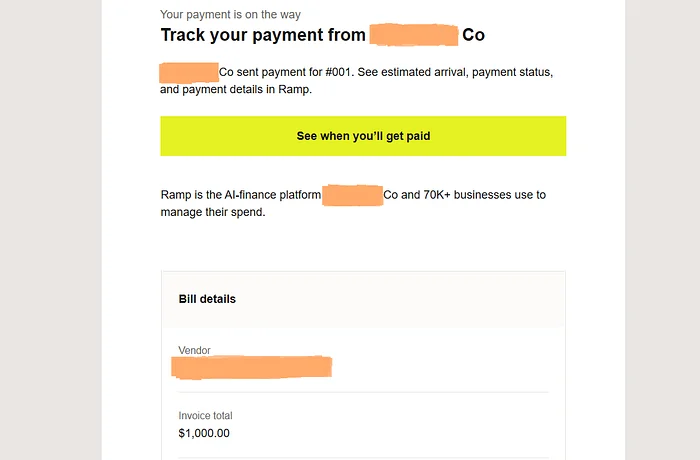
The screenshot is captioned payout.
What I learned
The first lesson was to treat error messages as infrastructure clues. There is a huge difference between:
404 Not Found
and:
NoSuchBucketBucketName: ...x-amz-request-id: ...
The first tells you a page is missing. The second response tells you something about the architecture.
The second lesson was to independently verify takeover conditions. The researcher tries to move from:
"This looks vulnerable."
to:
"The live hostname behaves like this."
"The cloud provider expects this resource.""The resource independently appears absent.""These observations all agree."
In plain words: replace a hunch with a set of separate observations that all point the same way.
The third lesson was that context matters. A takeover condition on:
archive-static.target.tld
and one on:
auth.target.tld
may be technically similar. But the trust users place in those hostnames is very different. One is a place for old files; the other is where people type their passwords.
Finally, he was reminded that proving a bug does not always mean exploiting it to its maximum possible impact. Good research also means knowing when you already have enough evidence.
My subdomain takeover checklist
This is roughly what the researcher now asks whenever he encounters a suspicious abandoned hostname:
Does the hostname still resolve?
Who is actually generating the error?Is a third-party cloud service involved?Does the response reveal the expected resource name?Does that resource still exist?Can I verify the missing-resource condition independently?What would an existing-but-private resource return instead?Does the hostname have a security-sensitive purpose?Can the issue be demonstrated without claiming anything?
Line by line:
- Does the hostname still resolve? If the name is dead, there is nothing to take over.
- Who is actually generating the error? The application, the proxy, or the cloud provider?
- Is a third-party cloud service involved? That is where a dangling resource can live.
- Does the response reveal the expected resource name? If it names the bucket, you know what to check.
- Does that resource still exist? Ask the provider directly.
- Can I verify the missing-resource condition independently? A second source makes the finding solid.
- What would an existing-but-private resource return instead? Usually
403 AccessDenied, which is not a takeover. - Does the hostname have a security-sensitive purpose?
auth.matters more thanold-images.. - Can the issue be demonstrated without claiming anything? Read-only proof is safer and usually enough.
Not every dead hostname is vulnerable. Not every cloud error means takeover. But if several independent checks point toward the same dangling resource, a boring error page can become a very interesting finding.
Variants to test
These are the same checks generalised, so you can apply them to other hostnames.
- Any hostname returning a cloud provider's missing-resource error. Send a plain request and look for
NoSuchBucket,NoSuchKeyor similar provider-specific codes naming the expected resource. A positive result is a live hostname whose origin reports the resource as absent rather than private. - Direct provider endpoint checks. Query the provider's endpoints with the expected resource name, as done here with
https://s3.amazonaws.com/auth.target.tld/andhttps://s3.us-east-1.amazonaws.com/auth.target.tld/. A positive result is a404 Not Foundfrom the provider itself, matching the live hostname's error. - Compare against a private-but-existing resource. Check what an existing private bucket returns, typically
403 AccessDenied. A positive result for takeover is the absence of that response and the presence of a missing-resource error instead. - Security-sensitive hostnames. Prioritise names such as
auth.,login.,account.orsso.over static or asset hostnames. A positive result is a dangling resource on a hostname users would trust with credentials. - Parent-domain cookie scope. Check the real parent domain against the Public Suffix List. A positive result is the parent domain not being listed, meaning a
Domain=.target.tldcookie configuration is technically possible; this alone does not prove exploitability. - Repeatability. Re-run the checks independently, ideally with a small read-only script, and confirm every observation agrees. A positive result is a consistent verdict of an unclaimed resource with takeover possible, without claiming anything.
Final thoughts
This entire investigation started with a 404. The important part was noticing that the failure did not belong to the web application. It belonged to the infrastructure underneath it. The hostname still existed. The cloud resource behind it did not. That gap was enough to turn an abandoned authentication-related subdomain into a High-severity security finding.
Bug hunting often rewards complicated technical knowledge. But it also rewards curiosity. Sometimes the best question is simply: why is it failing like that? Because every once in a while, the error page is the vulnerability.
Glossary
- Bug bounty program: a scheme where a company invites outside researchers to find and report security problems, sometimes paying a reward.
- Subdomain: a name placed in front of a domain, separated by a dot, such as
authinauth.example.com. - DNS: the internet's address book, translating names into the locations of servers.
- Resolve: when a name successfully points to a real server.
- CDN / proxy: a layer of servers between visitors and a company's real servers, used for speed and filtering.
- Cloudflare: a well-known provider of CDN and proxy services.
- Header: a labelled piece of information in a request or response, such as the server's name.
- Amazon S3: Amazon's file storage service.
- Bucket: a container for files inside S3, identified by a name.
- Region: a physical area where cloud resources are stored, such as
us-east-1. - 404 Not Found: the status code meaning the requested thing could not be found.
- 403 AccessDenied: the status code meaning the thing exists but you are not allowed to see it.
- NoSuchBucket: Amazon S3's error code meaning no bucket by that name exists.
- Subdomain takeover: a vulnerability where a company's subdomain points at an outside resource the company no longer controls, letting someone else claim it and serve content under the company's name.
- Dangling resource: a cloud resource that a configuration still points at but that no longer exists or is no longer owned.
- Origin: the place a proxy forwards requests to, where the actual content comes from.
- Endpoint: a specific address on a service that answers a particular kind of request.
- Burp Suite Repeater: a tool that lets a tester send a single web request by hand and inspect the reply.
- curl: a command-line tool for fetching things from the internet;
curl.exeis the Windows version. -I: a curl option that asks only for the response headers, not the full content.- Python: a programming language often used for small automation scripts.
- Script: a file of instructions a computer runs automatically.
- Read-only: testing that only observes and never changes anything.
- Cookie: a small piece of data a site asks your browser to store and send back later, commonly used to keep you logged in.
- Cookie scope: which names a cookie is sent to;
Domain=.target.tldcovers the domain and all its subdomains. - Session: the period during which you stay logged in to a site.
- Cookie theft / session theft: stealing someone's cookie or session so you can act as them.
- Cookie injection: planting a cookie in someone's browser to change how a site treats them.
- Account takeover: fully controlling someone else's account.
- Public Suffix List: a public list of domain endings under which separate people can register names, used to tell which part of a name belongs to one owner.
- Phishing: tricking someone into entering their details on a fake page.
- Impersonation: pretending to be someone or something you are not.
- Proof of concept: a demonstration that a problem is real.
- Payload: the crafted input an attacker sends to trigger a vulnerability.
- Race condition: a bug that depends on the precise timing of two actions.
- Exploit chain: a sequence of steps where each depends on the previous one.
- Root cause: the underlying reason a problem exists.
- Lifecycle: how long something lasts from creation to removal.
- Remediation: the fix for a problem.
- Severity: how serious a company judges an issue to be.
- Triager: the person who reviews a submitted report and decides whether it is valid and how serious it is.
- Impact: the harm a vulnerability could cause.
- Minimum necessary impact: proving a problem with the smallest amount of disruption needed.




