The Internal Tool T-Mobile Forgot Was Facing the Public Internet
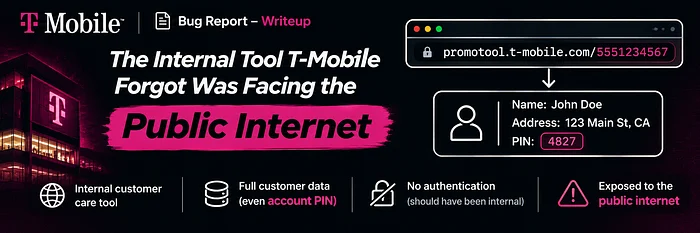
An internal customer care portal was reachable from the public internet without authentication, and its API returned full customer account data, including a reference to the account PIN, when given a phone number. An attacker could harvest this data for any phone number and use the PIN reference to social-engineer the carrier's support line, potentially leading to SIM-swap account takeover.

medium.com
Published on medium.com
Bug Bounty
The full write-up lives on its author's site
It belongs to its author, so we link to it rather than copy it. The other two tabs are our own rewrites, checked against it.
Context
T-Mobile ran a subdomain, promotool.t-mobile.com, built as an internal customer care portal. It was somewhere staff could look up an account's details while a customer was on the phone with support. Sitting behind that portal was an API that answered a request with full account data the moment you handed it a customer's phone number appended to the end of the URL.
The data returned included name, billing address, account status, whether a bill was past due, and in some cases a tax ID number. It also included a reference to the customer's account PIN, the exact PIN used as a security question when calling in to support. That last field is what made the exposure dangerous rather than merely embarrassing.
The bug was found by security researcher Ryan Stevenson in early 2018, reported to T-Mobile, pulled offline within a day, and paid $1,000. Stevenson did not publish his own technical writeup, so the best detailed account is Security Affairs' coverage, sourced from Zack Whittaker's original ZDNet reporting.
Setup
There were no accounts, roles, tokens or special tooling involved. The precondition was simply that the subdomain was reachable from the public internet, although it was only ever meant for an internal audience. The tool was designed for an internal audience, so no end-user login was ever built into the direct browser path.
Finding it
Stevenson's method was not exotic reverse engineering or fuzzing. By every account of how this surfaced, the subdomain itself was discoverable simply by searching for it, sitting there indexed and reachable like any other public page on the internet.
That is the whole technique worth internalising: subdomain enumeration is not only for finding more application surface to attack with clever payloads. It is just as often how you find tools that were only ever designed with an internal audience in mind and that nobody ever verified stayed internal. A tool's own UI saying it is meant for employees, a login screen branded for staff, or a dashboard clearly built for customer care reps is not actual protection. The only thing that matters is whether the server enforces the assumption, and the only way to know is to try reaching it directly and see what happens.
Exploitation
Step 1: locate the internal-sounding subdomain
Searching for the subdomain surfaced promotool.t-mobile.com, indexed and reachable like any other public page. The name itself signals an internal tool, which is exactly the kind of lead that should be chased rather than skipped.
Step 2: request the API with a phone number appended
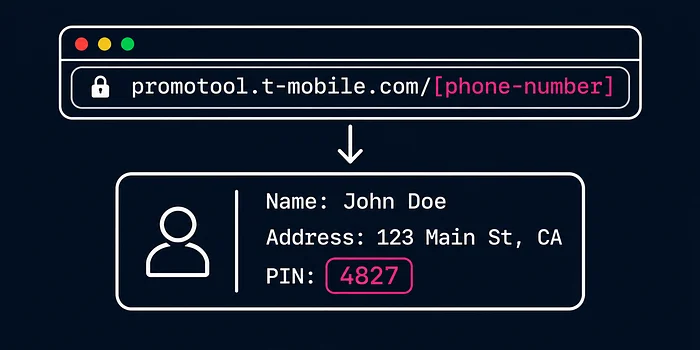
The API answered a request with full account data the moment a customer's phone number was appended to the end of the URL. The report does not reproduce the exact request line or the parameter name, only that the number was appended to the end of the URL.
Step 3: read the response
The response contained name, billing address, account status, whether a bill was past due, in some cases a tax ID number, and a reference to the customer's account PIN.
Root cause
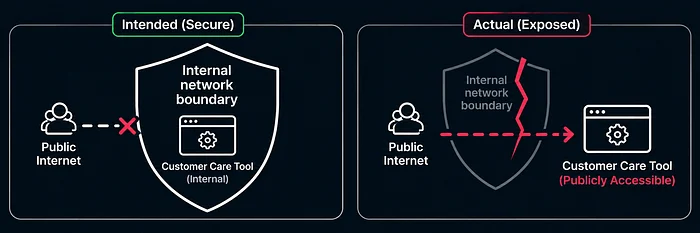
The tool was never supposed to need a password typed in by an end user accessing it directly from a browser, because it was never supposed to be reachable by anyone outside T-Mobile's own internal network in the first place. The intended security model for an internal support tool like this is usually not "require a login" but "do not expose it to the public internet at all, put it behind a VPN or an internal network boundary, and let whatever authentication the corporate network already handles do the gatekeeping."
The moment that assumption breaks, the moment the tool somehow ends up reachable from any browser anywhere, every protection the team thought it had disappears at once, because there was never a second layer underneath the network boundary to catch the fall.
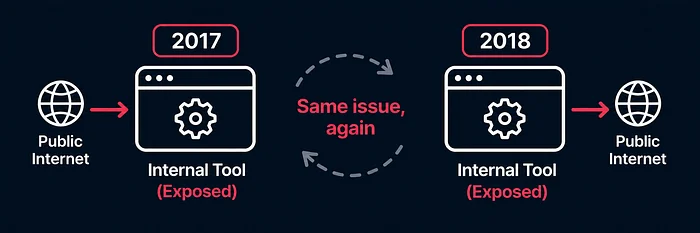
This was not T-Mobile's first time. A nearly identical bug had been found and patched on a different T-Mobile subdomain the year before, with the same basic shape: an internal tool exposed without authentication, customer data readable through a simple parameter. Fixing one instance of a root cause without addressing why it happened in the first place, somewhere in the deployment pipeline where internal tools were ending up on the public internet without anyone double-checking, just means the next internal tool someone spins up carries the exact same risk forward. A patched endpoint is not a fixed process.
Impact
The exposed fields were name, billing address, account status, past-due status, in some cases a tax ID number, and a reference to the account PIN. The PIN is the detail that turns this from merely bad into genuinely dangerous. Most companies' support call flows use a PIN or security question specifically as proof that the caller actually owns the account before an agent will make any changes, enable a SIM swap, update billing, or read out sensitive details.
If an attacker can pull that exact PIN for any phone number just by querying an open API, the PIN stops being a secret the real owner holds and becomes just another field sitting in a database anyone can read. That is the real chain this bug enabled, even though it never needed to be demonstrated explicitly: leaked account data feeding directly into social engineering a phone carrier's own support line, the kind of path that leads straight into SIM-swap account takeovers.
The bug is also trivial to weaponise into a mass data-harvesting script, which is why reporting it rather than using it mattered.
Fix
The report states that the tool was pulled offline within a day. It does not describe any code or configuration change beyond that. The broader lesson it draws is that patching a single endpoint does not fix the process: internal tools were ending up on the public internet without anyone double-checking, and that pipeline-level gap is what needs addressing so the next internal tool does not carry the same risk forward.
Variants to test
The generalisable habit is almost disappointingly simple, and that is the point: you do not need a clever technique for this bug class, you need the discipline to check rather than assume.
- Enumerate for internal-sounding names. Any time subdomain enumeration turns up something that sounds internal, admin, portal, tool, staff, promo or care, treat it as a lead worth chasing immediately rather than skipping past on the assumption that "internal-sounding" means "properly gated."
- Hit it directly with nothing attached. Request the host with no login, no token and no special headers, and see whether the server actually stops you or just assumes nobody but an employee would ever think to look.
- Probe the API behind the portal. Where a portal exposes an API, try appending an identifier such as a phone number to the URL and observe whether account data comes back unauthenticated.
- Check for the same root cause elsewhere. When you find one exposed internal tool, look for sibling subdomains with the same shape, since a single patched endpoint does not mean the deployment process was fixed.
What happened, in plain words
T-Mobile is a large mobile phone company. Like every large company, it has tools that only its own employees are supposed to use: screens where a support agent can look up a customer's account while that customer is on the phone. One of those tools lived at a web address called promotool.t-mobile.com. It was never supposed to be reachable from outside T-Mobile's own network, the way a staff-only door in an office is meant to open only with a staff badge.
It was not. Anyone on the internet could open it in an ordinary browser, and the thing sitting behind it answered questions about customers without asking who was asking. You gave it a phone number, and it gave back the customer's name, billing address, account status, whether a bill was late, sometimes a tax ID number, and a reference to the customer's account PIN. That PIN is the number a real customer is asked for when they call support, precisely to prove they own the account.
A security researcher, Ryan Stevenson, found it in early 2018. He reported it to T-Mobile, the tool was taken offline within a day, and he was paid $1,000. He did not publish his own technical writeup, so the detailed account comes from Security Affairs' coverage, which was sourced from Zack Whittaker's original ZDNet reporting.
This article walks through the same story for someone who has never done security work: what each piece is, why it mattered, and what habit you can take from it. Nothing here needs special software. A browser and some curiosity are enough to follow along.
The pieces, explained from zero
Before the story makes sense, a few everyday ideas need names.
A subdomain is a named section of a company's main web address. If t-mobile.com is the company's building, promotool.t-mobile.com is one office inside it. Companies often run dozens or hundreds of these, one per service, team or tool. Each one is a separate thing that can be switched on or off, protected or left open, independently of the others.
A portal is a website built as a front door to some service. A customer care portal is a website built for support staff: you log in, search for a customer, and see their details. It is a workspace, not a shop front.
An API is the part of a website that answers questions with data rather than with a page designed for a human to look at. A useful comparison: a website is a waiter who brings you a menu and takes your order in a polite conversation; an API is the kitchen hatch, where you hand over a slip of paper and get a plate back, with no conversation at all. Both are useful, but the hatch does not care who you are unless someone deliberately stands there checking. When this article says the portal had an API behind it, it means the portal's screens were talking to a data service, and that data service could also be spoken to directly.
Authentication means proving who you are, usually with a username and password. Authorisation means what you are allowed to do once you have proved it. A login screen is authentication. A rule that says only support staff may see billing details is authorisation.
A token or cookie is a small piece of text your browser keeps after you log in, and shows to the site on every later request so the site remembers you. Think of a wristband at an event: you show your ticket once at the gate, get a wristband, and after that the staff just glance at your wrist. If a site never issues a wristband and never checks for one, then there is nothing to glance at, and everyone is treated the same.
A VPN is a private tunnel between a computer and a company's internal network. When you are connected to it, your computer behaves as if it were sitting inside the office. Companies use VPNs so that internal tools can be reached by staff working from home without those tools being open to the whole world.
A network boundary is the edge of a company's private network: the line between inside and outside. The whole idea of an internal tool is that the boundary does the guarding, so the tool itself does not have to.
A vulnerability class is a family of bugs that share the same basic shape. This one belongs to a family you could call "internal thing left reachable from outside". The shape is simple: something was designed on the assumption that only certain people could reach it, and that assumption turned out to be false.
Subdomain enumeration is the practice of listing all the subdomains a company has. You can do it by searching, by trying likely names, or with tools that do the searching for you. It is the security equivalent of walking around a building and writing down every door you can see.
Fuzzing means throwing large amounts of slightly varied, often malformed input at a program to see if it breaks in an interesting way. It is a real technique, but it is not what found this bug, and that is part of the lesson.
A SIM swap is when someone persuades a phone company to move a victim's phone number onto a SIM card the attacker controls. After that, calls and text messages meant for the victim arrive at the attacker, including the one-time codes many websites send to confirm a login. It is one of the most damaging things that can follow from leaked phone account data.
Social engineering means persuading a human being to do something, rather than tricking a computer. Calling a support line and convincingly pretending to be the account owner is social engineering.
Setup: what had to be true for this to work
There were no accounts, roles, tokens or special tools involved in finding this. The only two conditions were:
- The subdomain could be reached from the public internet, meaning from any ordinary browser anywhere.
- The tool was never meant to need a login, because the network boundary was supposed to do the guarding.
The tool had been built for an internal audience, so nobody had ever built an end-user login into the path a browser takes when it opens the tool directly. That is the crucial point: the missing login was not a mistake in the login code, because there was no login code. The login was supposed to be the network boundary itself.
Finding it
Stevenson's method was not exotic reverse engineering, and it was not fuzzing. By every account of how this surfaced, the subdomain was discoverable simply by searching for it. It was indexed, meaning search engines had crawled it and listed it, and it was reachable like any other public page on the internet.
Sit with how ordinary that is. Nobody broke in. Nobody guessed a password. The door was simply listed in the equivalent of a public directory, and it opened when pushed.
The technique worth internalising is this: subdomain enumeration is not only for finding more application surface to attack with clever payloads. It is just as often how you find tools that were only ever designed with an internal audience in mind, and that nobody ever verified stayed internal.
A tool's own interface telling you it is meant for employees is not protection. A login screen branded for staff is not protection. A dashboard clearly built for customer care representatives is not protection. Those are labels, and labels do not stop anyone. The only thing that matters is whether the server enforces the assumption, and the only way to know is to try reaching it directly and see what happens.
Exploitation, step by step
Step 1: locate the internal-sounding subdomain
Searching surfaced promotool.t-mobile.com, indexed and reachable like any other public page. The name itself signals an internal tool: "promo tool" sounds like something a marketing or care team uses, not something a customer is meant to visit. That is exactly the kind of lead worth chasing rather than skipping.
Why chase it? Because the name is a hint about the design assumption. A tool with a name like that was probably built quickly, for colleagues, with the understanding that only colleagues could reach it. Assumptions like that are where this bug class lives.
Step 2: request the API with a phone number appended
The API answered a request with full account data the moment a customer's phone number was appended to the end of the URL. In other words, the address you typed into the browser contained the phone number as part of the path, and the server used it to decide which account to describe.
The report does not reproduce the exact request line or the parameter name. It only says that the number was appended to the end of the URL. So there is no code block to copy here: the precise URL shape is not part of the public account.
Why does this matter? Because it means the server treated the phone number as a lookup key, not as a secret. Anyone who knows a phone number, and phone numbers are not secret at all, could ask the same question. There was no step where the server asked who was calling.
Step 3: read the response
The response contained:
- the customer's name
- billing address
- account status
- whether a bill was past due
- in some cases a tax ID number
- a reference to the customer's account PIN
A header is a small piece of extra information a browser sends alongside a request, such as what kind of data it will accept; a special header would be something like a key proving the caller is allowed in. None was required.
Look at that list again and notice what kind of information it is. A name and address identify a person. Account status and past-due status describe their private financial situation. A tax ID number is a strong identifier used for official purposes. And the PIN is the thing the company itself uses to decide whether a caller is really the account owner. Each field on its own is sensitive; together they are a complete profile of a customer, handed to anyone who asked.
Root cause: why the door was open
The tool was never supposed to need a password typed in by an end user accessing it directly from a browser, because it was never supposed to be reachable by anyone outside T-Mobile's own internal network in the first place.
The intended security model for an internal support tool like this is usually not "require a login". It is "do not expose it to the public internet at all, put it behind a VPN or an internal network boundary, and let whatever authentication the corporate network already handles do the gatekeeping."
A comparison helps here. Think of a company's private network as an office building with a reception desk at the only entrance. Inside, the stationery cupboard has no lock, because you cannot get to the cupboard without passing reception. That is a perfectly reasonable design, as long as the building really has only one entrance. Now imagine someone builds a second entrance at the back, straight onto the pavement, and forgets to put a reception desk there. The cupboard still has no lock, but now anyone walking past can help themselves. Nothing inside the cupboard changed. The assumption around it did.
The moment that assumption breaks, the moment the tool somehow ends up reachable from any browser anywhere, every protection the team thought it had disappears at once, because there was never a second layer underneath the network boundary to catch the fall.
That phrase, "a second layer", is the heart of it. Good security often has layers: the network boundary, then a login, then permission checks on each piece of data. If the outer layer fails and there is nothing behind it, the failure is total. Here, the outer layer failed and there was nothing behind it.
This was not T-Mobile's first time. A nearly identical bug had been found and patched on a different T-Mobile subdomain the year before, with the same basic shape: an internal tool exposed without authentication, customer data readable through a simple parameter. A parameter is a piece of information you add to a request, such as a phone number, to tell the server what you want.
Fixing one instance of a root cause without addressing why it happened in the first place just means the next internal tool someone spins up carries the exact same risk forward. Somewhere in the deployment pipeline, the sequence of steps by which software gets built and put live, internal tools were ending up on the public internet without anyone double-checking. A patched endpoint is not a fixed process. An endpoint is one specific address a service answers on; patching it fixes that address and nothing else.
Impact: why this was dangerous, not just embarrassing
The exposed fields were name, billing address, account status, past-due status, in some cases a tax ID number, and a reference to the account PIN.
The PIN is the detail that turns this from merely bad into genuinely dangerous. Most companies' support call flows use a PIN or security question specifically as proof that the caller actually owns the account before an agent will make any changes, enable a SIM swap, update billing, or read out sensitive details.
If an attacker can pull that exact PIN for any phone number just by querying an open API, the PIN stops being a secret the real owner holds. It becomes just another field sitting in a database anyone can read.
That is the real chain this bug enabled, even though it never needed to be demonstrated explicitly. Leaked account data feeds directly into social engineering a phone carrier's own support line. An attacker calls up, says "hello, I'm [the customer], my PIN is such and such", and the agent, quite reasonably, believes them, because the PIN is exactly the check the company designed to be convincing. From there the path leads straight into SIM-swap account takeovers.
Notice the shape of that chain. The bug did not break the phone company's security check. It supplied the answer to it. The check worked exactly as designed, which is what made the leak so valuable.
The bug is also trivial to weaponise into a mass data-harvesting script. A script is a small program that repeats a task automatically; here it would mean asking the API about one phone number after another. That is why reporting it rather than using it mattered. A single lookup is a privacy problem. A loop over thousands of numbers is a database of victims.
Fix: what was done, and what the lesson is
The report states that the tool was pulled offline within a day. It does not describe any code or configuration change beyond that.
The broader lesson it draws is that patching a single endpoint does not fix the process. Internal tools were ending up on the public internet without anyone double-checking, and that pipeline-level gap is what needs addressing so the next internal tool does not carry the same risk forward.
In plain terms: taking the tool down closed this door. It did not answer the question of how the door came to be there, or how many other doors the same process has produced. That question is the one worth answering, because the next tool is already being built.
Variants to test: the habit to take away
The generalisable habit is almost disappointingly simple, and that is the point. You do not need a clever technique for this bug class. You need the discipline to check rather than assume.
- Enumerate for internal-sounding names. Any time subdomain enumeration turns up something that sounds internal, admin, portal, tool, staff, promo or care, treat it as a lead worth chasing immediately rather than skipping past on the assumption that "internal-sounding" means "properly gated". In everyday terms: if you find a door marked "staff only", try the handle before you assume it is locked.
- Hit it directly with nothing attached. Request the host with no login, no token and no special headers, and see whether the server actually stops you or just assumes nobody but an employee would ever think to look. An authentication challenge is the server saying, in effect, "who are you?", usually a login form or an error saying you are not allowed.
- Probe the API behind the portal. Where a portal exposes an API, try appending an identifier such as a phone number to the URL and observe whether account data comes back unauthenticated. The identifier does not have to be a phone number; the principle is that you supply something that names a record, and you watch whether the server hands back that record's contents without asking who you are.
- Check for the same root cause elsewhere. When you find one exposed internal tool, look for sibling subdomains with the same shape, since a single patched endpoint does not mean the deployment process was fixed. Sibling subdomains are the other names under the same company's domain, often built by the same team with the same habits.
Each of these steps is deliberately unglamorous. None of them requires a payload, a script or a special tool. They require only that you do not accept a label as a lock.
Glossary
- API: the part of a service that answers requests with data rather than with a page designed for a person to read; the kitchen hatch rather than the waiter.
- Authentication: proving who you are, usually with a username and password or a token.
- Authorisation: what you are allowed to do once you have proved who you are.
- Cookie: a small piece of text a browser stores after you log in and sends with later requests so the site remembers you.
- Deployment pipeline: the sequence of steps by which software is built, tested and put live.
- Endpoint: one specific address that a service answers on.
- Fuzzing: sending large amounts of varied or malformed input to a program to see whether it breaks in an interesting way.
- Header: a small piece of extra information sent alongside a web request, such as the type of data the browser will accept.
- Indexed: crawled and listed by search engines, so the page appears in search results.
- Internal network: a company's private network, reachable only from inside the company or through a VPN.
- Network boundary: the edge between a company's private network and the public internet.
- Parameter: a piece of information added to a request, such as a phone number, that tells the server what you want.
- Portal: a website built as a front door to a service, often for a specific group of staff.
- SIM swap: persuading a phone company to move a victim's number onto a SIM card the attacker controls, so calls and text messages go to the attacker.
- Social engineering: persuading a person to do something, rather than tricking a computer.
- Subdomain: a named section of a company's main web address, such as
promotool.t-mobile.comundert-mobile.com. - Subdomain enumeration: the practice of listing all the subdomains a company has.
- Token: a piece of text, similar in role to a cookie, that proves to a service that a request is allowed.
- Vulnerability class: a family of bugs that share the same basic shape.
- VPN: a private tunnel between a computer and a company's internal network, making the computer behave as if it were inside the office.



