The Lock That Opened for the Wrong Key
The 2FA reset endpoint accepted a member identifier from any organisation without verifying that the caller's organisation contained that member. An attacker with a free trial account could reset another organisation's member's 2FA, invalidate their session, and then take over the account via password reset.
 Published on medium.com
Bug Bounty
The full write-up lives on its author's site
It belongs to its author, so we link to it rather than copy it. The other two tabs are our own rewrites, checked against it.
Context
The target is a SaaS platform whose name and identifying details the author deliberately withholds. It runs a member-management API behind its dashboard: the usual plumbing that lets an organisation owner manage the people inside their organisation. That includes resetting a password, removing a seat and, the interesting one here, resetting two-factor authentication for a member who is locked out.
That last capability is a dangerous lever. 2FA is the deadbolt, and whoever can switch it off from outside effectively owns the account behind it, regardless of how strong the password is. The author frames the whole exercise as one question: if I am the owner of my own house, can I still walk into my neighbour's and turn off their alarm?
On most systems the answer is no, because the server checks your key against the door. Here, the door never checked. It only asked whether you were someone's owner, and if the answer was yes it opened for anyone's house.
Setup
The author used an attacker account with its own token against a victim member belonging to a separate organisation. The victim is identified only by a member identifier, and the attacker's access is described as a free trial account in a different organisation entirely. No tooling, versions or specific endpoints beyond those shown are given.
The precondition is an authenticated user on the platform, plus knowledge of a member identifier that belongs to another organisation.
Finding it
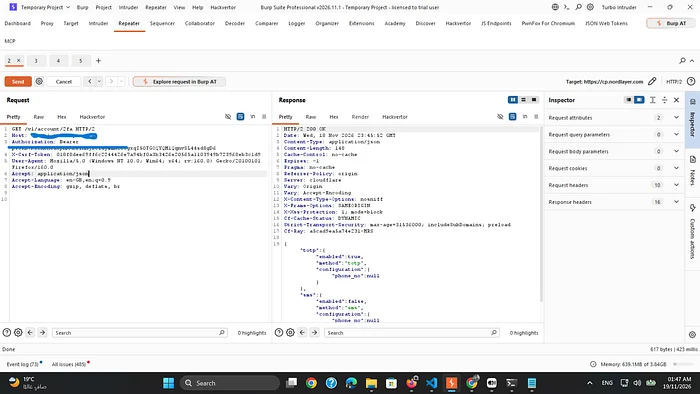
Before touching anyone else's account, the author wanted to know what a 2FA record looked like on this system. A simple authenticated call against the attacker's own account answered that:
Request:GET /v1/account/2faAuthorization: Bearer <OWN_TOKEN>Response:HTTP/2 200 OK{ "totp": { "enabled": true, "method": "totp", "configuration": { "phone_no": null } }, "sms": { "enabled": false, "method": "sms", "configuration": { "phone_no": null } }}
Nothing hostile about that call. It mapped the terrain, confirmed the response shape, and confirmed that enabled: true/false was the field that mattered. As the author puts it, every good attack chain starts with reconnaissance this boring.
The reset endpoint itself did not take a member ID in the URL. It took a member_identifier in the request body:
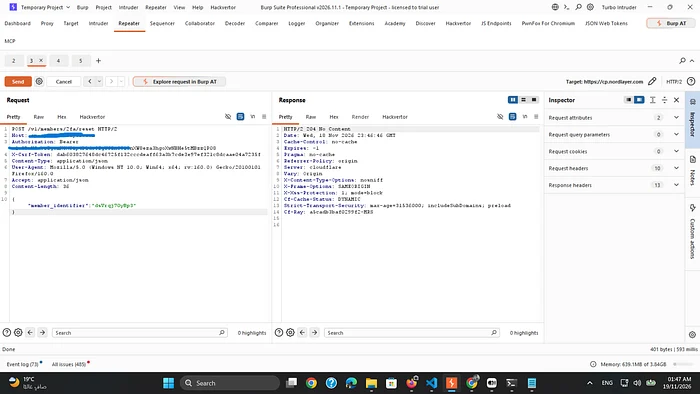
Request:POST /v1/members/2fa/resetAuthorization: Bearer <ATTACKER_TOKEN>Content-Type: application/json{ "member_identifier": "<VICTIM_MEMBER_ID>"}
Nothing in that body is scoped to an organisation. It is just a string the client supplies and the server trusts. That raises the obvious question: what happens if the string belongs to a member of a completely different organisation?
Exploitation
Step 1: reset another organisation's 2FA
The attacker sends the reset request shown above, with their own bearer token and the victim's member identifier in the body. The server did not hesitate:
HTTP/2 204 No Content
Two hundred and four. No content, no complaint, no "this member isn't in your organization." Just silence, the kind of silence that in security testing is usually louder than an error message. The server had done exactly what was asked, for exactly the wrong person.
Somewhere else entirely, a real user's session quietly died.
Step 2: confirm the victim's session is gone
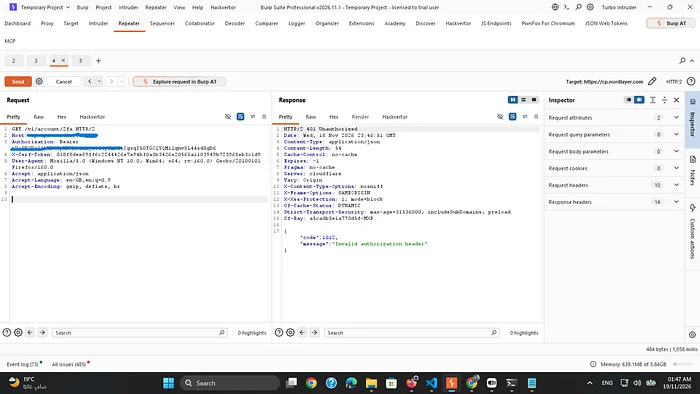
The confirmation came fast. The victim's own token, valid moments earlier, was handed back a flat refusal:
Request:GET /v1/account/2faAuthorization: Bearer <VICTIM_TOKEN>Response:HTTP/2 401 Unauthorized{"code": 1012, "message": "Invalid authorization header"}
That is the tell. On this system a 2FA reset does not merely strip the second factor: it invalidated the entire session behind it. One stranger's API call, and a person logged in on a completely unrelated account was kicked out without ever touching their own keyboard.
Step 3: compare how the same identifier resolves elsewhere
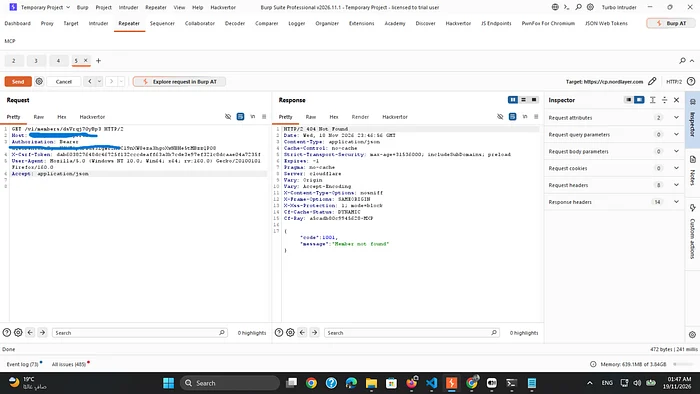
Chasing the same member ID down a different path led to a second, smaller oddity:
GET /v1/members/<VICTIM_MEMBER_ID>Authorization: Bearer <ATTACKER_TOKEN>HTTP/2 404 Not Found{"code": 1001, "message": "Member not found"}
The identifier that worked perfectly as a reset target in the POST body came back "not found" when looked up directly. That is a sign the two endpoints resolve members through different internal paths, and that the reset endpoint's lack of a scope check was not an isolated typo so much as a gap in how member identity was validated across the API as a whole.
Step 4: the proof in the victim's inbox
Then the proof that really mattered arrived somewhere the attacker could not see: the victim's own inbox.
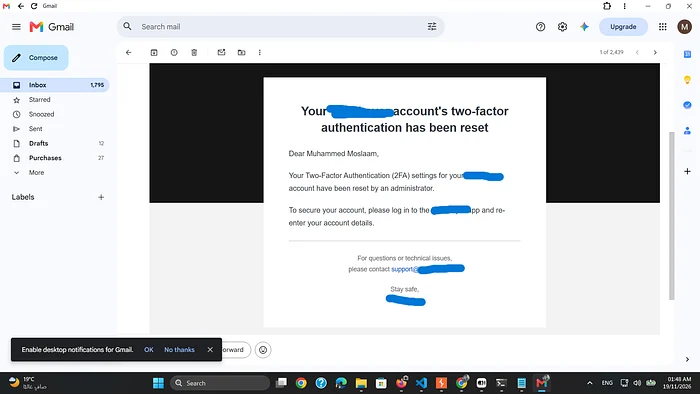
An email that reads as routine IT housekeeping to anyone who receives it, which is exactly what makes this bug dangerous. There was no alert, no "a login from an unrecognized device tried to change your security settings." Just a calm, official-looking notice that something an administrator would normally do had, in fact, been done by a stranger with a free trial account in a different organisation entirely.
Step 5: account takeover
From there, the path to full takeover was the boring, well-worn one that every account recovery flow enables by design: trigger a password reset, walk through a now-unprotected account, and own it. The hard part, the actual security boundary, had already failed at step one.
Root cause
Strip away the drama and the bug is almost embarrassingly simple. The reset endpoint checked that you were authenticated, but never checked whose member the member_identifier in your request body actually pointed to. It trusted the string the client sent and ignored the relationship between the caller's organisation and the target's organisation.
In the language of the trade, that is a broken object-level authorization flaw, BOLA: the familiar "change the ID in the request and see what happens" bug, carried in a JSON body instead of a URL path this time. It is a quiet kind of vulnerability. No buffer overflows, no exotic payloads, no memory corruption. Just a missing WHERE org_id = ? somewhere in the business logic, and a feature powerful enough that its absence mattered enormously.
The 404 on the direct member lookup suggests the two endpoints resolve members through different internal paths, which is consistent with the scope check being absent from the reset route specifically rather than enforced centrally. The report does not describe any other defence that was in place or bypassed.
Impact
An authenticated owner of any organisation could reset the 2FA of a member of any other organisation, provided they knew that member's identifier. The reset also invalidated the victim's existing session, so the victim was logged out as a side effect. With the second factor removed and the session terminated, the attacker could trigger a password reset and walk through a now-unprotected account.
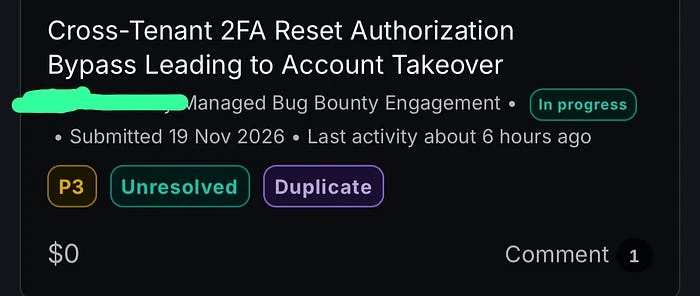
The victim received only a routine-looking notification, with no warning that an unrecognised party had changed their security settings. The author notes that the report was marked as a duplicate, so the same issue had been reported before.
Fix
The author's proposed fix reads almost anticlimactic next to the blast radius of the bug:
- Before acting on any member-scoped endpoint, verify the acting user's organisation actually contains the target member.
- Treat that check as mandatory middleware across the whole
/v1/members/*surface, not a one-off patch on this single route. - Rate-limit the reset endpoint regardless, because even a correctly-scoped reset should not be hammerable.
None of that is clever. It is just the check that should have been there from the start, the one line of logic standing between "I manage my team" and "I can manage anyone's."
Variants to test
- Body-carried object identifiers on member-scoped routes. Send a member identifier belonging to another organisation in the JSON body of the reset endpoint. A positive result is a 2xx response rather than a 403 or 404, followed by a visible effect on the other organisation's member.
- Compare resolution paths across endpoints. Take an identifier that succeeds on one route and use it on a direct lookup such as
GET /v1/members/<id>. A 404 there while the write route succeeds points to inconsistent identity validation, as seen here. - Session invalidation as a side channel. After a cross-tenant reset, replay the victim's token against an authenticated endpoint. A 401 with an invalid-authorization code confirms the reset reached the victim's session.
- Notification content review. Check what the victim receives after a cross-tenant action. A routine-looking email with no mention of an unrecognised actor is a sign the action was accepted as legitimate.
- Recovery chain completion. After removing the second factor, attempt a password reset on the victim account. A positive result is a reset flow that completes without the second factor being demanded.
What happened, in plain words
A security researcher found a way to switch off another person's two-factor authentication (2FA) on a software platform, even though the researcher had no connection to that person's organisation. Two-factor authentication is the second lock on an account: after your password, the site asks for a short code from your phone. If an attacker can turn that second lock off, the password becomes the only thing standing in the way, and passwords can be reset. So the researcher could, in principle, have taken over a stranger's account.
The platform is a SaaS product. SaaS means "software as a service": instead of installing a program on your own computer, you use a website that someone else runs for you. This particular product lets organisations manage their members: the people who work inside the organisation. An organisation owner can reset a member's password, remove a member, and reset a member's 2FA when that member is locked out. The author deliberately withholds the platform's name and identifying details.
The researcher frames the whole thing as one question: if I am the owner of my own house, can I still walk into my neighbour's and turn off their alarm? On most systems the answer is no, because the server checks your key against the door. Here, the door never checked. It only asked whether you were someone's owner, and if the answer was yes, it opened for anyone's house.
The setup
The target runs a member-management API behind its dashboard. An API (application programming interface) is the set of addresses and rules a website's own pages use to talk to its server. When you click a button in a dashboard, your browser sends a request to one of these addresses, and the server sends back an answer. Think of an API as a restaurant's service counter: you place an order at a specific window with a specific name, and the kitchen sends back a dish. You do not walk into the kitchen yourself.
The feature at the centre of this story is the 2FA reset. That last capability is a dangerous lever to hand anyone. 2FA is the deadbolt, and whoever can switch it off from outside effectively owns the account behind it, regardless of how strong the password is.
The author used an attacker account with its own token against a victim member belonging to a separate organisation. A token is a long string of characters that the server gives you when you log in, and that your browser sends with every request so the server knows who you are. Think of it as a wristband at an event: the staff do not check your ID at every door, they just look at the wristband. The victim is identified only by a member identifier, a short code that names a particular member inside the system. The attacker's access is described as a free trial account in a different organisation entirely.
The precondition is an authenticated user on the platform, plus knowledge of a member identifier that belongs to another organisation. "Authenticated" just means logged in.
Learning the shape of the lock
Before touching anyone else's account, the author wanted to know what a 2FA record looked like on this system. Why? Because you cannot tell whether you have changed something if you do not know what it looked like before. It is like reading the label on a fuse box before you flip a switch, so you know which switch does what. A simple authenticated call against the attacker's own account answered that:
Request:GET /v1/account/2faAuthorization: Bearer <OWN_TOKEN>Response:HTTP/2 200 OK{ "totp": { "enabled": true, "method": "totp", "configuration": { "phone_no": null } }, "sms": { "enabled": false, "method": "sms", "configuration": { "phone_no": null } }}
Line by line, in plain words:
Request:GET /v1/account/2fais the request the researcher's browser or tool sent.GETis the HTTP method used when you want to read something, not change it./v1/account/2fais the address (the path) of the 2FA settings for the account making the request.v1is just a version label in the address.Authorization: Bearer <OWN_TOKEN>is a header. Headers are extra lines of information attached to a request, like the address and return address written on an envelope. This one carries the token.Beareris the word the server expects before the token itself.<OWN_TOKEN>is a placeholder for the researcher's own token; the real value is not shown.Response:HTTP/2 200 OKis the server's answer.HTTP/2is the version of the protocol used to carry the request.200 OKis the status code, a number that says how it went. 200 means success.- The block after it is the body of the answer, written in JSON. JSON is a way of writing structured data as text, using curly braces, names in quotes and colons. It is how most modern APIs send information back.
"totp": { "enabled": true, "method": "totp", ... }describes one kind of second factor. TOTP stands for time-based one-time password: the six-digit code that changes every 30 seconds in an authenticator app. Here it is switched on (enabled: true)."sms": { "enabled": false, ... }describes the other kind, codes sent by text message. Here it is switched off."phone_no": nullmeans no phone number is stored.nullis JSON's way of saying "nothing here".
Nothing hostile about that call. It mapped the terrain, confirmed the response shape, and confirmed that enabled: true/false was the field that mattered. As the author puts it, every good attack chain starts with reconnaissance this boring. Reconnaissance means looking around before acting, the way a burglar might first note which windows are open.
Pulling the thread
The reset endpoint itself did not take a member ID in the URL. It took a member_identifier in the request body:
Request:POST /v1/members/2fa/resetAuthorization: Bearer <ATTACKER_TOKEN>Content-Type: application/json{ "member_identifier": "<VICTIM_MEMBER_ID>"}
Line by line:
POST /v1/members/2fa/resetis a request that asks the server to do something, not just read.POSTis the method used for actions such as submitting a form. The path says: reset the 2FA of a member.Authorization: Bearer <ATTACKER_TOKEN>carries the attacker's token, so the server knows the request comes from the attacker's account.Content-Type: application/jsontells the server that the body of the request is written in JSON, so it knows how to read it.{ "member_identifier": "<VICTIM_MEMBER_ID>" }is the body: a small JSON object with one field, naming which member to reset.<VICTIM_MEMBER_ID>is a placeholder for the victim's identifier.
Nothing in that body is scoped to an organisation. "Scoped" means tied to a particular organisation, so that the server can check the target belongs to the same organisation as the person asking. It is just a string the client supplies and the server trusts. That raises the obvious question: what happens if the string belongs to a member of a completely different organisation?
The moment it broke
The attacker sends the reset request shown above, with their own bearer token and the victim's member identifier in the body. The server did not hesitate:
HTTP/2 204 No Content
This is the whole answer: a status code and nothing else. 204 No Content means the server carried out the action and has nothing to send back. Two hundred and four. No content, no complaint, no "this member isn't in your organization." Just silence, the kind of silence that in security testing is usually louder than an error message. The server had done exactly what was asked, for exactly the wrong person.
Somewhere else entirely, a real user's session quietly died. A session is the period during which the server treats you as logged in, usually tracked by that token. When a session dies, the token stops working and you are effectively logged out.
Watching the damage land
The confirmation came fast. The victim's own token, valid moments earlier, was handed back a flat refusal:
Request:GET /v1/account/2faAuthorization: Bearer <VICTIM_TOKEN>Response:HTTP/2 401 Unauthorized{"code": 1012, "message": "Invalid authorization header"}
Line by line:
- The request is the same read of the 2FA settings as in the first step, but this time it carries
<VICTIM_TOKEN>, the victim's token, to see whether the victim is still logged in. HTTP/2 401 Unauthorizedis the answer. 401 means the server does not accept the credentials you presented: in everyday terms, "I do not know who you are, or your pass has expired."{"code": 1012, "message": "Invalid authorization header"}is the body of the refusal.codeis the platform's own internal error number, andmessageis a short human-readable explanation. The server is saying the token in theAuthorizationheader is no longer valid.
That is the tell. On this system a 2FA reset does not merely strip the second factor: it invalidated the entire session behind it. One stranger's API call, and a person logged in on a completely unrelated account was kicked out without ever touching their own keyboard.
Comparing how the same identifier resolves elsewhere
Chasing the same member ID down a different path led to a second, smaller oddity:
GET /v1/members/<VICTIM_MEMBER_ID>Authorization: Bearer <ATTACKER_TOKEN>HTTP/2 404 Not Found{"code": 1001, "message": "Member not found"}
Line by line:
GET /v1/members/<VICTIM_MEMBER_ID>asks the server to read the record of one member, named directly in the address this time rather than in the body.Authorization: Bearer <ATTACKER_TOKEN>again carries the attacker's token.HTTP/2 404 Not Foundis the answer. 404 is the classic "there is nothing at this address" code.{"code": 1001, "message": "Member not found"}says the platform could not find that member.
The identifier that worked perfectly as a reset target in the POST body came back "not found" when looked up directly. That is a sign the two endpoints resolve members through different internal paths, and that the reset endpoint's lack of a scope check was not an isolated typo so much as a gap in how member identity was validated across the API as a whole. "Validated" means checked against a rule before being trusted.
The proof in the victim's inbox
Then the proof that really mattered arrived somewhere the attacker could not see: the victim's own inbox.
An email that reads as routine IT housekeeping to anyone who receives it, which is exactly what makes this bug dangerous. There was no alert, no "a login from an unrecognized device tried to change your security settings." Just a calm, official-looking notice that something an administrator would normally do had, in fact, been done by a stranger with a free trial account in a different organisation entirely.
Account takeover
From there, the path to full takeover was the boring, well-worn one that every account recovery flow enables by design: trigger a password reset, walk through a now-unprotected account, and own it. The hard part, the actual security boundary, had already failed at step one. "Account takeover" means an attacker ends up in control of someone else's account. "Account recovery" is the normal "forgot my password" process, which is designed to let a legitimate owner back in, and which an attacker can also use once the second factor is gone.
What was actually missing
Strip away the drama and the bug is almost embarrassingly simple. The reset endpoint checked that you were authenticated, but never checked whose member the member_identifier in your request body actually pointed to. It trusted the string the client sent and ignored the relationship between the caller's organisation and the target's organisation.
In the language of the trade, that is a broken object-level authorization flaw, BOLA: the familiar "change the ID in the request and see what happens" bug, carried in a JSON body instead of a URL path this time. "Authorization" is the check of what you are allowed to do, as opposed to "authentication", which is the check of who you are. A BOLA flaw means the server knows who you are but never checks whether the particular thing you are asking for belongs to you. It is like a hotel receptionist who checks your room key is genuine but never checks which room it opens.
It is a quiet kind of vulnerability. No buffer overflows, no exotic payloads, no memory corruption. A buffer overflow and memory corruption are low-level programming faults where a program writes data past the space set aside for it; none of that is involved here. Just a missing WHERE org_id = ? somewhere in the business logic, and a feature powerful enough that its absence mattered enormously. WHERE org_id = ? is a fragment of database query language: it is the instruction that would have limited the action to rows belonging to the caller's organisation. The ? is a placeholder for the organisation's number.
The 404 on the direct member lookup suggests the two endpoints resolve members through different internal paths, which is consistent with the scope check being absent from the reset route specifically rather than enforced centrally. The report does not describe any other defence that was in place or bypassed.
Closing the door properly
The author's proposed fix reads almost anticlimactic next to the blast radius of the bug:
- Before acting on any member-scoped endpoint, verify the acting user's organisation actually contains the target member.
- Treat that check as mandatory middleware across the whole
/v1/members/*surface, not a one-off patch on this single route. Middleware is code that runs automatically on every request before the main handler, like a security guard at the building entrance rather than a lock on one office door. The/v1/members/*surface means every address that starts with that path. - Rate-limit the reset endpoint regardless, because even a correctly-scoped reset should not be hammerable. Rate-limiting means capping how many requests can be made in a given time, so nobody can try thousands of times in a row.
None of that is clever. It is just the check that should have been there from the start, the one line of logic standing between "I manage my team" and "I can manage anyone's."
The report was marked as a duplicate, so the same issue had been reported before.
Glossary
- 2FA (two-factor authentication): a second proof of identity after your password, usually a short code from your phone, so a stolen password alone is not enough to log in.
- Account takeover: a situation where an attacker gains control of someone else's account.
- API (application programming interface): the set of addresses and rules a website's pages use to talk to its server; the service counter where requests are placed and answers returned.
- Authentication: the check of who you are, usually by password or token.
- Authorization: the check of what you are allowed to do once the system knows who you are.
- Bearer token: a token sent in the
Authorizationheader after the wordBearer; whoever holds it is treated as the logged-in user. - BOLA (broken object-level authorization): a flaw where the server checks that you are logged in but not that the specific item you are asking for belongs to you.
- Buffer overflow: a low-level programming fault where a program writes more data than the space set aside for it; not involved in this bug.
- Content-Type: a header that tells the server what format the body of a request is written in, such as JSON.
- Dashboard: the web page where a user manages their account or organisation.
- Endpoint: one specific address on an API that performs one specific job, such as resetting a member's 2FA.
- GET: the HTTP method used to read something without changing it.
- Header: an extra line of information attached to a request or response, such as the token or the content type.
- HTTP/2: the version of the protocol used to carry requests and responses between browser and server.
- JSON: a text format for structured data, using curly braces, quoted names and colons; how most APIs send information.
- Member identifier: a short code that names a particular member inside the platform.
- Memory corruption: a low-level fault where a program damages its own memory; not involved in this bug.
- Middleware: code that runs automatically on every request before the main handler, like a guard at the building entrance.
- Organisation: a company or team using the platform, with its own members and its own owner.
- POST: the HTTP method used to ask the server to perform an action, such as submitting a form.
- Rate-limiting: capping how many requests can be made in a given time, so an action cannot be hammered repeatedly.
- Reconnaissance: looking around a system before acting, to learn how it behaves.
- SaaS (software as a service): software you use through someone else's website instead of installing it yourself.
- Scope / scoped: tied to a particular organisation or owner, so the server can check the target belongs to the same one as the caller.
- Session: the period during which the server treats you as logged in, tracked by your token.
- SMS: text message; one of the ways a 2FA code can be delivered.
- Status code: the number in a server's answer that says how the request went, such as 200 (success), 204 (done, nothing to return), 401 (not accepted) or 404 (not found).
- Token: a long string of characters given to you at login and sent with each request so the server knows who you are, like a wristband at an event.
- TOTP (time-based one-time password): the six-digit code that changes every 30 seconds in an authenticator app.
- Validation: checking a value against a rule before trusting it.
WHERE org_id = ?: a fragment of database query language that limits an action to rows belonging to one organisation; the check that was missing here.