The Metadata Nobody Reads: How a Government Portal Leaked Internal Usernames Across 15,000 Documents.
A government document portal published PDFs and DOCX files with their original metadata intact, exposing internal staff account names, workstation identifiers, local filesystem paths and template GUIDs. Because the site published a sitemap, an attacker could enumerate and harvest this metadata from thousands of documents without authentication or interaction.

Information Disclosure
The full write-up lives on its author's site
It belongs to its author, so we link to it rather than copy it. The other two tabs are our own rewrites, checked against it.
Context
A large public-sector document portal was publishing every PDF and DOCX file exactly as its authors had saved them, with metadata intact. The documents themselves were public by design; the problem was the envelope around them. Embedded in the files were internal staff account names, internal workstation identifiers, local filesystem paths containing usernames, and internal template GUIDs.
The target is redacted to target.com throughout. The findings came from a responsible-disclosure process, and the target acknowledged the report.
Metadata is data about data. In PDFs and DOCX files it can include the author's name, company, creation details, the software used, internal template identifiers and local filesystem paths. It is usually invisible when you open a document, but it stays embedded in the file. If it is not sanitised before publication, it can expose internal usernames, workstation naming conventions and other infrastructure details that were never meant to be public.
This class of bug is easy to overlook. Most people think of leaked credentials, exposed S3 buckets or SQL injection when they hear "information disclosure", and document metadata rarely makes the list. A single PDF author field is low severity on its own. A document estate is not a single PDF, though: it is a corpus, and a corpus with a predictable URL structure and a published sitemap is an enumerable one. When the leak is systematic, the value is in the aggregate: a directory of account names, a map of workstation naming conventions, a set of internal template identifiers. That is reconnaissance material, and it was sitting behind nothing more than a curl.
Setup
The precondition was simply that the portal published a sitemap index and served its documents without authentication. The work was done with curl and a metadata reader, run across a list of URLs the site had published itself. No interaction with an application was required.
Finding it
The researcher did not start with a document. The starting point was the target's published sitemap. Like most large sites, it exposed a sitemap index, in this case with 44 sub-sitemaps, and from there every document URL on the estate was enumerable without authentication. That is the point at which the issue changed from "a PDF has a name in it" to "the estate is a directory".
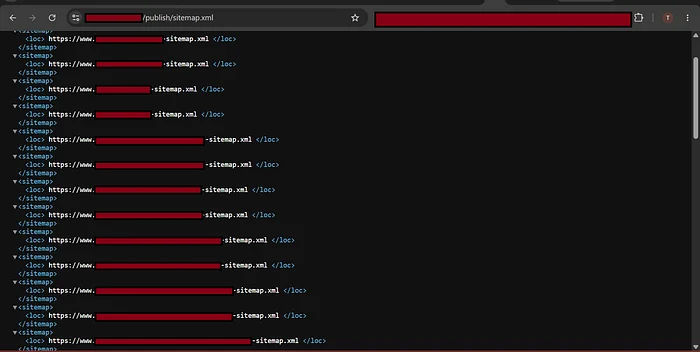
Once the URL list existed, the rest was mechanical: fetch a file, read its metadata, repeat. There was no interaction, no rate-limit trouble and no cleverness required, just a curl and a metadata reader over a list of URLs the site had helpfully published. The vulnerability was not discovered by poking at an application; it was discovered by reading a sitemap.
Exploitation
Step 1: enumerate the sitemap index
Visit the target's published sitemap. It exposed a sitemap index with 44 sub-sitemaps, and from those every document URL on the estate could be enumerated without authentication.
Step 2: harvest document URLs
Collect the document URLs from the sub-sitemaps. The estate was large: the sitemap index had 44 sub-sitemaps, more than 80,000 total URLs, more than 15,000 PDFs and more than 700 DOCX files.
Sitemap index .......... 44 sub-sitemapsTotal URLs ............. 80,000+PDFs ................... 15,000+DOCX ................... 700+
Step 3: fetch each file and read its metadata
For each URL, fetch the file and read its metadata, then repeat. No authentication and no interaction were needed, and thousands of files could be processed in minutes.
What the metadata contained
The full inventory is not reproduced in the write-up; the specifics belong in the disclosure thread. The categories are worth naming, because each one says something different about how the files got there.
- PDF author field with an internal staff account name. The kind of short alphanumeric identifier an organisation issues to its employees. Low severity on its own; across a corpus, a directory.
- Author field with the account name plus an internal workstation identifier, in the form
NAME@W######. The suffix exposed the target's workstation naming scheme, which is more useful for reconnaissance than a bare username because it shows how machines are named and numbered internally. - XMP metadata carrying local filesystem paths from the author's machine:
C:/Users/<name>/...on Windows and/Users/<name>/...on macOS. On one document the XMP path was actually thedc:title, so the file's displayed title was a local temporary path rather than a title. That is the tell that nobody looked at what was shipping. - DOCX files all carried
Company = <redacted> <country name>and a set of distinct internal.dotxtemplate GUIDs. The researcher checked for tracked changes, comments and recoverable deleted text and found none; the templates were clean apart from their metadata. This is worth stating explicitly, because "DOCX metadata leak" often implies worse things than what was actually here. - PDF author fields holding staff personal names. Recorded for completeness, but the researcher argues this is the weakest category in the report: names of employees acting in a professional capacity are not, in most readings, personal data requiring protection. It is mentioned because it was in the data, not because it is the story.
Root cause
Nothing exotic. Documents were published as the authors saved them: no metadata stripping step in the publishing pipeline, no sanitisation on ingest, no template hygiene enforced at source. The metadata that leaked was written by the authoring applications (Word, Acrobat, scanners, template macros) years before the files reached the web server, and nothing in between touched it.
Impact
The documents were always meant to be public. The account names, workstation IDs and local paths were not. The leak was systematic and bulk-harvestable: a public sitemap made every document URL enumerable, and metadata could be extracted from thousands of files in minutes with no authentication and no interaction. The aggregate is reconnaissance material: a directory of account names, a map of workstation naming conventions and a set of internal template identifiers. A single leaked username is trivia; fifteen thousand files with predictable URLs and a public sitemap is an enumerable directory. Severity is a function of both, not either.
The report was accepted as a Medium-severity information disclosure vulnerability, and the researcher received a 250 CHF bounty.

Fix
The fix is as unexotic as the cause:
- Strip on ingest. Run every published file through
exiftool -all=(or equivalent) before it lands in the DAM. - Do not trust the authoring app to leave it alone.
dc:titlebeing a temp path is the tell that nobody looked. - Publish a sanitised copy, keep the original. Metadata is useful internally; it does not need to be public.
exiftool -all= file is a one-liner. The gap between leaking and not leaking here is a single step in a pipeline that nobody had added.
Variants to test
- Sitemap-first enumeration on any large portal. Fetch the sitemap index and its sub-sitemaps, collect document URLs, and fetch a sample. A positive result is a document whose metadata contains an internal account name, a workstation identifier or a local path.
- Check
dc:titleand other XMP fields for local paths. A positive result is a title or description that is a filesystem path such asC:/Users/<name>/...or/Users/<name>/.... - Check the PDF author field for the
NAME@W######pattern. A positive result is an author value that combines an account name with a workstation identifier, which reveals the workstation naming scheme. - Inspect DOCX
docProps/forCompanyand template GUIDs. A positive result is a company value or a set of distinct internal.dotxtemplate GUIDs. Also check for tracked changes, comments and recoverable deleted text, which the researcher found absent here. - Treat metadata as part of the public surface. If it ships in the file, it is published:
/Author, XMP packets,docProps/and template GUIDs all count.
What happened, in plain words
A large public-sector document portal published PDF and Word (DOCX) files for anyone to download. The files themselves were meant to be public: they were the point of the site. But each file also carried a hidden layer of information called metadata, and that layer was never cleaned before the files went online. Inside it were internal staff account names, internal workstation identifiers, local file paths from the authors' own computers, and internal template identifiers.
None of that hidden information was meant to be public. And because the site also published a sitemap (a machine-readable list of its pages and files), anyone could collect every document URL automatically, download thousands of files, and read the hidden layer from each one. No login, no interaction, no trickery: just a curl and a metadata reader.
The researcher reported it through a responsible-disclosure process, and the target acknowledged the report. The report was accepted as a Medium-severity information disclosure vulnerability, and the researcher received a 250 CHF bounty. The target is redacted to target.com throughout.
This article walks through the same story for someone who has never done security work: what metadata is, why a leak like this matters, how it was found, what was inside the files, how the scale was measured, why it happened, how to fix it, and what to look for on other sites.
What metadata is
Metadata is data about data. Think of a paper letter: the letter itself is the content, but the envelope carries the sender's address, the postmark, the date and the post office's stamps. You read the letter, but the envelope tells a story too. Digital documents have the same kind of envelope, stored inside the file.
In PDFs and DOCX files, metadata can include:
- the author's name or account name,
- the company name,
- when the file was created and with what software,
- internal template identifiers,
- local filesystem paths (folders on the author's own computer).
When you open a document in a viewer, you normally see only the content. The metadata is invisible, but it is still embedded in the file. If nobody removes it before publication, it can expose internal usernames, workstation naming conventions and other infrastructure details that were never meant to be public.
A useful comparison: posting a photo online after forgetting that your phone stamped the GPS coordinates of your home into it. The picture is what you meant to share; the location tag is the envelope you forgot about.
Why this class of bug matters
When people hear "information disclosure", they usually think of leaked passwords, an exposed cloud storage bucket, or SQL injection (a way of tricking a database through a web form). Document metadata rarely makes that list, and that is exactly why it is interesting: nobody looks at it.
A single PDF author field is low severity on its own. One name tells you almost nothing. But a document portal is not a single PDF. It is a corpus, meaning a large body of documents. And a corpus with a predictable URL structure and a published sitemap is an enumerable one: you can list every item in it automatically.
When the leak is systematic, the value is in the aggregate, meaning the combined total rather than any one file. Put together, the files gave:
- a directory of account names,
- a map of how workstations are named,
- a set of internal template identifiers.
That is reconnaissance material: information useful for planning a further attack. And it was sitting behind nothing more than a curl, a command-line tool for downloading things from the web.
How it was found
The researcher did not start with a document. The starting point was the target's published sitemap.
A sitemap is a file that a website publishes to help search engines find its pages. It usually lists URLs, which are web addresses. Large sites often publish a sitemap index: a sitemap of sitemaps, pointing to several smaller sitemap files. In this case the index pointed to 44 sub-sitemaps, and from those every document URL on the estate could be listed without logging in. "The estate" here just means all the documents the organisation publishes.
That is the moment the issue changed from "a PDF has a name in it" to "the estate is a directory".
Once the URL list existed, the rest was mechanical: fetch a file, read its metadata, repeat. There was no interaction with the site's application, no rate-limit trouble (rate limiting is when a server refuses too many requests in a short time) and no cleverness required. Just a curl and a metadata reader over a list of URLs the site had helpfully published itself.
The vulnerability was not discovered by poking at an application. It was discovered by reading a sitemap.
Exploitation
Step 1: enumerate the sitemap index
Visit the target's published sitemap. It exposed a sitemap index with 44 sub-sitemaps, and from those every document URL on the estate could be listed without authentication. Authentication means proving who you are, usually by logging in; here, no login was needed at all.
Why this step: before touching any document, you want to know what the site itself says it has. The sitemap is the site handing you the inventory.
Step 2: harvest document URLs
Collect the document URLs from the sub-sitemaps. The estate was large enough that the harvest was bulk: the sitemap index had 44 sub-sitemaps, more than 80,000 total URLs, more than 15,000 PDFs and more than 700 DOCX files.
Sitemap index .......... 44 sub-sitemapsTotal URLs ............. 80,000+PDFs ................... 15,000+DOCX ................... 700+
Line by line, this block is a small summary table written as plain text:
Sitemap index .......... 44 sub-sitemaps: the top-level sitemap points to 44 smaller sitemaps.Total URLs ............. 80,000+: across all of them there are more than eighty thousand addresses.PDFs ................... 15,000+: more than fifteen thousand of those are PDF files.DOCX ................... 700+: more than seven hundred are Word documents.
The dots are just spacing to line the numbers up. The point of the block is scale: this is not a handful of files, it is a library.
Step 3: fetch each file and read its metadata
For each URL, fetch the file and read its metadata, then repeat. No authentication and no interaction were needed, and thousands of files could be processed in minutes.
Why this step: the metadata is inside the file, so downloading the file is enough to get it. You do not need to open it in a viewer or click anything on the site. A metadata reader is a tool that pulls out the hidden fields, the same way a photo viewer can show the GPS tag on a picture.
What the metadata contained
The full inventory is not reproduced in the write-up; the specifics belong in the disclosure thread. The categories are worth naming, because each one says something different about how the files got there.
- PDF author field with an internal staff account name. This is the kind of short alphanumeric identifier an organisation issues to its employees. Low severity on its own; across a corpus, a directory.
- Author field with the account name plus an internal workstation identifier, in the form
NAME@W######. The suffix exposed the target's workstation naming scheme, which is more useful for reconnaissance than a bare username because it shows how machines are named and numbered internally. The suffix shows how machines are named and numbered internally. - XMP metadata carrying local filesystem paths from the author's machine:
C:/Users/<name>/...on Windows and/Users/<name>/...on macOS. XMP is a standard format for storing metadata inside files. A filesystem path is the address of a folder or file on a computer, like a street address for data. On one document the XMP path was actually thedc:title, so the file's displayed title was a local temporary path rather than a title.dc:titleis the metadata field that holds a document's title. That is the tell that nobody looked at what was shipping. - DOCX files all carried
Company = <redacted> <country name>and a set of distinct internal.dotxtemplate GUIDs. A.dotxis a Word template file, and a GUID is a long unique identifier, a string of characters meant to be one of a kind. The researcher checked for tracked changes, comments and recoverable deleted text and found none; the templates were clean apart from their metadata. This is worth stating explicitly, because "DOCX metadata leak" often implies worse things than what was actually here. Tracked changes are edits Word records so they can be reviewed later; recoverable deleted text is text removed from a document but still present in the file. - PDF author fields holding staff personal names. Recorded for completeness, but the researcher argues this is the weakest category in the report: names of employees acting in a professional capacity are not, in most readings, personal data requiring protection. It is mentioned because it was in the data, not because it is the story.
Root cause
The cause is nothing exotic. Documents were published as the authors saved them: no metadata stripping step in the publishing pipeline, no sanitisation on ingest, no template hygiene enforced at source. In plain terms, nobody had added a cleaning step between the author's computer and the public web server.
The metadata that leaked was written by the authoring applications (Word, Acrobat, scanners, template macros) years before the files reached the web server, and nothing in between touched it. A macro is a small automated script inside a document; a scanner is the machine that turns paper into a PDF.
A comparison: a company that photocopies letters for a public noticeboard without checking whether the back of each page still has an internal memo on it. The front is meant to be seen; the back was never meant to leave the office.
Impact
The documents were always meant to be public. The account names, workstation IDs and local paths were not. The leak was systematic and bulk-harvestable: a public sitemap made every document URL enumerable, and metadata could be extracted from thousands of files in minutes with no authentication and no interaction.
The aggregate is reconnaissance material: a directory of account names, a map of workstation naming conventions and a set of internal template identifiers. A single leaked username is trivia; fifteen thousand files with predictable URLs and a public sitemap is an enumerable directory. Severity is a function of both, not either: it depends on what leaked and on how much of it could be collected.
CHF is the Swiss franc.
Fix
The fix is as unexotic as the cause:
- Strip on ingest. Run every published file through
exiftool -all=(or equivalent) before it lands in the DAM. A DAM is a digital asset management system, the software many organisations use to store and publish their files.exiftoolis a free tool for reading and writing metadata, and-all=tells it to remove all metadata fields. - Do not trust the authoring app to leave it alone.
dc:titlebeing a temp path is the tell that nobody looked. - Publish a sanitised copy, keep the original. Metadata is useful internally; it does not need to be public.
exiftool -all= file is a one-liner. The gap between leaking and not leaking here is a single step in a pipeline that nobody had added.
Variants to test
These are the same checks applied to other sites, written so you can follow them without prior security experience.
- Sitemap-first enumeration on any large portal. Fetch the sitemap index and its sub-sitemaps, collect document URLs, and fetch a sample. A positive result is a document whose metadata contains an internal account name, a workstation identifier or a local path. Why: the sitemap is the site's own inventory, so it is the fastest way to see how much is published.
- Check
dc:titleand other XMP fields for local paths. A positive result is a title or description that is a filesystem path such asC:/Users/<name>/...or/Users/<name>/.... Why: a title that looks like a folder address means the file was published straight from someone's computer without review. - Check the PDF author field for the
NAME@W######pattern. A positive result is an author value that combines an account name with a workstation identifier, which reveals the workstation naming scheme. Why: knowing the naming scheme lets an attacker guess other machine names. - Inspect DOCX
docProps/forCompanyand template GUIDs.docProps/is the folder inside a DOCX file where Word stores its document properties. A positive result is a company value or a set of distinct internal.dotxtemplate GUIDs. Also check for tracked changes, comments and recoverable deleted text, which the researcher found absent here. - Treat metadata as part of the public surface. If it ships in the file, it is published:
/Author, XMP packets,docProps/and template GUIDs all count. Why: anything a visitor can download is public, whether or not it appears on the page.
Glossary
- Metadata: data about data; hidden information stored inside a file, such as author, company, creation details and file paths.
- PDF: a common file format for documents that look the same on any device.
- DOCX: the standard file format for Microsoft Word documents.
- Information disclosure: a vulnerability where information that should stay private is exposed.
- Vulnerability: a weakness in a system that can be used to cause harm or leak data.
- Severity: how serious a vulnerability is judged to be, often low, medium or high.
- SQL injection: a way of tricking a database by putting commands into a web form.
- S3 bucket: a storage container in Amazon's cloud; if misconfigured, it can expose files publicly.
- Corpus: a large body of documents or data taken as a whole.
- Enumerable: able to be listed one by one automatically.
- Aggregate: the combined total, as opposed to any single item.
- Reconnaissance: gathering information about a target to plan a further attack.
- Sitemap: a file a website publishes listing its pages and files, mainly for search engines.
- Sitemap index: a sitemap that points to other sitemaps.
- Sub-sitemap: one of the smaller sitemaps listed by a sitemap index.
- URL: a web address.
- Estate: all the documents or pages an organisation publishes.
curl: a command-line tool for downloading things from the web.- Authentication: proving who you are, usually by logging in.
- Rate limiting: a server refusing too many requests in a short time.
- Metadata reader: a tool that extracts the hidden fields from a file.
- Author field: the metadata field that records who created a document.
- Account name: a short identifier an organisation issues to an employee.
- Workstation: a desktop or laptop computer used by an employee.
- Workstation identifier: a name or code for a specific machine, here in the form
NAME@W######. - Naming scheme: the pattern an organisation uses to name its machines.
- XMP: a standard format for storing metadata inside files.
- Filesystem path: the address of a folder or file on a computer, such as
C:/Users/<name>/.... dc:title: the metadata field that holds a document's title..dotx: a Microsoft Word template file.- GUID: a long unique identifier, a string of characters meant to be one of a kind.
- Tracked changes: edits Word records so they can be reviewed later.
- Recoverable deleted text: text removed from a document but still present in the file.
- Macro: a small automated script inside a document.
- Root cause: the underlying reason a problem exists.
- Sanitisation: cleaning something, here removing hidden data from files before publishing.
- Ingest: the point where files are taken into a system.
- Pipeline: the series of steps a file goes through from author to publication.
- DAM: digital asset management, software for storing and publishing files.
exiftool: a free tool for reading and writing metadata;-all=removes all metadata fields.- Bounty: a payment made for reporting a valid vulnerability.
- CHF: the Swiss franc, the currency used here.
- Responsible disclosure: reporting a vulnerability privately to the owner so it can be fixed before details are made public.