THE NOOB WAY OF TAKING OVER ACCOUNTS
The application prevented duplicate company names only by exact string comparison, so an attacker could register a company with a visually similar name using a homoglyph character and become admin of what appeared to be the same company. This allowed the attacker to take over the organisation, delete the real admin, and access shared information.
 Published on medium.com
Hello Readers! Welcome to my another blog post, today I am going to share a very interesting finding which is Account takeover, well there are multiple ways of doing so, it basically depends on functionalities available in the application.
The full write-up lives on its author's site
It belongs to its author, so we link to it rather than copy it. The other two tabs are our own rewrites, checked against it.
Context
The target is a web application, referred to throughout as target.com, that lets users register their companies. When you set up a company you become its admin, and as admin you can add colleagues and set their privileges. The report notes that only the admin can set those privileges. The same platform also gives users internal communications and resource sharing between colleagues.
The feature that matters here is company registration. The application is supposed to reserve a company name for the first person who registers it, so that nobody else can create a second company with the same name and end up as its admin.
Setup
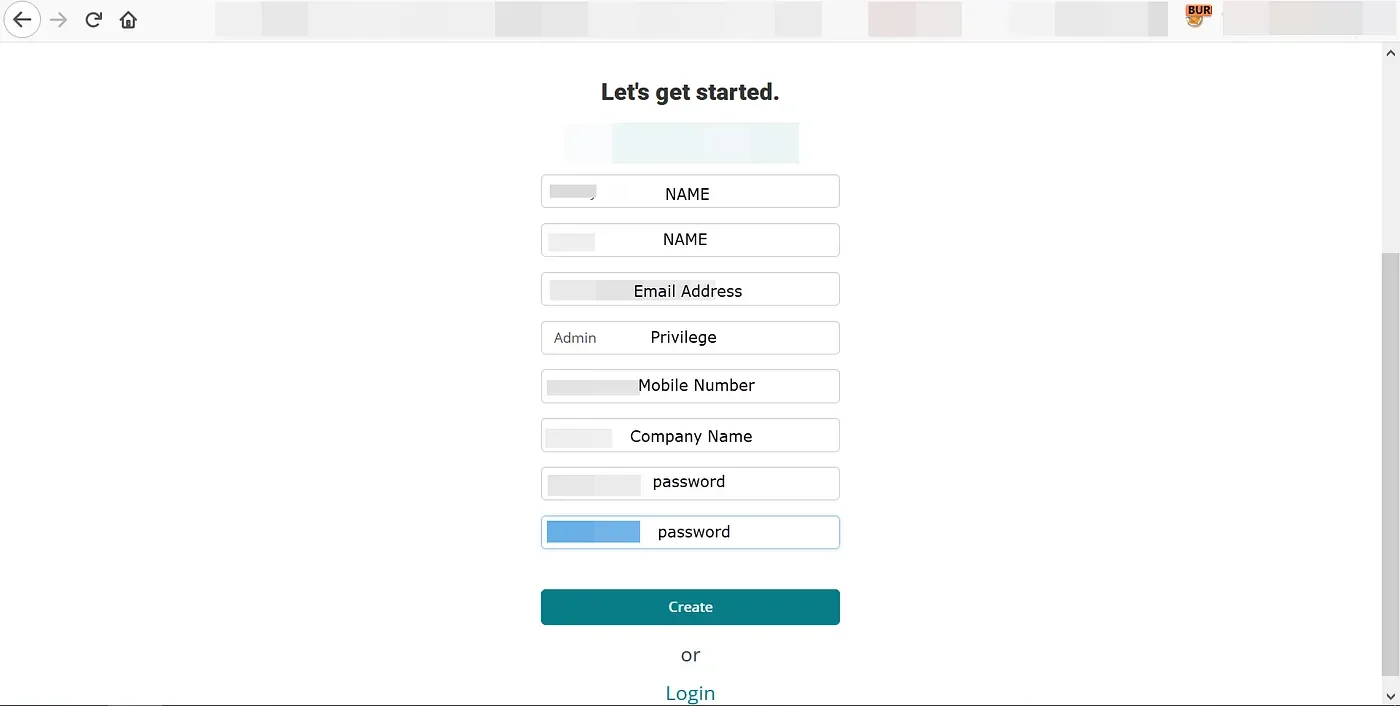
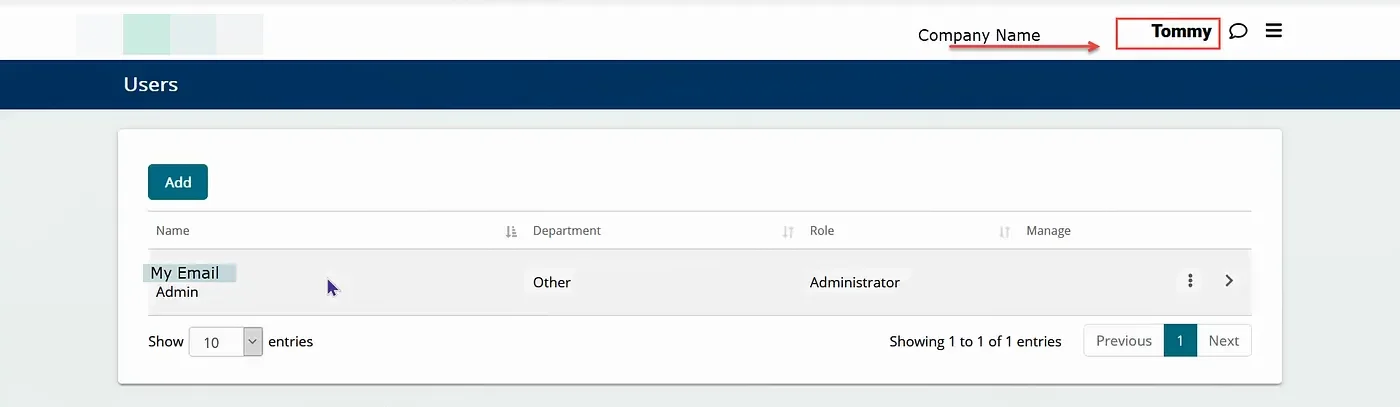
The researcher registered a company using his own email address, named the company "Tommy", and became the admin of that company at target.com.
No special tooling is described for the attack itself. In the tips the researcher mentions using the Firefox "Containers" extension for testing IDORs and privilege escalations, and credits the eWPTX course for the background knowledge.
Finding it
With the company "Tommy" already registered, a second registration attempt using the same company name is rejected. The application returns the message:
The company Tommy is already setup and contact the Admin
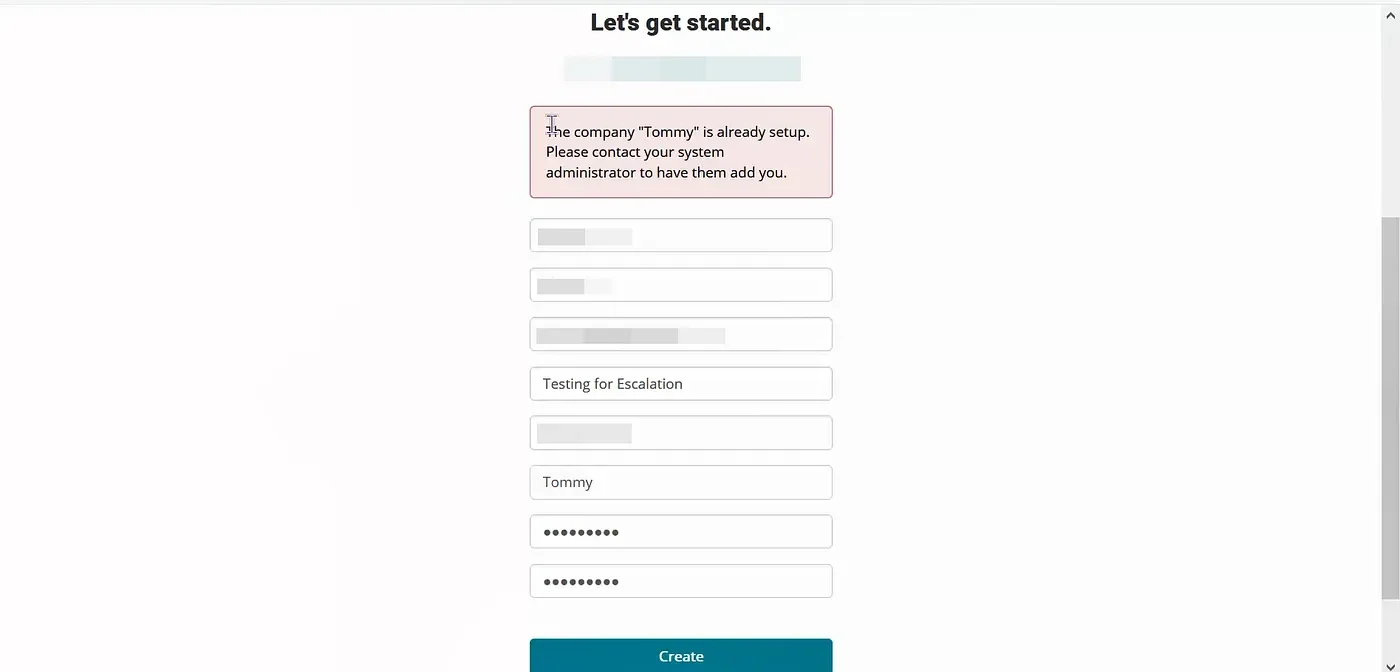

So a uniqueness check on the company name exists. The researcher's observation was that the uniqueness check could be bypassed by a character that looks identical to the human eye but is a different code point. He describes the technique as "Visual Spoofing|Homoglyph", quoting the definition of a homoglyph as one or more characters or glyphs whose shapes appear identical or cannot be differentiated by quick visual inspection, and distinguishes a homograph (a word that looks the same as another word) from a homogliph (a look-alike character used to create homographs).
Exploitation
Step 1: register the original company
The researcher registered a company with his email, named it "Tommy", and became its admin. This establishes the name that the uniqueness check will later protect.
Step 2: confirm the duplicate is blocked
A second registration with the same name "Tommy" is refused with the message shown above. This confirms the validation is active and that a plain duplicate does not work.
Step 3: re-register with a homoglyph
The researcher returned to the registration page and registered the same company again with a different email address, replacing "Tommy" with "Tömmy", that is, substituting the o for the character ö. The registration succeeded and he became the admin of the company "Tommy".
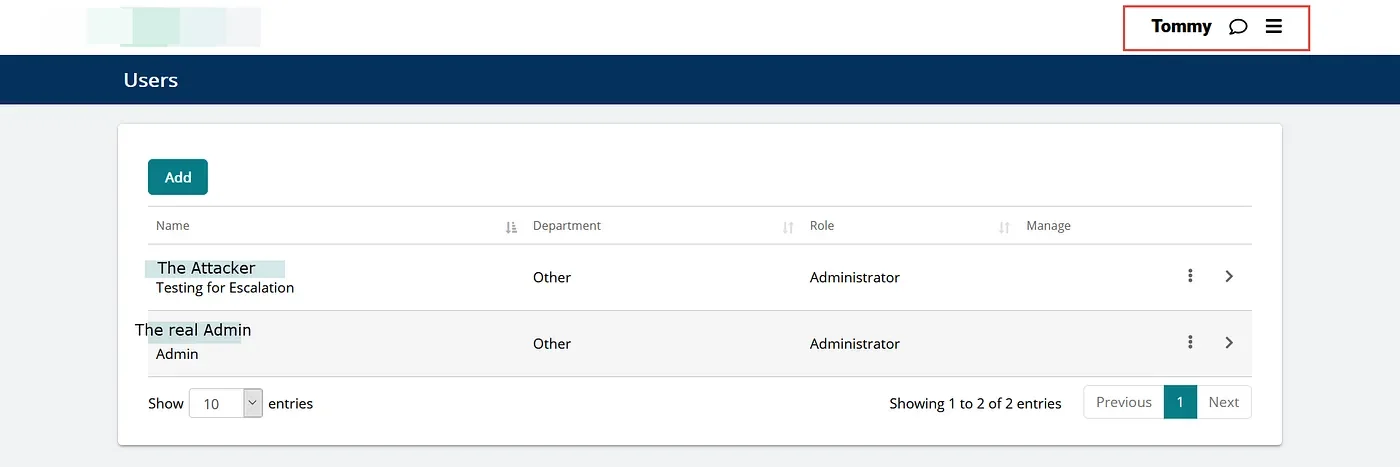
The researcher describes the outcome as a complete vertical privilege escalation.

Root cause
The report does not show the code or the comparison logic. What it establishes is that a visually similar company name was accepted as a new registration. The researcher's own framing is that the validation was insufficient and that it took about ten minutes to bypass. Whether the check ran on the client side, the server side, or both is not stated; the tips section suggests that client-side validation in general can be bypassed in multiple ways, but the report does not say where this particular check lived.
Impact
Once registered as admin of the spoofed company, the researcher states he could delete the real admin from his own company and download all the information shared among the colleagues, effectively taking over the organisation. The severity was rated 9.1/10 and the bounty awarded was 955 USD.
Fix
Based on the finding, the check should normalise company names before comparing them, for example by applying Unicode normalisation and rejecting or folding confusable characters, so that visually identical names cannot be registered twice.
Variants to test
- Register a name, then attempt a second registration with a homoglyph substitution in one or more characters. A positive result is a successful registration that resolves to the same organisation as the original.
- If the validation appears to run on the client side, perform the visual spoofing in the browser, capture the request with Burp, and change the value back to its real form before forwarding. A positive result is the server accepting the real name as a new registration.
- Try permutations and combinations of the above, as the researcher recommends, since a single technique may not work on every target.
- Use separate browser containers when testing IDORs and privilege escalations so that sessions for different accounts stay isolated, as the researcher does with the Firefox Containers extension.
What happened, in plain words
A website let people create a company account. The first person to register a company name became its admin, and the site promised that nobody else could register the same name. The researcher found that by swapping one letter for a look-alike letter, he could register a company name that looked the same and become its admin. From there he could remove the real admin and read everything the company's colleagues had shared. The site rated the issue 9.1/10 and paid a 955 USD bounty.
This post walks through the same steps for someone who has never done security testing before. You only need a browser and a computer.
The target and the feature
The target is a web application, called target.com throughout the report. It lets users register their companies. When you set up a company you become its admin, and as admin you can add colleagues and set their privileges. Only the admin can set those privileges. The same platform also gives users internal communications and resource sharing between colleagues.
The feature that matters here is company registration. The application is supposed to reserve a company name for the first person who registers it, so that nobody else can create a second company with the same name and end up as its admin.
A quick word on what an admin is: think of a shared photo album where one person can add or remove members and decide who can edit. That person is the admin. If someone else becomes admin of the same album, they can throw the original owner out.
Setting up
The researcher registered a company using his own email address, named the company "Tommy", and became the admin of that company at target.com.
No special tooling is described for the attack itself. In the tips the researcher mentions using the Firefox "Containers" extension for testing IDORs and privilege escalations, and credits the eWPTX course for the background knowledge.
A browser container is like having several separate browsers inside one window: each container keeps its own cookies and logins, so you can be signed in as two different users at the same time without them interfering. A cookie is a small piece of data the site stores in your browser to remember who you are between page loads. An IDOR (Insecure Direct Object Reference) is when a site lets you reach someone else's data just by changing an identifier in a request, for example changing a number in a URL from 12 to 13 and seeing another user's record.
Finding it
With the company "Tommy" already registered, a second registration attempt using the same company name is rejected. The application returns the message:
The company Tommy is already setup and contact the Admin
So a uniqueness check on the company name exists: a plain duplicate is refused. The researcher's observation was that the check could be defeated by a character that looks identical to the human eye but is a different code point.
Two ideas need unpacking here. A string is just a sequence of characters as the computer stores them. A code point is the number the computer uses internally for each character. The letter "o" and the letter "ö" look similar in some fonts, but they are different code points, so a computer comparing them sees two different values. To a person glancing at the screen, they can look the same.
He describes the technique as "Visual Spoofing|Homoglyph", quoting the definition of a homoglyph as one or more characters or glyphs whose shapes appear identical or cannot be differentiated by quick visual inspection, and distinguishes a homograph (a word that looks the same as another word) from a homogliph (a look-alike character used to create homographs).
An everyday comparison: the digits 0 and the letter O can look almost identical in many fonts. If a form only accepts one of them as a valid code, typing the other one is a way to slip past a check that a human would not notice.
Exploitation
Step 1: register the original company
The researcher registered a company with his email, named it "Tommy", and became its admin. This establishes the name that the uniqueness check will later protect. Doing this first is what makes the later test meaningful: without an existing "Tommy", there is nothing for the check to defend.
Step 2: confirm the duplicate is blocked
A second registration with the same name "Tommy" is refused with the message shown above. This confirms the validation is active and that a plain duplicate does not work. In other words, the researcher first proves the guard is working before trying to get around it. That is a useful habit: if the plain attempt had succeeded, the finding would be a different, simpler bug.
Step 3: re-register with a homoglyph
The researcher returned to the registration page and registered the same company again with a different email address, replacing "Tommy" with "Tömmy", that is, substituting the o for the character ö. The registration succeeded and he became the admin of the company "Tommy".
The researcher describes the outcome as a complete vertical privilege escalation.
Privilege escalation means gaining more power on the system than you were given. Vertical means moving up a level, for example from ordinary user to admin, rather than sideways from one ordinary user to another. Here the researcher did not just get a new account: he got admin rights over an organisation that already had a real admin.
Root cause
The report does not show the code or the comparison logic. What it establishes is that a visually similar company name was accepted as a new registration.
Normalising means tidying text into a standard form before comparing it, the way a librarian might ignore capital letters and extra spaces when checking whether a book title is already on the shelf. Without that step, "Tommy" and "Tömmy" are simply two different strings to the computer.
The researcher's own framing is that the validation was insufficient and that it took about ten minutes to bypass. Whether the check ran on the client side, the server side, or both is not stated; the tips section suggests that client-side validation in general can be bypassed in multiple ways, but the report does not say where this particular check lived.
Client side means the check happens in your browser, in code the page sends to you. Server side means the check happens on the website's own computer before it saves anything. A check that only runs in the browser can often be skipped, because the browser is under your control; a check on the server is much harder to avoid.
Impact
Once registered as admin of the spoofed company, the researcher states he could delete the real admin from his own company and download all the information shared among the colleagues, effectively taking over the organisation. The severity was rated 9.1/10 and the bounty awarded was 955 USD.
Fix
Based on the finding, the check should normalise company names before comparing them, for example by applying Unicode normalisation and rejecting or folding confusable characters, so that visually identical names cannot be registered twice.
Unicode is the standard that assigns a number to every character in every writing system. Normalisation is a set of rules in that standard for turning equivalent-looking text into one agreed form, so that comparisons behave the way a person would expect.
Variants to test
- Register a name, then attempt a second registration with a homoglyph substitution in one or more characters. A positive result is a successful registration that resolves to the same organisation as the original.
- If the validation appears to run on the client side, perform the visual spoofing in the browser, capture the request with Burp, and change the value back to its real form before forwarding. A positive result is the server accepting the real name as a new registration.
Burp is a tool that sits between your browser and the website and lets you look at, and edit, the requests your browser sends before they reach the server. A request is simply the message your browser sends when you submit a form or open a page.
- Try permutations and combinations of the above, as the researcher recommends, since a single technique may not work on every target.
- Use separate browser containers when testing IDORs and privilege escalations so that sessions for different accounts stay isolated, as the researcher does with the Firefox Containers extension.
Glossary
- Admin: the user who controls an organisation on the site, able to add colleagues and set their privileges.
- Bounty: a payment a company makes to a researcher who reports a valid security bug.
- Browser container: a feature that keeps separate cookies and logins inside one browser, so several accounts can be used at once without mixing.
- Burp: a tool that intercepts and lets you edit the requests your browser sends to a website.
- Client side: code or checks that run in your own browser.
- Code point: the number a computer uses internally to represent a character.
- Cookie: a small piece of data a site stores in your browser to remember who you are.
- Homoglyph: a character whose shape looks the same as another character but which is a different code point.
- Homograph: a word that looks the same as another word.
- Homogliph: the researcher's spelling for a look-alike character used to build homographs.
- IDOR: a bug where changing an identifier in a request lets you reach another user's data.
- Normalisation: turning text into a standard form before comparing it, so equivalent-looking input matches.
- Privilege escalation: gaining more power on a system than you were given.
- Request: the message your browser sends to a website when you open a page or submit a form.
- Server side: code or checks that run on the website's own computer.
- String: a sequence of characters as stored by a computer.
- Unicode: the standard that assigns a number to every character in every writing system.
- Vertical privilege escalation: moving up a level of power, for example from ordinary user to admin.
- Visual spoofing: using look-alike characters so that text appears the same to a person but differs to a computer.




