The story of becoming a Super Admin
A publicly accessible .dll file exposed the application's source code, which contained hard-coded credentials for a Super Admin account. An attacker could use these credentials to obtain a session token and perform privileged actions such as creating a backdoor user.
 Published on medium.com
Before I move on to the P1 vulnerability I found, let me tell you a little about myself. I’m Ömer and I’ve been working as a Penetration Tester at Privia Security for over 3 years.
The full write-up lives on its author's site
It belongs to its author, so we link to it rather than copy it. The other two tabs are our own rewrites, checked against it.
Context
This is the story of a P1 finding made during a bug bounty programme on Intigriti. The finding started from a .dll file found on one of the in-scope domains, which turned out to be an API service built on the .NET framework. The report does not name the domain or the programme, and the name of the file that gave everything away is deliberately withheld because it is related to the domain.
The feature at the centre of the finding is the service's authentication and user management: an API that issues session tokens and lets privileged accounts list users, change other users' passwords, delete users and add new users. The service defines three user account types with different privileges, and the most authoritative of them is Super Admin.
Setup
The researcher, Ömer Kepenek, works as a penetration tester at Privia Security and does bug bounty in his spare time. No special accounts were provisioned for this test: the whole attack started from unauthenticated reconnaissance against the in-scope domains.
Tools used:
- Self-made, target-based word lists, in addition to commonly used ones.
- fuzzuli, a URL fuzzing tool that builds a dynamic word list from the domain name, extracting all combinations of the domain and allowing fuzzing with specific matchers.
- dnSpy as the decompiler for the .NET assembly. The report also mentions dotPeek and ILSpy as alternatives.
The chain began with a compiled .NET assembly that was reachable from the web. As the report explains, the CIL code in the .NET framework lives in the .dll and .exe files produced when source code is compiled, so a web application's .dll contains all of its source code.
Finding it
Reconnaissance came first, because the more attack surface you can extract, the more likely you are to find vulnerabilities. Using the custom word lists and fuzzuli, the researcher fuzzed all the domains in scope. On one of them he found a .dll file containing the source code of an application.

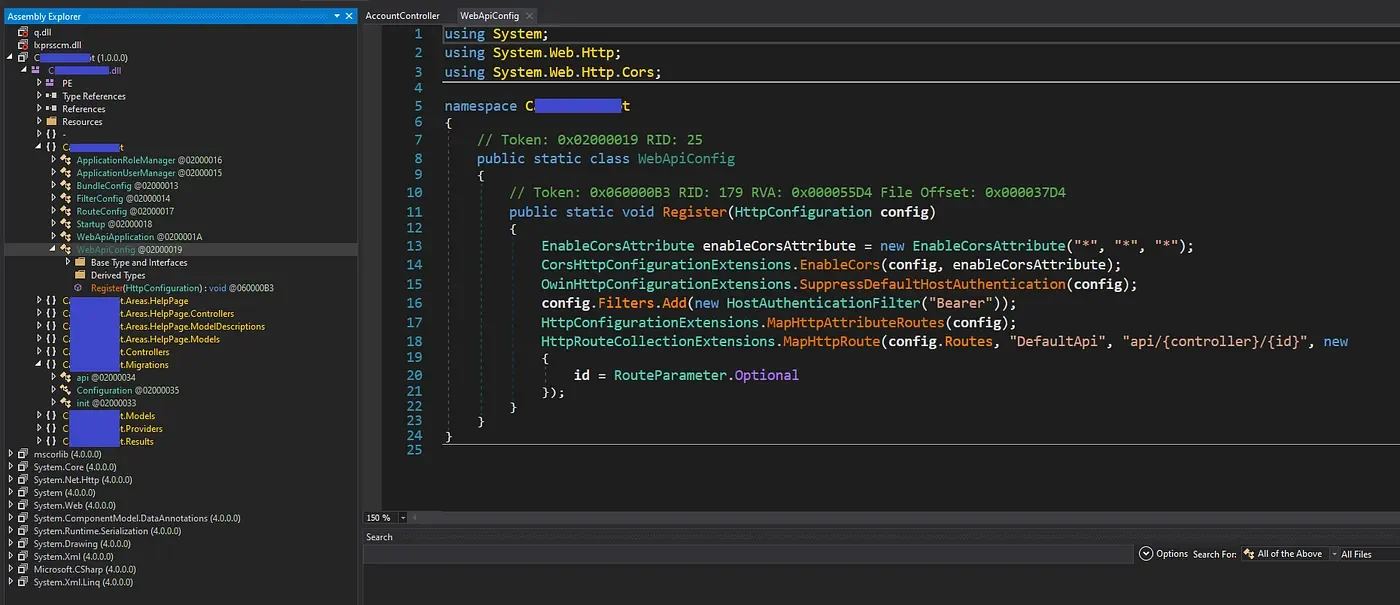
The file was downloaded and opened in dnSpy. Looking at the namespaces and class names showed that the application is an API service.
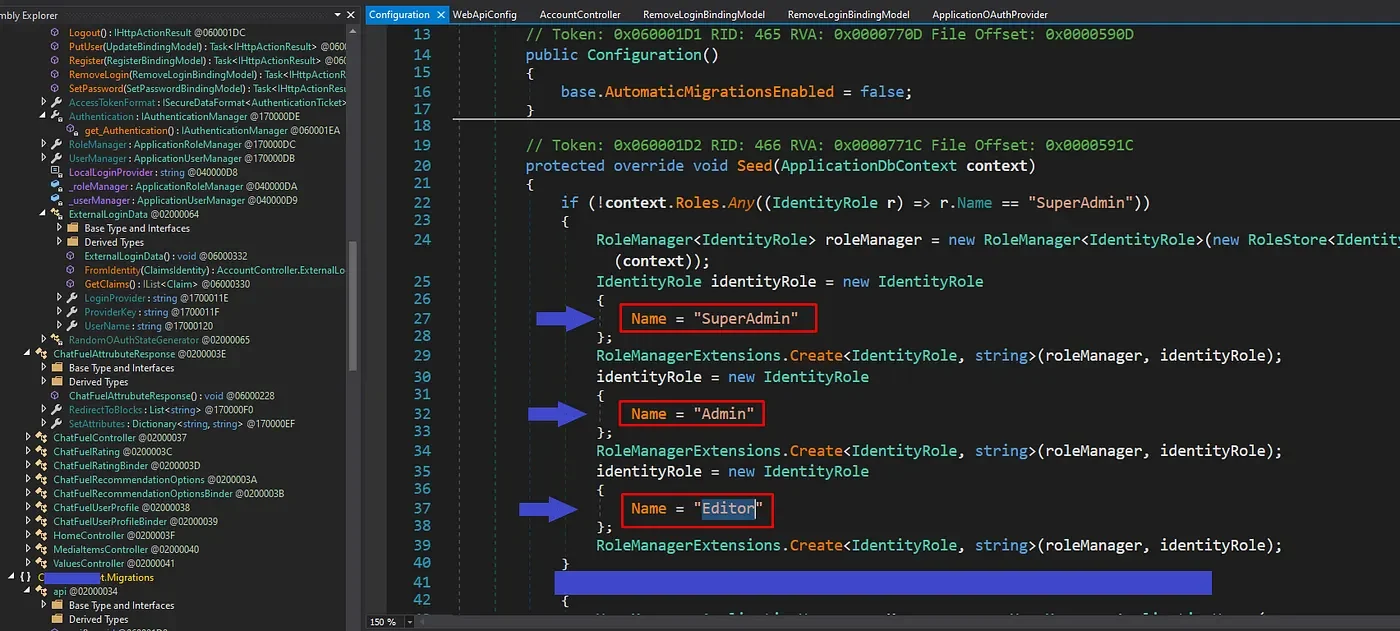
Reading the code in detail surfaced two things. First, the service has user account types with different privileges: three different types of user account, the most authoritative being Super Admin.
Second, digging deeper revealed hard-coded credentials, and those credentials carry Super Admin privileges.
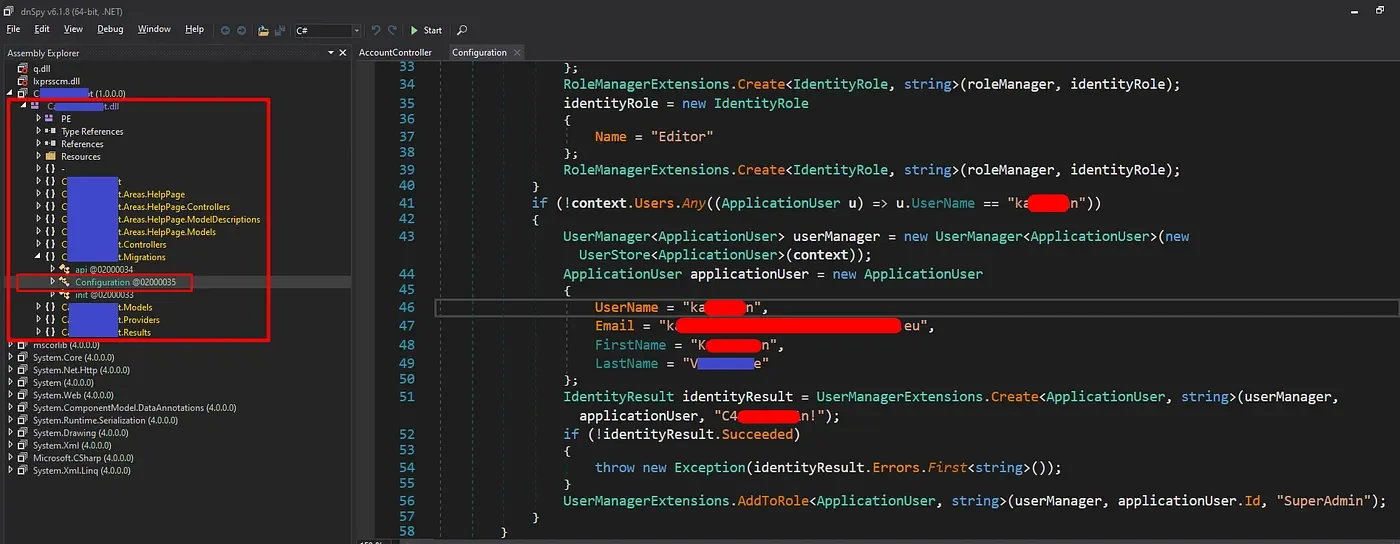
At this point the hope was simply that the credentials were still valid.
Exploitation
Step 1: find an endpoint that accepts the credentials
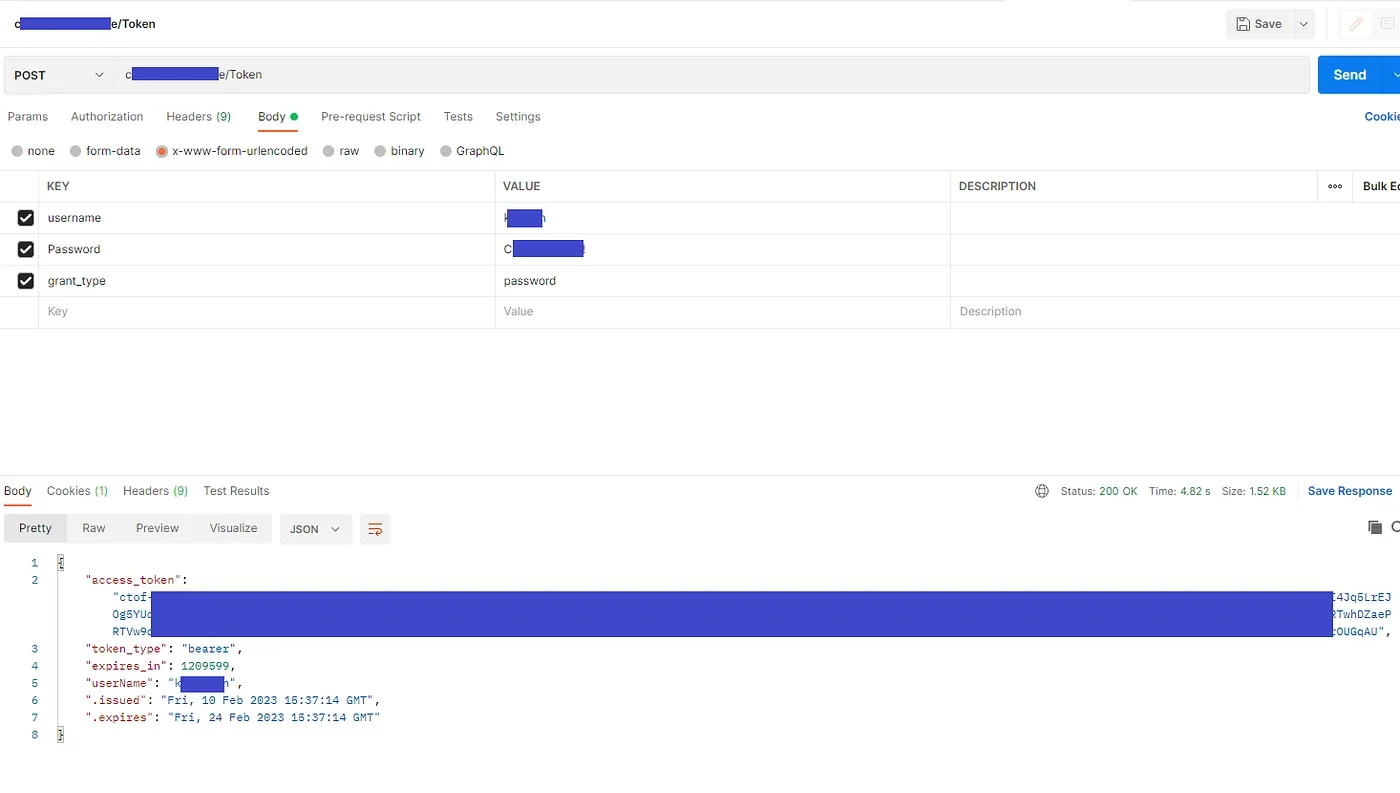
With the credentials in hand, the researcher looked for places to use them and found an API endpoint where a session can be obtained using the credentials from the code. He tried to get a session straight away.
Step 2: confirm the session and the identity
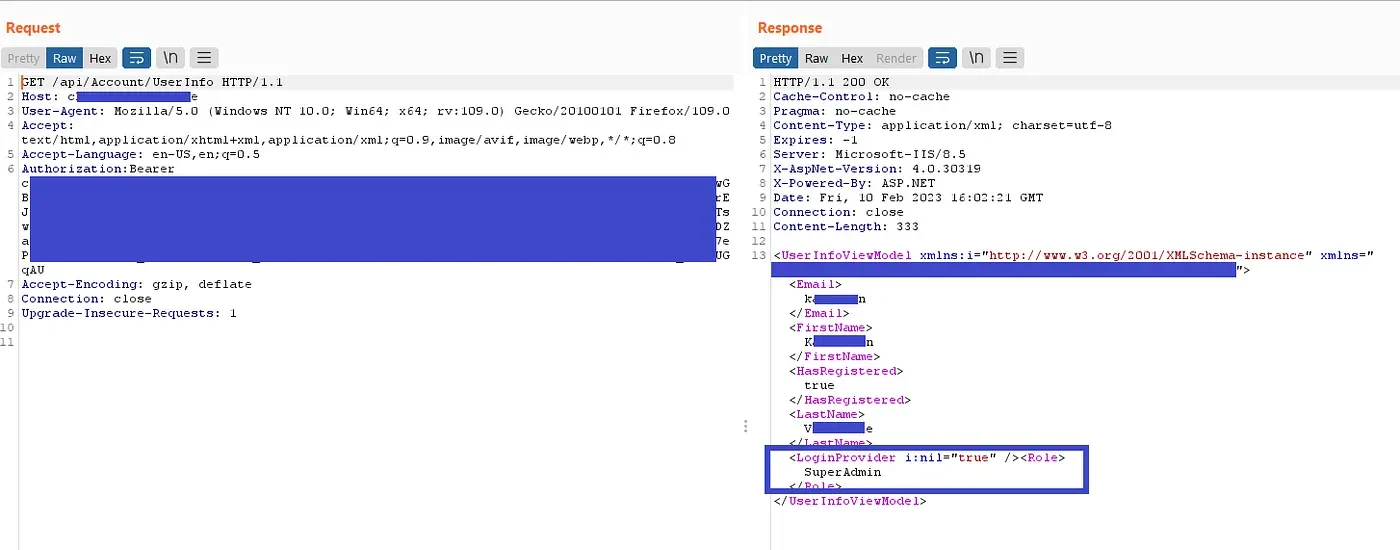
The credentials were still valid and the login to the Super Admin account succeeded. The session token came back, and the user information confirmed the identity behind it.
Step 3: enumerate what the token allows
With a token carrying SuperAdmin privileges, critical operations are available in the application: all users can be listed, another user's password can be changed, any user can be deleted, or a new user can be added.
Step 4: create a backdoor user
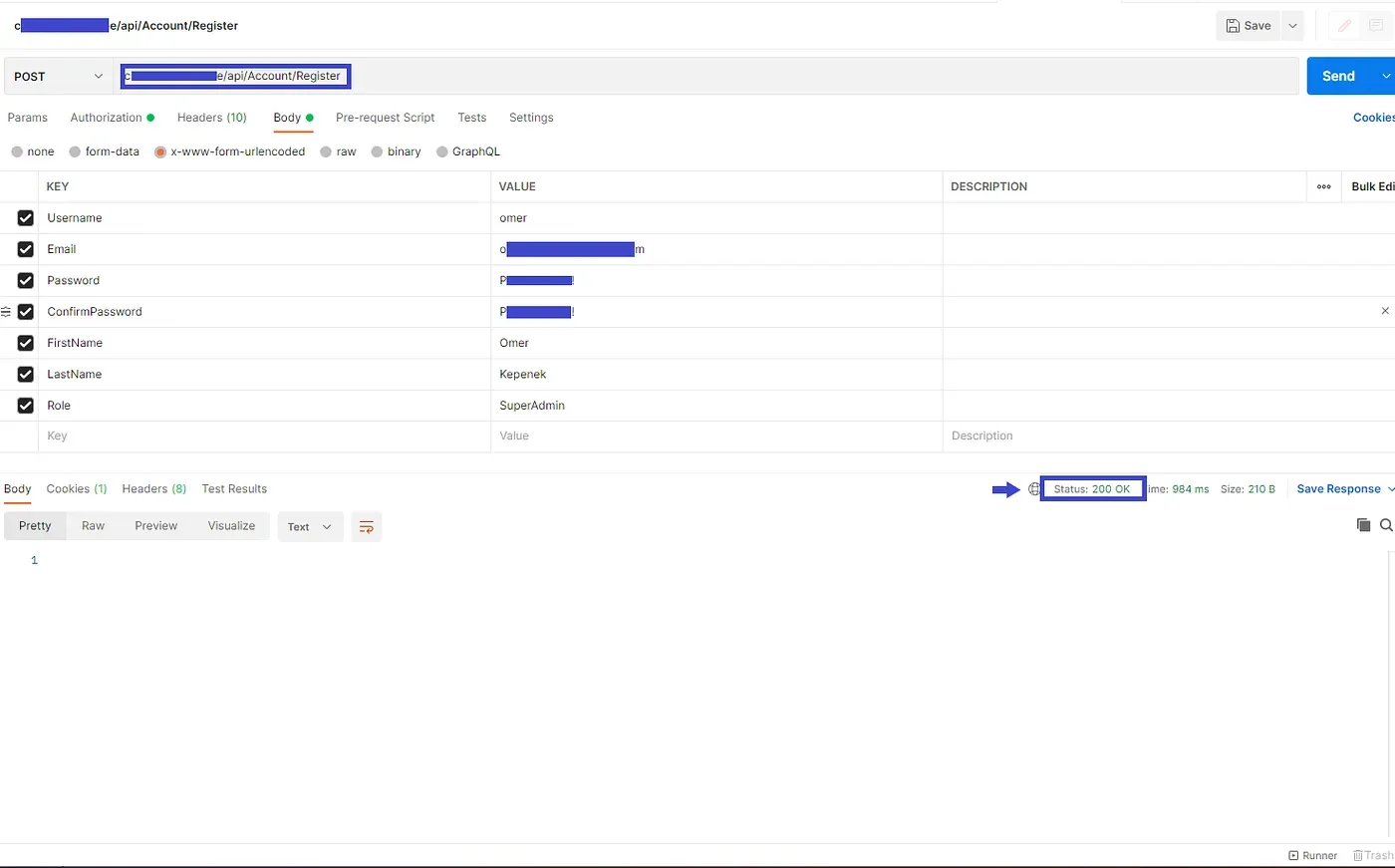
For the proof of concept the researcher chose to create his own backdoor user rather than, say, reset someone else's password. The new account was created with Super Admin privileges.
Step 5: log in as the new user
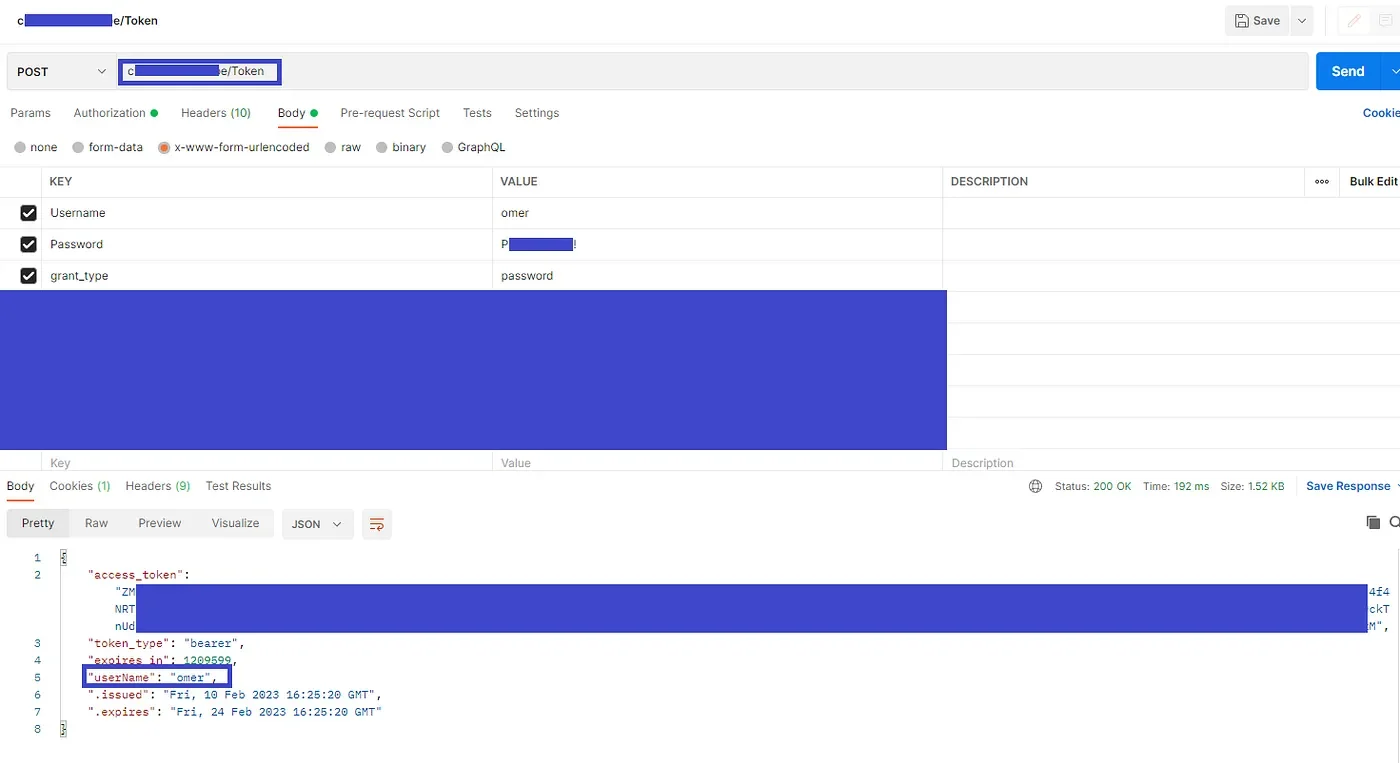
A new token was obtained with the newly created user, showing that the backdoor account is usable on its own.
Step 6: list all users
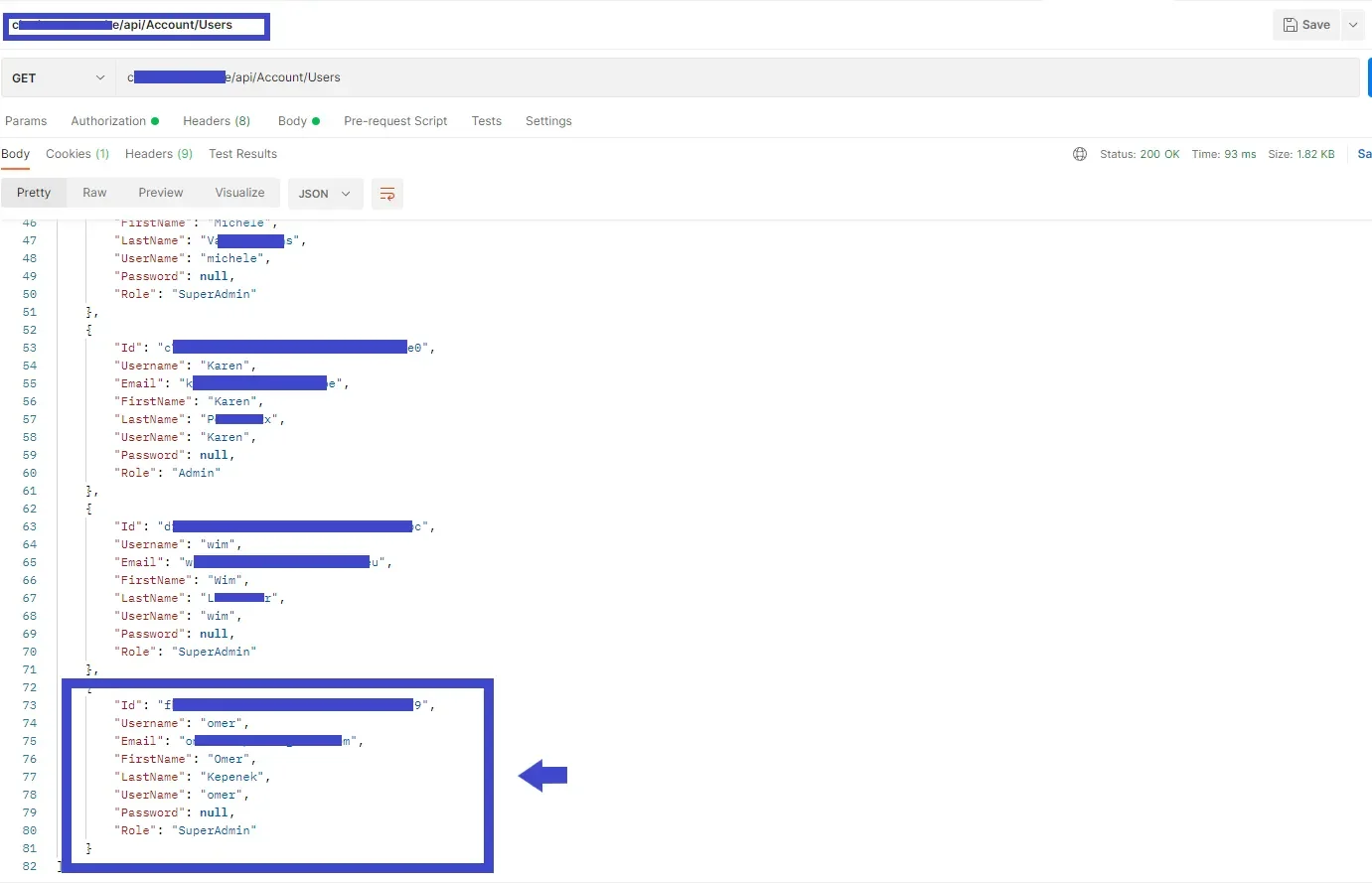
With the new account, the full user list was retrieved, demonstrating the reach of the privileges.
By creating his own user, the researcher had become one of the most authorised users of the service.
Root cause
Two mistakes combine here. The first is deployment hygiene: a compiled assembly containing the application's source code was reachable from the web, so anyone doing content discovery could download it. The second, and the one that turns information disclosure into full compromise, is that privileged credentials were hard-coded in that source and were still valid. Because the credentials belonged to a Super Admin, a single leaked string granted the highest level of authorisation the service offers.
Why did existing defences not stop it? The report does not describe any control that was in place.
Impact
An unauthenticated attacker who finds the assembly can read the hard-coded Super Admin credentials and, if they are still valid, obtain a Super Admin session. From there the attacker can list all users, change another user's password, delete any user, and add new users, which gives the attacker the same user-management powers as a Super Admin and a persistent backdoor account. The severity assigned by the programme reflects this: the report was first filed as High (7.5) and changed to Critical (9.1).
Fix
Changes that would address the root cause include removing the assembly from any web-accessible location and removing hard-coded credentials from source entirely, loading secrets from configuration or a secret store instead. Any credential that has ever been embedded in a shipped assembly should be treated as compromised and rotated.
Timeline
| Date | Event |
|---|---|
| 09.02.2023 | First reported |
| 13.02.2023 | Severity changed from High (7.5) to Critical (9.1) |
| 13.02.2023 | Triaged by Intigriti |
| 22.02.2023 | Accepted by the company |
| 22.02.2023 | Marked as resolved and added to the Hall of Fame |
Variants to test
- Hunt for compiled artefacts during content discovery. Fuzz for
.dll,.exe,.pdb,.jar,.warand source maps on every in-scope host, using domain-derived word lists such as those fuzzuli generates. A positive result is a downloadable binary or map that decompiles into recognisable application code. - Decompile and grep for secrets. Once an assembly is in hand, open it in dnSpy, dotPeek or ILSpy and search namespaces, class names and string literals for credentials, connection strings, API keys and role names. A positive result is a literal username and password, or a key, that maps to a privileged role.
- Test leaked credentials against authentication endpoints. For each credential pair found, look for login or token endpoints in the decompiled routes and try them. A positive result is a session token returned for an account with elevated privileges.
- Check what the privileged token can do. With any elevated token, enumerate the user-management operations the API exposes: listing users, changing passwords, deleting users, creating users. A positive result is any of these succeeding, which turns a leaked secret into account takeover and persistence.
- Look for role names in code and responses. Enumerating account types in the source (here, three types with Super Admin at the top) tells you which role to aim for and which fields in responses to inspect. A positive result is a role value in a token or user object that you should not be able to obtain.
What happened, in plain words
A security researcher was hunting for bugs on a bug bounty programme, fuzzing the domains in scope. A bug bounty programme is a scheme where a company invites outside people to look for security problems in its systems and pays them (or thanks them publicly) when they find something real. The researcher's job in this case was simple to describe: find something on the company's web servers that should not be there, and see how far it can be pushed.
What he found was a file that a web server was handing out to anyone who asked for it. Inside that code were two gifts: a list of user roles, the highest being Super Admin, and a username and password written directly into the source code, belonging to a Super Admin account. Those credentials still worked. The researcher logged in, got a session token, and used it to create his own new Super Admin account, which he could then log in with separately. From there he could list every user on the service.
The whole chain, from an anonymous visitor to the most powerful account on the service, needed nothing more than a download and a decompiler. This article walks through it step by step, explaining each idea as it comes up.
The pieces you need to know first
Before the story makes sense, a few everyday ideas need to be clear.
A web server and a web application. When you type an address into your browser, your browser sends a request to a computer somewhere (the server), and the server sends back a response, usually a web page. A web application is a program running on that server that builds the response based on what you asked for. A shop's website is a web application: it looks up products, checks your basket, and so on.
An API. An API (Application Programming Interface) is a way for one program to talk to another, rather than for a human to look at pages. Think of a restaurant: the dining room is the website you see, and the kitchen is the database and the logic. The API is the waiter, a fixed set of requests you can make ("give me the list of users", "create a user") and the answers that come back, usually as structured data rather than pretty pages. Many modern websites are really a thin set of pages sitting on top of an API, and the API is where the interesting operations live.
A .NET application and a .dll. .NET is a framework from Microsoft for building programs. When programmers write code, they write it in a language humans can read (C#, for example). Before the computer can run it, the code is compiled, meaning translated into a form the machine understands. In .NET, the result of that translation is stored in files ending in .dll (a library) and .exe (a program). The intermediate form inside those files is called CIL, the Common Intermediate Language. The important point for us: a .dll is not just machine noise. It keeps the structure of the original program, including names of classes, names of variables, and text strings such as messages and, sometimes, passwords.
A decompiler. If a compiler turns readable code into a .dll, a decompiler turns a .dll back into readable code. It is like a machine that takes a baked cake and gives you back a recipe that is close enough to bake it again. The researcher used one called dnSpy; the report also mentions dotPeek and ILSpy as alternatives.
Credentials, sessions and tokens. Credentials are simply a username and password, the proof of who you are. When you log in, the server does not want to ask for your password on every single request, so it gives your browser a session: a short-lived proof that you already logged in. In a browser this is usually a cookie, a small piece of text the browser stores and sends back automatically. In an API it is usually a token, a long string you include in each request to say "it's me, and I logged in already". Anyone who holds a valid token can act as that user until the token expires or is revoked. A token is like a cloakroom ticket: whoever holds the ticket gets the coat, no questions asked.
Hard-coded credentials. Programmers sometimes put a username and password directly into the source code, for example to let a support tool log in automatically. This is called hard-coding. It is dangerous because the credential travels with the code: anyone who gets the code gets the password, and changing the password means changing and redeploying the program.
Privileges and roles. Not every user of a system can do the same things. A normal user can see their own profile; an administrator can see everyone's. The set of things a user is allowed to do is called their privileges, and systems usually group users into roles (for example "user", "manager", "admin"). The most powerful role in this service is called Super Admin.
The vulnerability class. This finding is a chain of three weaknesses. First, information disclosure: a file that should have been private was publicly downloadable. Second, hard-coded credentials: a password was sitting in that file. Third, account takeover: because the password belonged to a Super Admin and still worked, the researcher could take over the most powerful account on the service. Each one alone is a problem; together they are a full compromise.
The setup
The researcher, Ömer Kepenek, works as a penetration tester at Privia Security and does bug bounty in his spare time. A penetration tester is someone paid to attack systems with permission, to find problems before criminals do. No special account was given to him for this test: everything started from the outside, as an anonymous visitor.
The tools he used were:
- Word lists he wrote himself for this specific target, in addition to the usual off-the-shelf ones. A word list here is a list of file and folder names to try, such as
admin,backup,config. - fuzzuli, a tool that fuzzes URLs. Fuzzing means automatically trying many candidate names against a server and watching which ones give a different answer. fuzzuli builds its word list from the domain name itself, generating combinations of the domain and allowing fuzzing with specific matchers (rules for recognising an interesting response).
- dnSpy, the decompiler used to read the .NET file.
The precondition for the whole chain is that a compiled .NET file was reachable from the web. As the report puts it:
The Common Intermediate Language (CIL) code in the .NET framework is the “.dll” and “.exe” files that you get once source code is compiled. That means when the web application is compiled, this “.**dll”**file contains all the source code.
In plain words: the .dll is what you get when the source code is compiled, and it still carries the source code inside it in a recoverable form. So a .dll sitting on a public web server is effectively the application's source code sitting on a public web server.
Finding it
Step 1: look for files that should not be public
Reconnaissance came first. Reconnaissance (recon) is the phase of learning as much as possible about a target before attacking anything: which servers exist, which names they answer to, which files they serve. The researcher's reasoning was that the more attack surface you can extract, the more likely you are to find vulnerabilities. Attack surface means all the places an attacker can knock on: every host, every path, every file.
Using his custom word lists and fuzzuli, he fuzzed all the domains in scope. In scope means the list of systems the company has authorised researchers to test; testing outside it would be unauthorised. On one of the domains, the fuzzing turned up a .dll file containing the source code of an application.
The screenshot shows the .dll file that was found. The report deliberately hides the name of the file, because it is related to the domain and would identify the target.
Why this step matters: web servers are often configured to serve whatever file is placed in a folder, and build artefacts (the output of compiling) sometimes end up in those folders by accident. Nobody links to them, so they are invisible to normal browsing, but a fuzzer tries thousands of names and finds them anyway.
Step 2: open the file and see what it is
The file was downloaded and opened in dnSpy. Looking at the namespaces and class names showed that the application is an API service. A namespace is a folder-like grouping of code; a class is a blueprint for a piece of the program. Reading those names is like reading the table of contents of a book: even before understanding the details, you learn what kind of book it is.
The screenshot shows the WebApiConfig class, which is the part of a .NET project that configures a web API. Seeing it told the researcher that this was not a normal website but an API service, meaning the interesting operations would be reachable as API requests rather than pages.
Step 3: read the code and find the roles
Reading the code in detail surfaced two things. First, the service has user account types with different privileges: three different types of user account, the most authoritative being Super Admin.
The screenshot shows the account types defined in the code. Knowing the names of the roles is useful for two reasons: it tells you which role is worth aiming for, and it tells you what values to look for in responses later. If you do not know the top role is called Super Admin, you might not recognise it when it appears in a token or a user record.
Step 4: find the password written in the code
Digging deeper revealed hard-coded credentials, and those credentials carry Super Admin privileges.
The screenshot shows the Super Admin credentials as they appear in the source. At this point the hope was simply that the credentials were still valid. That hope is the whole gamble of this kind of finding: a password in old code is only useful if nobody changed it.
Why this is a serious mistake: a password in source code is not protected by anything. It is not hashed, it is not in a secret store, it is not rotated. Anyone who can read the file can read the password, and the only way to fix it is to change the password and remove it from the code.
Exploitation
Exploitation means turning a finding into proof that it actually works, safely and without harming anyone. Each step below builds on the previous one.
Step 1: find an endpoint that accepts the credentials
With the credentials in hand, the researcher looked for places to use them. An endpoint is a specific address on the API that performs a specific action, like a counter in a shop: one counter for returns, one for new accounts. He found an API endpoint where a session can be obtained using the credentials from the code, and tried to get a session straight away.
The screenshot shows the token that came back. A token here is the proof of login: a string the API returns when the username and password are correct, which must then be sent with every later request. Getting a token means the credentials are valid right now.
Why this step matters: finding the password is only half the story. The password has to be accepted somewhere. Reading the code tells you which endpoints exist and what they expect, so you know where to try the credentials instead of guessing.
Step 2: confirm the session and the identity
The credentials were still valid and the login to the Super Admin account succeeded. The session token came back, and the user information confirmed the identity behind it.
The screenshot shows the user information returned for the token. This is the moment of confirmation: the token is not just any token, it belongs to the Super Admin account. Checking who you are logged in as is a basic habit, because a token can belong to a low-privilege account and still look impressive.
Step 3: work out what the token allows
With a token carrying SuperAdmin privileges, critical operations are available in the application: all users can be listed, another user's password can be changed, any user can be deleted, or a new user can be added.
Why this step matters: a token is only as dangerous as what it can do. Before proving impact, you map the operations the API exposes to that role. Listing users, changing passwords, deleting users and creating users are the four classic user-management operations, and all four together mean full control of the user base.
Step 4: create a backdoor user
For the proof of concept the researcher chose to create his own backdoor user rather than, say, reset someone else's password. A proof of concept (PoC) is the smallest, safest demonstration that a vulnerability is real. A backdoor user is an account the attacker creates for themselves so they can come back later, even if the original password is changed.
The new account was created with Super Admin privileges.
The screenshot shows the account that was created, with Super Admin privileges. The researcher chose to create a new account rather than tamper with an existing one.
Step 5: log in as the new user
A new token was obtained with the newly created user, showing that the backdoor account is usable on its own.
The screenshot shows the token obtained with the new user. This step shows the new account is usable on its own, with a token obtained for it.
Step 6: list all users
With the new account, the full user list was retrieved, demonstrating the reach of the privileges.
The screenshot shows the list of all users. This shows the reach of the privileges: the full user list was retrieved.
By creating his own user, the researcher had become one of the most authorised users of the service.
Root cause
Two mistakes combine here. The first is deployment hygiene: a compiled assembly containing the application's source code was reachable from the web, so anyone doing content discovery could download it. Content discovery is the same fuzzing described earlier: trying many file and folder names to see what the server will hand out. The second mistake, and the one that turns information disclosure into full compromise, is that privileged credentials were hard-coded in that source and were still valid. Production means the live system real users use, as opposed to a test environment.
Because the credentials belonged to a Super Admin, a single leaked string granted the highest level of authorisation the service offers. The two mistakes compound each other: the file leak alone would be embarrassing but limited, and the hard-coded password alone would be hidden if the file were private. Together they hand over the keys.
Why did existing defences not stop it? The report does not describe any control that was in place.
Impact
An unauthenticated attacker (someone with no account at all) who finds the assembly can read the hard-coded Super Admin credentials and, if they are still valid, obtain a Super Admin session. From there the attacker can list all users, change another user's password, delete any user, and add new users. That gives the attacker the same user-management powers as a Super Admin and a persistent backdoor account. Account takeover means logging in as other people; persistent means the access survives attempts to fix the original leak.
The severity assigned by the programme reflects this. Severity is a score for how bad a bug is, usually expressed as a number from 0 to 10 (the CVSS score) and a label such as High or Critical. The report was first filed as High (7.5) and changed to Critical (9.1).
Fix
The report does not state what remediation was applied, only that the issue was marked as Resolved. Remediation means the changes made to close the hole. Changes that would address the root cause are:
- Remove the assembly from any web-accessible location, so the file can no longer be downloaded.
- Remove hard-coded credentials from source entirely, loading secrets from configuration or a secret store instead. A secret store is a dedicated service for keeping passwords and keys, with access control and auditing, so they never sit in code.
- Treat any credential that has ever been embedded in a shipped assembly as compromised and rotate it. Rotating means changing it to a new value, so the old one stops working.
Timeline
| Date | Event |
|---|---|
| 09.02.2023 | First reported |
| 13.02.2023 | Severity changed from High (7.5) to Critical (9.1) |
| 13.02.2023 | Triaged by Intigriti |
| 22.02.2023 | Accepted by the company |
| 22.02.2023 | Marked as resolved and added to the Hall of Fame |
Triaged means the bug bounty platform checked the report, confirmed it was real and passed it to the company. A Hall of Fame is a public page where a company thanks researchers who reported valid bugs.
Variants to test
If you want to look for the same kind of problem yourself, here are the same ideas written as a checklist. Each one describes what to do and what a positive result looks like.
- Hunt for compiled artefacts during content discovery. Fuzz for
.dll,.exe,.pdb,.jar,.warand source maps on every in-scope host, using domain-derived word lists such as those fuzzuli generates. A positive result is a downloadable binary or map that decompiles into recognisable application code. - Decompile and grep for secrets. Once an assembly is in hand, open it in dnSpy, dotPeek or ILSpy and search namespaces, class names and string literals for credentials, connection strings, API keys and role names. A positive result is a literal username and password, or a key, that maps to a privileged role.
- Test leaked credentials against authentication endpoints. For each credential pair found, look for login or token endpoints in the decompiled routes and try them. A positive result is a session token returned for an account with elevated privileges.
- Check what the privileged token can do. With any elevated token, enumerate the user-management operations the API exposes: listing users, changing passwords, deleting users, creating users. A positive result is any of these succeeding, which turns a leaked secret into account takeover and persistence.
- Look for role names in code and responses. Enumerating account types in the source (here, three types with Super Admin at the top) tells you which role to aim for and which fields in responses to inspect. A positive result is a role value in a token or user object that you should not be able to obtain.
Glossary
- Account takeover: logging in as another person's account, usually without their permission.
- API (Application Programming Interface): a fixed set of requests one program can make to another, returning structured data rather than web pages.
- Attack surface: all the places an attacker can try to interact with a system: hosts, paths, files, endpoints.
- Backdoor user: an account an attacker creates for themselves so they can return later, even after the original weakness is fixed.
- Bug bounty programme: a scheme where a company invites outside researchers to find security problems and rewards valid reports.
- CIL (Common Intermediate Language): the intermediate form of .NET code stored inside
.dlland.exefiles after compilation. - Class: a blueprint in code that groups related data and behaviour.
- Compiled / compilation: the process of translating human-readable source code into a form the computer can run.
- Content discovery: automatically trying many file and folder names against a server to find things that are not linked anywhere.
- Cookie: a small piece of text a browser stores and sends back to a site automatically, often used to remember a login.
- Credentials: a username and password (or similar) that prove who you are.
- Critical / High: severity labels for how bad a vulnerability is; Critical is the most serious.
- CVSS: a standard scoring system for vulnerability severity, from 0 to 10.
- Decompiler: a tool that turns a compiled file back into readable source code.
- dnSpy: a .NET decompiler used to read
.dllfiles. - dotPeek / ILSpy: alternative .NET decompilers mentioned in the report.
- Endpoint: a specific address on an API that performs a specific action.
- Exploitation: turning a finding into a working demonstration that it is real.
- fuzzuli: a URL fuzzing tool that builds word lists from a domain name.
- Fuzzing: automatically trying many candidate names or inputs and watching for interesting responses.
- Hall of Fame: a public page where a company thanks researchers who reported valid bugs.
- Hard-coded credentials: a username and password written directly into source code.
- Information disclosure: a weakness where data that should be private is exposed.
- Namespace: a grouping of code, like a folder, used to organise classes.
- Penetration tester: someone paid to attack systems with permission, to find problems before criminals do.
- Persistent: access that survives attempts to fix the original weakness.
- PoC (Proof of Concept): the smallest, safest demonstration that a vulnerability is real.
- Privileges: the set of things a user is allowed to do.
- Production: the live system real users use, as opposed to a test environment.
- Reconnaissance (recon): the phase of learning as much as possible about a target before attacking.
- Remediation: the changes made to close a vulnerability.
- Role: a named group of privileges, such as user, manager or admin.
- Rotate: change a credential to a new value so the old one stops working.
- Scope: the list of systems a company has authorised researchers to test.
- Secret store: a dedicated service for keeping passwords and keys, with access control and auditing.
- Severity: a score or label for how bad a vulnerability is.
- Super Admin: the most powerful role in this service.
- Token: a string returned after login that proves who you are on later requests.
- Triaged: checked and confirmed by the bug bounty platform before being passed to the company.
- Unauthenticated: with no account and no login at all.
- Word list: a list of names or words to try automatically against a target.



