The WAF Said No: Finding XSS Through JavaScript Recon
A login page rendered an error message parameter through a dangerous HTML sink, protected only by a tag blacklist. An attacker could inject an event handler on an unblocked element to run script, and a hardcoded client-side encryption key allowed the payload to bypass the WAF.

Xss Attack
The full write-up lives on its author's site
It belongs to its author, so we link to it rather than copy it. The other two tabs are our own rewrites, checked against it.
Hello hackers, I'm Youssef Wael (aka 0xGh4zy). In this write-up, I'll walk you through how I discovered and exploited a XSS vulnerability by analysing a single JavaScript file in a self-hosted bug bounty program.
Context
The target was a self-hosted bug bounty program whose only visible surface was a login page. The login page carried a client-side error display: a parameter named msg, combined with type=error, was used to show error messages back to the user. The message was rendered into the page through React's dangerouslySetInnerHTML, which means the value is inserted as raw HTML rather than as text.
Setup
There were no accounts, roles or special tooling involved. The starting point was the login page itself, and the first move was to read the JavaScript files it loaded. The researcher notes that AI helped while digging through the code. No versions of the application, framework or WAF are given.
Finding it
While inspecting the JavaScript, the researcher found the msg parameter and the code that renders it:
if (t.msg) { if (/<(script|form|iframe|object|embed|link|style|meta|img|svg|input|button|textarea|select)[^>]*>/i.test(t.msg)) return void window.history.replaceState({}, "", window.location.pathname); A((0, n.jsx)("span", { className: "server-error-html", dangerouslySetInnerHTML: { __html: t.msg } })); }
The code tests t.msg against a regular expression that lists a set of HTML tags: script, form, iframe, object, embed, link, style, meta, img, svg, input, button, textarea and select. If the message matches any of those tags, the handler returns early and rewrites the URL with window.history.replaceState. Otherwise the message is passed to dangerouslySetInnerHTML on a span with the class server-error-html.
So the developer had built a blacklist of tags in front of an HTML injection sink. The input was still rendered as HTML, and the blacklist only covered a fixed list of element names.
Exploitation
Step 1: pick a tag outside the blacklist
The researcher looked for tags that the blacklist did not mention and chose the details element with its ontoggle event:
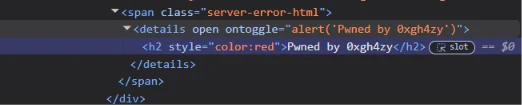
<details open ontoggle="alert('Pwned by 0xgh4zy')"> <h2>Pwned by 0xgh4zy</h2></details>
Neither details nor the ontoggle attribute appears in the regular expression, so the payload passes the client-side check. The open attribute makes the element toggle as soon as it is rendered, which fires ontoggle and runs the handler.
Step 2: the WAF blocks the request
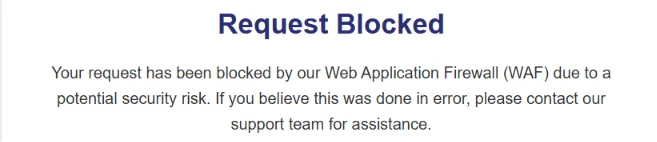
The payload was injected into the msg parameter, but the WAF blocked the request.
Step 3: notice the encrypted parameters
While reviewing the same JavaScript file, the researcher noticed encryption and decryption functions. Instead of ordinary parameters such as:
/login?msg=Hello&type=error
the application used hexadecimal-looking parameter names and values. The client decrypted both the parameter names and their values before processing them:
let params = Array.from(D.entries());if (params.length >= 2) { let decrypted = {}; params.forEach(([key, value]) => { try { let decodedKey = decrypt(key); let decodedValue = decrypt(value); decrypted[decodedKey] = decodedValue; } catch (e) {} });}
Each key and each value goes through decrypt, and the results are collected into a decrypted object. The application therefore expects encrypted parameters, which suggested generating them directly.
Step 4: reverse the encryption
The encryption logic and its key were in the same JavaScript file:
let i="[redacted]";function o(e) { let t = CryptoJS.AES.encrypt(e, i).toString(); return CryptoJS.enc.Base64.parse(t).toString(CryptoJS.enc.Hex);}function s(e) { let t = CryptoJS.enc.Hex.parse(e).toString(CryptoJS.enc.Base64); return CryptoJS.AES.decrypt(t, i).toString(CryptoJS.enc.Utf8);}
The application uses AES with a hardcoded key, then converts the Base64 ciphertext to hexadecimal for transport. Because the key sits in a publicly accessible JavaScript file, the same process can be reproduced for both parameter names and values.
Step 5: encrypt the payload and resend
The researcher encrypted the payload, generated the corresponding URL and tried again:
https://target.com/login/?[redacted]=[redacted]&[redacted]=[redacted]
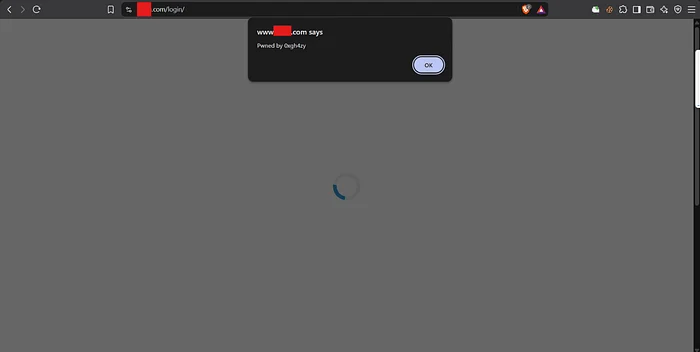
This time the request followed the application's expected parameter format, and the original payload was no longer present as readable text in the URL.
The report does not show the decrypted response or the alert firing; it states that the request was accepted in the expected format.
Root cause
Two mistakes combine here. First, user-controlled input reaches dangerouslySetInnerHTML, so the message is interpreted as HTML. The only defence in the client code is a blacklist of tag names, and a blacklist of element names cannot cover every element that can carry an event handler: details with ontoggle is not on the list, so the payload passes the check. Second, the application's parameter encryption is not a security control. The AES key is hardcoded in a publicly accessible JavaScript file, so anyone who reads the file can produce valid ciphertext for any parameter name and value. The WAF blocked the plaintext payload; the encrypted request followed the application's expected parameter format.
Impact
The payload was designed to execute JavaScript in a victim's browser in the context of the login page, though the report does not show it firing. The researcher notes that the report was marked as a duplicate.
Fix
Based on the code shown, the message should not be rendered as HTML at all: pass it as text so React escapes it, and drop the blacklist, which only gives the appearance of protection. If HTML rendering is genuinely required, sanitise with an allowlist-based sanitiser rather than a tag blacklist. Client-side encryption of parameters should not be treated as a security boundary; anything that must be trusted has to be validated on the server, and secrets should not be shipped in publicly accessible JavaScript.
Variants to test
- Look for other sinks fed by
dangerouslySetInnerHTMLor similar raw HTML APIs and check whether the guard is a tag blacklist. A positive result is a tag outside the list that fires an event on render, such asdetailswithontoggle. - Grep JavaScript bundles for
CryptoJS.AES.encrypt, hardcoded key strings and hex or Base64 parameter handling. A positive result is a request whose encrypted parameters the server decrypts and acts on. - When a WAF blocks a plaintext payload, check whether the application transforms input before it reaches the sink (encryption, encoding, serialisation) and reproduce that transformation yourself. A positive result is the same payload accepted in the transformed format.
- Test whether the client-side blacklist can be bypassed by case or attribute tricks on tags that are listed, since the regular expression matches tag names only. A positive result is a listed tag still reaching the sink in a form the check misses.
Resources
The researcher published the encryption code and a lab inspired by the technique at GitHub, XSS Lab.
And we're all done. If you have any questions or comments, feel free to reach out to Youssef Wael.
What happened, in plain words
A security researcher found a way that could make a website run his own code inside a visitor's browser. The website was part of a bug bounty program, which is a scheme where companies invite independent researchers to look for weaknesses in their systems and report them, often for a reward. The only thing the researcher could see at first was a login page, a screen with a username and password box. He did not have an account and did not use any special software. He opened the page in a browser, read the JavaScript files the page loaded, and found two things: a place where the site inserts a message into the page as if it were HTML (the language web pages are written in), and a way the site scrambles its web addresses so they look like long strings of random characters.
The first discovery let him build a small piece of HTML designed to run a script when the page displays it. The site had a filter that blocked a list of dangerous HTML tags, but the filter did not list every tag, so he picked one it had forgotten. When he sent that payload (the malicious input) to the site, a WAF blocked it. A WAF, or web application firewall, is a guard that sits in front of a website and inspects incoming requests, rejecting ones that look like attacks.
The second discovery explained why the site's addresses looked strange: the site encrypts the names and values of its parameters (the pieces of information in a web address, like name=value) before using them. The key used for that encryption was written directly in the JavaScript file, which anyone can download. So the researcher encrypted his payload himself, put the scrambled text into the address, and sent it again. The request now followed the application's expected parameter format, with the payload no longer readable text.
The report was marked as a duplicate, meaning someone else had already reported the same issue. The researcher still published the write-up as a learning exercise.
The starting point: a login page and its JavaScript
The target was a self-hosted bug bounty program. "Self-hosted" here means the program runs on the company's own platform rather than on a third-party bug bounty website. The only visible surface was a login page. "Surface" means the parts of a system an outsider can reach and interact with; a login page is a small surface, but it is still a door.
Every modern web page is built from three kinds of file. HTML describes the structure (headings, forms, buttons). CSS describes the look (colours, spacing). JavaScript is the code that runs inside your browser and makes the page react: checking a form before it is sent, showing an error message, fetching data in the background. Because JavaScript runs on your own computer, anyone can download it and read it. It is never secret. Think of it like the instruction leaflet that comes with a piece of furniture: the manufacturer can print it, but every customer can read every line.
The login page had a feature for showing error messages. When something goes wrong, the site can put a message on the screen, for example "wrong password". The page read that message from a parameter called msg, and only displayed it when another parameter, type, had the value error. A parameter is simply a named piece of data passed in a web address, after the question mark. In example.com/page?colour=blue, colour is the parameter name and blue is its value.
The researcher's first move was therefore to read the JavaScript files the login page loaded. He notes that AI helped him while digging through the code. No versions of the application, framework or WAF are given in the report.
Finding the dangerous line
Inside the JavaScript, he found the code that handles the msg parameter:
if (t.msg) { if (/<(script|form|iframe|object|embed|link|style|meta|img|svg|input|button|textarea|select)[^>]*>/i.test(t.msg)) return void window.history.replaceState({}, "", window.location.pathname); A((0, n.jsx)("span", { className: "server-error-html", dangerouslySetInnerHTML: { __html: t.msg } })); }
Line by line, in plain words:
if (t.msg) {checks whether a message exists at all.tis an object holding the parameters the page received;t.msgis the value of themsgparameter. If there is no message, there is nothing to show and the rest is skipped.- The second line is the filter.
/<(script|form|iframe|object|embed|link|style|meta|img|svg|input|button|textarea|select)[^>]*>/iis a regular expression, a pattern used to search text. It looks for a<followed by one of the listed tag names, then any characters that are not>, then a>. Theiat the end means the match ignores upper and lower case..test(t.msg)asks: does the message contain a match for this pattern? - If it does match,
return void window.history.replaceState({}, "", window.location.pathname);stops the function immediately and rewrites the address bar back to the plain page path, discarding the parameters.voidis a JavaScript trick to make the expression return nothing. In effect: a message containing a blocked tag is thrown away. - If the message does not match, the code continues to
A((0, n.jsx)("span", { ... })), which creates aspanelement (a small inline container in HTML) with the CSS classserver-error-html. dangerouslySetInnerHTML: { __html: t.msg }is the important part. React, the library this page is built with, normally inserts values as plain text, so a<would appear on screen as a character rather than starting a tag.dangerouslySetInnerHTMLswitches that safety off and inserts the value as raw HTML. The name is a warning from React's authors: this is dangerous, use it only when you trust the content.
So the developer had built a blacklist, a list of things that are forbidden, in front of a place where HTML gets inserted. A blacklist only blocks what someone thought of. The input was still rendered as HTML, and the list covered only a fixed set of tag names.
Step 1: choosing a tag the list forgot
The researcher looked for HTML tags the blacklist did not mention. He chose the details element together with its ontoggle event:
<details open ontoggle="alert('Pwned by 0xgh4zy')"> <h2>Pwned by 0xgh4zy</h2></details>
What each part does:
<details>is a standard HTML element that shows a collapsible section, like a fold-out panel. When the user opens or closes it, the browser fires an event calledtoggle.opentells the browser to start with the panel already open. Because the panel changes state as soon as it appears, thetoggleevent fires immediately, without the visitor clicking anything.ontoggle="alert('Pwned by 0xgh4zy')"is an event handler: JavaScript that runs when thetoggleevent happens.alert(...)opens a small pop-up box in the browser showing the text inside the quotes. A pop-up is the classic harmless proof that you can run code on someone else's page.<h2>Pwned by 0xgh4zy</h2>is a heading, included so the page visibly shows the text as well.
Neither details nor ontoggle appears in the regular expression, so the payload passes the client-side check. "Client-side" means the check runs in your browser, on code you can read and change; it is a convenience, not a security barrier, because an attacker controls their own browser.
This class of bug is called cross-site scripting, or XSS. It means an attacker gets their own JavaScript to run inside another person's browser session on a website. The browser cannot tell the difference between the site's own code and code that arrived through a message field, so the injected code can do anything the site's code could do on that page.
Step 2: the WAF says no
He put the payload into the msg parameter, but the WAF blocked the request. A WAF inspects incoming requests and compares them against patterns of known attacks. A request containing <details ... ontoggle=...> looks like an attack, so it was rejected before the application ever saw it.
At this point the obvious route was closed. The researcher did not stop there.
Step 3: the strange-looking addresses
While reviewing the same JavaScript file, he noticed functions for encryption and decryption. Normally, a request to this page would look like:
/login?msg=Hello&type=error
That is a readable address: the path /login, then ?, then two parameters joined by &. Anyone looking at it, including a WAF, can read msg=Hello and type=error.
But the application actually used parameter names and values that looked like long hexadecimal strings. Hexadecimal means written with the digits 0 to 9 and the letters a to f; it is a common way to write binary data as text. The client decrypted both the names and the values before using them:
let params = Array.from(D.entries());if (params.length >= 2) { let decrypted = {}; params.forEach(([key, value]) => { try { let decodedKey = decrypt(key); let decodedValue = decrypt(value); decrypted[decodedKey] = decodedValue; } catch (e) {} });}
Line by line:
let params = Array.from(D.entries());turns the collection of parameters, calledD, into a list of pairs, each pair being a name and a value.if (params.length >= 2) {only continues if there are at least two parameters. The page expects at least a message and a type.let decrypted = {};creates an empty object to hold the results after decryption.params.forEach(([key, value]) => {loops over every pair, unpacking it intokeyandvalue.try {starts a block where errors are caught rather than crashing the page.let decodedKey = decrypt(key);andlet decodedValue = decrypt(value);run the decryption function on the name and on the value separately.decrypted[decodedKey] = decodedValue;stores the result under the decrypted name.} catch (e) {}silently ignores any pair that fails to decrypt, for example because it was not encrypted in the first place.
So the application expects encrypted parameters. If you can produce the same encryption, you can speak its language. That was the way forward.
Step 4: reversing the encryption
The encryption logic and its key were in the same JavaScript file:
let i="[redacted]";function o(e) { let t = CryptoJS.AES.encrypt(e, i).toString(); return CryptoJS.enc.Base64.parse(t).toString(CryptoJS.enc.Hex);}function s(e) { let t = CryptoJS.enc.Hex.parse(e).toString(CryptoJS.enc.Base64); return CryptoJS.AES.decrypt(t, i).toString(CryptoJS.enc.Utf8);}
Line by line:
let i="[redacted]";stores the encryption key in a variable. This is the secret that makes the scrambling reversible. It is written in plain text in a file that anyone can download.function o(e) {defines the encryption function. It takes a piece of texteand returns the scrambled version.let t = CryptoJS.AES.encrypt(e, i).toString();uses CryptoJS, a JavaScript library for cryptography, to encrypt the text with AES, a widely used encryption standard, using the keyi. The result is converted to a string.return CryptoJS.enc.Base64.parse(t).toString(CryptoJS.enc.Hex);takes that string, which is in Base64 (a way of writing binary data using letters, digits and a few symbols), reads it as binary, and writes it out in hexadecimal. That is why the parameters look like long strings of hex characters.function s(e) {defines the decryption function, the reverse operation.let t = CryptoJS.enc.Hex.parse(e).toString(CryptoJS.enc.Base64);reads the hexadecimal text and converts it back to Base64.return CryptoJS.AES.decrypt(t, i).toString(CryptoJS.enc.Utf8);decrypts with the same key and turns the result back into readable text (UTF-8 is a standard way of encoding characters).
Encryption is like putting a letter in a locked box. If only the recipient has the key, the contents stay private. Here the key was taped to the outside of the box, in a public file. Anyone who reads the file can lock a letter in an identical box, and the application will open it without hesitation. The report does not give the version of CryptoJS or of any other library.
Step 5: encrypt the payload and send it again
Because the key was available, the researcher could reproduce the same process for both parameter names and values. He encrypted the payload, built the corresponding address, and tried again:
https://target.com/login/?[redacted]=[redacted]&[redacted]=[redacted]
What you are looking at:
https://target.com/login/?is the page being requested.target.comstands in for the real site.- The first long hex string before the
=is the encrypted name of the first parameter, and the long hex string after it is the encrypted value. The second pair, after the&, is the encrypted name and value of the second parameter. - Nothing in the address reads as
msg,typeorerror. To a WAF, it looks like random data, not like an attack.
This time the request followed the application's expected parameter format, and the original payload was no longer present as readable text in the address.
The report does not show the decrypted response or the pop-up firing. It states that the request was accepted in the expected format.
Why it worked
Two mistakes combine here.
First, user-controlled input reaches dangerouslySetInnerHTML, so the message is interpreted as HTML. The only defence in the client code is a blacklist of tag names, and a blacklist of element names cannot cover every element that can carry an event handler. details with ontoggle is not on the list, so the payload passes the check. A blacklist is like a bouncer with a list of banned faces: anyone not on the list walks in, including people the list's author never imagined.
Second, the application's parameter encryption is not a security control. The AES key is hardcoded in a publicly accessible JavaScript file, so anyone who reads the file can produce valid scrambled text for any parameter name and value. The WAF blocked the readable payload, but it did not stop the same payload once it was encrypted in the format the application expects, because the application decrypts the parameters before processing them. The WAF was inspecting the envelope, and the application was reading the letter inside.
What an attacker could do
An attacker who can get a crafted link in front of a victim can run JavaScript in the victim's browser, in the context of the login page. "In the context of" means the code runs as if it came from that site, so it can read what the page can read and do what the page can do. The researcher notes that the report was marked as a duplicate.
How it should be fixed
Based on the code shown, the message should not be rendered as HTML at all: pass it as text so React escapes it, and drop the blacklist, which only gives the appearance of protection. If HTML rendering is genuinely required, sanitise with an allowlist-based sanitiser rather than a tag blacklist. An allowlist is the opposite of a blacklist: only named, known-safe things are permitted, and everything else is rejected. Client-side encryption of parameters should not be treated as a security boundary; anything that must be trusted has to be validated on the server, and secrets should not be shipped in publicly accessible JavaScript.
Variants to test
- Look for other sinks fed by
dangerouslySetInnerHTMLor similar raw HTML APIs and check whether the guard is a tag blacklist. A sink is any place where data ends up being interpreted, for example as HTML. A positive result is a tag outside the list that fires an event on render, such asdetailswithontoggle. - Search JavaScript bundles for
CryptoJS.AES.encrypt, hardcoded key strings and hex or Base64 parameter handling. A positive result is a request whose encrypted parameters the server decrypts and acts on. - When a WAF blocks a readable payload, check whether the application transforms input before it reaches the sink (encryption, encoding, serialisation) and reproduce that transformation yourself. A positive result is the same payload accepted in the transformed format.
- Test whether the client-side blacklist can be bypassed by case or attribute tricks on tags that are listed, since the regular expression matches tag names only. A positive result is a listed tag still reaching the sink in a form the check misses.
Resources
The researcher published the encryption code and a lab inspired by the technique at GitHub, XSS Lab.
And we're all done. If you have any questions or comments, feel free to reach out to Youssef Wael.
Glossary
- AES: a widely used standard for encrypting data, so that only someone with the key can read it.
- Allowlist: a list of things that are permitted, with everything else rejected by default.
- Base64: a way of writing binary data as text using letters, digits and a few symbols, so it can travel safely in addresses and files.
- Blacklist: a list of things that are forbidden, with everything else allowed by default.
- Bug bounty program: a scheme where an organisation invites independent researchers to find and report weaknesses, often for a reward.
- Client-side: code that runs in the visitor's browser, which the visitor can read and change.
- CryptoJS: a JavaScript library that provides cryptographic functions such as AES encryption.
- CSS: the language that describes how a web page looks.
dangerouslySetInnerHTML: a React feature that inserts a value into the page as raw HTML instead of plain text, switching off React's automatic escaping.- Decryption: turning scrambled data back into readable data using the key.
- Encryption: scrambling data with a key so that only someone with the key can read it.
- Event handler: JavaScript attached to an element that runs when something happens, such as a click or a toggle.
- Hexadecimal: a way of writing numbers and binary data using the digits 0 to 9 and the letters a to f.
- HTML: the language that describes the structure of a web page, such as headings, forms and buttons.
- HTML injection: getting your own HTML into a page that then displays it as part of the page.
- JavaScript: the programming language that runs inside a browser and makes pages interactive.
- Parameter: a named piece of data passed in a web address, after the question mark, in the form
name=value. - Payload: the input an attacker sends to trigger a vulnerability.
- React: a JavaScript library for building user interfaces, which normally escapes values inserted into the page.
- Regular expression: a pattern used to search text for a particular shape, such as a tag name inside angle brackets.
- Sanitiser: a tool that cleans HTML by removing anything not on an allowlist of safe elements and attributes.
- Self-hosted: running on the organisation's own platform rather than a third party's.
- Sink: a place in code where data is interpreted, for example as HTML, and where unsafe data can cause harm.
- Surface: the parts of a system an outsider can reach and interact with.
- Tag: an HTML element written between angle brackets, such as
<details>. - UTF-8: a standard way of encoding characters as bytes so text can be stored and transmitted.
- WAF (web application firewall): a guard in front of a website that inspects incoming requests and rejects ones that look like attacks.
- XSS (cross-site scripting): a vulnerability where an attacker gets their own JavaScript to run in another person's browser on a website.




