This Is How Phishing Links Slip Into Trusted Business Emails
A purchase-inquiry form accepted user-supplied external URLs and included them in platform-generated business emails, allowing an attacker to deliver phishing links through a trusted notification channel. The text claims recipients could be directed to fraudulent sites that may collect visitor information or credentials, but does not establish JavaScript execution or a real account compromise.

medium.com
Published on medium.com
Cybersecurity
The full write-up lives on its author's site
It belongs to its author, so we link to it rather than copy it. The other two tabs are our own rewrites, checked against it.
Context
The target is the purchase-inquiry workflow of Munshi, a product identified in the report as Petpooja. The endpoint named is:
munshi.petpooja.com/purchase-inquiry
The feature is ordinary business functionality. A buyer submits a product requirement, enters a description, and sends the request to a supplier. The platform processes the submission and automatically generates an email notification to the recipient, telling them that a buyer has submitted a purchase request, showing the requirement details, and asking them to review the request and respond.
Nothing in that flow is unusual. The question the researcher asked was what happens to user-supplied content, specifically a URL, once it leaves the form and enters the platform-generated email.
Setup
The report does not describe accounts, roles, tooling versions or other preconditions beyond the following. Testing was carried out in a controlled environment, with a testing destination that the researcher controlled and monitored. The researcher submitted an ordinary purchase inquiry containing a product description and an external URL. The assessment is dated 18 June 2026 and is attributed to Vyom Nagpal.
Finding it
While examining the description field, the researcher noticed that it accepted externally hosted URLs alongside ordinary product information. Accepting a URL is not by itself a vulnerability: businesses routinely share catalogues, product specifications and reference websites.
The interesting question was what happened to that URL after the form was submitted. Rather than stopping at the input field, the researcher followed the data through the application.
Exploitation
Step 1: submit a purchase inquiry with an external URL
A normal purchase inquiry was submitted, containing a product description and an external URL. The application accepted the request and processed it through its usual workflow.
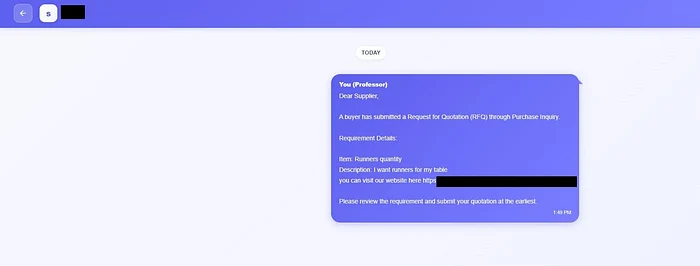
The screenshot shows the original purchase inquiry with the user-controlled content and the external URL, with identifying information redacted.
Step 2: inspect the generated email
The email generated after submission was then examined. The platform had included the submitted description in its notification to the recipient, and the external URL was present as well. The message looked like a completely normal business communication: it informed the recipient that a buyer had submitted a purchase request, displayed the requirement details, and asked them to review the request and respond.
The link inside the email was not controlled by the platform. It had originated from the user-submitted description.
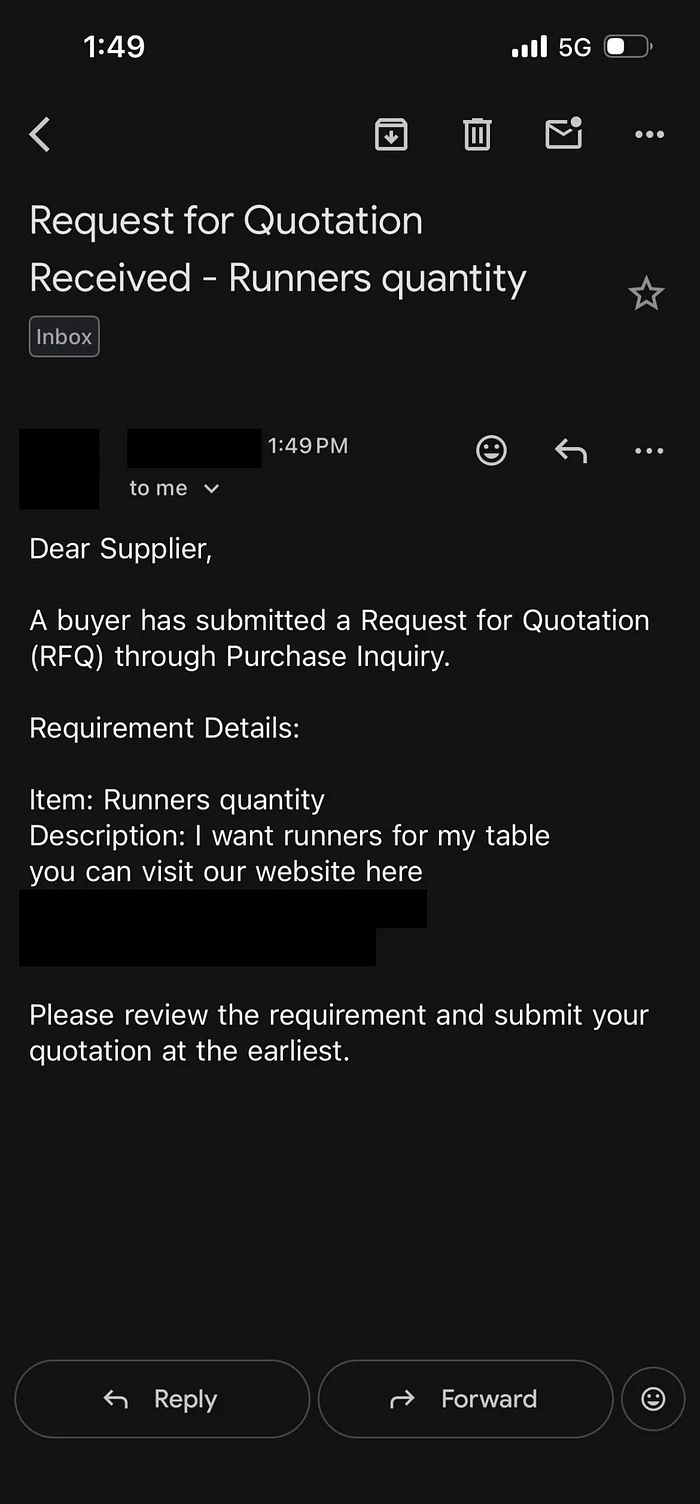
The screenshot shows the automatically generated business email containing the submitted purchase details and the external link, with sender and destination redacted.
This is the core of the finding. The issue is not merely that a form accepts an external URL. The application takes attacker-controlled content and delivers it through an email generated by a legitimate business workflow, lending the platform's credibility to content it does not control.
Step 3: follow the link to a controlled destination
To understand the consequences of a recipient interacting with the external destination, testing continued in a controlled environment while the resulting activity was monitored.
The terminal output recorded multiple link-open events and indicated that network information and location data had been received by the testing environment.
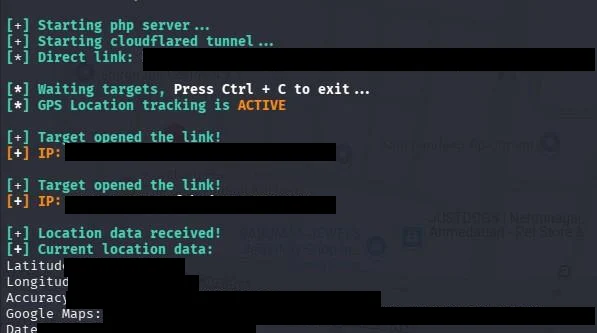
The console capture shows link-open events and information received, with IP addresses, direct URLs and precise coordinates redacted.
A separate console capture contained further activity, including repeated target-open events and messages indicating that camera-related files had been received.
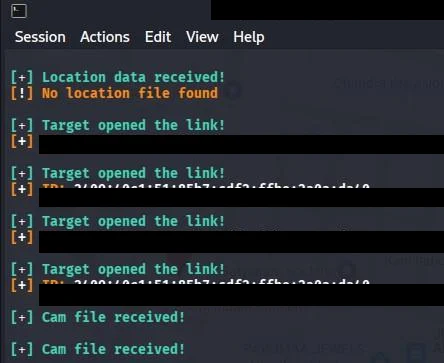
This second console shows reported link interactions and camera file-receipt events, with sensitive information redacted.
The evidence also contained location-related output, along with a corresponding map view.
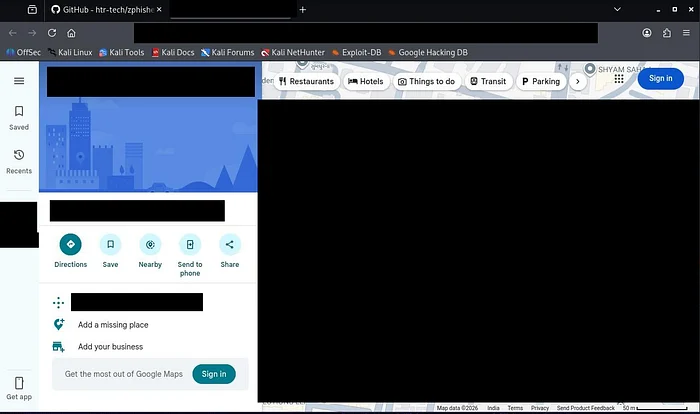
The map view shows coordinates from the location-related output, redacted in the publication copy.
Step 4: review the captured material
The testing material went beyond terminal logs. It included a sequence of captured images, individual image-viewer evidence, and additional capture output.
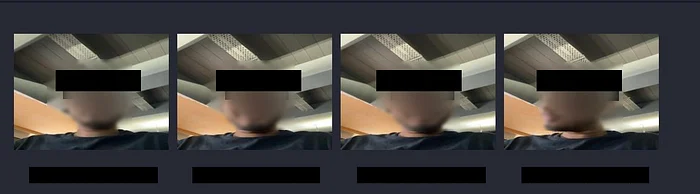
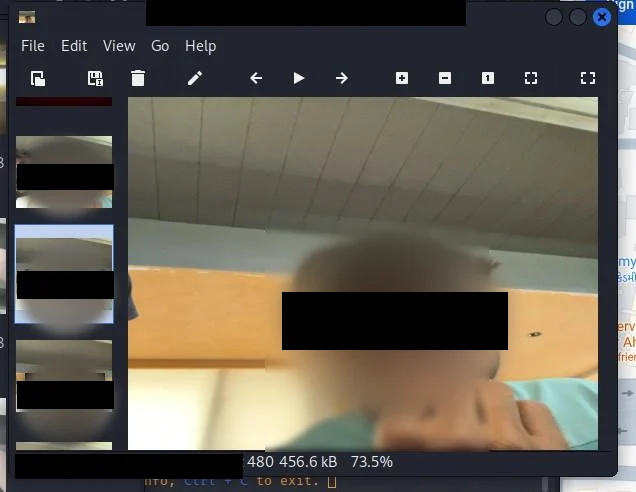
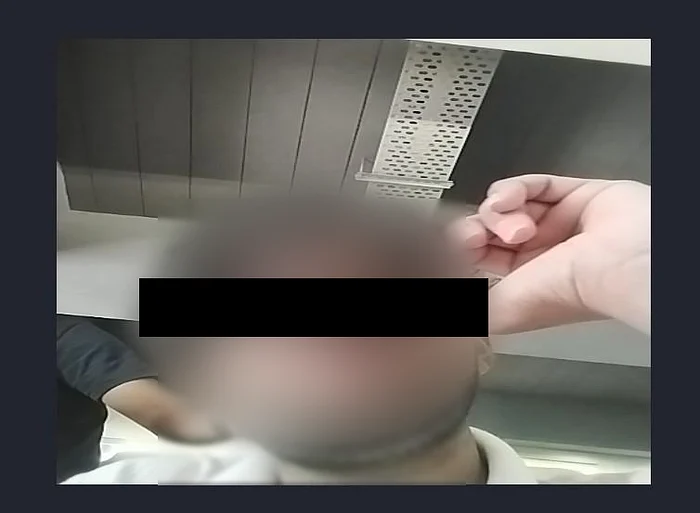
These are captured images from the testing material, anonymised in the publication copies.
Another portion of the console output contained fields labelled with IP, account, and login information.
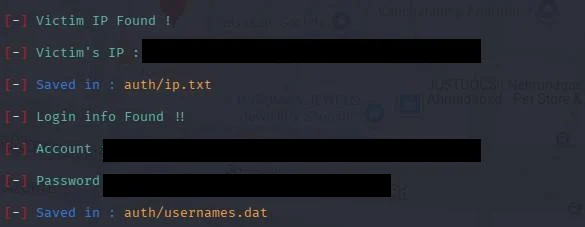
The output shows fields labelled with IP, account and login information, with all values and identifiers concealed.
The researcher states explicitly that these screenshots provide supporting context for the controlled testing activity. They should not be interpreted as proof that the original application bypassed browser camera permissions or that a real supplier account was compromised. The application-level finding remains the propagation of user-controlled external links into a trusted, platform-generated business notification.
The distinction between the application and the external destination matters. The application enabled delivery of the URL; the subsequent collection activity was performed by the external testing destination.
Root cause
The weakness lies in how user-controlled content travels through the purchase-inquiry workflow. The description field accepts user input, that information is processed by the application, and it is included in a generated email.
The important security boundary is between untrusted input and trusted system-generated content. An application cannot assume that information is safe simply because it was submitted through a legitimate form, since the same content may later appear in HTML pages, email templates, notifications or other components, each of which needs controls appropriate to its output context.
In this case an externally supplied URL travelled from the form into a notification carrying the credibility of the platform itself. The researcher classifies the behaviour as stored phishing injection through user-controlled purchase-inquiry content, resulting in trusted-channel phishing.
This is distinct from Cross-Site Scripting. The available evidence demonstrates that an external link was propagated into a generated email; it does not establish arbitrary JavaScript execution within the application. The relevant weakness is primarily insufficient control over user-supplied content and its subsequent presentation. The report does not describe the specific validation, sanitisation or encoding code that was missing, so the exact implementation gap is not stated.
Impact
The potential impact goes beyond a recipient opening an unfamiliar website. An attacker could submit a purchase request containing a link to a fraudulent supplier portal. The recipient receives the notification through a familiar business workflow, the message contains an apparently legitimate purchase requirement, and the external destination looks relevant to the request. Depending on the page and the recipient's interaction, this could lead to credential-harvesting attempts or exposure of visitor information.
The same approach could support supplier impersonation, fraudulent business communications, or further attempts to compromise partner accounts. There is also a reputational dimension: even when the malicious site is hosted externally, recipients may associate the phishing email with the platform that delivered it. The attacker is not creating trust from scratch but attempting to exploit trust that already exists.
The report records the finding as a high-severity vulnerability with a proposed CVSS v3.1 score of 8.1 and CWE-20 (Improper Input Validation), with the vector:
CVSS:3.1/AV:N/AC:L/PR:L/UI:R/S:C/C:H/I:L/A:N
Fix
Blocking the exact destination observed during testing would be an incomplete solution, since attackers can register new domains, use URL shorteners, introduce redirect chains, or move content to different hosting infrastructure. The report sets out the following measures to secure the complete path taken by user-submitted content:
- Treat purchase descriptions as untrusted input and validate them on the server. Where rich formatting is not necessary, prefer plain-text handling. If HTML formatting is supported, use a strict allow-list sanitiser.
- Apply output encoding according to the context in which user-controlled content is rendered, particularly when it is inserted into HTML email templates. Input validation alone does not guarantee safe output.
- Parse and normalise external URLs before accepting them, rejecting unsupported schemes, malformed destinations and suspicious URL structures. Reputation checks and redirect inspection can add further protection.
- Clearly distinguish externally supplied links from platform-owned links in the generated email, and warn recipients when a destination is external rather than encouraging them to treat every link in the notification as trusted.
- Monitor for suspicious inquiry submissions, repeated URL abuse and unusual sender activity, and use regression testing to verify that user-controlled content cannot alter email templates, introduce active HTML, or disguise external destinations.
The objective is not to stop businesses sharing legitimate links, but to ensure a legitimate application does not unintentionally become a phishing delivery mechanism.
Variants to test
- Other user-controlled fields that reach email templates. Submit URLs and HTML in every free-text field of a notification-generating workflow (product name, quantity notes, delivery instructions, contact message). A positive result is a platform-generated email in which your external URL or markup appears as active content.
- HTML injection into the email body. Submit markup such as an anchor tag with misleading link text pointing at an external destination. A positive result is an email client rendering the anchor as a clickable link whose visible text does not match the destination.
- Scheme and URL-structure handling. Try unusual schemes, userinfo-style URLs, redirect chains and shorteners in the description. A positive result is acceptance and propagation of a destination that a recipient cannot reasonably identify from the email.
- Template manipulation. Attempt to break out of the field's position in the email template with closing tags or template syntax. A positive result is altered layout, injected sections, or content appearing outside the intended field.
- Other trusted notification channels. Repeat the submission against workflows that generate SMS, in-app notifications or PDF documents. A positive result is the same untrusted URL delivered through any channel that carries the platform's branding.
- Recipient-side rendering differences. Open the generated email in clients with different HTML and link-preview handling. A positive result is a client that resolves or previews the external destination in a way that hides its true origin from the recipient.
Each of these tests the same boundary: whether untrusted input can cross into system-generated content that recipients are expected to trust.
What happened, in plain words
A business website called Munshi, which the report identifies as a product of Petpooja, has a feature for sending purchase inquiries to suppliers. A buyer fills in a form: what they want to buy, a description, and then sends it. The platform takes that information and automatically writes an email to the supplier, saying "a buyer has submitted a purchase request, here are the details, please review and respond".
That is completely normal business software. The problem the researcher found is what happens to a web link (a URL) that the buyer types into the description field. The platform copies the description, link and all, straight into the email it generates. So a person who fills in the form can put any link they like into an email that looks like it came from a trusted business platform.
Why does that matter? Because most people treat an email from a platform they already use with more trust than an email from a stranger. If the link in that email leads to a fake login page, the recipient is more likely to click it. The platform is, in effect, lending its good name to a link it does not control.
The researcher tested this in a controlled way: they submitted an inquiry with a link to a page they controlled, examined the email generated with the link inside, and then looked at what that page could collect when someone opened it. The report records the finding as high severity, with a proposed CVSS v3.1 score of 8.1 and the weakness class CWE-20 (Improper Input Validation).
Below, I walk through the same steps in the same order, explaining each idea from scratch.
The target and the feature
The endpoint named in the report is:
munshi.petpooja.com/purchase-inquiry
What this line means, piece by piece:
munshi.petpooja.comis the address of a website (a hostname). Think of it as the street address of a building./purchase-inquiryis the path to a particular page or feature inside that site, like the floor and room number inside the building.- Together they point at the purchase-inquiry feature: the form a buyer uses to send a request to a supplier.
An endpoint is simply a specific address on a server that accepts a request and does something with it. When your browser loads a page, or a form sends data, it is talking to an endpoint.
The feature itself is ordinary. A buyer submits a product requirement, enters a description, and sends the request to a supplier. The platform processes the submission and automatically generates an email notification to the recipient. That email tells the recipient a buyer has submitted a purchase request, shows the requirement details, and asks them to review the request and respond.
Nothing in that flow is unusual. The question the researcher asked was simpler: what happens to user-supplied content, specifically a URL, once it leaves the form and enters the platform-generated email?
Setup
The report does not describe accounts, roles, tooling versions or other preconditions beyond the following. Testing was carried out in a controlled environment, with a testing destination that the researcher controlled and monitored. The researcher submitted an ordinary purchase inquiry containing a product description and an external URL. The assessment is dated 18 June 2026 and is attributed to Vyom Nagpal.
A few terms worth knowing before we go on:
- A controlled environment means the researcher set up their own test page and watched what it received.
- A testing destination is the web page the link points to. Because the researcher owned it, they could see exactly what it received when someone opened it.
- Monitoring means watching the output of that page, for example a console window that prints a line every time the page is opened.
Finding it
While examining the description field, the researcher noticed that it accepted externally hosted URLs alongside ordinary product information. Accepting a URL is not by itself a vulnerability: businesses routinely share catalogues, product specifications and reference websites.
A vulnerability is a weakness in software that someone can misuse to cause harm. A form accepting a link is not a weakness on its own, any more than a letterbox accepting an envelope is a weakness. The question is what the system does with the envelope afterwards.
The interesting question was what happened to that URL after the form was submitted. Rather than stopping at the input field, the researcher followed the data through the application.
That is a habit worth copying. Many people stop testing when a form accepts something odd. The real behaviour shows up later, when the data is stored, processed and shown to someone else.
Exploitation
Exploitation here means deliberately using the feature in the way that demonstrates the weakness, in a safe test setup. It does not mean breaking into anything.
Step 1: submit a purchase inquiry with an external URL
A normal purchase inquiry was submitted, containing a product description and an external URL. The application accepted the request and processed it through its usual workflow.
The screenshot shows the original purchase inquiry with the user-controlled content and the external URL, with identifying information redacted.
User-controlled content means any text a person using the site can type in. The description field is user-controlled; the platform's own wording around it is not. The whole finding turns on the difference between the two.
Why submit a normal-looking inquiry rather than something obviously malicious? Because the point is to show that the ordinary workflow itself carries the link. If the form only accepted strange input, the finding would be narrower.
Step 2: inspect the generated email
The email generated after submission was then examined. The platform had included the submitted description in its notification to the recipient, and the external URL was present as well. The message looked like a completely normal business communication: it informed the recipient that a buyer had submitted a purchase request, displayed the requirement details, and asked them to review the request and respond.
The link inside the email was not controlled by the platform. It had originated from the user-submitted description.
The screenshot shows the automatically generated business email containing the submitted purchase details and the external link, with sender and destination redacted.
This is the core of the finding. The issue is not merely that a form accepts an external URL. The application takes attacker-controlled content and delivers it through an email generated by a legitimate business workflow, lending the platform's credibility to content it does not control.
Think of it like a company's headed notepaper. If someone can get their own handwritten note printed on that notepaper and posted by the company, the recipient will assume the company stands behind the note. The paper is genuine; the message on it is not.
Step 3: follow the link to a controlled destination
To understand the consequences of a recipient interacting with the external destination, testing continued in a controlled environment while the resulting activity was monitored.
The terminal output recorded multiple link-open events and indicated that network information and location data had been received by the testing environment.
The console capture shows link-open events and information received, with IP addresses, direct URLs and precise coordinates redacted.
A terminal or console is a text window where a program prints messages. Here it is the researcher's test page reporting back: each time the link was opened, a line appeared. Network information means details such as the visitor's IP address, which is the number that identifies a device on the internet. Location data means approximate or precise coordinates derived from the browser.
A separate console capture contained further activity, including repeated target-open events and messages indicating that camera-related files had been received.
This second console shows reported link interactions and camera file-receipt events, with sensitive information redacted.
The evidence also contained location-related output, along with a corresponding map view.
The map view shows coordinates from the location-related output, redacted in the publication copy.
A map view is simply those coordinates plotted on a map, which makes the precision easy to see at a glance.
Step 4: review the captured material
The testing material went beyond terminal logs. It included a sequence of captured images, individual image-viewer evidence, and additional capture output.
These are captured images from the testing material, anonymised in the publication copies.
Another portion of the console output contained fields labelled with IP, account, and login information.
The output shows fields labelled with IP, account and login information, with all values and identifiers concealed.
The researcher states explicitly that these screenshots provide supporting context for the controlled testing activity. They should not be interpreted as proof that the original application bypassed browser camera permissions or that a real supplier account was compromised. The application-level finding remains the propagation of user-controlled external links into a trusted, platform-generated business notification.
The distinction between the application and the external destination matters. The application enabled delivery of the URL; the subsequent collection activity was performed by the external testing destination.
That distinction is the most important sentence in this section. The platform did not collect anything itself. It delivered a link. Whatever the link's page did afterwards happened on the researcher's own test page, and browsers normally ask the visitor before granting access to a camera or location. The finding is about the delivery, not about the platform breaking the browser's protections.
Root cause
The weakness lies in how user-controlled content travels through the purchase-inquiry workflow. The description field accepts user input, that information is processed by the application, and it is included in a generated email.
The root cause is the underlying reason a weakness exists, as opposed to its visible symptom. The symptom is a suspicious link in an email. The root cause is that the platform treats text from a form as if it were its own trusted text.
The important security boundary is between untrusted input and trusted system-generated content. An application cannot assume that information is safe simply because it was submitted through a legitimate form, since the same content may later appear in HTML pages, email templates, notifications or other components, each of which needs controls appropriate to its output context.
A security boundary is a line that data should not cross without checks. Untrusted input is anything a user can type. System-generated content is anything the platform writes itself. HTML is the language web pages and many emails are built from. An output context is the place the data ends up: a web page, an email, a text message. Each place has its own rules for what is safe.
In this case an externally supplied URL travelled from the form into a notification carrying the credibility of the platform itself. The researcher classifies the behaviour as stored phishing injection through user-controlled purchase-inquiry content, resulting in trusted-channel phishing.
- Stored means the content is saved by the platform and reused later, rather than only reflected back once.
- Phishing is a trick that gets someone to click a link or hand over information by pretending to be someone trustworthy.
- Injection means putting content into a system in a place the designers did not intend.
- Trusted-channel phishing means the phishing arrives through a channel the recipient already trusts.
This is distinct from Cross-Site Scripting. The available evidence demonstrates that an external link was propagated into a generated email; it does not establish arbitrary JavaScript execution within the application. The relevant weakness is primarily insufficient control over user-supplied content and its subsequent presentation. The report does not describe the specific validation, sanitisation or encoding code that was missing, so the exact implementation gap is not stated.
Cross-Site Scripting (XSS) is a different weakness where an attacker gets their own JavaScript (code that runs in the browser) to execute inside someone else's website. JavaScript execution means that code actually running. The report is careful to say the evidence shows a link being passed through, not code running inside the platform. Validation means checking input is acceptable; sanitisation means cleaning it; encoding means converting characters so they are displayed as text rather than treated as instructions.
Impact
Impact means what harm the weakness could cause if misused.
The potential impact goes beyond a recipient opening an unfamiliar website. An attacker could submit a purchase request containing a link to a fraudulent supplier portal. The recipient receives the notification through a familiar business workflow, the message contains an apparently legitimate purchase requirement, and the external destination looks relevant to the request. Depending on the page and the recipient's interaction, this could lead to credential-harvesting attempts or exposure of visitor information.
Credential harvesting means collecting usernames and passwords, usually with a fake login page that looks real. Exposure of visitor information means details about the person who opened the page, such as their network address or location, being sent somewhere.
The same approach could support supplier impersonation, fraudulent business communications, or further attempts to compromise partner accounts. There is also a reputational dimension: even when the malicious site is hosted externally, recipients may associate the phishing email with the platform that delivered it. The attacker is not creating trust from scratch but attempting to exploit trust that already exists.
The report records the finding as a high-severity vulnerability with a proposed CVSS v3.1 score of 8.1 and CWE-20 (Improper Input Validation), with the vector:
CVSS:3.1/AV:N/AC:L/PR:L/UI:R/S:C/C:H/I:L/A:N
CVSS is a standard scoring system for how serious a vulnerability is. The score runs from 0 to 10, and 8.1 sits in the high range. The vector is the same information written as a string of codes. Reading it left to right:
| Code | Meaning in plain words |
|---|---|
AV:N |
Attack vector: network. It can be done remotely over the internet. |
AC:L |
Attack complexity: low. No special conditions are needed. |
PR:L |
Privileges required: low. The attacker needs an ordinary account. |
UI:R |
User interaction: required. A person has to click or open something. |
S:C |
Scope: changed. The effect can reach beyond the vulnerable component. |
C:H |
Confidentiality: high. Information can be exposed. |
I:L |
Integrity: low. Data can be altered to a limited degree. |
A:N |
Availability: none. The service is not taken down. |
CWE-20 is a catalogue entry for a class of weakness: improper input validation, meaning the software did not properly check what it was given.
Fix
Blocking the exact destination observed during testing would be an incomplete solution, since attackers can register new domains, use URL shorteners, introduce redirect chains, or move content to different hosting infrastructure. The report sets out the following measures to secure the complete path taken by user-submitted content:
- Treat purchase descriptions as untrusted input and validate them on the server. Where rich formatting is not necessary, prefer plain-text handling. If HTML formatting is supported, use a strict allow-list sanitiser.
- Apply output encoding according to the context in which user-controlled content is rendered, particularly when it is inserted into HTML email templates. Input validation alone does not guarantee safe output.
- Parse and normalise external URLs before accepting them, rejecting unsupported schemes, malformed destinations and suspicious URL structures. Reputation checks and redirect inspection can add further protection.
- Clearly distinguish externally supplied links from platform-owned links in the generated email, and warn recipients when a destination is external rather than encouraging them to treat every link in the notification as trusted.
- Monitor for suspicious inquiry submissions, repeated URL abuse and unusual sender activity, and use regression testing to verify that user-controlled content cannot alter email templates, introduce active HTML, or disguise external destinations.
Some of those terms, in plain words:
- Server-side validation means checking the input on the platform's own computers, not just in the browser, because anything checked only in the browser can be bypassed.
- Plain text means treating the input as characters only, with no formatting or links.
- Allow-list sanitiser means a filter that permits only a known list of safe formatting and removes everything else.
- Output encoding means converting characters at the moment they are displayed so they appear as text instead of being acted on.
- Parsing and normalising a URL means breaking a link into its parts and rewriting it into a standard form, so tricks like odd spellings or hidden parts are exposed.
- Scheme is the first part of a link, such as
httporhttps, which tells the browser how to handle it. - Reputation checks mean looking up whether a domain is known to be bad.
- Redirect inspection means following a link that bounces you to another address, to see where it really ends up.
- Regression testing means re-running tests after changes to make sure old problems have not come back.
The objective is not to stop businesses sharing legitimate links, but to ensure a legitimate application does not unintentionally become a phishing delivery mechanism.
Variants to test
These are further tests in the same spirit, each checking the same boundary: whether untrusted input can cross into system-generated content that recipients are expected to trust.
- Other user-controlled fields that reach email templates. Submit URLs and HTML in every free-text field of a notification-generating workflow (product name, quantity notes, delivery instructions, contact message). A positive result is a platform-generated email in which your external URL or markup appears as active content.
- HTML injection into the email body. Submit markup such as an anchor tag with misleading link text pointing at an external destination. A positive result is an email client rendering the anchor as a clickable link whose visible text does not match the destination.
- Scheme and URL-structure handling. Try unusual schemes, userinfo-style URLs, redirect chains and shorteners in the description. A positive result is acceptance and propagation of a destination that a recipient cannot reasonably identify from the email.
- Template manipulation. Attempt to break out of the field's position in the email template with closing tags or template syntax. A positive result is altered layout, injected sections, or content appearing outside the intended field.
- Other trusted notification channels. Repeat the submission against workflows that generate SMS, in-app notifications or PDF documents. A positive result is the same untrusted URL delivered through any channel that carries the platform's branding.
- Recipient-side rendering differences. Open the generated email in clients with different HTML and link-preview handling. A positive result is a client that resolves or previews the external destination in a way that hides its true origin from the recipient.
A few of those need a word of explanation. An anchor tag is the HTML element that makes clickable link text. Userinfo-style URLs are links that contain an @ and a username before the real host, which can be used to make a bad address look like a good one. A URL shortener is a service that turns a long link into a short one, hiding where it goes. An email client is the program you read mail in, and different clients handle HTML and link previews differently.
Glossary
- Allow-list sanitiser: a filter that keeps only a known list of safe formatting and removes everything else.
- Anchor tag: the HTML element that turns text into a clickable link.
- Attack complexity: a CVSS measure of how hard a weakness is to use.
- Attack vector: a CVSS measure of how the attacker reaches the target, for example over the network.
- Availability: whether a weakness can stop a service working.
- Confidentiality: whether a weakness can expose information.
- Console: a text window where a program prints messages.
- Controlled environment: a test setup the researcher owns and can watch, separate from real users.
- Credential harvesting: collecting usernames and passwords, usually through a fake login page.
- Cross-Site Scripting (XSS): a weakness where an attacker's JavaScript runs inside someone else's website.
- CVSS: a standard scoring system for the severity of a vulnerability, from 0 to 10.
- CWE-20: the catalogue entry for improper input validation.
- Email client: the program used to read email.
- Encoding: converting characters so they are shown as text rather than treated as instructions.
- Endpoint: a specific address on a server that accepts a request and does something with it.
- Exploitation: deliberately using a weakness in a safe test setup to show it exists.
- High severity: a severity band in CVSS, above medium and below critical.
- HTML: the language web pages and many emails are built from.
- Impact: the harm a weakness could cause if misused.
- Injection: putting content into a system where the designers did not intend it to go.
- Integrity: whether data can be altered.
- IP address: the number that identifies a device on a network.
- JavaScript: code that runs in the browser.
- Location data: coordinates a browser can report about where the device is.
- Monitoring: watching the output of a test page to see what it receives.
- Normalising a URL: rewriting a link into a standard form so tricks are exposed.
- Output context: the place data ends up, such as a web page or an email, each with its own safety rules.
- Output encoding: converting characters at display time so they appear as text.
- Parsing: breaking a value such as a URL into its parts.
- Phishing: a trick that gets someone to click a link or share information by pretending to be trustworthy.
- Plain text: characters only, with no formatting or active links.
- Privileges required: a CVSS measure of what level of account an attacker needs.
- Redirect chain: a link that bounces through one or more addresses before reaching its final destination.
- Regression testing: re-running tests after changes to check old problems have not returned.
- Reputation check: looking up whether a domain is known to be malicious.
- Root cause: the underlying reason a weakness exists.
- Scheme: the first part of a URL, such as
httporhttps, telling the browser how to handle it. - Scope: a CVSS measure of whether the effect can reach beyond the vulnerable component.
- Security boundary: a line data should not cross without checks.
- Server-side validation: checking input on the platform's own computers rather than only in the browser.
- Stored: content saved by the platform and reused later.
- Terminal: a text window used to run programs and see their output.
- Testing destination: the web page a test link points to, owned by the researcher.
- Trusted-channel phishing: phishing delivered through a channel the recipient already trusts.
- URL: a web address.
- URL shortener: a service that turns a long link into a short one, hiding the destination.
- User interaction: a CVSS measure of whether a person has to click or open something.
- User-controlled content: any text a person using the site can type in.
- Userinfo-style URL: a link containing a username and
@before the real host, used to disguise the destination. - Validation: checking that input is acceptable.
- Vulnerability: a weakness in software that someone can misuse to cause harm.




