Time-Based Business Logic Bypass via API
The booking platform's front end hid the change-time and cancel options for bookings within 24 hours of the start time, but the API endpoint that changes the booking time did not enforce this restriction. An attacker could replay a legitimate change-time request with the id of a locked booking and a new time, successfully modifying the booking despite the policy.
 Published on scriptjacker.medium.com
Hey Hackers, I am Parth Narula. A penetration tester, bug hunter, red teamer and overall a security researcher.
The full write-up lives on its author's site
It belongs to its author, so we link to it rather than copy it. The other two tabs are our own rewrites, checked against it.
Context
The target is a booking platform, referred to throughout as REDACTED, where a business lists its services and a customer books a slot against them. The feature in question is the customer's own booking management page: a booking details view that lets the customer change the time of an existing booking or cancel it, subject to a stated notice period.
The platform states the rule in plain English on the booking page:
Cancellation for this service is only possible up to 24 hours before the service is started.
The researcher's own booking was a free consultation with a business on the platform, set for the next day.
Setup
The researcher held a normal customer account with a booking on the platform. The only tooling described is the browser's network tab, used to capture the request the page makes when a new time is confirmed, and Burp Repeater, used to replay that request with a different booking id. No versions, endpoints beyond the one shown, or additional accounts are described.
Two preconditions matter for reproducing the finding:
- A booking that is still outside the 24 hour window, so the change-time flow is reachable through the interface and a legitimate request can be captured.
- A second booking, on the same account, that sits inside the 24 hour window, so the interface has already withdrawn the change and cancel options for it.
Finding it
Because the consultation was less than 24 hours away, the booking details page enforced the notice period in the interface. The Change time and Cancel choices were gone, replaced by the orange notice about the 24 hour cancellation cutoff.
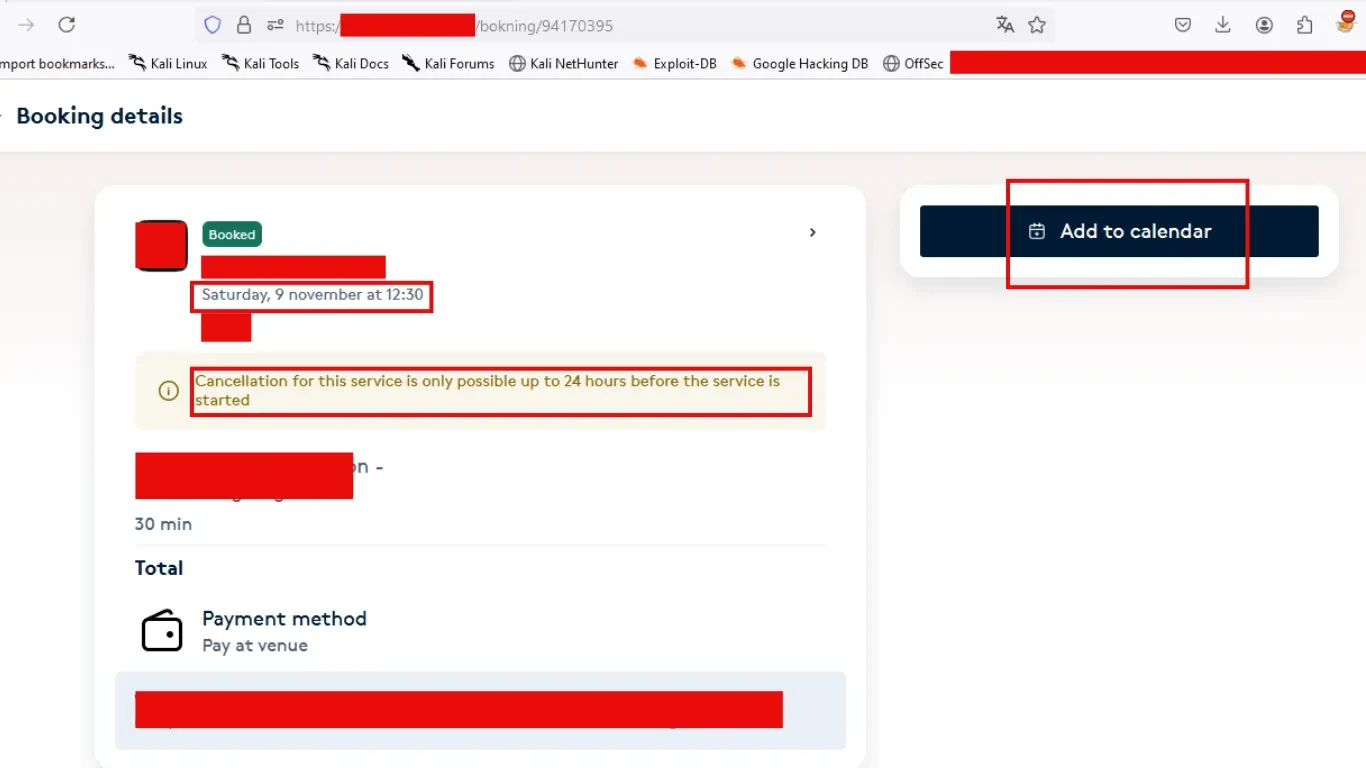
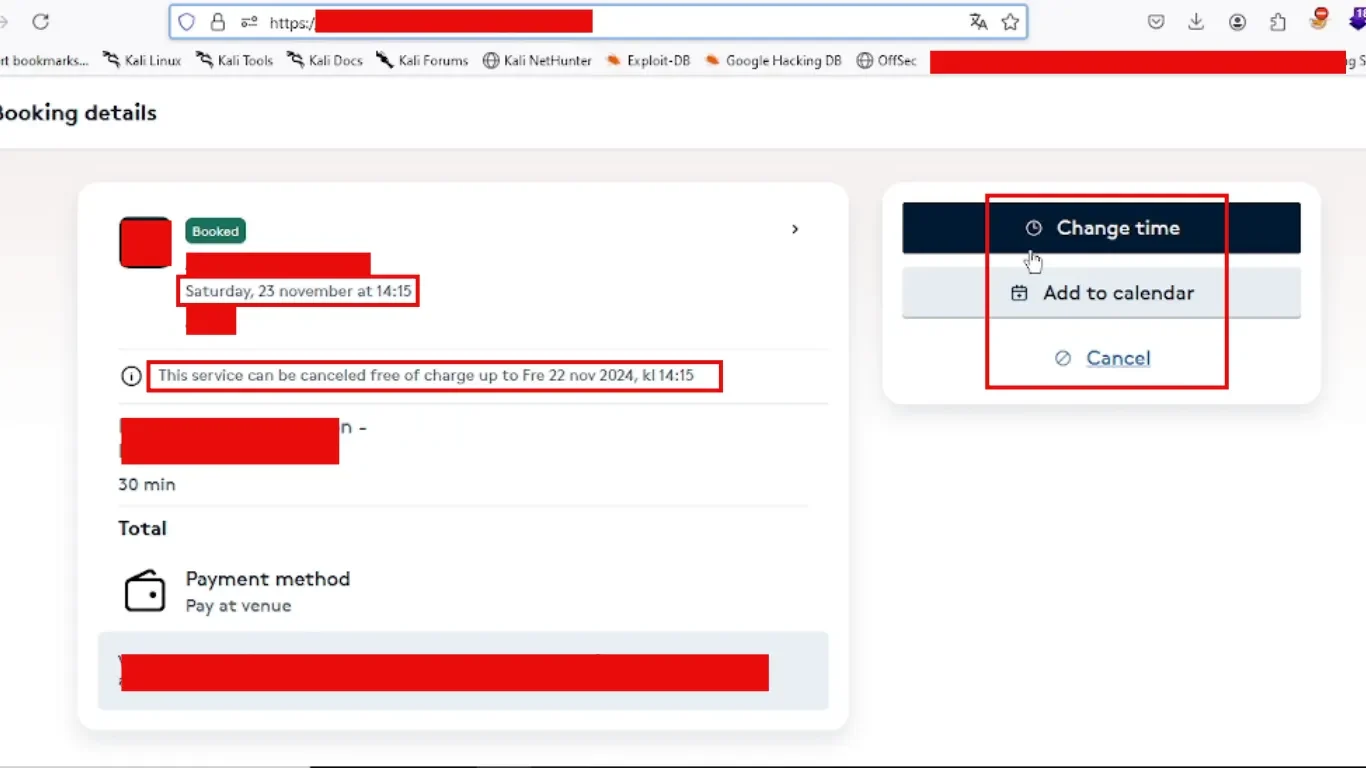
That is the locked state. For comparison, a booking still outside the 24 hour window kept its three dot menu on the card, showing Change time, Add to calendar and Cancel.
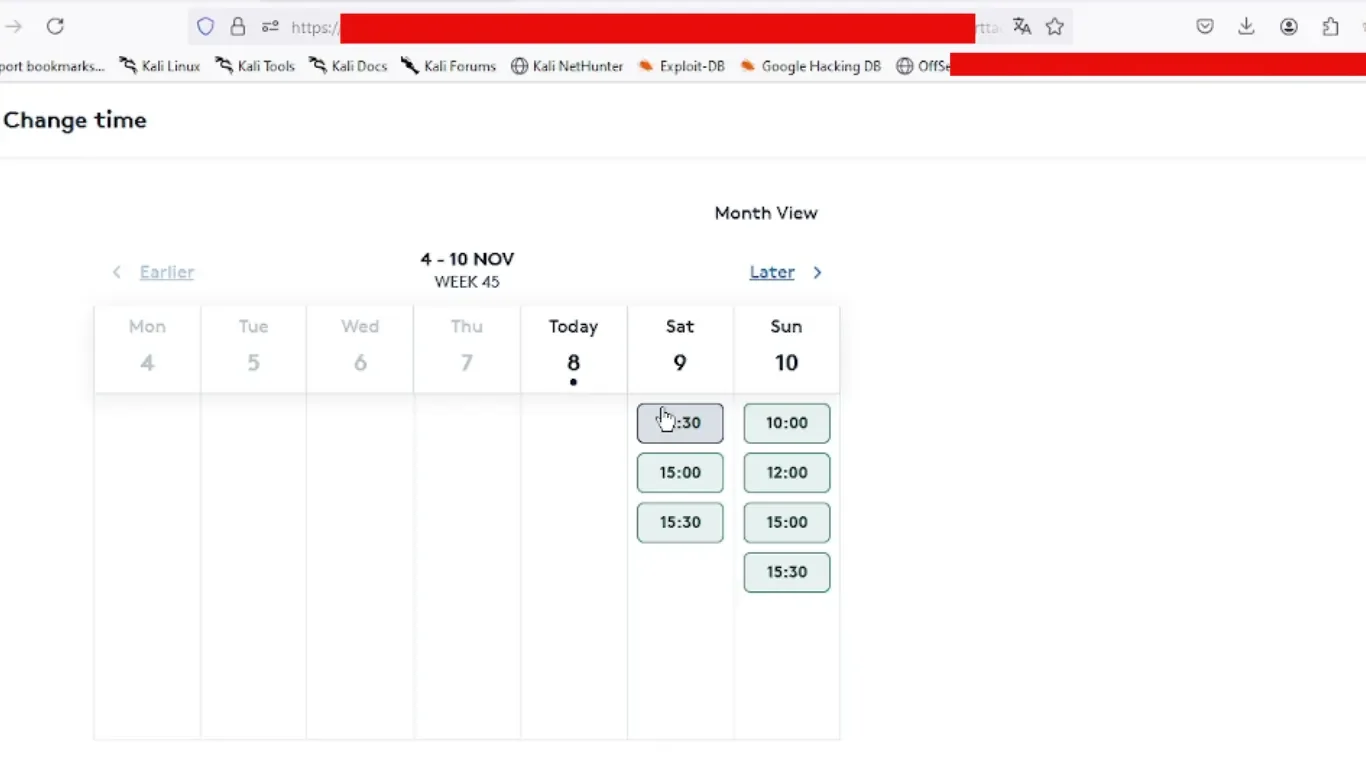
Tapping Change time opened a calendar, free slots appeared once the server finished loading times, and picking one opened a confirmation prompt asking whether the researcher was sure about moving the booking to the new date and time.
That confirmation box is the interesting part. It implies a request carrying the booking id and the new time is being sent, and that a server decides whether to accept it. The researcher wanted to see that request rather than trust the button.
Exploitation
Step 1: capture a legitimate change-time request
Using the feature normally on a booking that was still outside the 24 hour window, the researcher opened the network tab, found the call made when a new time was confirmed, and sent it to Burp Repeater for replay. The request was a plain POST with a JSON body:
POST /api/change-booking-time HTTP/2 Host: redacted Content-Type: application/json Origin: https://www.redacted{ "id":94170395, "time":1732371300 }
The body carries only two fields: the booking id and the new time as a Unix timestamp. The response was:
HTTP/2 201 Created Content-Type: application/json{ "id":94170395 }
Nothing in the request ties it to a particular booking beyond the id, and nothing in it states whether the server checked how close the current time was to the booking's start before accepting the change. The only thing beyond the two fields is the authorization header that Repeater had already captured with the request.
Step 2: replay it against the locked booking
The researcher went back to the booking the page had said could not be touched, the one less than 24 hours out showing the cancellation notice instead of a menu. Its id was copied into the same request, a new time a few hours later in the day was chosen, and the request was sent.
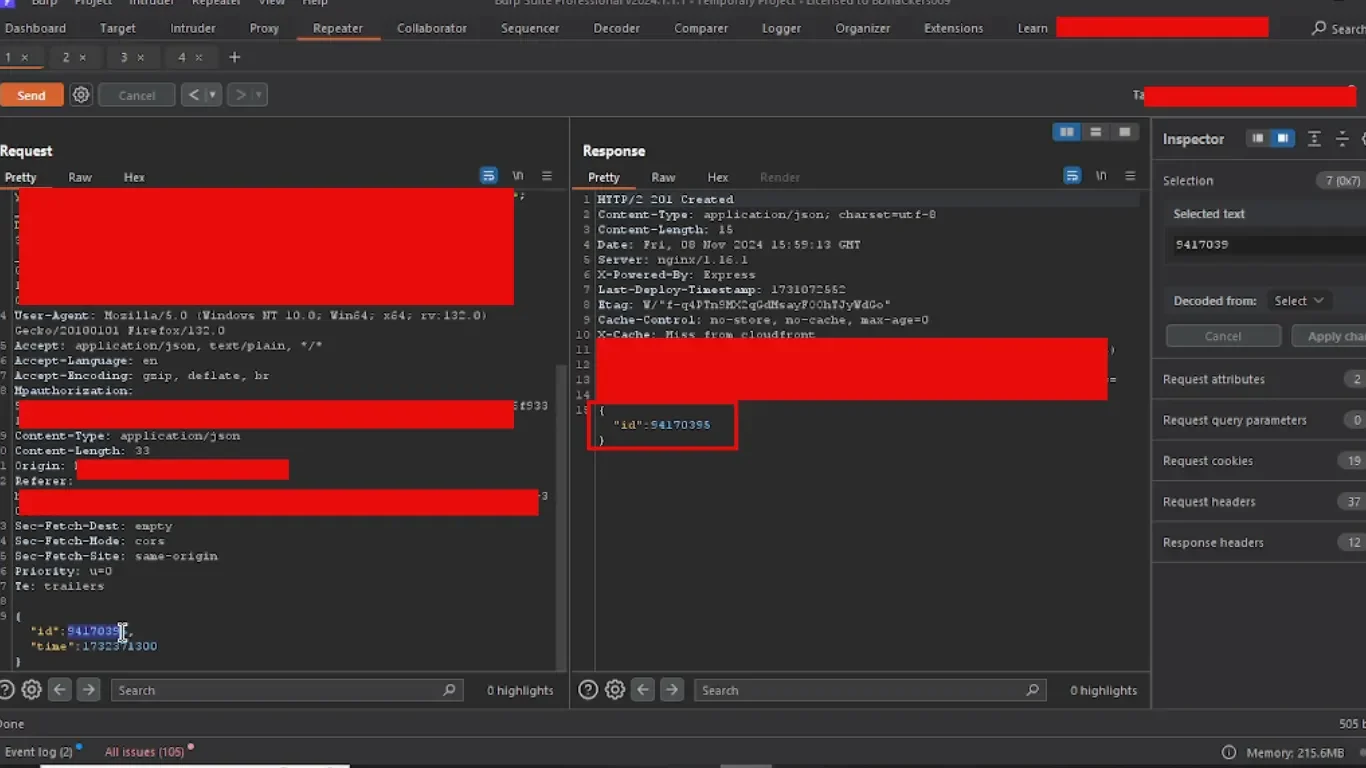
The response was 201 Created, the same as the legitimate call.
Step 3: confirm the effect in the interface
On reloading the booking details page, the researcher expected either the old time or an error. Instead the page showed the new time sent through Repeater, a toast at the bottom of the card confirming Time has changed, and directly above it, unchanged, the same orange notice claiming cancellation was only possible up to 24 hours before the service started.
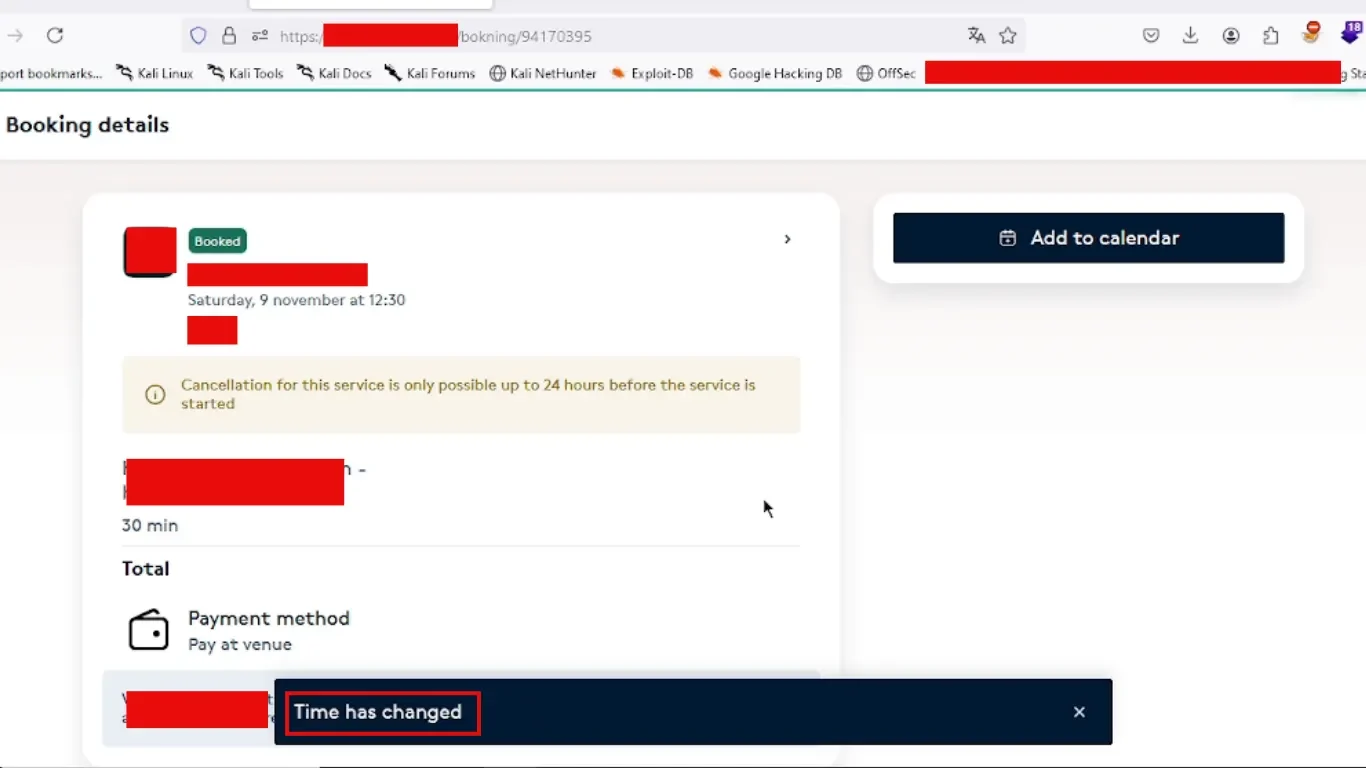
The interface had not been lying: it genuinely hides the Change time and Cancel options once a booking falls inside the 24 hour window, and genuinely refuses to let the flow be reached through the page. It simply never tells the endpoint that performs the change about any of this.
Root cause
The restriction lives entirely in what buttons the front end decides to draw. The API behind those buttons takes an id and a time, checks that the request is authenticated, and writes the new time. Nothing in that path reads the booking's current start time, compares it against now, and refuses the write the way the button already refuses to appear.
The confirmation modal is not a security control; it is a courtesy the front end offers before firing a request, and the request itself does not know or care that a modal ever existed. Because the missing check is a comparison of two timestamps rather than anything tied to who owns the booking, fixing the button on the page would do nothing for it. The button was never the thing enforcing the rule.
Impact
The gap matters more than a missed cancellation fee. A customer management notice built around a 24 hour cutoff usually exists because the business on the other end needs that notice to plan staff and slots. A customer who can silently push a same day appointment to a different hour, or cancel it outright, right up until the moment it starts, removes the one guarantee that notice was supposed to give the business.
The researcher demonstrates the time change only; the report does not test cancellation. The impact is bounded by what the endpoint accepts: the attacker needs a valid authenticated session and a booking id, and the write is performed on the booking the id names.
Fix
The report does not describe a fix being applied. What it argues for is server-side enforcement: the endpoint that performs the change should read the booking's current start time, compare it against the current time, and refuse the write when the booking falls inside the restricted window, exactly as the interface already refuses to offer the action. Hiding the button is not a substitute for that check.
Variants to test
- Replay a captured write against a locked record. Capture a legitimate request from a feature while it is available, then replay it with the id of a record for which the interface has withdrawn the action. A positive result is a success response and the change reflected in the interface.
- Time-window restrictions generally. Wherever a rule is based on time (notice periods, edit cutoffs, refund windows), send the endpoint a timestamp inside the restricted window directly rather than trusting that hiding the control was enough. A positive result is the write being accepted.
- Minimal write endpoints. Look for write endpoints that take an id and a value and nothing else. If ownership and business rules are not revalidated on every write, one legitimate request from the feature is often enough to replay it anywhere the rule should have applied. A positive result is the same request succeeding against a record the rule was meant to protect.
- Confirmation prompts as a map. When a confirmation prompt asks you to confirm an action, treat it as telling you exactly which request to go and find and test on its own. A positive result is that request being accepted when replayed outside the flow that produced it.
What happened, in plain words
A booking platform lets a business list services and lets a customer book a slot against them. The platform has a rule, written on the page in plain English: you can only cancel up to 24 hours before the service starts. Once a booking is inside that window, the page stops offering you the buttons to change the time or cancel.
The researcher had a free consultation booked for the next day, so the booking was inside the window. The page hid the buttons, as promised. But the request that the page sends when you change a time was still accepted by the server for that same locked booking. The page was honest about what it would let you click, and the server behind it never checked the rule at all.
This is a beginner's walkthrough of how that was found, why it works, and what it teaches. Every concept is explained from scratch, and the requests are shown exactly as they were captured.
The target and the feature
A booking platform is a website where a business lists the services it offers, and a customer picks a slot and books it. Think of it like a restaurant's online reservation page: the restaurant publishes its opening times, and you pick one.
The feature in question is the customer's own booking management page. It is the screen where you look at a booking you already made and decide to change its time or cancel it. The platform attaches a condition to that: a notice period. You can only cancel up to 24 hours before the service starts.
The rule is stated on the booking page itself:
Cancellation for this service is only possible up to 24 hours before the service is started.
The researcher's own booking was a free consultation with a business on the platform, set for the next day. The report says the slot was less than 24 hours away, so the rule was already in force on that booking.
What you need to know before we start
A few ideas come up again and again below. Here they are, in everyday terms.
Front end and back end. A website has two halves. The front end is everything your browser draws: the buttons, the calendar, the orange notice. The back end is the server, a computer somewhere else that stores the data and answers requests. The front end is like the menu on a restaurant table; the back end is the kitchen. The menu can say a dish is unavailable, but only the kitchen can actually refuse to cook it.
API. An API (Application Programming Interface) is the set of addresses on the server that the front end talks to. When you click a button, your browser sends a request to one of those addresses, and the server sends back an answer. Think of it as the serving hatch between the dining room and the kitchen: the waiter passes your order through it, and the kitchen passes the plate back.
Request and response. A request is the message your browser sends to the server: "please do this thing". A response is the message the server sends back: "done", or "no", or an error. Every button you press on a modern website produces at least one of these pairs.
HTTP method. Requests have a method, which is a verb describing what you want. GET means "give me something". POST means "here is some data, do something with it". Changing a booking is a POST, because you are sending new data to be stored.
JSON. JSON is a simple text format for structured data, made of names and values in curly braces. {"id": 94170395} means "the field called id has the value 94170395". It is how the browser and the server exchange details like which booking and which time.
Endpoint. An endpoint is one specific address on the server, like /api/change-booking-time. It is the door you knock on to perform one particular action.
Authentication and the authorization header. When you log in, the server gives your browser a credential so it knows future requests come from you. That credential travels in a request header, a small labelled line attached to the request. The Authorization header is the standard place for it. Think of it as the wristband you get at an event: it proves you are allowed in, and you show it at every door.
Session. A session is the server's memory of "this browser is logged in as this user". The credential in the authorization header is what ties a request to your session.
Unix timestamp. A Unix timestamp is a way of writing a date and time as a single number: the count of seconds since 1 January 1970. 1732371300 is one such moment in time. Computers use it because comparing two numbers is easy.
Business logic. Business logic is the set of rules a company decides for its own product: notice periods, refund windows, edit cutoffs. They are not technical rules like "passwords must be long"; they are the rules of how the business works.
Business logic bypass. A business logic bypass is when those rules are enforced in one place (the page) but not in another (the server), so someone can step around them. The vulnerability class here is exactly that: a time-based business logic bypass. The rule is about time, and it is only enforced in the interface.
Burp Repeater. Burp is a tool for inspecting and editing web traffic. Repeater is one part of it: you paste a captured request into it, change whatever you like, and send it again as many times as you want. It is like being able to re-read and rewrite a letter before posting it, instead of only being able to click "send" once.
Network tab. The network tab is a panel built into every modern browser (usually opened with F12) that lists every request the page makes. It is how you see what the page is really doing behind the buttons.
Status code. Every response starts with a number saying how it went. 201 Created means "I made the thing you asked for". 200 OK means "here is your answer". 403 Forbidden means "no". These numbers are how you tell success from refusal.
Setup
The researcher held a normal customer account with a booking on the platform. The only tools described are the browser's network tab, used to capture the request the page makes when a new time is confirmed, and Burp Repeater, used to replay that request with a different booking id. No versions, no endpoints beyond the one shown, and no additional accounts are described.
Two things had to be true to reproduce the finding:
- A booking that is still outside the 24 hour window, so the change-time flow is reachable through the interface and a legitimate request can be captured.
- A second booking, on the same account, that sits inside the 24 hour window, so the interface has already withdrawn the change and cancel options for it.
Why both? Because the plan is to take a request that the page is happy to send for one booking, and send the same request for the other booking, the one the page has locked. You need one of each to compare.
Finding it
Because the consultation was less than 24 hours away, the booking details page enforced the notice period in the interface. The Change time and Cancel choices were gone, replaced by the orange notice about the 24 hour cancellation cutoff.
That is the locked state. The page is not broken: it is doing exactly what it says. The buttons are simply not drawn.
For comparison, a booking still outside the 24 hour window kept its three dot menu on the card, showing Change time, Add to calendar and Cancel.
So the page has two states. Outside the window, you get a menu with the actions. Inside the window, you get a notice instead. The difference between the two states is entirely in what the page chooses to draw.
Tapping Change time opened a calendar, free slots appeared once the server finished loading times, and picking one opened a confirmation prompt asking whether the researcher was sure about moving the booking to the new date and time.
That confirmation box is the interesting part. It tells you something is happening underneath: a request carrying the booking id and the new time is being sent, and a server somewhere decides whether to accept it. The researcher wanted to see that request rather than trust the button.
This is the key mental shift for anyone new to security. A button is not the action. A button is a picture that, when clicked, causes your browser to send a request. The action is the request. If you can see and copy the request, you can send it yourself, with or without the button.
Exploitation
Step 1: capture a legitimate change-time request
Using the feature normally on a booking that was still outside the 24 hour window, the researcher opened the network tab, found the call made when a new time was confirmed, and sent it to Burp Repeater for replay. The request was a plain POST with a JSON body:
POST /api/change-booking-time HTTP/2 Host: redacted Content-Type: application/json Origin: https://www.redacted{ "id":94170395, "time":1732371300 }
Line by line, in plain words:
POST /api/change-booking-timeis the method and the endpoint. It says: "I am sending data, and the action I want is to change a booking time."HTTP/2is the version of the web protocol being used. It is just the language version the browser and server agreed on.Host: redactednames the server being talked to. The actual hostname has been removed from the write-up.Content-Type: application/jsontells the server that the body is in JSON format, so it knows how to read it.Origin: https://www.redactedsays which website the request came from. Browsers add this automatically.- The body
{ "id":94170395, "time":1732371300 }carries only two fields: the bookingidand the newtimeas a Unix timestamp.
Notice what is not there. There is no field saying "this booking is outside the window", no signature tying the request to a particular booking beyond the id, and nothing stating whether the server checked how close the current time was to the booking's start before accepting the change. The only thing beyond the two fields is the authorization header that Repeater had already captured with the request.
The response was:
HTTP/2 201 Created Content-Type: application/json{ "id":94170395 }
Line by line:
HTTP/2 201 Createdis the status line.201 Createdmeans the server accepted the request and made the change.Content-Type: application/jsonsays the reply body is JSON.- The body
{ "id":94170395 }simply echoes back the booking id that was changed. It confirms which record was touched.
So a normal, legitimate change produces a 201 Created and an echo of the id. That is the baseline. Now the question is: what happens if the same request is sent for a booking the page has locked?
Step 2: replay it against the locked booking
The researcher went back to the booking the page had said could not be touched, the one less than 24 hours out showing the cancellation notice instead of a menu. Its id was copied into the same request, a new time a few hours later in the day was chosen, and the request was sent.
Why do this? Because the request only carries an id and a time. The request carries only an id and a time, and the server accepted it for a booking the page had locked. The page's rule about the 24 hour window never enters the request, so it cannot enter the server's decision. The test is simply: swap the id for the locked one and see what comes back.
The response was 201 Created, the same as the legitimate call.
That is the finding. The server did not refuse. It did not refuse, because nothing in the request carried the 24 hour rule and the endpoint did not apply it.
Step 3: confirm the effect in the interface
On reloading the booking details page, the researcher expected either the old time or an error. Instead the page showed the new time sent through Repeater, a toast at the bottom of the card confirming Time has changed, and directly above it, unchanged, the same orange notice claiming cancellation was only possible up to 24 hours before the service started.
The interface had not been lying: it genuinely hides the Change time and Cancel options once a booking falls inside the 24 hour window, and genuinely refuses to let the flow be reached through the page. It simply never tells the endpoint that performs the change about any of this.
This is worth pausing on, because it is the heart of the lesson. The page and the server are two different programs with two different jobs. The page's job is to draw things. The server's job is to decide. If the rule only lives in the drawing, the rule does not exist.
Root cause
The restriction lives entirely in what buttons the front end decides to draw. The API behind those buttons takes an id and a time, checks that the request is authenticated, and writes the new time. Nothing in that path reads the booking's current start time, compares it against now, and refuses the write the way the button already refuses to appear.
The confirmation modal is not a security control. It is a courtesy the front end offers before firing a request, and the request itself does not know or care that a modal ever existed. A modal is like a shop assistant asking "are you sure?" before handing you the item. It is polite, but it is not a lock on the door.
Because the missing check is a comparison of two timestamps rather than anything tied to who owns the booking, fixing the button on the page would do nothing for it. The button was never the thing enforcing the rule. The rule was never enforced at all; it was only displayed.
Impact
The gap matters more than a missed cancellation fee. A customer management notice built around a 24 hour cutoff usually exists because the business on the other end needs that notice to plan staff and slots. A customer who can silently push a same day appointment to a different hour, or cancel it outright, right up until the moment it starts, removes the one guarantee that notice was supposed to give the business.
Think of a hairdresser who blocks out an hour for your appointment and turns away other customers for it. The 24 hour notice is what lets them rebook that hour if you change your mind. If you can move or cancel at the last minute, the notice was decoration.
The researcher demonstrates the time change only; the report does not test cancellation. The impact is bounded by what the endpoint accepts: the attacker needs a valid authenticated session and a booking id, and the write is performed on the booking the id names.
Fix
The report does not describe a fix being applied. What it argues for is server-side enforcement: the endpoint that performs the change should read the booking's current start time, compare it against the current time, and refuse the write when the booking falls inside the restricted window, exactly as the interface already refuses to offer the action. Hiding the button is not a substitute for that check.
In plain terms: the kitchen, not the menu, has to say no.
Variants to test
These are the general lessons the researcher draws, written as things you could try on other sites.
- Replay a captured write against a locked record. Capture a legitimate request from a feature while it is available, then replay it with the id of a record for which the interface has withdrawn the action. A positive result is a success response and the change reflected in the interface.
- Time-window restrictions generally. Wherever a rule is based on time (notice periods, edit cutoffs, refund windows), send the endpoint a timestamp inside the restricted window directly rather than trusting that hiding the control was enough. A positive result is the write being accepted.
- Minimal write endpoints. Look for write endpoints that take an id and a value and nothing else. If ownership and business rules are not revalidated on every write, one legitimate request from the feature is often enough to replay it anywhere the rule should have applied. A positive result is the same request succeeding against a record the rule was meant to protect.
- Confirmation prompts as a map. When a confirmation prompt asks you to confirm an action, treat it as telling you exactly which request to go and find and test on its own. A positive result is that request being accepted when replayed outside the flow that produced it.
Glossary
- API: the set of addresses on a server that a website's front end talks to; the serving hatch between the page and the data.
- Authentication: proving who you are to a server, usually by logging in and then presenting a credential on each request.
- Authorization header: the labelled line in a request that carries your credential, proving the request comes from a logged-in user.
- Back end: the server side of a website, which stores data and decides whether to accept requests.
- Business logic: the rules a company sets for its own product, such as notice periods and refund windows.
- Business logic bypass: getting around those rules because they are enforced in one place (the page) but not another (the server).
- Burp Repeater: a tool that lets you paste a captured request, edit it, and send it again as many times as you like.
- Content-Type: a request or response header saying what format the body is in, such as JSON.
- Endpoint: one specific address on a server that performs one particular action.
- Front end: everything your browser draws: buttons, calendars, notices.
- GET: an HTTP method meaning "give me something".
- Host: the header naming which server a request is addressed to.
- HTTP/2: a version of the protocol browsers and servers use to exchange requests and responses.
- JSON: a simple text format for structured data, made of names and values in curly braces.
- Network tab: a browser panel that lists every request the page makes, so you can see what happens behind the buttons.
- Origin: a header saying which website a request came from; browsers add it automatically.
- POST: an HTTP method meaning "here is some data, do something with it".
- Request: the message a browser sends to a server asking it to do something.
- Response: the message a server sends back, including a status code and usually a body.
- Session: the server's memory that a particular browser is logged in as a particular user.
- Status code: the number at the start of a response saying how it went, such as
201 Createdor403 Forbidden. - Toast: a small temporary message that pops up on a page to confirm something happened.
- Unix timestamp: a date and time written as the number of seconds since 1 January 1970, so computers can compare times easily.




