‘Try-Harder’ for XSS
A reflected cross-site scripting vulnerability existed in a URL parameter because the application reflected user input without proper sanitisation, and the web application firewall blocked many common payloads. The author bypassed the filter using an SVG tag with an onauxclick event handler and a payload that used backticks instead of parentheses, allowing script execution in the victim's browser.
 Published on medium.com
My Twitter handle: https://twitter.com/initroott
The full write-up lives on its author's site
It belongs to its author, so we link to it rather than copy it. The other two tabs are our own rewrites, checked against it.
Context
The target was a web application on a host the author refers to only as "company." The feature in question is an endpoint that takes URL parameters and reflects their values back into the response. The author does not name the product, the company, or the exact path of the endpoint. The bug class is reflected cross-site scripting (XSS), and the write-up is about getting a payload past a restrictive web application firewall (WAF) and input filtering rather than about finding the reflection itself.
Setup
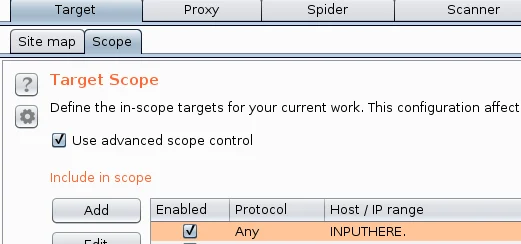
The work was done with Burp Suite. The author set the target scope using Burp's advance scope control and entered the host-name as "company.". No accounts, roles or specific Burp version are described.
Finding it
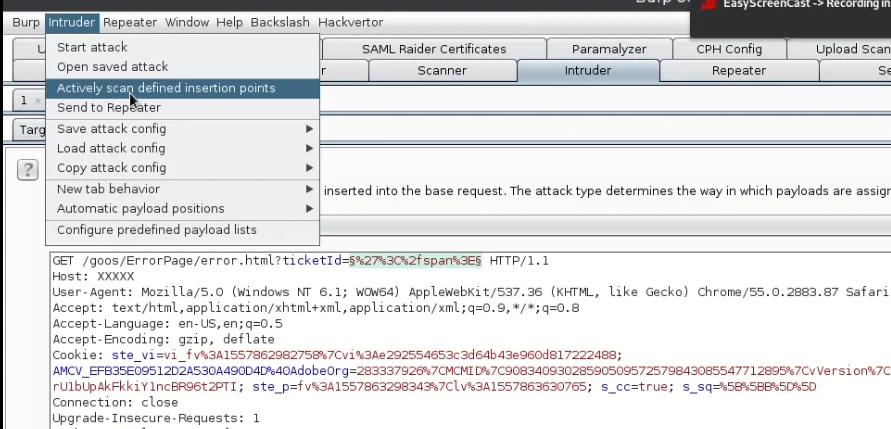
The author browsed the application slowly, one request at a time, looking specifically for parameters whose values get reflected. Once a reflection was suspected, the Intruder tab was used to Actively scan defined insertion points. Insertion points for cookies and similar were cleared so that only the URL parameters were in scope.
Enumerating endpoints from JavaScript
The endpoint for this specific XSS was found by browsing links inside the application's JS files. The author recommends the Linkfinder tool (https://github.com/GerbenJavado/LinkFinder), which summarises the endpoints it extracts into a neat HTML report.
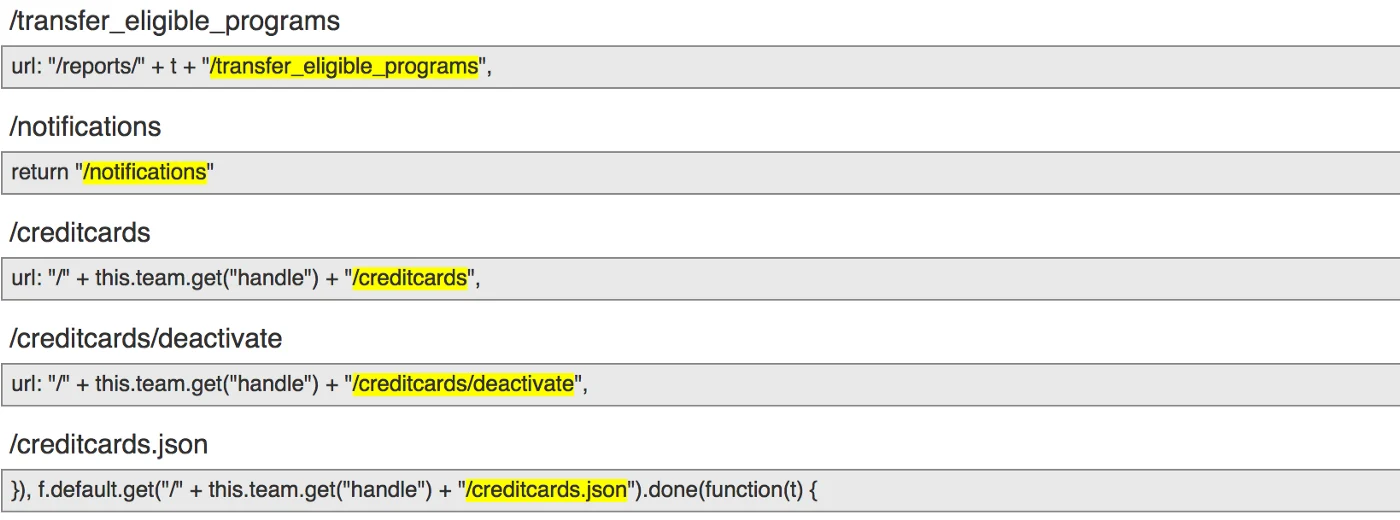
The image is a screenshot from the Linkfinder git site showing its HTML summary of endpoints.
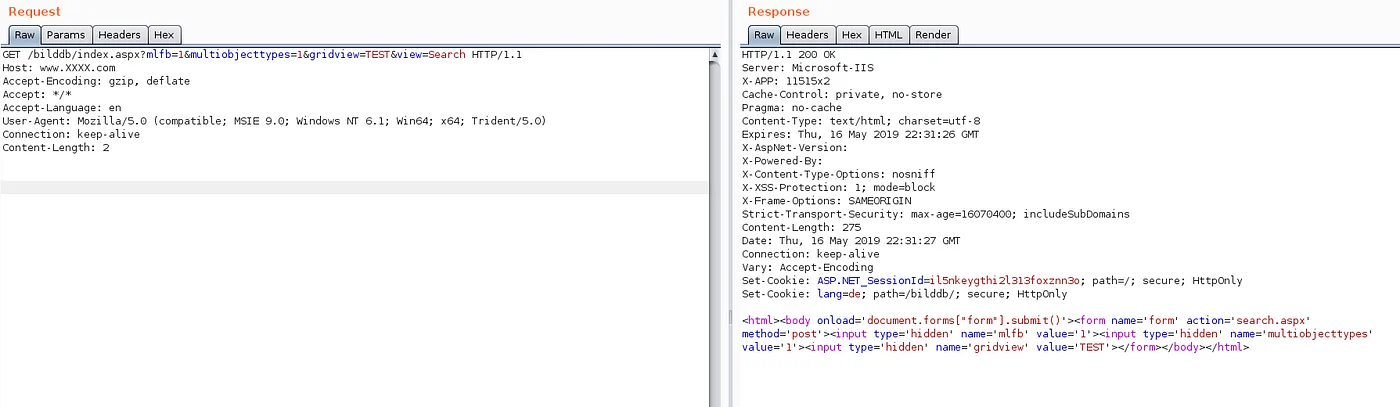
This led to the endpoint vulnerable to XSS. The first check was for reflection: the TEST value was clearly reflected in the response, and further testing revealed that most of the parameters could be reflected.
Exploitation
Step 1: break out of the value
The author broke out of the parameter value and tried several injections. None worked. Over several hours, every variation of tags and fillers tried was blocked. The general shape being attempted was the common XSS design:
{TAG}{EVENT}={PAYLOAD}
The author also points readers to an article on bypassing XSS detection WAFs (https://0x00sec.org/t/fun-bypass-xss-detection-waf/12228) and notes that fillers can be added in between to evade a WAF or a white/black list. The tags tried included:
scriptimgabodyscript htmlmetaxmlobject etc.. etc..
Step 2: find a tag the WAF lets through
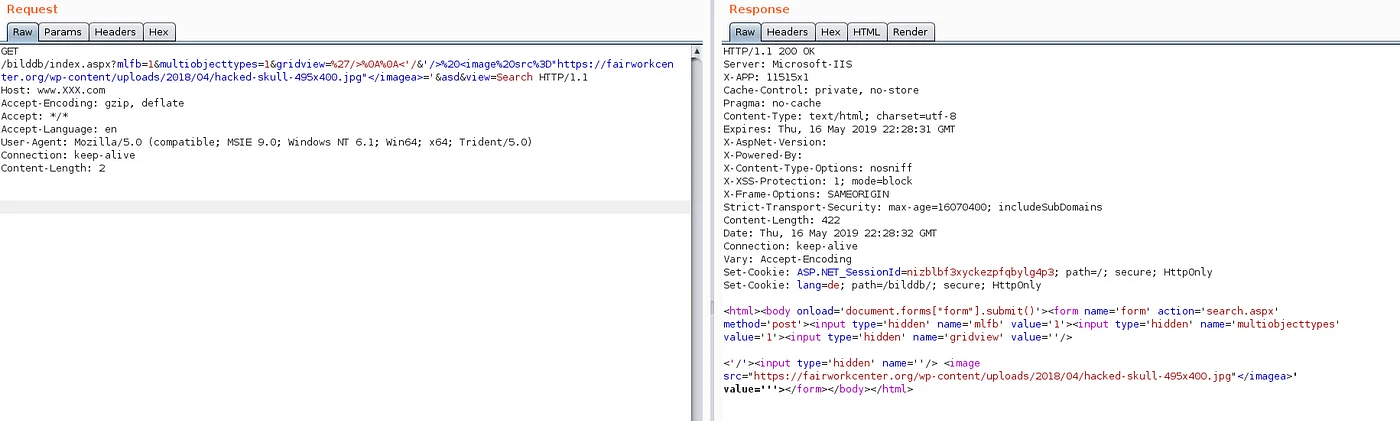
After a few hours, the only injection that could be added with a good success rate was the svg and image tag. The WAF clearly blocks img, but image is not blocked. Injecting images into the site was possible, but the injection was redirected almost immediately because of the form onload event. The author then continued experimenting with the svg tag.
Step 3: find an event handler that is not blocked
The next problem was finding an event handler that was not blocked. The classic handlers
events on(load|click|error|show)
all seemed to be blocked. After "trying harder", the author found that the OnAuxClick event is not blocked. A list of events to try:
onclickondblclickonmousedownonmousemoveonmouseoveronmouseoutonmouseuponkeydownonkeypressonkeyuponabortonerroronloadonresizeonscrollonunloadonsubmitonbluronchangeonfocusonresetonselectonMoveOnonauxclickoncontextmenuonmouseleaveontouchcancel
The onauxclick handler is not nearly as sophisticated or practical for attacks as the other methods, but it works nonetheless: it triggers on any mouse button that is not the primary button.
Step 4: choose an executable payload
With the tag and event both unblocked, the next step was a payload that executes. The author does not cover what is and is not executable in general, but says the best bet was to run something directly executable from the Alert and Prompt commands. Some example payloads:
write(1)confirm(1)alert(1)prompt(1)Simple variation if () is blocked. Pay Attention now `` is just as effective.write`1`confirm`1`alert`1`prompt`1`
Eventually the payloads worked using backticks instead of the traditional () approach. The final payload that worked was:
gridview=%27&’/>%20<svg/onauxClick%3D”alert`HackerOne`”</svg>=’&asd
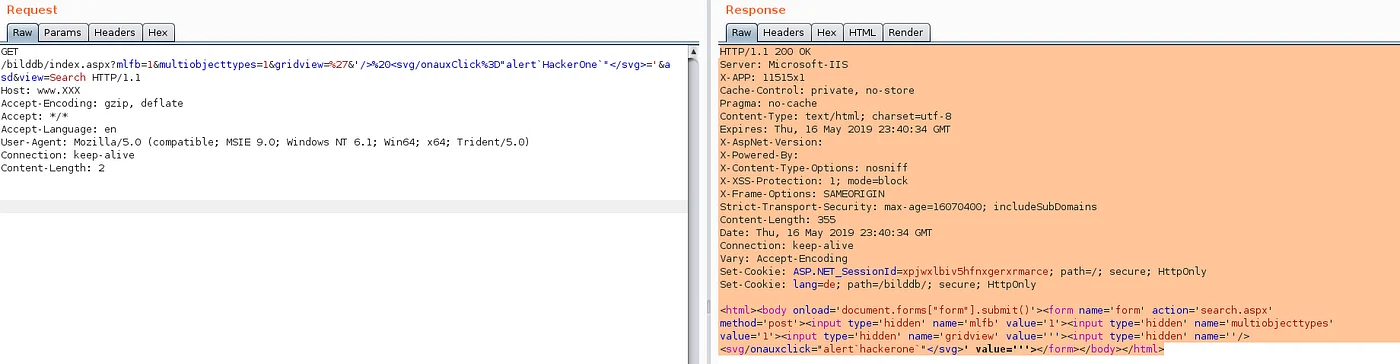
The image shows the payload reflected correctly in the response.
Getting this working took several hours because the WAF and filtering were very restrictive.
Root cause
The endpoint reflects URL parameter values into the HTML response without adequate output encoding, so a value that breaks out of its context is rendered as markup. The application's filtering and the WAF reduced the set of usable tags and events but did not eliminate them: img was blocked while image was not, the common load, click, error and show handlers were blocked while onauxclick was not, and the () call syntax could be replaced with backticks. The report does not describe the server-side code, so the exact encoding mistake is not stated.
Impact
The author describes this as a reflected XSS and does not set out a specific impact scenario. In general terms, a reflected XSS lets an attacker who can get a victim to load a crafted URL run script in the victim's browser in the context of the site. The report does not state which users or data were affected, nor whether any bounty was paid.
Fix
The appropriate fix is context-aware output encoding of every reflected parameter so that values cannot break out of their HTML context, together with input validation that does not rely on a blocklist of tag and event names.
Variants to test
- Alternative tag names for blocked ones. Where
imgis blocked, tryimage,svgand other tags that render or execute. A positive result is the tag appearing unescaped in the response. - Less common event handlers. Where
onload,onclick,onerrorandonshoware blocked, tryonauxclickand the other handlers in the list above. A positive result is the handler surviving into the response. - Backtick call syntax. Where
()is filtered, tryalert`1`and the equivalents forconfirm,promptandwrite. A positive result is the payload executing without parentheses. - Fillers between tag and event. Insert fillers between the tag and the event to evade WAF or white/black list matching. A positive result is the payload passing the filter and still parsing as valid markup.
- Endpoint discovery from JavaScript. Run Linkfinder over the application's JS files and test the extracted endpoints for reflection. A positive result is a parameter whose value comes back unencoded.
Timeline
- 17-05-19: bug discovered, company informed on HackerOne.
What happened, in plain words
A security researcher found a bug on a website run by a company he only calls "company." The bug is called reflected cross-site scripting, or reflected XSS for short. In plain terms: the website takes a value from the address bar of your browser (the part after the ? sign) and pastes it straight into the page it sends back, without cleaning it first. If that value is ordinary text, nothing bad happens. If the value is written to look like a piece of a web page, the browser treats it as part of the page and runs it. That lets an attacker make the site do things in a visitor's browser that the site never intended.
The interesting part of this story is not finding the bug. It is getting a working attack past the site's defences. The site had a web application firewall (WAF), which is a filter that sits in front of a website and blocks requests that look dangerous, and it also had its own input filtering. The researcher spent several hours trying different combinations until he found one that slipped through. This article walks through that process from the beginning, assuming you have never done security testing before.
The setup: Burp Suite and scope
The work was done with a tool called Burp Suite. Think of Burp as a pair of glasses you put between your browser and the website: every request your browser sends and every response the site sends back passes through Burp, where you can read it, change it and replay it. Security testers use it because a normal browser hides all of that from you.
Before testing anything, the researcher told Burp which host he was allowed to touch. This is called the target scope. It matters because a tester should only send test traffic to systems they are authorised to test, and a scope setting keeps the tool from wandering onto other sites by accident. He used Burp's advance scope control and entered the host-name as "company.".
Looking for reflections
The researcher then browsed the application slowly, one request at a time, instead of crawling it automatically. The reason is simple: he was looking for a specific behaviour. He wanted to see a value he typed into a URL parameter come back inside the page. A URL parameter is the name=value pair you sometimes see after a question mark in an address, for example ?search=shoes. If the page then shows "You searched for: shoes", the value has been reflected.
Once he suspected a reflection, he switched to Burp's Intruder tab. Intruder is the part of Burp that takes a request and automatically resends it many times with different values in chosen places. Those chosen places are called insertion points. He set Intruder to Actively scan defined insertion points, and he cleared the insertion points for cookies and similar so that only the URL parameters were being tested.
Why limit it to URL parameters? Because a cookie is a small piece of data the site stores in your browser and sends back with every request, often used to remember that you are logged in. Changing cookies during a scan can break your session or test things you did not mean to test. Keeping the scan on the URL parameters kept the experiment focused on the reflection he had spotted.
Finding endpoints inside JavaScript files
The endpoint for this particular XSS was found by browsing links inside the application's JavaScript files. JavaScript is the programming language that runs in your browser and makes pages interactive. Modern sites ship large JavaScript files, and those files often contain the addresses of the site's internal features, called endpoints. An endpoint is simply a specific address on the server that does something, like /api/user/details.
The researcher recommends a tool called Linkfinder (https://github.com/GerbenJavado/LinkFinder), which reads JavaScript files and pulls out the endpoints it finds. It even summarises them for you in a neat HTML report.
The screenshot is from the Linkfinder git site and shows its HTML summary of endpoints.
This led him to the endpoint that was vulnerable to XSS. His first check was for reflection. He put the value TEST into a parameter, and the value came back clearly in the response. Further testing showed that most of the parameters could be reflected.
Building the attack
Step 1: break out of the value
A reflected value usually lands inside some existing HTML, for example inside an attribute like value="...". To make the browser treat your input as new markup rather than as text, you have to break out of that spot, typically by closing a quote or a tag. The researcher tried several injections of this kind. None worked. Over several hours, every variation of tags and fillers he tried was blocked.
The general shape he was aiming for is the classic XSS pattern:
{TAG}{EVENT}={PAYLOAD}
Read it as three slots. {TAG} is an HTML element such as svg or img. {EVENT} is something that can happen to that element, such as a click or a load. {PAYLOAD} is the code to run when the event happens. Put together, the browser sees an element that runs code when you interact with it.
He also points readers to an article about bypassing XSS detection WAFs (https://0x00sec.org/t/fun-bypass-xss-detection-waf/12228) and notes that fillers can be added between the parts to evade a WAF or a white/black list. A filler is junk that the filter does not recognise as dangerous but that the browser still parses as part of the markup. The tags he tried included:
scriptimgabodyscript htmlmetaxmlobject etc.. etc..
That block is a run-together list of tag names: script, img, abody, script html, meta, xml, object, and so on. These are all HTML elements that, in one way or another, can load or run something. The point of trying many of them is that a filter often blocks the obvious ones (script, img) while forgetting a less obvious one.
Step 2: find a tag the WAF lets through
After a few hours, the only injection that could be added with a good success rate was the svg and image tag. The WAF clearly blocks img, but image is not blocked. That is a useful lesson about blocklists: img and image are different strings, and a filter that only checks for the first one misses the second. Injecting images into the site was possible, but the injection was redirected almost immediately because of the form onload event. In other words, the page did something on load that sent the browser elsewhere before the injected content could be used. He then continued experimenting with the svg tag. SVG is a format for drawing vector graphics, and browsers treat SVG elements as real page elements, which is why they are useful in XSS testing.
Step 3: find an event handler that is not blocked
The next problem was finding an event handler that was not blocked. An event handler is the on... part of a tag: it tells the browser "when this happens to this element, run this code." The classic handlers
events on(load|click|error|show)
all seemed to be blocked. That line is shorthand for the handlers onload, onclick, onerror and onshow. After "trying harder", the researcher found that the OnAuxClick event is not blocked. Here is a list of events to try:
onclickondblclickonmousedownonmousemoveonmouseoveronmouseoutonmouseuponkeydownonkeypressonkeyuponabortonerroronloadonresizeonscrollonunloadonsubmitonbluronchangeonfocusonresetonselectonMoveOnonauxclickoncontextmenuonmouseleaveontouchcancel
Again this is a run-together list of handler names: onclick, ondblclick, onmousedown, and so on through to ontouchcancel. The idea is to work through them until one survives the filter. The onauxclick handler is not nearly as sophisticated or practical for attacks as the other methods, but it works nonetheless: it triggers on any mouse button that is not the primary button. In everyday terms, a normal left click is the primary button; a middle click or a right click is an auxiliary click, and that is what fires onauxclick.
Step 4: choose an executable payload
With the tag and the event both unblocked, the next step was a payload that actually executes. A payload is the piece of code you want the browser to run. The researcher does not cover what is and is not executable in general, but he says the best bet was to run something directly executable from the Alert and Prompt commands. alert, confirm and prompt are built-in browser functions that pop up a small dialog box; they are the standard, harmless way to prove that code ran. Some example payloads:
write(1)confirm(1)alert(1)prompt(1)Simple variation if () is blocked. Pay Attention now `` is just as effective.write`1`confirm`1`alert`1`prompt`1`
This block is a run-together list of examples. The first four are write(1), confirm(1), alert(1) and prompt(1), each calling a function with the value 1 inside round brackets. Then comes a note that if () is blocked, backticks work just as well, followed by the same four calls written with backticks: write`1`, confirm`1`, alert`1` and prompt`1`. In JavaScript, a function can be invoked as a tagged template with backticks instead of brackets, a lesser-known form that many filters do not account for.
Eventually the payloads worked using backticks instead of the traditional () approach. The final payload that worked was:
gridview=%27&’/>%20<svg/onauxClick%3D”alert`HackerOne`”</svg>=’&asd
Reading that from left to right: gridview is the parameter name, %27 is the URL-encoded form of a single quote, then a literal ’ and /> and %20 (a space), then the <svg tag with the onauxClick handler, %3D (an equals sign), a double quote, the call alert`HackerOne`, a closing </svg>, and some trailing characters. The mix of encoded and literal characters is part of what got it past the filter.
The screenshot shows the payload reflected correctly in the response.
Getting this working took several hours because the WAF and the filtering were very restrictive.
Why the bug exists
The endpoint takes values from URL parameters and puts them into the HTML response without adequate output encoding. Output encoding means converting characters that have special meaning in HTML, such as < and ", into harmless forms before placing them in the page. Without it, a value that breaks out of its context is rendered as markup instead of text.
The application's filtering and the WAF reduced the set of usable tags and events, but they did not eliminate them. img was blocked while image was not. The common load, click, error and show handlers were blocked while onauxclick was not. The () call syntax could be replaced with backticks. Each of those is a gap in a blocklist, and a blocklist only works until someone finds the item it forgot. The report does not describe the server-side code, so the exact encoding mistake is not stated.
What the impact is
The researcher describes this as a reflected XSS and does not set out a specific impact scenario. In general terms, a reflected XSS lets an attacker who can get a victim to load a crafted URL run script in the victim's browser in the context of the site. The report does not state which users or data were affected, nor whether any bounty was paid.
How it should be fixed
The appropriate fix is context-aware output encoding of every reflected parameter, so that values cannot break out of their HTML context, together with input validation that does not rely on a blocklist of tag and event names. Context-aware means the encoding matches where the value lands: inside an HTML attribute, inside a script block and inside plain text all need different treatment.
Variants to test
If you are learning this, these are the variations worth trying, each with a clear sign of success:
- Alternative tag names for blocked ones. Where
imgis blocked, tryimage,svgand other tags that render or execute. A positive result is the tag appearing unescaped in the response. - Less common event handlers. Where
onload,onclick,onerrorandonshoware blocked, tryonauxclickand the other handlers in the list above. A positive result is the handler surviving into the response. - Backtick call syntax. Where
()is filtered, tryalert`1`and the equivalents forconfirm,promptandwrite. A positive result is the payload executing without parentheses. - Fillers between tag and event. Insert fillers between the tag and the event to evade WAF or white/black list matching. A positive result is the payload passing the filter and still parsing as valid markup.
- Endpoint discovery from JavaScript. Run Linkfinder over the application's JavaScript files and test the extracted endpoints for reflection. A positive result is a parameter whose value comes back unencoded.
Timeline
- 17-05-19: bug discovered, company informed on HackerOne. HackerOne is a platform where researchers report vulnerabilities to companies.
Glossary
- Reflected XSS: a bug where a value from a request is pasted into the response without cleaning, so it can be treated as code by the browser.
- WAF (web application firewall): a filter in front of a website that blocks requests that look dangerous.
- Burp Suite: a tool that sits between your browser and a website so you can read, change and replay requests and responses.
- Target scope: the list of hosts a tester is allowed to send traffic to.
- Advance scope control: Burp's setting for defining that list.
- URL parameter: a
name=valuepair in an address, usually after a?. - Reflection: when a value you sent comes back inside the page you receive.
- Intruder: the Burp tab that resends a request many times with different values in chosen places.
- Insertion point: a place in a request that Intruder is told to change.
- Cookie: a small piece of data a site stores in your browser and sends back with each request, often to keep you logged in.
- JavaScript: the programming language that runs in the browser and makes pages interactive.
- Endpoint: a specific address on a server that does something.
- Linkfinder: a tool that extracts endpoints from JavaScript files and summarises them in an HTML report.
- Break out: to close the surrounding quote or tag so your input is treated as new markup.
- Tag: an HTML element such as
svgorimg. - Event handler: the
on...part of a tag that says what to run when something happens to the element. - Filler: junk inserted between parts of a payload that a filter ignores but the browser still parses.
- Blocklist: a filter that blocks known-bad strings, which fails when something is missing from the list.
- SVG: a format for vector graphics that browsers treat as real page elements.
- Payload: the piece of code you want the browser to run.
alert,confirm,prompt: built-in browser functions that show a small dialog, used to prove code ran.- Backtick call syntax: calling a JavaScript function with backticks instead of round brackets.
- Output encoding: converting characters with special meaning in HTML into harmless forms before putting them in a page.
- Context-aware encoding: encoding that matches where the value lands, such as an attribute or a script block.
- HackerOne: a platform where researchers report vulnerabilities to companies.




