Two faces of a same PDF document
PDF readers that support XFA forms (like Firefox's PDF.js) render the XFA content, while non-XFA readers show a fallback page. An attacker can craft a PDF where the XFA page and fallback page display different content, enabling fraud such as showing different payment amounts to different parties.
 Published on blog.fraktal.fi
Pdf Reader
The full write-up lives on its author's site
It belongs to its author, so we link to it rather than copy it. The other two tabs are our own rewrites, checked against it.
Context
PDF is the format most people reach for when a document has to look the same everywhere: contracts, invoices, purchase orders. The presentation of a PDF is meant to be independent of the viewer software, the browser, the operating system and the fonts installed on the device, and it should render identically even through different printers.
The format itself is old and limited, so Adobe extended it. PDF 1.7 (ISO 32000-1) introduces Adobe's Interactive Forms, which include JavaScript extensions, AcroForms and the Adobe XML Forms Architecture (XFA). XFA documents can carry a fillable form description plus a fallback page for readers that cannot handle XFA. The XFA specification lets the document define that fallback page, and it lets readers choose which pages they present.
This write-up looks at what happens when two readers make different choices about the same file. The focus is Mozilla PDF.js, the PDF library used by Firefox, but the issue is more general. The attack is a parser differential: one document, two parsers, two different visible contents.
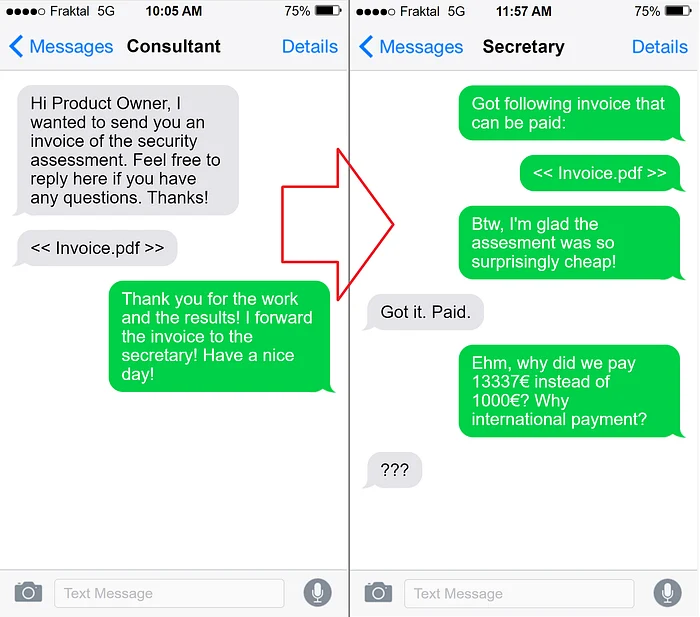
The article opens with a familiar scenario. Two people discuss an invoice and disagree about the amount and the destination account, each convinced by the PDF in front of them.
Setup
The preconditions are on the reader side:
- Mozilla activated PDF XFA form support in PDF.js by default on 2 October 2021.
- PDF.js renders fillable XFA form pages. Most other readers do not support XFA and instead present the fallback PDF page that is included as part of the document.
- The fallback page content is stored inside the document and is fully customisable.
Adobe Acrobat Reader, Mozilla Firefox and products using the PDF.js core render the XFA content. Most other readers are non-XFA-compliant, including Safari, Chromium, Edge and iOS Firefox. The real situation is more mixed: Acrobat Reader might integrate into the browser, and websites might use their own embedded PDF.js viewer, bypassing the browser's own reader.
Finding it
The starting question is whether a PDF can be manipulated so that the same file shows different content in different viewer apps. The answer is yes, and it is by design.
The XFA specification describes how a processor that cannot handle XFA content should fall back to a default presentation.
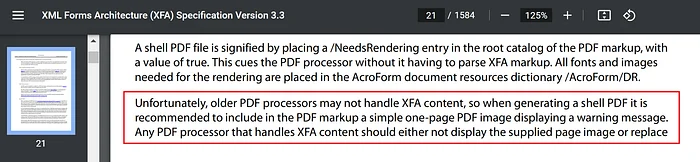
https://www.pdfa.org/norm-refs/XFA-3_3.pdf
In practice, PDF.js renders the fillable XFA form pages, while the other readers present the fallback PDF page included as part of the document.
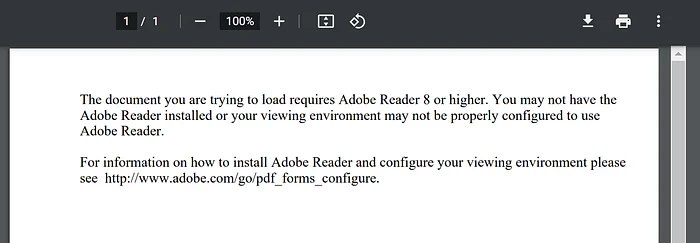
This fallback page is included into most of the XFA documents.
The fallback page content stored inside the document is fully customisable.
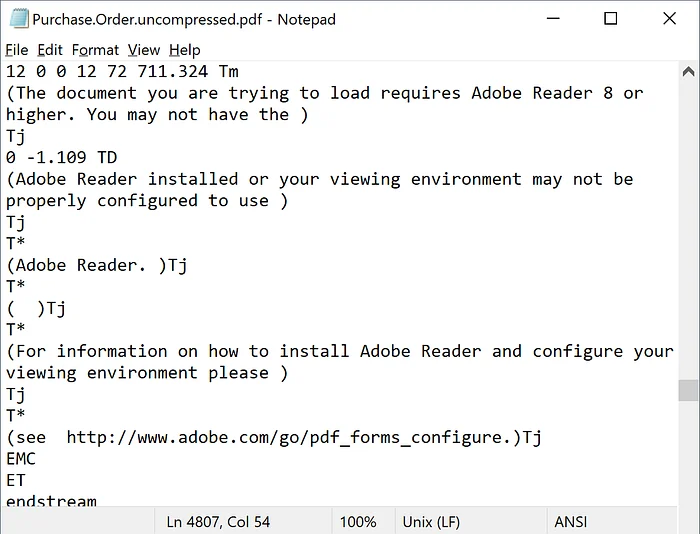
The fallback page content stored inside the document is fully customizable.
So an XFA-capable reader and a non-XFA reader can present completely different content out of the same base document file. None of the readers alert the user that the document contains unsupported features, or that rare PDF features are in use that most readers will not render properly. The reader simply shows what it can, and the user has no reason to suspect that the person next to them sees something else.
Exploitation
Step 1: build a document with two faces
Start from an XFA document. It carries the XFA form content that PDF.js will render, and it carries a fallback page that non-XFA readers will render instead. The fallback page is part of the document and its text area is under the author's control.
Step 2: edit the fallback page
The content manipulation was possible simply by modifying the fallback PDF page text area of "The document you are trying to load...". The content manipulation was possible simply by modifying the fallback PDF page text area.
Step 3: choose the two stories
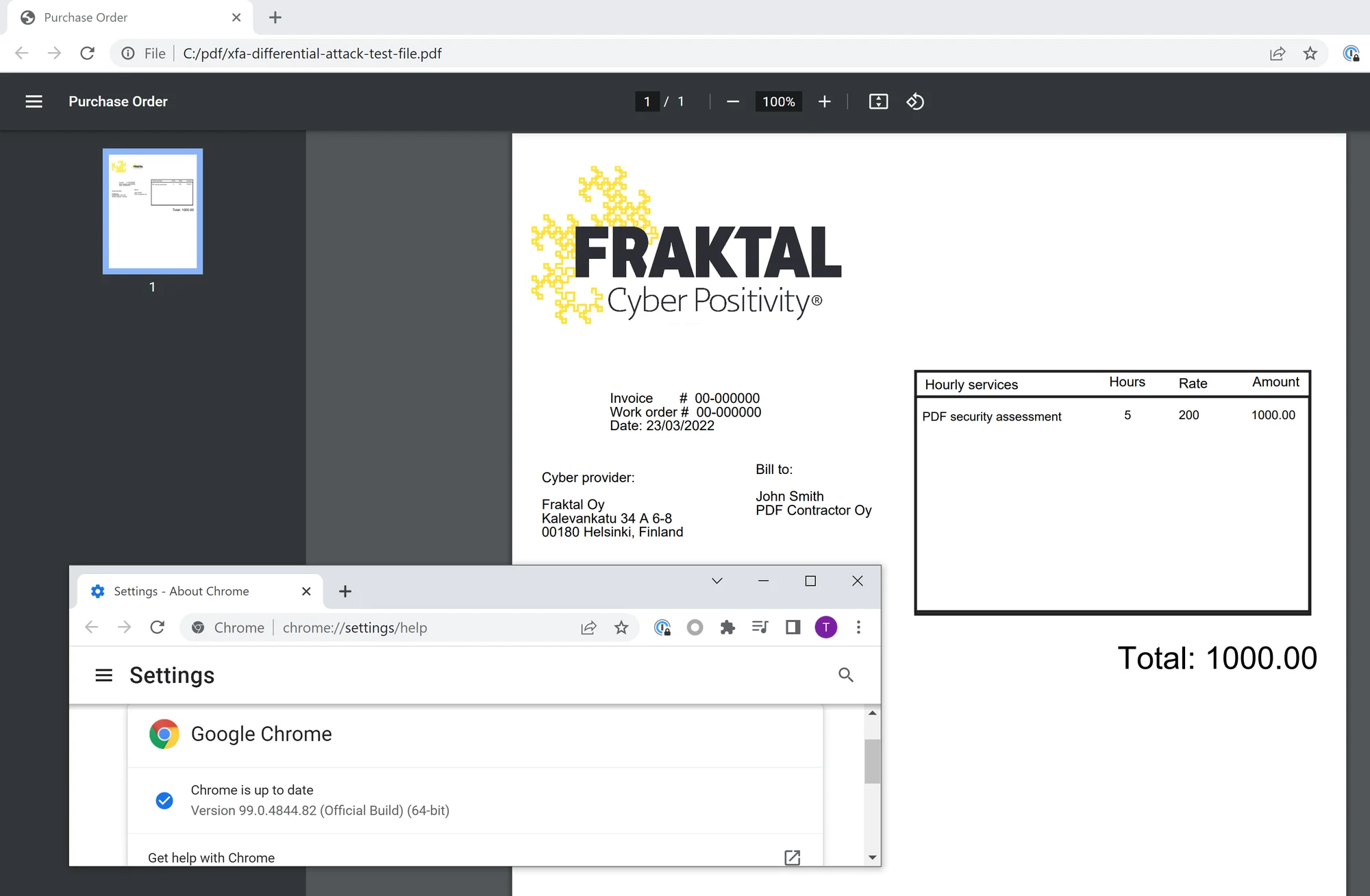
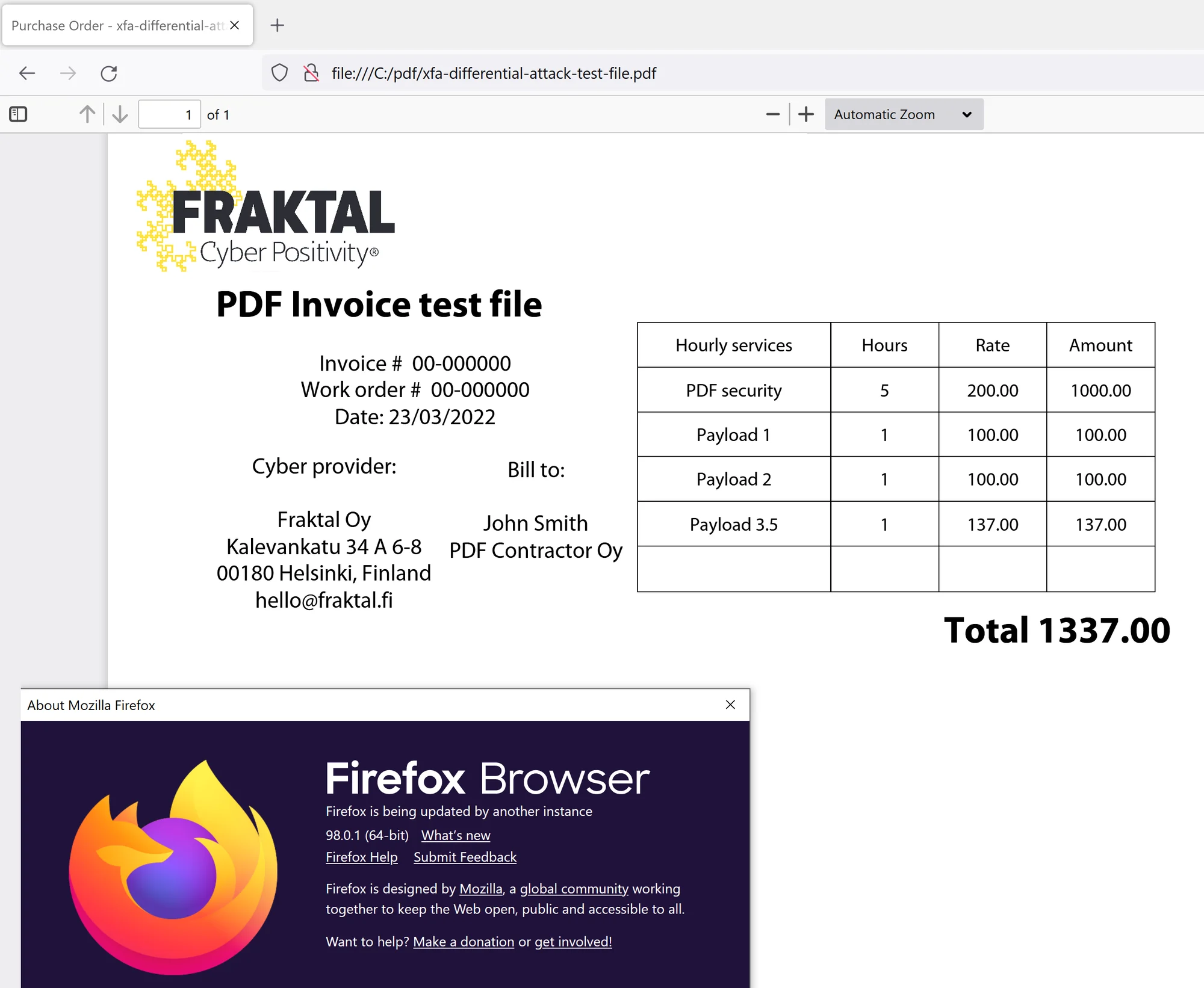
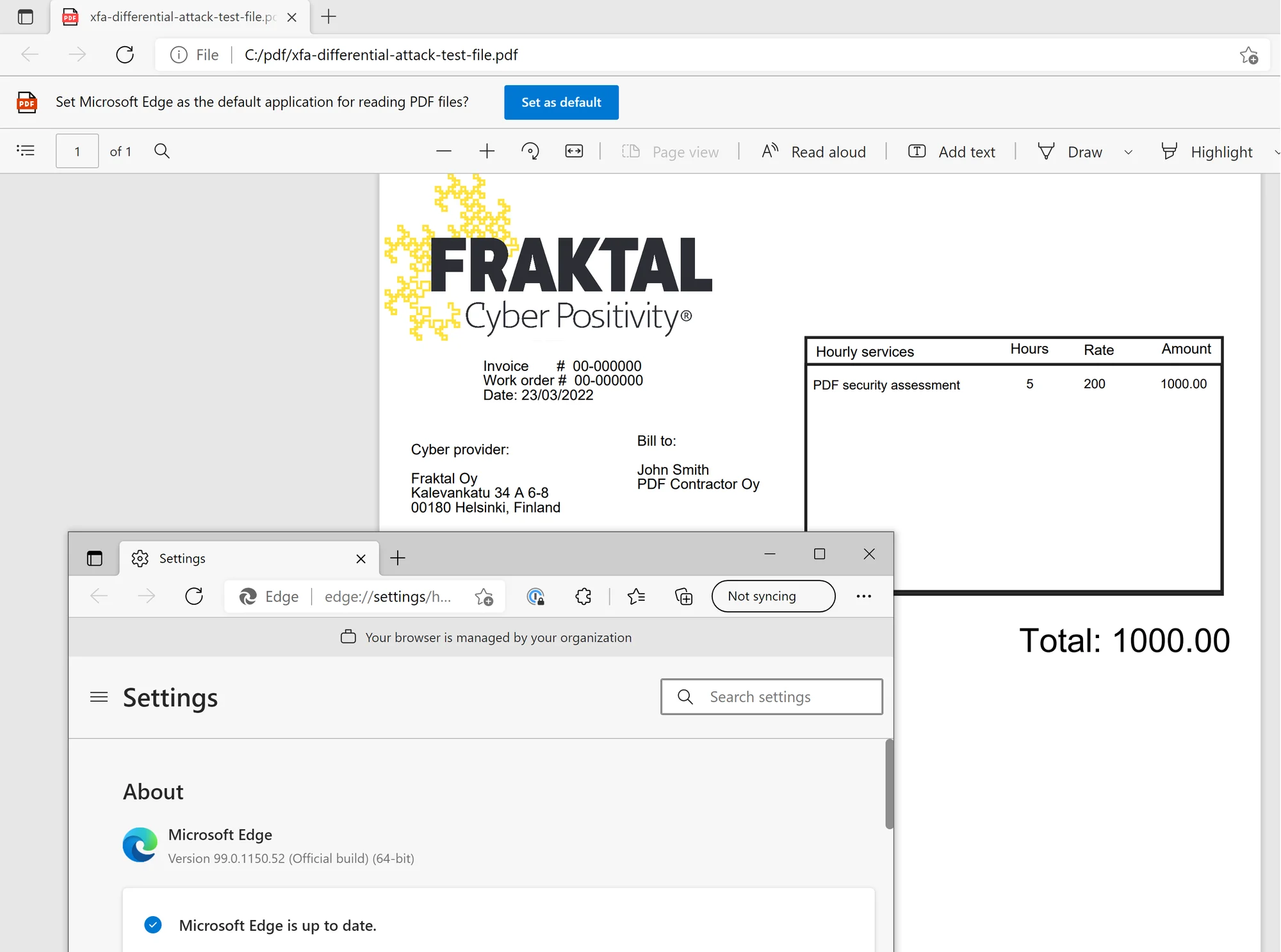
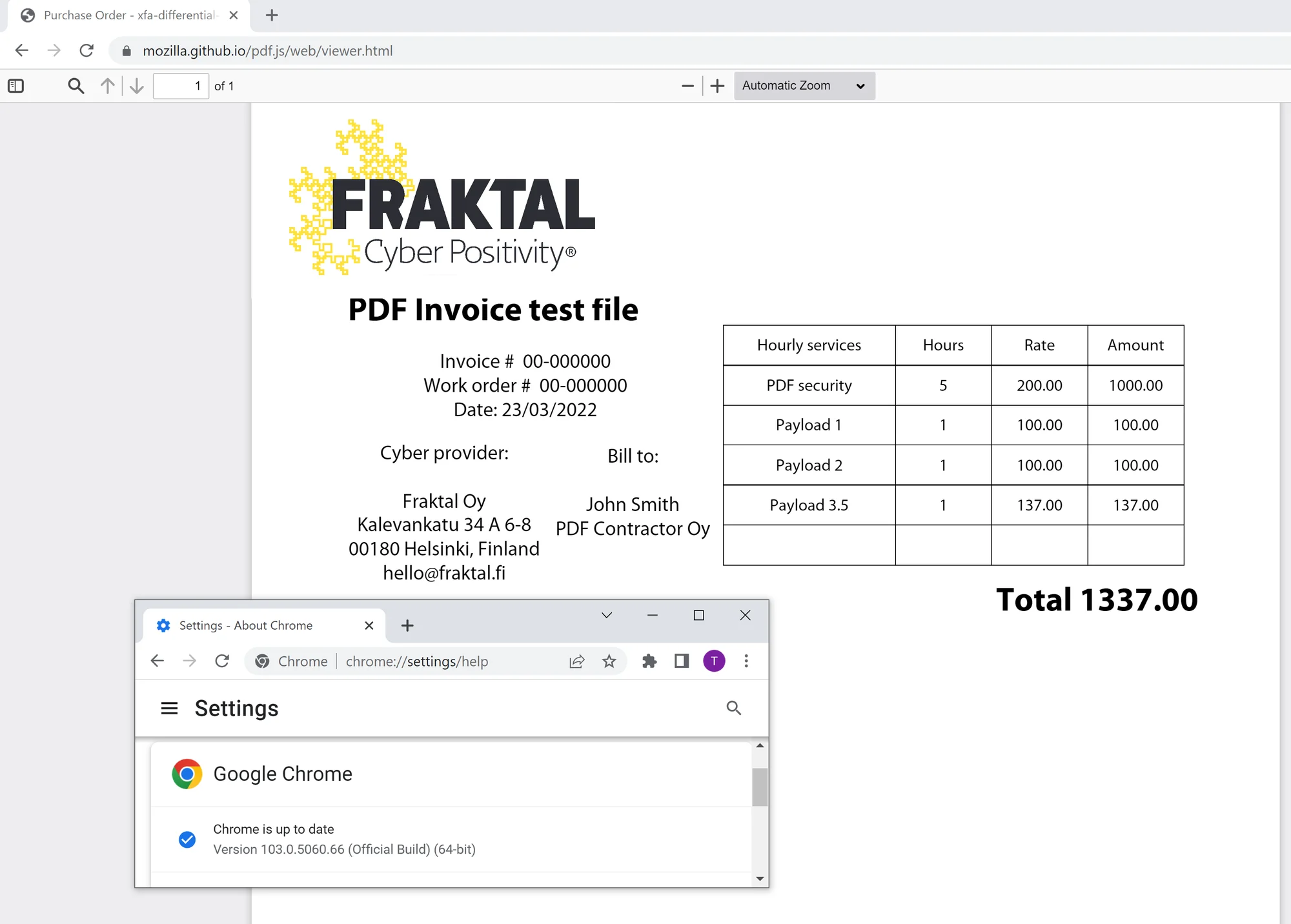
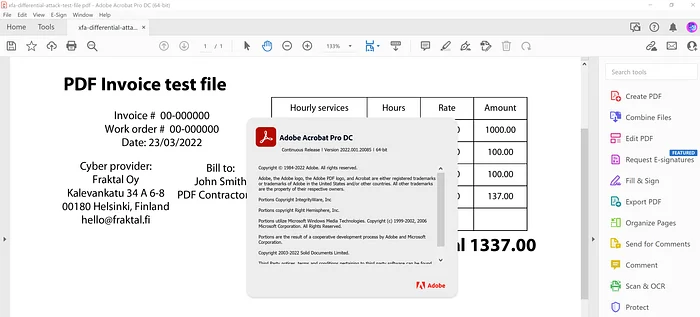
The proof of concept is a malicious PDF called "Purchase order". It shows a different purchase order depending on the reader used: 1337 € for XFA readers and 1000 € for the others.
Step 4: deliver it into a mixed pipeline
The document only needs to pass through more than one parser. PDF.js can be embedded in an HTML page, so many popular sites are affected regardless of the browser: a site may preview a PDF through PDF.js while the download and local opening lead to the alternative content. Content previewed and downloaded in Firefox might later be opened in a local PDF viewer or printed on paper. Corporate printers might accept PDF files directly, through web interfaces or from a USB stick. A system default PDF viewer can also change over time, changing the visible content of a file that was already reviewed.
Root cause
The weakness is in the design of the format and in how readers handle it, not in a single parsing bug. XFA defines a fallback page for readers that cannot process XFA, and the specification lets readers choose which pages they present. The fallback content lives inside the same file and is fully customisable, so the file legitimately contains two presentations. A reader that supports XFA shows the form; a reader that does not shows the fallback. Neither warns the user that the document contains features that might not render identically everywhere.
The trust users place in PDF as a format whose content is the same for everyone is the assumption that breaks.
Impact
The technique can be used to conduct fraud against business processes where the integrity of PDF documents is inherently trusted by the people in review and acceptance roles. An attacker could inject mutually exclusive pages into a document and hope that the various openers use different readers and see different contexts. In the invoice example, the document presents different payable amounts and account numbers to an approving supervisor and to accounts payable: the supervisor approves a lower sum, while accounting executes a payment with a larger sum.
The impact depends on the readers in use along the path: browser integration, embedded viewers, local viewers, printing and changing defaults all matter.
Fix
There is currently no fix available for the issue. The author gives advice for each stakeholder.
For companies: knowing that PDFs might not present the same content to all users is input for assessing risks in agreement and purchase payment processes.
For services handling PDFs: define a list of supported PDF file format extensions and ensure that accepted files are in line with the requirements. Avoid supporting file formats that cannot guarantee the same content will be visible to all users. Files could also be converted to a simpler format where the same potentially lossy converter handles those special cases and strips them out similarly.
For PDF reader apps: feature-rich readers should provide a compatibility view of the document, rendering it like a basic PDF reader would, and could present the fallback page as a compatibility page. This would be simple, effective and easy to understand for end users. Basic readers should alert when the document contains an unsupported feature and explain the consequences for portability; if all pages cannot be rendered, the reader should alert about the issue.
The disclosure timeline:
| Date | Event |
|---|---|
| 2022-03-25 | Reported issue to Mozilla PDF.js |
| 2022-04-04 | Mozilla confirmed the issue |
| 2022-06-16 | Mozilla closed the issue and decided not to fix |
| 2022-06-22 | Reported the issue to Chromium |
| 2022-06-22 | Chromium marked the issue as a duplicate with a previously reported bug without a security concern |
| 2022-06-22 | Reported issue to Adobe |
| 2022-06-27 | Adobe reported issue to be a product bug instead of a security issue |
| 2022-07-01 | This article published |
References from the write-up:
- https://bugzilla.mozilla.org/show_bug.cgi?id=1761472
- https://bugs.chromium.org/p/chromium/issues/detail?id=1338561
- https://bugs.chromium.org/p/chromium/issues/detail?id=1048930
- https://hackerone.com/reports/1609243
- Other XFA fallback fields. Modify other parts of the fallback page besides the text area, such as amounts, account numbers or dates, and open the file in an XFA-capable reader and a non-XFA reader. A positive result is two visibly different documents from one file.
- Embedded PDF.js viewers. Find sites that preview uploaded or hosted PDFs through PDF.js and compare the preview with the downloaded file opened locally. A positive result is different content in the two views.
- Print and scan pipelines. Send the same file to a printer that accepts PDFs directly and compare the printed output with the on-screen view. A positive result is a printed page that differs from what the reviewer approved.
- Default viewer changes. Open the same file before and after changing the system default PDF viewer. A positive result is a change in visible content for a file that was already reviewed.
- Mixed browser and local paths. Preview in Firefox and open the downloaded file in Safari, Chromium, Edge or iOS Firefox. A positive result is the XFA content in one and the fallback content in the other.
- Document conversion services. Pass the file through a service that converts PDFs to another format and check which presentation survives. A positive result is a converted document that keeps only one of the two contents, silently dropping the other.
What happened, in plain words
A PDF is the file format most people use when a document has to look the same for everyone: contracts, invoices, purchase orders. The idea behind PDF is that the file should look identical no matter which program opens it, which browser or operating system you use, which fonts are installed, or which printer you send it to.
The format is old and limited, so Adobe extended it over the years. One extension is called PDF 1.7 (ISO 32000-1), and it introduces Adobe's Interactive Forms. These include JavaScript extensions, AcroForms and the Adobe XML Forms Architecture, usually shortened to XFA. An XFA document can carry a fillable form description, and it can also carry a fallback page for readers that cannot handle XFA. The XFA specification lets the document define that fallback page, and it lets each reader choose which pages it presents.
This write-up looks at what happens when two different readers make different choices about the same file. The focus is Mozilla PDF.js, the PDF library used by Firefox, but the issue is more general. The attack is called a parser differential: one document, two parsers, two different visible contents. A parser is the part of a program that reads a file and works out what it means; a differential is simply a difference between two things.
The article opens with a familiar scenario. Two people discuss an invoice and disagree about the amount and the destination account, each convinced by the PDF in front of them.
Setup
The preconditions are on the reader side:
- Mozilla activated PDF XFA form support in PDF.js by default on 2 October 2021.
- PDF.js renders fillable XFA form pages. Most other readers do not support XFA and instead present the fallback PDF page that is included as part of the document.
- The fallback page content is stored inside the document and is fully customisable.
Adobe Acrobat Reader, Mozilla Firefox and products using the PDF.js core render the XFA content. Most other readers are non-XFA-compliant, including Safari, Chromium, Edge and iOS Firefox. The real situation is more mixed: Acrobat Reader might integrate into the browser, and websites might use their own embedded PDF.js viewer, bypassing the browser's own reader.
Finding it
The starting question is whether a PDF can be manipulated so that the same file shows different content in different viewer apps. The answer is yes, and it is by design.
The XFA specification describes how a processor that cannot handle XFA content should fall back to a default presentation.
https://www.pdfa.org/norm-refs/XFA-3_3.pdf
In practice, PDF.js renders the fillable XFA form pages, while the other readers present the fallback PDF page included as part of the document.
This fallback page is included into most of the XFA documents.
The fallback page content stored inside the document is fully customisable.
The fallback page content stored inside the document is fully customizable.
So an XFA-capable reader and a non-XFA reader can present completely different content out of the same base document file. None of the readers alert the user that the document contains unsupported features, or that rare PDF features are in use that most readers will not render properly. The reader simply shows what it can, and the user has no reason to suspect that the person next to them sees something else.
Exploitation
Step 1: build a document with two faces
Start from an XFA document. It carries the XFA form content that PDF.js will render, and it carries a fallback page that non-XFA readers will render instead. The fallback page is part of the document and its text area is under the author's control.
Step 2: edit the fallback page
The content manipulation was possible simply by modifying the fallback PDF page text area of "The document you are trying to load...". The content manipulation was possible simply by modifying the fallback PDF page text area.
Step 3: choose the two stories
The proof of concept is a malicious PDF called "Purchase order". It shows a different purchase order depending on the reader used: 1337 € for XFA readers and 1000 € for the others.
Step 4: deliver it into a mixed pipeline
The document only needs to pass through more than one parser. PDF.js can be embedded in an HTML page, so many popular sites are affected regardless of the browser: a site may preview a PDF through PDF.js while the download and local opening lead to the alternative content. Content previewed and downloaded in Firefox might later be opened in a local PDF viewer or printed on paper. Corporate printers might accept PDF files directly, through web interfaces or from a USB stick. A system default PDF viewer can also change over time, changing the visible content of a file that was already reviewed.
Root cause
The weakness is in the design of the format and in how readers handle it, not in a single parsing bug. XFA defines a fallback page for readers that cannot process XFA, and the specification lets readers choose which pages they present. The fallback content lives inside the same file and is fully customisable, so the file legitimately contains two presentations. A reader that supports XFA shows the form; a reader that does not shows the fallback. Neither warns the user that the document contains features that might not render identically everywhere.
The trust users place in PDF as a format whose content is the same for everyone is the assumption that breaks.
Impact
The technique can be used to conduct fraud against business processes where the integrity of PDF documents is inherently trusted by the people in review and acceptance roles. An attacker could inject mutually exclusive pages into a document and hope that the various openers use different readers and see different contexts. In the invoice example, the document presents different payable amounts and account numbers to an approving supervisor and to accounts payable: the supervisor approves a lower sum, while accounting executes a payment with a larger sum.
The impact depends on the readers in use along the path: browser integration, embedded viewers, local viewers, printing and changing defaults all matter.
Fix
There is currently no fix available for the issue. The author gives advice for each stakeholder.
For companies: knowing that PDFs might not present the same content to all users is input for assessing risks in agreement and purchase payment processes.
For services handling PDFs: define a list of supported PDF file format extensions and ensure that accepted files are in line with the requirements. Avoid supporting file formats that cannot guarantee the same content will be visible to all users. Files could also be converted to a simpler format where the same potentially lossy converter handles those special cases and strips them out similarly.
For PDF reader apps: feature-rich readers should provide a compatibility view of the document, rendering it like a basic PDF reader would, and could present the fallback page as a compatibility page. This would be simple, effective and easy to understand for end users. Basic readers should alert when the document contains an unsupported feature and explain the consequences for portability; if all pages cannot be rendered, the reader should alert about the issue.
The disclosure timeline:
| Date | Event |
|---|---|
| 2022-03-25 | Reported issue to Mozilla PDF.js |
| 2022-04-04 | Mozilla confirmed the issue |
| 2022-06-16 | Mozilla closed the issue and decided not to fix |
| 2022-06-22 | Reported the issue to Chromium |
| 2022-06-22 | Chromium marked the issue as a duplicate with a previously reported bug without a security concern |
| 2022-06-22 | Reported issue to Adobe |
| 2022-06-27 | Adobe reported issue to be a product bug instead of a security issue |
| 2022-07-01 | This article published |
References from the write-up:
- https://bugzilla.mozilla.org/show_bug.cgi?id=1761472
- https://bugs.chromium.org/p/chromium/issues/detail?id=1338561
- https://bugs.chromium.org/p/chromium/issues/detail?id=1048930
- https://hackerone.com/reports/1609243
- Other XFA fallback fields. Modify other parts of the fallback page besides the text area, such as amounts, account numbers or dates, and open the file in an XFA-capable reader and a non-XFA reader. A positive result is two visibly different documents from one file.
- Embedded PDF.js viewers. Find sites that preview uploaded or hosted PDFs through PDF.js and compare the preview with the downloaded file opened locally. A positive result is different content in the two views.
- Print and scan pipelines. Send the same file to a printer that accepts PDFs directly and compare the printed output with the on-screen view. A positive result is a printed page that differs from what the reviewer approved.
- Default viewer changes. Open the same file before and after changing the system default PDF viewer. A positive result is a change in visible content for a file that was already reviewed.
- Mixed browser and local paths. Preview in Firefox and open the downloaded file in Safari, Chromium, Edge or iOS Firefox. A positive result is the XFA content in one and the fallback content in the other.
- Document conversion services. Pass the file through a service that converts PDFs to another format and check which presentation survives. A positive result is a converted document that keeps only one of the two contents, silently dropping the other.
Glossary
- PDF: Portable Document Format, a file format designed so a document looks the same on any device or program.
- Parser: the part of a program that reads a file and works out what it means.
- Parser differential: a situation where two different parsers read the same file and reach different conclusions about its content.
- XFA: Adobe XML Forms Architecture, an extension to PDF that describes fillable forms in XML.
- XML: a text-based way of structuring data with tags, similar in spirit to HTML.
- Fallback page: a page stored inside a document that a reader shows when it cannot handle the main content.
- PDF.js: a PDF library written in JavaScript, used by Firefox and embeddable in web pages.
- AcroForms: Adobe's older style of fillable PDF form, mentioned alongside XFA in the PDF 1.7 standard.
- ISO 32000-1: the international standard that describes PDF 1.7.
- JavaScript extensions: extra scripting features Adobe added to PDF forms.
- Reader / viewer: the program that opens and displays a PDF file.
- Proof of concept (PoC): a small demonstration that shows an issue is real.
- Disclosure: the process of telling the vendor about an issue and, later, the public.
- Vendor: the company or project that makes the software involved.
- Duplicate: a bug report that describes the same issue as one already filed.
- Lossy converter: a tool that converts a file to another format and may drop information in the process.
- Compatibility view: a mode in which a feature-rich reader shows a document the way a basic reader would.
- Integrity: the property that data has not been changed or misrepresented.
- Fraud: deception carried out for financial or other gain.
- Pipeline: the chain of programs and people a document passes through, from author to reader.
- USB stick: a small removable storage device.
- Default viewer: the program the operating system opens a file type with when you double-click it.
- Bugzilla: Mozilla's public bug-tracking system.
- Chromium: the open-source browser project behind Chrome and Edge.
- HackerOne: a platform where security reports are submitted and tracked.






