Un3xpected DoS Attack on Profile Pictur3
The profile picture upload feature allowed a user to first upload a valid image without saving, then upload a very large pixel image and save it, causing the page to become unresponsive. An attacker could use this to cause a denial of service on the profile page.

Okayyyy - First of all, I wanted to say everyone that I prefer to publish Write-ups that are unique and something strange that may help you along the way of Bug Hunting and not something cliche, so I think that this Write-up may not bore you with regular stuffs instead help you with some insights during your hunting(…
The full write-up lives on its author's site
It belongs to its author, so we link to it rather than copy it. The other two tabs are our own rewrites, checked against it.
Context
The target is a web application with user profiles and a profile picture upload feature. The report does not name the product or the program. The feature works as you would expect: a user picks an image file, the application validates it, and the user then confirms the change with a button labelled "Set New profile Picture". The researcher's goal was to bypass the file upload validation, a common objective when testing this kind of feature.
The author frames the write-up as an attempt to document something unusual rather than a standard upload bypass, and notes that this was the first time they had tried to bypass a file upload.
Setup
The report does not describe accounts, roles, versions or a test environment. The only tool named is Burp Suite, used to intercept the upload request. The precondition for the bug is simply an authenticated user with access to the profile picture upload form, plus a copy of the "lottapixel" image file, which the report links to as lottapixel.jpg.
Finding it
The researcher began with the obvious approaches and each one was rejected:
- Uploading a pixel image as the profile picture produced an error pop-up and the file was not accepted.
- Uploading files with other extensions, including
php,.php.jpeg,.svgand other possible extensions, failed as well. - Intercepting the request with Burp Suite and changing the extension and other parts of the request also failed.
At this point the researcher had tried most of what they had learned from write-ups, blogs and videos, and had concluded that a complex trick would be needed. The actual issue turned out to be much simpler and did not involve bypassing the validation at all.
Exploitation
Step 1: upload a valid image without confirming
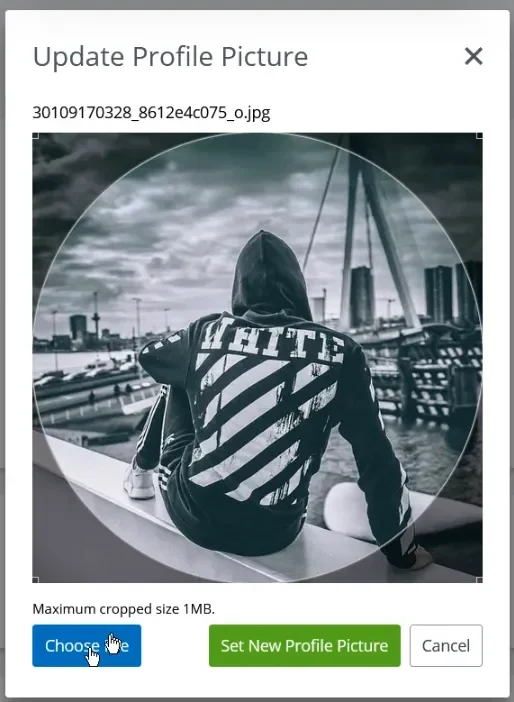
Acting as a normal user would, the researcher uploaded a valid image as the profile picture but did not click "Set New profile Picture". The upload form was left open with the valid image selected.
Step 2: replace the file with the pixel image
Without closing the window, the researcher clicked "Choose file" again and selected the lottapixel file, then clicked "Set New profile Picture".
Step 3: observe the result
Setting the pixel image as the new profile picture caused application level denial of service: the page became unresponsive. The researcher confirmed the behaviour from other browsers as well.
Step 4: attempt to increase the impact
The researcher tried once more with svg, php and other extensions to raise the impact, but this was not possible. The researcher tried svg, php and other extensions again to raise the impact, but this was not possible.
Root cause
The report does not include the server-side code or the validation logic, so the exact mistake is not shown. One possible explanation is that the application validates the first file selected and then processes the file submitted at confirmation without repeating that validation. The valid image passes the check, and the pixel image is then accepted in its place. Why the pixel image makes the page unresponsive is not explained in the report; likely the image is large enough, or expensive enough to decode, that the processing or rendering step blocks the page.
Impact
The result is an application level denial of service: the profile picture page becomes unresponsive, and the researcher observed this from other browsers too. The researcher notes that the program had listed DoS as out of scope. Despite that, the program rewarded the issue with $100.
Fix
Based on the behaviour described, the validation should be performed on the file that is actually submitted when the profile picture is set, not only on the file chosen earlier in the form, and the server should reject or safely handle images whose dimensions or decoded size exceed a reasonable limit.
Variants to test
- Two-step upload forms in general: select a valid file, then replace it before confirming. A positive result is that the second file is stored and served even though it would have been rejected on its own.
- Extension and content-type checks applied at selection time only: swap the file after the check passes. A positive result is a stored file whose extension or content type differs from what was validated.
- Image processing limits: submit very large or highly compressed images through the confirmation step. A positive result is a request that takes noticeably long, times out, or leaves the page unresponsive.
- Replay of the confirmation request with a different file reference: intercept the final request in Burp Suite and point it at another uploaded file. A positive result is that the server accepts the substitution without revalidating.
- Cross-browser confirmation: repeat any successful case from a second browser. A positive result is the same unresponsive behaviour, which shows the issue is server side rather than a quirk of one client.
What happened, in plain words
A security researcher found a way to make a website's profile picture page stop responding. The trick was not a complicated hack: they uploaded a normal image, then, without confirming, swapped it for a special image file called a "pixel image" file called lottapixel. When they confirmed the change, the page froze. The website's owner had said that denial-of-service (DoS) attacks were out of scope for their bug bounty programme, but they still paid the researcher $100 for reporting it.
This write-up explains, step by step, how the researcher found the issue, why the obvious attacks failed, and what the simple trick was. It is aimed at people who are new to security testing but know how to use a browser.
The background
The target is a web application that lets users create profiles and upload a profile picture. The report does not name the product or the bug bounty programme. The feature works like this: you click a button to choose an image file from your computer, the application checks that the file is a valid image, and then you click a button labelled "Set New profile Picture" to save it.
The researcher's goal was to get around the file upload check. This is a common thing to test: if you can upload a file that the application should reject (like a script), you might be able to take over the site or run code on it. The researcher notes that this was their first time trying to bypass a file upload.
The tools and setup
The report does not describe any special accounts, roles, software versions, or a test environment. The only tool mentioned is Burp Suite, which is a program that sits between your browser and the website and lets you see and change the requests that your browser sends. Think of it like a mail intercept service: you can open a letter, read it, change the contents, and send it on.
The only precondition for the bug is that you are logged in as a normal user and have access to the profile picture upload form. You also need a copy of the "lottapixel" image file, which the report links to as lottapixel.jpg.
How the researcher found it
The researcher started with the obvious attacks, and each one was blocked:
- They tried uploading a pixel image as the profile picture. The application showed an error pop-up and did not accept the file.
- They tried uploading files with other extensions, such as
php,.php.jpeg,.svg, and other possible extensions. These also failed. - They used Burp Suite to intercept the upload request and changed the extension and other parts of the request. That failed too.
At this point the researcher had tried most of the tricks they had learned from write-ups, blogs, and videos. They thought they would need a complex technique. But the real issue turned out to be much simpler and did not involve bypassing the validation at all.
The simple trick
Step 1: upload a valid image but do not confirm
The researcher acted like a normal user: they uploaded a valid image as the profile picture, but they did not click "Set New profile Picture". The upload form stayed open with the valid image selected.
Step 2: replace the file with the pixel image
Without closing the window, the researcher clicked "Choose file" again and selected the lottapixel file. Then they clicked "Set New profile Picture".
Step 3: see what happens
Setting the pixel image as the new profile picture caused an application-level denial of service: the page became unresponsive. The researcher confirmed this behaviour from other browsers as well.
Step 4: try to make it worse
The researcher tried once more with svg, php, and other extensions to increase the impact, but that was not possible. The researcher tried svg, php and other extensions again to increase the impact, but that was not possible.
Why it works
The report does not include the server-side code or the validation logic, so the exact mistake is not shown. One possible explanation is that the application checks the first file you select, and then, when you confirm, processes whatever file is submitted without checking again. The valid image passes the check, and the pixel image is accepted in its place.
Likely the image is large enough, or expensive enough to decode, that the processing or rendering step blocks the page.
Impact
The result is an application-level denial of service: the profile picture page becomes unresponsive, and the researcher saw this from other browsers too. The researcher notes that the programme had listed DoS as out of scope. Despite that, the programme rewarded the issue with $100.
How to fix it
Based on the behaviour described, the validation should be performed on the file that is actually submitted when the profile picture is set, not only on the file chosen earlier in the form. Also, the server should reject or safely handle images whose dimensions or decoded size exceed a reasonable limit.
Other things to test
- Two-step upload forms in general: select a valid file, then replace it before confirming. A positive result is that the second file is stored and served even though it would have been rejected on its own.
- Extension and content-type checks applied only at selection time: swap the file after the check passes. A positive result is a stored file whose extension or content type differs from what was validated.
- Image processing limits: submit very large or highly compressed images through the confirmation step. A positive result is a request that takes noticeably long, times out, or leaves the page unresponsive.
- Replay of the confirmation request with a different file reference: intercept the final request in Burp Suite and point it at another uploaded file. A positive result is that the server accepts the substitution without revalidating.
- Cross-browser confirmation: repeat any successful case from a second browser. A positive result is the same unresponsive behaviour, which shows the issue is server-side rather than a quirk of one client.
Glossary
- API: Application Programming Interface; a set of rules that lets one program talk to another. In a web application, the browser sends requests to the server's API to fetch or save data.
- Cookie: A small piece of data that a website stores in your browser and that your browser sends back with every request to that site. It is often used to keep you logged in.
- Token: A piece of data, similar to a cookie, that proves who you are. It is often used in APIs instead of cookies.
- Vulnerability: A weakness in a system that can be exploited to cause harm.
- Denial of Service (DoS): An attack that makes a service unavailable to its intended users, for example by overwhelming it or making it crash.
- Application-level DoS: A denial of service that affects a specific application or feature, rather than the entire network or server.
- File upload bypass: A technique to get a file past the checks that a website performs on uploaded files, often to upload malicious files.
- Extension: The part of a filename after the last dot, like
.jpgor.php, which often indicates the file type. - Burp Suite: A tool that intercepts and modifies HTTP requests between your browser and a website, used for security testing.
- Intercept: To capture a request or response so you can inspect or change it before it reaches its destination.
- Pixel image: An image that is 1x1 pixel in size, often used for tracking. In this context, it refers to an image file that is very large in dimensions but may be small in file size.
- lottapixel: The name of the image file used in the attack, linked as
lottapixel.jpg. - Out of scope: A category of issues that a bug bounty programme does not accept reports for, usually because they are considered low impact or too common.
- Bug bounty programme: A programme run by an organisation that rewards people for finding and reporting security vulnerabilities in their systems.
- Root cause: The underlying reason why a vulnerability exists.
- Validation: The process of checking that data meets certain rules, such as ensuring an uploaded file is a valid image.
- Content-type: A header that tells the browser or server what type of data is being sent, such as
image/jpeg. - Replay: To send a previously captured request again, sometimes with modifications.
- Cross-browser: Testing the same action in different web browsers to see if the behaviour is consistent.


