Bypass Rate Limit — A blank space leads to this random encounter!
The password reset endpoint applied its rate limit to the exact email string submitted, so appending a trailing space to a registered email produced a different key while the server still matched the account and sent the OTP to the linked mobile number. An attacker could therefore keep sending OTP messages to a victim's phone past the intended limit.

Let me get straight into the vulnerability that I’ve found. There is a website named “example.com”, I cannot disclose the name of the site yet.
The full write-up lives on its author's site
It belongs to its author, so we link to it rather than copy it. The other two tabs are our own rewrites, checked against it.
Context
The target is a website the researcher refers to only as "example.com"; the name of the site is not disclosed in the report. The feature under test is the password reset flow. When a user requests a password reset, the server sends a one-time password (OTP) to the user's email address and to the user's mobile number.
That dual delivery channel is central to the finding: the email address and the mobile number are linked on the account, so the server can reach the phone even when the email side of the request is malformed.
Setup
The researcher tested the login and password reset functionality with two accounts:
- A test account created without a mobile number.
- A personal account, used occasionally for booking activities, with a verified phone number.
Tools used were Burp Intruder for sending repeated reset requests, the IP Rotate Burp extension (which spins up API Gateways across multiple regions) for source-IP variation, and manual header manipulation. No versions are given in the report.
The behaviour the researcher observed depended on the account having a mobile number associated with the email address.
Finding it
The researcher started by sending the password reset request to Intruder and trying null payloads and arbitrary values. That failed because rate limiting kicks in after 20 requests. Attempts to get around the limit by varying the source also failed:
- Adding
X-Forwarded-Host:[redacted],X-Forwarded-Client,X-Client-IPand "all other header stuffs" did not work. - IP Rotate did not work either, which indicated the rate limit was not IP based.
- Adding
%00(a null byte at the end of the email) and other encoded characters did not work.
The researcher then remembered a blog post saying that adding a space at the end of the email address may bypass rate limiting. That failed initially too.
Exploitation
Step 1: Observe the normal reset request and response
The researcher captured the reset request and response for an email address without a trailing space.

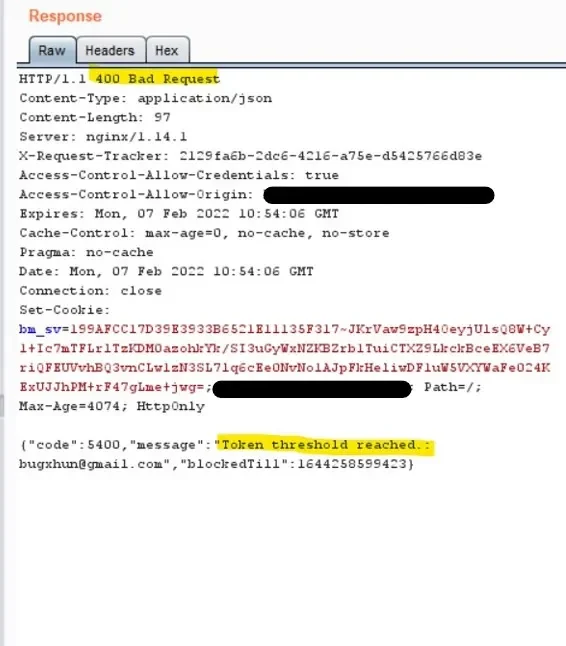
The report shows these as the request and response without the space. The exact request and response bodies are not reproduced in the text of the report, so they are not reproduced here.
Step 2: Add a trailing space to the email address
While testing with the test account, the researcher switched to the personal account and appended a space to the end of the email address in the reset request. The request and response after adding the space are shown below.

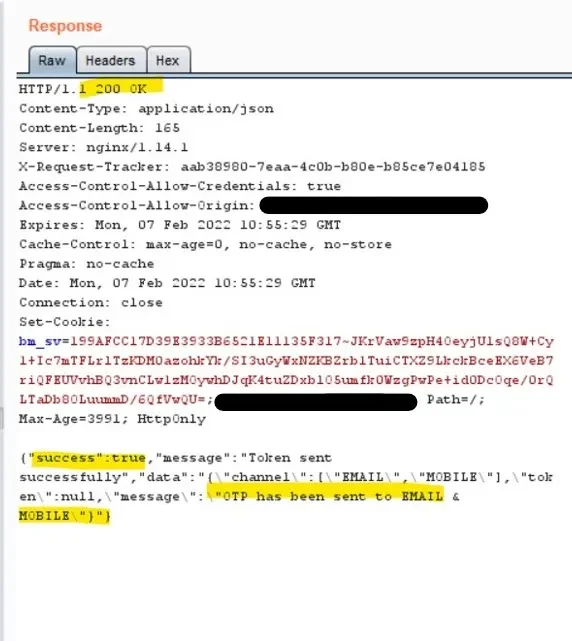
The observed result: the OTP was not sent to the email address, because of the space at the end, but because the mobile number is associated with the email address, the OTPs were sent to the mobile number. The rate limit was bypassed.
Root cause
The report does not explain the mechanism; it only records that the OTP was not sent to the email but was sent to the linked mobile number. A trailing space therefore produces a distinct key for the limiter on every request, but still resolves to the same account, so the OTP is generated and delivered to the linked mobile number each time.
The existing defences did not stop this because the limit was not IP based (IP Rotate and forwarding headers had no effect), and the null byte and other encoded characters did not produce the same effect. The null byte and other encoded characters did not produce the same effect; the report does not explain why.
Impact
With this behaviour, the researcher was able to bypass rate limiting and send huge numbers of requests to a victim's mobile number. The report frames this as a small issue rather than a major vulnerability, and notes that it depends on the account having a mobile number associated with the email address.
Fix
Variants to test
- Trailing and leading whitespace on identifiers in other flows (login, registration, password reset, OTP verification). A positive result is a request that is accepted and processed as the same account while not counting against the limit.
- Other characters that normalisation may strip or ignore, such as tabs, newlines or Unicode whitespace. A positive result is the same: the account is resolved but the limiter treats the value as new.
- Case variation in the email address. A positive result is the account being resolved while the limiter counts each case variant separately.
- Rate limits keyed on one identifier while the action is delivered through another channel (email plus SMS). A positive result is repeated delivery to the secondary channel despite the limit on the primary one.
- Header-based source variation (
X-Forwarded-Host,X-Forwarded-Client,X-Client-IP) on limits that may be IP based. A positive result is the limit resetting when the header changes.
What happened, in plain words
A security researcher was testing a website (the report calls it "example.com" and does not reveal the real name) and found a small but useful trick. The website has a password reset feature: if you forget your password, you type your email address, and the site sends you a one-time code (an OTP) by email and also by text message to your phone. The site also has a limit on how many reset requests you can make: after 20 requests it stops you. That limit exists to stop someone from flooding a victim with codes.
The researcher found that adding a single space at the end of the email address let the reset request through past the limit. The OTP was not sent to the email address, but because the mobile number is associated with the email, the OTPs were sent to the mobile number. The result: someone could send a huge number of text messages to a victim's phone, past the limit that was supposed to prevent exactly that.
This is a beginner-friendly story because the trick is tiny (one space character) and the lesson is about how different parts of a website can disagree about what a piece of text means.
The feature being tested: password reset and OTP
When you click "forgot password" on most sites, the site needs to prove you own the account before letting you set a new password. The usual proof is a one-time password (OTP): a short code, valid once, sent to a channel only the real owner controls, such as an email inbox or a phone. You type the code back into the site and you are allowed in.
On this site, the reset request triggers delivery on two channels at once: email and SMS (text message). That matters later, because the two channels behave differently when the email address is slightly malformed.

The screenshot above shows the password reset functionality as the researcher first encountered it: you request a reset, and the server sends an OTP to your email and your mobile number.
A quick word on the account setup. The researcher had two accounts:
- A test account, created without a mobile number.
- A personal account, used occasionally for booking activities, with a verified phone number.
The interesting behaviour only appears on an account that has both an email address and a mobile number linked together. The researcher notes that having added a mobile number was lucky, because without it the issue would not have shown up.
The tools, explained from zero
Before the steps, here is what the researcher was using, in plain terms.
- Burp Suite is a program that sits between your browser and a website. It lets you see the exact request your browser sends and the exact response the server sends back, and it lets you change the request before forwarding it. Think of it as an interception desk for letters: you can read a letter, edit it, and post it on.
- Burp Intruder is a part of Burp that sends the same request many times, each time with a small change (a different value in one field). It is used to test what happens when you repeat or vary a request at scale.
- IP Rotate is a Burp extension that sends your requests out through different internet addresses in different regions, so the website sees them coming from different places. It is used when a site limits you by your internet address.
- Headers are extra lines of information attached to every request and response, beyond the address and the body. Your browser sends them automatically (for example, telling the server what browser you use). Some headers, like
X-Forwarded-Host,X-Forwarded-ClientandX-Client-IP, are meant to carry information about the original client when a request passes through a proxy. Testers sometimes add them by hand to see whether the server trusts them.
No software versions are given in the report.
Step 1: try to break the rate limit the obvious ways
A rate limit is a cap on how many times you can do something in a period. It is like a shop that only lets you buy 20 tickets a day. The site's limit kicked in after 20 reset requests.
The researcher first sent the password reset request to Intruder and tried null payloads (sending the request with an empty or missing value) and arbitrary values. That failed: the limit still applied.
Next, the researcher tried to look like a different visitor by changing the source information in the request:
X-Forwarded-Host:[redacted]
X-Forwarded-Client
X-Client-IP
Line by line:
X-Forwarded-Host:[redacted]is a header claiming the request originally came to the address[redacted](the local machine address). The idea was to see whether the server would treat the request as coming from somewhere else.X-Forwarded-ClientandX-Client-IPare headers of the same family, meant to carry the client's address through a proxy. The researcher also tried "all other header stuffs", meaning other headers of that kind.
None of these worked. The researcher then tried IP Rotate, which changes the actual internet address the request comes from. That failed too, and that failure was informative: it suggested the limit was not IP based, meaning the site was not counting requests per internet address. If it had been, changing the address would have reset the counter.
Finally, the researcher tried adding %00 (a null byte) at the end of the email address, plus other encoded characters. A null byte is a character with value zero; in URLs it is written %00. It is a classic trick because some programs treat it as the end of a string while others keep reading past it. Here it did not work either.
Step 2: the space trick, and why it failed at first
The researcher remembered reading a blog post saying that adding a space at the end of an email address may bypass rate limiting. Tried on its own, it failed initially.
Why would a space matter at all? Because to a computer, [redacted] and [redacted] (with a space at the end) are two different strings of characters. If one part of the site uses the raw text as a label for counting, and another part trims spaces before looking up the account, the two parts disagree. That disagreement is the whole bug.
Step 3: watch a normal request and response
The researcher captured the reset request and response for an email address with no trailing space.
The two screenshots show the request and the response without the space. The report does not reproduce the exact request and response bodies in its text, so there is nothing more to quote here.
What to look for in a capture like this: the request is what your browser sends (the address, the headers, and the form data including the email), and the response is what the server sends back (a status and a message). Comparing a normal pair with a modified pair is how you spot a difference in behaviour.
Step 4: add a space and watch what changes
While testing with the test account, the researcher switched to the personal account and appended a space to the end of the email address in the reset request.
These two screenshots show the request and response after adding the space.
The observed result, in the researcher's words: the OTP was not sent to the email address, because of the space at the end, but because the mobile number is associated with the email address, the OTPs were sent to the mobile number. The rate limit was bypassed.
The observed result was:
- The OTP was not sent to the email address because of the space at the end.
- The rate limit was bypassed.
- Because the mobile number is associated with the email address, the OTPs were sent to the mobile number.
Why it works (the root cause)
The report does not explain why the space had this effect; it only records what was observed. Normalisation means cleaning a value into a standard form, for example removing extra spaces or lowercasing letters, so that variants of the same thing are treated as one. A trailing space therefore gives the limiter a distinct key on every request, but still resolves to the same account, so an OTP is generated and delivered to the linked mobile number each time.
IP Rotate and the forwarding headers had no effect, and the null byte and other encoded characters did not work either. Only the trailing space created the mismatch between the limiter's view of the identifier and the account lookup's view of it.
What an attacker could do with it
With this behaviour, the researcher was able to bypass rate limiting and send huge numbers of requests to a victim's mobile number. The report frames this as a small issue rather than a major vulnerability, and notes that it depends on the account having a mobile number associated with the email address. The report does not describe any further consequence beyond OTP flooding of the victim's phone.
In plain terms, the harm is unwanted text messages arriving on someone else's phone, in large numbers, because the safety cap that should have stopped the flood was counting the wrong thing.
How to fix it
In everyday terms: make sure the doorman counting visitors and the receptionist looking up names are reading from the same list, written the same way.
Other places to try the same idea
- Trailing and leading whitespace on identifiers in other flows (login, registration, password reset, OTP verification). A positive result is a request that is accepted and processed as the same account while not counting against the limit.
- Other characters that normalisation may strip or ignore, such as tabs, newlines or Unicode whitespace. A positive result is the same: the account is resolved but the limiter treats the value as new.
- Case variation in the email address. A positive result is the account being resolved while the limiter counts each case variant separately.
- Rate limits keyed on one identifier while the action is delivered through another channel (email plus SMS). A positive result is repeated delivery to the secondary channel despite the limit on the primary one.
- Header-based source variation (
X-Forwarded-Host,X-Forwarded-Client,X-Client-IP) on limits that may be IP based. A positive result is the limit resetting when the header changes.
Glossary
- API: a way for one program to talk to another, like a waiter taking your order to the kitchen; here, the website's own endpoints that the browser calls.
- Burp Suite: a tool that sits between your browser and a website so you can read and edit requests and responses.
- Burp Intruder: the part of Burp that repeats a request many times with small changes, used to test limits and inputs at scale.
- Cookie: a small piece of data a website stores in your browser so it can recognise you on later requests, like a cloakroom ticket.
- Header: an extra line of information attached to a request or response, beyond the address and body.
- IP address: the number that identifies a device on the internet, like a postal address for a computer.
- IP Rotate: a Burp extension that sends requests through different internet addresses in different regions.
- IP based rate limit: a cap that counts requests per internet address, so changing address resets the count.
- Mobile number / SMS: the phone number linked to an account, and the text message channel used to deliver codes.
- Normalisation: cleaning a value into a standard form (for example trimming spaces or lowercasing) so variants are treated as one.
- Null byte (
%00): a character with value zero, written%00in a URL; some programs treat it as the end of a string, others do not. - OTP (one-time password): a short code valid once, sent to a channel only the account owner controls, used to prove identity.
- Password reset flow: the sequence of steps a site uses to let you set a new password after proving you own the account.
- Payload: the value you put into a request field when testing, such as a modified email address.
- Rate limit: a cap on how many times an action can be performed in a period, like a shop limiting tickets per day.
- Rate limiting bypass: getting past that cap, for example by making each request look like a new one to the counter.
- Request: the message your browser (or tool) sends to a server asking for something.
- Response: the message the server sends back.
- Root cause: the underlying reason a bug works, as opposed to its visible symptom.
- Token: a piece of data used to prove who you are or to authorise an action, like a wristband at an event.
- Trailing space: a space character at the end of a piece of text.
- Verified phone number: a mobile number the site has confirmed belongs to the account owner.
- Vulnerability: a weakness in a system that lets someone make it behave in a way its owners did not intend.
- X-Forwarded-Host / X-Forwarded-Client / X-Client-IP: headers meant to carry information about the original client through a proxy, sometimes trusted by servers when they should not be.




