Unauthenticated Spring Boot Actuator: Credential-Shaped Secrets Leaking from /actuator/env and…
The Spring Boot Actuator management endpoints of a financial company's backend were reachable without authentication. The /actuator/env and /actuator/loggers endpoints returned credential-shaped values (an AWS-style access key and an HMAC signing secret) in clear text while masking all other sensitive properties.
 Published on medium.com
Environment
The full write-up lives on its author's site
It belongs to its author, so we link to it rather than copy it. The other two tabs are our own rewrites, checked against it.
Context
The target was the Factoring backend of a financial company, reachable at a host under factoring-**.**.ru. The application is a Spring Boot Java service, and like many such services it shipped with Spring Boot Actuator enabled. Actuator is a built-in monitoring panel that exposes health, metrics and configuration over plain HTTP endpoints. It is meant to sit behind authentication or stay off the public internet, because two of its endpoints are unusually informative:
/actuator/envlists configuration properties and environment variables. Spring masks values whose names look sensitive (key,secret,password,token) by replacing them with******./actuator/loggerslists logger names and their log levels, such asINFOorDEBUG.
The host matched the program's published wildcard scope, so it was in scope for testing.
Setup
No account, role or special tooling was needed. The endpoints answered without any credentials, and the only header used in the requests was a researcher tag, X-Bug-Bounty: alkaser, so that traffic could be attributed to the report. The requests were made with curl using -sk (silent, and ignoring certificate errors) and -i to show response headers.
Finding it
The first request went to the loggers endpoint. It returned 200 OK with no credentials at all, which already means the management surface was unauthenticated. The interesting part was inside the JSON: two loggers had a configuredLevel that was not a log level at all.
"com.**.factoring.integration.s3": { "configuredLevel": "AKIA****************", "effectiveLevel": "AKIA****************"},"com.**.factoring.signing.hmac": { "configuredLevel": "4414********************", "effectiveLevel": "4414********************"}
A level field should only ever contain TRACE, DEBUG, INFO, WARN, ERROR or FATAL. Here it held values shaped like an AWS access key ID (the AKIA prefix) and a 32-character hex secret. Two logger names, one for S3 integration and one for HMAC signing, carried credential-shaped strings where a log level belongs.
Exploitation
Step 1: Confirm the Actuator surface is open
curl -sk -i -H "X-Bug-Bounty: alkaser" "https://factoring-**.**.ru/actuator/loggers"
The -i flag prints the status line and headers, which is how the 200 OK without authentication was established. The body is the JSON shown above, with the two anomalous configuredLevel values.
Step 2: Pull the same values from the env endpoint
curl -sk -i -H "X-Bug-Bounty: alkaser" "https://factoring-**.**.ru/actuator/env"
The same two values appeared here under their real property names, **.integration.s3.access-key and **.integration.signing.hmac-secret. Meanwhile every other sensitive property was correctly masked:
encryption.aes-key,jwt.signing-key,keycloak.client-secret,spring.datasource.passwordand several API tokens all returned******./actuator/configpropsalso returned a differently named S3 credential, correctly masked.
So the sanitizer was working. Only those two properties slipped through, which looks like a targeted override or allow-list entry rather than a disabled security control.
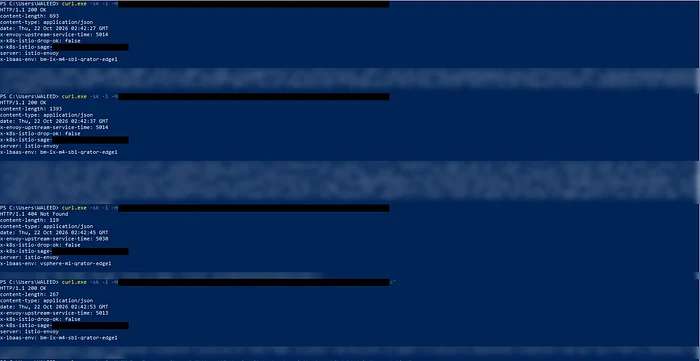
The four requests (loggers, env, heapdump, configprops). Hostnames and response bodies are redacted.
Step 3: Note the extra information the env endpoint gave away
Beyond the two values, /actuator/env disclosed:
- The real name of the production Kubernetes secret and an internal service hostname.
- A property pointing to an admin path for key rotation. The researcher checked only that it exists: it answered
401 Unauthorizedwith a Bearer challenge, and did not probe it further. - A different
x-powered-by: ASP.NETheader on that path, which suggests it is served by a separate .NET backend.
Step 4: Check whether the whole surface is open
/actuator/heapdump returned 404 Not Found. That shows the Actuator surface was not uniformly open, and the exposed endpoints were specific misconfigurations rather than a scanning artifact.
Root cause
The management endpoints under /actuator/** were reachable with no authentication. On top of that, the sanitizer that masks credential-like properties was bypassed for exactly two properties: **.integration.s3.access-key and **.integration.signing.hmac-secret. Because every other sensitive property was masked, including a differently named S3 credential in /actuator/configprops, the likely explanation is a targeted override or allow-list entry for those two names, not a disabled security control. The same values also surfaced in /actuator/loggers, in a field that should only hold a log level.
A note on whether the credentials are real
In the original report the researcher argued that the values were live production credentials, because the key and the secret both changed across three requests over about two hours. On reflection that argument is weaker than it was made to sound:
- Real AWS access keys do not normally change every 20 minutes. Fast-changing values can just as well mean a rotation process, a decoy, or generated placeholder data.
- The configuration pointed at a bucket region that looks like a Yandex Cloud region, while the key had the AWS
AKIAshape. That mismatch does not prove anything, but it does not support a clean AWS story either.
The values were never used against AWS, a signing service or the admin endpoint, deliberately, because the program rules forbid exploitation, so validity could not be confirmed. The honest description is credential-shaped values exposed in clear text, validity unconfirmed. If they were decoys (honeytokens), the real finding is still an unauthenticated Actuator leaking internal configuration and infrastructure names.
Impact
- If the values are real: object-storage access and the ability to forge signed documents, which matters a lot in a factoring product that signs invoices.
- Even if they are not: internal hostnames, a Kubernetes secret name, an admin path and the stack layout. That is a ready-made map for a later attack.
The endpoints answered without any credentials.
Fix
The recommended remediation was to require authentication on /actuator/** or remove it from the public ingress, expose only health if needed, fix the sanitizer override so every credential-like property is masked, and rotate the exposed values anyway. The report does not say which of these were applied.
Timeline
- Oct 22, 05:46: Submitted as Standoff365 report #37252 (CWE-200, rated High by the researcher).
- Oct 22, 20:43: Closed as a duplicate of #37053, with read access granted to the original, about 15 hours after submission.
Variants to test
/actuator/envon any Spring Boot host in scope. A positive result is a200 OKwithout credentials, with property values visible. Look for the masking pattern: if most sensitive names show******but one or two show real values, the sanitizer has an override worth reporting./actuator/loggers. A positive result is aconfiguredLeveloreffectiveLevelthat is not one ofTRACE,DEBUG,INFO,WARN,ERRORorFATAL. Long random strings,AKIA-prefixed values or hex strings in that field are the signal./actuator/configprops. A positive result is a credential-shaped value that is not masked, especially one that differs from a masked equivalent in/actuator/env./actuator/heapdumpand other Actuator endpoints. A404on one endpoint while others answer200shows the surface is selectively exposed; enumerate the rest rather than assuming the whole panel is closed.- Admin or rotation paths referenced in
env. A positive result is a path that exists and answers with an authentication challenge (for example401with a Bearer challenge), which confirms the path without probing it further. Note differingx-powered-byheaders, which can reveal a separate backend behind the same host.
What happened, in plain words
A financial company runs a web service for its factoring business. Factoring is a way of getting paid early on an invoice: a company hands its unpaid invoices to a finance provider, the provider pays most of the money straight away, and later collects the full amount from the customer. Because money and signed documents are involved, the backend behind that service holds credentials: strings that act like keys to other systems.
The backend is a Java application built with a framework called Spring Boot. Like many Spring Boot applications, it shipped with a built-in monitoring panel called Spring Boot Actuator. Think of Actuator as a service hatch on the side of a building: it exists so operators can look at the machinery inside (is it healthy, what settings is it using, what is it logging). A service hatch is fine as long as it is locked and only staff can reach it. Here it was not locked. Anyone on the internet who knew the address could open it and read the settings.
Two of the hatch's doors were especially talkative. One lists configuration settings and environment variables, which is where an application keeps things like database passwords and API keys. The other lists loggers, which are the parts of the program that write diagnostic messages, together with the level of detail they are set to record.
When the researcher opened the first door, the application did what it is supposed to do: it hid the sensitive values behind ******, the same way a bank statement might print only the last digits of an account number. But two values came back in clear text: something shaped like an Amazon Web Services (AWS) access key, and something shaped like a secret used to sign data. The same two values also appeared in the loggers door, in a field that should only ever contain a word like INFO or DEBUG.
The researcher reported it, and the report was closed about 15 hours later as a duplicate: someone else had already reported the same problem. The report does not say what the company did to fix it.
This article walks through the same steps the researcher took, in the same order, and explains every term from scratch. You only need to be able to use a browser and a computer to follow it.
Background: the pieces involved
Before the steps, here are the ideas you need. Each one is explained the first time it matters, and collected again in the glossary at the end.
An API is a way for one program to talk to another over the internet. When you use a website, your browser asks a server for pages and the server sends back HTML that your browser draws. An API is the same idea without the drawing: your program sends a request to a specific address, and the server sends back data, usually in a format called JSON. JSON is just text with a strict shape, made of names and values in curly braces, like {"colour": "blue"}. It is easy for programs to read and reasonably easy for people to read too.
An endpoint is one specific address on a server that answers one specific kind of request. If a server is a building, endpoints are the counters in the lobby: one counter for passports, one for driving licences. In this story the endpoints are paths like /actuator/env and /actuator/loggers, appended to the server's hostname.
HTTP status codes are the three-digit numbers a server sends back with every answer. 200 means "here is what you asked for, all good". 401 means "you are not allowed in without proving who you are". 404 means "there is nothing at this address". You will see all three below.
Authentication means proving who you are, usually with a username and password, or with a token. A token (sometimes called a bearer token) is a long string that a server gives you after you log in, and that you show on later requests instead of logging in again. It works like a cloakroom ticket: whoever holds the ticket gets the coat, so a token must be kept secret. Unauthenticated means no proof of identity was required at all: the server answered anyone who asked.
Spring Boot is a popular toolkit for building Java web applications. It saves developers a lot of work by providing ready-made parts, and one of those parts is Actuator.
Spring Boot Actuator is a built-in monitoring panel. It adds a set of endpoints under /actuator/ that report on the running application: whether it is healthy, what settings it is using, what it is logging. It is meant to be locked behind authentication or kept off the public internet, because two of its endpoints are unusually informative:
/actuator/envlists configuration properties and environment variables. Configuration properties are the settings an application reads at startup: database addresses, passwords, API keys. Environment variables are similar settings supplied by the operating system or the hosting platform. Spring masks values whose names look sensitive (names containingkey,secret,passwordortoken) by replacing them with******./actuator/loggerslists logger names and their log levels, such asINFOorDEBUG. A logger is the part of a program that writes diagnostic messages to a log file. Its level decides how chatty it is:ERRORrecords only serious failures,INFOrecords ordinary events,DEBUGrecords fine detail. The allowed levels are a small fixed set of words.
A wildcard scope is how bug bounty programs describe which of their systems you are allowed to test. A wildcard like *.example.com means "anything whose hostname ends in .example.com". The host in this story matched the program's published wildcard scope, so testing it was allowed.
A bug bounty program is an arrangement where a company invites outside researchers to look for security problems in its systems and report them, often for a reward. The company publishes rules, including what is in scope and what you may not do. Here the rules forbade exploitation, which becomes important later.
curl is a command-line tool for sending HTTP requests. You type a request, it prints the server's answer. It is the programmer's version of typing an address into a browser, with more control over exactly what is sent.
Setup: what was needed to start
No account, no special role and no special tooling were needed. The endpoints answered without any credentials. The only header used in the requests was a researcher tag, X-Bug-Bounty: alkaser, so that the traffic could be attributed to the report. A header is a small piece of extra information attached to a request or a response, like the label on an envelope: it is not the letter itself, but it tells the recipient something about it.
The requests were made with curl using two options:
-smeans silent: do not print progress information, only the answer.-kmeans ignore certificate errors. Websites prove their identity with certificates;-ktellscurlnot to stop if the certificate does not check out.-imeans include the response headers and status line in the output, so you can see the200 OKand the headers, not just the body.
Finding it
The first request went to the loggers endpoint. It returned 200 OK with no credentials at all, which already means the management surface was unauthenticated: the service hatch was open. The interesting part was inside the JSON. Two loggers had a configuredLevel that was not a log level at all.
"com.**.factoring.integration.s3": { "configuredLevel": "AKIA****************", "effectiveLevel": "AKIA****************"},"com.**.factoring.signing.hmac": { "configuredLevel": "4414********************", "effectiveLevel": "4414********************"}
Line by line, in plain words:
"com.**.factoring.integration.s3"is the name of a logger. Logger names usually mirror the structure of the code, so this one belongs to the part of the application that talks to S3. S3 is Amazon's object storage service: a place to keep files in the cloud. The**are redactions: the researcher removed parts of the real name before publishing."configuredLevel"is the level someone set for this logger. It should be one ofTRACE,DEBUG,INFO,WARN,ERRORorFATAL."AKIA****************"is what was actually there.AKIAis the prefix AWS uses at the start of its access key IDs, the public half of a pair of credentials. The asterisks are redactions of the rest of the value."effectiveLevel"is the level actually in force, which can differ from the configured one if something else overrides it. Here it held the same value.- The second block is the same story for a logger named
com.**.factoring.signing.hmac. HMAC is a way of signing data with a shared secret so that the receiver can check it was not altered. The value4414********************is shaped like a 32-character hexadecimal secret: hexadecimal means made of the digits 0 to 9 and the letters a to f.
A level field should only ever contain one of those six words. Here it held values shaped like an AWS access key ID and a 32-character hex secret. Two logger names, one for S3 integration and one for HMAC signing, carried credential-shaped strings where a log level belongs. "Credential-shaped" is the careful wording: the values look like credentials, but looking like one is not the same as proving it is one.
Exploitation
Step 1: Confirm the Actuator surface is open
curl -sk -i -H "X-Bug-Bounty: alkaser" "https://factoring-**.**.ru/actuator/loggers"
What each part does:
curlis the tool sending the request.-skcombines the two options above: silent output, and do not stop on certificate errors.-iprints the status line and headers, which is how the200 OKwithout authentication was established.-H "X-Bug-Bounty: alkaser"adds a header namedX-Bug-Bountywith the valuealkaser. This is a courtesy tag so the company can tell which traffic came from this researcher. It is not a credential and it does not unlock anything.- The quoted address is the endpoint: the host
factoring-**.**.ru(redacted) plus the path/actuator/loggers.
Why this step first: the loggers endpoint is a quick way to ask "is the service hatch open at all?" If it answers 200 without asking who you are, the answer is yes, and the rest of the investigation is worth doing. The body is the JSON shown above, with the two anomalous configuredLevel values.
Step 2: Pull the same values from the env endpoint
curl -sk -i -H "X-Bug-Bounty: alkaser" "https://factoring-**.**.ru/actuator/env"
This is the same request with one change: the path is now /actuator/env instead of /actuator/loggers. The options and the header do the same things as before.
Why this step: the loggers endpoint showed the values in the wrong place, which is suspicious but odd. The env endpoint is where configuration properties are supposed to live, so if the same values are real settings, they should appear here under their proper names. That is exactly what happened: the same two values appeared under **.integration.s3.access-key and **.integration.signing.hmac-secret.
Meanwhile every other sensitive property was correctly masked:
encryption.aes-key,jwt.signing-key,keycloak.client-secret,spring.datasource.passwordand several API tokens all returned******./actuator/configpropsalso returned a differently named S3 credential, correctly masked.
A few of those names deserve a word. An AES key is a secret used to encrypt data. A JWT signing key is the secret used to stamp and verify JSON Web Tokens, which are compact tokens often used to prove who a user is. Keycloak is a login and identity system, and its client secret is the password one application uses to identify itself to it. A datasource password is the password the application uses to connect to its database. /actuator/configprops is another Actuator endpoint that lists configuration in a different, grouped form.
So the sanitizer was working. The masking was not switched off. Only those two properties slipped through, which looks like a targeted override or allow-list entry rather than a disabled security control. An allow-list is a list of items that are treated as exceptions: here, a short list of property names the masking step was told to skip.
The image shows the four requests (loggers, env, heapdump, configprops). Hostnames and response bodies are redacted.
Step 3: Note the extra information the env endpoint gave away
Beyond the two values, /actuator/env disclosed:
- The real name of the production Kubernetes secret and an internal service hostname. Kubernetes is a system for running applications in containers across many machines; a secret in Kubernetes is an object that holds a password or key. An internal hostname is the name of a machine that is not meant to be reachable from the public internet.
- A property pointing to an admin path for key rotation. Key rotation is the routine of replacing a credential with a new one on a schedule, so that an old one stops working. The researcher checked only that the path exists: it answered
401 Unauthorizedwith a Bearer challenge, and did not probe it further. A Bearer challenge is the server's way of saying "this area needs a token; show me one and I will consider it". - A different
x-powered-by: ASP.NETheader on that path, which suggests it is served by a separate .NET backend.x-powered-byis a response header some servers send to say what software built the page. ASP.NET is a Microsoft framework for building web applications, different from the Java stack the rest of the service uses.
Why this step matters: even without usable credentials, a list of internal names, a secret name and an admin path is a map. It tells an attacker what else exists and where to look next.
Step 4: Check whether the whole surface is open
/actuator/heapdump returned 404 Not Found. A heap dump is a snapshot of a running program's memory, and it can contain almost anything the program was holding, including secrets. That this endpoint returned 404 shows the Actuator surface was not uniformly open, and the exposed endpoints were specific misconfigurations rather than a scanning artifact. A scanning artifact would be a result produced by an automated scanner rather than a real, reachable service.
Why this step: if every Actuator endpoint had answered, the story would be "the whole panel is public". Because one answered 404 while others answered 200, the story is more precise: someone exposed some endpoints and not others, which is a configuration mistake worth describing accurately.
Root cause
The management endpoints under /actuator/** were reachable with no authentication. Ingress here means the entry point through which outside traffic reaches the service.
On top of that, the sanitizer that masks credential-like properties was bypassed for exactly two properties: **.integration.s3.access-key and **.integration.signing.hmac-secret. Because every other sensitive property was masked, including a differently named S3 credential in /actuator/configprops, the likely explanation is a targeted override or allow-list entry for those two names, not a disabled security control. The same values also surfaced in /actuator/loggers, in a field that should only hold a log level.
A note on whether the credentials are real
In the original report the researcher argued that the values were live production credentials, because the key and the secret both changed across three requests over about two hours. On reflection that argument is weaker than it was made to sound:
- Real AWS access keys do not normally change every 20 minutes. Fast-changing values can just as well mean a rotation process, a decoy, or generated placeholder data. A decoy (also called a honeytoken) is a fake credential planted on purpose: if anyone uses it, the owner knows someone has been looking where they should not.
- The configuration pointed at a bucket region that looks like a Yandex Cloud region, while the key had the AWS
AKIAshape. A bucket region is the geographic area where a storage bucket lives. That mismatch does not prove anything, but it does not support a clean AWS story either.
The values were never used against AWS, a signing service or the admin endpoint, deliberately, because the program rules forbid exploitation, so validity could not be confirmed. The honest description is credential-shaped values exposed in clear text, validity unconfirmed. If they were decoys, the real finding is still an unauthenticated Actuator leaking internal configuration and infrastructure names.
Impact
- If the values are real: object-storage access and the ability to forge signed documents, which matters a lot in a factoring product that signs invoices. Object storage is cloud storage for files. Forging a signed document means producing one that appears to have been signed by the legitimate party.
- Even if they are not: internal hostnames, a Kubernetes secret name, an admin path and the stack layout. Stack layout means which technologies the service is built from and how they fit together. That is a ready-made map for a later attack.
Fix
The recommended remediation was to require authentication on /actuator/** or remove it from the public ingress, expose only health if needed, fix the sanitizer override so every credential-like property is masked, and rotate the exposed values anyway. Remediation means the changes that remove the problem. The report does not say which of these were applied.
Timeline
- Oct 22, 05:46: Submitted as Standoff365 report #37252 (CWE-200, rated High by the researcher). CWE-200 is a standard catalogue number for "exposure of sensitive information to an unauthorised actor".
- Oct 22, 20:43: Closed as a duplicate of #37053, with read access granted to the original, about 15 hours after submission. A duplicate means someone else had already reported the same issue, so this report was closed in favour of the earlier one.
Variants to test
If you want to look for the same kind of problem on systems you are allowed to test, these are the checks to try. Each one is a variation on the same idea: ask an Actuator endpoint a simple question and read the answer carefully.
/actuator/envon any Spring Boot host in scope. A positive result is a200 OKwithout credentials, with property values visible. Look for the masking pattern: if most sensitive names show******but one or two show real values, the sanitizer has an override worth reporting./actuator/loggers. A positive result is aconfiguredLeveloreffectiveLevelthat is not one ofTRACE,DEBUG,INFO,WARN,ERRORorFATAL. Long random strings,AKIA-prefixed values or hex strings in that field are the signal./actuator/configprops. A positive result is a credential-shaped value that is not masked, especially one that differs from a masked equivalent in/actuator/env./actuator/heapdumpand other Actuator endpoints. A404on one endpoint while others answer200shows the surface is selectively exposed; enumerate the rest rather than assuming the whole panel is closed. Enumerate means to go through a list of possible names one by one and see which ones answer.- Admin or rotation paths referenced in
env. A positive result is a path that exists and answers with an authentication challenge (for example401with a Bearer challenge), which confirms the path without probing it further. Note differingx-powered-byheaders, which can reveal a separate backend behind the same host.
Glossary
- API: a way for one program to talk to another over the internet, usually by sending a request to an address and receiving structured data back.
- Endpoint: one specific address on a server that answers one specific kind of request.
- JSON: a text format for data, made of names and values in curly braces, easy for programs and people to read.
- HTTP status code: the three-digit number a server sends with every answer, such as
200(fine),401(not allowed without proof of identity) or404(nothing here). - Header: a small piece of extra information attached to a request or response, separate from the main content.
- Authentication: proving who you are, usually with a password or a token.
- Unauthenticated: answered without any proof of identity being required.
- Token: a long string a server gives you after you log in, which you show on later requests instead of logging in again; it must be kept secret.
- Bearer challenge: a server's reply saying that an area needs a token before it will answer.
- Spring Boot: a popular toolkit for building Java web applications.
- Spring Boot Actuator: a built-in monitoring panel that adds endpoints under
/actuator/reporting on health, settings and logging. - Configuration property: a setting an application reads at startup, such as a database address or an API key.
- Environment variable: a setting supplied to a program by the operating system or hosting platform.
- Sanitizer: the part of a system that hides sensitive values before they are shown, here by replacing them with
******. - Allow-list: a list of items treated as exceptions, here property names the masking step was told to skip.
- Logger: the part of a program that writes diagnostic messages to a log file.
- Log level: the setting that decides how chatty a logger is, from
TRACEandDEBUG(very detailed) throughINFOandWARNtoERRORandFATAL(serious failures only). - S3: Amazon's object storage service, a place to keep files in the cloud.
- Object storage: cloud storage for files, addressed by name rather than by folder path.
- Bucket region: the geographic area where a storage bucket lives.
- AWS access key ID: the public half of a pair of AWS credentials, recognisable by its
AKIAprefix. - HMAC: a way of signing data with a shared secret so the receiver can check it was not altered.
- Hexadecimal: a way of writing numbers using the digits 0 to 9 and the letters a to f.
- AES key: a secret used to encrypt data.
- JWT signing key: the secret used to stamp and verify JSON Web Tokens, compact tokens often used to prove who a user is.
- Keycloak: a login and identity system; its client secret is the password one application uses to identify itself to it.
- Datasource password: the password an application uses to connect to its database.
- Kubernetes: a system for running applications in containers across many machines.
- Kubernetes secret: an object in Kubernetes that holds a password or key.
- Internal hostname: the name of a machine that is not meant to be reachable from the public internet.
- Key rotation: the routine of replacing a credential with a new one on a schedule so the old one stops working.
- Ingress: the entry point through which outside traffic reaches a service.
- ASP.NET: a Microsoft framework for building web applications.
x-powered-by: a response header some servers send to say what software built the page.- Heap dump: a snapshot of a running program's memory, which can contain almost anything the program was holding, including secrets.
- Scanning artifact: a result produced by an automated scanner rather than a real, reachable service.
- Decoy (honeytoken): a fake credential planted on purpose so that anyone who uses it reveals that they have been looking where they should not.
- Credential-shaped: a value that looks like a credential, without proof that it is one.
- Wildcard scope: a bug bounty program's description of which systems may be tested, using a pattern such as
*.example.com. - Bug bounty program: an arrangement where a company invites outside researchers to find and report security problems in its systems, under published rules.
- Duplicate: a report of an issue that someone else has already reported, closed in favour of the earlier one.
- CWE-200: a standard catalogue number for exposure of sensitive information to an unauthorised actor.
- Remediation: the changes that remove a security problem.
- Stack layout: which technologies a service is built from and how they fit together.
- Enumerate: to go through a list of possible names one by one and see which ones answer.
curl: a command-line tool for sending HTTP requests and printing the server's answer.



