Unauthorized access to any user’s account.
The login response contained a JWT whose payload included the username, and the server did not validate the token's signature or the username against the authenticated session. By changing the username in the JWT payload and forwarding the modified response, an attacker could log in as any other user.
 Published on medium.com
Hi everyone! This is Vikram Naidu, Bug bounty hunter and cybersecurity researcher from India.
The full write-up lives on its author's site
It belongs to its author, so we link to it rather than copy it. The other two tabs are our own rewrites, checked against it.
Context
This write-up describes an authentication bypass found on a private bug bounty program. The researcher, Vikram Naidu (@ImVikram7msd), does not name the organisation or the product; the only asset detail recorded for the disclosure is medium.com, which is where the write-up was published, not the target. What the report does describe is a login portal that asks a user to enter a user id and a password.

The portal issues a JWT (JSON Web Token) on successful login. The researcher's finding is that the identity carried inside that token could be manipulated so that the application logged the attacker into a different user's account without knowing that user's password.
Setup
- Two accounts were created: one attacker account and one victim account.
- The researcher observed that usernames across the platform follow a fixed pattern, of the form
*******001,*******002,*******003, and so on. Passwords, by contrast, are unique per user. - A proxy tool, Burp Suite, was used to inspect and modify the login request and response.
- No versions, endpoints, parameter names or hostnames are given in the report.
Finding it
The researcher logged in with the attacker's username and password and inspected the server's response in Burp Suite. The response contained a JWT.
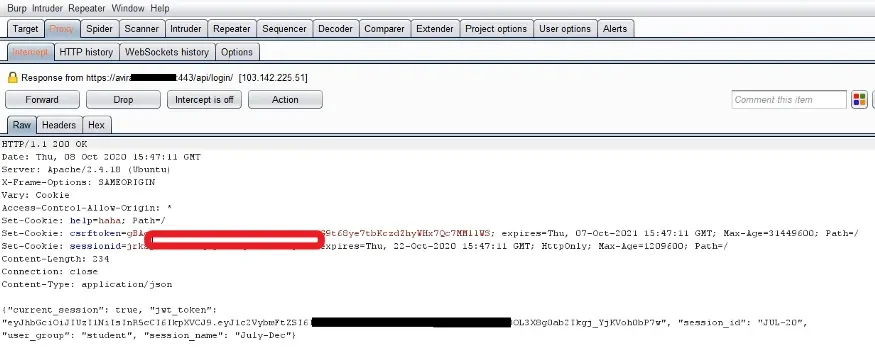
The report explains the token format: a JWT is a JSON object used to transfer information securely between two parties, commonly for authentication or information exchange. It is composed of a header, a payload and a signature, separated by dots.
Decoding the token showed that the payload carried the user id.
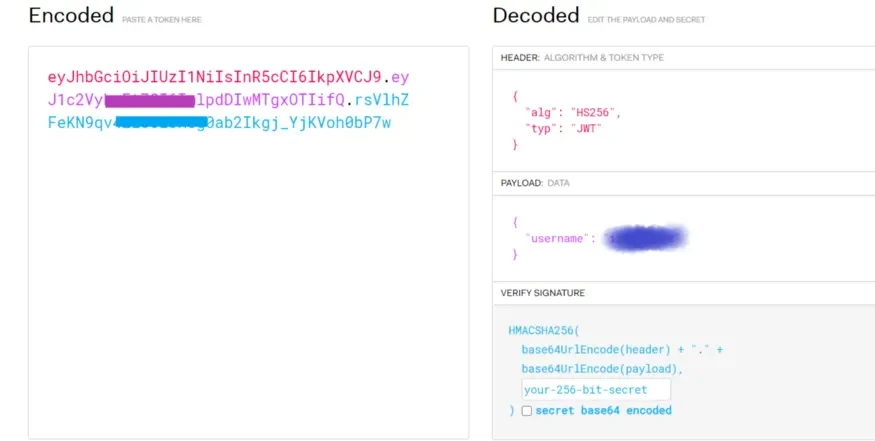
In the payload, the attacker's username appeared as *********2. The payload carried the username, which is what made the response worth manipulating.
Exploitation
Step 1: Capture the login response
Log in with the attacker's credentials through Burp Suite and inspect the response, which contains the JWT described above.
Step 2: Decode the token and change the identity
The researcher decoded the JWT, changed the payload's username from the attacker's value to the victim's username, and produced a new token. That token was substituted into the response before it was forwarded to the browser.
Step 3: First attempt
With the modified token forwarded, the browser displayed the victim's username, but the login did not complete. The researcher took this as a sign of a misconfiguration rather than a dead end.
Step 4: Repeat and manipulate the response in the browser
The process was repeated from the start. This time, before forwarding the response to the browser, the username was changed to the victim's username in the browser itself. The value used was *******106.
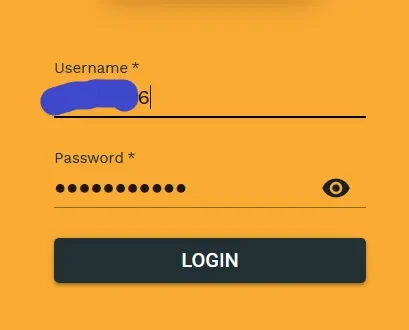
Step 5: Access the victim account
With the username changed to *******106 and the response forwarded, the server accepted the manipulated response. The report attributes this to a lack of validation and to response manipulation being possible. The researcher was logged into the victim's account and could see all of the victim's details.
The report ends there: the mission was accomplished by logging into the victim's account.
Root cause
The application issued a JWT whose payload contained the username, and the report attributes the result to a lack of validation and response manipulation. Because the response could be manipulated so that the username was changed before it reached the browser, and the server accepted the result, the login flow trusted client-side data. The report describes this as a lack of validation combined with response manipulation; the exact server-side code is not shown, so
Impact
An attacker who can log in with a valid account can change the username in the response to another user's username and be logged in as that user, without knowing that user's password. Usernames follow a predictable pattern (*******001, *******002, and so on). The researcher demonstrated access to all of the victim's details in the account. The report does not enumerate which data or actions were available beyond viewing the victim's details.
Fix
The report states that the issue was reported to the organisation on 08-10-2020 and was fixed within hours. It does not describe the fix itself. A correct fix would be for the server to derive the identity from the authenticated session or from a token it signed and validated, and to reject any response or token whose username does not match the authenticated account, rather than trusting a username supplied by the client.
Variants to test
- JWT payload tampering. Decode the token, change the username or user id claim, re-encode, and replay it. A positive result is the application accepting the modified token and showing another user's data.
- Response manipulation. Intercept the login response and change the username field before it reaches the browser. A positive result is the browser showing the victim's username and the session completing as the victim.
- Predictable identifiers. Where usernames or ids follow a fixed pattern, enumerate neighbouring values and test each against the tampering steps above. A positive result is successful login to an account that was never authenticated.
- Signature validation. Test whether the server verifies the JWT signature at all, for example by altering the payload without re-signing. A positive result is the server accepting an unsigned or invalidly signed token.
- Session binding. After logging in as one user, replay the session against another user's identifier. A positive result is the server returning the second user's data without a fresh authentication.
What happened, in plain words
A security researcher found a way to log into any user's account on a private bug bounty program without knowing that user's password. He did this by taking advantage of how the login system handled a small piece of data called a token. The token carried a username, and changing that username let him log in as another user. By changing that username to someone else's, he could become that other user. The organisation fixed the problem within hours of being told, and paid him a bounty (a reward for finding security bugs).
This article explains the whole process from scratch, assuming you only know how to use a browser and a computer. We will go step by step through what he did, why he did it, and what it means.
Background: what is a login portal and why does it matter?
A login portal is the page where you type your username and password to get into a website or app. Behind the scenes, when you press "Log in", your browser sends your credentials to a server (a computer that runs the website). The server checks them and, if they are correct, sends back something that tells your browser "this person is now logged in". That "something" is often a token.
A token is like a temporary ID card. Instead of asking for your password on every page you visit, the website gives your browser a token after you log in, and your browser shows that token on each subsequent request. The server looks at the token and decides whether to let you in. If an attacker can forge or change a token, they might impersonate someone else.
In this case, the token was a JWT (JSON Web Token). We'll explain JWT in detail later, but for now think of it as a small package of information that is signed (stamped) by the server so it can't be tampered with. Here, the report attributes the result to a lack of validation and response manipulation.
The setup: two accounts and a proxy tool
To test for this kind of flaw, the researcher created two accounts: one for himself (the attacker) and one for a victim. He needed both so he could log in as himself, capture what the server sent back, and then try to modify it to become the victim.
He also used a proxy tool called Burp Suite. A proxy sits between your browser and the server, letting you see and change the requests and responses. Think of it as a mail interception service: you can open letters, read them, change the contents, and send them on. Burp Suite is a common tool for this in security testing.
The report does not give the exact web address (URL) of the login page, the names of the parameters sent, or the version of any software. It only describes the general flow.
Step 1: Observe the username pattern
The researcher noticed that usernames on the platform follow a fixed pattern. They look like *******001, *******002, *******003, and so on. The asterisks hide the actual prefix; the report shows the pattern as *******001, *******002, *******003. Passwords, however, are unique for each user.
Why does this matter? If you can guess usernames easily, you can try to target any account. For example, if you know a victim's username is *******106, you can attempt to log in as them if you find a way to bypass the password. The predictable pattern makes it simple to enumerate (list) valid usernames.
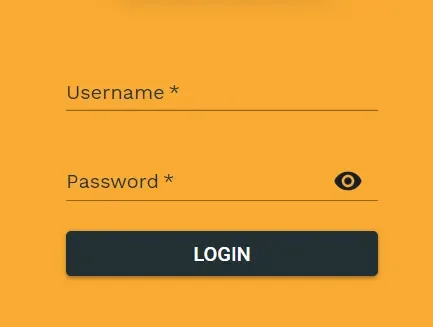
Step 2: Log in as the attacker and capture the response
The researcher entered the attacker's username and password into the login form. With Burp Suite running, he could see the request that the browser sent to the server and the response that came back. The response contained a JWT.
In the image, you would see the server's response, which includes the token. The researcher observed that the server sends this token after a successful login.
What is a JWT?
A JWT (JSON Web Token) is a way to securely transmit information between two parties as a JSON object. JSON (JavaScript Object Notation) is a text format for structured data, like a shopping list with labels. A JWT is often used for authentication: after you log in, the server gives you a JWT, and you include it in subsequent requests to prove who you are.
A JWT has three parts, separated by dots (.):
- Header: says what algorithm was used to sign the token.
- Payload: contains the claims, which are statements about the user, such as their username or user ID.
- Signature: a cryptographic stamp that verifies the token hasn't been altered.
The header and payload are just base64url-encoded JSON, which means anyone can decode them (they are not encrypted). The signature is created using a secret key that only the server knows. If the server checks the signature properly, an attacker cannot change the payload without invalidating the signature. But if the server doesn't check, or if it trusts the payload without verifying, then the attacker can change the payload and the server might accept it.
In this case, the researcher decoded the JWT and found that the payload contained the user ID (username).
In the payload, he saw the attacker's username as *********2, showing the token carried the userid. If he could change that username to the victim's, and the server accepted it, he could become the victim.
Step 3: Modify the token and try to log in as the victim
The researcher changed the payload's username from the attacker's to the victim's username. He then created a new JWT with that modified payload. He replaced the original token in the server's response with this new token and forwarded the response to the browser.
What does "forwarding the response" mean? In Burp Suite, you can intercept the server's response before it reaches your browser. You can edit it and then click "Forward" to send it on to the browser. The browser then behaves as if that response came directly from the server.
When he did this, the browser displayed the victim's username, but the login did not complete. He could not fully access the account. However, he was confident there was a misconfiguration (a mistake in how the system was set up) because the browser showed the victim's username, indicating that the application was using the manipulated data somewhere.
Step 4: Repeat and manipulate the response in the browser
He started the process again from the beginning. This time, instead of changing the token, he intercepted the server's response and changed the username to the victim's username directly in the response before it reached the browser. The value he used was *******106.
In the image, you can see the intercepted response with the username field changed to *******106. He then forwarded the response to the browser.
Step 5: Access the victim's account
With the username changed to *******106 and the response forwarded, the server accepted the manipulated response. The researcher attributes this to a lack of validation (the server did not check that the username matched the logged-in user) and to response manipulation being possible. As a result, he was logged into the victim's account and could see all of the victim's details.
In the screenshot, you can see the victim's account page with their details, confirming successful unauthorized access.
Why did this work? (Root cause)
The application issued a JWT that contained the username in its payload. When the user logged in, the server sent this token to the browser. The browser then used this token for subsequent requests. However, the report attributes the result to a lack of validation and to response manipulation being possible. In other words, the server trusted the username supplied by the client (the browser) without checking it against the actual logged-in user.
Additionally, the server allowed the response to be manipulated: the researcher could change the username in the response before it reached the browser, and the server accepted the result. This means the login flow trusted client-side data, which is a classic security mistake. The report describes this as a lack of validation combined with response manipulation.
Impact
An attacker who can log in with a valid account can change the username in the response to another user's username and be logged in as that user, without knowing that user's password. Usernames follow a predictable pattern (*******001, *******002, and so on). The researcher demonstrated access to all of the victim's details in the account. The report does not enumerate which data or actions were available beyond viewing the victim's details.
Fix
The report states that the issue was reported to the organisation on 08-10-2020 and was fixed within hours. It does not describe the fix itself. A correct fix would be for the server to derive the identity from the authenticated session or from a token it signed and validated, and to reject any response or token whose username does not match the authenticated account, rather than trusting a username supplied by the client.
Variants to test
If you are learning about this kind of vulnerability, here are related tests you can try in a legal practice environment (like a bug bounty program or your own lab):
- JWT payload tampering. Decode the token, change the username or user id claim, re-encode, and replay it. A positive result is the application accepting the modified token and showing another user's data.
- Response manipulation. Intercept the login response and change the username field before it reaches the browser. A positive result is the browser showing the victim's username and the session completing as the victim.
- Predictable identifiers. Where usernames or ids follow a fixed pattern, enumerate neighbouring values and test each against the tampering steps above. A positive result is successful login to an account that was never authenticated.
- Signature validation. Test whether the server verifies the JWT signature at all, for example by altering the payload without re-signing. A positive result is the server accepting an unsigned or invalidly signed token.
- Session binding. After logging in as one user, replay the session against another user's identifier. A positive result is the server returning the second user's data without a fresh authentication.
Glossary
- Authentication: The process of verifying who you are, typically with a username and password.
- Authentication bypass: A flaw that lets someone skip or defeat the authentication process and access an account without valid credentials.
- Bug bounty program: A program where organisations reward security researchers for finding and reporting vulnerabilities.
- Burp Suite: A proxy tool used to intercept, inspect, and modify HTTP requests and responses between a browser and a server.
- Claim: A piece of information in a JWT payload, such as a username or user ID.
- Client-side: Anything that happens in the user's browser or device, as opposed to on the server.
- Cookie: A small piece of data stored by the browser and sent with requests, often used to maintain sessions.
- Enumeration: The act of listing or guessing valid identifiers, such as usernames, by trying a series of values.
- HTTP request: A message sent by a browser to a server asking for something, like a web page or to submit a form.
- HTTP response: The server's reply to an HTTP request, containing the requested data or a status code.
- IDOR (Insecure Direct Object Reference): A vulnerability where an application exposes an internal identifier (like a user ID) and fails to check if the user is authorised to access it.
- JSON (JavaScript Object Notation): A text-based format for representing structured data, commonly used in web APIs.
- JWT (JSON Web Token): A compact, URL-safe means of representing claims to be transferred between two parties, often used for authentication.
- Payload: The part of a JWT that contains the claims (the actual data).
- Proxy: An intermediary that sits between a client and a server, allowing inspection and modification of traffic.
- Session: A period of interaction between a user and a system, often maintained by a token or cookie.
- Signature: A cryptographic value that verifies the integrity and authenticity of a JWT.
- Token: A piece of data used to represent a user's identity or session, often sent with requests.
- Username: A unique identifier for a user account.
- Validation: The process of checking that data is correct and meets certain rules.
- Vulnerability: A weakness in a system that can be exploited to cause harm.
- Write-up: A detailed explanation of a security vulnerability, often published after it has been fixed.