Uncovering a Privacy Bug in Proton Meet — How a Simple Logic ‘Typo’ Earned Me $100
A logic error in Proton Meet's receiver code used the OR operator instead of AND when checking whether the sender was an admin or host, causing the function to return early for an admin who was not the host. As a result, that admin could record the meeting without other participants seeing the recording indicator or consent UI.
 Published on medium.com
Bug Bounty
The full write-up lives on its author's site
It belongs to its author, so we link to it rather than copy it. The other two tabs are our own rewrites, checked against it.
Context
Proton Meet is a meeting product from Proton, a company whose products are built around privacy. The feature at the centre of this report is the recording indicator: when a participant starts recording a meeting, the receiving clients are supposed to update their recording state and show the other participants a recording indicator and consent UI.
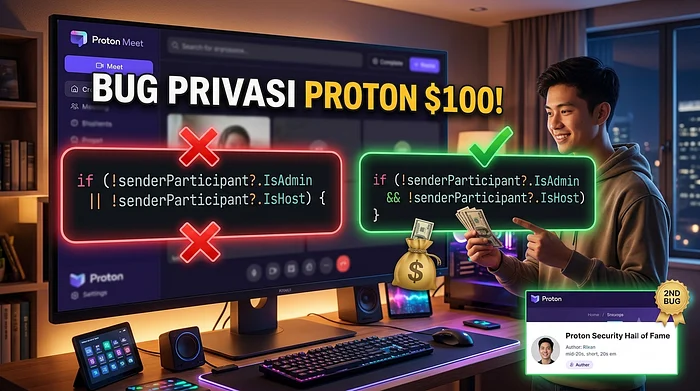
The bug is a logic error in the receiver-side role check that decides whether to process a recording status update. The author describes it as a simple logic typo, an || where an && was intended, and reports that Proton awarded a $100 bounty for it and listed the author in the Proton Security Hall of Fame. The report states that this was the second bug bounty received by Proton.
Setup
The report does not describe any accounts, tools, versions or environment used to test the issue. The only precondition it establishes is conceptual: a meeting participant who is an Admin but not a Host. The analysis is presented as a reading of the receiver code, with the role combinations reasoned through rather than demonstrated with captured traffic.
Finding it
The author looked at the receiver-side check that guards the recording status update and found a condition that, at first glance, might look correct. The report does not reproduce the buggy line verbatim; it describes it as a check that returns early when the sender is not an admin or not a host, using ||.
To show why it is wrong, the author plugs in the Admin-but-not-Host case:
IsAdmin=trueIsHost=false
Evaluating the condition step by step:
!IsAdminevaluates tofalse!IsHostevaluates totruefalse || trueresults intrue
Because the condition is true, the function executes the return; statement inside the if block. The function aborts early and the recording status is never updated on the receiving clients. As a direct result, the participant-facing recording UI is completely bypassed.
Exploitation
Step 1: Compare against the correct logic elsewhere in the receiver
The author points out that other parts of the receiver code use the expected logic, with the && (AND) operator:
if (!senderParticipant?.IsAdmin && !senderParticipant?.IsHost) { return;}
This returns early only when the sender is neither an admin nor a host. Applying it to the same Admin-but-not-Host scenario gives false && true, which is false. The function does not return early, the recording state (participantsRecording) updates properly, and the warnings are shown to everyone.
Step 2: Record as an admin who is not the host
With the buggy check in place, a meeting admin who is not the host can start recording and the receiving clients never update their recording state. The other participants therefore do not see the expected recording indicator or consent UI. The report does not include a request, payload or captured response for this step; the behaviour follows from the early return described above.
Root cause
The mistake is the boolean operator in the receiver's role check. The guard is meant to skip the update only when the sender holds neither privileged role, which requires the negation of a disjunction: not admin AND not host. Written with ||, the guard also fires when the sender is an admin who is not a host, so that case hits the early return; and the participantsRecording state is never propagated.
The author frames this as a trap of negative logic: when writing conditions with !, it is easy to be misled by De Morgan's laws. The report does not say whether any existing test or review process covered this path before the fix.
Impact
A meeting admin who is not the host could silently record important discussions without the other participants receiving the expected recording indicator or consent UI. On a privacy-first platform, the author argues, user consent is not negotiable. The author suggested a severity of Low to Medium, citing the direct impact on privacy consent notifications.
Fix
Proton changed the receiver role check so that it allows either an admin or a host, replacing the || with &&:
if (!senderParticipant?.IsAdmin && !senderParticipant?.IsHost) { return;}
They also added unit and regression tests covering all role combinations:
| Role combination | Expected result |
|---|---|
| Host only | Accepted |
| Admin only | Accepted |
| Host + Admin | Accepted |
| Participant only | Rejected |
The author describes the reporting process as incredibly smooth, with the Proton security team highly responsive and quick to validate the finding.
Variants to test
- Other negated role guards. Search client and server code for conditions combining two or more
!-negated role or permission checks with||. A positive result is a guard that returns early for a user holding exactly one of the privileged roles, where the surrounding code clearly intends to admit either. - State-sync handlers for other meeting features. Look at handlers that propagate mute, screen share, waiting room or consent state to participants and check whether the same role gate is used. A positive result is a privileged user whose action succeeds locally but produces no update on other participants' clients.
- Enumerate the role matrix. For every guard of the form
if (!A && !B) return;orif (!A || !B) return;, test each combination of A and B (neither, A only, B only, both) and compare the observed behaviour with the intended one. A positive result is any combination that is silently rejected or silently admitted against the design. - Regression coverage as a signal. Where a project publishes tests, check whether role permutations are covered for security-relevant state changes. A positive result is a privileged-role path with no test asserting the state update reaches other clients.
What happened, in plain words
Proton is a company that makes online services built around privacy: the idea that your messages, files and meetings are for you and the people you choose, and not for anyone else. Proton Meet is one of those services: it is a meeting product, the kind of thing you use to talk to a group of people over the internet with video and sound, similar in purpose to other video-call tools.
One of the safety features of a meeting tool is the recording indicator. When somebody in a meeting starts recording it, everyone else in the meeting is supposed to see a clear sign that recording is happening, and is supposed to be asked to agree to it. That sign and that request for agreement are what the report calls the recording indicator and the consent UI. "Consent" simply means permission: you are told what is happening and you say yes. "UI" stands for user interface, which is just the part of the screen you see and click on.
The bug in this report is a small mistake in the code that decides whether to pass that recording signal on to the other people in the meeting. The author calls it a logic typo: two symbols were swapped, and because of that, one particular kind of user could record a meeting while everyone else saw nothing. The author reported it to Proton, Proton fixed it, and Proton paid a $100 bounty. A bounty is a reward a company pays to someone outside the company who finds and reports a security or privacy problem. The report states that this was the second bug bounty received by Proton, and that Proton listed the author's name in its Security Hall of Fame, a public page that thanks people who have reported problems.
The pieces you need to know first
Before the mistake makes sense, a few everyday ideas need to be clear.
Code and conditions. A program is a list of instructions a computer follows. Very often a program has to make a decision: do this, but only if some statement is true. That statement is called a condition. In most programming languages a condition is written inside an if, like if (something) { ... }. If the something is true, the instructions inside the curly braces run. If it is false, they are skipped.
True and false. Computers reason with two values, true and false. A condition is just a question whose answer is one of those two.
The ! symbol (NOT). In many languages, including the one used here, TypeScript, a ! in front of a value flips it. !true becomes false, and !false becomes true. Read it as "not". So !IsAdmin means "is not an admin".
The || symbol (OR). Two conditions joined by || are true if at least one of them is true. It is the inclusive "or": one or the other or both.
The && symbol (AND). Two conditions joined by && are true only if both of them are true.
Roles. In a meeting product, people have roles. Two roles matter here. An Admin is someone with management powers over the meeting. A Host is the person running the meeting. They are not the same thing: you can be an admin without being the host, and a host without being an admin. The code stores these as values called IsAdmin and IsHost, each either true or false.
The receiver. When one person's computer does something in a meeting, a message goes out to the computers of everyone else. Each of those computers is a receiver, and it has code that decides what to do with the message. The bug lives in the receiver's code.
Returning early. A function is a named block of instructions. return; means "stop here and leave this function now", without running the rest of it. Programmers use it as a guard: if the situation is not one we care about, leave immediately. The danger is that a guard can be written slightly wrong and leave too often.
A state update. The receiver keeps a little note of what is currently true in the meeting, for example whether recording is on. That note is called the state, and changing it is called updating it. If the receiver leaves early, the note is never changed, and the screen never shows the warning.
Setting the scene
The report does not describe any accounts, tools, software versions or test environment. There is no captured network traffic and no list of steps performed in a browser. The whole analysis is a reading of the receiver's code, with the possible role combinations reasoned through on paper. The only precondition it establishes is a situation: a meeting participant who is an Admin but not a Host.
That is worth pausing on, because it is the heart of the beginner-friendly lesson. You do not always need special tools to find a serious problem. Sometimes you need to read a decision carefully and ask what happens for each kind of user.
Finding it
The author looked at the receiver-side check that guards the recording status update. This check decides whether the incoming recording message should be processed. At first glance, the author says, it might look correct. The report does not reproduce the faulty line word for word; it describes it as a check that returns early when the sender is not an admin or not a host, using ||.
To show why that is wrong, the author takes the Admin-but-not-Host case and plugs in the values:
IsAdmin=trueIsHost=false
Then evaluates the condition one piece at a time:
!IsAdminevaluates tofalse!IsHostevaluates totruefalse || trueresults intrue
Line by line in plain words:
- The person is an admin, so "not an admin" is false.
- The person is not the host, so "not a host" is true.
- An OR is true when at least one side is true, and the right side is true, so the whole condition is true.
Because the condition is true, the function runs the return; statement inside the if block. It stops immediately. The recording status is never updated on the receiving computers. As a direct result, the recording interface that other participants should see is completely bypassed: the warning and the request for consent never appear.
Think of it like a door policy written as "turn away anyone who is not a manager or not a staff member". Read quickly, it sounds like it only turns away people who are neither. Read carefully, it turns away anyone who is missing either badge, which includes a manager who is not staff. The wording is the bug.
Comparing it to the correct logic
To make the mistake obvious, the author points to other parts of the receiver code where Proton used the logic that was actually intended, with the && (AND) operator:
if (!senderParticipant?.IsAdmin && !senderParticipant?.IsHost) { return;}
What each part means:
senderParticipantis the person who sent the message, the one who started recording.- The
?.is a safety mark: if there is no such person, the code does not crash, it just treats the value as missing. !senderParticipant?.IsAdminmeans "the sender is not an admin".&&means both sides must be true.!senderParticipant?.IsHostmeans "the sender is not a host".- So the whole line reads: if the sender is neither an admin nor a host, stop here.
return;is the early exit, and the rest of the function, the part that updates the recording state, is skipped.
This version returns early only when the sender holds neither privileged role. Apply it to the same Admin-but-not-Host case: false && true is false. The function does not return early. The recording state, which the report names participantsRecording, updates properly, and the warnings are shown to everyone.
The difference between the two versions is one symbol. With ||, the guard fires for anyone missing either role. With &&, it fires only for someone missing both. The intent was clearly the second.
Recording as an admin who is not the host
With the faulty check in place, a meeting admin who is not the host can start recording, and the receiving computers never update their recording state. The other participants therefore do not see the expected recording indicator or consent screen.
The report does not include a request, a payload or a captured response for this step. There is nothing to copy and replay. The behaviour follows directly from the early return described above: the message arrives, the guard stops it, and the screen stays as it was. For a beginner, this is an important point: some bugs are not about sending a clever request, they are about a decision that quietly says no when it should say yes.
Why it happens
The mistake is the boolean operator in the receiver's role check. The guard is meant to skip the update only when the sender holds neither privileged role. Saying "neither" in code means "not an admin AND not a host". Written with ||, the guard also fires whenever the sender is missing either role. So an admin who is not a host hits the early return;, and the participantsRecording state is never passed on.
The author frames this as a trap of negative logic. When you write conditions with !, it is easy to be misled by De Morgan's laws, which are the rules for how "not" moves across "and" and "or". One of those rules says that "not (A or B)" is the same as "not A and not B". If you mean "neither", you need the AND form. Writing the OR form changes the meaning without looking wrong at a glance.
The report does not say whether any existing test or review process covered this path before the fix.
What it means for people in the meeting
A meeting admin who is not the host could silently record important discussions without the other participants receiving the expected recording indicator or consent screen. On a privacy-first platform, the author argues, user consent is not negotiable: if people are not told they are being recorded, they cannot agree to it.
The author suggested a severity of Low to Medium, citing the direct impact on privacy consent notifications. Severity is the rough measure of how serious a problem is, and it is usually suggested by the reporter and then judged by the company.
The fix
Proton changed the receiver role check so that it allows either an admin or a host, replacing the || with &&:
if (!senderParticipant?.IsAdmin && !senderParticipant?.IsHost) { return;}
In plain words: stop only if the sender is neither an admin nor a host. Everyone else, including an admin who is not the host, gets through, and the recording state is updated for the other participants.
They also added unit and regression tests covering all role combinations. A unit test is a small automatic check that runs one piece of code with chosen inputs and confirms the result. A regression test is one that stays in the project so the same mistake cannot quietly come back later.
| Role combination | Expected result |
|---|---|
| Host only | Accepted |
| Admin only | Accepted |
| Host + Admin | Accepted |
| Participant only | Rejected |
Read the table as a checklist of every kind of person who might send the message. A host alone is allowed through. An admin alone is allowed through. Someone who is both is allowed through. An ordinary participant with neither role is refused. The bug was exactly the case in the second row, and now there is a test that would catch it if it broke again.
The author describes the reporting process as incredibly smooth, with the Proton security team highly responsive and quick to validate the finding.
Other places to look
Once you understand the shape of this mistake, you can look for it elsewhere. The report suggests four directions.
- Other negated role guards. Search client and server code for conditions that combine two or more
!-negated role or permission checks with||. A positive result is a guard that returns early for a user holding exactly one of the privileged roles, where the surrounding code clearly intends to admit either. - State-sync handlers for other meeting features. Look at the code that passes mute, screen share, waiting room or consent state to participants, and check whether the same role gate is used. A positive result is a privileged user whose action works on their own screen but produces no update on other participants' screens.
- Enumerate the role matrix. For every guard of the form
if (!A && !B) return;orif (!A || !B) return;, test each combination of A and B (neither, A only, B only, both) and compare what happens with what was intended. A positive result is any combination that is silently rejected or silently admitted against the design. - Regression coverage as a signal. Where a project publishes tests, check whether role permutations are covered for security-relevant state changes. A positive result is a privileged-role path with no test asserting that the state update reaches other clients.
What to take away
- Bugs do not have to be complicated. Sometimes a privacy problem does not come from a complex memory exploit or an SQL injection, but from a basic logic error,
||instead of&&. - Read code carefully. Code review matters. When writing negative logic with
!, it is easy to be tricked by De Morgan's laws. - Unit testing matters. Write tests that cover all combinations of user states or roles, so edge cases like this one are caught.
That is the author's story. The lesson for someone starting out is that you can begin by learning what a condition means, then asking what happens for each kind of user. The smallest detail can be the whole bug.
Glossary
- Admin: a meeting role with management powers over the meeting; not the same as the host.
- AND (
&&): a way of joining two conditions so the result is true only when both are true. - Bounty: a reward a company pays to someone outside the company who finds and reports a security or privacy problem.
- Condition: a question in code whose answer is true or false, used to decide whether instructions run.
- Consent: permission; here, a participant being told that recording is happening and agreeing to it.
- Consent UI: the part of the screen that asks a participant to agree to being recorded.
- De Morgan's laws: the rules for how "not" moves across "and" and "or"; for example, "not (A or B)" is the same as "not A and not B".
- Function: a named block of instructions in a program.
- Guard: a check at the start of a function that stops it early when the situation is not one it should handle.
- Host: the person running a meeting; not the same as an admin.
- Logic error: a mistake in how a decision is written, so the program does what the code says rather than what was intended.
- NOT (
!): an operator that flips true to false and false to true; read as "not". - OR (
||): a way of joining two conditions so the result is true when at least one of them is true. - Payload: the data sent in a request; this report contains no payload for the recording step.
- Privacy-first: a design approach where protecting users' data and consent is a central goal.
- Receiver: the computer or piece of code that receives a message sent by another participant.
- Regression test: a test kept in a project so that a fixed mistake cannot quietly return.
- Return (
return;): an instruction that leaves a function immediately, skipping the rest of it. - Role: the kind of user someone is in a meeting, such as admin, host or ordinary participant.
- Security Hall of Fame: a public page where a company thanks people who have reported problems.
- Severity: a rough measure of how serious a problem is.
- SQL injection: a classic attack where malicious input is fed into a database query; mentioned only as a contrast to simple logic errors.
- State: the stored note of what is currently true, such as whether recording is on.
- State update: changing that stored note so the screen reflects the new situation.
- True and false: the two values a computer uses to answer a condition.
- TypeScript: the programming language the code snippets in this report are written in.
- UI (user interface): the part of a program you see and interact with on screen.
- Unit test: a small automatic check that runs one piece of code with chosen inputs and confirms the result.
?.(optional chaining): a safety mark in code that avoids a crash when a value is missing.




