Understanding and Mitigating Log4Shell CVE-2021–44228
Log4j 2 versions from 2.0-beta9 to 2.14.1 resolved JNDI lookups in logged messages, so attacker-controlled text that reached the logger could make the application connect to an attacker-controlled LDAP server and download and execute a Java class. This allowed unauthenticated remote code execution with the rights of the application process.

medium.com
Published on medium.com
Bug Bounty
The full write-up lives on its author's site
It belongs to its author, so we link to it rather than copy it. The other two tabs are our own rewrites, checked against it.
Context
Log4Shell is CVE-2021-44228, a vulnerability in Apache Log4j 2, a logging library for Java applications. Versions from 2.0-beta9 through 2.14.1 shipped a feature called message lookups. When Log4j printed a log message, it searched the message for special patterns and resolved them. One of those patterns used JNDI, the Java Naming and Directory Interface, which can fetch objects from network services such as LDAP.
The problem is that the same substitution runs on text the application did not author. A line typed into a login form, a chat box or a search field could make a Java server reach out to an external server and run code from it. No password was needed. The text only had to be logged.
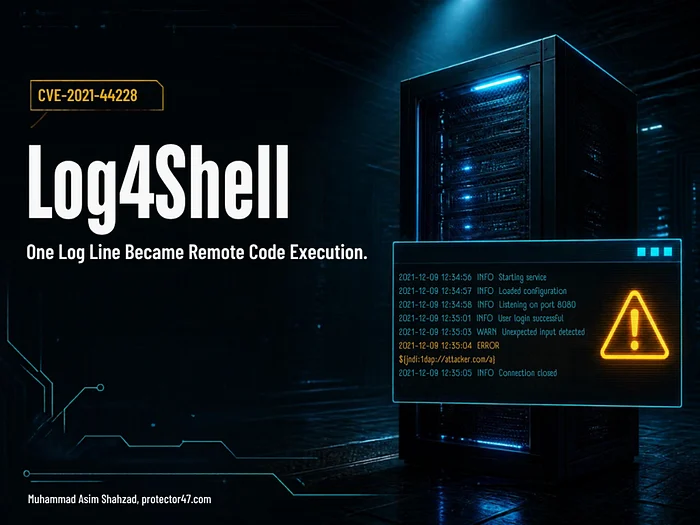
The cover image is an AI generated illustration made in Canva.
Some vulnerabilities live in one product. Log4Shell lived in a library that thousands of products carried inside them. In December 2021, defenders learned that the trigger was any logged input, which made the attack surface every form, header and field an application recorded.
Setup
The lab is built on an isolated host only network, with no internet route for the victim machine beyond the lab. Every virtual machine is snapshotted before the first run so it can be rolled back.
- Victim machine: a virtual machine running a deliberately vulnerable Java application that uses Log4j 2.14.1. Public training images built for this CVE exist for exactly this purpose. It gets a lab address such as 10.10.0.20.
- Attacker machine: a Linux virtual machine on the same host only network, for example [redacted], with a Java development kit, a simple web server and a JNDI LDAP server tool built for Log4Shell training labs.
- Safety rules for the lab: no port forwarding, no bridged networking, no real credentials anywhere in the lab, and full disk snapshots before the first run.
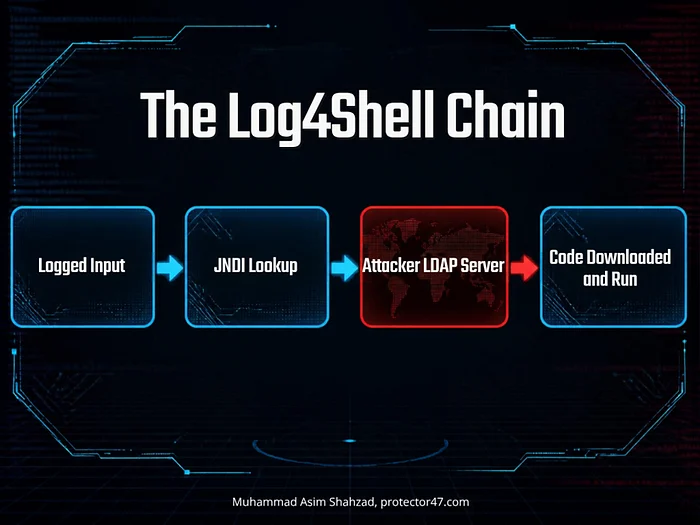
The diagram shows the chain: logged input triggers a JNDI lookup, the attacker LDAP server answers, and code is downloaded and run. It is an AI generated illustration made in Canva.
Finding it
The precondition is simple and is also the first test a defender should run in a lab: does a harmless unique word sent through a field the application accepts appear in the application log? If it does, the input reaches Log4j. That single observation is what makes the rest of the chain possible, because everything after it depends on attacker controlled text arriving at the logger in raw form.
The failure is easy to state. Attacker controlled text reached the logger. The logger saw a JNDI pattern inside that text and obeyed it, connecting to an LDAP server the attacker controlled. That server answered with a reference to a Java class hosted on an attacker web server. The victim application downloaded the class and executed it with the full rights of the application process. Logging, a feature meant to record events, became a remote control.
Exploitation
The chain has four links, and breaking any one of them stops it. The walkthrough below stays at concept level and uses only a listener inside the lab.
Step 1: confirm that untrusted input reaches the logger
Send a harmless unique word through a field the application accepts, then read the application log. If the word appears there, the input reaches Log4j. This is the first link and the first thing to test.
Step 2: prove that the logger resolves a lookup inside that input
In a lab, a safe callback test proves this link without any harmful effect: a lookup that points only at a listener you control inside the lab, which records the connection and serves nothing harmful. A connection arriving at your listener proves the lookup fires. In a real assessment this callback proof is where responsible testing stops.
Step 3: the external reference is followed
The lookup answer points the application to a second server, which supplies a Java class. The application downloads that class because the lookup mechanism was designed to fetch remote objects, with no check that the object was safe or expected.
Step 4: the class runs inside the application process
That is the impact link. Code execution at the privilege level of the Java application follows from the three links above, not from any separate flaw. In many real deployments that meant full server control.
Defenders should read the chain backwards. If untrusted input never reaches the logger in raw form, if lookups are disabled, if outbound connections from the application server are blocked, or if the library is patched, the chain breaks.
Root cause
The mistake is that a logging call treated its message as a template. Message lookups resolved JNDI patterns found in the message, including text supplied by the user. The lookup mechanism was designed to fetch remote objects and did not check that the object was safe or expected.
Existing defences did not stop it for two reasons. The vulnerable code sat in a library, so one pattern attacked countless products at once, including copies bundled inside other products. And the trigger was any logged input, so the attack surface was every form, header and field an application recorded. Defenders could not fix one app. They had to find every copy of one library.
Impact
Unauthenticated remote code execution is the highest impact class in security, and Log4Shell added two multipliers: the library distribution and the breadth of the trigger. Code execution runs at the privilege level of the Java application, which in many real deployments meant full server control.
Detection
- Hunt the logs. Search application and web logs for the jndi pattern and its obfuscated cousins, including nested lookups and mixed case tricks that attackers used to slip past simple filters.
- Watch the network. A Java application server that suddenly opens outbound LDAP or HTTP connections to unknown addresses is showing the exact behaviour this exploit needs.
- Scan the estate properly. Inventory every application and appliance for Log4j core files at vulnerable versions, including libraries bundled inside vendor products. Public CISA guidance during the incident centred on this inventory problem.
- Deploy detection rules. Public rule sets for web application firewalls and intrusion detection covered the lookup patterns, and endpoint tools flagged Java processes spawning shells or writing unexpected files.
Defenders should also log lookup patterns and outbound connection attempts from Java application servers, and alert when a Java process opens an outbound LDAP or HTTP connection to an unknown address or spawns a shell or writes an unexpected file.
Fix
The fix and verify summary: upgrade to 2.17.1 or later, remove JndiLookup if stuck, retest the callback, and rescan for hidden copies. The image is an AI generated illustration made in Canva.
The definitive fix is to upgrade Log4j 2 to a safe release. Public guidance settled on version 2.17.1 or later for Java 8, with 2.12.4 for the Java 7 branch line in the 2.12 series and later safe releases beyond those numbers. Follow on issues CVE-2021-45046, CVE-2021-45105 and CVE-2021-44832 are the reason teams should land on the later releases rather than the first emergency patch.
Temporary measures from public vendor guidance, useful only while an upgrade is scheduled: set the system property log4j2.formatMsgNoLookups to true for versions from 2.10 onward, or remove the JndiLookup class from the log4j core jar file.
The core fix, shown as sanitised logic with no real account data and no working payload:
Vulnerable logic: untrusted input logged with lookups enabled

logger.info(user_input)

Patched logic: upgrade to a safe Log4j release, and log untrusted input with lookups disabled

logger.info(“Received request from {}”, sanitized_user_id)
For builders, the durable fixes are well known.
- Upgrade every copy of Log4j, including copies bundled inside vendor products, to a safe release.
- Disable message lookups where the feature is not needed, and treat any lookup that reaches an external server as a design fault.
- Block outbound LDAP and HTTP connections from application servers at the network level, so a missed library copy has less room to call out.
- Keep an accurate software inventory, so a library flaw can be found across the estate in hours, not weeks.
- Retest the fix with the lab callback test, rescan for nested copies, and keep detection rules live after patching.
For defenders reviewing a Log4Shell report, the test checklist is short. Confirm the deployed jar version on disk, not only in a spreadsheet. Repeat the lab callback test against the patched build and confirm no connection reaches your listener. Rescan the estate for nested copies inside other applications, including vendor bundled copies. Keep the log hunts running for a period after patching, because exploitation attempts against this CVE continued for years.
Variants to test
- Obfuscated lookup patterns in logged fields. Try nested lookups and mixed case tricks against a field you know is logged, and watch your lab listener. A connection arriving at the listener is a positive result.
- Header and field coverage. Send the harmless unique word through every form, header and field the application records, then read the log. The word appearing in the log identifies another input path that reaches Log4j.
- Nested library copies. Inventory applications and appliances for Log4j core files at vulnerable versions, including libraries bundled inside vendor products. Finding a vulnerable jar inside a vendor product is a positive result.
- Outbound egress from application servers. Check whether a Java application server can open outbound LDAP or HTTP connections to unknown addresses. A successful outbound connection from the application server shows the network control is missing.
- Post patch callback. Repeat the lab callback test against the patched build. No connection reaching your listener is the result you want; a connection means the fix is not in place.
Closing takeaways
Log4Shell is the supply chain lesson of the decade. A feature nobody asked for, inside a library nobody reviewed, turned routine logging into remote code execution across the world.
For testers, the craft lesson is the callback proof. One recorded connection from your own lab listener proves the flaw completely. For builders, the lesson is inventory. You cannot patch a library you do not know you run.
What happened, in plain words
In December 2021, the security world learned about a flaw in a piece of software called Apache Log4j 2. Log4j is a logging library: a small block of code that Java programs use to write down what they are doing. Every time a website records "user logged in" or "search for shoes" or "error reading file", something like Log4j is usually doing the writing.
The flaw meant that a line of text typed into an ordinary box on a website, such as a login form, a chat box or a search field, could make the server behind that website contact another computer chosen by the attacker and run code from it. No password was needed. The text only had to be written into the log.
That is the whole story in one sentence: a feature meant to record events could be turned into a remote control. The vulnerability was given the name Log4Shell and the identifier CVE-2021-44228. A CVE is simply a public catalogue number for a known security flaw, so people around the world can refer to the same thing.
The cover image is an AI generated illustration made in Canva.
Some vulnerabilities live inside one product. Log4Shell lived in a library that thousands of products carried inside them, the way thousands of different meals can contain the same brand of stock cube. When the stock cube is bad, you cannot fix it by changing one recipe. You have to find every kitchen that uses it.
The pieces you need to know first
Before the attack chain makes sense, here are the few ideas it rests on. None of them require any security background.
A library. When programmers build an application, they rarely write everything themselves. They reuse small packages of ready made code called libraries. A library is like a pre-made part in a car: the car maker does not forge every bolt, it buys bolts. If a bolt is faulty, every car that used it is affected, even though the car makers never made the bolt.
A Java application. Java is a programming language, and a Java application is a program written in it. Many large websites and internal business systems run on Java. You do not need to know Java to follow this; you only need to know that these programs run on a server, a computer in a data centre that answers requests from your browser.
A log. A log is a diary that a program keeps about itself. When you submit a form, the program may write a line such as "received search for red shoes". Support staff and engineers read these diaries to understand what happened when something goes wrong.
JNDI. JNDI stands for Java Naming and Directory Interface. It is a built in way for a Java program to look something up by name, a bit like a phone book: you give a name, and the system fetches whatever is filed under that name. The important part is that the thing filed under the name does not have to sit on the same computer. It can live on another machine on the network.
LDAP. LDAP is a common protocol, a shared language, for directory services. Think of it as the format of the phone book that JNDI can talk to. A JNDI lookup can be answered by an LDAP server somewhere else on the network.
Remote code execution. This is the name for the worst kind of security bug: the attacker gets their own code to run on the victim's computer. It is the difference between someone reading your diary and someone moving into your house and using your kitchen.
Unauthenticated. It means no login is required. The attacker does not need a username, a password or any account at all.
The vulnerability, explained simply
Apache Log4j 2 is a logging library for Java applications. Versions from 2.0-beta9 through 2.14.1 included a feature called message lookups. When Log4j printed a log message, it would look inside the message for special patterns and resolve them. One pattern used JNDI, which can fetch objects from network services such as LDAP.
A simple comparison: imagine a secretary who types letters for you, and who has been trained that whenever she sees the note "insert today's date" she should replace it with the actual date. That is helpful. Now imagine a stranger can slip a note into the pile of papers saying "insert the contents of the safe". If the secretary follows every note she sees, the stranger has just used her helpful habit against her.
The problem is that the same substitution ran on text the application did not write itself. A line typed into a login form, a chat box or a search field could make a Java server reach out to an external server and run code from it. No password was needed. The text only had to be logged.
Lab setup
Everything that follows is meant for a lab: a practice environment you build and own, on your own computer or your own virtual machines. A virtual machine is a computer simulated inside your real computer, like a cardboard box inside a room. You can break it, throw it away and start again without touching anything real.
The lab is built on an isolated host only network, with no internet route for the victim machine beyond the lab. "Host only" means the virtual machines can talk to each other but not to the outside world, like a sealed room with no windows. Every virtual machine is snapshotted before the first run so it can be rolled back. A snapshot is a saved copy of the whole machine at a point in time, so if something goes wrong you press a button and return to that moment.
- Victim machine: a virtual machine running a deliberately vulnerable Java application that uses Log4j 2.14.1. Public training images built for this CVE exist for exactly this purpose. It gets a lab address such as 10.10.0.20. An IP address is the number that identifies a computer on a network, the way a street address identifies a house.
- Attacker machine: a Linux virtual machine on the same host only network, for example [redacted], with a Java development kit, a simple web server and a JNDI LDAP server tool built for Log4Shell training labs. The Java development kit is the set of tools needed to build and run Java programs. The web server and the LDAP server tool play the roles of the two servers the attack needs.
- Safety rules for the lab: no port forwarding, no bridged networking, no real credentials anywhere in the lab, and full disk snapshots before the first run. Port forwarding and bridged networking are settings that would connect the lab machines to your real network or the internet; leaving them off keeps the lab sealed. Credentials means usernames and passwords, and there should be none that matter inside the lab.
The diagram shows the chain: logged input triggers a JNDI lookup, the attacker LDAP server answers, and code is downloaded and run. It is an AI generated illustration made in Canva.
Finding it
The precondition is simple and is also the first test a defender should run in a lab: does a harmless unique word sent through a field the application accepts appear in the application log? If it does, the input reaches Log4j. That single observation is what makes the rest of the chain possible, because everything after it depends on attacker controlled text arriving at the logger in raw form.
Why start here? Because if the text never reaches the logger, nothing else can happen. It is like checking whether a letter actually arrives at the secretary's desk before worrying about what she does with it. Pick a word that will never appear by accident, type it into a form, then read the log and look for it.
The failure is easy to state. Attacker controlled text reached the logger. The logger saw a JNDI pattern inside that text and obeyed it, connecting to an LDAP server the attacker controlled. That server answered with a reference to a Java class hosted on an attacker web server. The victim application downloaded the class and executed it with the full rights of the application process. Logging, a feature meant to record events, became a remote control.
A Java class, in this context, is simply a piece of program code that Java can load and run. "With the full rights of the application process" means the downloaded code inherits whatever permissions the application itself had, so it can do anything the application could do.
Exploitation
The chain has four links, and breaking any one of them stops it. The walkthrough below stays at concept level and uses only a listener inside the lab. A listener is a small program that waits for an incoming connection and writes down that it arrived. It is the equivalent of leaving a notebook by the door to see whether anyone knocks.
Step 1: confirm that untrusted input reaches the logger
Send a harmless unique word through a field the application accepts, then read the application log. If the word appears there, the input reaches Log4j. This is the first link and the first thing to test.
Why this step: it answers the only question that matters at the start. If your word does not show up in the log, this particular input path is not feeding the logger, and there is nothing further to examine on that path.
Step 2: prove that the logger resolves a lookup inside that input
In a lab, a safe callback test proves this link without any harmful effect: a lookup that points only at a listener you control inside the lab, which records the connection and serves nothing harmful. A connection arriving at your listener proves the lookup fires. In a real assessment this callback proof is where responsible testing stops.
Why this step: it shows that the logger does not merely copy the text, it acts on it. The proof is a connection arriving at your own listener. Nothing harmful is served, so the test demonstrates the behaviour without causing damage. A callback is simply the incoming connection your listener receives.
Step 3: the external reference is followed
The lookup answer points the application to a second server, which supplies a Java class. The application downloads that class because the lookup mechanism was designed to fetch remote objects, with no check that the object was safe or expected.
Why this step matters: this is where the design decision bites. The lookup feature was built to fetch things from elsewhere, and it never asked whether the thing it fetched was trustworthy. It is the secretary again, fetching whatever the note tells her to fetch.
Step 4: the class runs inside the application process
That is the impact link. Code execution at the privilege level of the Java application follows from the three links above, not from any separate flaw. In many real deployments that meant full server control.
Why this is the end of the chain: once the downloaded code runs, the attacker is effectively sitting inside the application. There is no extra bug needed at this point; the earlier three links did all the work.
Defenders should read the chain backwards. If untrusted input never reaches the logger in raw form, if lookups are disabled, if outbound connections from the application server are blocked, or if the library is patched, the chain breaks. Reading backwards is useful because each link is a place where you can cut the chain, and the cheapest cut is often the last one: patching the library.
Root cause
The mistake is that a logging call treated its message as a template. A template is a text with blanks or instructions that get filled in or acted on. Message lookups resolved JNDI patterns found in the message, including text supplied by the user. The lookup mechanism was designed to fetch remote objects and did not check that the object was safe or expected.
Existing defences did not stop it for two reasons. The vulnerable code sat in a library, so one pattern attacked countless products at once, including copies bundled inside other products. And the trigger was any logged input, so the attack surface was every form, header and field an application recorded. Attack surface simply means all the places where an outsider can send something in. Defenders could not fix one app. They had to find every copy of one library.
Impact
Unauthenticated remote code execution is the highest impact class in security, and Log4Shell added two multipliers: the library distribution and the breadth of the trigger. Code execution runs at the privilege level of the Java application, which in many real deployments meant full server control.
In plain terms: an attacker with no account could, in the right conditions, run their own code on a server. The two conditions are worth remembering, because they are also the two places where a defender can stop the attack.
Detection
Detection means noticing that an attack is being attempted or has happened. There are four practical places to look.
- Hunt the logs. Search application and web logs for the jndi pattern and its obfuscated cousins, including nested lookups and mixed case tricks that attackers used to slip past simple filters. Obfuscated means disguised. Attackers wrote the pattern in slightly different ways, such as changing capitalisation or nesting one lookup inside another, so that a simple search for the plain word would miss it.
- Watch the network. A Java application server that suddenly opens outbound LDAP or HTTP connections to unknown addresses is showing the exact behaviour this exploit needs. Outbound means going out from your server to somewhere else. A web server that normally only answers requests suddenly dialling out to a stranger is suspicious in the same way as a shop assistant making unexplained phone calls.
- Scan the estate properly. Inventory every application and appliance for Log4j core files at vulnerable versions, including libraries bundled inside vendor products. Public CISA guidance during the incident centred on this inventory problem. An estate is the whole collection of systems an organisation runs. An inventory is a list of what you have. CISA is a government cybersecurity agency whose public guidance was widely used during the incident.
- Deploy detection rules. Public rule sets for web application firewalls and intrusion detection covered the lookup patterns, and endpoint tools flagged Java processes spawning shells or writing unexpected files. A web application firewall inspects incoming web traffic and can block known bad patterns. Intrusion detection watches network traffic for signs of attack. Endpoint tools watch individual computers. A shell is a command prompt, so a Java process starting a shell is like a quiet office worker suddenly opening a cash register.
Defenders should also log lookup patterns and outbound connection attempts from Java application servers, and alert when a Java process opens an outbound LDAP or HTTP connection to an unknown address or spawns a shell or writes an unexpected file. An alert is an automatic notification, so nobody has to sit and watch the screens all day.
Fix
The fix and verify summary: upgrade to 2.17.1 or later, remove JndiLookup if stuck, retest the callback, and rescan for hidden copies. The image is an AI generated illustration made in Canva.
The definitive fix is to upgrade Log4j 2 to a safe release. Upgrading means replacing the old library with a newer version, the way you replace a recalled part with a fixed one. Public guidance settled on version 2.17.1 or later for Java 8, with 2.12.4 for the Java 7 branch line in the 2.12 series and later safe releases beyond those numbers. Java 7 and Java 8 are older major versions of Java, and each has its own line of Log4j releases, so the safe version number differs between them. Follow on issues CVE-2021-45046, CVE-2021-45105 and CVE-2021-44832 are the reason teams should land on the later releases rather than the first emergency patch. In other words, the first quick patch was not the end of the story; later flaws were found, so the later releases are the ones to aim for.
Temporary measures from public vendor guidance, useful only while an upgrade is scheduled: set the system property log4j2.formatMsgNoLookups to true for versions from 2.10 onward, or remove the JndiLookup class from the log4j core jar file. A system property is a setting passed to a Java program when it starts. A jar file is the packaged file that contains a Java library, like a zip file for code. These measures are stopgaps, not cures: they reduce the risk until the real upgrade happens.
The core fix, shown as sanitised logic with no real account data and no working payload:
Vulnerable logic: untrusted input logged with lookups enabled

logger.info(user_input)

Patched logic: upgrade to a safe Log4j release, and log untrusted input with lookups disabled

logger.info(“Received request from {}”, sanitized_user_id)
Vulnerable logic: untrusted input logged with lookups enabledis a comment, a note for the reader, describing the bad version.logger.info(user_input)is the bad line.loggeris the logging tool,infomeans write an informational line, anduser_inputis whatever the visitor typed. The visitor's text goes straight into the diary, and because lookups are on, any lookup pattern inside it gets acted on.Patched logic: upgrade to a safe Log4j release, and log untrusted input with lookups disabledis the comment describing the good version.logger.info(“Received request from {}”, sanitized_user_id)is the good line. The message is a fixed sentence with a placeholder, the{}, and the value is supplied separately.sanitized_user_idmeans the identifier has been cleaned and checked first. The visitor's text is treated as data to be printed, not as a template to be obeyed.
Parameterised means the sentence and the value are kept apart until the moment of printing, which is the programming equivalent of reading a stranger's note aloud rather than following its instructions.
For builders, the durable fixes are well known.
- Upgrade every copy of Log4j, including copies bundled inside vendor products, to a safe release.
- Disable message lookups where the feature is not needed, and treat any lookup that reaches an external server as a design fault.
- Block outbound LDAP and HTTP connections from application servers at the network level, so a missed library copy has less room to call out.
- Keep an accurate software inventory, so a library flaw can be found across the estate in hours, not weeks.
- Retest the fix with the lab callback test, rescan for nested copies, and keep detection rules live after patching.
For defenders reviewing a Log4Shell report, the test checklist is short. Confirm the deployed jar version on disk, not only in a spreadsheet. Repeat the lab callback test against the patched build and confirm no connection reaches your listener. Rescan the estate for nested copies inside other applications, including vendor bundled copies. Keep the log hunts running for a period after patching, because exploitation attempts against this CVE continued for years. "On disk" means the actual file on the actual machine, because spreadsheets drift out of date and files do not.
Variants to test
These are the different shapes the same problem can take. Each one is a way to check a different part of the chain.
- Obfuscated lookup patterns in logged fields. Try nested lookups and mixed case tricks against a field you know is logged, and watch your lab listener. A connection arriving at the listener is a positive result. Why: it shows the disguise does not save you, and it tells you whether your filters catch the disguised forms.
- Header and field coverage. Send the harmless unique word through every form, header and field the application records, then read the log. The word appearing in the log identifies another input path that reaches Log4j. A header is a small piece of information your browser sends along with every request, such as which browser you use. Why: every path that reaches the logger is another door into the same room.
- Nested library copies. Inventory applications and appliances for Log4j core files at vulnerable versions, including libraries bundled inside vendor products. Finding a vulnerable jar inside a vendor product is a positive result. Why: the copy you did not know about is the one that hurts.
- Outbound egress from application servers. Check whether a Java application server can open outbound LDAP or HTTP connections to unknown addresses. A successful outbound connection from the application server shows the network control is missing. Egress means traffic leaving your network. Why: if the server cannot call out, a missed library copy has nowhere to call.
- Post patch callback. Repeat the lab callback test against the patched build. No connection reaching your listener is the result you want; a connection means the fix is not in place. Why: a fix you have not tested is a hope, not a fix.
Closing takeaways
Log4Shell is the supply chain lesson of the decade. A feature nobody asked for, inside a library nobody reviewed, turned routine logging into remote code execution across the world. A supply chain, in software, is the chain of parts and suppliers that ends up inside your product, and a flaw anywhere along it reaches you.
For testers, the craft lesson is the callback proof. One recorded connection from your own lab listener proves the flaw completely. For builders, the lesson is inventory. You cannot patch a library you do not know you run.
Glossary
- Alert: an automatic notification sent when a monitoring system sees something suspicious.
- Apache Log4j 2: a logging library for Java applications, the component that contained the flaw.
- Attack surface: all the places where an outsider can send input into a system.
- Callback: an incoming connection that arrives at a listener you control, used as proof that a lookup was triggered.
- CISA: a government cybersecurity agency whose public guidance was used during the incident.
- Class (Java): a piece of Java program code that can be loaded and run.
- Credentials: usernames and passwords, or anything else used to prove identity.
- CVE: a public catalogue number for a known security vulnerability, such as CVE-2021-44228.
- Egress: network traffic leaving your systems towards somewhere else.
- Endpoint tool: software that watches an individual computer for suspicious behaviour.
- Estate: the whole collection of systems and applications an organisation runs.
- Header: a small piece of information a browser sends with every web request, such as the browser type.
- Host only network: a virtual network where machines can talk to each other but not to the outside world.
- Inventory: a list of the software and systems you actually have.
- Intrusion detection: watching network traffic for signs of attack.
- IP address: the number that identifies a computer on a network.
- Jar file: a packaged file containing Java code, similar to a zip file.
- Java: a programming language, and the platform many large applications run on.
- Java development kit: the set of tools needed to build and run Java programs.
- JNDI: Java Naming and Directory Interface, a built in way for Java to look things up by name, possibly on another machine.
- LDAP: a common protocol for directory services, the kind of server a JNDI lookup can talk to.
- Library: a reusable package of code that many applications include instead of writing it themselves.
- Listener: a small program that waits for an incoming connection and records that it arrived.
- Log: the diary a program keeps about what it is doing.
- Message lookup: a Log4j feature that finds special patterns inside a log message and resolves them.
- Obfuscated: disguised, written in a different form so a simple search misses it.
- Outbound: traffic going from your server out to another machine.
- Parameterised message: a log message written as a fixed sentence with placeholders, where values are supplied separately.
- Port forwarding: a setting that redirects network traffic from one machine or network to another; left off in the lab to keep it sealed.
- Bridged networking: a virtual machine setting that connects the machine directly to your real network; left off in the lab.
- Remote code execution: a flaw that lets an attacker run their own code on someone else's computer.
- Sanitised: cleaned and checked before use.
- Shell: a command prompt, a way to type commands directly to a computer.
- Snapshot: a saved copy of a whole virtual machine at a point in time, used to roll back.
- Supply chain (software): the chain of parts and suppliers whose code ends up inside your product.
- System property: a setting passed to a Java program when it starts.
- Template: text containing instructions or placeholders that get acted on or filled in.
- Unauthenticated: done without any login or account.
- Virtual machine: a computer simulated inside your real computer.
- Web application firewall: a defence that inspects incoming web traffic and can block known bad patterns.


