Unique Username Validation Bypass to a Stored Open Redirect: How I Escalated a Bug Bounty Finding
The username field was only validated in the browser, so a crafted request could store characters the frontend rejected, including a full URL. When another user opened the attacker's profile, the application redirected them to that stored attacker-controlled URL.
 Published on medium.com
Hackerone
The full write-up lives on its author's site
It belongs to its author, so we link to it rather than copy it. The other two tabs are our own rewrites, checked against it.
Context
Skillmate is a web application with user profiles. Each profile carries a username field that the user can edit from the profile page and save with a Save Changes button. The application tells users that a username may contain only lowercase letters, numbers and underscores, and the profile page is meant to display that username to other users who visit the profile.
The assessment described here started from that single field. The researcher, Ankit Rathva, tested whether the rule shown in the browser was also enforced by the server, and then traced what happened to a value once it had been stored and was later rendered to a different user.
Setup
The testing was done against Skillmate during a security assessment, using Burp Suite to intercept and modify the profile update request. The profile was viewed from another account to see the behaviour a visitor would get. The report does not give application versions, account roles beyond ordinary users, or the exact request and response headers.
Finding it
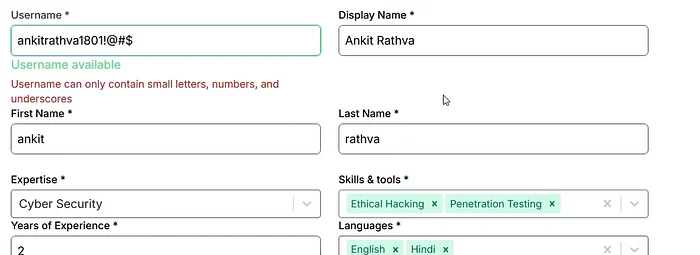
While testing the profile functionality, the researcher noticed that the username field had input restrictions. The application displayed an error similar to:
Username can only contain small letters, numbers, and underscores
For example, entering:
test@123
was rejected by the frontend.
The expected format appeared to be something similar to:
^[a-z0-9_]+$
So on the surface the validation worked. The question the researcher asked at this point was whether the backend enforced the same rule, because a rule that exists only in the browser can be removed by anyone who controls the request.

Exploitation
Step 1: Capture a valid profile update
A valid username was entered and Save Changes was clicked while Burp Suite intercepted the request. The request contained the username parameter, for example:
username=testuser
Step 2: Modify the parameter past the frontend rule
Instead of changing the value through the frontend, the request was edited directly. The value was changed to:
username=@!@
The modified request was forwarded and the backend accepted it. Returning to the profile page showed the username updated, even though the frontend had explicitly stated that these characters were not allowed. That confirmed the backend was accepting invalid usernames.
The reproduction steps recorded in the report are:
- Entering
@!@#$%into the username field. - Frontend displaying the validation error.
- Entering a valid username.
- Intercepting the request in Burp Suite.
- Modifying the username parameter.
- Forwarding the request.
- Showing the invalid username saved successfully.
Step 3: Report the validation bypass
The issue was first reported as a Client-Side Input Validation Bypass. The initial report explained that:
- The frontend restricted usernames to lowercase letters, numbers, and underscores.
- The restriction could be bypassed by modifying the request.
- The backend accepted and stored characters that were rejected by the frontend.
- This could potentially create problems wherever usernames were trusted or processed elsewhere in the application.
The report also recommended that validation be enforced server-side rather than relying solely on client-side controls.
Step 4: Answer the triage questions
Skillmate responded and asked what the broader security impact could be, specifically how the issue could affect authentication, rendering, search functionality and other application logic. Rather than argue that the bypass was impactful, the researcher went back to testing.

Step 5: Store a URL as the username
Different values were tried in the username field. Instead of only special characters such as:
a URL-like value was submitted:
https://evil.com
The backend accepted it. That raised the next question: how does the application handle this value when another user views the profile?
Step 6: View the profile from a second account
https://evil.com was saved as the username, and the profile was then accessed from another account. When the other user attempted to view the profile, the application redirected the user to:
https://evil.com
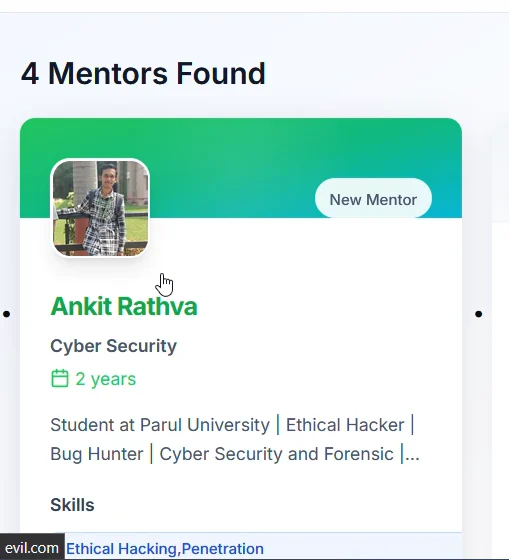
The stored username was therefore not simply being displayed as text. It was being interpreted in a way that could cause navigation to an external, attacker-controlled domain.
The reproduction steps for this behaviour are:
- Setting the username to
https://evil.com. - Saving the profile.
- Opening the profile from another account/browser session.
- Showing the browser navigating to the external domain.
Step 7: Follow-up report with a video PoC
The researcher returned to Skillmate with the additional evidence, explaining that the impact was not limited to storing invalid characters. The important proof of concept was:
Username:https://evil.com
After saving the value, another user visiting the profile could be redirected to the attacker-controlled domain. A video PoC demonstrating the behaviour was included, which gave the security team a clearer understanding of the practical impact.
Root cause
The report shows two layers of failure. The username rule was implemented in the frontend, and the backend accepted and stored values that the frontend rejected, so the validation was not enforced server-side. Separately, the stored username was later used in a way that caused navigation rather than being rendered as inert text, which is what turned a stored string into a redirect. The report does not show the code responsible, so the exact mechanism on the rendering side is not stated; The report does not show the code responsible, so the exact mechanism on the rendering side is not stated.
Impact
The original finding was about bypassing an input validation rule. The deeper test demonstrated something more important. An attacker could potentially:
- Create or control an account.
- Set the username to an attacker-controlled URL.
- Have that value stored by the application.
- Share or expose the attacker profile to other users.
- Cause profile visitors to navigate to the attacker-controlled destination.
The flow described in the report is:
Attacker Profile ↓Username = https: ↓Victim visits profile ↓Application processes stored username ↓Victim is redirected ↓Attacker-controlled website
This creates a potential phishing and social-engineering attack path: an attacker could potentially host a convincing login page or another malicious landing page on the destination and attempt to trick users into entering sensitive information. The researcher did not attempt to collect credentials or perform any destructive actions; the goal was to demonstrate that the stored value could cause navigation to an attacker-controlled domain.
Fix
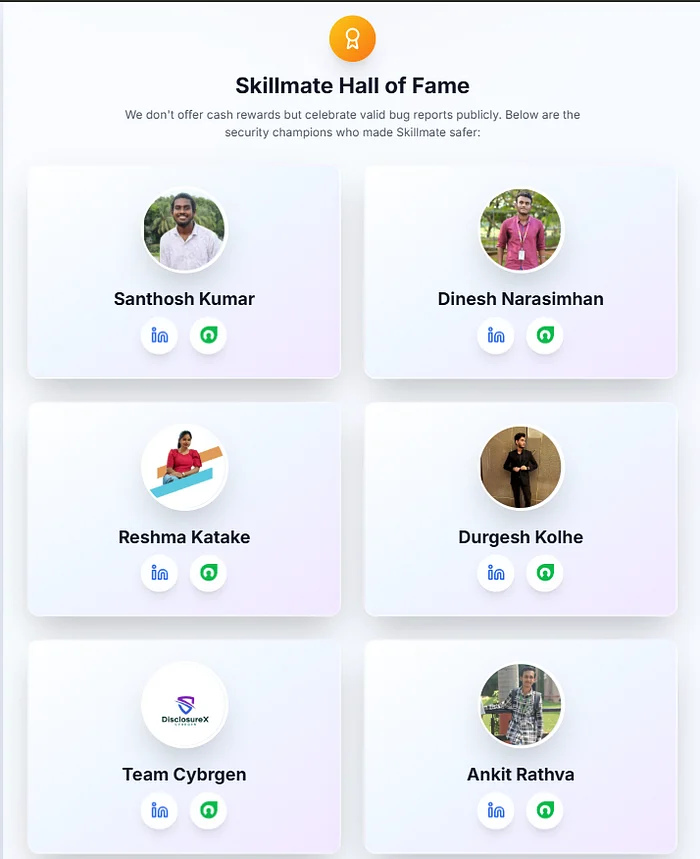
The recommendation it does contain is that validation should be enforced server-side rather than relying solely on client-side controls. Skillmate accepted the report after the additional proof of concept and recognised the contribution on their Hall of Fame page.

Variants to test
- Other profile fields with frontend-only rules. Intercept the save request and submit characters the browser rejects. A positive result is the backend storing the value and the profile page showing it.
- URL-like values in any stored display field. Submit a value such as
https://evil.comin a field that is later shown to other users. A positive result is a visitor's browser navigating to that domain when the profile is opened. - A positive result is navigation to the external destination rather than the value being displayed as text.
- A positive result is any of those areas treating the value as a URL or otherwise acting on it unexpectedly.
- Second-session verification. Always view the stored value from a different account or browser session, since the behaviour may only appear for other users.
What happened, in plain words
Skillmate is a website where people have profiles. A profile is the page other people see about you, and it has a field called username, which is the short name shown on that page. You can type a username, press a button labelled Save Changes, and the site stores it.
The site tells you that a username may only contain lowercase letters, numbers and underscores (the _ character). When the researcher, Ankit Rathva, typed something else, the page refused it. That looks like the site is protecting itself. But the refusal happened in the browser, on the page itself. The browser is the program on your computer that shows websites. A rule that lives only in the browser can be removed by anyone who can change what the browser sends, because the browser is under the user's control, not the site's.
So the researcher checked whether the server, the computer that actually stores the data, applied the same rule. It did not. The server accepted characters the page had rejected. That alone is a bug, but a small one: it means odd characters can be saved.
Then came the interesting part. The researcher saved a web address, https://evil.com, as the username. When a second account opened the profile, the site did not show that address as plain text. It sent the visitor's browser to that address instead. A stored piece of text had become a redirect, a mechanism that automatically moves a visitor from one page to another. That turns a small validation bug into a potential phishing path: an attacker could host a fake login page on a domain they control and lure people to it through a profile link.
Skillmate asked good questions, the researcher went back with a video proof of concept of the redirect, and the report was accepted and recognised on the company's Hall of Fame page, a public page where companies thank researchers.
Who the researcher is
Ankit Rathva describes himself as an MCA second-year student, an ethical hacker and security researcher who looks for logic, authorisation and data-integrity flaws in web applications. He works as a bug bounty hunter and red teamer, combining hands-on testing, forensic analysis and careful disclosure. He publishes developer-friendly write-ups and mitigation advice, and links to his LinkedIn profile at https://linkedin.com/in/ankitrathva.

A bug bounty is a programme where a company invites outside researchers to test its systems and rewards responsible reports. Responsible disclosure means telling the company privately and giving it time to fix the issue before saying anything publicly.
The first discovery
While testing the profile functionality, the researcher noticed the username field had input restrictions. The application displayed an error similar to:
Username can only contain small letters, numbers, and underscores
For example, entering:
test@123
was rejected by the frontend.
What this block means, piece by piece:
test@123is just an example value a user might type. It contains an@symbol and digits.- The
@symbol is not a lowercase letter, a number or an underscore, so it breaks the stated rule. - The word frontend means the part of the application that runs in your browser: the page, the form, the buttons. The backend is the part on the company's server that receives the data and stores it. The frontend is like the form you fill in at a counter; the backend is the clerk behind it who files the paper.
- The rejection happened in the frontend, so the page stopped the value before it was ever sent. That tells us nothing yet about what the clerk would have done with it.
The expected format appeared to be something similar to:
^[a-z0-9_]+$
This is a regular expression, a compact way of describing which characters are allowed. Reading it left to right:
^means "the start of the value".[a-z0-9_]means "one character that is a lowercase letter from a to z, a digit from 0 to 9, or an underscore".+means "one or more of the previous thing", so at least one such character.$means "the end of the value".
Together it says: the whole value must consist only of lowercase letters, digits and underscores, with nothing else before or after. So on the surface the validation worked.
The question the researcher asked at this point was whether the backend enforced the same rule. A rule that exists only in the browser can be removed by anyone who controls the request, because the request is just data the browser sends and a user can change it.
Exploitation
Step 1: Capture a valid profile update
A valid username was entered and Save Changes was clicked while Burp Suite intercepted the request. The request contained the username parameter, for example:
username=testuser
What this block means:
- Burp Suite is a tool that sits between your browser and the website, like a postal worker who opens every letter, shows it to you, and lets you rewrite it before delivering it. It is commonly called a proxy.
- A request is the message your browser sends to the server, for example "please save this profile with this username".
- A parameter is one named piece of data inside that message. Here the name is
usernameand the value istestuser. testuseris an ordinary valid username: lowercase letters only, so it passes the rule.
The reason for this step is to see the exact shape of a normal, accepted request. Once you know what a good request looks like, you can change one small part of it and see what the server does.
Step 2: Modify the parameter past the frontend rule
Instead of changing the value through the frontend, the request was edited directly. The value was changed to:
username=@!@
The modified request was forwarded and the backend accepted it. Returning to the profile page showed the username updated, even though the frontend had explicitly stated that these characters were not allowed. That confirmed the backend was accepting invalid usernames.
What this block means:
- The parameter name
usernameis unchanged; only the value after the=is different. @!@contains characters that are not lowercase letters, digits or underscores, so the frontend would never have sent it.- "Forwarded" means the researcher released the edited request from Burp Suite so it travelled on to the server.
- The server replied as if everything was fine and stored the value. That is the proof: the rule existed only in the browser.
The reproduction steps recorded in the report are:
- Entering
@!@#$%into the username field. - Frontend displaying the validation error.
- Entering a valid username.
- Intercepting the request in Burp Suite.
- Modifying the username parameter.
- Forwarding the request.
- Showing the invalid username saved successfully.
Why these steps in this order: step 1 shows the browser refusing the value, which documents the rule. Step 3 gives the browser something it will accept, so a request is actually sent. Step 4 catches that request before it leaves. Step 5 changes only the username value. Step 6 delivers it. Step 7 proves the server stored what the browser would have blocked.
Step 3: Report the validation bypass
The issue was first reported as a Client-Side Input Validation Bypass. The initial report explained that:
- The frontend restricted usernames to lowercase letters, numbers, and underscores.
- The restriction could be bypassed by modifying the request.
- The backend accepted and stored characters that were rejected by the frontend.
- This could potentially create problems wherever usernames were trusted or processed elsewhere in the application.
The report also recommended that validation be enforced server-side rather than relying solely on client-side controls.
Some terms here:
- Client-side means the code running on the user's side, in the browser. Server-side means the code running on the company's machine.
- Input validation is the check that data a user types is in an acceptable form before it is used.
- A bypass is getting past a control without satisfying it.
- "Wherever usernames were trusted" means any other part of the site that reads the username and assumes it is safe, for example a search box, a login screen or a page that displays it.
The recommendation matters because a check in the browser is a convenience for honest users, not a security control. Anyone can skip it. The server is the only place a rule can be relied on, because the server is the one holding the data.
Step 4: Answer the triage questions
Skillmate responded and asked what the broader security impact could be, specifically how the issue could affect authentication, rendering, search functionality and other application logic. Rather than argue that the bypass was impactful, the researcher went back to testing.
What those areas mean:
- Authentication is how the site decides who you are when you log in.
- Rendering is how the site turns stored data into what you see on the page.
- Search functionality is any search box that might look through usernames.
- Application logic is the general set of rules the site follows, for example what it does when one user opens another user's profile.
Triage is the first review a security team does on a report. Asking "what is the real impact?" is a fair question, because a bug that only stores odd characters is low value. The researcher's answer was not an argument but more evidence.
Step 5: Store a URL as the username
Different values were tried in the username field. Instead of only special characters such as:
a URL-like value was submitted:
https://evil.com
The backend accepted it. That raised the next question: how does the application handle this value when another user views the profile?
What this block means:
- A URL is a web address, the thing you type in the address bar, such as
https://evil.com. httpsis the scheme, the part before://that says how to talk to the destination.httpsmeans an encrypted web connection.evil.comis a domain name, a name that points to a computer on the internet. In this test it stands for a domain an attacker could control.- The value contains
:,/and., none of which are lowercase letters, digits or underscores, so it should never have been accepted under the stated rule.
The reason for trying a URL rather than more punctuation is that a URL is something a browser can act on. If the site ever treats the stored username as a link or a redirect target, a URL will reveal it. Punctuation alone would only prove storage.
Step 6: View the profile from a second account
https://evil.com was saved as the username, and the profile was then accessed from another account. When the other user attempted to view the profile, the application redirected the user to:
https://evil.com
The stored username was therefore not simply being displayed as text. It was being interpreted in a way that could cause navigation to an external, attacker-controlled domain.
What this means:
- A redirect is when a page tells your browser "do not stay here, go to this other address instead". You often see it as the address bar changing by itself.
- "Displayed as text" would mean the page shows the characters
https://evil.comon screen and nothing more. That is harmless. - "Interpreted" means the site used the value as an instruction, not as a label. That is the difference between a sign on a wall and a sign that orders you to walk somewhere.
- The second account matters because the redirect appeared when another user viewed the profile. Testing only as yourself can hide behaviour that only appears for other people.
The reproduction steps for this behaviour are:
- Setting the username to
https://evil.com. - Saving the profile.
- Opening the profile from another account/browser session.
- Showing the browser navigating to the external domain.
A browser session is one period of use, usually tied to being logged in. Using a different account or a different session is how you see the site as a stranger would.
Step 7: Follow-up report with a video PoC
The researcher returned to Skillmate with the additional evidence, explaining that the impact was not limited to storing invalid characters. The important proof of concept was:
Username:https://evil.com
After saving the value, another user visiting the profile could be redirected to the attacker-controlled domain. A video PoC demonstrating the behaviour was included, which gave the security team a clearer understanding of the practical impact.
What this block means:
- A proof of concept, or PoC, is a small demonstration that a bug is real, not theoretical.
- The line simply records the field name
Usernameand the valuehttps://evil.comthat was saved. - A video PoC shows the whole sequence happening, from saving to the redirect, which is often easier for a security team to follow than a written description.
Root cause
The report shows two layers of failure. The username rule was implemented in the frontend, and the backend accepted and stored values that the frontend rejected, so the validation was not enforced server-side. Separately, the stored username was later used in a way that caused navigation rather than being rendered as inert text, which is what turned a stored string into a redirect. The report does not show the code responsible, so the exact mechanism on the rendering side is not stated; likely the stored value was placed into a redirect or link target without restricting it to a safe scheme or to the expected username format.
In plain words: two mistakes combined. The first was trusting the browser to do the checking. The second was trusting the stored value later, when the page was built for a visitor. Together they let a visitor be sent somewhere the site did not intend.
Impact
The original finding was about bypassing an input validation rule. The deeper test demonstrated something more important. An attacker could potentially:
- Create or control an account.
- Set the username to an attacker-controlled URL.
- Have that value stored by the application.
- Share or expose the attacker profile to other users.
- Cause profile visitors to navigate to the attacker-controlled destination.
The flow described in the report is:
Attacker Profile ↓Username = https: ↓Victim visits profile ↓Application processes stored username ↓Victim is redirected ↓Attacker-controlled website
Reading this diagram from top to bottom:
- The attacker has a profile on the site.
- That profile's username is a URL beginning
https:. - A victim opens the profile, perhaps from a link the attacker shared.
- The application reads the stored username and acts on it.
- The victim's browser is sent away from the site.
- The victim lands on a website the attacker controls.
This creates a potential phishing and social-engineering attack path: an attacker could potentially host a convincing login page or another malicious landing page on the destination and attempt to trick users into entering sensitive information. The researcher did not attempt to collect credentials or perform any destructive actions; the goal was to demonstrate that the stored value could cause navigation to an attacker-controlled domain.
Some terms:
- Phishing is tricking someone into giving away information, such as a password, by pretending to be a site they trust.
- Social engineering is manipulating people rather than machines, for example by making a message look official.
- Credentials are the things that prove who you are, such as a username and password.
- A landing page is the page you arrive at after following a link.
Why the redirect is worse than the validation bypass: a stored odd character is a data-quality problem. A stored redirect is a delivery mechanism. The attacker does not need to break into anything; they only need someone to click a profile link and then trust the page they land on.
The follow-up report
The researcher went back to Skillmate with the additional evidence, explaining that the impact was not limited to storing invalid characters. The important proof of concept was:
Username:https://evil.com
The final outcome
After the additional proof of concept and the demonstration of the real-world behaviour, Skillmate accepted the report. What started as "the username field accepts invalid characters" became "an attacker-controlled URL can be stored as a username and can cause profile visitors to be redirected to an attacker-controlled domain". Skillmate recognised the contribution on their Hall of Fame page.
Fix
The report does not describe the code change Skillmate made. The recommendation it does contain is that validation should be enforced server-side rather than relying solely on client-side controls. In everyday terms: the clerk behind the counter should check the form, not just the person handing it over. And when the stored value is later shown to a visitor, it should be treated as text, not as an instruction to navigate.
Variants to test
If you want to practise the same thinking on a site you are allowed to test, these are the directions the report suggests:
- Other profile fields with frontend-only rules. Intercept the save request and submit characters the browser rejects. A positive result is the backend storing the value and the profile page showing it.
- URL-like values in any stored display field. Submit a value such as
https://evil.comin a field that is later shown to other users. A positive result is a visitor's browser navigating to that domain when the profile is opened. - A positive result is navigation to the external destination rather than the value being displayed as text.
- A positive result is any of those areas treating the value as a URL or otherwise acting on it unexpectedly.
- Second-session verification. Always view the stored value from a different account or browser session, since the behaviour may only appear for other users.
Glossary
- Authentication: the process by which a site decides who you are, usually at login.
- Backend: the part of a web application that runs on the company's server and stores and processes data.
- Browser session: one period of use of a site, usually tied to being logged in; a second session is a way to see the site as another person would.
- Bug bounty: a programme where a company invites outside researchers to test its systems and rewards responsible reports.
- Burp Suite: a tool that sits between browser and server, letting you view and edit requests before they are sent.
- Bypass: getting past a security control without satisfying it.
- Client-side: code that runs in the user's browser, on the user's machine.
- Credentials: information that proves identity, such as a username and password.
- Domain name: a name that points to a computer on the internet, such as
evil.com. - Frontend: the part of a web application you see and interact with in the browser.
- Hall of Fame: a public page where a company thanks researchers who reported valid issues.
- HTTPS: the encrypted version of the protocol used to load web pages.
- Input validation: checking that data entered by a user is in an acceptable form before it is used.
- Landing page: the page you arrive at after following a link.
- Parameter: one named piece of data inside a request, such as
username=testuser. - Phishing: tricking someone into giving away information by pretending to be a trusted site.
- Proof of concept (PoC): a small demonstration that a bug is real and reproducible.
- Proxy: an intermediary that sits between two parties and can inspect or change what passes between them.
- Redirect: an instruction from a page or server that sends the browser to a different address.
- Regular expression: a compact pattern describing which characters or sequences are allowed in a value.
- Rendering: the process of turning stored data into what appears on the page.
- Request: the message a browser sends to a server, for example asking it to save a profile.
- Responsible disclosure: reporting a security problem privately to the owner and allowing time to fix it before public discussion.
- Scheme: the part of a URL before
://, such ashttps, that says how to reach the destination. - Server-side: code that runs on the company's server, which the user cannot change.
- Social engineering: manipulating people rather than machines, for example with a convincing fake message.
- Triage: the first review a security team performs on a report, often asking for the real-world impact.
- URL: a web address, such as
https://evil.com. - Username: the short name shown on a profile and used to identify a user.




