From Admin to Owner: How I Discovered a Critical Full Organization Takeover
An organization administrator could invite a new user with the Owner role by changing a role parameter in the API request, because the backend did not check whether the admin was allowed to assign that role. The new Owner could then remove the legitimate Owner and take full control of the organization.
 Published on medium.com
Bug Bounty
The full write-up lives on its author's site
It belongs to its author, so we link to it rather than copy it. The other two tabs are our own rewrites, checked against it.
Context
The target was a web application with an organization management feature. Organizations had three roles: Owner, Admin and User. The feature let members invite other users into the organization and assign them a role. The intended rule was that an Admin could invite users as Admin or User, but could not create another Owner. An Admin could invite users as Admin or User, but should not be able to create another Owner.
The researcher, Ankit Rathva (Gujarati Hacker), focuses on authentication and authorization, broken access control, business logic, race conditions and account takeover. This write-up covers one finding from a security assessment of that organization management functionality.
Setup
The researcher created an organization and configured two accounts:
👑 Account A → Organization Owner ↓🛡️ Account B → Organization Admin
Account A, the Owner, invited Account B as an Administrator. The researcher then logged in as Account B. Burp Suite was used to intercept and modify the relevant request. No product version or other environment detail is given.
Finding it
From the user interface, the restriction looked correctly implemented. When logged in as the administrator (Account B) and opening the invitation functionality, the Owner role was not offered: only Admin and User were selectable. So far the application behaved as intended.
The question the researcher asked was whether that restriction was enforced by the backend or only by the frontend. The UI hiding an option proves nothing about what the API accepts, so the next step was to inspect the API request that the invitation form sends.

The image sits at the point where the researcher moves from the interface to the API request.
Exploitation
Step 1: Capture the invitation request
Logged in as Account B (Admin), the researcher attempted to manage and invite users and captured the request in Burp Suite. The request contained a parameter controlling the invited user's organization role. Conceptually, the body looked like this:
{ "role": "admin"}
The frontend only allowed the administrator to select permitted roles, but the request itself carried the role as a client-controlled value.
Step 2: Change the role to owner
The researcher modified the value manually, changing:
"role": "admin"
to:
"role": "owner"
and forwarded the request.
Step 3: Observe the server response
The researcher expected the server to reject the request, for example with:
403 Forbidden
or another authorization error saying that an Admin was not allowed to create an Owner. Instead, the server accepted the modified request. The invitation was created with the Owner role. This was the authorization failure: the backend trusted the client-supplied role value without checking whether the requesting user was allowed to assign that role.
Step 4: Accept the invitation
The researcher switched to the invited account and accepted the invitation normally. After acceptance, the account was a member of the organization with Owner privileges. The escalation flow was:
🛡️ Admin ↓📝 Modify API request ↓🔧 role = owner ↓✉️ Accept invitation ↓👑 Organization Owner
An administrator who should never have been able to create an Owner account had done exactly that.
Step 5: Remove the legitimate Owner
As the newly created Owner, the researcher checked the organization management functionality. An Owner could manage organization members, including the legitimate Owner. The new Owner could therefore remove the original Owner from the organization. The full chain was:
🛡️ Compromised/low-privileged Admin ↓🔧 Manipulate invitation role ↓👑 Create unauthorized Owner ↓✉️ Accept invitation ↓🔓 Gain Owner privileges ↓❌ Remove legitimate Owner ↓💥 Full organization control
What started as a role-manipulation issue became a full organization takeover.
Root cause
The backend accepted a role value supplied by the client and did not verify that the requesting user was authorized to assign that role. The role restriction existed only in the frontend, which hid the Owner option from administrators. Hiding an option is not an access control: the API is the real security boundary, and it accepted a role assignment that should never have been permitted. The UI restriction did nothing against a manually crafted request.
Impact
A malicious administrator could:
- escalate from Admin to Owner;
- create unauthorized Owner accounts;
- obtain full organization-level privileges;
- remove the legitimate organization Owner;
- take complete control of the organization;
- modify organization settings;
- manage organization members;
- invite additional privileged users.
Depending on the application's organization model and the resources connected to the organization, this could potentially expose or affect a significant amount of organizational data and functionality. The company classified the vulnerability as Critical.
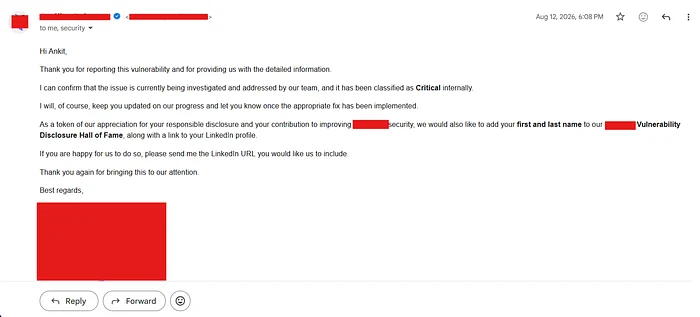
The image accompanies the impact section, where the organization takeover impact is described.
Reporting and fix
The researcher reported the issue with a detailed proof of concept covering the affected functionality, the original request, the modified request, the role parameter manipulation, the invitation flow, the resulting Owner privileges, the ability to remove the legitimate Owner and the resulting organization takeover impact. The security team investigated, confirmed the vulnerability, classified it as Critical and added the researcher to their Hall of Fame.
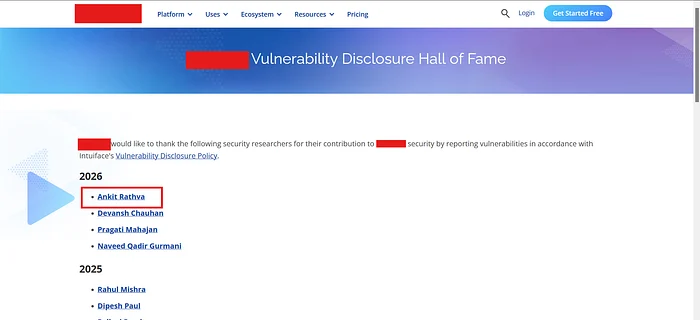
The image shows the recognition: the Critical classification and the Hall of Fame entry.
The report does not describe a code change. The lesson it draws for developers is that if a user is not authorized to perform an action, the backend must reject it, even when the request is manually crafted.
Variants to test
The same pattern, a client-controlled privilege field checked only in the UI, appears in many places. On other targets, try:
- Invitation role parameters. Intercept the invite request and change the role to the highest privileged value the product uses (owner, superadmin, root). A positive result is a 2xx response and an invitation that, once accepted, carries the higher role.
- Member update requests. Change the role of an existing member through the update endpoint rather than the invite endpoint. A positive result is the member's role changing to a value the caller could not assign in the UI.
- Role identifiers instead of names. If the body uses numeric or UUID role IDs, substitute the ID of the highest role. A positive result is the same silent acceptance.
- Organization creation and transfer. Look for parameters that set an initial owner or transfer ownership. A positive result is an Admin being able to name themselves or another account as Owner.
- Removal of the legitimate Owner. After any successful escalation, check whether the new role can remove or demote the original Owner. A positive result confirms the full takeover chain rather than a cosmetic role change.
In each case, compare what the UI offers with what the API accepts; the gap between the two is where the bug lives.
What happened, in plain words
A web application let people work together in groups called organizations. Each organization had members, and each member had a role: Owner, Admin or User. The Owner is the person in charge. The Admin is a trusted helper. The User is an ordinary member.
The application let an Admin invite new people into the organization. When an Admin opened the invitation screen, they could choose only two roles for the new person: Admin or User. The Owner role was not in the list. That looked correct, because an Admin should not be able to create another Owner.
But the screen is only the part you see. Behind it, the browser sends a message to the company's computer (the server) asking it to create the invitation. That message is called an API request. The researcher looked at that message and noticed it contained a small piece of text saying which role the new person should get. The researcher changed that text from admin to owner and sent the message again. The server accepted it. A new Owner account was created, even though the person doing it was only an Admin.
The new Owner could then remove the real Owner from the organization. That gave the attacker complete control of the organization. The company confirmed the problem and rated it Critical, and the researcher was added to their Hall of Fame.
Who the researcher is and what this write-up covers
The researcher is Ankit Rathva, also known as Gujarati Hacker. He looks for security problems in web applications, mainly in the areas of authentication and authorization, broken access control, business logic, race conditions and account takeover. This write-up describes one finding from a security assessment of the organization management feature.
A few of those words need explaining before we go further:
- Authentication is proving who you are, like showing your passport at a border.
- Authorization is what you are allowed to do once you are inside, like which doors your key opens in a building.
- Broken access control means the application lets someone through a door that should have stayed locked for them.
- Business logic is the set of rules the application is supposed to follow, for example "only the Owner can create another Owner".
- Race conditions are problems that appear when two actions happen at almost the same moment.
- Account takeover means one person ends up controlling another person's account.
The feature being tested
The application had an organization management feature. An organization is a shared space, a bit like a company account in a tool such as a chat app or a project tracker. People join the organization and get a role. The role decides what they can do.
There were three roles:
- Owner: the person at the top. In a company comparison, this is the founder who can do anything, including deciding who else is in charge.
- Admin: a trusted manager. They can invite people and help run things, but they should not be able to put someone else above themselves.
- User: an ordinary member with normal access.
The rule the application was supposed to follow was simple: an Admin can invite people as Admin or as User, but cannot create another Owner. An Admin can invite people as Admin or User, but cannot create another Owner.
Setting up the test
The researcher created an organization and set up two accounts to work with:
👑 Account A → Organization Owner ↓🛡️ Account B → Organization Admin
This diagram is a small map of the test setup. Account A is the Owner of the organization. Account B is an Admin. The arrow means "is a member of the organization with this role".
- The researcher logged in as Account A, the Owner.
- As the Owner, he invited Account B and gave it the Admin role.
- He then logged out and logged in as Account B.
Why two accounts? Because the whole question is about what an Admin is allowed to do. To test that, you need to actually be an Admin. Having a separate Owner account also lets you check later whether the new Owner can remove the real one.
To look at and change the messages the browser sends, the researcher used a tool called Burp Suite. Think of Burp Suite as a pause button and editing window placed between your browser and the server. Normally your browser sends a request and the server answers, and you see only the final page. With Burp Suite, the request stops on the way out, you can read it, change it, and then let it continue. This is how security testers check what the server really accepts, rather than what the screen lets you click.
Finding it
From the screen, everything looked right. When the researcher was logged in as the Admin (Account B) and opened the invitation feature, the Owner role was simply not offered. Only Admin and User could be chosen. So far the application behaved as intended.
The question the researcher asked was: is that restriction enforced by the server, or only by the screen? This matters because hiding an option on a screen proves nothing about what the server will accept. Imagine a restaurant menu that does not list a dish. That does not mean the kitchen cannot cook it if someone orders it by name. The menu is the screen; the kitchen is the server.
So the next step was to look at the API request that the invitation form sends.
An API is the way one piece of software talks to another. When you fill in a form on a website and press a button, your browser does not send the whole page back. It sends a short, structured message to the server, and the server replies with a short, structured answer. That message is the API request. It is like a written order slip sent to the kitchen, rather than a conversation with the waiter.
The image sits at the point where the researcher moves from the interface to the API request.
Exploitation
Step 1: Capture the invitation request
Still logged in as Account B (the Admin), the researcher used the invitation feature and captured the request in Burp Suite. The request contained a parameter that controlled the role of the invited user. In plain terms, the request body looked like this:
{ "role": "admin"}
Line by line:
- The curly braces
{and}mark the start and end of a small bundle of information. This bundle is called a JSON object, and it is just a way of writing data as name and value pairs. "role"is the name of the field. It says which piece of information follows.- The colon
:separates the name from the value. "admin"is the value. It tells the server that the person being invited should get the Admin role.
So the whole line says: "the role for this invitation is admin". The frontend only allowed the administrator to pick from the permitted roles, but the request itself carried the role as a value supplied by the client. The client is your side, the browser. The server is the company's side. Anything the client sends can be changed by the person using the client, because the client runs on their own computer.
Step 2: Change the role to owner
The researcher edited the value by hand, changing:
"role": "admin"
to:
"role": "owner"
and then let the request continue to the server.
Line by line:
"role"is the same field name as before. Nothing about the structure changed."owner"is the new value. It asks the server to give the invited person the Owner role instead of the Admin role.
That is the entire attack: one word changed. No special tool, no clever trick, just editing a value that the browser had sent and the server was willing to read.
Step 3: Observe the server response
The researcher expected the server to refuse. For example, he expected something like:
403 Forbidden
or another authorization error saying that an Admin is not allowed to create an Owner.
What does that code mean? When a browser asks a server for something, the server answers with a short number called a status code, followed by the content. Some common ones:
- 200 means "OK, here is the result".
- 403 means "I understood your request, but you are not allowed to do this".
- 404 means "I could not find what you asked for".
A 403 is the server acting like a locked door: it knows who you are, and it still says no. That is exactly what should have happened here.
Instead, the server accepted the modified request. The invitation was created with the Owner role. This was the authorization failure: the server trusted the role value sent by the client without checking whether the person sending it was allowed to assign that role.
Step 4: Accept the invitation
The researcher then switched to the invited account and accepted the invitation in the normal way. After accepting, that account was a member of the organization with Owner privileges. The escalation flow was:
🛡️ Admin ↓📝 Modify API request ↓🔧 role = owner ↓✉️ Accept invitation ↓👑 Organization Owner
This diagram reads from top to bottom. Start as an Admin. Change the API request. Set the role to owner. Accept the invitation. End up as an Owner. Each arrow is one step in the chain.
An administrator who should never have been able to create an Owner account had done exactly that.
Step 5: Remove the legitimate Owner
As the newly created Owner, the researcher looked at the organization management features. An Owner could manage organization members, including the legitimate Owner. The new Owner could therefore remove the original Owner from the organization. The full chain was:
🛡️ Compromised/low-privileged Admin ↓🔧 Manipulate invitation role ↓👑 Create unauthorized Owner ↓✉️ Accept invitation ↓🔓 Gain Owner privileges ↓❌ Remove legitimate Owner ↓💥 Full organization control
Again, read it top to bottom. A low-privileged Admin, meaning an Admin with less power than an Owner, changes the role in the invitation. That creates an Owner account that should never have existed. The invitation is accepted. The new account has Owner privileges. The original Owner is removed. The attacker now controls the whole organization.
What started as a role-manipulation issue became a full organization takeover.
Root cause
The server accepted a role value supplied by the client and did not check that the person sending the request was allowed to assign that role. The role restriction existed only in the frontend, meaning the part of the application that runs in your browser and draws the screen. The frontend hid the Owner option from administrators.
Hiding an option is not access control. Access control is the server deciding, for every request, whether this particular person may do this particular thing. The API is the real security boundary, and it accepted a role assignment that should never have been permitted. The hidden option in the screen did nothing against a request that was edited by hand.
A useful comparison: a shop that keeps the expensive items in a back room but leaves the door unlocked has not protected the items. The locked door is the control. The fact that customers cannot see the items from the shop floor is not.
Impact
A malicious administrator could:
- escalate from Admin to Owner;
- create unauthorized Owner accounts;
- obtain full organization-level privileges;
- remove the legitimate organization Owner;
- take complete control of the organization;
- modify organization settings;
- manage organization members;
- invite additional privileged users.
Depending on the application's organization model and the resources connected to the organization, this could potentially expose or affect a significant amount of organizational data and functionality. The company classified the vulnerability as Critical.
The image accompanies the impact section, where the organization takeover impact is described.
Reporting and fix
The researcher reported the issue with a detailed proof of concept. A proof of concept is a small, repeatable demonstration that shows the problem really exists, rather than just describing it. It covered:
- the affected functionality;
- the original request;
- the modified request;
- the role parameter manipulation;
- the invitation flow;
- the resulting Owner privileges;
- the ability to remove the legitimate Owner;
- the resulting organization takeover impact.
The security team investigated, confirmed the vulnerability, classified it as Critical and added the researcher to their Hall of Fame.
The image shows the recognition: the Critical classification and the Hall of Fame entry.
The report does not describe a code change. The lesson it draws for developers is that if a user is not authorized to perform an action, the server must reject it, even when the request is manually crafted.
Variants to test
The same pattern, a privilege field controlled by the client and checked only in the screen, appears in many places. On other targets, try:
- Invitation role parameters. Intercept the invite request and change the role to the highest privileged value the product uses (owner, superadmin, root). A positive result is a 2xx response and an invitation that, once accepted, carries the higher role.
- Member update requests. Change the role of an existing member through the update endpoint rather than the invite endpoint. A positive result is the member's role changing to a value the caller could not assign in the screen.
- Role identifiers instead of names. If the body uses numeric or UUID role IDs, substitute the ID of the highest role. A positive result is the same silent acceptance.
- Organization creation and transfer. Look for parameters that set an initial owner or transfer ownership. A positive result is an Admin being able to name themselves or another account as Owner.
- Removal of the legitimate Owner. After any successful escalation, check whether the new role can remove or demote the original Owner. A positive result confirms the full takeover chain rather than a cosmetic role change.
In each case, compare what the screen offers with what the API accepts; the gap between the two is where the bug lives.
A few terms in that list are worth explaining. An endpoint is a specific address on the server that does a specific job, like a particular counter in a post office. A 2xx response is any status code starting with 2, which means the server treated the request as successful. A UUID is a long, unique identifier made of letters and numbers, used to name things without collisions.
Glossary
- API: the way software talks to software. When your browser sends a request to a server, that request is an API request.
- API request: the structured message your browser sends to the server, for example when you submit a form.
- Access control: the rules that decide who may do what. Enforced properly, the server checks every request.
- Account takeover: a situation where one person ends up controlling another person's account.
- Admin: a trusted role in an organization, able to invite and manage members, but not to create an Owner.
- Authentication: proving who you are, such as logging in with a password.
- Authorization: what you are allowed to do once you are known, such as which actions your role permits.
- Broken access control: a flaw where the application lets someone do something they should not be allowed to do.
- Burp Suite: a tool that sits between your browser and the server, letting you read, pause and edit requests before they are sent.
- Business logic: the rules an application is supposed to follow, such as who may assign which role.
- Client: your side of the connection, usually the browser running on your computer.
- Critical: the highest severity rating a company gives a security issue, meaning it is very serious.
- Endpoint: a specific address on the server that performs a specific job.
- Escalation: gaining more privileges than you were given.
- Frontend: the part of the application that runs in your browser and draws what you see.
- Hall of Fame: a public list where a company thanks researchers who reported valid security issues.
- JSON: a simple way of writing data as name and value pairs, using curly braces, quotes and colons.
- Organization: a shared space in the application that groups members and their roles.
- Owner: the highest role in an organization, able to manage all members including other Owners.
- Parameter: a named piece of information inside a request, such as
role. - Proof of concept: a small, repeatable demonstration that proves a problem exists.
- Race condition: a problem that appears when two actions happen at almost the same moment.
- Role: a label attached to a member that decides what they are allowed to do.
- Root cause: the underlying reason a problem exists, as opposed to its visible symptoms.
- Server: the company's computer that receives requests and decides what to do with them.
- Status code: a short number the server sends back to say how the request went, such as 200 for OK or 403 for forbidden.
- 403 Forbidden: a status code meaning the server understood the request but refuses to allow it.
- 2xx response: any status code starting with 2, meaning the server treated the request as successful.
- User: an ordinary member of an organization with normal access.
- UUID: a long, unique identifier made of letters and numbers, used to name things without collisions.
- Vulnerability: a weakness in an application that someone could abuse.

