Web Cache Poisoning: A Tale of chaining unkeyed inputs
The transparency.hackxor.net/contact page was vulnerable to web cache poisoning because it honoured two unkeyed headers: X-Original-URL, which overrode the requested path, and X-Host, which overrode the host used in the response. An attacker could poison the cache so that visitors to /contact received content from /blog with a logo loaded from analytics.hackxor.net.

infosecwriteups.com
Published on infosecwriteups.com
Bug Bounty
The full write-up lives on its author's site
It belongs to its author, so we link to it rather than copy it. The other two tabs are our own rewrites, checked against it.
Context
This is a walkthrough of a deliberately vulnerable lab, not a live bug bounty target. The mission is called Custom Analytics, hosted on hackxor.net, and the author says he solved a lab by @albinowax. The stated goal is to serve the content of analytics.hackxor.net on the transparency.hackxor.net/contact page.
The vulnerability class is web cache poisoning. The author frames it as chaining two unkeyed inputs: headers that change the response but are not taken into account by the cache when it decides whether two requests are the same.
A short recap of the caching layers, as the article gives it: the browser keeps a local cache, DNS has its own cache, and the application server has a cache of its own. Web cache poisoning is about the third one. The aim is to pollute the server-side cache so that other users who send the same request receive the attacker's cached response.
Setup
The only tool named is param miner, a Burp extension used to brute force headers that have some effect on the application response. It is installed from the BApp store. No versions are given.
The starting point is the transparency.hackxor.net/contact page. The author does not describe any account, role or authentication step.
Finding it
The first unkeyed header
After brute forcing headers on transparency.hackxor.net/contact, param miner reports that the page supports an X-original-URL header, which can override the requested path. The article illustrates the behaviour with a generic example:
GET /admin HTTP/1.1
Host: unity.com

HTTP/1.1 403 Forbidden
…
Access is denied
In the example, the plain request to /admin is denied, while the request to /anything carrying the override header returns the content of /admin instead.
Applied to the lab, a request like this:
GET /contact HTTP/1.1
Host: transperncy.hackxor.net
User-Agent: Mozilla/…..
Referer: https://hackxor.net/
Connection: close
Cookie: ………..
X-original-url: /anything
returns the page for transparency.hackxor.net/anything rather than /contact. Since /anything does not exist, that response is a 404. The important observation is that the response for the overridden path is cached under the original path: querying /contact with the x-original-url header causes the response of the new path to be stored in the server's cache.
A page that reflects the host
Looking around, the author finds transparency.hackxor.net/blog. Its source fetches a logo from the same host:
<img src="https://transparency.hackxor.net/static/logo.png"/>
This gives the second ingredient: requesting /contact with x-original-url: /blog caches the /blog response under /contact, because the server treats a request for /contact on transparency.hackxor.net as the same request it already has in cache. The /blog response reflects the host in the logo URL, so the host is attacker-influenced.
Param mining again, this time against /blog, finds a second supported header: x-host. On this page X-Host overrides the Host header:
GET /blog HTTP/1.1
Host: transparency.hackxor.net
X-Host: analytics.hackxor.net
The response now fetches the logo from the new host:
<img src="https://analytics.hackxor.net/static/logo.png"/>
Exploitation
With both headers confirmed, the chain is assembled in four steps.
Step 1: target the cached path
Make a request to /contact on Host: transparency.hackxor.net, so that the poisoned response will be served to users requesting the same path and host.
Step 2: override the path
Add X-Original-URL: /blog so the server returns the /blog page instead of the contact page.
Step 3: override the host
Add X-Host: analytics.hackxor.net so the logo URL inside the /blog response points at the analytics host.
Step 4: send the final payload
The combined request is:
GET /contact HTTP/1.1
Host: transparency.hackxor.net
X-Host: analytics.hackxor.net
X-Original-URL: /blog
The cached response then contains the content of /blog with analytics.hackxor.net as the host.
Timing the poison
A request sent while a valid cached copy exists is answered from the cache, so the attacker is not actually talking to the backend and nothing gets poisoned. The malicious request has to arrive after the cached entry expires, so that the server processes it and stores the new response. The author describes this as a race against time, with two practical options: send the payload repeatedly, or loop curl requests with the payload.
The response headers show the window:
Cache-Control: public; max-age: 60;
Age: 4
Here the entry lives for 60 seconds and the current copy is 4 seconds old, so the payload should be sent when the age reaches 60.
Once the response is cached, /contact serves the content of /blog, with the different host. Mission accomplished.
Root cause
Both X-Original-URL and X-Host change the response but are not part of the cache key. The cache does not take these headers into account, so a response generated for one set of header values is stored and later handed to users who sent none of those headers. The article states this directly: unkeyed inputs are headers which affect the response but are not taken care of by the server while caching.
Impact
In this lab the effect is that visitors to transparency.hackxor.net/contact receive the /blog page with its logo loaded from analytics.hackxor.net. In general terms, as the article frames it, the attacker pollutes the server cache so that malicious content is served to legitimate users who query the same request. The response headers advertise a 60 second lifetime, and the author waits for the cached copy to expire before sending the payload.
Fix
The article does not describe any fix or mitigation applied to the lab. It points readers to the PortSwigger research paper on practical web cache poisoning for how to mitigate these issues, without listing the measures.
- Run param miner against every cacheable page and look for headers that change the response body, such as path overrides or host overrides. A positive result is a response that differs from the baseline when only the candidate header is added.
- Check whether the response reflects the
Hostheader, for example in absolute URLs for images, scripts or links. A positive result is a reflected host that can be swapped withX-Hostor a similar header. - Combine a path-override header with a host-override header on a cached endpoint. A positive result is a cached response for the original path that contains content from the overridden path and the attacker-chosen host.
- Read
Cache-ControlandAgeon the target to estimate the expiry window, then time or loop the payload. A positive result is a subsequent plain request returning the poisoned response.
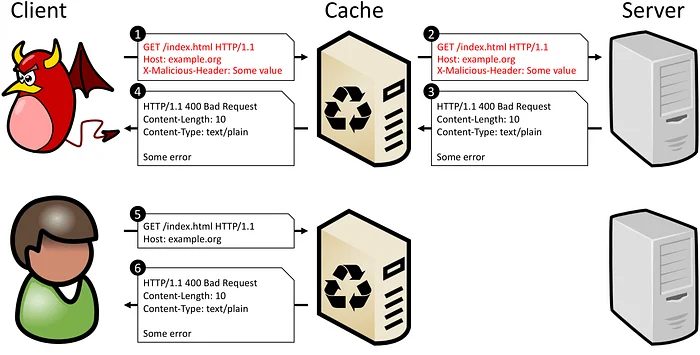
What happened, in plain words
A security researcher solved a practice challenge about web cache poisoning. The goal was to make one page of a website show content from a different page and a different host, by sending a specially crafted request. The trick relies on two HTTP headers that change what the server sends back but are ignored by the cache when it decides whether two requests are the same. By chaining them, the researcher got the server to store a poisoned response and serve it to other visitors.
This is a walkthrough of a deliberately vulnerable lab, not a live bug bounty target. The mission is called Custom Analytics, hosted on hackxor.net, and the author says he solved a lab by @albinowax. The stated goal is to serve the content of analytics.hackxor.net on the transparency.hackxor.net/contact page.
The vulnerability class is web cache poisoning. The author frames it as chaining two unkeyed inputs: headers that change the response but are not taken into account by the cache when it decides whether two requests are the same.
A short recap of the caching layers, as the article gives it: the browser keeps a local cache, DNS has its own cache, and the application server has a cache of its own. Web cache poisoning is about the third one. The aim is to pollute the server-side cache so that other users who send the same request receive the attacker's cached response.
Setup
The only tool named is param miner, a Burp extension used to brute force headers that have some effect on the application response. It is installed from the BApp store. No versions are given.
The starting point is the transparency.hackxor.net/contact page. The author does not describe any account, role or authentication step.
Finding it
The first unkeyed header
After brute forcing headers on transparency.hackxor.net/contact, param miner reports that the page supports an X-original-URL header, which can override the requested path. The article illustrates the behaviour with a generic example:
GET /admin HTTP/1.1
Host: unity.com

HTTP/1.1 403 Forbidden
…
Access is denied
This request asks for /admin on unity.com. The server replies with 403 Forbidden and the message Access is denied. In plain words: you are not allowed to see that page.
Here the request is for /anything, but it carries the header XOriginalURL: /admin. The server replies with 200 OK and the content of the /admin page (Please log in). So the header made the server treat the request as if it were for /admin, even though the path in the request line was /anything. That is what "overriding the requested path" means: the header tells the server which page to serve, regardless of the URL in the request.
Applied to the lab, a request like this:
GET /contact HTTP/1.1
Host: transperncy.hackxor.net
User-Agent: Mozilla/…..
Referer: https://hackxor.net/
Connection: close
Cookie: ………..
X-original-url: /anything
This is a request for /contact on transperncy.hackxor.net (note the spelling in the original; it is likely a typo for transparency). It includes several standard headers: User-Agent identifies the browser, Referer says which page linked here, Connection: close asks to close the connection after the response, and Cookie carries session data (redacted here). The important part is X-original-url: /anything, which tells the server to serve the page for /anything instead of /contact. Since /anything does not exist, that response is a 404 (not found). The important observation is that the response for the overridden path is cached under the original path: querying /contact with the x-original-url header causes the response of the new path to be stored in the server's cache.
A page that reflects the host
Looking around, the author finds transparency.hackxor.net/blog. Its source fetches a logo from the same host:
<img src="https://transparency.hackxor.net/static/logo.png"/>
This HTML tag tells the browser to load an image from https://transparency.hackxor.net/static/logo.png. The host name in that URL is the same as the site you are on. This gives the second ingredient: requesting /contact with x-original-url: /blog caches the /blog response under /contact, because the server treats a request for /contact on transparency.hackxor.net as the same request it already has in cache. The /blog response reflects the host in the logo URL, so the host is attacker-influenced.
Param mining again, this time against /blog, finds a second supported header: x-host. On this page X-Host overrides the Host header:
GET /blog HTTP/1.1
Host: transparency.hackxor.net
X-Host: analytics.hackxor.net
This request asks for /blog on transparency.hackxor.net, but adds X-Host: analytics.hackxor.net. The server uses the value of X-Host instead of the normal Host header when building the page. The response now fetches the logo from the new host:
<img src="https://analytics.hackxor.net/static/logo.png"/>
The logo URL now points to analytics.hackxor.net instead of transparency.hackxor.net. That means the page content can be made to reference a different host, which is the second unkeyed input.
Exploitation
With both headers confirmed, the chain is assembled in four steps.
Step 1: target the cached path
Make a request to /contact on Host: transparency.hackxor.net, so that the poisoned response will be served to users requesting the same path and host.
Step 2: override the path
Add X-Original-URL: /blog so the server returns the /blog page instead of the contact page.
Step 3: override the host
Add X-Host: analytics.hackxor.net so the logo URL inside the /blog response points at the analytics host.
Step 4: send the final payload
The combined request is:
GET /contact HTTP/1.1
Host: transparency.hackxor.net
X-Host: analytics.hackxor.net
X-Original-URL: /blog
This single request asks for /contact on transparency.hackxor.net, but includes both override headers. The server will process it as a request for /blog (because of X-Original-URL) and will build the page using analytics.hackxor.net as the host (because of X-Host). The cached response then contains the content of /blog with analytics.hackxor.net as the host.
Timing the poison
A request sent while a valid cached copy exists is answered from the cache, so the attacker is not actually talking to the backend and nothing gets poisoned. The malicious request has to arrive after the cached entry expires, so that the server processes it and stores the new response. The author describes this as a race against time, with two practical options: send the payload repeatedly, or loop curl requests with the payload.
The response headers show the window:
Cache-Control: public; max-age: 60;
Age: 4
Cache-Control: public; max-age: 60; tells caches that the response may be stored publicly and is fresh for 60 seconds. Age: 4 says the current copy has been in the cache for 4 seconds. So the entry lives for 60 seconds and the current copy is 4 seconds old, meaning the payload should be sent when the age reaches 60 (or after it expires).
Once the response is cached, /contact serves the content of /blog, with the different host. Mission accomplished.
Root cause
Both X-Original-URL and X-Host change the response but are not part of the cache key. The cache does not take these headers into account, so a response generated for one set of header values is stored and later handed to users who sent none of those headers. The article states this directly: unkeyed inputs are headers which affect the response but are not taken care of by the server while caching.
Impact
In this lab the effect is that visitors to transparency.hackxor.net/contact receive the /blog page with its logo loaded from analytics.hackxor.net. In general terms, as the article frames it, the attacker pollutes the server cache so that malicious content is served to legitimate users who query the same request. The response headers advertise a 60 second lifetime, and the author waits for the cached copy to expire before sending the payload.
Fix
The article does not describe any fix or mitigation applied to the lab. It points readers to the PortSwigger research paper on practical web cache poisoning for how to mitigate these issues, without listing the measures.
- Run param miner against every cacheable page and look for headers that change the response body, such as path overrides or host overrides. A positive result is a response that differs from the baseline when only the candidate header is added.
- Check whether the response reflects the
Hostheader, for example in absolute URLs for images, scripts or links. A positive result is a reflected host that can be swapped withX-Hostor a similar header. - Combine a path-override header with a host-override header on a cached endpoint. A positive result is a cached response for the original path that contains content from the overridden path and the attacker-chosen host.
- Read
Cache-ControlandAgeon the target to estimate the expiry window, then time or loop the payload. A positive result is a subsequent plain request returning the poisoned response.
Glossary
- Web cache poisoning: A vulnerability where an attacker causes a cache to store a malicious response that is then served to other users.
- Cache: A storage layer that keeps copies of responses to speed up future requests.
- Unkeyed input: A part of a request (like a header) that affects the response but is not considered when the cache decides if two requests are the same.
- Header: Extra information sent with an HTTP request or response, such as
HostorCookie. - Host header: The header that tells the server which website the request is for.
- X-Original-URL: A non-standard header that can override the path in the request line.
- X-Host: A non-standard header that can override the Host header.
- Param miner: A Burp Suite extension that brute-forces headers and parameters to find ones that affect the response.
- Burp Suite: A toolkit for web security testing.
- BApp store: The extension store for Burp Suite.
- Brute force: Trying many possibilities systematically.
- HTTP request: A message from a client (like a browser) to a server asking for a resource.
- HTTP response: The server's reply to a request, containing status code, headers, and body.
- Status code: A number indicating the result, e.g. 200 OK, 403 Forbidden, 404 Not Found.
- Cookie: A small piece of data stored by the browser and sent with requests to identify a session.
- User-Agent: A header identifying the client software.
- Referer: A header indicating the page from which the request originated.
- Cache-Control: A header that tells caches how to store the response, e.g.
max-age=60means it is fresh for 60 seconds. - Age: A header indicating how many seconds the response has been in a cache.
- Race against time: A situation where the attacker must send a request at the right moment, e.g. after cache expiry.
- curl: A command-line tool for making HTTP requests.
- 404: Not Found status code.
- 403: Forbidden status code.
- 200 OK: Success status code.
- DNS: Domain Name System, which translates domain names to IP addresses.


