Weird (im)possible XSS on error page
The error page reflected user input without proper sanitisation, allowing HTML injection. By crafting a payload that avoided the admin's malicious code filter, the researcher achieved XSS and received a bounty.
 Published on komradz86.medium.com
I am not usually a person who does write ups, but wanted to start sharing some with everyone.
The full write-up lives on its author's site
It belongs to its author, so we link to it rather than copy it. The other two tabs are our own rewrites, checked against it.
Context
This is a write-up of a reflected XSS found on a private program whose name the researcher is not allowed to disclose, referred to throughout as test.com. The affected feature is the site's error page. On this site the error page was disabled as a standalone page and instead integrated into the website itself, complete with the site's background, and attempts to add something malicious were normally redirected to another page.
The researcher's handle is Rody Shahnazarian (@Komradz86), and this was his first write-up.
Setup
No accounts, roles, tools or versions are described. The only precondition that matters is the shape of the application: directory-style URLs such as test.com/test exist, and requesting a variant of such a path with a different extension produces an error page rendered inside the site.
Finding it
The researcher was working on the private program and noticed that on test.com/test he was able to trigger an error, a Reflection Exception, which surprised him given that the error page was supposed to be disabled. He searched for more information about this error and found that other researchers had been able to inject HTML into it.
He had found the error by adding extensions to directories. If test.com/test is the original page, requesting test.com/test.php or test.com/test.aspx returned an error page. That showed him he could manipulate the error page's error message into a message of his own.

He reported this using the old trick, but the program's security engineer replied that they were aware of the issue, that it was not eligible for a bounty, and that they would close it as RTFS. He left the error page alone and moved on to other testing, thinking an easy bounty had slipped away.
Some time later, while testing, he stumbled into the same error page again. He tested for HTML injection, which he had forgotten to try the first time, and was able to inject HTML through the error message, making the message bold or underlined and so on. He did not want to report that, expecting the reply that there was no impact.
He then started testing for XSS and tried everything in the book, a lot of payloads. The behaviour was odd: the page responded only to specific tags and ignored others. He retested HTML and the same thing happened: when the tags were not accepted he was redirected to the home page.
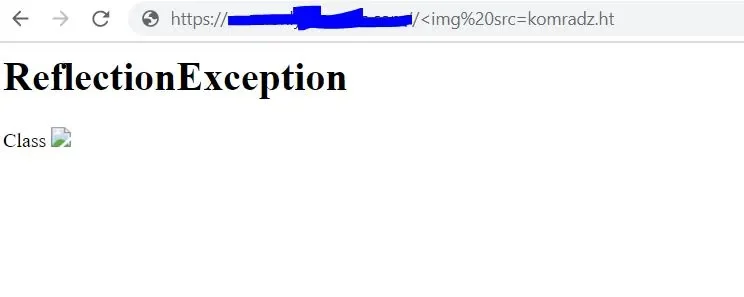
He moved to XSS payloads built with <img src= tags rather than any other tag. These reflected on the page with a small icon showing that the photo was being imported, although no photo was there, and he figured he had an XSS. Every payload he tried, however, redirected him to the home page, which felt like being back at the beginning.
Exploitation
Step 1: Trigger the error page through a directory extension
Requesting a directory path with an added extension produced the error page:
test.com/test.php
Where test.com/test is the original page, these variants returned an error page whose message could be influenced. This was the entry point for everything that followed.
Step 2: Confirm HTML injection in the error message
Through the error message he could inject HTML and change the formatting of the message, for example making it bold or underlined. This confirmed that the error message was rendered as markup rather than escaped text.
Step 3: Observe the filtering behaviour
The page accepted only specific tags and ignored others. When a tag was not accepted, the request was redirected to the home page. This is the behaviour that made payload testing confusing: a rejection did not look like a rejection, it looked like a redirect away from the page.
Step 4: Try <img src= payloads
Switching to payloads built with <img src= tags, the input reflected on the page with a small icon indicating that an image was being imported, even though no image existed. That suggested the markup was being parsed, but every payload still redirected to the home page.
Step 5: Understand the redirect
After a lot of testing he found that adding the whole payload, for example:
<script>alert(1)</script>
redirected him to the home page or to an error page that the web admin used to detect malicious code on the website. The admin, however, did not know about a misconfiguration that let the researcher inject a malicious payload without closing the tag, for example:
<script>alert(1)
With the tag left unclosed, the tag was closed for him. He also tried starting the payload with "><script>.. and tried alert, onerror and the rest.
Step 6: Move the payload into the path and end it with .aspx
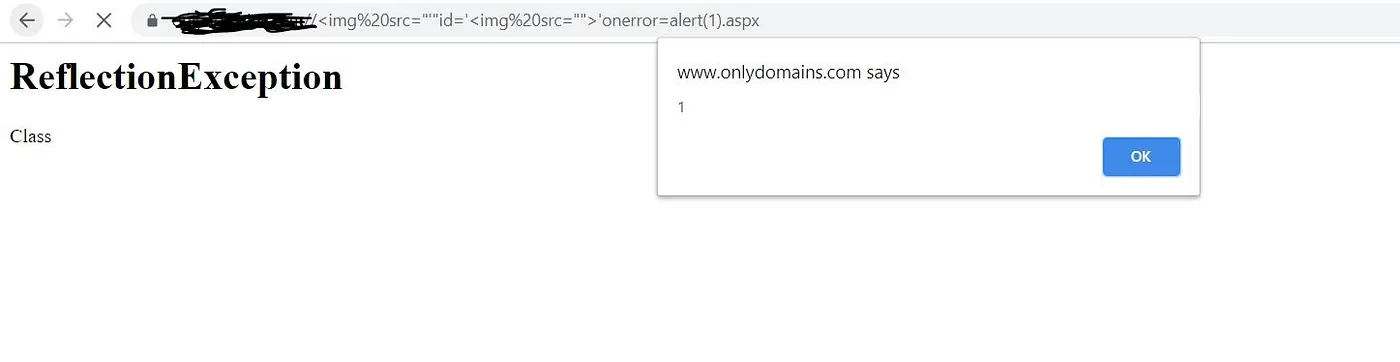
Finally he removed test.aspx as described and added the payload as a directory, ending the payload with .aspx. The final payload, as seen in the photo, was:
%3Cimg%20src=%22'%22id=’%3Cimg%20src=%22%22%3E’onerror=alert(1).aspx
The final payload, as seen in the photo, was the encoded string above, with the payload placed in the path and ended with .aspx. The researcher received a bounty for it and learned something new.
Root cause
The error message is reflected into the page without being escaped, so markup in the message is parsed by the browser. The site's attempt to block malicious input relied on matching complete payloads: a full <script>alert(1)</script> was caught and redirected to the home page or to the admin's detection error page. That check did not account for an unclosed tag, which the browser closes itself, so <script>alert(1) passed. The page accepted only specific tags and ignored others, redirecting to the home page when a tag was not accepted. He removed test.aspx and added the payload as a directory, ending it with .aspx.
Impact
The final payload used onerror=alert(1) as the proof, and the researcher received a bounty for it. The report does not describe any further impact, any victim interaction, or which users could be affected. The first report of the error page reflection was closed as not eligible, and the XSS was rewarded with a bounty.
Fix
The report does not say what was changed. The measure implied by the finding is to stop relying on matching complete payloads and to escape the error message when rendering it, so that injected markup is displayed as text rather than parsed.
Variants to test
- Request existing directory paths with alternative extensions (
.php,.aspx, and others the stack uses) and check whether the resulting error page reflects the path or message. A positive result is your own text appearing in the page body. - Send HTML formatting tags in the reflected message and look for bold or underlined output. A positive result confirms the message is rendered as markup.
- Send an unclosed tag such as
<script>alert(1)where the full closed payload is blocked. A positive result is the tag being closed by the browser and the script running. - Send
<img src=payloads and watch for the broken-image icon in the response. A positive result shows image markup is parsed even when other tags are filtered. - Put the payload in the path itself and terminate it with the extension the error route expects, as in the final payload above. A positive result is the handler firing while the request still reaches the error page instead of the home page.
What happened, in plain words
A security researcher was testing a website he was allowed to test, but not allowed to name, so he calls it test.com. He found that when he asked the site for a page that does not exist, the site showed an error page. That error page was built into the website itself, with the site's background and styling, rather than being a separate plain page. Normally, if you tried to put anything nasty into the address, the site sent you away to another page.
The interesting part was that the error page repeated back part of what he had typed. If you can make a website repeat your text, you can sometimes make it repeat text that a browser treats as instructions rather than as words. That is the whole idea behind the bug class called cross-site scripting, or XSS: you get your own code to run inside someone else's website, in the browser of whoever views the page.
He first reported the error page reflection, and the company said they already knew about it and it did not qualify for a reward. Later he came back, dug deeper, and found a way to make actual JavaScript run. That version earned him a bounty. This is the story of how he got from one to the other.
The setup
There are no special tools, accounts or versions involved. All you need to follow along is a browser and the ability to edit the address bar. The only thing that matters about the site is its shape: it has pages whose addresses look like folders, for example test.com/test. When you ask for a variation of such an address with a different file extension on the end, the site shows an error page inside its own design.
A quick word on the terms used from here on:
- A URL is the address you type in the browser, like
test.com/test. - A directory is a folder-like part of a URL. In
test.com/test,testbehaves like a folder name. - An extension is the bit after the dot at the end of a file name, like
.phpor.aspx. It tells a server what kind of file it is dealing with. - An error page is what a site shows when something goes wrong, for example when the page you asked for does not exist.
- HTML is the language web pages are written in. Tags like
<b>make text bold, and<img>puts a picture on the page. - JavaScript is the programming language browsers run. It is what makes pages interactive, and it is what an XSS attack tries to run.
Finding it
The researcher was testing the private program and noticed something odd. On test.com/test he could trigger an error, which the site called a Reflection Exception. That surprised him, because the error page was supposed to be switched off.
He looked up information about this kind of error and found that other researchers had managed to inject HTML into it. In other words, the error page was not just showing text, it was treating some of that text as page markup.
How did he find the error in the first place? By adding extensions to directories. If test.com/test is the normal page, then asking for test.com/test.php or test.com/test.aspx gave him an error page. That told him he could influence the error page's message and turn it into a message of his own.
He reported this using the old trick, meaning the well-known simple version of the bug. The program's security engineer replied that they were aware of the issue, that it was not eligible for a bounty, and that they would close it as RTFS. He left the error page alone and moved on to other testing, thinking an easy reward had slipped through his fingers.
Some time later, while testing something else, he stumbled into the same error page again. This time he tried HTML injection, which he had forgotten the first time. He was able to inject HTML through the error message, making the message bold or underlined and so on. He did not want to report that on its own, because he expected the reply that there was no impact. Changing how text looks is not, by itself, a security problem.
So he started testing for XSS and tried everything in the book, a lot of payloads. A payload is simply the piece of input an attacker sends to try to trigger a bug. The behaviour was strange: the page responded only to specific tags and ignored others. He retested HTML and the same thing happened: when the tags were not accepted, he was redirected to the home page.
He then moved to XSS payloads built with <img src= tags rather than any other tag. These reflected on the page with a small icon showing that the photo was being imported, even though no photo was there. It told him the markup was being parsed, so he figured he had an XSS. Every payload he tried, however, redirected him to the home page, which felt like being back at the beginning.
Exploitation
Step 1: Trigger the error page through a directory extension
Requesting a directory path with an added extension produced the error page:
test.com/test.php
Line by line: the first line asks the site for test with .php on the end, the second with .aspx. Where test.com/test is the original page, these variants returned an error page whose message could be influenced. This was the entry point for everything that followed: without a page that repeats your input, there is nothing to attack.
Step 2: Confirm HTML injection in the error message
Through the error message he could inject HTML and change the formatting of the message, for example making it bold or underlined. This confirmed that the error message was rendered as markup rather than escaped text.
Escaping means converting characters that have special meaning in HTML, like < and >, into harmless text so the browser shows them literally instead of acting on them. If the site had escaped the message, typing <b> would have shown the letters <b> on screen. Because it did not, the browser made the text bold instead. That is the difference between a site that is safe and one that is not.
Step 3: Observe the filtering behaviour
The page accepted only specific tags and ignored others. When a tag was not accepted, the request was redirected to the home page. This is the behaviour that made payload testing confusing: a rejection did not look like a rejection, it looked like a redirect away from the page.
Think of it like a bouncer who does not say "no", he just quietly walks you out the front door. You only notice you have been rejected because you are suddenly standing outside.
Step 4: Try <img src= payloads
Switching to payloads built with <img src= tags, the input reflected on the page with a small icon indicating that an image was being imported, even though no image existed. That suggested the markup was being parsed, but every payload still redirected to the home page.
An <img> tag tells the browser to load a picture. The src part is where the picture lives. If the browser tries to load it and fails, it shows a small broken-image icon. Seeing that icon is proof that the browser treated your text as a real tag, not as plain words.
Step 5: Understand the redirect
After a lot of testing he found that adding the whole payload, for example:
<script>alert(1)</script>
redirected him to the home page or to an error page that the web admin used to detect malicious code on the website.
Line by line: <script> opens a block of JavaScript. alert(1) is the simplest possible proof: it makes the browser pop up a box with the number 1 in it. </script> closes the block. This is the classic test payload, and it is exactly what the site's filter was looking for.
The admin, however, did not know about a misconfiguration that let the researcher inject a malicious payload without closing the tag, for example:
<script>alert(1)
Line by line: this is the same as before, but the closing </script> is missing. With the tag left unclosed, the tag was closed for him.
He also tried starting the payload with "><script>.. and tried alert, onerror and the rest. The "> trick is an attempt to close whatever attribute or tag the site has already opened, so that your own tag starts cleanly. onerror is an attribute that runs JavaScript when something fails, for example when an image cannot load.
Step 6: Move the payload into the path and end it with .aspx
Finally he removed test.aspx as described and added the payload as a directory, ending the payload with .aspx. The final payload, as seen in the photo, was:
%3Cimg%20src=%22'%22id=’%3Cimg%20src=%22%22%3E’onerror=alert(1).aspx
The % codes are URL encoding: %3C is <, %20 is a space, %22 is a double quote, and %3E is >. The report gives the payload as seen in the photo without further explanation.
The payload ends with onerror=alert(1) and .aspx, and the researcher received a bounty for it. The researcher received a bounty for it and learned something new.
Root cause
The error message is reflected into the page without being escaped, so markup in the message is parsed by the browser. The site's attempt to block malicious input relied on matching complete payloads: a full <script>alert(1)</script> was caught and redirected to the home page or to the admin's detection error page. That check did not account for an unclosed tag, which the browser closes itself, so <script>alert(1) passed. The page accepted only specific tags and ignored others, redirecting to the home page when a tag was not accepted. He removed test.aspx and added the payload as a directory, ending it with .aspx.
In everyday terms: the site was checking for a specific, complete sentence and blocking it, but it never checked whether the words themselves were dangerous. Change the sentence slightly and the check is useless.
Impact
The final payload used onerror=alert(1) as the proof, and the researcher received a bounty for it. The report does not describe any further impact, any victim interaction, or which users could be affected. The first report of the error page reflection was closed as not eligible, and the XSS was rewarded with a bounty.
Fix
The report does not say what was changed. The measure implied by the finding is to stop relying on matching complete payloads and to escape the error message when rendering it, so that injected markup is displayed as text rather than parsed.
Variants to test
- Request existing directory paths with alternative extensions (
.php,.aspx, and others the stack uses) and check whether the resulting error page reflects the path or message. A positive result is your own text appearing in the page body. - Send HTML formatting tags in the reflected message and look for bold or underlined output. A positive result confirms the message is rendered as markup.
- Send an unclosed tag such as
<script>alert(1)where the full closed payload is blocked. A positive result is the tag being closed by the browser and the script running. - Send
<img src=payloads and watch for the broken-image icon in the response. A positive result shows image markup is parsed even when other tags are filtered. - Put the payload in the path itself and terminate it with the extension the error route expects, as in the final payload above. A positive result is the handler firing while the request still reaches the error page instead of the home page.
Glossary
- Reflected XSS: the specific kind where the malicious input is sent in the request and immediately echoed back in the response, rather than being stored on the server.
- HTML: the markup language web pages are written in, made of tags like
<b>and<img>. - Tag: a piece of HTML markup, usually opened and closed, like
<script>and</script>. - Attribute: extra information inside a tag, like
srcin<img src=...>oronerrorin<img onerror=...>. - JavaScript: the programming language browsers run to make pages interactive.
- Payload: the piece of input an attacker sends to try to trigger a bug.
- URL: the address of a page, like
test.com/test. - Directory: a folder-like part of a URL.
- Extension: the part after the dot at the end of a file name, like
.phpor.aspx. - Error page: the page a site shows when something goes wrong.
- Reflection Exception: the name of the error the site produced in this case, as reported by the researcher.
- Escaping: converting characters with special meaning into harmless text so they are displayed rather than acted on.
- HTML injection: getting your own HTML into a page, for example to change formatting, without necessarily running code.
- URL encoding: writing characters that are not allowed in a URL as
%codes, for example%3Cfor<. alert(1): the simplest JavaScript proof, which makes the browser show a pop-up box containing 1.onerror: an attribute that runs JavaScript when something fails, such as an image that cannot load.- Allow-list: a filter that accepts only a known set of things and rejects everything else.
- Redirect: when a server sends your browser to a different page than the one you asked for.
- RTFS: the label the program used when closing the first report, as quoted in the write-up.
- Bounty: a reward paid by a company for a security report it accepts.




