Subdomain Takeover
A subdomain's CNAME pointed to an Amazon S3 bucket that no longer existed, and the author took over the subdomain by creating a new bucket with the same name in the correct AWS region. An attacker could host content on the subdomain, potentially phishing or damaging the target's reputation.
 Published on medium.com
Thanks for huge response to my previous write-ups. Recently I participated in a Bug Bounty program and I have found “Sub-domain takeover” issue by leveraging the Amazon S3 hosting service.
The full write-up lives on its author's site
It belongs to its author, so we link to it rather than copy it. The other two tabs are our own rewrites, checked against it.
Context
This write-up covers a subdomain takeover found during a bug bounty program, where the dangling DNS record pointed at Amazon S3 rather than at a service that simply hands the name back to anyone who asks. The interesting part is not the takeover itself but the region problem: the subdomain was aliased to one specific regional S3 endpoint, and creating the bucket in the wrong region produced a redirect instead of the expected result.
The report uses a placeholder domain, assets.flawdomain.com, throughout. The target program is not named.
A short recap of the two ingredients, as the author frames them:
- Subdomain: a domain that is part of a larger domain.
blog.example.comandwww.example.comare subdomains ofexample.com.
- AWS S3: Simple Storage Service, the object storage offered by the AWS cloud platform, described in the report as cloud object storage with scalability, data availability, security and performance.
Subdomain takeover is defined in the report as the process of registering a non-existing domain name to gain control over another domain. The mechanism hangs on the CNAME record, which aliases one name to another. If a subdomain's CNAME points at a cloud resource that no longer exists, and the provider lets anyone create a resource with that name, the person who creates it controls what the subdomain serves.
Setup
The researcher's reconnaissance process is a fixed sequence:
- Enumerate all subdomains of the target.
- Run a whatweb scan against every subdomain to fingerprint it.
- Instead of pulling CNAME records for every subdomain first, filter the whatweb results for S3-pointed targets using the
Serverheader.
The whatweb output can be exported as JSON and grepped with the gron tool, which flattens JSON into greppable assignment lines.
Finding it
The typical S3 takeover flow is illustrated first. Given a subdomain whose CNAME points at S3, the CNAME is read with:
dig cname assets.flawdomain.com
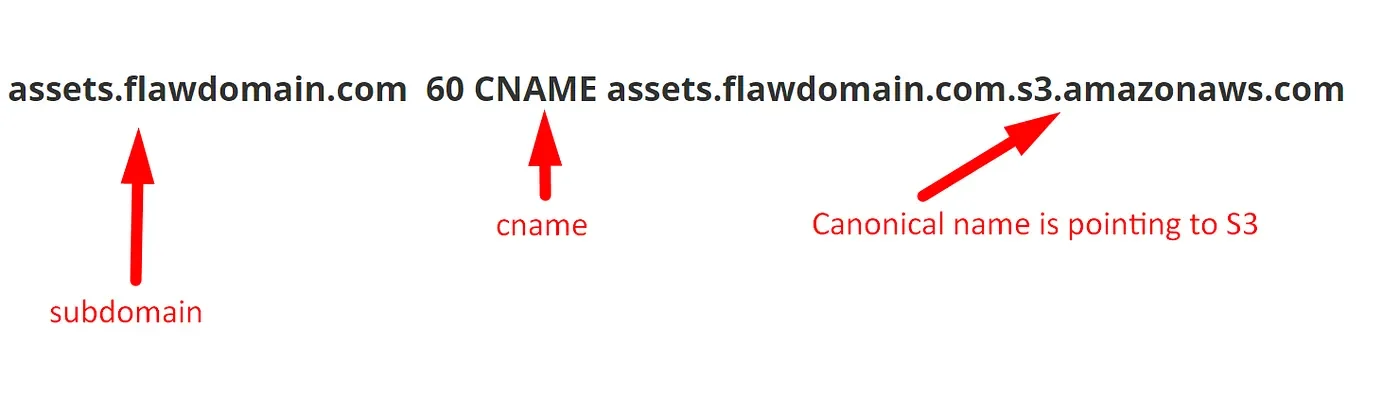
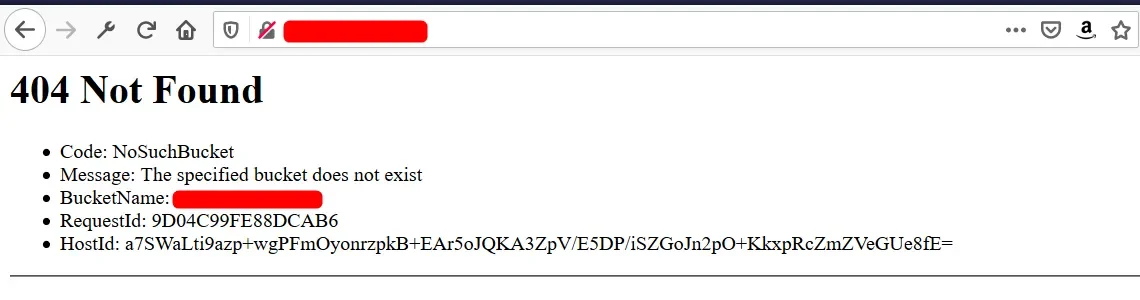
If visiting assets.flawdomain.com returns the S3 error page for a bucket that does not exist, the subdomain can be taken over by creating a bucket named assets.flawdomain.com in the US East (N. Virginia) region.
That is the textbook case. The program target behaved differently.
After the whatweb scan, one subdomain returned a Server: AmazonS3 header and redirected to https://aws.amazon.com/s3/. Requesting a random resource path produced the following responses, as recorded in the report:
assets.flawdomain.com → redirecting to https://aws.amazon.com/s3/
https://assets.flawdomain.com/dasdsa/ → Permanent Redirect error
https://assets.flawdomain.com/teest1245678 → NosuchBucket error
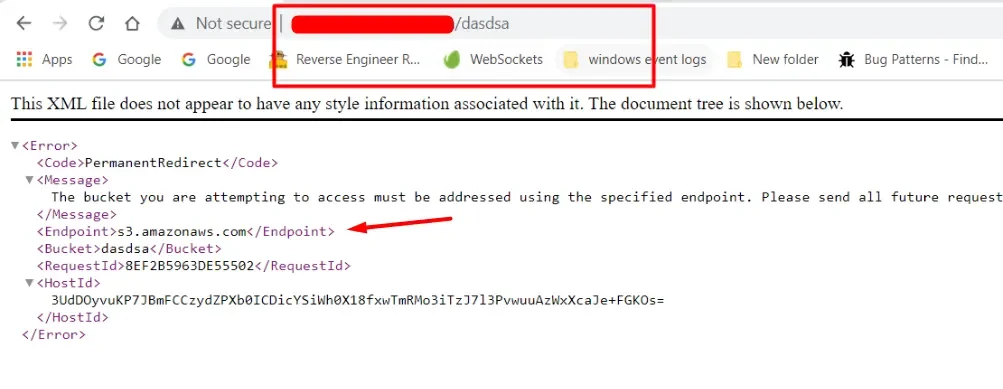
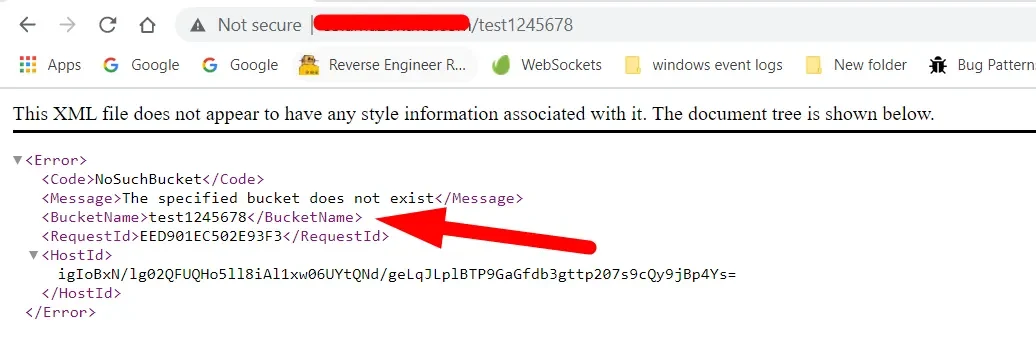
While learning about S3, the author noticed that the domain s3.amazonaws.com shows the same redirection and the same response pattern:
s3.amazonaws.com → redirecting to https://aws.amazon.com/s3/
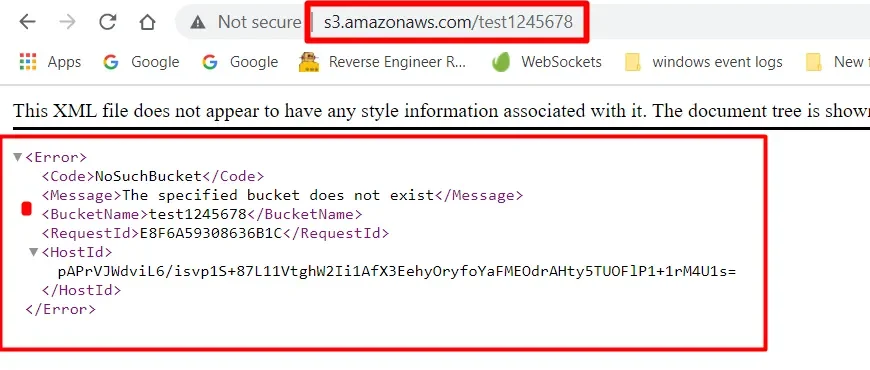

That similarity is what made the target suspicious: assets.flawdomain.com appeared to behave exactly like s3.amazonaws.com, the global endpoint that maps to the US East (N. Virginia) region.
Exploitation
Step 1: create the bucket in the assumed region
Acting on that assumption, the author created a bucket in the US East (N. Virginia) region, which yields the s3.amazonaws.com domain name, and then requested the bucket through assets.flawdomain.com.
The result was a Permanent Redirect error rather than the bucket contents.
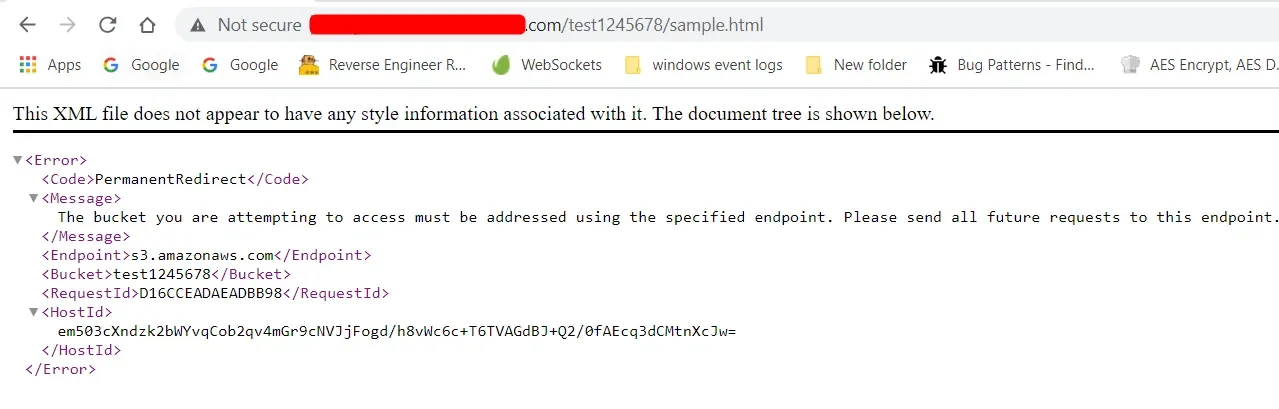
Accessing the bucket through its actual regional S3 domain worked.

Step 2: understand the redirect
Reading an issue in the aws-amplify/aws-sdk-ios GitHub repository explained the behaviour: the error occurs when a bucket is accessed through the wrong region. The same error appeared when the bucket was tested against other S3 regional domains.
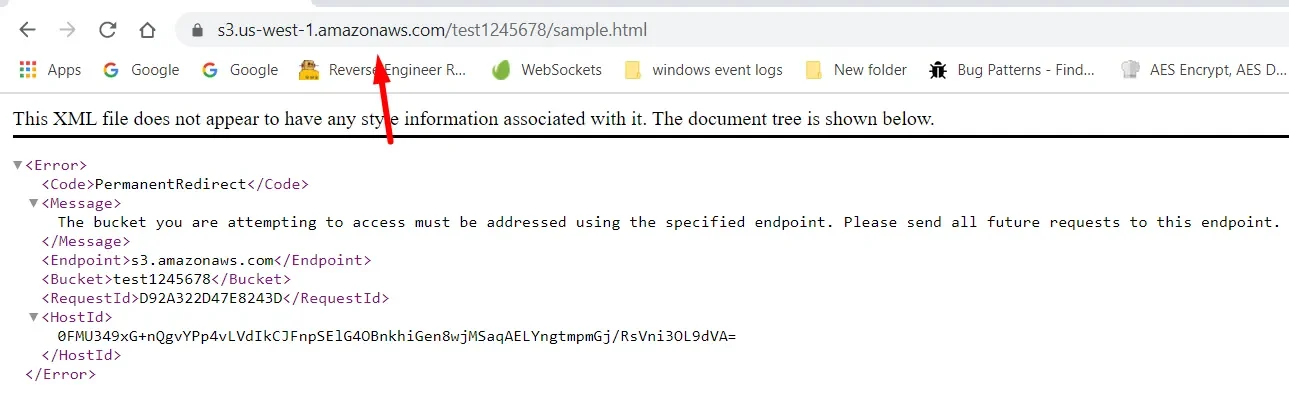
The problem therefore became one of identifying the correct region for the alias.
Step 3: enumerate the candidate regional endpoints
Per the AWS documentation, S3 has several domain names depending on the region of the bucket, so assets.flawdomain.com had to be acting as one of the following:
s3.amazonaws.com
s3-us-east-1.amazonaws.com
s3-us-west-2.amazonaws.com
s3-us-west-1.amazonaws.com
s3-eu-west-1.amazonaws.com
s3-eu-central-1.amazonaws.com
s3-ap-southeast-1.amazonaws.com
s3-ap-northeast-1.amazonaws.com
s3-ap-southeast-2.amazonaws.com
s3-ap-northeast-2.amazonaws.com
s3-sa-east-1.amazonaws.com
s3-cn-north-1.amazonaws.com
s3-ap-south-1.amazonaws.com
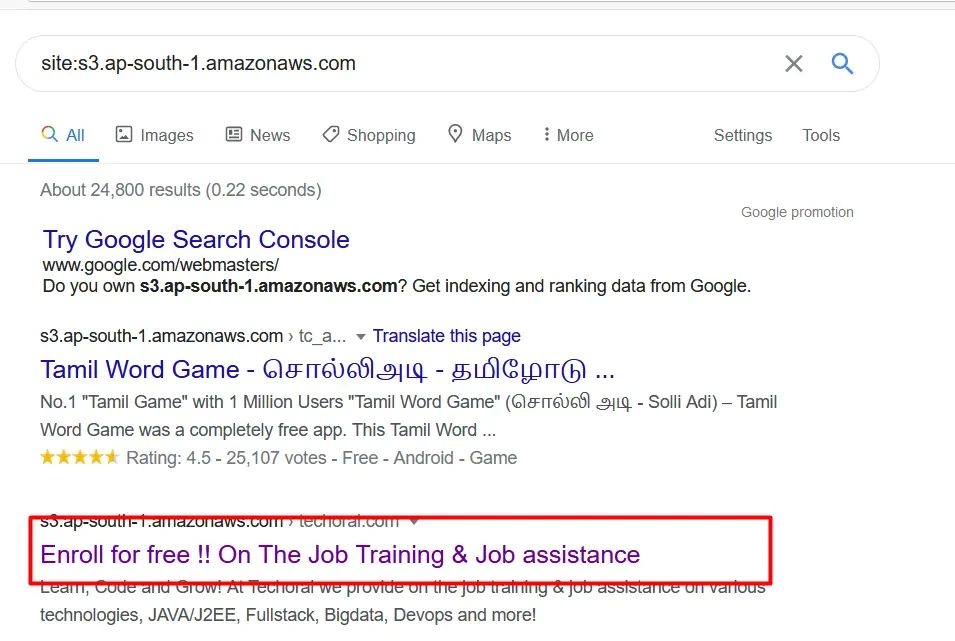
To find public-facing bucket URLs in each region, the author used Google dorks:
site:s3-us-east-1.amazonaws.com → this gives the specific region public facing bucket urls.
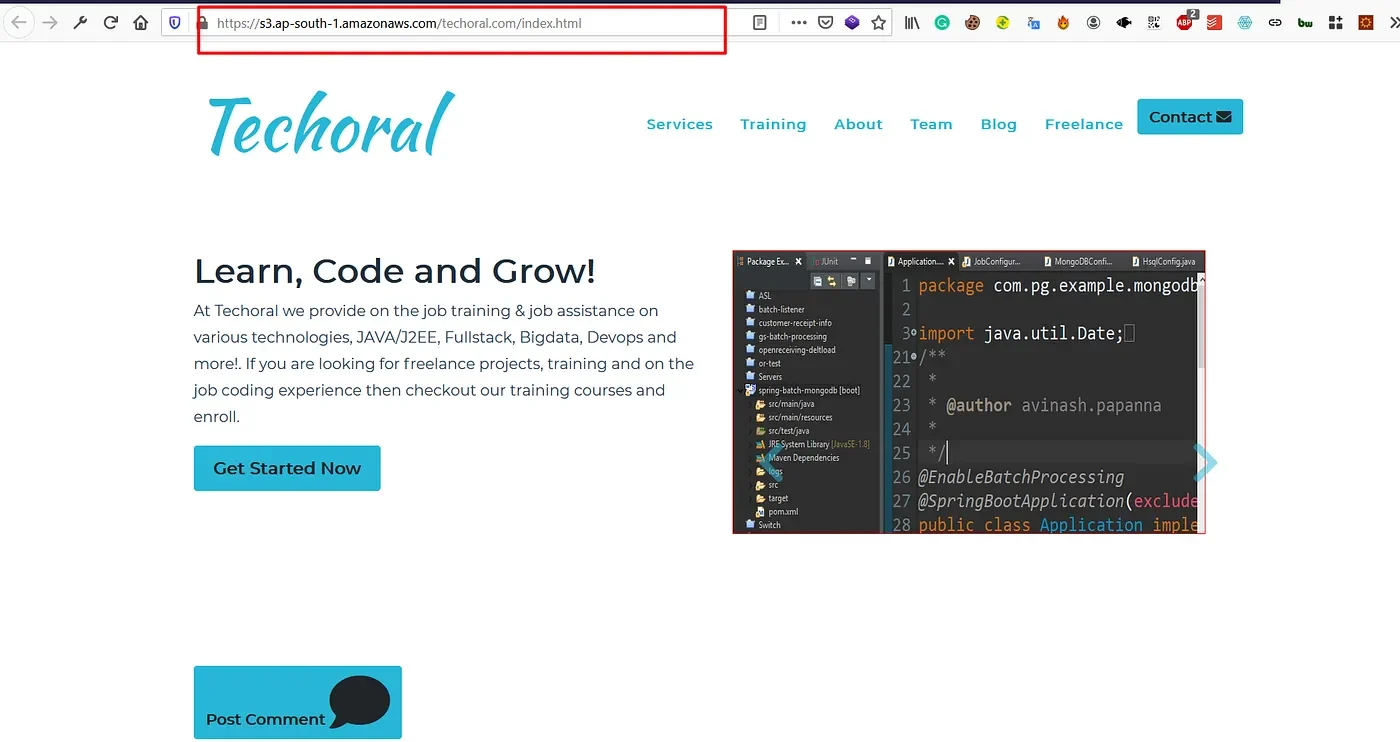
Applying the same technique across all possible regions produced a set of public endpoints, which were then checked against assets.flawdomain.com.
Step 4: create the bucket in the matching region
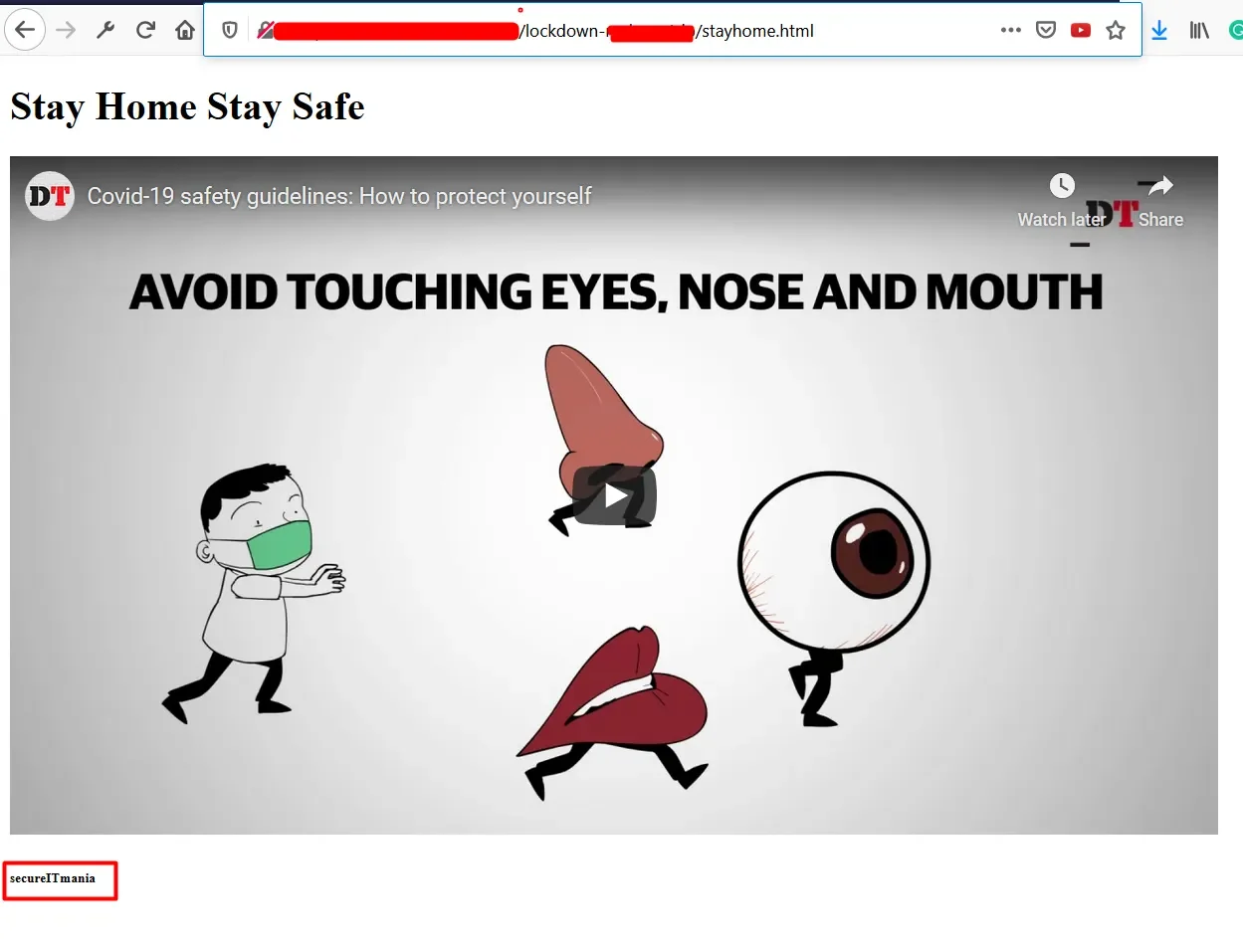
The correct region turned out to be s3.ap-south-1.amazonaws.com: assets.flawdomain.com was acting as an alias of that endpoint. A bucket was created in the Asia Pacific (Mumbai) region and accessed through assets.flawdomain.com.
Root cause
The underlying condition is the usual one for S3 takeover: a DNS record for the subdomain still aliases a bucket name that no longer exists, and S3 lets any AWS account claim a globally unique bucket name. The report does not describe how the record was left behind or what the original bucket was used for.
The twist is regional. S3 bucket names are global, but each bucket lives in one region, and requests must reach it through an endpoint for that region. A CNAME that points at a regional endpoint therefore only resolves to the attacker's bucket if the bucket is created in the region that endpoint serves. Creating the bucket elsewhere produces a redirect error, which is exactly what happened on the first attempt. The report does not state whether the DNS record pointed at the regional endpoint directly or through some other alias; it only establishes, by testing, that the subdomain behaved as an alias of s3.ap-south-1.amazonaws.com.
Impact
With the bucket created in the correct region, the researcher controlled the content served on the target's subdomain. The report shows the bucket being accessed through the subdomain after creation and gives no further exploitation.
Fix
No remediation is described. The general fix for this class is to remove or repoint the dangling CNAME, and to keep an inventory of cloud resources referenced by DNS so that records are cleaned up when a bucket is deleted.
Variants to test
- Filter fingerprints by server header first. Run whatweb across all subdomains, export JSON, and grep for the storage provider's server string before pulling any CNAMEs. A positive result is a subdomain whose
Serverheader names the storage service. - Compare against the provider's global endpoint. Request the subdomain and the provider's global endpoint and compare redirects and error pages. Matching behaviour suggests the subdomain aliases the global endpoint, but as this case shows, matching behaviour alone does not prove which regional endpoint is behind the name.
- Create the bucket in the assumed region and test through the subdomain. If the bucket works through its own regional domain but the subdomain returns a redirect error, the region is wrong.
- Enumerate regional endpoints with search dorks. Use
site:queries against each regional endpoint to collect live public bucket URLs, then test the subdomain against each region in turn. A positive result is the region whose endpoint the subdomain turns out to alias. - Create the bucket in the matching region and confirm. Access the subdomain again; a positive result is the bucket content being served under the target's name.
What happened, in plain words
A security researcher was taking part in a bug bounty program. A bug bounty program is a scheme where an organisation invites outside people to look for security weaknesses in its systems and pays or credits them for reporting what they find. During that work the researcher found a way to take control of one of the organisation's subdomains, using Amazon's file storage service, S3, as the lever.
A subdomain is a name that sits underneath a larger name. If the organisation owns example.com, then blog.example.com and www.example.com are subdomains of it. Each subdomain is a separate address that can point at a separate machine or service.
Amazon S3 (Simple Storage Service) is a service from Amazon Web Services (AWS) for storing files in the cloud. You create a container called a bucket, give it a name, and put files in it. AWS then serves those files over the web for you. The report describes S3 as cloud object storage offering scalability, data availability, security and performance.
Subdomain takeover, as the report defines it, is the process of registering a non-existing domain name to gain control over another domain. In everyday terms: imagine a shop sign that says "ask at the warehouse on Elm Street", but the warehouse has been demolished. If the landlord of that empty plot lets anyone put up a new warehouse and keep the same address, whoever moves in gets all the customers following the sign. A subdomain takeover works the same way. The organisation's DNS still points the subdomain at a cloud resource, the resource has been deleted, and the cloud provider lets anyone create a resource with that name.
The mechanism hangs on a DNS record type called CNAME. DNS is the phone book of the internet: it translates names people type into the addresses computers use. A CNAME record is an alias, meaning "this name is really just another name, go and look that one up instead". If a subdomain's CNAME points at a cloud resource that no longer exists, and the provider lets anyone create a resource with that name, the person who creates it controls what the subdomain serves.
The interesting part of this case is not the takeover itself but the region problem. S3 buckets are stored in a particular geographic region, such as US East (N. Virginia) or Asia Pacific (Mumbai), and each region has its own web address for reaching buckets. The subdomain was aliased to one specific regional address, and creating the bucket in the wrong region produced a redirect instead of the expected result. The researcher had to work out which region was the right one.
The report uses a placeholder domain, assets.flawdomain.com, throughout. The target program is not named.
Setup
The researcher's reconnaissance process is a fixed sequence. Reconnaissance means the information-gathering phase that comes before any testing: finding out what exists, what it runs, and how it is wired together.
- Enumerate all subdomains of the target. Enumerating means listing them out, one by one, so you know the full set of names that belong to the organisation.
- Run a whatweb scan against every subdomain to fingerprint it. whatweb is a free tool that looks at a website's responses and reports what software it appears to be running. Fingerprinting means identifying the technology behind a site from the outside, the way you might guess a car's make from its shape.
- Instead of pulling CNAME records for every subdomain first, filter the whatweb results for S3-pointed targets using the
Serverheader. TheServerheader is a small piece of information a web server sends back with every response, naming the software that answered. If it says Amazon S3, the subdomain is probably backed by S3.
The whatweb output can be exported as JSON and grepped with the gron tool. JSON is a plain-text format for structured data, easy for programs to read. Grepping means searching text for a pattern. gron is a small utility that flattens JSON into one assignment per line, so that ordinary text search tools can find things inside it.
Finding it
The typical S3 takeover flow is illustrated first. Given a subdomain whose CNAME points at S3, the CNAME is read with:
dig cname assets.flawdomain.com
dig is a command-line tool for asking DNS questions. The word cname tells it to ask specifically for the CNAME record. The name after it is the subdomain being looked up. The answer tells you which other name this subdomain is an alias of.
If visiting assets.flawdomain.com returns the S3 error page for a bucket that does not exist, the subdomain can be taken over by creating a bucket named assets.flawdomain.com in the US East (N. Virginia) region. The reasoning is simple: the DNS record still points at a bucket with that name, the bucket is gone, and S3 will let anyone create a bucket with an unused name. Create it and the subdomain starts serving your files.
That is the textbook case. The program target behaved differently.
After the whatweb scan, one subdomain returned a Server: AmazonS3 header and redirected to https://aws.amazon.com/s3/. A redirect is when a web server answers a request by telling the browser to go somewhere else instead. Requesting a random resource path produced the following responses, as recorded in the report:
assets.flawdomain.com → redirecting to https://aws.amazon.com/s3/
https://assets.flawdomain.com/dasdsa/ → Permanent Redirect error
https://assets.flawdomain.com/teest1245678 → NosuchBucket error
The first line says that asking for the subdomain itself sends the browser to Amazon's S3 marketing page. The second line says that asking for a made-up path, dasdsa, produces a Permanent Redirect error. The third line says that asking for another made-up path, teest1245678, produces a NosuchBucket error, which is S3 saying no bucket by that name exists.
While learning about S3, the author noticed that the domain s3.amazonaws.com shows the same redirection and the same response pattern:
s3.amazonaws.com → redirecting to https://aws.amazon.com/s3/
This line says that asking for s3.amazonaws.com also sends the browser to the same Amazon page. s3.amazonaws.com is the global S3 address, the one that maps to the US East (N. Virginia) region.
That similarity is what made the target suspicious: assets.flawdomain.com appeared to behave exactly like s3.amazonaws.com. If two names behave identically, one may be an alias of the other, which would mean the subdomain is backed by S3 and can be claimed.
Exploitation
Step 1: create the bucket in the assumed region
Acting on that assumption, the author created a bucket in the US East (N. Virginia) region, which yields the s3.amazonaws.com domain name, and then requested the bucket through assets.flawdomain.com.
The result was a Permanent Redirect error rather than the bucket contents.
Accessing the bucket through its actual regional S3 domain worked. In other words, the bucket existed and was reachable, but only through the address that matched its region, not through the target's subdomain.
Step 2: understand the redirect
Reading an issue in the aws-amplify/aws-sdk-ios GitHub repository explained the behaviour: the error occurs when a bucket is accessed through the wrong region. GitHub is a website where software projects keep their code and discuss problems; an issue is a thread about a bug or question. The same error appeared when the bucket was tested against other S3 regional domains.
The problem therefore became one of identifying the correct region for the alias. The bucket name was right, but the bucket was sitting in the wrong part of the world for this particular DNS record.
Step 3: enumerate the candidate regional endpoints
Per the AWS documentation, S3 has several domain names depending on the region of the bucket, so assets.flawdomain.com had to be acting as one of the following:
s3.amazonaws.com
s3-us-east-1.amazonaws.com
s3-us-west-2.amazonaws.com
s3-us-west-1.amazonaws.com
s3-eu-west-1.amazonaws.com
s3-eu-central-1.amazonaws.com
s3-ap-southeast-1.amazonaws.com
s3-ap-northeast-1.amazonaws.com
s3-ap-southeast-2.amazonaws.com
s3-ap-northeast-2.amazonaws.com
s3-sa-east-1.amazonaws.com
s3-cn-north-1.amazonaws.com
s3-ap-south-1.amazonaws.com
Each line is one regional address for S3. The part after s3- names the region, for example us-east-1 for US East, eu-west-1 for EU West, and ap-south-1 for Asia Pacific South. The first line, s3.amazonaws.com, is the global one that maps to US East (N. Virginia).
To find public-facing bucket URLs in each region, the author used Google dorks:
site:s3-us-east-1.amazonaws.com → this gives the specific region public facing bucket urls.
A Google dork is a search query that uses special operators to narrow results. The site: operator tells Google to return only pages from one particular website or domain. Here it asks Google for pages hosted on s3-us-east-1.amazonaws.com, which in practice returns links to public buckets in that region. Doing this for each regional address gives a list of real, working endpoints to compare against.
Applying the same technique across all possible regions produced a set of public endpoints, which were then checked against assets.flawdomain.com.
Step 4: create the bucket in the matching region
The correct region turned out to be s3.ap-south-1.amazonaws.com: assets.flawdomain.com was acting as an alias of that endpoint. A bucket was created in the Asia Pacific (Mumbai) region and accessed through assets.flawdomain.com.
Root cause
The underlying condition is the usual one for S3 takeover: a DNS record for the subdomain still aliases a bucket name that no longer exists, and S3 lets any AWS account claim a globally unique bucket name. The report does not describe how the record was left behind or what the original bucket was used for.
The twist is regional. S3 bucket names are global, but each bucket lives in one region, and requests must reach it through an endpoint for that region. A CNAME that points at a regional endpoint therefore only resolves to the attacker's bucket if the bucket is created in the region that endpoint serves. Creating the bucket elsewhere produces a redirect error, which is exactly what happened on the first attempt. The report does not state whether the DNS record pointed at the regional endpoint directly or through some other alias; it only establishes, by testing, that the subdomain behaved as an alias of s3.ap-south-1.amazonaws.com.
Impact
With the bucket created in the correct region, the researcher controlled the content served on the target's subdomain. The report shows the bucket being accessed through the subdomain after creation and gives no further exploitation.
Fix
No remediation is described. The general fix for this class is to remove or repoint the dangling CNAME, and to keep an inventory of cloud resources referenced by DNS so that records are cleaned up when a bucket is deleted.
Variants to test
- Filter fingerprints by server header first. Run whatweb across all subdomains, export JSON, and grep for the storage provider's server string before pulling any CNAMEs. A positive result is a subdomain whose
Serverheader names the storage service. - Compare against the provider's global endpoint. Request the subdomain and the provider's global endpoint and compare redirects and error pages. Matching behaviour suggests the subdomain aliases the global endpoint, but as this case shows, matching behaviour alone does not prove which regional endpoint is behind the name.
- Create the bucket in the assumed region and test through the subdomain. If the bucket works through its own regional domain but the subdomain returns a redirect error, the region is wrong.
- Enumerate regional endpoints with search dorks. Use
site:queries against each regional endpoint to collect live public bucket URLs, then test the subdomain against each region in turn. A positive result is the region whose endpoint the subdomain turns out to alias. - Create the bucket in the matching region and confirm. Access the subdomain again; a positive result is the bucket content being served under the target's name.
Glossary
- Bug bounty program: a scheme where an organisation invites outside researchers to find security weaknesses and rewards them for reporting them.
- Subdomain: a name that sits underneath a larger domain, such as
blog.example.comunderexample.com. - AWS: Amazon Web Services, Amazon's cloud platform, offering many services including storage and computing.
- S3 (Simple Storage Service): AWS's service for storing files in containers called buckets and serving them over the web.
- Bucket: a named container in S3 that holds files; bucket names are globally unique across all AWS accounts.
- Region: a geographic area where AWS runs data centres, such as US East (N. Virginia) or Asia Pacific (Mumbai); each bucket lives in one region.
- Endpoint: a web address that a service answers on; S3 has a different endpoint for each region.
- Subdomain takeover: registering a non-existing domain name to gain control over another domain, typically because a DNS record still points at a resource that no longer exists.
- DNS: the phone book of the internet, translating names people type into the addresses computers use.
- CNAME record: a DNS record that aliases one name to another, saying "this name is really just that other name".
- Dangling DNS record: a DNS record that points at a resource which no longer exists, leaving the name claimable.
- Reconnaissance: the information-gathering phase before testing, finding out what exists and how it is wired together.
- Enumerate: to list things out one by one, such as all subdomains of a target.
- Fingerprint: to identify the technology behind a site from the outside, from clues in its responses.
- whatweb: a free tool that scans a website and reports what software it appears to be running.
- Server header: a small piece of information a web server sends with every response, naming the software that answered.
- JSON: a plain-text format for structured data, easy for programs to read.
- grep / grepping: searching text for a pattern.
- gron: a small utility that flattens JSON into one assignment per line so ordinary text search tools can find things inside it.
- dig: a command-line tool for asking DNS questions.
- Redirect: a web server answering a request by telling the browser to go somewhere else instead.
- Permanent Redirect error: an HTTP response indicating the requested resource has moved permanently to another address.
- NosuchBucket error: S3's error saying no bucket by that name exists.
- GitHub: a website where software projects keep their code and discuss problems.
- Issue: a thread on GitHub about a bug or question in a project.
- Google dork: a search query using special operators, such as
site:, to narrow results to particular pages or domains. site:operator: a Google search operator that returns only pages from one particular website or domain.- Alias: a name that stands in for another name, so looking up one leads to the other.



