#Example 1 — A Weird Load Balancer Misconfiguration
Several web applications leaked other users' personal data (email addresses, usernames, and an API authorization header) in JavaScript responses due to load balancer misconfiguration, a shallow-copy caching bug, and CDN caching of a JavaScript file. An attacker could obtain this information without authentication, and in one case could cache a victim's authorization header by luring them to a crafted link.

When looking for security vulnerabilities on a web application - either for bug hunting or a penetration test project -, I always check 2 things at last when I was clearing my testing up on a target:
The full write-up lives on its author's site
It belongs to its author, so we link to it rather than copy it. The other two tabs are our own rewrites, checked against it.
Context
This write-up collects four separate information disclosure bugs found while doing bug bounty work and penetration testing. They share a habit rather than a vulnerability class: after finishing the active testing on a target, the author searches the HTTP responses already collected for personal data belonging to the account in use, such as username, e-mail address and phone number, and also reviews every e-mail address that Burp's Passive Scanner has flagged across the responses. The original motivation was to find endpoints worth attacking with IDOR and access or privacy issues, but over time the review became a routine clearing step that surfaced misconfigurations nobody else had reported.
The affected assets are ordinary web applications; some sat behind load balancers and one served JavaScript through a CDN. In each case the leaked data appears inside a JavaScript block or a JavaScript file served to the browser, which is why it goes unnoticed: it never renders on the page, so neither users nor most testers see it.
Setup
The tooling is Burp Suite, used in three ways:
- The HTTP history log, to search for the current account's personal information in responses.
- The Passive Scanner results, which collect e-mail addresses found in responses.
- The Repeater, to resend and compare requests.
No special accounts or roles are described beyond a normal registered user on each target. The preconditions that matter are behavioural: the tester must be logged in while browsing so that responses contain their own data, and must be willing to replay requests with cookies removed.
Finding it
In the first three examples the starting point was the same: while reviewing the e-mail addresses gathered by the Passive Scanner, the author saw an address that did not belong to them. Following it back to the response showed it sitting inside a script block in the HTML source of an endpoint.
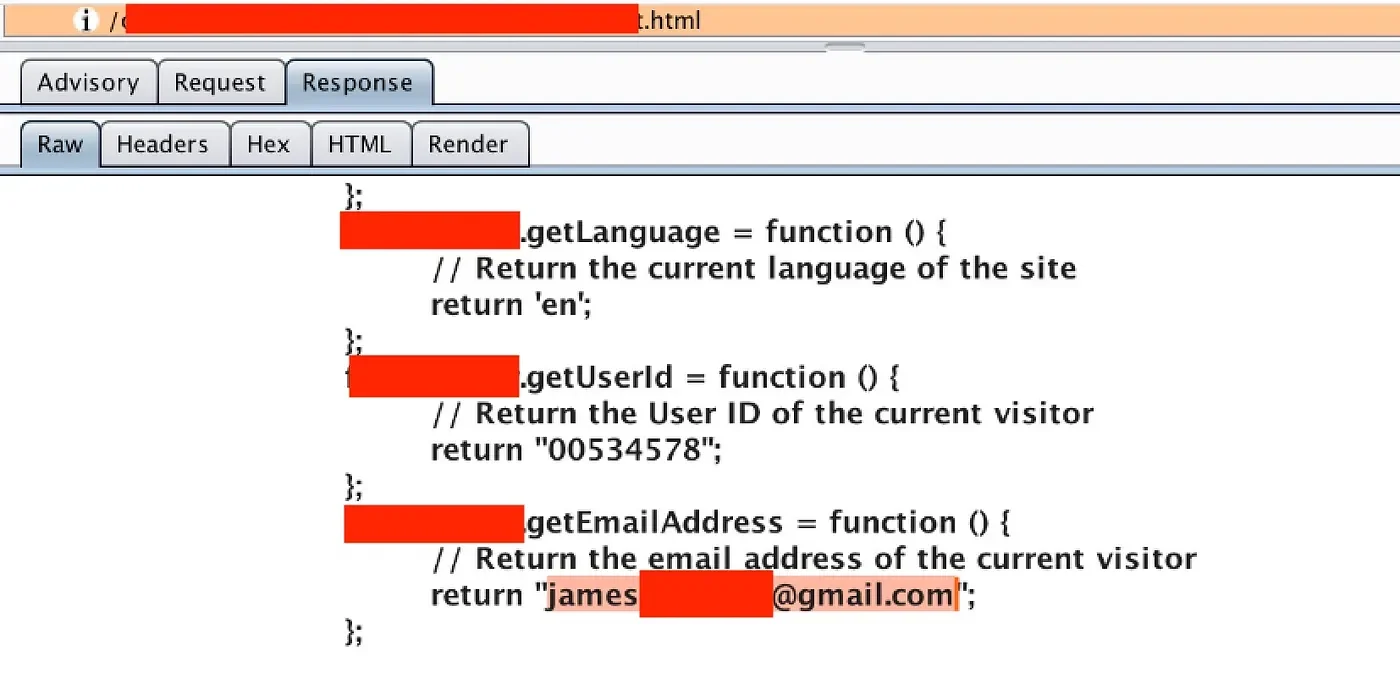
Sending the main request to Repeater and repeating it returned the author's own e-mail address, user id and user settings instead of the leaked one. That contradiction, a value that appears once in passive results but not on replay, is the signal that something between the browser and the application is choosing which user's data to embed.
Exploitation
Example 1: load balancer misconfiguration
After some testing the author determined that the trigger was the absence of a specific cookie on the prior request leading to this request. Without that cookie, the load balancer configuration was confused and returned another user's information in the JavaScript block. In practice, anyone visiting the site after deleting all cookies received another user's e-mail address in the HTTP response.
Because the leak only exists in the source code and never on the rendered page, it had apparently gone unnoticed. Repeating the process leaked sensitive information for thousands of registered users.
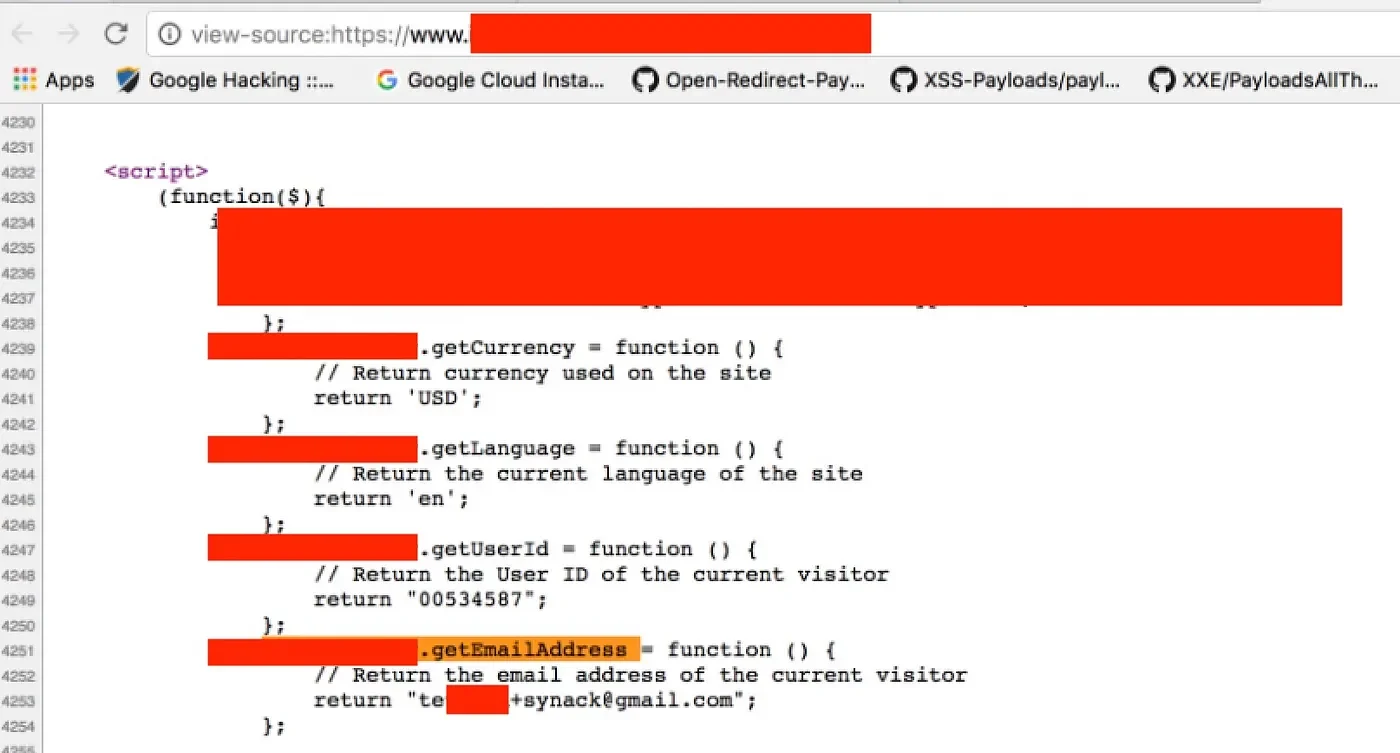
The report was accepted and paid approximately $400.
Example 2: whitelisted e-mail addresses on the home page
A few days later, on a very common web page's home page, the author found 17 unfamiliar e-mail addresses in a script block, assigned as the value of a whitelistExternalUserEmails parameter.
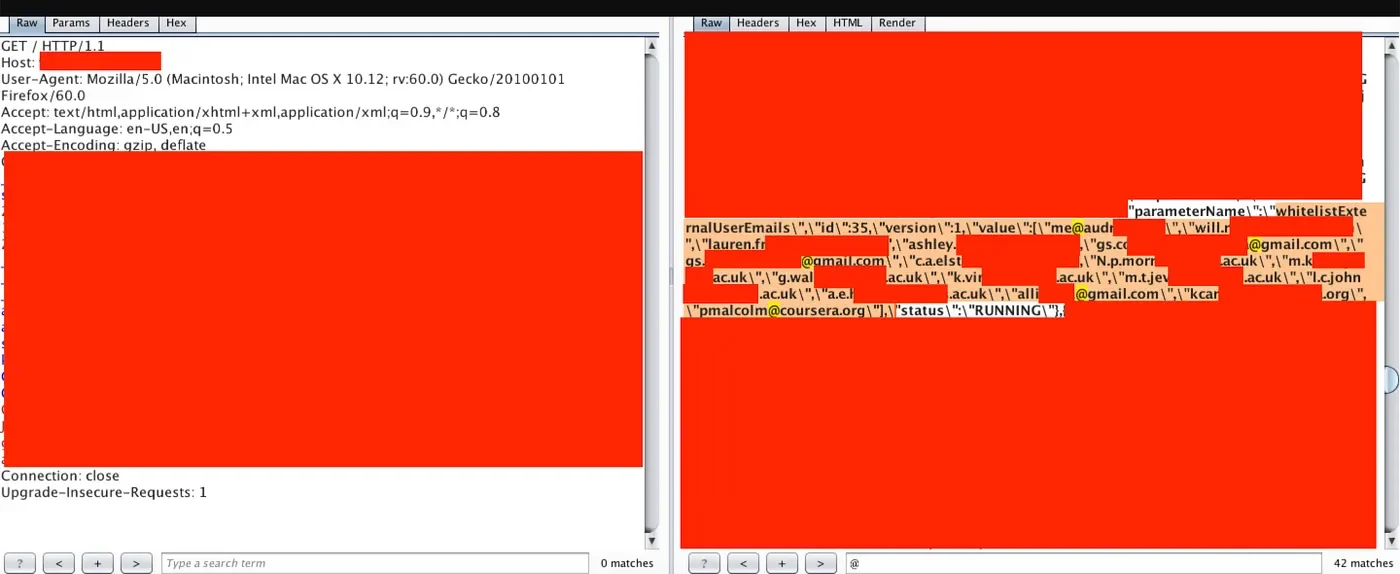
Checking those addresses against the registration and forgot-password pages showed that all of them belonged to working accounts. The author later concluded that whitelisted users for that application were excluded from some security controls (the report suggests possibly a WAF, without confirming it), and that this security configuration was also mistakenly adding a script block to the main page.
The report was accepted and paid approximately $800 within an incentive.
Example 3: load balancer strikes again
On a penetration testing project, the Passive Scanner log showed a leakage similar to the first example.
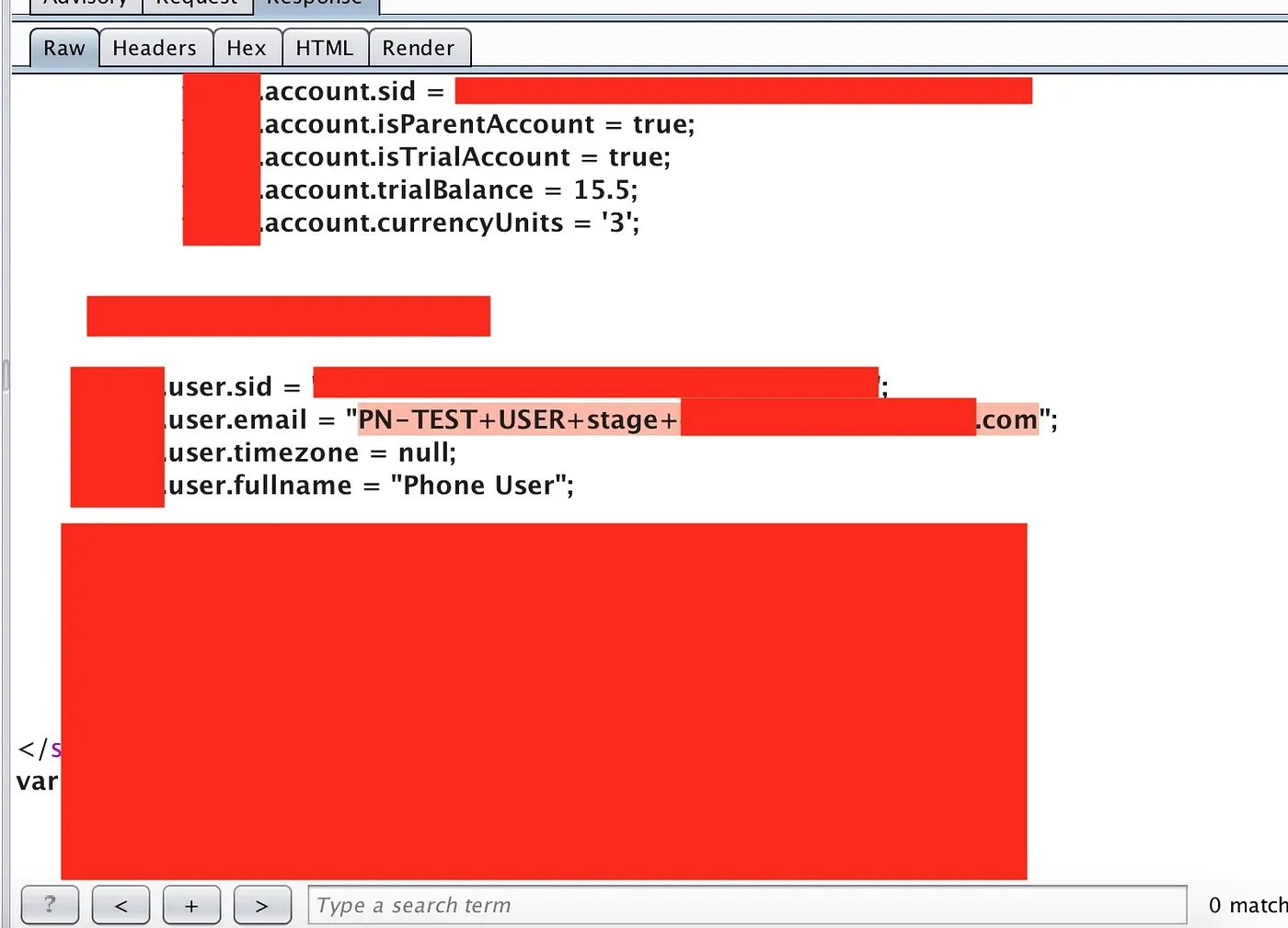
Unlike the first case, the author could never reproduce it or collect any other user's information, whatever was tried. Given the earlier experience and the fact that this was a client engagement, the finding and the concerns were shared with the client directly. The client investigated and explained the cause in their own words:
Due to a shallow copy of an object in back-end, an object with references to other customer data was cached. When that object is returned, the vulnerable page is rendered with multiple instances of customer data.
So the leak happened once per hour, which made it very hard both to find and to reproduce. The client resolved it.
Example 4: authorization header cached as a JavaScript file
While searching the responses visited for the registered user's username, the author found a JavaScript file that contained it, together with the authorization security header used for the application APIs. That is the classic XSSI shape. Before attempting an XSSI, the author deleted all session cookies for that request and found that the response still returned the username and authorization header.
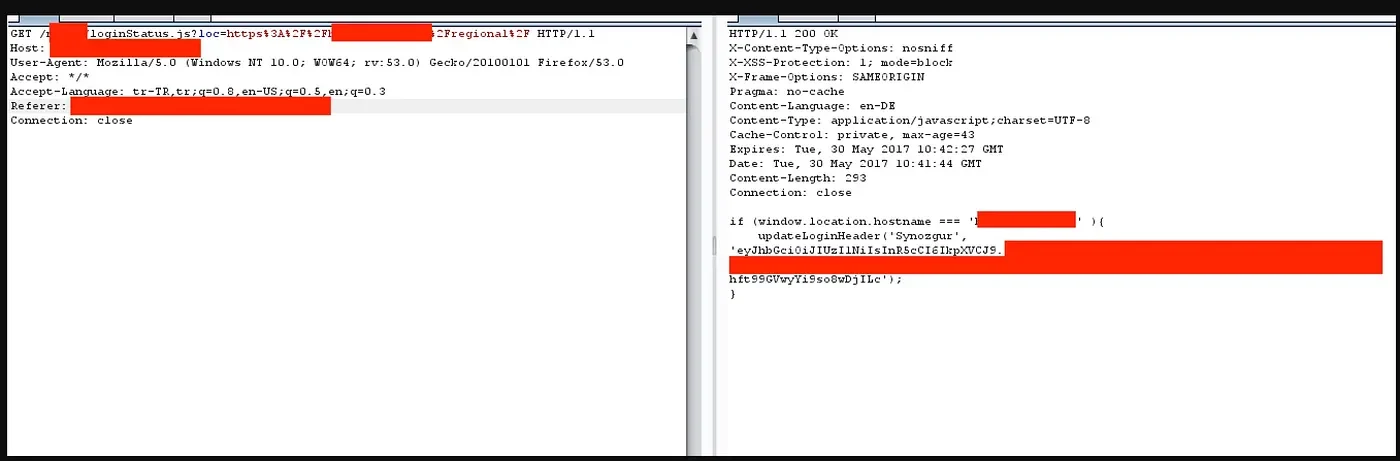
Further steps:
- Changing the
locparameter removed all leaked information from the response. - Visiting the same endpoint from a second user account returned the second user's information.
- Deleting all session cookies again returned the second user's information.
Because the resource is a JavaScript file, it was cached at the CDN under different parameter values. Changing loc to an invalid value such as phishing, sending the link to a victim and having the victim click it caused the victim's authorization header to be cached as a JavaScript file.
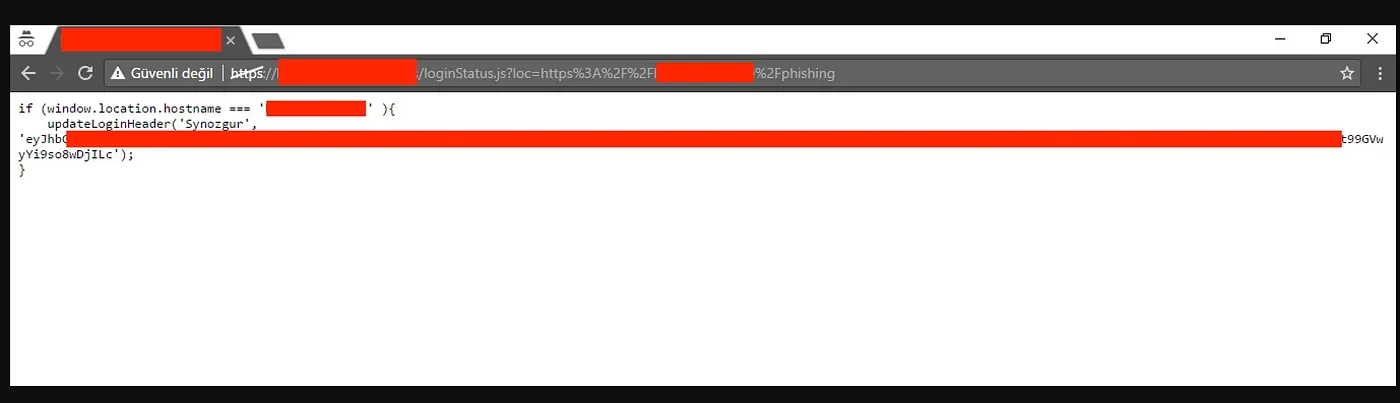
At first sight this resembles a Web Cache Deception attack, but it goes further. These JavaScript files are cached during the normal operation of the application, without any user interaction, under valid loc parameters, which are the referrer endpoints that call the JavaScript file. That makes it possible to collect other users' usernames and authorization headers by brute-forcing the loc parameter, with values that can be gathered from the Burp history log. Automating this and running it repeatedly could let an attacker steal the information of all authenticated users.
The report was accepted and paid approximately $300. The amount was reduced because the leaked authorization header was not privileged enough to perform user operations, though the author still considers it underrated.
Root cause
The four cases have three distinct causes:
- Load balancer state confusion (Example 1). A request without a specific cookie was routed or handled in a way that returned another user's data in the JavaScript block. The report does not name the cookie or the load balancer product.
- Back-end object caching with a shallow copy (Example 3). The client's explanation is that a shallow copy of an object left references to other customer data, and that object was cached. When the cached object was returned, the page rendered with multiple instances of customer data. This is why the leak recurred roughly once per hour rather than on demand.
- CDN caching keyed on a user-controlled parameter (Example 4). The JavaScript file was cached per
locvalue, and the cached response contained the requesting user's username and authorization header. Because the cache did not distinguish users, a request with no session cookies still received a previously cached user's data.
In Example 2 the report does not state the mechanism beyond the observation that the whitelist configuration added a script block to the main page.
Impact
- Example 1: any visitor without the relevant cookie received another registered user's e-mail address in the page source, and the script block also carried user id and settings. Repeated visits leaked thousands of users' information.
- Example 2: 17 working accounts' e-mail addresses were exposed on a very common home page, and the same list revealed which users were excluded from certain security controls.
- Example 3: the page was rendered with multiple instances of customer data, once per hour, making it hard to reproduce but still a disclosure of customer data.
- Example 4: usernames and authorization headers for the application APIs could be cached and retrieved by an attacker. The bounty was reduced because the leaked header was not privileged enough to conduct user operations, but the author notes that automating the brute force of
loccould expose all authenticated users.
Fix
The report only records that the client in Example 3 resolved the issue after investigating the shallow copy and the caching of the object. Reasonable fixes, consistent with the causes above, would be to stop embedding per-user data in JavaScript blocks served through shared infrastructure, to avoid caching objects that hold references to other customers' data, and to ensure CDN cache keys cannot be influenced by parameters that select whose data is returned.
Variants to test
- Cookie-less replay. Take any request whose response contains your own e-mail, user id or settings and replay it with all cookies removed. A positive result is another user's data appearing in the response.
- Passive scanner review. After browsing a target logged in, review every e-mail address Burp's Passive Scanner collected and check whether any belongs to another account. A positive result is an address that is not yours appearing in a script block.
- Whitelist parameters. Look for parameters such as
whitelistExternalUserEmailsin page sources and confirm whether the listed addresses are registered accounts via registration or forgot-password pages. A positive result is a list of valid accounts exposed on a public page. - Cache key manipulation. For JavaScript files that contain your username or authorization header, change the parameter that selects the referrer endpoint (here
loc) to an invalid value and resend without cookies. A positive result is the cached response still containing a user's data. - Brute force of the cache parameter. Enumerate values of the parameter from your history log and request each one without cookies. A positive result is a series of cached responses each containing a different user's username or authorization header.
What happened, in plain words
This is a story about four separate bugs found while hunting for security problems on websites. They all have something in common: the private information of one user ended up being shown to other people, but not on the visible page. It was hidden inside the code that the browser downloads behind the scenes. Because it never appears on the screen, most people, including many testers, never notice it.
The author's habit was simple. After finishing the active testing on a website, he would look back through all the responses his browser and tools had already received. He searched for his own personal details (username, e-mail address, phone number) and also reviewed every e-mail address that his tool had automatically spotted. At first he did this to find places worth attacking for other bugs, but over time it became a routine clean-up step that uncovered mistakes nobody else had reported.
The websites involved were ordinary web applications sitting behind load balancers and CDNs. A load balancer is a computer that sits in front of several web servers and decides which server should handle each request, like a receptionist directing visitors to the right desk. A CDN (Content Delivery Network) is a network of servers spread around the world that store copies of files so they can be delivered faster; think of it as a chain of local libraries that keep copies of popular books so you don't have to wait for the main library. In each case, the leaked data appeared inside a JavaScript block or a JavaScript file. JavaScript is the programming language that makes web pages interactive; a JavaScript block is a piece of code embedded in the HTML of a page, and a JavaScript file is a separate file that the page loads. Neither is normally visible to the user, which is why the leaks went unnoticed.
The tool and the routine
The author used Burp Suite, a popular tool for testing web security. He used it in three ways:
- HTTP history log: a record of every request and response that passed through the tool. He searched this log for his own personal information in the responses.
- Passive Scanner: a feature that automatically scans responses for things like e-mail addresses and flags them. He reviewed every e-mail address it found.
- Repeater: a tool that lets you take a request, modify it, and send it again to see how the server responds. He used it to replay requests and compare results.
No special accounts or roles were needed beyond a normal registered user on each target. The important preconditions were behavioural: the tester had to be logged in while browsing so that responses contained his own data, and he had to be willing to replay requests with cookies removed. A cookie is a small piece of data that a website stores in your browser to remember who you are; when you log in, the site gives your browser a cookie (often a session cookie) that it sends back with every request so the server knows it's you. Removing cookies simulates a visitor who is not logged in.
Finding it
In the first three examples the starting point was the same: while reviewing the e-mail addresses gathered by the Passive Scanner, the author saw an address that did not belong to him. Following it back to the response showed it sitting inside a script block in the HTML source of an endpoint. An endpoint is a specific URL or address on a server that performs a particular function, like a page or an API route.
Weird user information on the javascript block
Sending the main request to Repeater and repeating it returned the author's own e-mail address, user id and user settings instead of the leaked one. That contradiction, a value that appears once in passive results but not on replay, is the signal that something between the browser and the application is choosing which user's data to embed. In other words, the server or an intermediary (like a load balancer or CDN) is deciding whose information to put into the JavaScript block, and that decision can be influenced.
Exploitation
Example 1: load balancer misconfiguration
After some testing the author determined that the trigger was the absence of a specific cookie on the prior request leading to this request. Without that cookie, the load balancer configuration was confused and returned another user's information in the JavaScript block. In practice, anyone visiting the site after deleting all cookies received another user's e-mail address in the HTTP response.
Because the leak only exists in the source code and never on the rendered page, it had apparently gone unnoticed. Repeating the process leaked sensitive information for thousands of registered users.
Another leaked user’s information, which was probably doing some tests with “+synack” registered e-mail address :)
The report was accepted and paid approximately $400.
Example 2: whitelisted e-mail addresses on the home page
A few days later, on a very common web page's home page, the author found 17 unfamiliar e-mail addresses in a script block, assigned as the value of a whitelistExternalUserEmails parameter. A parameter is a piece of information passed in a request or embedded in code that tells the system how to behave; here it is a list of e-mail addresses that are whitelisted, meaning they are allowed special treatment.
Leakage of 17 e-mail addresses on script block
Checking those addresses against the registration and forgot-password pages showed that all of them belonged to working accounts. The author later concluded that whitelisted users for that application were excluded from some security controls (the report suggests possibly a WAF, without confirming it), and that this security configuration was also mistakenly adding a script block to the main page. A WAF (Web Application Firewall) is a security system that filters out malicious traffic to a website, like a security guard at the door checking IDs.
The report was accepted and paid approximately $800 within an incentive.
Example 3: load balancer strikes again
On a penetration testing project, the Passive Scanner log showed a leakage similar to the first example.
Another user’s information is leaked on the script block again
Unlike the first case, the author could never reproduce it or collect any other user's information, whatever was tried. Given the earlier experience and the fact that this was a client engagement, the finding and the concerns were shared with the client directly. The client investigated and explained the cause in their own words:
Due to a shallow copy of an object in back-end, an object with references to other customer data was cached. When that object is returned, the vulnerable page is rendered with multiple instances of customer data.
So the leak happened once per hour, which made it very hard both to find and to reproduce. The client resolved it.
Example 4: authorization header cached as a JavaScript file
While searching the responses visited for the registered user's username, the author found a JavaScript file that contained it, together with the authorization security header used for the application APIs. An API (Application Programming Interface) is a set of rules that lets different software talk to each other; here it refers to the application's own endpoints that the JavaScript file communicates with. An authorization header is a piece of information sent with a request to prove that the user is allowed to perform an action, like a ticket that grants access. That is the classic XSSI shape. XSSI (Cross-Site Script Inclusion) is a vulnerability where an attacker can include a script from another site and read data from it, because the browser allows scripts to be loaded from other domains.
Before attempting an XSSI, the author deleted all session cookies for that request and found that the response still returned the username and authorization header.
Leakage of username & authorization header in JS response
Further steps:
- Changing the
locparameter removed all leaked information from the response. - Visiting the same endpoint from a second user account returned the second user's information.
- Deleting all session cookies again returned the second user's information.
Because the resource is a JavaScript file, it was cached at the CDN under different parameter values. Changing loc to an invalid value such as phishing, sending the link to a victim and having the victim click it caused the victim's authorization header to be cached as a JavaScript file.
Caching the victim’s authorization header
At first sight this resembles a Web Cache Deception attack, but it goes further. Web Cache Deception is a technique where an attacker tricks a victim into visiting a crafted URL that causes the victim's private information to be stored in a shared cache, which the attacker can then retrieve. Here, these JavaScript files are cached during the normal operation of the application, without any user interaction, under valid loc parameters, which are the referrer endpoints that call the JavaScript file. That makes it possible to collect other users' usernames and authorization headers by brute-forcing the loc parameter, with values that can be gathered from the Burp history log. Brute-forcing means trying many possible values systematically. Automating this and running it repeatedly could let an attacker steal the information of all authenticated users.
The report was accepted and paid approximately $300. The amount was reduced because the leaked authorization header was not privileged enough to perform user operations, though the author still considers it underrated.
Root cause
The four cases have three distinct causes:
- Load balancer state confusion (Example 1). A request without a specific cookie was routed or handled in a way that returned another user's data in the JavaScript block. The report does not name the cookie or the load balancer product.
- Back-end object caching with a shallow copy (Example 3). The client's explanation is that a shallow copy of an object left references to other customer data, and that object was cached. When the cached object was returned, the page rendered with multiple instances of customer data. This is why the leak recurred roughly once per hour rather than on demand. A shallow copy is a copy of an object that shares references to the same nested objects, so changes to the original can affect the copy; think of photocopying a document that has sticky notes attached: the copy has the same notes, not new ones.
- CDN caching keyed on a user-controlled parameter (Example 4). The JavaScript file was cached per
locvalue, and the cached response contained the requesting user's username and authorization header. Because the cache did not distinguish users, a request with no session cookies still received a previously cached user's data.
In Example 2 the report does not state the mechanism beyond the observation that the whitelist configuration added a script block to the main page.
Impact
- Example 1: any visitor without the relevant cookie received another registered user's e-mail address in the page source, and the script block also carried user id and settings. Repeated visits leaked thousands of users' information.
- Example 2: 17 working accounts' e-mail addresses were exposed on a very common home page, and the same list revealed which users were excluded from certain security controls.
- Example 3: the page was rendered with multiple instances of customer data, once per hour, making it hard to reproduce but still a disclosure of customer data.
- Example 4: usernames and authorization headers for the application APIs could be cached and retrieved by an attacker. The bounty was reduced because the leaked header was not privileged enough to conduct user operations, but the author notes that automating the brute force of
loccould expose all authenticated users.
Fix
The report only records that the client in Example 3 resolved the issue after investigating the shallow copy and the caching of the object. Reasonable fixes, consistent with the causes above, would be to stop embedding per-user data in JavaScript blocks served through shared infrastructure, to avoid caching objects that hold references to other customers' data, and to ensure CDN cache keys cannot be influenced by parameters that select whose data is returned.
Variants to test
- Cookie-less replay. Take any request whose response contains your own e-mail, user id or settings and replay it with all cookies removed. A positive result is another user's data appearing in the response.
- Passive scanner review. After browsing a target logged in, review every e-mail address Burp's Passive Scanner collected and check whether any belongs to another account. A positive result is an address that is not yours appearing in a script block.
- Whitelist parameters. Look for parameters such as
whitelistExternalUserEmailsin page sources and confirm whether the listed addresses are registered accounts via registration or forgot-password pages. A positive result is a list of valid accounts exposed on a public page. - Cache key manipulation. For JavaScript files that contain your username or authorization header, change the parameter that selects the referrer endpoint (here
loc) to an invalid value and resend without cookies. A positive result is the cached response still containing a user's data. - Brute force of the cache parameter. Enumerate values of the parameter from your history log and request each one without cookies. A positive result is a series of cached responses each containing a different user's username or authorization header.
Glossary
- API: A set of rules that lets different software talk to each other; often refers to endpoints that return data in a structured format.
- Authorization header: A piece of information sent with a request to prove that the user is allowed to perform an action, like a ticket that grants access.
- Brute-forcing: Trying many possible values systematically to find a correct one.
- CDN (Content Delivery Network): A network of servers spread around the world that store copies of files to deliver them faster.
- Cookie: A small piece of data stored in your browser by a website to remember who you are or other state.
- Endpoint: A specific URL or address on a server that performs a particular function.
- HTTP history log: A record of every request and response that passed through a tool like Burp Suite.
- JavaScript: The programming language that makes web pages interactive; can be embedded in HTML or loaded as a separate file.
- Load balancer: A computer that sits in front of several web servers and decides which server should handle each request.
- Parameter: A piece of information passed in a request or embedded in code that tells the system how to behave.
- Passive Scanner: A feature in Burp Suite that automatically scans responses for things like e-mail addresses and flags them.
- Repeater: A tool in Burp Suite that lets you take a request, modify it, and send it again to see how the server responds.
- Session cookie: A cookie that identifies a logged-in session; removing it simulates a visitor who is not logged in.
- Shallow copy: A copy of an object that shares references to the same nested objects, so changes to the original can affect the copy.
- WAF (Web Application Firewall): A security system that filters out malicious traffic to a website.
- Web Cache Deception: A technique where an attacker tricks a victim into visiting a crafted URL that causes the victim's private information to be stored in a shared cache, which the attacker can then retrieve.
- XSSI (Cross-Site Script Inclusion): A vulnerability where an attacker can include a script from another site and read data from it, because the browser allows scripts to be loaded from other domains.