What About Security of Hosting Control Panels? Story of the Cyber
A hardcoded JWT secret used by a WebSocket SSH endpoint let any authenticated admin forge a token for any user, including root, and a path traversal in a backup report reader allowed reading that secret. Chained together, an authenticated attacker could gain remote code execution as root on the server.

Cybersecurity
The full write-up lives on its author's site
It belongs to its author, so we link to it rather than copy it. The other two tabs are our own rewrites, checked against it.
Context
Hosting control panels are the management layer of shared hosting businesses. As the author puts it, back-end code, databases, customer PII, payment pipelines, Redis instances and operational secrets all live inside a large piece of software whose inner workings most people never look at. You can secure your application, front end and OAuth integrations, but the management infrastructure itself is the part that tends to stay out of scope.
That mindset led to an authenticated remote code execution zero-day chain in CyberPanel, made of two CVEs: CVE-2026-67614 (hardcoded JWT secret) and CVE-2026-67613 (path traversal). The author works as a technical support specialist at a hosting company whose customers use CyberPanel heavily, so the product was already familiar from troubleshooting.

The chain combines an admin-only file read, a hardcoded JWT secret and a WebSocket SSH terminal.
Setup
The starting point is a valid admin account on the panel. Such a user can add domains and subdomains, add databases, create, delete and restore backups, and use a file manager. The chain also needs a valid admin account to obtain the token used against the cloud API, and the final step connects to the WebTerminal WebSocket on port 8888.
The researcher worked by reading source code, starting with the authentication flow and then moving through the functions available to the low-privileged user. No specific CyberPanel version is given in the report.
Finding it
The first pass covered the customer-facing functions: domains, subdomains, databases, backup create/delete/restore and the file manager. Those looked safe. The reasoning that kept the search going was simple: if it is human made, there is always something vulnerable. The next step was to look at administrator functions instead, and that is where the hardcoded secret appeared.
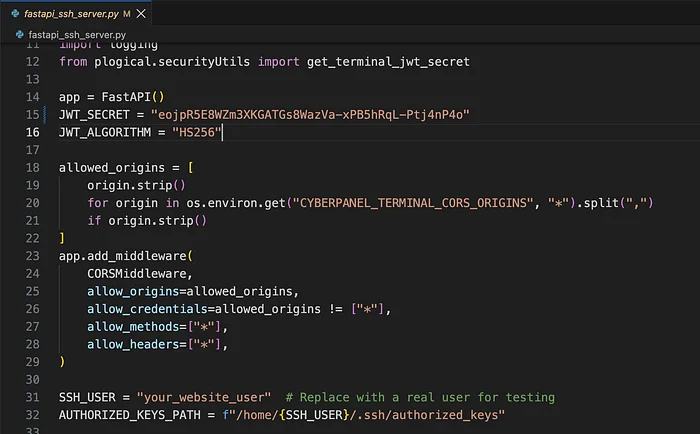
Because the token is signed with a secret created at install time, anyone who can read it can forge a token. The only claim that matters is ssh_user, and the report notes that you can put any valid username there, including root.
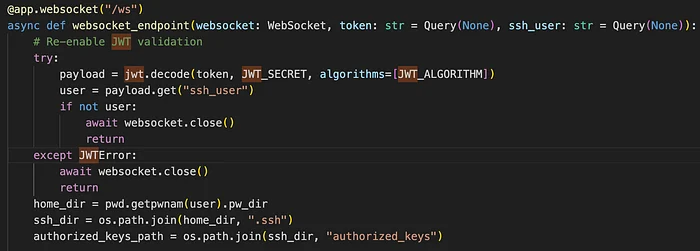
The second image shows how CyberPanel parses the JWT inside this endpoint. The researcher expected at least a check that ssh_user matches the session of the HTTP request, but there is none. That turns the secret into the missing piece: read the secret, forge a token, get a root shell. The remaining problem was how to read the file containing the secret.
Exploitation
Step 1: Look for a file read
The search moved to endpoints that read files. In a hosting control panel, log-reading endpoints are the obvious candidates, so the researcher enumerated paths and endpoints including serverlogs/views.py, websiteFunctions/website.py and serverLogs/serverLogs.py. All of them had path validations.
Logs are not the only readable files in a hosting environment, so the approach changed to grepping for likely file-reading function names. The grep was:
grep -rnE Read
The capital R reflects the project's naming conventions, which the researcher had picked up by the sixth hour of the research. The first try produced a hit: the ReadReport function in cloudAPI/cloudManager.py, written to read the reports of backup and restore functions.
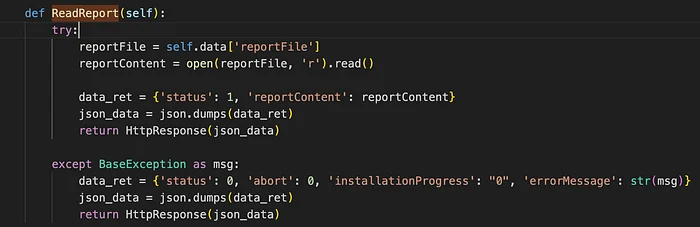
Step 2: Confirm the missing sanitisation
The function performs no sanitisation on the path it reads. There is one catch, described in the report as a little crumb.
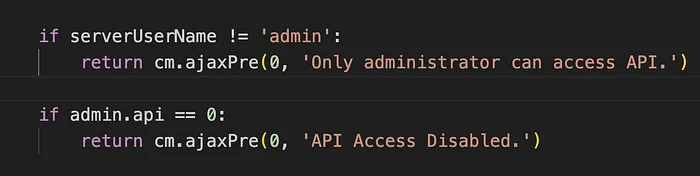
The function is only reachable through the /cloudapi endpoint and requires an admin token. That constraint is what makes the full chain an authenticated RCE as root rather than an unauthenticated one: the attacker needs admin credentials to reach the traversal, and the traversal is what yields the JWT secret that grants root over SSH.
Step 3: The chain
The exploit proceeds in four steps, as listed in the report:
- Generate an authentication token with a valid admin account.
- Extract the hardcoded
JWT_SECRETinfastapi_ssh_server.py. - Forge the JWT token with
ssh_user=root. - Connect to the WebTerminal WebSocket at port 8888 with the forged JWT token.
The exploit code the author wrote in Python is published at github.com/dennywise/CyberPanel-Authenticated-RCE.
Root cause
Two design mistakes combine. First, the JWT secret used by the SSH WebSocket server is hardcoded and generated per instance at installation time, and it is readable from the filesystem. Second, the WebSocket endpoint trusts the ssh_user claim in the token without checking it against the session of the HTTP request, so a forged token naming root is accepted as root.
The path traversal in ReadReport is the enabler: the function reads a caller-supplied path with no sanitisation, and the only defence in front of it is the admin token requirement on /cloudapi. The log-reading endpoints that were checked first did have path validations, which is why the search moved to a less obvious function. The report does not describe any further validation inside ReadReport.
Impact
An attacker who holds a valid admin account can use the traversal to read the JWT secret, forge a token for any user including root, and connect to the WebTerminal WebSocket on port 8888 to obtain a root SSH session. That is remote code execution as root on the hosting server, and by extension control over the customer data, databases, payment pipelines and secrets that live on it. The precondition is significant: the chain is authenticated and needs admin credentials to reach /cloudapi.
Fix
A hardcoded JWT secret should not exist. , The report does not state which of these changes were made.
Variants to test
- Grep for file-reading helpers with the project's own naming conventions, for example
grep -rnE Read,grep -rnE (open|read|load|download). A positive result is a function that takes a path from the request and passes it to a file API without a validation call nearby. - Check log and report endpoints separately from the main application. A positive result is a path parameter that accepts
../sequences and returns content from outside the intended directory. - Look for endpoints that are gated only by a role check and no input validation, such as admin-only report or backup readers. A positive result is a privileged endpoint whose only defence is the token requirement.
- Inspect WebSocket authentication handlers for claims that are trusted without being tied to the HTTP session, such as a username or role claim. A positive result is a token whose subject can be changed to another user and still accepted.
- Search installation and setup code for secrets written to disk, such as JWT secrets, API keys and database passwords. A positive result is a secret that is fixed at install time and readable by the application itself.
What happened, in plain words
A security researcher found a way to take full control of a server running CyberPanel, a piece of software that hosting companies use to manage websites for their customers. The trick was not one bug but two, joined together like a chain: the first bug lets someone read a file they should not be able to read, and the second bug lets someone use what is in that file to log in to the server as the most powerful user, root.
To understand why this matters, you need to know what a hosting control panel is. Imagine a large building with many flats. Each flat is a customer's website: its files, its database, its email. The building manager holds the master keys, the electricity board, the water supply and the list of every tenant. A hosting control panel is that building manager for websites. It is the software that creates accounts, sets up domains, runs backups and lets customers manage their own little corner. Because it sits in the middle of everything, it is a very attractive target: if you can control the manager, you control every flat.
The researcher works in technical support at a hosting company, so they already knew CyberPanel from helping customers with it. They read its source code, which is the human-written text that a program is made of, and found two problems that, used together, give an attacker a remote shell on the server. A shell is a text interface where you type commands and the computer runs them. "Remote" means the attacker does this over the network, from their own machine, without ever touching the server.
The two problems have official tracking numbers, called CVEs. A CVE is a public label for a known security flaw, so that everyone can refer to the same bug unambiguously. The first is CVE-2026-67614, a hardcoded JWT secret. The second is CVE-2026-67613, a path traversal. We will unpack both terms as we go.
The title image of the article, introducing the story of the CyberPanel zero-day RCE chain.
The file-read step requires the attacker to already have a valid administrator account on the panel. That is what "authenticated" means: you need to be logged in first. It is not a bug that a random stranger on the internet can trigger. But it is still serious, because an administrator account can be stolen, phished, or belong to a careless insider, and because the jump from "admin of the panel" to "root of the whole server" should never be possible.
The mindset: why control panels are worth attacking
Before any technical detail, the researcher explains the way of thinking that led to the discovery. A hosting company can harden its own website, its login system, its connections to third-party services. But the control panel is the management infrastructure itself. It is the thing that holds the keys to everything else. You can lock every door in the building, but if the manager's office is made of glass, the locks do not help much.
Inside a control panel you find back-end code, databases, customer personal information, payment pipelines, Redis instances (Redis is a very fast in-memory database often used for caching) and operational secrets. "Secrets" here means passwords, keys and tokens that the software uses to talk to other systems. All of that lives inside one large program whose inner workings most people never look at. That is exactly why the researcher looked.
The starting point: what a normal customer can do
The researcher began with the authentication flow. Authentication is the process of proving who you are when you log in, usually with a username and password. After that, the researcher moved to the features available to a low-privileged user, meaning a hosting customer rather than an administrator. Such a customer can:
- add domains and subdomains (a domain is a website address like example.com; a subdomain is a prefix like shop.example.com);
- add databases (organised stores of data that a website uses);
- create, delete and restore backups (copies of data kept so it can be recovered);
- use a file manager (a web page for browsing and editing files on the server).
All of these functions looked safe after days of reading. The researcher's guiding principle was simple: if it is made by humans, there is always something vulnerable. So the search moved from customer functions to administrator functions, and that is where the first bug appeared.
Bug one: a secret that is the same for everyone (CVE-2026-67614)
What a JWT is
A JWT, short for JSON Web Token, is a small piece of text that a server gives you after you log in, so that it can recognise you on your next request. Think of a wristband at a festival: the staff at the gate check it, and from then on you can walk in and out without showing your ID again. A JWT has three parts separated by dots. The middle part contains claims, which are statements like "this user is called alice" or "this user is an administrator". The last part is a signature, which is a cryptographic stamp that proves the token was issued by the server and not typed by someone else.
The signature is made with a secret key. Only the server knows the key, so only the server can produce a valid signature. If you change a claim in the token, the signature no longer matches, and the server rejects it. That is the whole security model: the claims are readable by anyone, but they cannot be altered without the key.
What the researcher found
A screenshot of the CyberPanel source code showing the hardcoded JWT secret, created per instance during installation.
The code creates a JWT secret that is hardcoded, meaning it is written directly into the program's source code, and the report says it is created per instance during installation. The report says it is created per instance during installation, and that this secret is used to generate a token which opens an SSH connection over a WebSocket.
Two more terms to unpack. SSH, or Secure Shell, is the standard way to log in to a Linux server and run commands. It is the remote shell mentioned earlier. A WebSocket is a connection between a browser and a server that stays open in both directions, unlike a normal web request where you ask and then the connection closes. CyberPanel uses a WebSocket to give customers a terminal in their browser, called the WebTerminal.
Because the secret is created at install time, anyone who can read it can sign their own tokens. And because the only claim that matters for the SSH connection is ssh_user, anyone who can read the secret can write any username into that claim, sign it, and be accepted. The report says you can even use root, which is the all-powerful administrator account on a Linux system.
A screenshot of the code that parses JWT tokens inside the WebSocket endpoint, showing that the ssh_user claim is trusted without being checked against the HTTP session.
The second screenshot shows how CyberPanel checks the token inside this endpoint. The researcher expected at least a check that the ssh_user in the token matches the user who is actually logged in on the web request. There is no such check. The endpoint simply believes whatever username the token claims.
So the missing piece became clear: if the attacker could read the file containing the secret, they could forge a token for root and get a root shell. The next question was how to read that file.
Bug two: reading files you should not read (CVE-2026-67613)
What a path traversal is
Files on a server live in folders, and the full location of a file is called its path, for example /home/cyberpanel/reports/backup.txt. A path traversal is a bug where a program takes a path from the user and uses it without checking it carefully. If the program expects a file inside one folder but accepts ../ in the name, the user can climb up the folder tree. .. means "the folder above this one", so ../../etc/passwd means "go up two folders and read the system's user list". It is like a hotel receptionist who is told to fetch a document from room 204, and who obediently walks to room 204 of any hotel in the city because nobody told them to stay in this building.
The search for a file read
The researcher expected a hosting panel to have endpoints for reading logs. An endpoint is a specific address on a server that does a specific job, like a counter in a bank: you go to the right counter for the service you need. Logs are records of what the software has been doing, and reading them is a normal feature. The researcher enumerated, meaning listed and tried, paths and endpoints such as serverlogs/views.py, websiteFunctions/website.py and serverLogs/serverLogs.py. All of them had path validations, meaning they checked that the requested file really was inside the allowed folder.
Logs are not the only readable files on a hosting server, though. By the sixth hour of the research the researcher felt overwhelmed and looked for a shortcut: instead of reading every file by hand, search the whole codebase for function names that sound like they read files. The command used was:
grep -rnE Read
Line by line:
grepis a command-line tool that searches text for a pattern and prints the matching lines.-rmeans recursive: search inside every folder below the current one.-nmeans show the line number of each match, so you can jump straight to it.-Emeans use extended regular expressions, a richer pattern language. Here the pattern is just the wordRead, so it does not change much, but it is a habit.Readis the pattern being searched for. The capitalRis deliberate: the researcher had learned the project's naming conventions by then, and functions in this codebase that read things start with a capital letter.
The first try produced a hit: a function called ReadReport in cloudAPI/cloudManager.py. Its job is to read the reports produced by the backup and restore features.
A screenshot of the ReadReport function in cloudAPI/cloudManager.py, which reads backup and restore reports.
The missing check
A screenshot of the ReadReport function showing that there is no sanitisation of the path before it is read.
The function does no sanitisation on the path it reads. Sanitisation means cleaning up or checking input before using it, for example by removing .. sequences or by confirming the final path is inside the intended folder. Here, whatever path is passed in is read.
There is one catch, which the researcher calls a little crumb. The function is only reachable through the /cloudapi endpoint, and that endpoint requires an admin token. So the attacker must already be an administrator to use the traversal. That is why the whole chain is described as authenticated: you need admin credentials to reach the file read, and the file read gives you the secret that grants root over SSH.
Putting the chain together
The exploit runs in four steps, exactly as listed in the report:
- Generate an authentication token with a valid admin account.
- Extract the hardcoded
JWT_SECRETinfastapi_ssh_server.py. - Forge the JWT token with
ssh_user=root. - Connect to the WebTerminal WebSocket at port 8888 with the forged JWT token.
In plain words: log in as an administrator, use the file-read bug to fetch the file that contains the signing secret, use that secret to sign a token that says "I am root", and present that token to the terminal service. The terminal service believes the token and opens a root shell. A port is a numbered door on a server; port 8888 is the door where the WebTerminal WebSocket listens.
The exploit code the author wrote in Python is published at github.com/dennywise/CyberPanel-Authenticated-RCE.
Why it works: the root cause
Two design mistakes combine.
First, the JWT secret used by the SSH WebSocket server is hardcoded and generated per instance at installation time. A secret that is written into the code can be read by anything that can read files on that disk, including the application itself through a file-read bug.
Second, the WebSocket endpoint trusts the ssh_user claim in the token without checking it against the session of the HTTP request. A session is the server's memory of who you are during a visit, usually tracked with a cookie, which is a small piece of data your browser stores and sends back with each request. The endpoint should have compared the claimed username with the logged-in user. It did not, so a forged token naming root was accepted as root.
The path traversal in ReadReport is the enabler. The function reads a caller-supplied path with no sanitisation, and the only defence in front of it is the admin token requirement on /cloudapi. The log-reading endpoints checked first did have path validations, which is why the search moved to a less obvious function. The report does not describe any further validation inside ReadReport.
What an attacker could do
An attacker holding a valid admin account can use the traversal to read the JWT secret, forge a token for any user including root, and connect to the WebTerminal WebSocket on port 8888 to obtain a root SSH session. That is remote code execution as root on the hosting server: the ability to run any command with the highest privileges. From there, the attacker reaches the customer data, databases, payment pipelines and secrets that live on that machine.
The precondition is significant. The chain is authenticated and needs admin credentials to reach /cloudapi. It is not something a passer-by can trigger.
How to fix it
A hardcoded JWT secret should not exist. The report does not state which of these changes were made.
Variants to test
If you are learning to look for bugs like these, here are patterns worth trying on software you are allowed to test.
- Grep for file-reading helpers using the project's own naming conventions, for example
grep -rnE Readorgrep -rnE (open|read|load|download). A positive result is a function that takes a path from the request and passes it to a file API without a validation call nearby. - Check log and report endpoints separately from the main application. A positive result is a path parameter that accepts
../sequences and returns content from outside the intended directory. - Look for endpoints gated only by a role check and no input validation, such as admin-only report or backup readers. A positive result is a privileged endpoint whose only defence is the token requirement.
- Inspect WebSocket authentication handlers for claims that are trusted without being tied to the HTTP session, such as a username or role claim. A positive result is a token whose subject can be changed to another user and still accepted.
- Search installation and setup code for secrets written to disk, such as JWT secrets, API keys and database passwords. A positive result is a secret that is fixed at install time and readable by the application itself.
Glossary
- API: a defined set of addresses and rules that one program uses to talk to another, like a service counter with specific forms to fill in.
- Authentication: proving who you are, usually with a username and password.
- Authenticated attack: an attack that requires the attacker to be logged in first.
- Backup: a copy of data kept so it can be restored if the original is lost or damaged.
- Claim: a statement inside a token, such as a username or a role.
- Cookie: a small piece of data a website stores in your browser and receives back on later requests, often used to remember your session.
- CVE: a public identifier for a known security vulnerability, so everyone can refer to the same bug.
- CyberPanel: a hosting control panel, software used to manage websites, domains, databases and backups on a server.
- Database: an organised store of data that a website reads and writes.
- Endpoint: a specific address on a server that performs a specific job.
- Enumerate: to list and try things one by one, such as paths or endpoints.
- File manager: a web interface for browsing and editing files on a server.
- grep: a command-line tool that searches text for a pattern.
- Hardcoded: written directly into the source code instead of being generated or configured.
- Hosting control panel: management software that a hosting company uses to run websites for many customers.
- HTTP request: a message a browser sends to a server asking for something.
- JWT (JSON Web Token): a signed piece of text that carries claims about a user, used by servers to recognise them.
- JWT secret: the key used to sign JWTs; whoever knows it can create valid tokens.
- Log: a record of what software has been doing, kept for troubleshooting and auditing.
- Path: the location of a file or folder on a server, such as
/home/user/file.txt. - Path traversal: a bug where user-supplied paths are used without checks, letting someone read files outside the intended folder using
../. - Port: a numbered door on a server where a particular service listens.
- Privilege: the level of access an account has; low-privileged means limited, root means unlimited.
- RCE (remote code execution): running your own commands on someone else's server over the network.
- Redis: a fast in-memory database often used for caching.
- Root: the all-powerful administrator account on a Linux system.
- Sanitisation: cleaning or checking input before using it, for example removing
..from a path. - Secret: a password, key or token that software uses to prove its identity to another system.
- Session: the server's memory of who you are during a visit, usually tracked with a cookie.
- Shell: a text interface where you type commands and the computer runs them.
- Signature: a cryptographic stamp on a token proving it was issued by the server.
- Source code: the human-written text that a program is made of.
- SSH (Secure Shell): the standard way to log in to a Linux server and run commands remotely.
- Subdomain: a prefix on a domain, such as shop.example.com.
- Token: a piece of text a server gives you after login so it can recognise you later.
- Validation: checking that input is acceptable before using it.
- WebSocket: a connection between a browser and a server that stays open in both directions.
- WebTerminal: a terminal in the browser, provided by CyberPanel over a WebSocket.
- Zero-day: a vulnerability that was unknown to the vendor when it was found, so no fix existed at the time.


