When DLP Leaves Its Kill Switch on the Endpoint
A DLP agent stored its local administration password in clear text in the Windows registry. An attacker with access to the endpoint could recover the password, log in to local administration, and disable policies or remove the agent.

medium.com
Published on medium.com
Bug Bounty
The full write-up lives on its author's site
It belongs to its author, so we link to it rather than copy it. The other two tabs are our own rewrites, checked against it.
Context
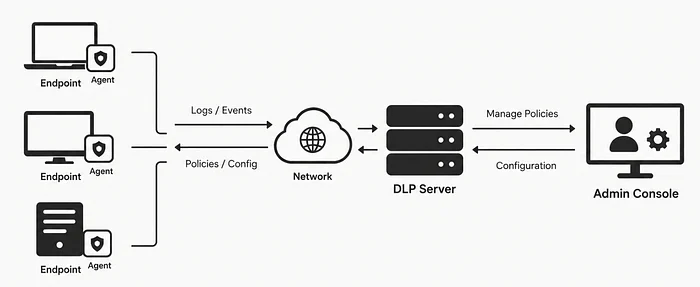
During a security assessment of a Data Loss Prevention (DLP) solution, the component that drew attention was not the DLP engine itself but the DLP Agent installed on user systems. The product used a Client/Server architecture: the Server defined the policies and the Agent enforced them on the Endpoint. The Agent could restrict access to the Internet and certain resources, collect logs and events about user activity and send them to the DLP Server, and in some scenarios enforce file protection policies such as Encryption.

Under normal operation the flow was straightforward: the Server defined the policies and the Agent enforced them on the user's system.
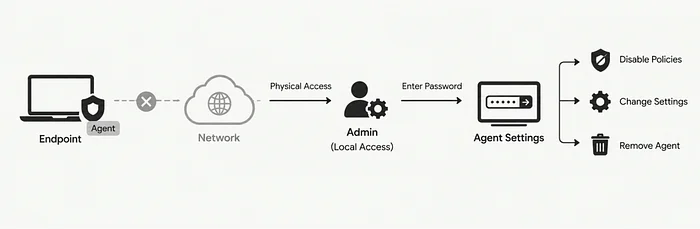
One capability in this architecture stood out: what happens when the Agent loses its connection to the DLP Server. In that situation the Administrator should still be able to manage the Agent locally, so the product provided a Local Administration mechanism. An Administrator could sit physically in front of the system, access the Agent's settings and use a Password to reach the administrative settings. Operationally this makes sense: sometimes an Endpoint cannot reach the Server and the Administrator needs to inspect or modify the Agent's settings directly from the system.
That raised a simple question: where is this Password stored on the Endpoint itself?
Setup
The assessment was performed on an Endpoint running the DLP Agent. The only tool named in the write-up is Process Hacker, used to inspect the Agent's processes and services and to locate where it stored its own configuration. No accounts, roles or product versions are given.
Finding it
The first step was to examine the processes and services associated with the DLP Agent, then move on to the Registry. Rather than searching randomly through a large number of Registry keys, the researcher searched for several keywords related to the Agent itself, its configuration and authentication.
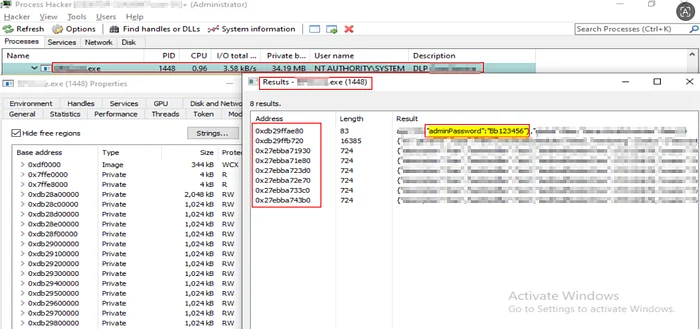
Several values related to the Agent's settings were found. One of them stood out: a Credential associated with Local Administration of the Agent was present in the Registry, and the Password was visible in clear text.
At that point the question changed from where the Password is stored to whether the Password can actually be used to log in to Local Administration.
Exploitation
Step 1: Recover the credential from the Registry
Using Process Hacker to inspect the Agent's processes, services and Registry configuration, and searching the Registry for keywords related to the Agent, configuration and authentication, a Local Administration credential was found stored in clear text. The write-up does not give the Registry path, the value name or the credential itself.
Step 2: Log in to Local Administration
The recovered credential was used to log in to the Agent's Local Administration section. The login was successful.
Step 3: Use the administrative capabilities
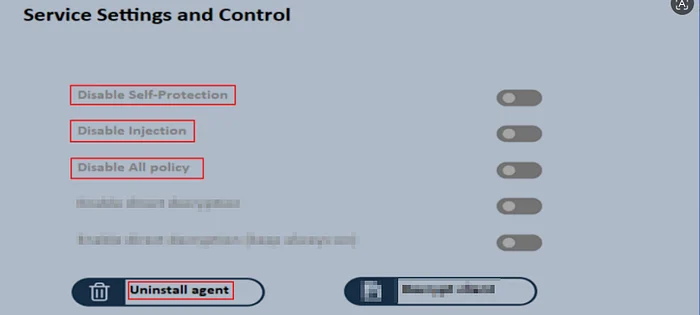
Local Administration was not just a page for viewing the Agent's status. After logging in, the Agent's administrative settings were accessible, which meant the configuration could be changed and the applied policies could be disabled. It was even possible to completely remove the Agent.
The chain was now clear: a credential used for Local Administration was recoverable from the same Endpoint, and that same credential provided access to the Agent's administrative capabilities.
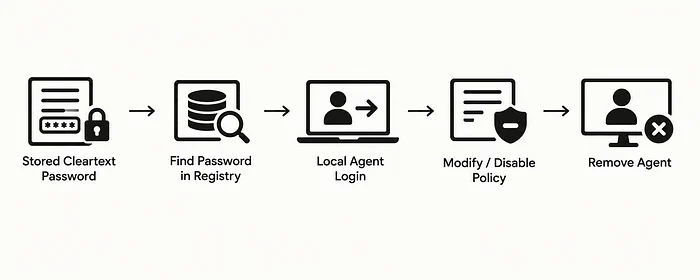
Root cause
The root cause was the combination of two issues. First, a credential with sensitive privileges for Local Administration existed. Second, that same credential was stored in clear text on the Endpoint. Together they made it possible to recover the administrative credential from where it was stored on the system.
Impact
DLP is supposed to protect an organisation's data, and the Agent is one of the most important components in that chain because the policies received from the Server are ultimately enforced by the Agent on the Endpoint. An attacker who gains access to Local Administration can modify or disable the very controls meant to prevent data exfiltration or unauthorised activity on the Endpoint. If the Agent is removed, the layer responsible for enforcement on the Endpoint is no longer present.
The write-up stresses that finding the Password alone was not the main issue; the level of access behind that Password was.
Fix
The write-up gives remediation recommendations rather than describing a change that was made:
- Avoid predictable passwords. The credential used by the Agent should not be generated from the product name, Agent name, hostname, username or other predictable patterns; secrets should preferably be generated randomly with sufficient entropy.
- Do not store credentials in clear text. Passwords or secrets should not be stored as plain text in the Registry or other locations accessible on the Endpoint.
- Use secure storage. If a secret must be stored on the Endpoint, use secure credential storage mechanisms available in Windows, with access restricted to the component that actually requires it.
- Use proper encryption. If the design requires a recoverable secret, use standard encryption and proper key management, with well-established algorithms and keys that cannot themselves be extracted alongside the ciphertext. Encrypting the password is not enough; the location and method used to store the encryption key must also be designed and protected.
- Use rotatable secrets. Local credentials should preferably not remain static, and rotation or periodic change mechanisms should be available so that disclosure does not allow long-term abuse.
- Restrict sensitive operations. Disabling policies or removing the Agent should preferably not be possible solely by knowing a password, and additional security controls should be considered.
Variants to test
- Search the Registry for keywords related to the agent, its configuration and authentication, as was done here. A positive result is a value whose name or content indicates a credential used for local administration.
- Inspect the agent's processes and services with a tool such as Process Hacker to find where configuration is stored. A positive result is a configuration location readable by the current user that contains authentication material.
- Try the recovered credential against the agent's local administration interface. A positive result is a successful login that exposes settings, policy controls or agent removal.
What happened, in plain words
A security researcher was asked to look at a piece of software that companies use to stop important files from leaving their network. This kind of software is called Data Loss Prevention, or DLP for short. Think of it like a security guard standing at the door of an office: it checks what is going out and blocks anything that should not leave.
DLP products usually have two parts. One part sits on a central computer (the Server) and decides the rules. The other part sits on every employee's computer (the Agent) and actually enforces those rules. The Server is the manager who writes the policy; the Agent is the guard who carries it out.
The researcher noticed something odd. The Agent has a special feature: if it cannot reach the Server (for example, because the network is down), a local administrator can still log in to the Agent directly on that computer using a password. That makes sense operationally. But it raised a simple question: where is that password kept on the computer itself?
He looked. He found it in the Registry (a kind of settings cupboard inside Windows), and it was stored in clear text, meaning anyone who could read that spot could read the password as easily as reading a note left on a desk.
He then tried that password on the Agent's local login page. It worked. And once logged in, he could change the Agent's settings, switch off the protection rules, and even uninstall the Agent completely.
That is the whole story: a password meant to protect the guard was left lying around in plain sight, and that same password unlocked the guard's control room.
The setup: a guard on every computer
The product used a Client/Server architecture. That phrase just means the work is split between two computers: one central machine that gives orders, and many smaller machines that follow them. A restaurant works the same way: the head office writes the menu, and each branch cooks the dishes.
Here, the DLP Agent was installed on user systems and was responsible for enforcing security policies on the Endpoint. An Endpoint is simply any device at the edge of the network where a real person sits and works: a laptop, a desktop, a phone. When people say "the endpoint", they usually mean "the employee's computer".
The Agent could do several things:
- restrict access to the Internet and to certain resources;
- collect logs and events about what users were doing and send them to the DLP Server;
- in some scenarios, enforce file protection policies such as Encryption.
Encryption means scrambling a file so that only someone with the right key can read it. It is like putting a document in a locked box: even if someone steals the box, they cannot read the paper inside without the key.
Under normal circumstances, the flow looked roughly like this:
The picture shows the normal flow: the Server defines the policies, and the Agent enforces them on the user's system. In plain words, the head office writes the rules, and the guard in each branch applies them.
So far, everything seemed completely reasonable. A central manager, local guards, clear rules. Nothing strange yet.
What happens when the Server is no longer available?
Now suppose the Agent loses its connection to the DLP Server. Maybe the network cable is unplugged, maybe the Server is down for maintenance, maybe the laptop is on a plane. In that situation, the Administrator should still be able to manage the Agent locally.
Locally means "on that same computer, without going through the network". It is the difference between phoning head office and walking over to the filing cabinet in the same room.
For this reason, the system provided a mechanism for Local Administration. An Administrator could physically sit in front of the system, access the Agent's settings, and use a Password to gain access to the administrative settings.
From an operational perspective, this capability makes perfect sense. Sometimes an Endpoint cannot reach the Server, and the Administrator needs to be able to inspect or modify the Agent's settings directly from the system itself:
The picture shows what happens when network access is lost: the Agent can no longer talk to the Server, so the Administrator uses the local route instead.
But that was exactly where a relatively simple question came to mind:
Where is this Password stored on the Endpoint itself?
That question changed the direction of the assessment. Instead of testing the DLP rules themselves, the researcher started looking at how the Agent kept its own secrets.
A little searching
To investigate the Agent's behaviour on the system, the researcher used Process Hacker.
Process Hacker is a free tool for Windows that shows you what programs are running, what services are installed, and where they keep their settings. Think of it as a magnifying glass for the inside of a computer: it does not change anything by itself, it just lets you look.
The initial goal was to see which processes and services the Agent had and where it stored its own configuration.
A process is a program that is currently running. Your browser is a process; so is your music player. A service is a special kind of program that starts automatically and runs in the background, usually without a window, doing a job for the system. The DLP Agent would typically run as a service so that it is always on, even before anyone logs in.
Configuration means the settings a program uses: where it connects, what it should do, which password it uses. Every program has some configuration somewhere, and finding it is often the first step in understanding how the program works.
The researcher first examined the processes and services associated with the DLP Agent. Then he moved on to the Registry.
The Registry is a central database inside Windows where the operating system and most programs store their settings. If Windows were a house, the Registry would be the labelled drawers in the hallway: every program has its own drawer, and inside are notes with settings. It is not secret by design; it is just a place to keep configuration.
Instead of randomly searching through a large number of Registry keys, the researcher looked for several keywords related to the Agent itself, configuration, and authentication.
A Registry key is like a folder inside the Registry. Inside a key there are values, which are individual named entries holding data. Searching by keyword is like using the search box in a filing system instead of opening every drawer by hand: much faster, and it points you straight at the interesting entries.
Authentication means proving who you are. A username and password are the classic example. When the researcher searched for authentication-related keywords, he was looking for anything that looked like a login secret.
He found several values related to the Agent's settings. But one of them caught his attention more than the others.
A Credential associated with Local Administration of the Agent was present in the Registry.
A credential is a pair of things that prove identity: usually a username and a password, or a token. It is the digital equivalent of an ID card plus the secret PIN that goes with it.
And the more interesting part:
The Password was visible in Clear Text:
The picture relates to the point where the Password was visible in Clear Text. "Clear text" (also called "plain text") means the password is not scrambled in any way. It is like writing your PIN on a sticky note and putting it on your monitor: anyone who looks can read it.
At this point, the question was no longer simply:
Where is the Password stored?
The next question was much more important:
Can this Password actually be used to log in to Local Administration?
There was only one way to find out.
Time to test it
I used the recovered Credential to log in to the Agent's Local Administration section.
The login was successful.
But Local Administration was not just a page for viewing the Agent's status. After logging in, it was possible to access the Agent's administrative settings. That meant the Configuration could be changed and the applied Policies could be disabled. It was even possible to completely remove the Agent:
The picture relates to the point where removing the Agent was possible. In plain words: the password did not just open a status page, it opened the control room.
At this point, the chain of events was clear.
A Credential used for Local Administration was recoverable from the same Endpoint, and that same Credential provided access to the Agent's administrative capabilities:
The picture relates to the summary of the chain.
Why does this matter for DLP?
This is where the real value of the finding became clear.
DLP is supposed to protect an organisation's data. In this architecture, the Agent is one of the most important components in this chain because the Policies received from the Server are ultimately enforced by the Agent on the Endpoint.
A policy here means a rule: for example, "files containing customer data must not be copied to a USB stick" or "documents must be encrypted before leaving the company". The Server writes the rule; the Agent makes sure it is followed.
Therefore, if an attacker can gain access to Local Administration, they can modify or disable the very controls that are supposed to prevent data exfiltration or unauthorised activity on the Endpoint.
Data exfiltration means data being taken out of the organisation without permission. It could be a malicious insider copying files, or malware sending them out. The DLP Agent exists precisely to stop that.
Even if the Agent is removed, the layer responsible for Enforcement on the Endpoint will no longer be present. Enforcement is the act of actually applying a rule, not just writing it down. A rule that nobody enforces is just a suggestion.
For this reason, finding the Password alone was not the main issue; the level of access behind that Password was the important part of the story.
Root cause
The main root cause of this vulnerability was the combination of two issues:
First: the existence of a Credential with sensitive privileges for Local Administration.
Second: storing that same Credential in Clear Text on the Endpoint.
A root cause is the underlying reason a problem exists, as opposed to its symptoms. If your car will not start because the battery is flat, the flat battery is the symptom; the root cause might be that the alternator is broken. Fixing only the symptom means the problem comes back.
Privileges are the permissions an account has. A user with high privileges can do more: change settings, delete things, switch protections off. A user with low privileges can only look.
This combination made it possible to recover the administrative Credential from where it was stored on the system. Together, they hand an attacker the keys to the control room.
Remediation recommendations
To address this issue, several changes could significantly reduce the risk. Remediation simply means "how to fix it".
1. Avoid using predictable passwords
The Credential used by the Agent should not be generated based on the product name, Agent name, hostname, username, or other predictable patterns.
A hostname is the name a computer uses on a network. A predictable pattern means a password that follows an obvious recipe, such as the product name plus the year. If an attacker knows the recipe, they can guess the password on any computer without ever reading the Registry.
Secrets should preferably be generated randomly with sufficient entropy. Entropy is a measure of how unpredictable something is. A coin flip has low entropy; a long random string has high entropy. The more entropy, the harder it is to guess.
2. Do not store credentials in clear text
Passwords or Secrets should not be stored as plain text in the Registry or other locations accessible on the Endpoint. This is the direct fix for the second half of the root cause: if the password is not readable, it cannot be copied.
3. Use secure storage
If a Secret needs to be stored on the Endpoint, it is preferable to use secure Credential storage mechanisms available in Windows, with access restricted only to the component that actually requires it.
Secure credential storage means a built-in vault that Windows provides for keeping secrets, designed so that other programs cannot simply read them. Restricting access to "only the component that requires it" means that even other programs on the same computer cannot peek.
4. Use proper encryption
If the product's design requires storing a Secret that must be recoverable, standard encryption and proper key management should be used; for example, using well-established cryptographic algorithms and keys that cannot themselves be extracted alongside the Ciphertext.
Ciphertext is the scrambled version of a message. Key management means deciding where the key lives, who can use it, and how it is protected. The report makes an important point: simply encrypting the password is not enough. If the key is stored right next to the encrypted password, an attacker who finds one finds the other. It is like locking your diary and taping the key to the cover.
5. Use rotatable secrets
Local Credentials should preferably not remain static, and mechanisms for Rotation or periodic changes should be available so that, in the event of disclosure, the possibility of long-term abuse is reduced.
Rotation means changing a secret regularly, like changing the batteries in a smoke alarm. If a password leaks but is changed every week, the leak is only useful for a week. If it never changes, the leak is useful forever.
6. Restrict sensitive operations
Operations such as disabling Policies or removing the Agent should preferably not be possible solely by knowing a Password, and additional security controls should be considered where possible. In everyday terms: knowing the password should not be the only thing standing between an attacker and the off switch.
Conclusion
What made this vulnerability interesting was not simply finding a Password in the Registry.
Everything started with a simple question:
"When the Server is unavailable, how does the Administrator log in to the Agent?"
The answer led to Local Administration. Then came the next question:
"Where is the Credential for this section stored?"
And a few simple searches in the Registry put the Credential right in front of him. Clear text. Then he tested the Credential. The login was successful. And behind that login was the ability to change the Configuration, disable Policies, and even completely remove the Agent.
Sometimes, finding a serious vulnerability does not require breaking the system from scratch. Sometimes you do not need to write a complex exploit. Sometimes you just need to ask the right question:
"What has this system left on the Endpoint in order to do its job?"
And then look where that thing is stored.
Glossary
- Agent: the part of a security product installed on an employee's computer that enforces the rules set by the central Server.
- Authentication: the process of proving who you are, usually with a username and password.
- Ciphertext: data that has been scrambled by encryption so it cannot be read without the key.
- Clear text (plain text): data stored without any scrambling, readable by anyone who can access it.
- Client/Server architecture: a design where one central computer (the Server) gives instructions and many other computers (the clients) follow them.
- Configuration: the settings a program uses to know how to behave.
- Credential: a secret that proves identity, such as a username and password pair or a token.
- Data exfiltration: the unauthorised removal of data from an organisation.
- Data Loss Prevention (DLP): software that watches for and blocks sensitive data leaving an organisation.
- Encryption: scrambling data so that only someone with the right key can read it.
- Endpoint: any device at the edge of a network where a person works, such as a laptop or desktop.
- Enforcement: actually applying a rule, not just writing it down.
- Entropy: a measure of how unpredictable a value is; higher entropy means harder to guess.
- Hostname: the name a computer uses on a network.
- Key management: the practice of deciding where encryption keys live, who can use them, and how they are protected.
- Local Administration: managing a program directly on the computer it runs on, without going through the network.
- Locally: on the same computer, without a network connection.
- Policy: a rule that says what is allowed or forbidden, such as "do not copy customer files to USB sticks".
- Predictable pattern: a password or secret generated by an obvious recipe, such as the product name plus the year.
- Privileges: the permissions an account has; higher privileges mean more power.
- Process: a program that is currently running on a computer.
- Process Hacker: a free Windows tool that shows running processes, services and where programs keep their settings.
- Registry: a central database in Windows where the system and most programs store their settings.
- Registry key: a folder-like container inside the Registry that holds named values.
- Remediation: the steps taken to fix a security problem.
- Root cause: the underlying reason a problem exists, as opposed to its visible symptoms.
- Rotation: regularly changing a secret so that a leak has limited usefulness.
- Secure credential storage: a protected vault provided by the operating system for keeping secrets away from other programs.
- Server: the central computer that defines policies and sends them to Agents.
- Service: a background program that starts automatically and runs without a visible window.
- Value (Registry value): a single named entry inside a Registry key that holds data.



