When GraphQL Meets Web Cache Deception
A GraphQL endpoint that returned a user's personal information could be reached with a GET request, and appending a path parameter with a static file extension made Cloudflare cache the personalised response. An attacker could then retrieve another user's cached personal data if that user visited a crafted link.

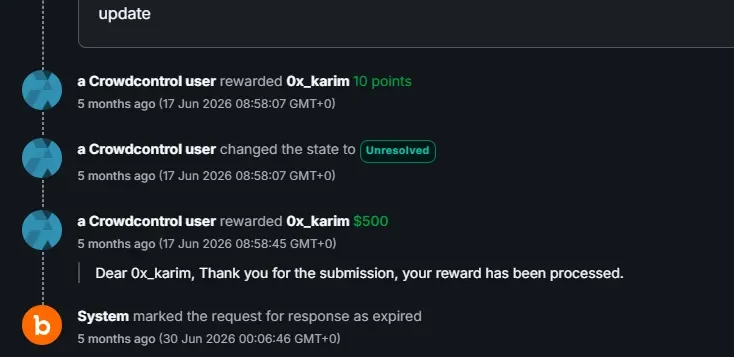
Hello, I’m 0xkarim from Morocco, passionate about cybersecurity, particularly discovering vulnerabilities in websites and web applications. I enjoy analyzing systems, identifying security weaknesses, and finding ways to improve their security.
The full write-up lives on its author's site
It belongs to its author, so we link to it rather than copy it. The other two tabs are our own rewrites, checked against it.
Context
This write-up comes from 0x_karim, a security researcher from Morocco, and describes a Web Cache Deception vulnerability found during a security assessment of a GraphQL-based application. The target was the application's API subdomain, and the feature of interest was the GraphQL endpoint responsible for retrieving users' personal information. Normally that endpoint returns user-specific data, and the question the researcher set out to answer was whether a cache sitting in front of it could be tricked into storing and serving that data to someone else.
Setup
The report does not describe any accounts, roles, tooling versions or special preconditions. The testing was done against the live application, with the API subdomain as the starting point. The only infrastructure detail that matters is that responses carried Cloudflare cache headers, so Cloudflare sat in front of the origin and its cache behaviour was observable through the CF-Cache-Status header.
Finding it
Reconnaissance on the API subdomain identified the endpoint that returns users' personal information. The application used GraphQL, and requests to it were handled through the POST method. The initial request looked roughly like this:
POST /api/graphql HTTP/2Host: target.comContent-Type: application/json{ "query": "..."}
The researcher tried several GraphQL-related techniques looking for an interesting attack vector, but none produced useful results. The turning point was a simple question: what if the POST request were converted into a GET request? The server processed the GET request successfully and returned the user's personal information in the response.
While inspecting the response headers, one header stood out:
CF-Cache-Status: DYNAMIC
That header made the researcher curious about whether the behaviour could be turned into a Web Cache Deception vulnerability. A response that is user-specific and passes through a cache is exactly the situation where cache key confusion becomes interesting.
Exploitation
Step 1: Confirm the endpoint answers over GET
The POST request to /api/graphql was converted to GET and the server still processed it, returning the user's personal information. This is the precondition for everything that follows: a cache only stores responses to requests it is willing to handle, and here the dynamic GraphQL endpoint was reachable with a method that caches typically treat as cacheable.
Step 2: Try a static extension on the path
The first attempt to make the response look cacheable was to append a static file extension to the endpoint:
/api/graphql/test.css?query=
This did not work. The cache did not treat the response as a static asset, so the trick failed at this stage.
Step 3: Use a path parameter instead of a path segment
After experimenting with different URL structures, a variation worked:
/api/graphql;test.css?query=
The difference is the semicolon: ;test.css is a path parameter attached to the graphql segment rather than an extra path segment. After this variation, Cloudflare returned CF-Cache-Status: HIT, so the response was served from Cloudflare's cache.
Step 4: Confirm the cache stored the response
The request was sent again and the response headers were inspected. This time Cloudflare returned:
CF-Cache-Status: HIT
The response was served from Cloudflare's cache, confirming that the response had been stored.
Root cause
The vulnerability comes from a mismatch between how the cache decides what is cacheable and how the origin decides what a URL means. The report does not explain why the semicolon variant was cached; it only records that Cloudflare returned CF-Cache-Status: HIT. The CF-Cache-Status: DYNAMIC header on the original response shows the cache was in front of the endpoint but not storing it; the path parameter changed that classification without changing what the origin returned.
The endpoint accepted GET requests, and the crafted URL produced a cached response. The report frames this as a matter of caching rules and cache key configuration: when the cache does not properly separate authenticated users from shared requests, sensitive responses can end up in a shared cache.
Impact
Caching user-specific responses introduces serious security risks when the cache does not properly distinguish between authenticated users and shared requests. Depending on the caching behaviour and cache key configuration, sensitive information could potentially be served to unauthorised users. The report keeps this hedged: the exposure depends on how the cache is configured and how the cached response is later requested.
Fix
The direction it points to is careful handling of caching rules for dynamic API endpoints, especially those returning user-specific data, so that responses tied to an authenticated user are not stored in a cache shared with other users.
Variants to test
- Method switching on GraphQL endpoints. Take a POST-only GraphQL endpoint and replay the same query as a GET. A positive result is the server returning the same user-specific data over GET.
- Path parameters with static extensions. Append
;name.css,;name.jsor similar to the endpoint path, keeping the query string intact. A positive result isCF-Cache-Status: HIT(or the equivalent header for the cache in use) on a response that still contains the user's data. - Path segments with static extensions. Try
/api/graphql/test.css?query=as well. A negative result here, as in this report, does not rule out the path-parameter variant. - Header inspection after each attempt. Check the cache status header on the first response and again on a repeat request. A change from a dynamic or miss status to a hit status on a user-specific response is the signal that the cache stored something it should not have.
What happened, in plain words
A security researcher from Morocco, 0x_karim, was testing a website and found a way to make a shared cache store a response that contained one user's personal information. The website's data was served by a GraphQL API, a style of API that normally only answers a particular kind of request (POST). The researcher discovered that the same API also answered a simpler kind of request (GET), and that by adding a small piece of text to the address, the cache in front of the site could be convinced the answer was a harmless static file worth storing. Once stored, the answer was served from the cache on a repeat request.
To follow the rest, you only need to know a handful of ideas, and each one is explained where it first appears.
The challenge behind web cache deception
A cache is a storage layer that sits between you and the real server. When many people ask for the same thing, the cache keeps a copy and hands it out quickly instead of asking the server every time. Think of a restaurant that keeps a few popular dishes ready: if you order the same dish as the previous customer, it comes out of the kitchen instantly. A shared cache is like that restaurant: it serves everybody, not just one person.
Web cache deception is a trick where an attacker makes the cache believe a private page is a public, reusable one, so the cache stores it and later gives it to someone who should never have seen it. The name is a bit misleading: nothing is really "deceived" in the sense of a person being fooled; the cache is simply given a URL that looks public while the server behind it still treats the request as private.
This is especially hard to spot on applications built around GraphQL. GraphQL is a way for a website to ask its server for exactly the data it needs, using a single address for many different questions. Because everything goes through one address, it is easy to assume the cache will treat every answer the same way. The researcher's point is that with a little creativity this assumption breaks.
Finding a way to exploit GraphQL
What an API and a subdomain are
An API (application programming interface) is the part of a website that programs talk to, rather than people. When you load a page in your browser, the page often asks the API behind the scenes for data, and the API answers with that data in a machine-friendly format. An API subdomain is a separate address, such as api.example.com, where that API lives, kept apart from the main website address.
The researcher started by looking at the API subdomain and searching for the endpoint that returns users' personal information. An endpoint is a specific address on a server that does one job, like a counter in a shop that only handles one kind of request. Finding the right endpoint is the first step of almost any test: you need to know which door leads to the data you care about.
The original request
After some reconnaissance (the exploratory work of mapping out what a site exposes), the researcher found that the application used GraphQL and that requests to it were handled with the POST method. A method is the verb attached to a web request: GET means "give me something", POST means "here is some data, do something with it". The initial request looked roughly like this:
POST /api/graphql HTTP/2Host: target.comContent-Type: application/json{ "query": "..."}
Line by line:
POST /api/graphql HTTP/2is the request line.POSTis the method,/api/graphqlis the path on the server, andHTTP/2is the version of the web protocol being used. The path tells you this is the GraphQL endpoint.Host: target.comsays which website the request is addressed to. One server can host many sites, so the host name tells it which one you mean.Content-Type: application/jsonannounces that the body of the request is written in JSON, a simple text format for structured data (curly braces, names in quotes, values after colons).{ "query": "..." }is the body itself: a JSON object with a single field calledquery, whose value is the GraphQL question being asked. The...stands for the actual question, which the report does not show.
Trying GraphQL techniques
The researcher then tried several GraphQL-related techniques, hoping one would open an interesting attack path. The report does not list them, and none produced useful results. This is normal in testing: most ideas fail, and the value is in noticing which failure tells you something.
The turning point: POST becomes GET
Then came a simple question: what if the POST request were turned into a GET request? A GET request is the ordinary kind your browser makes when you open a page or click a link. It carries its inputs in the address itself rather than in a body. The researcher tried it, and to their surprise the server processed the GET request successfully and returned the user's personal information.
Why does this matter? Because caches are built around the assumption that GET requests are safe to store and reuse, while POST requests are not. A cache that sees a GET request for a page is much more willing to keep a copy. By making the private data reachable through GET, the researcher had removed the first obstacle.
The header that started the idea
While inspecting the response headers, one header stood out:
CF-Cache-Status: DYNAMIC
A response header is a small line of metadata the server sends back alongside the actual content, like the label on a parcel telling you how it was handled. CF-Cache-Status is a header added by Cloudflare, a company whose caching and protection service sits in front of many websites. Its value tells you what the cache did with the response. DYNAMIC means the cache saw the response but chose not to store it, because it did not consider it a reusable static file.
That header made the researcher curious: could this behaviour be turned into a web cache deception? A response that contains one user's personal data and passes through a cache is exactly the situation where a mistake in the cache's rules becomes interesting.
Exploitation
Step 1: Confirm the endpoint answers over GET
The POST request to /api/graphql was converted to GET, and the server still processed it and returned the user's personal information. This is the precondition for everything that follows. A cache only stores responses to requests it is willing to handle, and here the dynamic GraphQL endpoint was reachable with a method that caches typically treat as cacheable.
Step 2: Try a static extension on the path
The first attempt to make the response look cacheable was to append a static file extension to the endpoint:
/api/graphql/test.css?query=
Line by line:
/api/graphqlis the real endpoint, the door that leads to the GraphQL handler./test.cssis an extra piece added after it..cssis the extension used for CSS files, the files that describe how a web page looks. Caches often store such files for a long time because they are the same for everyone.?query=starts the query string, the part of an address after the question mark that carries parameters. Here it is left empty in the report, standing in for the GraphQL question.
The idea was to make the address look like a request for a harmless style file, so the cache would store the answer. It did not work: the cache did not treat the response as a static asset, so the trick failed at this stage.
Step 3: Use a path parameter instead of a path segment
After experimenting with different URL structures, a variation worked:
/api/graphql;test.css?query=
Line by line:
/api/graphqlis still the endpoint.;test.cssis attached to thegraphqlpart with a semicolon. In a URL, a semicolon introduces a path parameter: extra information glued to one part of the path rather than a new folder. The difference from the previous attempt is subtle but crucial./api/graphql/test.cssis a new path segment, a subfolder as far as the server is concerned./api/graphql;test.cssis the samegraphqlsegment with a note attached.?query=is again the query string carrying the GraphQL question.
After this variation, Cloudflare returned CF-Cache-Status: HIT, so the response was served from the cache. Two pieces of software read the same address in two different ways, and that gap is the vulnerability.
Step 4: Confirm the cache stored the response
The request was sent again and the response headers were inspected. This time Cloudflare returned:
CF-Cache-Status: HIT
HIT means the cache found a stored copy and served it, instead of asking the server again. Compare this with the earlier DYNAMIC: the same kind of user-specific response, but now stored. The researcher had confirmed that the response was served from Cloudflare's cache.
Why it matters
Caching user-specific responses introduces serious security risks when the cache does not properly distinguish between authenticated users and shared requests. Authenticated means the server knows who you are, usually because you logged in and your browser carries a cookie or token, a small piece of proof of identity that is sent with each request. A shared cache that does not separate one logged-in user's responses from everybody else's can end up handing one person's data to another.
Depending on the caching behaviour and how the cache key is configured, sensitive information could potentially be served to unauthorised users. The cache key is the label the cache uses to decide whether two requests are "the same". If the key ignores who asked, two different people asking for the same address get the same stored answer. The report keeps this hedged: the exposure depends on how the cache is configured and how the cached response is later requested.
This highlights the importance of carefully handling caching rules for dynamic API endpoints, especially those returning user-specific data.
Glossary
- API: the part of a website that programs talk to, rather than people, usually returning data in a machine-friendly format.
- API subdomain: a separate address such as
api.example.comwhere an API lives, kept apart from the main website. - Authenticated: the server knows who you are, typically because you logged in and your browser sends proof of identity with each request.
- Cache: a storage layer between you and the real server that keeps copies of responses and hands them out quickly.
- Cache key: the label a cache uses to decide whether two requests count as the same and can share a stored response.
- Cloudflare: a company whose caching and protection service sits in front of many websites and adds headers such as
CF-Cache-Status. - Cookie: a small piece of data your browser stores for a website and sends back with each request, often used as proof that you are logged in.
- CSS: the files that describe how a web page looks; caches often store them for a long time because they are the same for everyone.
- Endpoint: a specific address on a server that does one job.
- GET: the ordinary request method your browser uses to ask for a page or resource, with inputs carried in the address.
- GraphQL: a way for a website to ask its server for exactly the data it needs, using a single address for many different questions.
- JSON: a simple text format for structured data, using curly braces, quoted names and values after colons.
- Method: the verb attached to a web request, such as GET (give me something) or POST (here is data, do something with it).
- Path parameter: extra information attached to one part of a URL path with a semicolon, rather than forming a new path segment.
- POST: a request method used to send data to the server, typically not stored by caches.
- Query string: the part of an address after the question mark that carries parameters.
- Reconnaissance: the exploratory work of mapping out what a site exposes before testing it.
- Response header: a small line of metadata sent back alongside the content, describing how it was handled.
- Shared cache: a cache that serves many users, so anything stored in it can be handed to anyone who asks for the same address.
- Token: a small piece of proof of identity, similar in role to a cookie, sent with requests so the server knows who you are.
- Web cache deception: a trick where a private response is made to look like a public, reusable file so a shared cache stores it and later serves it to someone else.



