When logout becomes an OAuth attack
The logout endpoint accepted a redirect parameter and performed the logout immediately, allowing an attacker to force a victim's session to end via a crafted link. Because the OAuth callback validation accepted an X URL that itself redirected, an attacker could chain the forced logout into a legitimate OAuth flow and obtain an authorization code for an attacker-controlled application if the victim approved consent.
 Published on medium.com
Bug Bounty
The full write-up lives on its author's site
It belongs to its author, so we link to it rather than copy it. The other two tabs are our own rewrites, checked against it.
Context
X (formerly Twitter) exposes a logout endpoint that accepts a redirect destination, and a standard OAuth 2.0 authorization server at /i/oauth2/authorize that third-party applications use to obtain access to a user's account. Both are legitimate, documented features. The logout endpoint is meant to end the current session and, optionally, send the browser somewhere afterwards. The OAuth endpoint is meant to authenticate the user, show a consent screen, and return an authorization code to the callback URI registered for the application.
The write-up examines what happens when the first feature is used to drive the second. The chain the researcher describes is:
malicious link → forced logout → legitimate OAuth authorization → legitimate X login → OAuth consent → attacker-controlled callback
Every page in that sequence is served by X. The victim never leaves the X domain until the OAuth flow itself completes.
Setup
The researcher created a legitimate X Developer account and registered an OAuth application through the official Developer Console. The platform provisioned the application credentials automatically, including the client identifier needed to start the authorization flow.
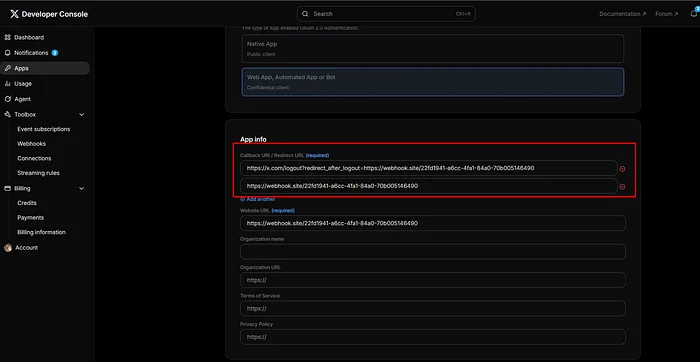
The screenshot accompanies the registration of the OAuth application in the Developer Console.
PKCE was used normally throughout: the attacker generates a code verifier, derives a code challenge, and picks a state value. No special tooling is described beyond the Developer Console and a proof of concept.
Finding it
The first observation was in the logout endpoint:
GET /logout?redirect_after_logout=<URL>
The endpoint behaves differently depending on whether the redirect parameter is present. Without it, requesting /logout returns a confirmation page. With it, the server immediately performs the logout and returns a redirect response.
That means a browser holding an authenticated X session can be logged out by a cross-site request, without the victim selecting "Log out". For a state-changing GET endpoint this is already undesirable, but on its own it gives no access to the account.
The second observation was that the redirect destination can be X's own OAuth authorization endpoint, which is a legitimate X page. A simplified OAuth flow looks like this:
Application
     │
     ▼
X OAuth Authorization
     │
     ▼
User authenticates
     │
     ▼
User approves permissions
     │
     ▼
Authorization code
     │
     ▼
Application callback
     │
     ▼
Access / refresh token
Nothing in that flow is inherently malicious. The problem is that the logout redirect can push the victim into the start of it automatically.
Exploitation
Step 1: Work around the callback domain restriction
When creating an OAuth application, X requires a valid Callback URI / Redirect URI, because the authorization code is delivered there. The initial assumption was that an attacker would need a callback on an external domain.
The logout redirect suggested otherwise: the registered callback could itself be a legitimate X URL that is capable of redirecting the browser elsewhere. The callback validation accepted an X-controlled URL as the registered callback:
https://x.com/logout?redirect_after_logout=<attacker-controlled-destination>
Step 2: Prepare the OAuth request
The attacker's application is configured with an OAuth callback under the attacker's control, and PKCE is used normally. The attacker generates:
- a code verifier
- a code challenge
- a state value
The authorization request is then constructed so that the outer request is an X URL. Conceptually:
/logout
   │
   └── redirect_after_logout
           │
           ▼
     /i/oauth2/authorize
           │
           ├── client_id = attacker application
           ├── response_type = code
           ├── redirect_uri = attacker callback
           ├── scope = requested permissions
           └── PKCE parameters
The important property is that the outer request remains an X URL.
Step 3: What the victim experiences
Assume the victim is already authenticated to X and clicks the malicious URL.
- The first request goes to the legitimate X logout endpoint. The server logs the user out and redirects them into X's OAuth authorization endpoint.
- The victim encounters the real X authentication interface. There is no fake login page involved.
- After authenticating, the victim reaches the legitimate OAuth consent screen, showing the permissions requested by the attacker's application.
- If the victim approves, the OAuth flow proceeds normally and the authorization code is sent to the application's registered callback.
- The attacker completes the OAuth exchange using the corresponding PKCE verifier.
The OAuth authorization itself is legitimate. The attack abuses the way the preceding logout changes the user's context and funnels them straight into that authorization flow.
Step 4: Choose scopes that make it persist
The impact depends heavily on the scopes requested. In testing, the application requested:
tweet.read
users.read
dm.read
offline.access
The notable one is offline.access, because it lets the application keep its authorization through a refresh-token-based flow instead of requiring the user to authorize again each time. Once the victim approves, the attacker holds an OAuth authorization belonging to the victim's account rather than a one-time redirect.
Step 5: Automate and confirm
The proof of concept automated the non-interactive parts of the process. At a high level it performed four operations:
1. Generate PKCE parameters
2. Construct the chained X URL
3. Wait for the OAuth callback
4. Exchange the authorization code
After authorization, the token endpoint returned a successful response and the resulting token could be used to query the authorized account. The evidence was therefore not the redirect alone, but the complete transition from an authenticated victim to an OAuth authorization belonging to that victim, under an application the attacker controls.
Root cause
Two design decisions combine. First, /logout accepts a redirect_after_logout parameter and acts on it without a confirmation step, so a state-changing action is reachable through a GET request and its destination is attacker-controlled. Second, callback URI validation for OAuth applications accepts X-controlled URLs, including the logout endpoint with its own redirect parameter. The callback validation accepted an X-controlled URL that redirects onwards.
Existing defences did not stop the chain. The callback domain restriction was satisfied because the registered callback was on x.com. The OAuth consent screen remained intact and was shown to the victim. The attacker is able to control the sequence of events immediately preceding the authorization decision.: the victim starts with an authenticated X session and, after one click, is placed into:
Logged-out session
        ↓
X login
        ↓
OAuth authorization
        ↓
Attacker application
Every individual page in that sequence is legitimate, which is what makes the chain more interesting than conventional phishing.
Impact
An attacker who gets a victim to click one link can log the victim out of X and route them through the genuine X login and consent screens into an attacker-controlled OAuth application. If the victim authenticates and approves, the attacker receives an authorization code at the registered callback, exchanges it with the PKCE verifier, and obtains a token that can query the authorized account. With offline.access among the scopes, that authorization persists through refresh tokens.
The chain does not bypass the consent screen. The victim still has to authenticate to X and explicitly approve the application, and from a triage perspective there is a legitimate argument that this is not an automatic account takeover. The severity also depends on the scopes requested: a very limited permission has a substantially different impact from permissions that allow access to private account data and persistent authorization.
Fix
The report does not describe a fix or a vendor response. Based on the chain, the changes that would break it are: require an explicit confirmation or a non-GET, CSRF-protected request before /logout ends the session; and reject OAuth callback URIs that point at endpoints which redirect elsewhere, so a registered callback must terminate on a page that does not forward the browser to an attacker-chosen destination.
Variants to test
- Logout endpoints with redirect parameters. Send
GET /logout?redirect_after_logout=<your URL>with an authenticated session and no confirmation step. - OAuth callback validation against redirecting same-origin URLs. Register a callback on the provider's own domain that itself takes a redirect parameter, for example a logout, login-return or link-shortener endpoint.
- Chaining the two. Build an authorization request whose outer URL is the provider's logout endpoint and whose
redirect_after_logoutis the authorization endpoint with yourclient_id,response_type=code,redirect_uriand PKCE parameters. - Scope selection. Request
offline.accessalongside read scopes and check whether the token endpoint issues a refresh token. - Other state-changing GET endpoints.
What happened, in plain words
This is a story about two ordinary features on X (the site formerly called Twitter) that, when put one after the other, produce something neither of them does on its own.
The first feature is logout. Every website that lets you sign in also has to let you sign out. On X, the address that does this is /logout. It also accepts an optional instruction: "after you have logged me out, send my browser to this other address." That instruction is called a redirect, and the part of the address that carries it is a parameter called redirect_after_logout.
The second feature is OAuth. OAuth is the system that lets one website or app ask another website for permission to act on your behalf, without ever seeing your password. When you click "Sign in with Google" or "Connect your Twitter account" on some other service, OAuth is what happens behind the scenes. X runs an OAuth server, and third-party apps can register with it.
The researcher noticed that the logout redirect could be pointed at X's own OAuth server. So one link could log the victim out and then immediately push them into a real X login screen, then a real X permission screen (the consent screen), and finally hand a credential to an application the attacker controls. Every single page in that journey is a genuine X page. There is no fake login form anywhere.
That is the whole trick: not breaking any one page, but controlling the order in which the victim sees them.
The two features involved
Before the chain makes sense, it helps to know what each piece is for.
Logout and redirects
When you sign in to a website, the server gives your browser a small piece of data to remember you by, usually stored in a cookie. On every later request your browser sends that cookie back, and the server uses it to know who you are. Logging out means the server throws that memory away, so the cookie stops working.
A redirect is the server's way of saying "not here, go there instead." When you log out, many sites send you back to the home page or the login page. Instead of hard-coding that destination, the site can accept it as a parameter in the URL, so the same endpoint can send people to different places.
A GET request is the ordinary kind of request your browser makes when you type an address or click a normal link. It is supposed to be safe: fetching a page should not change anything on the server. Logging out does change something (your session ends), so doing it through a GET request is already a design smell. The technical write-up calls this a "state-changing GET endpoint."
OAuth, in everyday terms
Imagine a hotel. You do not give the pizza delivery person your room key. Instead, the front desk gives them a temporary keycard that only opens the lobby door, and only for tonight. OAuth works like that keycard system.
- The application (the pizza delivery person) wants something from your account.
- The authorization server (the front desk) is X's OAuth server. It is the only party that ever sees your password.
- The user (you) signs in to the authorization server and is shown a screen listing what the application is asking for. That screen is the consent screen.
- If you approve, the authorization server hands the application a short-lived authorization code.
- The application swaps that code for an access token, which is the actual keycard it uses to call X's API.
An API is the part of a website built for programs rather than people. When you browse X in a browser you get web pages; when an app talks to X it gets raw data back from the API. A token is a string of characters that proves the app has been authorised, much like a ticket. It is not your password and it can be revoked.
PKCE, in one paragraph
PKCE (pronounced "pixy") is a safety measure for OAuth. Before starting, the application invents a random secret called the code verifier. It computes a scrambled fingerprint of that secret, called the code challenge, and sends only the fingerprint in the first request. Later, when it redeems the authorization code, it must present the original verifier. The server checks that the verifier matches the fingerprint it saw earlier. This stops someone who intercepts the authorization code from using it, because they do not have the verifier. A state value is another random string the application sends along and checks when the user comes back, to make sure the reply belongs to the request it started.
The callback URI
When an application registers with X's OAuth system, it must declare a callback URI (also called a redirect URI). This is the address where X will deliver the authorization code. It is a security control: the code only goes to a place the application has proven it owns. If an attacker could set the callback to any address they liked, they could steal codes meant for someone else.
The chain at a glance
The researcher describes the attack as this sequence:
malicious link → forced logout → legitimate OAuth authorization → legitimate X login → OAuth consent → attacker-controlled callback
Read it left to right. The victim clicks one link. That link logs them out. The logout sends them to X's OAuth server. The OAuth server asks them to sign in, on the real X login page. Then it shows the real consent screen. If they approve, the code goes to the callback the attacker registered. The victim never leaves X's domain until the OAuth flow itself finishes.
Setting up the attacker's application
To play the role of an application, the researcher needed a real one. They created a legitimate X Developer account and registered an OAuth application through the official Developer Console. X then issued the application's credentials automatically, including the client identifier (often shortened to client ID). The client ID is a public name tag: it tells X's OAuth server which application is asking. It is not a secret.
The screenshot accompanies the registration of the OAuth application in the Developer Console.
Throughout the work, PKCE was used in the normal way: the attacker generates a code verifier, derives a code challenge from it, and picks a state value. Nothing exotic was needed beyond the Developer Console and a proof of concept.
Finding it
The first thing the researcher looked at was the logout endpoint:
GET /logout?redirect_after_logout=<URL>
Line by line:
GETis the request method, the ordinary "please give me this page" request a browser makes when you click a link./logoutis the path on X's server that ends your session.?starts the list of parameters being passed to that path.redirect_after_logout=<URL>is one parameter namedredirect_after_logout, whose value is a web address. The angle brackets are a placeholder: in a real attack you would put an actual URL there.
The endpoint behaved differently depending on whether that parameter was present. Without it, asking for /logout gave a confirmation page. With it, the server skipped the question entirely: it logged the user out immediately and replied with a redirect.
Why does that matter? Because a browser that is signed in to X carries the session cookie on every request to X, including requests triggered by a link on some other site. So a link anywhere on the internet could end the victim's X session without the victim ever pressing "Log out." For a GET request that changes state, that is already bad practice. On its own, though, it gives no access to the account: being logged out is annoying, not a compromise.
The second observation was that the redirect destination could be X's own OAuth authorization endpoint, which is a genuine X page. Here is the OAuth flow in simplified form:
Application
     │
     ▼
X OAuth Authorization
     │
     ▼
User authenticates
     │
     ▼
User approves permissions
     │
     ▼
Authorization code
     │
     ▼
Application callback
     │
     ▼
Access / refresh token
Reading the diagram from top to bottom:
- The application starts the process by sending the user to X.
- X OAuth Authorization is X's page that runs the OAuth conversation.
- User authenticates means the user signs in to X, if they are not already signed in.
- User approves permissions is the consent screen, where the user sees what the application is asking for.
- Authorization code is the short-lived code X issues after approval.
- Application callback is the address where that code is delivered.
- Access / refresh token is what the application gets after trading the code in. The access token is used to call the API; the refresh token is used to get a new access token later without bothering the user again.
Nothing in that flow is malicious. It is how OAuth is supposed to work. The problem is that the logout redirect can push the victim into the start of it automatically, without the victim choosing to begin an OAuth flow.
Exploitation
Step 1: Work around the callback domain restriction
When you register an OAuth application, X requires a valid callback URI, because that is where the authorization code is delivered. The natural assumption is that an attacker would need to host a callback on their own external domain.
The logout redirect suggested a way around that. What if the registered callback were itself a legitimate X address that happens to redirect the browser somewhere else? Then the callback would satisfy the "must be on X" rule while still ending up wherever the attacker wanted. The callback validation accepted exactly that:
https://x.com/logout?redirect_after_logout=<attacker-controlled-destination>
Line by line:
https://x.comis X's own domain, so the callback looks legitimate./logoutis the logout endpoint described above.?redirect_after_logout=starts the parameter that tells the logout endpoint where to send the browser next.<attacker-controlled-destination>is a placeholder for whatever address the attacker chooses.
The callback validation accepted an X-controlled URL as the registered callback.
Step 2: Prepare the OAuth request
The attacker's application is configured with an OAuth callback under the attacker's control, and PKCE is used normally. The attacker generates:
- a code verifier
- a code challenge
- a state value
These three are the random strings described earlier: the secret, its fingerprint, and a marker to recognise the returning user. The authorization request is then built so that the outermost address is an X URL. Conceptually:
/logout
   │
   └── redirect_after_logout
           │
           ▼
     /i/oauth2/authorize
           │
           ├── client_id = attacker application
           ├── response_type = code
           ├── redirect_uri = attacker callback
           ├── scope = requested permissions
           └── PKCE parameters
Reading the diagram:
/logoutis the first address the victim's browser visits, on X.redirect_after_logoutis the parameter that carries the next address./i/oauth2/authorizeis X's OAuth authorization endpoint, the page that starts the OAuth conversation.client_id = attacker applicationidentifies which application is asking. It is the attacker's application.response_type = codesays "I want an authorization code back," which is the standard OAuth pattern for server-side applications.redirect_uri = attacker callbackis where the code should be delivered.scope = requested permissionsis the list of things the application wants to be allowed to do.PKCE parametersare the code challenge and related values from the previous step.
The important property is that the outer request remains an X URL.
Step 3: What the victim experiences
Assume the victim is already signed in to X and clicks the malicious URL.
- The first request goes to the legitimate X logout endpoint. The server logs the user out and redirects them into X's OAuth authorization endpoint. The victim did not ask to log out, but the request carried their session cookie, so the server obeyed.
- The victim now encounters the real X authentication interface. There is no fake login page involved. Because they were just logged out, they are asked to sign in again, on X's own page.
- After signing in, the victim reaches the legitimate OAuth consent screen, showing the permissions requested by the attacker's application.
- If the victim approves, the OAuth flow proceeds normally and the authorization code is sent to the application's registered callback, which is the X logout URL with the attacker's destination attached.
- The attacker completes the OAuth exchange using the corresponding PKCE verifier, trading the code for tokens.
The OAuth authorization itself is legitimate. The attack abuses the way the preceding logout changes the user's context and funnels them straight into that authorization flow.
Step 4: Choose scopes that make it persist
A scope is a named permission. When an application asks for scopes, it is listing what it wants to be allowed to do. The impact of the whole chain depends heavily on which scopes are requested. In testing, the application requested:
tweet.read
users.read
dm.read
offline.access
Line by line:
offline.accessenables the application to maintain authorization through a refresh-token-based flow.
The notable one is offline.access. Without it, an access token eventually expires and the user would have to authorise the application again. With it, the application can maintain authorization through a refresh-token-based flow. Once the victim approves, the attacker holds an OAuth authorization belonging to the victim's account rather than a one-time redirect. That is the difference between borrowing a key for an evening and being given a spare key.
Step 5: Automate and confirm
The proof of concept automated the parts of the process that do not need a human. At a high level it performed four operations:
1. Generate PKCE parameters
2. Construct the chained X URL
3. Wait for the OAuth callback
4. Exchange the authorization code
Line by line:
- Generate PKCE parameters: create the code verifier, derive the code challenge, and pick a state value.
- Construct the chained X URL: build the logout URL whose
redirect_after_logoutpoints at the OAuth authorization endpoint with the attacker's client ID, response type, callback and PKCE values. - Wait for the OAuth callback: wait for the OAuth callback.
- Exchange the authorization code: exchange the authorization code.
After authorization, the token endpoint returned a successful response, and the resulting token could be used to query the authorized account. The evidence was therefore not the redirect alone, but the complete transition from an authenticated victim to an OAuth authorization belonging to that victim, under an application the attacker controls.
Root cause
Two design decisions combine.
First, /logout accepts a redirect_after_logout parameter and acts on it without a confirmation step. A state-changing action is therefore reachable through a GET request, and its destination is attacker-controlled.
Second, callback URI validation for OAuth applications accepts X-controlled URLs, including the logout endpoint with its own redirect parameter. The validation checks that the callback belongs to X, but not that it terminates on X: a URL that redirects onwards passes.
Existing defences did not stop the chain. The callback domain restriction was satisfied because the registered callback was on x.com. The OAuth consent screen remained intact and was shown to the victim. The only boundary crossed is control over the sequence of events immediately before the consent decision. The victim starts with an authenticated X session and, after one click, is placed into:
Logged-out session
        ↓
X login
        ↓
OAuth authorization
        ↓
Attacker application
Reading the diagram: the victim begins signed in, is moved to a logged-out session by the forced logout, signs back in on the real X page, passes through the real OAuth authorization, and ends up inside the attacker's application. Every individual page in that sequence is legitimate, which is what makes the chain more interesting than conventional phishing.
Impact
An attacker who gets a victim to click one link can log the victim out of X and route them through the genuine X login and consent screens into an attacker-controlled OAuth application. If the victim authenticates and approves, the attacker receives an authorization code at the registered callback, exchanges it with the PKCE verifier, and obtains a token that can query the authorized account. With offline.access among the scopes, that authorization persists through refresh tokens.
The chain does not bypass the consent screen. The victim still has to authenticate to X and explicitly approve the application, and from a triage perspective there is a legitimate argument that this is not an automatic account takeover. The severity also depends on the scopes requested: a very limited permission has a substantially different impact from permissions that allow access to private account data and persistent authorization.
Fix
The report does not describe a fix or a vendor response. Based on the chain, the changes that would break it are: require an explicit confirmation or a non-GET, CSRF-protected request before /logout ends the session; and reject OAuth callback URIs that point at endpoints which redirect elsewhere, so a registered callback must terminate on a page that does not forward the browser to an attacker-chosen destination.
CSRF (cross-site request forgery) is the general name for the problem where another site can make your browser send a request to a site you are signed in to, carrying your cookies along. Requiring a non-GET request with an anti-CSRF token makes such requests much harder to forge.
Variants to test
- Logout endpoints with redirect parameters. Send
GET /logout?redirect_after_logout=<your URL>with an authenticated session and no confirmation step. - OAuth callback validation against redirecting same-origin URLs. Register a callback on the provider's own domain that itself takes a redirect parameter, for example a logout, login-return or link-shortener endpoint.
- Chaining the two. Build an authorization request whose outer URL is the provider's logout endpoint and whose
redirect_after_logoutis the authorization endpoint with yourclient_id,response_type=code,redirect_uriand PKCE parameters. - Scope selection. Request
offline.accessalongside read scopes and check whether the token endpoint issues a refresh token. - Other state-changing GET endpoints.
Glossary
- API: the part of a website built for programs rather than people, returning raw data instead of web pages.
- Access token: a credential an application uses to call an API on a user's behalf; usually short-lived.
- Authorization code: a short-lived code X gives an application after the user approves, which the application trades for tokens.
- Authorization server: the server that runs the OAuth conversation, authenticates the user and issues tokens.
- Callback URI (redirect URI): the address where the authorization server delivers the authorization code; the application must register it in advance.
- Client identifier (client ID): a public name tag identifying which OAuth application is making a request.
- Code challenge: a scrambled fingerprint of the PKCE code verifier, sent in the first OAuth request.
- Code verifier: a random secret the application keeps until it redeems the authorization code, proving the same application started the flow.
- Consent screen: the page where the user sees which permissions an application is asking for and approves or refuses.
- Cookie: a small piece of data a site stores in your browser and receives back on each request, commonly used to remember that you are signed in.
- CSRF (cross-site request forgery): an attack where another site causes your browser to send a request to a site you are signed in to, carrying your cookies.
- GET request: the ordinary request a browser makes when you click a link or type an address; it is meant to fetch data without changing anything.
- OAuth: the system that lets an application obtain limited access to your account on another service without seeing your password.
- Open redirect: a redirect whose destination can be chosen by anyone, so a trusted site can be used to send users to an untrusted one.
- Parameter: a named value attached to a URL after a
?, used to pass instructions to the server. - PKCE: a safety measure for OAuth in which the application proves, when redeeming the code, that it is the same application that started the flow.
- Redirect: a server's instruction to the browser to go to a different address instead.
- Refresh token: a long-lived credential used to obtain new access tokens without asking the user again.
- Scope: a named permission an application requests, such as reading tweets or direct messages.
- Session: the period during which a site remembers that you are signed in, usually maintained by a cookie.
- State value: a random string an application sends with an OAuth request and checks on return, to confirm the reply belongs to its own request.
- Token endpoint: the OAuth server address where an application exchanges an authorization code for tokens.

