When Two Parsers Disagree: Exploiting Query String Differentials for XSS
 Published on blog.voorivex.team
The developers assume "We already checked this on the server. It's fine." But here's the thing; what if the server and the browser don't agree on what the input actually says?
The full write-up lives on its author's site
It belongs to its author, so we link to it rather than copy it. The other two tabs are our own rewrites, checked against it.
Context
This is a challenge write-up rather than a bug bounty report. The author, Amirmohammad Safari, published a 20-line Node.js/Express challenge on his X account on 8 February 2026 and later broke down both intended solutions on the Voorivex blog. The target is a single Express application listening on port 3000 with one route, /, whose only job is to validate a redirect_uri query parameter and then hand the same parameter to the browser.
The feature mirrors a common real-world pattern: the server checks that a redirect target is on an allow-list, and then a client-side script reads the same parameter from window.location and navigates to it. In this challenge the allow-listed value is the exact string https://pwnbox.xyz/docs.
The whole challenge source is:
const express = require('express');
const app = express();

app.set('query parser', 'extended');

app.get('/', (req, res) => {
  const redirectUri = req.query.redirect_uri;

  if (!redirectUri) {
    return res.send("redirect_uri is required");
  }

  if (redirectUri !== "https://pwnbox.xyz/docs") {
    return res.send("Invalid redirect_uri");
  }

  return res.send(`
    <script>
      location = new URLSearchParams(window.location.search).get("redirect_uri");
    </script>
  `);
});

app.listen(3000, () => console.log('Listening on port 3000'));
Two details carry the whole challenge. First, app.set('query parser', 'extended') switches Express from its basic built-in parser to the qs library, which understands nested objects, arrays and bracket notation. Second, the inline script re-parses the raw query string in the browser with URLSearchParams and assigns the result to location. The server validates with one parser; the browser acts on the value using another.
Setup
No accounts, roles or special tooling are needed. The preconditions are simply a running instance of the code above and a browser. The attacker controls the query string; everything else is fixed by the application.
The route logic, in order:
- Read
redirect_urifromreq.query. - If it is missing, respond with
redirect_uri is required. - If it is not strictly equal (
!==) tohttps://pwnbox.xyz/docs, respond withInvalid redirect_uri. - Otherwise return an HTML page containing the inline script.
The inline script takes window.location.search, parses it with URLSearchParams, calls .get("redirect_uri") and assigns the result to location, causing navigation.
Finding it
The researcher's framing is the classic parser differential question: what if the server and the browser do not agree on what the input says? The attacker needs the backend to see redirect_uri as https://pwnbox.xyz/docs so the strict check passes, while the browser sees redirect_uri as something like javascript:alert(origin) so the assignment to location executes script.
To get there, the write-up traces exactly how Express invokes qs. When req.query is accessed, Express runs the raw query string through the function chosen by compileQueryParser:
exports.compileQueryParser = function compileQueryParser(val) {
  var fn;

  if (typeof val === 'function') {
    return val;
  }

  switch (val) {
    case true:
    case 'simple':
      fn = querystring.parse;
      break;
    case false:
      break;
    case 'extended':
      fn = parseExtendedQueryString;
      break;
    default:
      throw new TypeError('unknown value for query parser function: ' + val);
  }

  return fn;
}
With 'extended', Express uses parseExtendedQueryString, which calls qs.parse with exactly one non-default option:
function parseExtendedQueryString(str) {
  return qs.parse(str, {
    allowPrototypes: true
  });
}
So every other qs default is in force: depth 5, arrayLimit 20, delimiter &, parameterLimit 1000, and allowPrototypes: true as the only override. Two of these behaviours, the ]= splitting rule and the parameterLimit default, become the basis of the two solutions.
Exploitation
How qs splits a part
qs first splits the raw string on the delimiter, capped at parameterLimit:
var parts = cleanStr.split(options.delimiter, options.parameterLimit);
For each part it then decides where the key ends and the value begins. Unlike URLSearchParams, it does not simply use the first =. It looks for the sequence ]= first:
for (i = 0; i < parts.length; ++i) {
    part = parts[i];

    var bracketEqualsPos = part.indexOf(']=');
    var pos = bracketEqualsPos === -1
        ? part.indexOf('=')       // Normal: use the first '='
        : bracketEqualsPos + 1;   // Bracket: use the '=' AFTER ']'

    var key, val;
    if (pos === -1) {
        key = options.decoder(part, defaults.decoder, charset, 'key');
        val = options.strictNullHandling ? null : '';
    } else {
        key = options.decoder(part.slice(0, pos), defaults.decoder, charset, 'key');
        val = options.decoder(part.slice(pos + 1), defaults.decoder, charset, 'value');
    }

    // ...store the key/value pair...
}
If ]= appears anywhere in the part, even inside what a human would call the value, qs splits at the = that follows the ]. The ]= takes priority over the first = unconditionally.
How qs handles brackets
Keys are then decomposed into segments. [redirect_uri] becomes the single segment [redirect_uri], while a[b][c] becomes ["a", "[b]", "[c]"]. parseObject builds the object inside-out, stripping the brackets, so [redirect_uri]=https://pwnbox.xyz/docs ends up setting req.query.redirect_uri to the safe value, exactly as redirect_uri=... would.
Merging has one more relevant behaviour: if two parameters produce the same key, qs combines them into an array. So redirect_uri=foo&redirect_uri=bar yields { redirect_uri: ["foo", "bar"] }, which fails the strict string comparison.
How URLSearchParams behaves
URLSearchParams strips a leading ?, splits on &, and splits each part at the first =. It has no bracket notation, no nesting, no depth limit and no parameter limit; [foo] is literally the key [foo]. When .get(key) is called and the key appears more than once, it returns the first match.
Step 1: Solution 1, the ]= priority trick
The payload uses two parameters:
/?redirect_uri=javascript:alert(origin)//?x]=x&redirect_uri=https://pwnbox.xyz/docs
On the backend, qs takes the first part, redirect_uri=javascript:alert(origin)//?x]=x. It finds ]= in the trailing x]=x, so it splits there: the entire prefix redirect_uri=javascript:alert(origin)//?x] becomes the key and x becomes the value. That key has nothing to do with redirect_uri. The second part, redirect_uri=https://pwnbox.xyz/docs, contains no ]=, so it splits at the first = and sets req.query.redirect_uri to the safe string. The !== check passes and the page is returned.
In the browser, URLSearchParams splits both parts at the first =. The first part yields key redirect_uri with value javascript:alert(origin)//?x]=x; the second yields redirect_uri with the safe value. .get("redirect_uri") returns the first match, the malicious one. Assigning it to location makes the browser evaluate alert(origin)//?x]=x as code, and the alert fires.
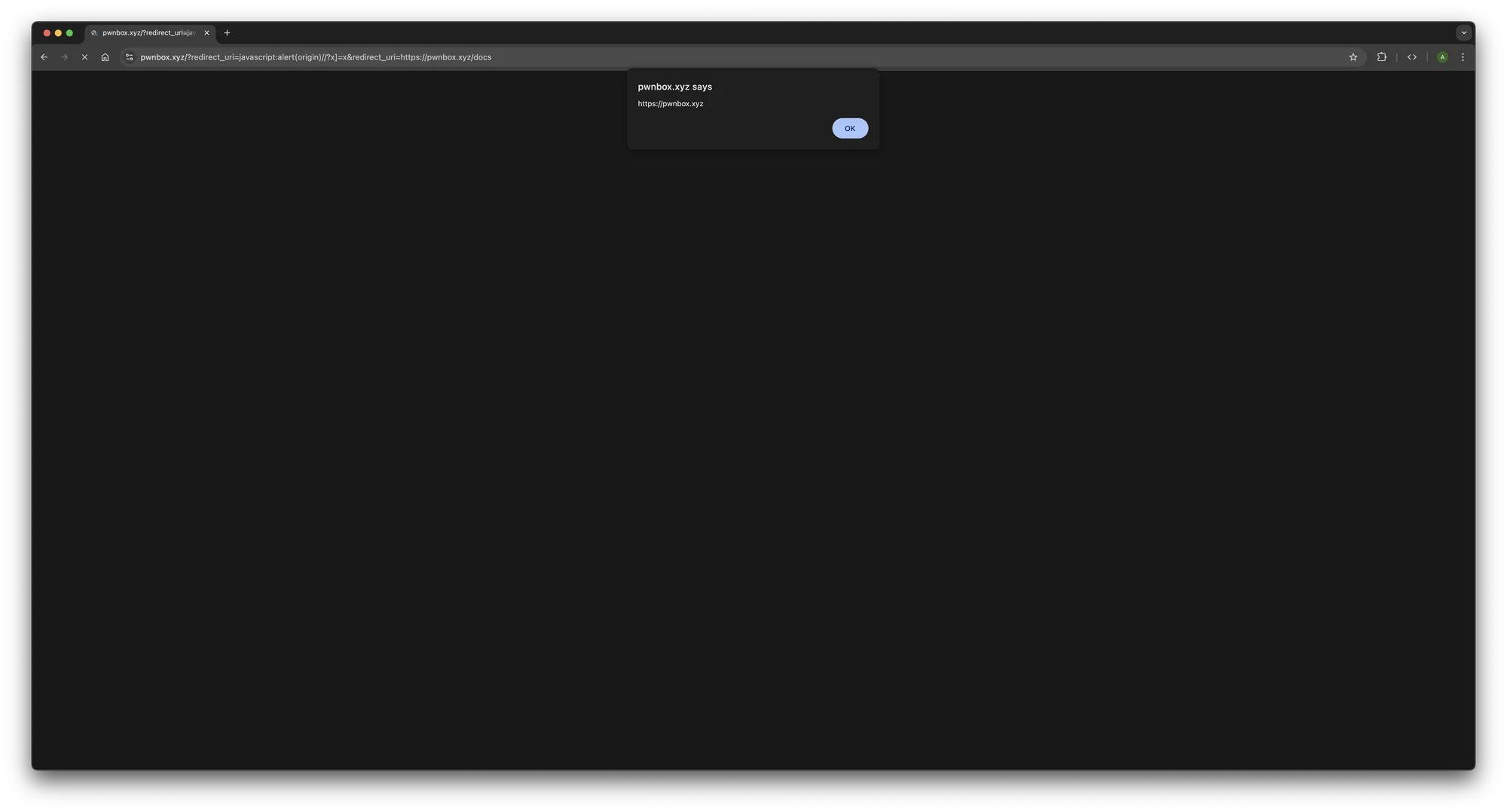
The diagram shows the two parsers reading the same string and choosing different split points, which is the whole mechanism of this solution.
Step 2: Solution 2, bracket stripping plus the parameter limit
This route leaves the ]= rule alone and abuses two other behaviours. The safe value is delivered to the backend under a bracketed key, which qs strips to redirect_uri but URLSearchParams treats as the literal key [redirect_uri], so the browser's .get("redirect_uri") ignores it. The malicious value is then placed after 1000 junk parameters, beyond the qs parameterLimit of 1000, so qs never reads it while URLSearchParams, which has no limit, does.
The payload shape is:
/?[redirect_uri]=https://pwnbox.xyz/docs&p&p&p...(×1000)...&p&redirect_uri=javascript:alert(origin)
On the backend, qs processes [redirect_uri]=https://pwnbox.xyz/docs first, strips the brackets and sets redirect_uri to the safe value. It then consumes roughly 1000 dummy p parameters, hits the limit and stops reading. The final redirect_uri=javascript:alert(origin) is never seen, so req.query.redirect_uri remains the safe string and validation passes.
In the browser, URLSearchParams reads the whole string. It stores [redirect_uri] as the literal key [redirect_uri], stores the 1000 p parameters (irrelevant), and reaches redirect_uri=javascript:alert(origin) at the end. .get("redirect_uri") returns the malicious value, location is set to it, and javascript:alert(origin) executes.
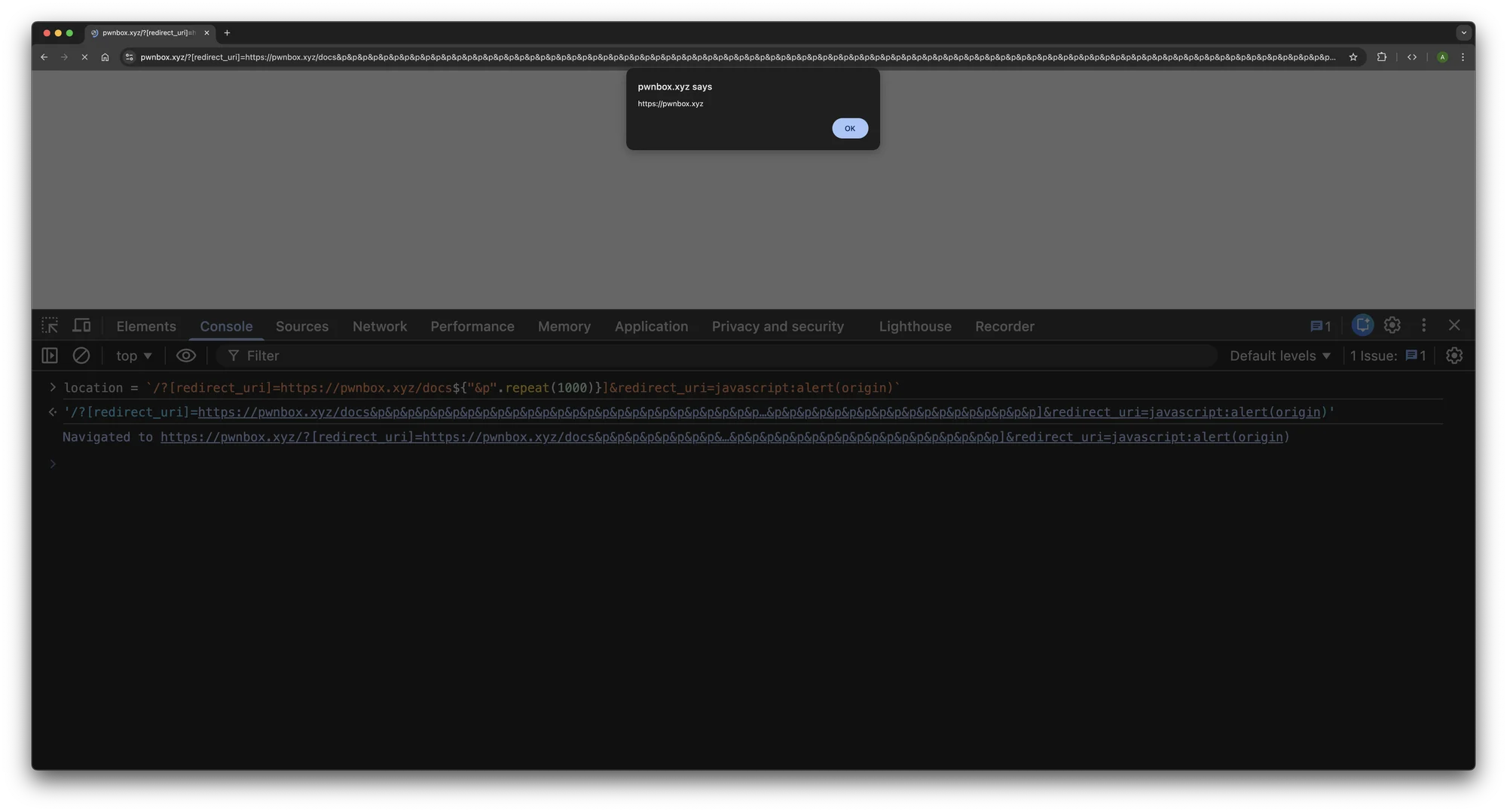
The diagram lays out the two views side by side: the backend stopping at the parameter limit with the safe value, and the browser reading to the end and picking up the malicious one.
Root cause
The application validates input with one parser and acts on it with another. qs, as configured by Express's extended parser, has behaviours that URLSearchParams does not share: the ]= split priority, bracket stripping, and a default parameterLimit of 1000. Each of these lets the same query string mean different things to the two parsers. The strict !== comparison on the server is correct for what the server sees, but it says nothing about what the browser will see.
The server-side check passes on the value the server parses, which is not the value the client acts on. The write-up describes the same pattern in real applications as a trust boundary violation: the server trusts its parser, the client trusts its parser, and nobody checks that they agree.
Impact
In the challenge, the crafted query string makes the page's script assign a javascript: URL to location, and the code runs. In real applications the same pattern appears in OAuth and SSO flows, where the server validates a redirect URI against an allow-list and then a server-side redirect or client-side script performs the navigation. It also appears in single-page applications whose server-side middleware validates query parameters before the page loads while client-side JavaScript reads the same parameters from window.location to decide what to render or where to navigate. Where the validation and the action use different parsers, the same class of attack applies.
Fix
The write-up does not describe a patch. The implied remedy is to ensure the value that is validated is the same value that is acted upon, rather than re-parsing raw input on the client with a different parser. The write-up says it is not just one quirk you can patch, but a problem with the "validate server-side, use client-side" pattern whenever different parsers are involved.
Variants to test
]=split priority. Send a parameter whose value contains]=and a second parameter carrying the allow-listed value. A positive result is the backend accepting the request while the browser's.get()returns the first, attacker-controlled value.- Bracket stripping. Send
[param]=safealongsideparam=malicious. A positive result is the backend seeing only the safe value while the browser sees the malicious one under the plain key. - Parameter limit. Put the safe value first, pad with more than 1000
&-separated junk parameters, then append the malicious value. A positive result is the backend stopping at the limit while the client parser reads the trailing value. - Duplicate keys. Send the same key twice and check whether the server merges into an array (rejecting) while the client returns the first match, or vice versa.
- Nested bracket keys. Try
a[b][c]style keys where the server builds a nested object but the client treats the whole bracketed string as a literal key, and see whether any downstream code reads the nested property.
In each case, the signal to look for is a divergence between what the server validates and what the client consumes from the same raw query string.
What happened, in plain words
A security researcher named Amirmohammad Safari wrote a small puzzle for other security people. On 8 February 2026 he posted it on his X account: about 20 lines of JavaScript code that run a tiny website. The challenge was to break it. It turned out there were two completely different ways to do so, and he later explained both on the Voorivex blog.
The website has one job. You visit it with a web address that contains a setting called redirect_uri. The server checks that this setting is exactly https://pwnbox.xyz/docs. If it is, the server sends back a page with a small script, and that script makes your browser go to whatever address the setting contains.
The trick is that the check and the redirect are done by two different programs: the server uses one way of reading the address, and your browser uses another. If you can craft one web address that the server reads as the safe value but the browser reads as something dangerous, you win. The dangerous value used here is javascript:alert(origin), which tells the browser to run a piece of code that pops up a box showing the site's address.
This kind of bug is called a parser differential. A parser is a program that takes a piece of text and works out its structure. When two parsers read the same text and disagree about what it means, an attacker can sometimes slip something past a check.
The code we are attacking
Here is the entire challenge, exactly as published:
const express = require('express');
const app = express();

app.set('query parser', 'extended');

app.get('/', (req, res) => {
  const redirectUri = req.query.redirect_uri;

  if (!redirectUri) {
    return res.send("redirect_uri is required");
  }

  if (redirectUri !== "https://pwnbox.xyz/docs") {
    return res.send("Invalid redirect_uri");
  }

  return res.send(`
    <script>
      location = new URLSearchParams(window.location.search).get("redirect_uri");
    </script>
  `);
});

app.listen(3000, () => console.log('Listening on port 3000'));
Line by line, in plain words:
const express = require('express');loads a library called Express. Express is a very popular toolkit for building websites with Node.js, which is a way of running JavaScript on a computer instead of inside a browser. Think of Express as a ready-made reception desk: it listens for visitors and passes them to the right person.const app = express();creates one such website application.app.set('query parser', 'extended');tells Express which tool to use when reading the extra information people attach to a web address. We will come back to this line; it is the heart of the whole puzzle.app.get('/', (req, res) => {says: when someone visits the main page (the path/), run the code that follows.reqholds everything about the incoming request, andresis how we send something back.const redirectUri = req.query.redirect_uri;pulls out the value ofredirect_urifrom the address. The part of a web address after the?is called the query string, and it is written as pairs likename=valuejoined by&.req.queryis Express's already-parsed version of that string.if (!redirectUri) { return res.send("redirect_uri is required"); }says: if the value is missing, reply with a message saying it is required.if (redirectUri !== "https://pwnbox.xyz/docs") { return res.send("Invalid redirect_uri"); }is the strict check.!==means "is not exactly equal to". The value must match that string character for character, or the server refuses.- The final
return res.send(...)sends back a small HTML page. Inside it is a<script>block, which is code the browser will run. location = new URLSearchParams(window.location.search).get("redirect_uri");is the browser-side part.window.location.searchis the raw query string from the address bar.URLSearchParamsis the browser's built-in tool for reading query strings..get("redirect_uri")asks it for the value ofredirect_uri. Assigning that tolocationtells the browser to navigate to it.app.listen(3000, ...)starts the website listening on port 3000. A port is like a numbered door on a computer; this one is door 3000.
So the server checks the value with one tool, and then the browser reads the same raw text again with a different tool. That is the crack.
Why this pattern exists in real life
This is not a made-up situation. Many real websites do exactly this. A common example is logging in with another service, such as "Sign in with Google". The service checks that the address it will send you back to is on an approved list, and then something, either the server or a script in your browser, performs the redirect. If the check and the redirect read the address differently, the same attack applies.
Another common case is a modern web app where the server checks the address before the page loads, but the page's own JavaScript reads the same address to decide what to show. Both sides look at the same text, but they may not read it the same way.
The two parsers
The server's parser: qs
When Express is told to use the extended query parser, it does not use its simple built-in reader. It hands the job to a library called qs. The name is short for "query string". This library is powerful: it understands square brackets, so user[name]=alice becomes a nested object like { user: { name: "alice" } }. An object here is just a labelled box of values, and nesting means a box inside a box.
The write-up shows how Express picks the parser. Here is the relevant code:
exports.compileQueryParser = function compileQueryParser(val) {
  var fn;

  if (typeof val === 'function') {
    return val;
  }

  switch (val) {
    case true:
    case 'simple':
      fn = querystring.parse;
      break;
    case false:
      break;
    case 'extended':
      fn = parseExtendedQueryString;
      break;
    default:
      throw new TypeError('unknown value for query parser function: ' + val);
  }

  return fn;
}
In plain words: this function receives the setting value and returns the reading tool to use. If the setting is true or 'simple', it picks the basic querystring.parse. If it is 'extended', it picks parseExtendedQueryString. Anything else is an error. Our challenge uses 'extended', so we get the second one.
That function is short:
function parseExtendedQueryString(str) {
  return qs.parse(str, {
    allowPrototypes: true
  });
}
It calls qs.parse on the raw string and passes one option, allowPrototypes: true. Everything else uses the library's defaults. The defaults that matter here are:
depth5: how deeply brackets may nest.arrayLimit20: the largest array index it will treat as an array.- delimiter
&: the character that separates onename=valuepair from the next. parameterLimit1000: the maximum number of pairs it will read.allowPrototypes: true: the only setting that was changed from the default.
Two of these, the way it finds the = sign and the 1000-pair limit, become the basis of the two solutions.
The browser's parser: URLSearchParams
URLSearchParams is built into every modern browser. It is much simpler than qs:
- If the string starts with
?, drop it. - Split the string on
&. - For each piece, split at the first
=. Everything before it is the key, everything after it is the value. - It has no bracket notation, no nesting, no depth limit and no parameter limit.
[foo]is literally the key[foo], brackets included. - When you ask for a key that appears more than once,
.get()returns the first match.
That is all. No special rules. What you see is what you get.
Solution 1: the ]= priority trick
The idea
qs has a special rule for finding where the key ends and the value begins. It does not simply use the first =. It first looks for the two characters ]= anywhere in the piece. If it finds them, it splits at the = that comes right after the ]. This rule exists so that bracket notation like user[name]=alice works: the = after the ] is the real separator.
But the rule does not check whether the ]= is in a sensible place. If ]= appears inside what a human would call the value, qs still uses it. The ]= always wins over the first =.
Here is the code that does this:
for (i = 0; i < parts.length; ++i) {
    part = parts[i];

    var bracketEqualsPos = part.indexOf(']=');
    var pos = bracketEqualsPos === -1
        ? part.indexOf('=')       // Normal: use the first '='
        : bracketEqualsPos + 1;   // Bracket: use the '=' AFTER ']'

    var key, val;
    if (pos === -1) {
        key = options.decoder(part, defaults.decoder, charset, 'key');
        val = options.strictNullHandling ? null : '';
    } else {
        key = options.decoder(part.slice(0, pos), defaults.decoder, charset, 'key');
        val = options.decoder(part.slice(pos + 1), defaults.decoder, charset, 'value');
    }

    // ...store the key/value pair...
}
In plain words: for each piece of the query string, look for ]=. If it is not there, use the first =. If it is there, use the = just after the ]. Then cut the piece at that position: the left side is the key, the right side is the value. The comment in the code says it all: "Bracket: use the '=' AFTER ']'".
The payload
/?redirect_uri=javascript:alert(origin)//?x]=x&redirect_uri=https://pwnbox.xyz/docs
This address has two pairs, separated by &. The first pair is redirect_uri=javascript:alert(origin)//?x]=x. The second is redirect_uri=https://pwnbox.xyz/docs.
What the server sees
qs splits on & and takes the first piece: redirect_uri=javascript:alert(origin)//?x]=x. It looks for ]= and finds it near the end, in x]=x. So it splits there. Everything to the left, redirect_uri=javascript:alert(origin)//?x], becomes the key, and x becomes the value. That key is a long, meaningless string that has nothing to do with redirect_uri. Nobody will ever read it.
Then qs takes the second piece: redirect_uri=https://pwnbox.xyz/docs. There is no ]= in it, so it splits at the first = as usual. Key: redirect_uri. Value: https://pwnbox.xyz/docs.
So req.query.redirect_uri is the safe string. The strict check passes, and the server sends back the page.
What the browser sees
URLSearchParams knows nothing about ]=. It splits both pieces at the first =.
- First piece: key
redirect_uri, valuejavascript:alert(origin)//?x]=x. - Second piece: key
redirect_uri, valuehttps://pwnbox.xyz/docs.
Now the script calls .get("redirect_uri"). There are two matches, and .get() returns the first one: javascript:alert(origin)//?x]=x.
The browser assigns that to location. Because it starts with javascript:, the browser treats the rest as code and runs it. The code is alert(origin)//?x]=x. The browser runs alert(origin), which pops up a box showing the site's address. That is the cross-site scripting, or XSS, working.
The diagram shows the two parsers reading the same string and choosing different split points. That is the whole mechanism.
Solution 2: bracket stripping plus the parameter limit
The idea
This solution does not use the ]= rule at all. It abuses two other behaviours of qs.
First, brackets. qs understands bracket notation. If you send [redirect_uri]=https://pwnbox.xyz/docs, it strips the brackets and treats the key as redirect_uri. But URLSearchParams has no idea what brackets mean. To the browser, the key is literally [redirect_uri], brackets included. That is a different key from redirect_uri, so when the browser later asks for redirect_uri, this pair does not match.
Second, the parameter limit. qs reads at most 1000 pairs. Anything after the 1000th is silently ignored. URLSearchParams has no such limit; it reads everything.
So the plan is:
- Put the safe value first, under a bracketed key:
[redirect_uri]=https://pwnbox.xyz/docs. The server strips the brackets and sees the safe value. The browser sees a key called[redirect_uri]and ignores it. - Add about 1000 junk pairs, such as
&p, to use up the server's budget. - Put the malicious pair
redirect_uri=javascript:alert(origin)after the limit. The server never reads it. The browser does.
The payload
/?[redirect_uri]=https://pwnbox.xyz/docs&p&p&p...(×1000)...&p&redirect_uri=javascript:alert(origin)
The (×1000) is shorthand for repeating the &p pair a thousand times. The server reads at most 1000 pairs, so the malicious pair must come after enough junk pairs to exhaust that budget.
What the server sees
qs reads the first pair, [redirect_uri]=https://pwnbox.xyz/docs. It strips the brackets and sets redirect_uri to the safe value. Then it reads the junk p pairs, one by one, until it has read 1000 pairs in total. At that point it stops. The final redirect_uri=javascript:alert(origin) is never seen. So req.query.redirect_uri is still the safe string, and the check passes.
What the browser sees
URLSearchParams reads the whole string. It stores [redirect_uri] as the literal key [redirect_uri], which is not the key we care about. It stores the 1000 p pairs, which are irrelevant. Then it reaches redirect_uri=javascript:alert(origin) at the end. When the script calls .get("redirect_uri"), it returns the malicious value. The browser assigns it to location, and javascript:alert(origin) runs. XSS achieved.
The diagram lays out the two views side by side: the server stopping at the parameter limit with the safe value, and the browser reading to the end and picking up the malicious one.
Why this matters in the real world
The redirect_uri parameter in this challenge is not a coincidence. It mirrors real login and single sign-on flows. In those flows, the server checks that the redirect address is on an approved list, and then either the server or a script in the browser performs the redirect. If the check and the redirect use different parsers, the same class of attack applies.
Many modern web apps also have server-side code that checks query parameters before the page loads, while the page's own JavaScript reads the same parameters from the address bar to decide what to show or where to go. The server and the browser are both looking at the same address, but they may not be reading it the same way.
The core problem is a trust boundary violation. The server trusts its parser. The browser trusts its parser. Nobody checks that the two agree. And as we have seen, there is more than one way for them to disagree. It is not a single quirk you can patch; it is a property of the pattern "check on the server, act on the client" whenever different parsers are involved.
How to look for this yourself
In each case, the signal is a difference between what the server checks and what the client uses from the same raw query string.
- The
]=split priority. Send a pair whose value contains]=, plus a second pair carrying the safe value. If the server accepts the request while the browser's.get()returns the first, attacker-controlled value, you have found it. - Bracket stripping. Send
[param]=safealongsideparam=malicious. If the server sees only the safe value while the browser sees the malicious one under the plain key, you have found it. - The parameter limit. Put the safe value first, pad with more than 1000
&-separated junk pairs, then append the malicious value. If the server stops at the limit while the browser reads the trailing value, you have found it. - Duplicate keys. Send the same key twice. Check whether the server merges them into an array and rejects, while the browser returns the first match, or the other way round.
- Nested bracket keys. Try keys like
a[b][c], where the server builds a nested object but the browser treats the whole bracketed string as a literal key. See whether any later code reads the nested property.
What the write-up does not say
It also does not describe a patch. The implied remedy is to make sure the value that is checked is the same value that is acted on, rather than re-reading the raw input in the browser with a different parser.
Glossary
- API: a defined way for one program to ask another program to do something, like a menu of requests a service accepts.
- Array: an ordered list of values, such as
["foo", "bar"]. - Bracket notation: a way of writing nested keys in a query string, such as
user[name]=alice, which some parsers turn into nested objects. - Browser: the program you use to visit websites, such as Chrome or Firefox.
- Client: the program on the user's side, usually the browser, as opposed to the server.
- Cookie: a small piece of data a website stores in your browser and sends back with later requests, often used to remember who you are.
- Cross-site scripting (XSS): a bug where an attacker gets their own code to run inside another website's page in a victim's browser.
- Default: the value a setting takes when you do not specify one.
- Delimiter: a character used to separate pieces of text, such as
&between query string pairs. - Depth: how many levels of nesting a parser will follow.
- Express: a popular library for building websites with Node.js.
- HTML: the language web pages are written in.
- JavaScript: the programming language that runs in browsers and, with Node.js, on servers.
javascript:URL: an address that starts withjavascript:and tells the browser to run the text after it as code.- Key and value: the two halves of a query string pair. In
name=alice,nameis the key andaliceis the value. - Node.js: a way of running JavaScript outside a browser, often on a server.
- Object: a labelled collection of values, such as
{ name: "alice" }. - OAuth: a common system that lets you log in to one site using an account from another, such as "Sign in with Google".
- Parameter: another word for a key/value pair in a query string.
- Parameter limit: the maximum number of pairs a parser will read.
- Parser: a program that takes text and works out its structure.
- Parser differential: a bug class where two parsers read the same text and disagree about what it means, letting an attacker slip past a check.
- Payload: the crafted input an attacker sends to trigger a bug.
- Port: a numbered door on a computer that a service listens on, such as 3000.
- Query string: the part of a web address after the
?, made ofname=valuepairs joined by&. qs: the JavaScript library Express uses for theextendedquery parser; it understands brackets and nesting.- Redirect: sending the browser from one address to another.
redirect_uri: the query parameter in this challenge that holds the address to redirect to.- Server: the computer and program that host a website and answer requests.
- Single sign-on (SSO): a system where one login gives access to several sites.
- Single Page Application (SPA): a website where the browser loads one page and its JavaScript updates the content without full page reloads.
- Strict equality (
!==): a JavaScript comparison that is true only when two values are not exactly the same, character for character. - Token: a piece of data, often secret, that proves who you are or grants access, similar in role to a cookie.
- Trust boundary: the line between parts of a system that trust each other and parts that do not; bugs happen when data crosses it without being re-checked.
URLSearchParams: the browser's built-in tool for reading query strings; it splits at the first=and has no bracket or parameter-limit rules.- Web framework: a toolkit that handles common website chores so you do not have to write them yourself.
- XSS: see cross-site scripting.




