Whoa! This is not a vulnerability 😠
The forgot-password page allowed enumeration of valid client numbers and had no server-side limit on OTP requests, so an attacker could send repeated SMS messages to many customers. This could cause financial loss from SMS charges and reputational damage.

medium.com
Published on medium.com
From the title, you might have got an idea about what this write up is about. Yes, readers who think “whoa! this is not a vulnerability (with anger)”, are the words of an application developer; you are right!
The full write-up lives on its author's site
It belongs to its author, so we link to it rather than copy it. The other two tabs are our own rewrites, checked against it.
Context
This write-up is about a penetration test of a banking application developed by a French team. The feature in question is the forgot password flow. Normally it works like this: the user enters a Client Number that is registered with an account, the application sends a One Time Password to the registered mobile number, the user enters the OTP and then changes the password. The application used 9 digit Client Numbers.
The researcher frames the result as two findings rather than vulnerabilities: Client Number enumeration, and the ability to request as many SMS as you like. Combined, they form an attack scenario reported under the name "SMS Bombing, Finacial Loss" with HIGH severity. The report notes that the Chief Information Security Officer stopped the release of the application on the basis of the report, and that the development team and project manager then came to the researcher's office and argued the finding was a business requirement, not a vulnerability.
The researcher draws a distinction that runs through the whole article: findings do not necessarily come with security risk, but they may come with business risk, such as financial or reputational harm. In his view this is the difference between a bug bounty hunter, who tends to focus on vulnerabilities that pay, and a professional penetration tester, who also studies application flow, business requirements, business logic and the function of every request and response.
Setup
The test was Grey Box. It ran in a test environment, and the researcher had access to the admin portal, which meant he already knew the registered users' Client Numbers. The tooling was Burp Proxy, in particular the Intruder with its payload positions and the Throttle setting under Intruder -> Options -> Request Engine. The client URL and the client name are not disclosed; the report uses hoaxed screenshots and the placeholder name Netherland Bank (also written Natheland Bank).
The researcher notes that the application was one of the most secure he had tested, and that he found nothing in the first two days; testers who had tested the same application before him had also found nothing.
Finding it
On the forgot password page, the behaviour differed depending on the input:
- A Client Number registered with an account caused an OTP to be sent to the registered mobile number and the user was forwarded to the OTP entry page.
- A Client Number with no associated account produced the message "please contact our nearest branch to open an account with us".
- A Client Number in an invalid format produced an error accordingly.
That difference in responses is what makes enumeration possible: the application tells the tester whether a given 9 digit number belongs to a customer. The researcher also observed a client-side validation that a user cannot ask for another OTP before 30 seconds, and that there was no limit on how many SMS a user can request before the account is blocked.
Exploitation
Step 1: enumerate Client Numbers
The forgot password page is shown below. The researcher could not disclose the client URL, so the screenshots are hoaxed.
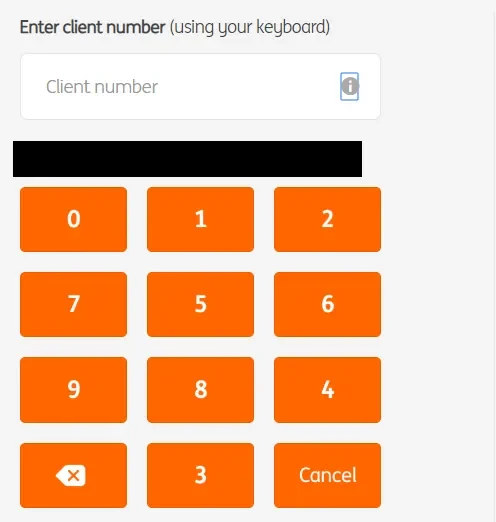
Any ID is entered in the valid 9 digit format:
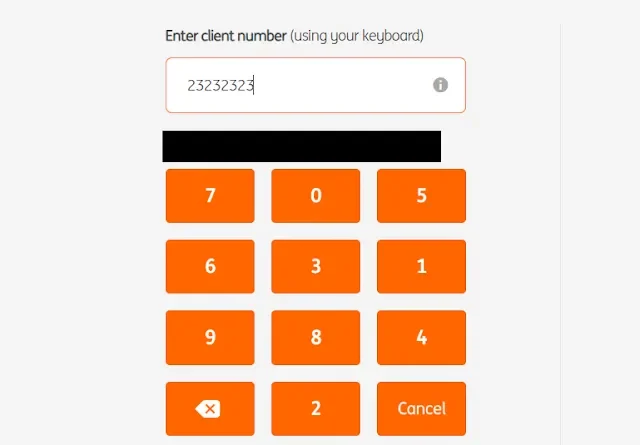
If the entered Client Number is not registered with the bank, the following error appears.
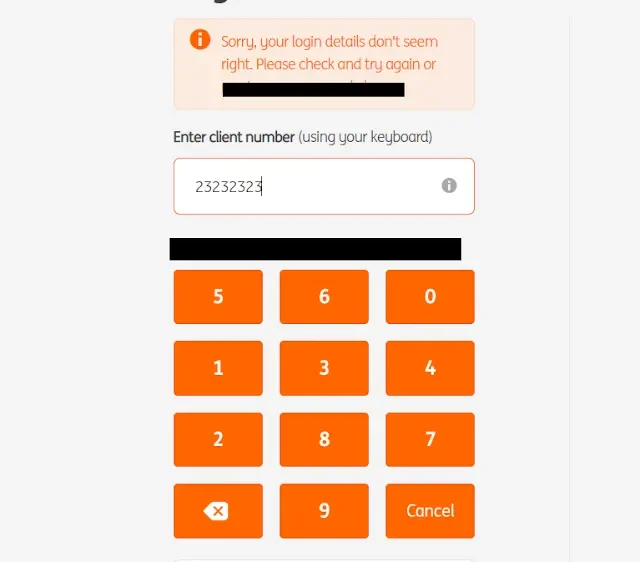
If the entered Client Number belongs to a customer, the application sends the OTP and forwards the user to the OTP entry page.
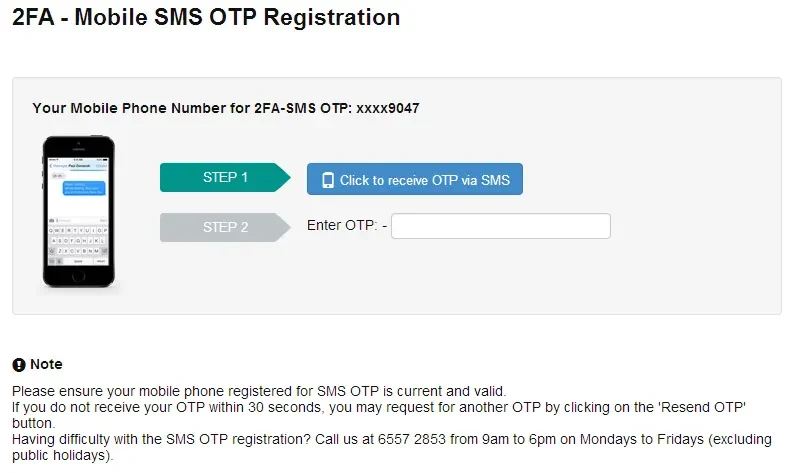
The 30 second window is visible here: before 30 seconds have passed the user cannot ask for another OTP. The researcher stresses that this is client-side validation only, and that the attack can be automated despite it.
To collect Client Numbers, he entered a Client Number, captured the request and sent it to the Intruder, selecting the position to hit with the payload.
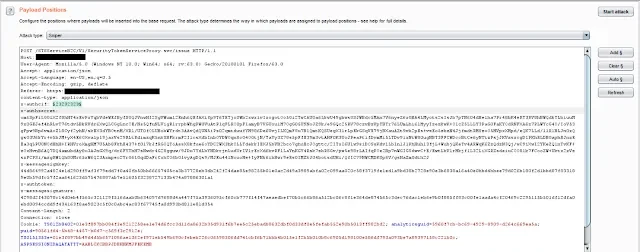
Because he had admin portal access in the test environment, he knew the registered users' Client Numbers. He put those numbers at the start of the payload and fired it. A response code of "200" was the successful response indicating that the OTP had been sent.
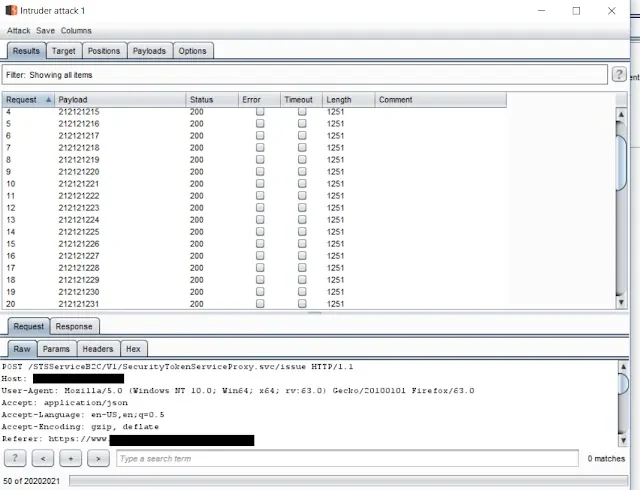
This produced the Client Numbers of 20 customers.
Step 2: automate the resend
He clicked Resend (asking for another OTP after 30 seconds), captured the request and sent it to the Intruder, selecting the payload position as a random number. He selected Mozilla agent 5 and hit the payload until it reached 1000.
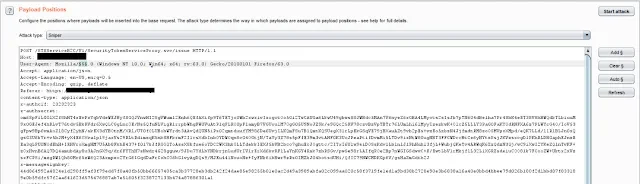
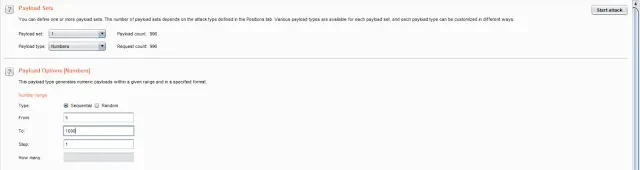
He then set a timer in Burp, the Throttle (Intruder -> Options -> Request Engine -> Throttle), instructing the Intruder to wait 30 seconds before sending the next request. His throttle timer was set to 31 seconds. The project manager sitting in the room began receiving an SMS every 30 seconds.

Step 3: repeat across all enumerated numbers
Step 2 is repeated for all 20 Client Numbers using an automated tool or script. All 20 customers receive an SMS/OTP from the bank every 31 seconds. The report repeats the key condition here: there was no limit on how many times a customer can ask for an OTP.
When the scenario was presented, the project manager asked what the security risk was.

Impact
The researcher presented the impact as a sequence:
- Using information gathering, an attacker collects Client Numbers of as many customers as possible. In the example, the attacker successfully enumerates 1000 customers.
- The attacker sends SMS to all 1000 customers every 30 seconds. The customers worry that their bank account is under attack, because they are not requesting OTPs yet receive an SMS every 30 seconds from the bank.
- All 1000 customers panic and discuss it with each other, creating the impression that the bank is under cyber attack. This causes reputational damage.
- The average charge the bank pays per SMS is $0.011. An attacker requesting 2 SMS per minute means approximately 3000 SMS per day. For 1000 customers that is 3 million SMS per day, or $33k in one day.
- If an adversary writes a script to bypass the client-side validation that prevents a request for another OTP before 30 seconds, an OTP can be requested every second, and the loss per day becomes 33*60k USD. The researcher declines to discuss the loss an organisation might face on the share market after a cyber attack.
The framing is explicit: if the finding leads to financial loss it may or may not be a security vulnerability, but it is surely a potential threat to the organisation, which is why it is called a finding. The conditions matter: the enumeration depends on the differing responses for registered and unregistered numbers, and the SMS volume depends on there being no limit on how many OTPs a customer can request. The figures are the researcher's own estimates for the presentation.
After the presentation, everyone in the conference hall was convinced it was a business risk. The researcher was appreciated for the finding and received apologies from the application team.

Root cause
The forgot password flow takes a single input, the Client Number, and its response distinguishes registered from unregistered numbers, which allows enumeration of valid 9 digit Client Numbers. The 30 second restriction on requesting another OTP is client-side validation only, so the attack can be automated despite it. There is no limit on the number of OTPs a customer can request before the account is blocked, so the resend can be repeated, and each SMS costs the bank money.
Fix
The report lists three prevention measures that organisations should take:
- A: To reset a password, do not take just one input and send an OTP or email. Implement a page that asks for more than one input, such as Client Number/User ID/National ID together with ATM card number, ATM PIN and Date of Birth.
- B: Implement CAPTCHA on the same page to prevent automation by which a user or adversary can enumerate all the IDs with tools such as Burp Proxy's Intruder.
- C: Set a limit on the maximum number of OTPs a user can ask for before being blocked, and mention it on the website as well.
The report does not say which of these, if any, the client implemented; it only notes that the enumeration finding is no longer there.
Variants to test
- Forgot password and registration flows with a single identifier. Submit a registered and an unregistered identifier and compare the responses. A positive result is any difference in message, status code, redirect or timing that reveals whether the identifier exists.
- Client-side-only resend timers. Capture the resend request and replay it immediately through a proxy. A positive result is a new OTP being sent before the advertised interval has elapsed.
- Missing server-side OTP caps. Use Burp Intruder with a Throttle set just above the client-side interval and let it run. A positive result is a steady stream of SMS with no block on the account.
- OTP endpoints without CAPTCHA. Run an enumeration payload against the identifier field. A positive result is a large number of automated requests completing without a challenge.
- Cost-bearing notification channels. Where the target pays per SMS or email, estimate the per-message cost and the achievable request rate to quantify the business risk in the report.

What happened, in plain words
A security tester was hired to test a banking application built by a French team. The application was, in his words, one of the most secure he had ever tested: he found nothing in the first two days, and testers who had gone before him had also found nothing. The feature that eventually gave him a result was the "forgot password" page, the screen where a customer who has forgotten their password asks the bank to help them set a new one.
On that page, the application behaved differently depending on what you typed. If you typed a customer number that belonged to a real account, the bank sent a one-time password (a short code, usually by SMS) to that customer's phone and moved you to a page where you enter the code. If you typed a number that did not belong to any account, you got a message telling you to visit your nearest branch. If you typed something that was not even the right shape (the bank used 9-digit customer numbers), you got a format error. That difference is the whole problem: by trying numbers one after another, anyone can learn which 9-digit numbers belong to real customers. Security people call this "enumeration".
The tester also noticed two other things. First, the page would not let you ask for another code until 30 seconds had passed since the last one. Second, there was no limit at all on how many codes a customer could ask for before the bank blocked the account. The 30-second rule was client-side validation only, enforced in the browser rather than by the bank's server. Anyone who captures the request that the browser sends and replays it with a tool can ignore the 30-second rule completely.
Put those two observations together and you get an attack: find out which numbers belong to real customers, then make the bank send those customers a code over and over. Each SMS costs the bank money, and a flood of unexpected codes worries customers and damages the bank's reputation. The tester reported this under the name "SMS Bombing, Finacial Loss" with HIGH severity. The Chief Information Security Officer stopped the release of the application on the strength of the report. The next day the development team and the project manager came to the tester's office and argued that this was not a vulnerability at all, just a business requirement.
The rest of the article is the story of how he proved them wrong, and the technical details of the attack. Along the way he draws a distinction that matters for anyone starting in security: a "finding" is not always a "vulnerability". A vulnerability is a weakness that lets someone do something they should not be able to do. A finding can be something that carries no direct security risk but does carry business risk, such as losing money or reputation. In his view, a bug bounty hunter tends to chase vulnerabilities that pay a big reward, while a professional penetration tester also studies how the application flows, what the business needs, and what every single request and response actually does.
The setup
The test was "grey box". That means the tester was not a complete outsider: he had some inside knowledge and access. In this case the test ran in a test environment (a copy of the application used for testing, not the live one), and he had access to the admin portal, the back-office screen where staff manage customers. Through that portal he already knew the customer numbers of registered users. That is why he could check whether his enumeration was working: he had a list of real numbers to compare against.
The main tool was Burp Proxy. Burp is a program that sits between your browser and the website. Normally your browser talks directly to the website; with Burp, the browser talks to Burp, and Burp forwards the conversation to the website and shows you every message. That lets you read, change and replay requests. One part of Burp, the Intruder, is built for sending the same request many times with one part changed each time (for example, a different customer number each time). Another setting, Throttle, makes the Intruder wait a fixed amount of time between requests.
The client's real name and URL are not disclosed. The report uses hoaxed (doctored) screenshots and the placeholder name "Netherland Bank", also written "Natheland Bank" in one place.
Finding it
On the forgot password page, the behaviour differed depending on the input:
- A customer number registered with an account caused a one-time password to be sent to the registered mobile number, and the user was forwarded to the page where you enter the code.
- A customer number with no associated account produced the message "please contact our nearest branch to open an account with us".
- A customer number in an invalid format produced an error accordingly.
That difference in responses is what makes enumeration possible: the application tells the tester whether a given 9-digit number belongs to a customer. The tester also observed a client-side validation that a user cannot ask for another code before 30 seconds, and that there was no limit on how many SMS a user can request before the account is blocked.
Why does this matter? Imagine a row of lockers. If a locker that exists clicks when you try the handle and a locker that does not exist stays silent, you can walk down the row and learn exactly which lockers are real without opening any of them. Here the "click" is the different message or the different next page. The 9-digit format is what the application uses for customer numbers. The 30-second rule is like a sign on the locker saying "please wait 30 seconds between tries"; it only works if people obey the sign. The server, which is the thing that actually sends the SMS, is not described as enforcing it.
Exploitation
Step 1: enumerate customer numbers
The forgot password page is shown below. The tester could not disclose the client URL, so the screenshots are hoaxed.
Any ID is entered in the valid 9-digit format:
If the entered customer number is not registered with the bank, the following error appears.
If the entered customer number belongs to a customer, the application sends the one-time password and forwards the user to the code entry page.
The 30-second window is visible here: before 30 seconds have passed, the user cannot ask for another code. The tester stresses that this is client-side validation only, and that the attack can be automated despite it.
To collect customer numbers, he entered a customer number, captured the request and sent it to the Intruder, selecting the position to hit with the payload.
Because he had admin portal access in the test environment, he knew the registered users' customer numbers. He put those numbers at the start of the payload and fired it. A response code of "200" was the successful response indicating that the code had been sent.
This produced the customer numbers of 20 customers.
What is happening in these steps, in plain words? When you fill in a form on a website and press a button, your browser sends a request to the server. That request contains the values you typed. Burp lets you pause that request, look at it, and then send it again and again with different values. The Intruder is the part of Burp that does the repeating. You mark the part of the request you want to change (the "payload position"), give it a list of values to try (the "payload"), and it sends one request per value. A response code of 200 is the standard web code for "OK, here is the result". In this case, a 200 meant the server had accepted the number and sent the SMS. A response code of 200 meant the server had accepted the number and sent the SMS. He started with the numbers he already knew from the admin portal, which is why he could confirm the method worked before using it on numbers he did not know.
Step 2: automate the resend
He clicked Resend (asking for another code after 30 seconds), captured the request and sent it to the Intruder, selecting the payload position as a random number. He selected Mozilla agent 5 and hit the payload until it reached 1000.
He then set a timer in Burp, the Throttle (Intruder -> Options -> Request Engine -> Throttle), instructing the Intruder to wait 30 seconds before sending the next request. His throttle timer was set to 31 seconds. The project manager sitting in the room began receiving an SMS every 30 seconds.
The tester set the throttle timer to 31 seconds. The point of the demonstration was to show that the rule is not a real barrier: a script can simply wait a little longer than the rule says and keep going forever. The report does not explain what "Mozilla agent 5" refers to; he hit the payload until it reached 1000.
Step 3: repeat across all enumerated numbers
Step 2 is repeated for all 20 customer numbers using an automated tool or script. All 20 customers receive an SMS or code from the bank every 31 seconds. The report repeats the key condition here: there was no limit on how many times a customer can ask for a code.
When the scenario was presented, the project manager asked what the security risk was.
Impact
The tester presented the impact as a sequence:
- Using information gathering, an attacker collects customer numbers of as many customers as possible. In the example, the attacker successfully enumerates 1000 customers.
- The attacker sends SMS to all 1000 customers every 30 seconds. The customers worry that their bank account is under attack, because they are not requesting codes yet receive an SMS every 30 seconds from the bank.
- All 1000 customers panic and discuss it with each other, creating the impression that the bank is under cyber attack. This causes reputational damage.
- The average charge the bank pays per SMS is $0.011. An attacker requesting 2 SMS per minute means approximately 3000 SMS per day. For 1000 customers that is 3 million SMS per day, or $33k in one day.
- If an adversary writes a script to bypass the client-side validation that prevents a request for another code before 30 seconds, a code can be requested every second, and the loss per day becomes 33*60k USD. The tester declines to discuss the loss an organisation might face on the share market after a cyber attack.
The framing is explicit: if the finding leads to financial loss it may or may not be a security vulnerability, but it is surely a potential threat to the organisation, which is why it is called a finding. The conditions matter: the enumeration depends on the differing responses for registered and unregistered numbers, and the SMS volume depends on there being no server-side cap on code requests. The figures are the tester's own estimates for the presentation.
After the presentation, everyone in the conference hall was convinced it was a business risk. The tester was appreciated for the finding and received apologies from the application team.
Root cause
The forgot password flow takes a single input, the customer number, and its response distinguishes registered from unregistered numbers, which allows enumeration of valid 9-digit customer numbers. The 30-second restriction on requesting another code is client-side validation only, so the attack can be automated despite it. There is no limit on the number of codes a customer can request before the account is blocked, so the resend can be repeated, and each SMS costs the bank money.
In everyday terms: the front door has a sign saying "one knock per 30 seconds", but the person inside answers every knock anyway. The sign only works on people who choose to read it. The fix is to make the person inside enforce the rule, not the sign.
Fix
The report lists three prevention measures that organisations should take:
- A: To reset a password, do not take just one input and send a code or email. Implement a page that asks for more than one input, such as customer number, user ID or national ID together with ATM card number, ATM PIN and date of birth.
- B: Implement CAPTCHA on the same page to prevent automation by which a user or adversary can enumerate all the IDs with tools such as Burp Proxy's Intruder.
- C: Set a limit on the maximum number of codes a user can ask for before being blocked, and mention it on the website as well.
The report does not say which of these, if any, the client implemented; it only notes that the enumeration finding is no longer there.
Why do these work? Asking for more than one piece of information means an attacker who only knows a customer number cannot get any further. A CAPTCHA is the little puzzle that humans can solve and simple programs cannot, so it breaks the automation that makes enumeration fast. A server-side limit means the server itself refuses to send more than a set number of codes, no matter what the browser says. Mentioning the limit on the website also tells honest customers what to expect.
Variants to test
- Forgot password and registration flows with a single identifier. Submit a registered and an unregistered identifier and compare the responses. A positive result is any difference in message, status code, redirect or timing that reveals whether the identifier exists.
- Client-side-only resend timers. Capture the resend request and replay it immediately through a proxy. A positive result is a new code being sent before the advertised interval has elapsed.
- Missing server-side code caps. Use Burp Intruder with a Throttle set just above the client-side interval and let it run. A positive result is a steady stream of SMS with no block on the account.
- Code endpoints without CAPTCHA. Run an enumeration payload against the identifier field. A positive result is a large number of automated requests completing without a challenge.
- Cost-bearing notification channels. Where the target pays per SMS or email, estimate the per-message cost and the achievable request rate to quantify the business risk in the report.
Glossary
- API: A way for one piece of software to talk to another, like a waiter taking your order to the kitchen. In web terms, it is the set of requests a website accepts and the responses it gives.
- Burp Proxy: A tool that sits between your browser and a website, letting you see, change and replay every request and response.
- Burp Intruder: The part of Burp that sends the same request many times, changing one chosen part each time.
- CAPTCHA: A small puzzle that is easy for a human and hard for a program, used to slow down automation.
- Client-side validation: A check performed by the browser (the client) rather than the server. It can be bypassed by anyone who sends requests directly.
- Cookie: A small piece of data a website stores in your browser so it can recognise you on later requests, like a wristband at an event.
- Customer number (Client Number): The 9-digit identifier the bank uses for each customer in this application.
- Enumeration: Trying many values one by one to discover which ones exist, for example which customer numbers are real.
- Finding: A result from a security test. It may or may not be a vulnerability; it can also be a business risk.
- Grey box testing: Testing where the tester has some inside knowledge or access, as opposed to black box (none) or white box (full).
- HIGH severity: A label meaning the issue is considered serious, usually because it could cause significant harm.
- Hoaxed screenshot: A screenshot that has been altered or mocked up to hide real details.
- One-time password (OTP): A short code sent to a customer, usually by SMS, that can be used once to prove identity.
- Payload: In Burp Intruder, the list of values to try, one per request.
- Payload position: The place in a request that Burp Intruder will replace with each payload value.
- Penetration test: An authorised security assessment of an application or network, usually by an outside specialist.
- Proxy: An intermediary that sits between two parties and forwards messages, like a translator standing between two people.
- Request: A message your browser sends to a server asking for something or submitting data.
- Response: The message the server sends back.
- Response code (status code): A number in the response that says what happened, such as 200 for OK.
- Server-side: Performed by the server, which the user cannot directly change, as opposed to client-side.
- SMS bombing: Sending large numbers of SMS messages to a target, often to cause cost, annoyance or reputational damage.
- Throttle: A Burp Intruder setting that makes it wait a fixed time between requests.
- User-agent: A label your browser sends to identify itself and its version.
- Vulnerability: A weakness that lets someone do something they should not be able to do.
- 200: The standard HTTP response code meaning the request succeeded.




