WordPress CVE-2026–64638 Exposes a Path from Login XSS to Code Execution
A reflected cross-site scripting flaw existed in the WordPress login page because separate input-filtering mechanisms interpreted the same user-supplied string differently. An attacker could use it to run JavaScript in a logged-in administrator's browser and, through the REST API and plugin upload, potentially reach PHP code execution on the server.
 Published on osintteam.blog
WordPress
The full write-up lives on its author's site
It belongs to its author, so we link to it rather than copy it. The other two tabs are our own rewrites, checked against it.
Context
CVE-2026-64638 is a pre-authentication Reflected XSS vulnerability in the WordPress Core login screen, disclosed in August 2026 and dubbed XSS2Shell. The affected feature is the input handling of wp-login.php: the login form takes a username, fails authentication, and reflects that username back in the error message. The report states that the flaw originates from differences in how separate input-filtering mechanisms interpret the same user-supplied string.
On its own the bug is a browser-side issue that can be triggered without authentication. The interesting part is the chain: the report describes how the reflected input can be combined with user-profile.js (loaded on the login page), DOM Clobbering, a JSONP response from the WordPress REST API, an administrator session, Application Passwords and the plugin upload feature to reach PHP code execution on the server. Escalation beyond the browser requires a logged-in administrator to interact with a page controlled by the attacker.
WordPress released 7.0.3 on 6 August 2026 as a security release addressing the issue, with fixes backported to supported maintenance branches. The report also notes that a PoC and detailed exploitation techniques for CVE-2026-64638 have already been publicly disclosed.
Setup
The report does not describe a lab environment, test accounts or specific tool versions. The tooling it does name is Criminal IP Asset Search, used to look for Internet-exposed WordPress assets and REST API paths. The preconditions implied by the attack chain are:
- A WordPress installation whose login page is reachable from the Internet at
/wp-login.php. - A WordPress REST API that is externally accessible, either via
/wp-json/or via the?rest_route=/parameter. - A logged-in administrator who can be induced to visit an attacker-controlled page.
- A WordPress version that has not received the fix shipped in 7.0.3 or the corresponding maintenance branch backport.
Finding it
The report frames the discovery around the login error path. When a login attempt fails, WordPress reflects the submitted username in the error response. CVE-2026-64638 arises because different filtering functions interpret the same string differently, so crafted input can survive filtering and land in the page as attacker-controlled HTML elements. That is the condition for a Reflected XSS without authentication.
The report then traces how those injected elements interact with user-profile.js, which is loaded on the login page. The attacker manipulates the ajaxurl value through DOM Clobbering and uses a JSONP response from the REST API to execute JavaScript within the WordPress origin.
To assess how widespread the relevant exposure is, the author used Criminal IP Asset Search to enumerate Internet-facing WordPress systems and REST API interfaces, then examined individual assets for the reflection behaviour that the CVE depends on.
Exploitation
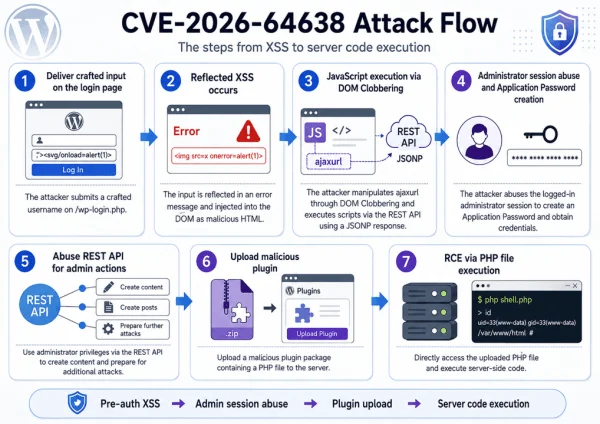
The report lays out the chain in seven stages.
1. Delivering a crafted input to the login page
The attacker sends a specially crafted username to /wp-login.php. The input exploits the way different WordPress filtering functions interpret the same string differently. The report does not publish the payload itself.
2. Triggering Reflected XSS
When the input is reflected in the login error message, attacker-controlled HTML elements can be inserted into the page DOM. This creates the conditions necessary to trigger a Reflected XSS vulnerability without authentication.
3. JavaScript execution through DOM Clobbering
The injected DOM elements interact with WordPress's user-profile.js, which is loaded on the login page.
4. Abusing the administrator session and creating an Application Password
When a logged-in administrator visits a page prepared by the attacker, the XSS can be used to abuse the administrator's browser session. The attacker can then create an Application Password with administrator privileges and obtain the resulting credentials.
5. Abusing administrator privileges through the REST API
Using the obtained Application Password, the attacker accesses the WordPress REST API with administrator privileges. The attacker can then create content with administrative permissions and inject JavaScript into publicly accessible pages to facilitate further attacks.
6. Uploading a malicious plugin
JavaScript executed in the administrator's browser can abuse WordPress's plugin upload functionality to upload a plugin containing a malicious PHP file to the server. This extends the attack from client-side XSS to server-side file upload.
7. RCE through PHP file execution
The attacker directly accesses the uploaded PHP file under wp-content/plugins/ to execute code on the server. As a result, the pre-authentication XSS on the login page can escalate through administrator privilege abuse and malicious file upload to remote code execution.
Exposure analysis with Criminal IP Asset Search
The report then turns to measuring how much of the Internet matches the preconditions of the chain. The reasoning is that CVE-2026-64638 leverages externally exposed WordPress login pages and REST APIs, so organisations should identify Internet-facing WordPress assets and assess both the versions in use and REST API exposure. The searches were run sequentially.
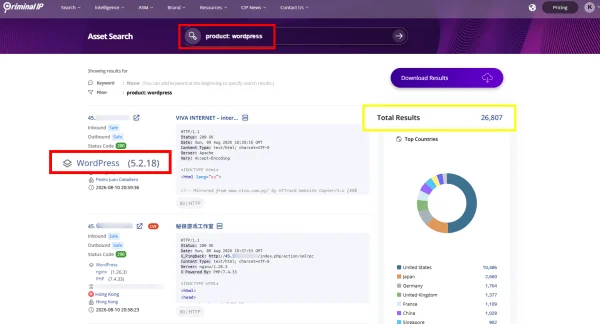
1. Locating Internet-facing WordPress systems
product: wordpress
This query identified a total of 26,807 WordPress-related assets as of August 2026. The results included assets where WordPress version information, such as (5.2.18), was identified. Comparing the detected version with the version containing the patch for CVE-2026-64638 lets you prioritise assets for patch verification.
The report is explicit about the limits of this signal: version information identified by Criminal IP is based on externally collected HTTP responses and service information. It should not be considered definitive evidence that an asset is vulnerable, but rather used as an indicator for verifying its patch status.
2. Finding Internet-facing WordPress REST API interfaces
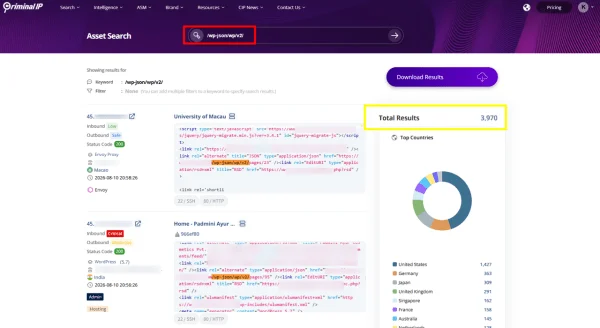
/wp-json/wp/v2/
This search identified a total of 3,970 assets as of August 2026. /wp-json/wp/v2/ is a path used by the WordPress REST API to access major resources such as posts and pages. Assets where this string is observed in HTTP responses may indicate that the WordPress REST API is externally accessible. Because the REST API is used for JavaScript execution and subsequent privilege abuse in the attack chain, organisations assessing Internet-exposed WordPress assets should also check whether the REST API is publicly accessible.
3. Tracing the REST API request method behind the exploit
In addition to the /wp-json/ path, the WordPress REST API can also be accessed using the ?rest_route=/ parameter. This method is also used in the XSS2Shell attack chain.
/?rest_route=/ product: "wordpress"
This query identified 114 related assets as of August 2026. ?rest_route= is an alternative method of accessing the WordPress REST API, and the query can be used to identify WordPress assets where this REST API access path is observable in external HTTP responses.
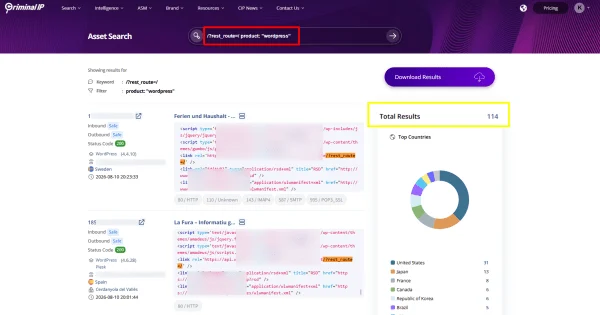
Insights from individual WordPress assets
Further examination of several WordPress assets from the search results showed that /wp-login.php returned an HTTP 200 response, with the WordPress login interface directly exposed to the Internet prior to authentication.
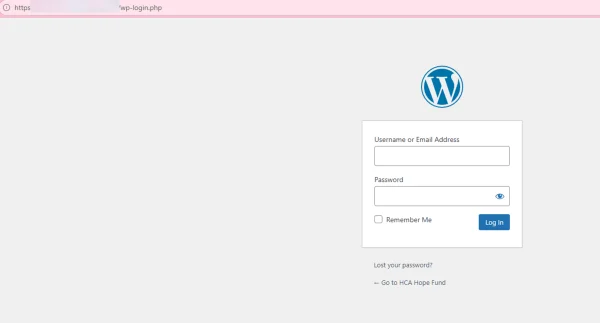
The same asset was examined to determine how a username supplied in a login request was reflected in the error response. When an arbitrary string, TESTUSER_XYZ, was submitted, the same string was observed in the response. A string containing quotation marks, TEST"QUOTE, was also returned as provided.

This confirms that user-supplied input included in the login request is reflected back in the error response. Since CVE-2026-64638 also originates from the reflection of user input in error messages on /wp-login.php, this response behaviour can serve as an additional indicator for determining whether a WordPress instance requires further verification of its patch status.
The report cautions that the individual assets examined represent only a subset of the exposed environment, while Criminal IP identified more than 20,000 Internet-exposed WordPress-related assets. Organisations should prioritise verifying the actual WordPress versions in use across their managed assets and confirming whether the latest security updates have been applied.
Root cause
The report attributes the vulnerability to differences in how separate input-filtering mechanisms interpret user-supplied input. The same string is handled inconsistently across those mechanisms, so crafted input passes through and is reflected into the login error message, where it can introduce attacker-controlled HTML elements into the DOM. The report does not name the specific functions involved or show the code path, so the precise mismatch is not documented here.
The chain then depends on the login page loading user-profile.js. The injected elements interact with that script, and the ajaxurl value can be manipulated through DOM Clobbering. A JSONP response from the REST API supplies the script execution primitive within the WordPress origin.
Impact
An unauthenticated attacker can trigger the reflected XSS on the login page. Escalation to server-side code execution requires a logged-in administrator to interact with a page controlled by the attacker. Under that condition, the attacker can abuse the administrator's browser session, create an Application Password with administrator privileges, use it against the REST API to create content and inject JavaScript into publicly accessible pages, upload a plugin containing a malicious PHP file, and access that file under wp-content/plugins/ to execute code on the server.
Fix
WordPress released 7.0.3 on 6 August 2026 as a security release that addressed the issue, with security fixes also backported to supported maintenance branches.
Beyond applying the patch, the report recommends reviewing external exposure and administrator access paths, with these measures prioritised:
- Apply the latest security updates.
- Review Internet-exposed assets and administrator pages.
- Check administrator accounts and Application Passwords.
- Review logs and plugin modification history.
Internet-exposed WordPress assets should be reviewed not only for patch status, but also for administrator access paths, authentication credentials and plugin modification history, to reduce the likelihood of exploitation across the chain.
Variants to test
- Reflection in the login error message. Submit an arbitrary username such as
TESTUSER_XYZto/wp-login.phpand check whether the same string appears in the error response. A positive result is the string coming back unchanged, which shows the reflection point the CVE depends on. - Quote handling in the reflected value. Submit a string containing quotation marks, such as
TEST"QUOTE, and check whether it is returned as provided. A positive result is the quotation marks surviving into the response, which is the kind of behaviour that lets crafted input become markup. - Login page exposure. Request
/wp-login.phpand check the status code. A positive result is an HTTP 200 with the login interface served before authentication, as observed on the assets examined in the report. - REST API via the standard path. Look for
/wp-json/wp/v2/in HTTP responses. A positive result may indicate the WordPress REST API is externally accessible, which the chain uses for the JSONP step and later privilege abuse. - REST API via the alternative route. Look for
/?rest_route=/in HTTP responses on WordPress assets. A positive result shows the alternative access path is observable externally, which the report says is also used in the XSS2Shell chain. - Version comparison. Where a version string is visible in responses, compare it against 7.0.3 and the supported maintenance branches that received the backport. A positive result is a version that differs from the fixed release, which marks the asset for patch verification rather than proving vulnerability.
In every case, treat the observation as an indicator for further verification, not as proof of exploitability, for the same reason the report gives about externally collected version data.
What happened, in plain words
In August 2026, a security flaw was found in WordPress, the software that runs a very large share of the world's websites. The flaw was given the identifier CVE-2026-64638 and the nickname XSS2Shell. It lives in the WordPress login screen, the page at /wp-login.php where you type your username and password to get into the admin area of a site.
The flaw is a reflected XSS, which means that something a visitor types into the login form can come back out of the page as if it were part of the page itself. On its own that is a browser-side problem: it can run code inside the visitor's browser. The reason this one got attention is that the report describes a chain of steps that turns that browser-side problem into something much worse: running code on the web server itself, which is called remote code execution, or RCE.
To get from one to the other, the attacker needs a logged-in WordPress administrator to open a page the attacker controls. If that happens, the report describes how the attacker can borrow the administrator's session, create an Application Password (a special password WordPress uses for automated access), use it against the WordPress REST API (the site's built-in interface for programs to talk to it), upload a plugin containing a malicious PHP file, and then run that file on the server.
WordPress released version 7.0.3 on 6 August 2026 as a security release that fixed the issue, and the same fixes were also backported to supported maintenance branches (older release lines that still receive security updates). The report also notes that a proof of concept and detailed exploitation techniques for CVE-2026-64638 have already been publicly disclosed.
The pieces you need to know before the chain makes sense
Before walking through the attack, here are the ideas the report leans on, explained from zero.
- WordPress: a free publishing system for websites. You install it, it gives you a public site and an admin area, and you add features through plugins (add-on packages of code).
/wp-login.php: the address of the WordPress login page. When you go to a WordPress site and add/wp-login.phpto the end of its address, you get the username and password form.- XSS (Cross-Site Scripting): a class of bug where a website takes something a visitor supplied and puts it into a page without neutralising it, so the visitor's own text can act like page code. Reflected XSS means the input bounces straight back in the response to the same request, rather than being stored on the site.
- DOM: the browser's in-memory model of the page. When the report says attacker-controlled HTML elements are inserted into the DOM, it means the browser has accepted the attacker's text as real page structure, not as plain text.
- JavaScript: the programming language browsers run. If an attacker can get JavaScript to run in a page's origin, that script can do anything the page itself could do.
- Origin: the browser's notion of "which site is this". Scripts from one origin are not supposed to touch another. Running JavaScript "within the WordPress origin" means the script is treated as part of the WordPress site.
- REST API: an interface a website offers so that programs, not just people with browsers, can read and change things. Think of it as a service counter at the back of a shop: the front door is for customers, the counter is for deliveries and pickups. WordPress exposes one under
/wp-json/. - JSONP: an older technique for getting data across origins by loading it as a script. The report says a JSONP response from the REST API is used to execute JavaScript within the WordPress origin.
- DOM Clobbering: a trick where injected HTML elements take over a name that a script expects to be a normal variable. If a script reads
ajaxurlexpecting a setting, and the attacker has planted an element with that name, the script may end up using the attacker's value instead. - Session and cookie: when you log in, the site gives your browser a cookie, a small piece of data it sends back on every request so the site knows who you are. Stealing or abusing that cookie means acting as you without knowing your password.
- Application Password: a credential WordPress creates for programs to log in on your behalf, separate from your normal password. If an attacker can create one with administrator rights, they have a durable key to the site.
- PHP: the programming language WordPress itself is written in and that the web server runs. A malicious PHP file placed on the server and then requested over the web runs as code on that server.
- Plugin upload: the admin feature that lets an administrator install a plugin by sending a file to the site. It is meant for trusted administrators, which is why the chain works so hard to become one.
- CVE: a public catalogue number for a known vulnerability, so people can refer to the same bug unambiguously.
- PoC (proof of concept): a demonstration, often code, showing that a vulnerability can really be triggered.
- Backport: applying a fix to an older release line that is still supported, rather than only to the newest version.
The setup the chain assumes
The report does not describe a lab environment, test accounts or specific tool versions. The tool it does name is Criminal IP Asset Search, which is used to look for Internet-exposed WordPress assets and REST API paths. From the attack chain, four preconditions follow:
- A WordPress installation whose login page is reachable from the Internet at
/wp-login.php. - A WordPress REST API that is externally accessible, either via
/wp-json/or via the?rest_route=/parameter. - A logged-in administrator who can be induced to visit an attacker-controlled page.
- A WordPress version that has not received the fix shipped in 7.0.3 or the corresponding maintenance branch backport.
Why these four? Because the first two are what the attacker can reach without any account, the third is the human step that turns a browser bug into administrator power, and the fourth is what makes any of it possible at all.
How the flaw was found
The report frames the discovery around the login error path. When a login attempt fails, WordPress puts the submitted username into the error message so the person can see what they typed. CVE-2026-64638 arises because different filtering functions interpret the same string differently, so crafted input can survive filtering and land in the page as attacker-controlled HTML elements. That is the condition for a Reflected XSS without authentication.
The report then traces how those injected elements interact with user-profile.js, a script that is loaded on the login page. The attacker manipulates the ajaxurl value through DOM Clobbering and uses a JSONP response from the REST API to execute JavaScript within the WordPress origin.
To assess how widespread the relevant exposure is, the author used Criminal IP Asset Search to enumerate Internet-facing WordPress systems and REST API interfaces, then examined individual assets for the reflection behaviour that the CVE depends on.
The attack chain, step by step
The report lays out the chain in seven stages. Each one is explained below with what it does and why it is needed.
1. Delivering a crafted input to the login page
The attacker sends a specially crafted username to /wp-login.php. The input exploits the way different WordPress filtering functions interpret the same string differently. The report does not publish the payload itself.
Why this step: the login form is the only place in the chain that an unauthenticated stranger can reach. Everything starts with getting text of the attacker's choosing into that form.
2. Triggering Reflected XSS
When the input is reflected in the login error message, attacker-controlled HTML elements can be inserted into the page DOM. This creates the conditions necessary to trigger a Reflected XSS vulnerability without authentication.
Why this step: the error message is the mirror. If the site repeats the attacker's text as markup rather than as plain text, the browser treats it as part of the page, and the attacker now has a foothold inside the WordPress origin.
3. JavaScript execution through DOM Clobbering
The injected DOM elements interact with WordPress's user-profile.js, which is loaded on the login page.
Why this step: getting markup into the page is not the same as running code. This step turns the injected elements into actual JavaScript execution, using a script the login page already loads and a data path the REST API already offers.
4. Abusing the administrator session and creating an Application Password
When a logged-in administrator visits a page prepared by the attacker, the XSS can be used to abuse the administrator's browser session. The attacker can then create an Application Password with administrator privileges and obtain the resulting credentials.
Why this step: the attacker's script runs in the administrator's browser, so it can make requests as that administrator. Creating an Application Password gives the attacker a credential that keeps working after the browser tab is closed, which is far more useful than a one-off action.
5. Abusing administrator privileges through the REST API
Using the obtained Application Password, the attacker accesses the WordPress REST API with administrator privileges. The attacker can then create content with administrative permissions and inject JavaScript into publicly accessible pages to facilitate further attacks.
Why this step: with a working administrator credential, the attacker no longer needs the victim's browser. They can act directly against the site's API, and they can plant JavaScript in public pages so that other visitors, including other administrators, run it too.
6. Uploading a malicious plugin
JavaScript executed in the administrator's browser can abuse WordPress's plugin upload functionality to upload a plugin containing a malicious PHP file to the server. This extends the attack from client-side XSS to server-side file upload.
Why this step: this is the crossing point. Up to here everything happened in a browser. Uploading a plugin puts a file of the attacker's choosing onto the server's disk, which is the first server-side foothold.
7. RCE through PHP file execution
The attacker directly accesses the uploaded PHP file under wp-content/plugins/ to execute code on the server. As a result, the pre-authentication XSS on the login page can escalate through administrator privilege abuse and malicious file upload to remote code execution.
Why this step: a file sitting on disk does nothing until something runs it. Requesting it over the web makes the server execute it, and that is remote code execution: the attacker's code now runs on the machine, not in a browser.
Measuring exposure with Criminal IP Asset Search
The report then turns to measuring how much of the Internet matches the preconditions of the chain. The reasoning is that CVE-2026-64638 leverages externally exposed WordPress login pages and REST APIs, so organisations should identify Internet-facing WordPress assets and assess both the versions in use and REST API exposure. The searches were run sequentially, each one looking at a different precondition.
1. Locating Internet-facing WordPress systems
product: wordpress
This is a search query for an asset search engine. product: is a field name meaning "the product this device or service is running", and wordpress is the value. In plain words: show me everything on the Internet that the engine believes is running WordPress.
This query identified a total of 26,807 WordPress-related assets as of August 2026. The results included assets where WordPress version information, such as (5.2.18), was identified. Comparing the detected version with the version containing the patch for CVE-2026-64638 lets you prioritise assets for patch verification.
The report is explicit about the limits of this signal: version information identified by Criminal IP is based on externally collected HTTP responses and service information. It should not be considered definitive evidence that an asset is vulnerable, but rather used as an indicator for verifying its patch status. In everyday terms: seeing a version number from outside is like reading a label on a door. It tells you what to check, not what is actually behind the door.
2. Finding Internet-facing WordPress REST API interfaces
/wp-json/wp/v2/
This is a URL path, the part of a web address after the site name. /wp-json/ is where the WordPress REST API lives, and /wp/v2/ is the part that serves major resources such as posts and pages. Searching for this string in responses is a way of asking: which sites are openly advertising that their API counter is open for business?
This search identified a total of 3,970 assets as of August 2026. Assets where this string is observed in HTTP responses may indicate that the WordPress REST API is externally accessible. Because the REST API is used for JavaScript execution and subsequent privilege abuse in the attack chain, organisations assessing Internet-exposed WordPress assets should also check whether the REST API is publicly accessible.
3. Tracing the REST API request method behind the exploit
In addition to the /wp-json/ path, the WordPress REST API can also be accessed using the ?rest_route=/ parameter. This method is also used in the XSS2Shell attack chain.
/?rest_route=/ product: "wordpress"
This query has two parts. /?rest_route=/ is the alternative way of reaching the REST API: instead of a path, the site accepts a parameter in the address, the part after the question mark. product: "wordpress" restricts the results to assets the engine believes are WordPress. Together: show me WordPress sites where this alternative API route is visible from outside.
This query identified 114 related assets as of August 2026. ?rest_route= is an alternative method of accessing the WordPress REST API, and the query can be used to identify WordPress assets where this REST API access path is observable in external HTTP responses.
Why bother with the alternative route? Because a site can hide or block one path while leaving the other open. Checking both gives a fuller picture of whether the API is reachable.
What individual WordPress assets showed
Further examination of several WordPress assets from the search results showed that /wp-login.php returned an HTTP 200 response, with the WordPress login interface directly exposed to the Internet prior to authentication.
An HTTP 200 is the status code a web server sends when a request succeeds. "Prior to authentication" means the page was served to someone who had not logged in, which is exactly what the chain needs: the attacker must be able to reach the login form without an account.
The same asset was examined to determine how a username supplied in a login request was reflected in the error response. When an arbitrary string, TESTUSER_XYZ, was submitted, the same string was observed in the response. A string containing quotation marks, TEST"QUOTE, was also returned as provided.
Why these two tests? The first checks whether the site echoes back what you typed at all. The second checks whether it echoes back characters that matter to a browser. Quotation marks are used to delimit attributes in HTML, so a site that returns them unchanged is a site where crafted input has a chance of becoming markup rather than text. Neither test proves the site is vulnerable; both are indicators that it deserves a closer look.
This confirms that user-supplied input included in the login request is reflected back in the error response. Since CVE-2026-64638 also originates from the reflection of user input in error messages on /wp-login.php, this response behaviour can serve as an additional indicator for determining whether a WordPress instance requires further verification of its patch status.
The report cautions that the individual assets examined represent only a subset of the exposed environment, while Criminal IP identified more than 20,000 Internet-exposed WordPress-related assets. Organisations should prioritise verifying the actual WordPress versions in use across their managed assets and confirming whether the latest security updates have been applied.
Why the bug exists
The report attributes the vulnerability to differences in how separate input-filtering mechanisms interpret user-supplied input. The same string is handled inconsistently across those mechanisms, so crafted input passes through and is reflected into the login error message, where it can introduce attacker-controlled HTML elements into the DOM. The report does not name the specific functions involved or show the code path, so the precise mismatch is not documented here.
A useful comparison: two guards at the same door, each with a different list of what counts as dangerous. Something one guard considers harmless, the other considers dangerous, and a visitor who knows both lists can walk through carrying exactly what neither guard stops. The report describes the effect, not the exact pair of guards.
The chain then depends on the login page loading user-profile.js. The injected elements interact with that script, and the ajaxurl value can be manipulated through DOM Clobbering. A JSONP response from the REST API supplies the script execution primitive within the WordPress origin.
What an attacker could achieve
An unauthenticated attacker can trigger the reflected XSS on the login page. Escalation to server-side code execution requires a logged-in administrator to interact with a page controlled by the attacker. Under that condition, the attacker can abuse the administrator's browser session, create an Application Password with administrator privileges, use it against the REST API to create content and inject JavaScript into publicly accessible pages, upload a plugin containing a malicious PHP file, and access that file under wp-content/plugins/ to execute code on the server.
The fix and what to do
WordPress released 7.0.3 on 6 August 2026 as a security release that addressed the issue, with security fixes also backported to supported maintenance branches.
Beyond applying the patch, the report recommends reviewing external exposure and administrator access paths, with these measures prioritised:
- Apply the latest security updates.
- Review Internet-exposed assets and administrator pages.
- Check administrator accounts and Application Passwords.
- Review logs and plugin modification history.
Internet-exposed WordPress assets should be reviewed not only for patch status, but also for administrator access paths, authentication credentials and plugin modification history, to reduce the likelihood of exploitation across the chain.
Why all four and not just the first? Because the chain has several links. Patching breaks it at the start, but if an administrator credential was already created or a plugin already modified, patching alone does not undo that. Checking accounts, Application Passwords, logs and plugin files is how you find out whether the chain was already walked.
Simple checks you can repeat
These are the observations the report describes, written so that someone who can use a browser can follow them. In every case, treat the observation as an indicator for further verification, not as proof of exploitability, for the same reason the report gives about externally collected version data.
- Reflection in the login error message. Submit an arbitrary username such as
TESTUSER_XYZto/wp-login.phpand check whether the same string appears in the error response. A positive result is the string coming back unchanged, which shows the reflection point the CVE depends on. - Quote handling in the reflected value. Submit a string containing quotation marks, such as
TEST"QUOTE, and check whether it is returned as provided. A positive result is the quotation marks surviving into the response, which is the kind of behaviour that lets crafted input become markup. - Login page exposure. Request
/wp-login.phpand check the status code. A positive result is an HTTP 200 with the login interface served before authentication, as observed on the assets examined in the report. - REST API via the standard path. Look for
/wp-json/wp/v2/in HTTP responses. A positive result may indicate the WordPress REST API is externally accessible, which the chain uses for the JSONP step and later privilege abuse. - REST API via the alternative route. Look for
/?rest_route=/in HTTP responses on WordPress assets. A positive result shows the alternative access path is observable externally, which the report says is also used in the XSS2Shell chain. - Version comparison. Where a version string is visible in responses, compare it against 7.0.3 and the supported maintenance branches that received the backport. A positive result is a version that differs from the fixed release, which marks the asset for patch verification rather than proving vulnerability.
Glossary
- Application Password: a credential WordPress creates so a program can log in on a user's behalf, separate from the user's normal password.
- Asset: in this context, a device or service reachable on the Internet, such as a website.
- Backport: applying a security fix to an older, still-supported release line rather than only to the newest version.
- Cookie: a small piece of data a site stores in your browser and receives back on each request, commonly used to remember that you are logged in.
- CVE: a public catalogue identifier for a known vulnerability.
- CVSS: a scoring system for rating the severity of vulnerabilities. The report does not assign a score.
- DOM: the browser's in-memory model of a page, which scripts read and change.
- DOM Clobbering: a technique where injected HTML elements take over a name a script expects to be a normal variable.
- HTTP 200: the status code a web server returns when a request succeeds.
- JavaScript: the programming language browsers execute.
- JSONP: an older technique for loading data across origins by treating it as a script.
- Origin: the browser's identity for a site; scripts from one origin are not supposed to touch another.
- PHP: the programming language WordPress is written in and that the web server executes.
- Plugin: an add-on package of code that extends a WordPress site.
- PoC (proof of concept): a demonstration, often code, showing that a vulnerability can be triggered.
- Pre-authentication: reachable before anyone has logged in.
- RCE (remote code execution): running your own code on someone else's server over the network.
- Reflected XSS: a cross-site scripting bug where the attacker's input is echoed straight back in the response to the same request.
- REST API: an interface a site offers so programs, not just browsers, can read and change things.
- Session: the state of being logged in, usually carried by a cookie.
user-profile.js: a script the report says is loaded on the WordPress login page and is involved in the chain.wp-content/plugins/: the directory on a WordPress server where plugin files are stored./wp-json/: the path where the WordPress REST API is normally reached.?rest_route=/: an alternative way of reaching the WordPress REST API through a URL parameter.- XSS (cross-site scripting): a class of bug where a site puts visitor-supplied input into a page without neutralising it, so the input can act like page code.




