XSS due to improper regex in third party js Uber 7k XSS

zhchbin.github.io
Published on zhchbin.github.io
两个月前的一天,在Hackerone上看了不少报告之后的我跃跃欲试,不自量力地给自己定下一个目标:一定要找一个能够获得Bounty的漏洞!然后,前后差不多花了三天的时候,找到了Uber网站的一个XSS漏洞。今早也顺利地收获了人生的第一笔奖金,$7000。接下来就分享一下这个漏洞吧。
The full write-up lives on its author's site
It belongs to its author, so we link to it rather than copy it. The other two tabs are our own rewrites, checked against it.
What the report shows
The researcher set out to find a bounty-earning vulnerability on HackerOne and, after roughly three days of work, found an XSS on an Uber website. The report states that the bounty paid was $7000. The asset listed for the write-up is zhchbin.github.io, which is where the write-up itself was published, not the vulnerable Uber host.
While reading the front-end JavaScript of the Uber site, the researcher found a snippet that loads a script file. The report says the code could still be seen at the time of writing at:
https://tags.tiqcdn.com/utag/uber/main/prod/utag.273.js
After the fix, the report notes, the site no longer loads that file. Reading the snippet, the researcher concluded that the kxsrc parameter is user-controllable and that, if certain conditions are met, the JavaScript file named by that parameter is loaded.
Root cause
The report's analysis is that the code appears safe at first glance because the script must be a file under the krxd.net domain. The flaw is in the regular expression: in a regex, . matches any character. The researcher demonstrated this in the browser console by opening the developer tools with F12.

The image shows the console experiment the researcher used to make that point. The report does not reproduce the regex itself, so the exact pattern is not available here; what it does say is that in a regex the dot matches any character.
Impact
Because the check can be bypassed, an attacker who controls a domain can have their own JavaScript loaded into the page. The report's proof of concept is exactly that: the researcher registered a domain, served it over HTTPS, and placed a simple JS file on it, then supplied it through the parameter. The report shows the proof of concept working.
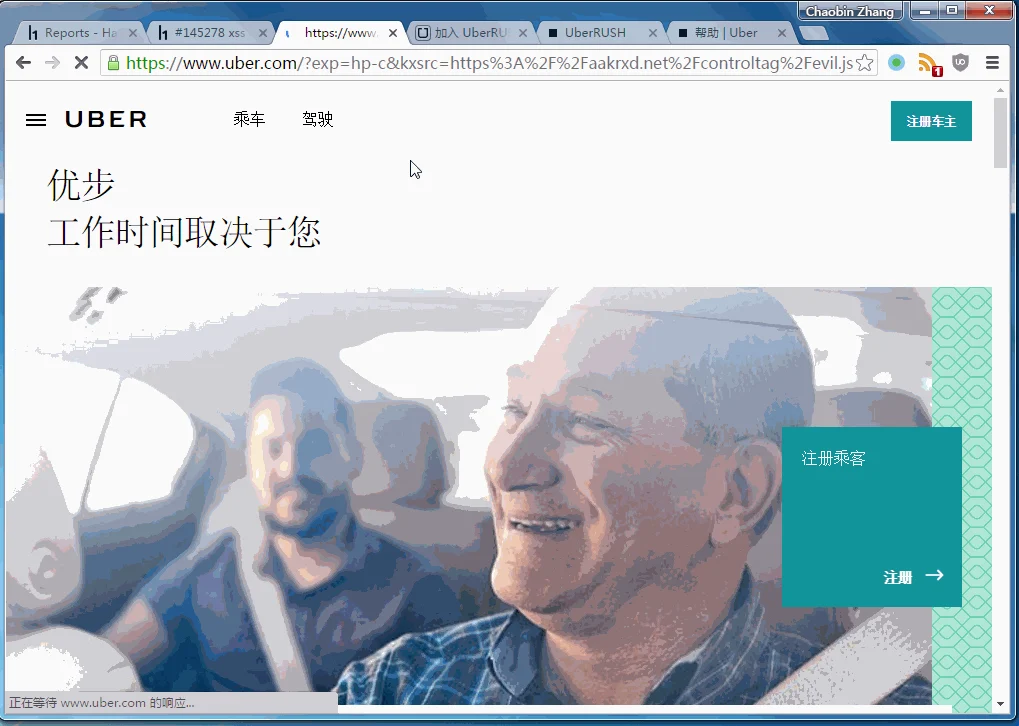
The report does not describe what the payload did beyond loading the attacker's JS file, and it gives no severity rating or CVSS score.
How this kind of bug works
This is client-side script injection caused by a validation check that is weaker than it looks. Code in the page decides whether a URL is acceptable and, if so, creates a script element pointing at it. When the check is a regular expression, any metacharacter that was meant literally becomes a wildcard or an anchor with different meaning. A dot matches any character, so a pattern intended to allow only krxd.net also accepts strings where those positions hold other characters, including a hostname the attacker owns.
The same class of mistake appears with unescaped characters in other positions: a missing anchor lets a permitted substring appear anywhere in the URL, and a permissive scheme or protocol-relative URL lets the script load from an unexpected origin. Because the loaded script runs in the page's origin, it can read the DOM, act with the user's session and reach anything the page's own scripts can reach.
Defences are straightforward: compare parsed URLs rather than matching strings, check the hostname against an exact allowlist after parsing, require HTTPS, and avoid building script sources from user input at all where a fixed list of files will do.
How to test for it
- Look for client-side code that reads a parameter and uses it to set a script
src, an iframesrc, or similar. Search the bundled JavaScript for parameter names passed to element creation or attribute assignment. - Identify the validation in front of it. If it is a regex, read it character by character and note every metacharacter that should have been escaped.
- Work out what the pattern actually accepts. In the browser console, test candidate strings against the regex directly, as the researcher did here, rather than guessing.
- Build a hostname or URL that satisfies the pattern but points at infrastructure you control, serve a harmless script from it over HTTPS, and pass it in the parameter.
- A positive result is your script executing in the target origin: a visible marker, a DOM change, or a callback to your server. Confirm it in a fresh session and note whether authentication is needed.
Common false positives: the parameter is validated again server-side; the script is loaded in a sandboxed iframe with an opaque origin; a Content Security Policy blocks the external origin; or the regex test you ran is not the one actually used at runtime because a different bundle is served.
How it is fixed
Parse the URL and compare the hostname exactly against an allowlist, rather than pattern-matching the raw string. Escape every literal metacharacter in any regex that remains, and anchor it at both ends. Restrict the scheme to HTTPS and, where possible, restrict the path as well. A Content Security Policy with a tight script-src allowlist limits the damage from any check that is bypassed.
Hunting notes
Third-party tag managers and analytics loaders are a good place to start: they frequently take a source URL from a query parameter and validate it with a hand-written regex. Recon signals include parameters whose names suggest a script source, references to vendor domains in bundled JS, and loader files hosted on shared tag CDNs.
What happened, in plain words
A security researcher spent about three days looking for a bug that would earn a bounty on HackerOne, a platform where companies pay people for reporting security flaws. The result was a cross-site scripting (XSS) bug on an Uber website, and the report says the bounty was $7,000. The write-up was published on zhchbin.github.io, which is the researcher's own site, not the Uber site that had the flaw.
XSS is a class of bug where an attacker gets their own JavaScript to run inside someone else's web page. JavaScript is the programming language that browsers run to make pages interactive. If an attacker's code runs inside a page, it runs with that page's permissions, which is why this matters.
While reading the JavaScript that Uber's site loaded, the researcher found a piece of code that fetches another script file and runs it. The report says the file could still be seen at the time of writing at:
https://tags.tiqcdn.com/utag/uber/main/prod/utag.273.js
Tag managers are tools that let a company load extra scripts (analytics, advertising, tracking) into its pages without changing the page code itself. After the fix, the report says, the Uber site no longer loads that file.
Reading the snippet, the researcher concluded that a parameter called kxsrc could be controlled by whoever visited the page, and that if certain conditions were met, the JavaScript file named in that parameter would be loaded. A parameter is the part of a URL after the ?, the place where a site passes values around, for example ?kxsrc=something.
Why the check failed
The code looked safe at first glance: it seemed to allow only files under the krxd.net domain. A domain is the part of a web address that identifies who owns it, like the example.com in www.example.com.
The flaw was in the regular expression used for that check. A regular expression (regex) is a pattern used to test whether text has a certain shape, a bit like a template with wildcards. In a regex, the dot . means "any single character", not "a literal dot". So a pattern written to allow only krxd.net also accepts strings where those dots are replaced by other characters, including a domain the attacker owns.
The researcher demonstrated this in the browser console, which is a panel built into every browser (opened with F12) where you can type JavaScript and see the result immediately.
The image shows that console experiment. The report does not reproduce the regex itself, so the exact pattern is not available here; what it does say is that in a regex the dot matches any character.
Proof of concept
The proof of concept was simple: register a domain, serve it over HTTPS, put a small JavaScript file on it, and pass it in the parameter. HTTPS is the encrypted version of the web protocol, the one shown by the padlock in the address bar. The report shows the proof of concept working.
The report does not describe what the payload did beyond loading the attacker's JS file, and it gives no severity rating or CVSS score.
In general, how this kind of bug works
Code in the page decides whether a URL is acceptable and, if so, creates a script element pointing at it. When the check is a regex, any character that was meant literally but not escaped becomes a wildcard with a different meaning. A dot matches any character, so a pattern meant to allow only krxd.net also accepts strings where those positions hold other characters, including a hostname the attacker owns.
The same mistake appears in other forms: a missing anchor lets a permitted substring appear anywhere in the URL, and a permissive scheme or protocol-relative URL lets the script load from an unexpected origin. Because the loaded script runs in the page's origin, it can read the page, act with the user's session and reach anything the page's own scripts can reach. A session is the logged-in state a site keeps for you, usually tied to a cookie, a small piece of data the browser stores and sends back with each request.
Defences are straightforward: compare parsed URLs rather than matching raw strings, check the hostname against an exact allowlist after parsing, require HTTPS, and avoid building script sources from user input at all where a fixed list of files will do.
In general, how to test for it
- Look for client-side code that reads a parameter and uses it to set a script
src, an iframesrc, or similar. Search the bundled JavaScript for parameter names passed to element creation or attribute assignment. - Identify the validation in front of it. If it is a regex, read it character by character and note every metacharacter that should have been escaped.
- Work out what the pattern actually accepts. In the browser console, test candidate strings against the regex directly, as the researcher did here, rather than guessing.
- Build a hostname or URL that satisfies the pattern but points at infrastructure you control, serve a harmless script from it over HTTPS, and pass it in the parameter.
- A positive result is your script executing in the target origin: a visible marker, a page change, or a callback to your server. Confirm it in a fresh session and note whether authentication is needed.
Common false positives: the parameter is validated again on the server; the script is loaded in a sandboxed iframe with an opaque origin; a Content Security Policy blocks the external origin; or the regex you tested is not the one actually used at runtime because a different bundle is served.
In general, how it is fixed
Parse the URL and compare the hostname exactly against an allowlist, rather than pattern-matching the raw string. Escape every literal metacharacter in any regex that remains, and anchor it at both ends. Restrict the scheme to HTTPS and, where possible, restrict the path as well. A Content Security Policy with a tight script-src allowlist limits the damage from any check that is bypassed.
In general, where to look
Third-party tag managers and analytics loaders are a good place to start: they frequently take a source URL from a query parameter and validate it with a hand-written regex. Signals worth watching include parameters whose names suggest a script source, references to vendor domains in bundled JavaScript, and loader files hosted on shared tag CDNs.
Glossary
- XSS (cross-site scripting): a bug where an attacker's JavaScript runs inside someone else's web page, with that page's permissions.
- Bounty: a payment a company makes for a valid security report.
- HackerOne: a platform where companies run bounty programmes and receive reports.
- JavaScript: the programming language browsers run to make pages interactive.
- Parameter: a value passed in a URL after the
?, used by the page to receive input. - Domain: the part of a web address that identifies its owner, such as
example.com. - Hostname: the specific name of a machine in a URL, such as
wwwinwww.example.com. - Regular expression (regex): a pattern used to test whether text has a certain shape, where some characters have special meanings.
- Metacharacter: a character in a regex with a special meaning, such as
.for any character. - Escaping: marking a special character so it is treated literally, for example
\.for a literal dot. - Anchor: a regex marker that ties a pattern to the start or end of the text.
- Browser console: a panel in the browser (F12) where you can run JavaScript and see results.
- HTTPS: the encrypted version of the web protocol, shown by the padlock in the address bar.
- Origin: the combination of scheme, host and port that a page belongs to; scripts from one origin share its permissions.
- Session: the logged-in state a site keeps for you, usually tied to a cookie.
- Cookie: a small piece of data the browser stores and sends back to a site with each request.
- Tag manager: a tool that loads extra scripts into a page without changing the page code.
- CDN: a network of servers that host shared files, such as scripts, close to users.
- Allowlist: a list of values that are explicitly permitted, with everything else rejected.
- Content Security Policy (CSP): a browser rule set, sent by the site, that says which sources scripts may be loaded from.
- iframe: an embedded page inside another page.
- Sandboxed iframe: an iframe with restrictions that stop its scripts from acting as the parent page.
- Proof of concept (PoC): a minimal demonstration that a bug can actually be exploited.
- Payload: the code or value an attacker sends to trigger the bug.
- CVSS: a standard scoring system for the severity of a vulnerability.
- False positive: a result that looks like a bug but is not exploitable in practice.



