XSS on a Jira Subdomain | by lnxcs
A Jira subdomain running version 8.0.2 was vulnerable to cross-site scripting through the searchOwnerUserName parameter. An attacker could inject script into a victim's browser, though the report does not detail the impact.

lnxcs.medium.com
Published on lnxcs.medium.com
Bug Bounty
The full write-up lives on its author's site
It belongs to its author, so we link to it rather than copy it. The other two tabs are our own rewrites, checked against it.
Context
This is a short account of a reflected cross-site scripting finding on a Jira subdomain. The researcher was hunting on a site referred to only as example.com. During recon they found a subdomain, jira.example.com, which hosted an Atlassian Jira instance. Jira is the issue and project tracker, and the affected feature here is the user search, which takes a username and looks it up. The report does not describe the search page in any more detail than that.
Setup
The only tooling mentioned is Burp Suite, used to capture and replay the request, and Firefox, used to load the resulting URL. No accounts, roles or credentials are described. The one precondition that mattered was the Jira version: the instance was running Jira 8.0.2. The researcher checked the login page and other obvious surfaces for misconfigurations and found none, then turned to known vulnerabilities for that version.
Finding it
After the recon phase turned up the subdomain, the researcher opened it and looked for misconfigurations on the login and elsewhere, without success. The version banner then became the lead: Jira 8.0.2, so they went looking for vulnerabilities affecting that release and found one that could be exploited. The report does not name the CVE or describe the advisory it came from.
The vulnerable parameter is searchOwnerUserName, which the researcher describes as vulnerable to XSS.
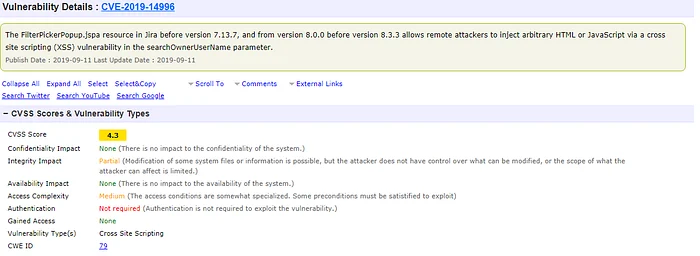
The image above is captioned in the report as the vulnerability itself.
Exploitation
Step 1: locate the parameter in a request
With Burp Suite running, the researcher searched the captured traffic for the parameter and found it.
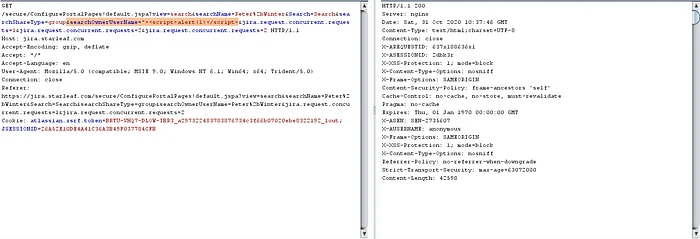
The report notes that the payload and the parameter can be seen in the picture.
Step 2: send the request and load the result
The request was sent with the payload in searchOwnerUserName, and the resulting URL was opened in Firefox, where the XSS payload was injected.
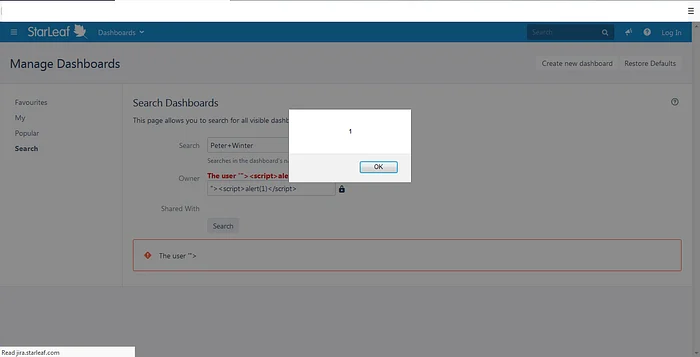
The report does not reproduce the raw request, the exact payload string or the server response in text; they appear only in the screenshots above.
Root cause
The report does not analyse the underlying code. What it establishes is that the searchOwnerUserName parameter reflected attacker-controlled input into a response without preventing script execution, in Jira 8.0.2. Whether the failure was missing output encoding, an unsafe sink in the page's JavaScript, or something else is not stated, so any specific mechanism would be speculation.
Impact
A reflected XSS in an authenticated Jira instance lets an attacker run script in the context of the Jira origin against whoever opens a crafted link.
Fix
The only outcome recorded is the triage result: the submission was closed as a duplicate. The researcher notes the takeaway was learning how to exploit the vulnerability.
Variants to test
- Other Jira versions and deployments. Check the version banner on any Jira instance you encounter and compare it against known XSS advisories for that release. A positive result is a reflected parameter that executes script when the URL is opened in a browser.
- Other user-search parameters. The same search feature may expose sibling parameters that reflect input. Send a benign marker and look for it unencoded in the response, then test whether it lands in an executable context.
- Reflection context. Determine whether the value is reflected into HTML, an attribute or a JavaScript string, since that decides which payload shape works. A positive result is execution in the page's origin, not just the marker appearing in the body.
- Authentication state. Test the parameter both with and without a session to see whether the reflection is reachable pre-auth. A positive result is the same execution without valid credentials.
Peace out.
What happened, in plain words
A security researcher was testing a website, which the write-up calls example.com, to see whether it had any weaknesses. While mapping out what the site was made of (a phase called recon), they found a smaller site attached to it, a subdomain called jira.example.com. That subdomain was running a piece of software called Jira, made by Atlassian. Jira is a tool teams use to keep track of tasks, bugs and projects, a bit like a shared to-do list with a discussion thread attached to every item.
The researcher looked around the Jira login page and other obvious places for mistakes in how it was set up, and found none. Then they noticed which version of Jira was running: Jira 8.0.2. Software versions matter because each version has a known list of bugs, and some of those bugs are security holes. So the researcher went looking for known problems in that version and found one that could be exploited.
The problem was in a parameter called searchOwnerUserName. A parameter is a named piece of information that a web page sends to the server, usually visible in the address bar after a question mark, for example ?name=alice. This particular parameter is used by Jira's user search: you type a username, and the page looks it up. The researcher found that whatever you put into that parameter came back in the page in a way that let you run your own code in the browser. That class of bug is called cross-site scripting, or XSS.
They captured the request with a tool called Burp Suite, put a payload into the parameter, sent it, and opened the resulting link in Firefox. The payload was injected. They reported it, and the report was closed as a duplicate, meaning someone else had already reported the same issue. The researcher's own takeaway was that they learned how to exploit the vulnerability.
The pieces you need to know first
Before walking through the steps, here are the ideas the write-up leans on, explained from scratch.
Subdomain. A domain is the name of a site, like example.com. A subdomain is a name placed in front of it, like jira.example.com, and it usually points at a different machine or a different service run by the same organisation. Think of example.com as a company's main reception and jira.example.com as a separate office in the same building: same organisation, different door.
Recon. Short for reconnaissance. It is the mapping-out phase at the start of a test: finding out which subdomains exist, which services run on them, and which versions of software they use. It is like walking around a building noting which doors are unlocked before trying any of them.
Jira. A product by Atlassian for tracking issues and projects. Teams create tickets, assign them, comment on them and search for them. The feature involved here is the user search, which takes a username and finds matching accounts.
Version banner. Many web applications display, somewhere on the page or in a response, which version they are running. It is useful for support, but it also tells an attacker exactly which known bugs to try. It is like a shop putting a sign in the window saying which model of lock it uses.
Parameter. A named value passed to a web application, typically in the URL after a ?, or inside the body of a form submission. The application reads the value and does something with it. Here the parameter is searchOwnerUserName, and the application uses its value to search for a user.
Request and response. Your browser sends a request to a server ("please give me this page, and here is the search term I typed"), and the server sends back a response (the page, with the results). Every click and every form submission is a request and a response.
Reflected input. When a server takes a value from your request and pastes it straight back into the page it returns, that value is said to be reflected. If the server pastes it back without cleaning it up, whatever you typed becomes part of the page.
Cross-site scripting (XSS). A bug where an application lets an attacker's input end up in a page as code rather than as plain text. Normally, if you type <b>hello</b> into a search box, you want to see those characters on screen. If the site instead treats them as instructions and makes the word bold, then it is interpreting your input as code. XSS is the same idea with script instead of bold: the attacker's input is treated as a program, and the browser runs it. The everyday comparison is a comment box that, instead of printing your comment, follows any instruction written in it.
Payload. The specific piece of input an attacker sends to trigger a bug. For XSS, the payload is the snippet of script or markup that, if the site is vulnerable, will be executed by the browser.
Burp Suite. A tool used by security testers that sits between your browser and the server. It records every request and response, lets you pause them, edit them and send them again. Think of it as a recording device plus an editing desk for web traffic.
Duplicate. Bug bounty programmes receive many reports. If two people report the same issue, the second one is marked as a duplicate. It is still a valid finding, but the reward usually goes to whoever reported it first.
Finding the subdomain and the version
During recon the researcher found jira.example.com. They opened it and checked the login page and other obvious surfaces for misconfigurations, meaning settings that are wrong or too permissive. They found none. That is a normal result: most of the time the front door is fine.
The lead came from the version: Jira 8.0.2. Knowing the exact version lets you look up which security issues are known to affect it. The researcher did that and found one that could be exploited. The write-up does not name the CVE (the public identifier for a known vulnerability) or the advisory it came from, so we only know that a known issue for that version existed and was usable here.
The vulnerable parameter is searchOwnerUserName, which the researcher describes as vulnerable to XSS.
The image above is captioned in the write-up as the vulnerability itself.
Step 1: find the parameter in a real request
To exploit a parameter, you first need to see it in a real request, so you know exactly how the application sends it and what the surrounding request looks like. The researcher started Burp Suite and searched for the parameter, and found it. They found it.
The write-up notes that the payload and the parameter can be seen in the picture. The write-up does not reproduce the raw request, the exact payload string or the server response in text; they appear only in the screenshots.
Step 2: send the request and open the result
The researcher put the payload into searchOwnerUserName, sent the request, and opened the resulting URL in Firefox. The XSS payload was injected.
That is the whole exploitation: a crafted request whose parameter value comes back into the page as code, and a browser that runs it.
Why it works
The write-up does not analyse the underlying code. What it establishes is that the searchOwnerUserName parameter reflected attacker-controlled input into a response without preventing script execution, in Jira 8.0.2. Whether the failure was missing output encoding (the server not converting special characters into harmless text), an unsafe sink in the page's JavaScript (a place where a value is treated as code), or something else is not stated, so any specific mechanism would be speculation.
What an attacker could do with it
A reflected XSS in an authenticated Jira instance lets an attacker run script in the context of the Jira origin against whoever opens a crafted link. In plain terms: if a logged-in Jira user clicks the attacker's link, the attacker's script runs as if it were part of Jira itself, with the same access that user has. The write-up does not spell out consequences such as session theft (stealing the cookie that keeps you logged in) or actions performed on behalf of the user, and it does not state whether authentication was required to reach the vulnerable parameter.
The fix
The only outcome recorded is the triage result: the submission was closed as a duplicate. The researcher notes the takeaway was learning how to exploit the vulnerability.
Variants to test
- Other Jira versions and deployments. Check the version banner on any Jira instance you encounter and compare it against known XSS advisories for that release. A positive result is a reflected parameter that executes script when the URL is opened in a browser.
- Other user-search parameters. The same search feature may expose sibling parameters that reflect input. Send a benign marker and look for it unencoded in the response, then test whether it lands in an executable context.
- Reflection context. Determine whether the value is reflected into HTML, an attribute or a JavaScript string, since that decides which payload shape works. A positive result is execution in the page's origin, not just the marker appearing in the body.
- Authentication state. Test the parameter both with and without a session to see whether the reflection is reachable pre-auth. A positive result is the same execution without valid credentials.
Peace out.
Glossary
- Subdomain: a name placed in front of a domain, like
jira.example.com, usually pointing at a separate service run by the same organisation. - Recon: the mapping-out phase of a security test, finding subdomains, services and software versions before trying anything.
- Jira: Atlassian's issue and project tracking product, used to create, assign and search for tickets.
- Version banner: a place where an application reveals which version it is running, useful for support and also for attackers choosing which known bugs to try.
- Parameter: a named value passed to a web application, typically in the URL or in a form submission, which the application reads and acts on.
- Request: the message your browser sends to a server asking for a page or submitting data.
- Response: the message the server sends back, containing the page or the result of your submission.
- Reflected input: a value from your request that the server pastes straight back into the page it returns.
- Cross-site scripting (XSS): a bug where an application lets attacker input end up in a page as code, so the browser runs it instead of displaying it as text.
- Payload: the specific piece of input sent to trigger a bug, here the snippet that gets executed by the browser.
- Burp Suite: a tool that sits between browser and server, recording, pausing, editing and replaying web traffic.
- CVE: a public identifier for a known security vulnerability, used to look up advisories and fixes.
- Output encoding: converting special characters in a value into harmless text before placing it in a page, so it is displayed rather than executed.
- Sink: a place in code where a value is treated as code or markup, which is dangerous if the value is attacker-controlled.
- Session: the state that keeps you logged in across requests, usually carried by a cookie.
- Cookie: a small piece of data the browser stores for a site and sends back with each request, often used to identify your session.
- Duplicate: a bug report describing an issue that someone else already reported, so it is closed without a separate reward.




