XSS on twitter worth 1120

The original lives on medium.com
We do not hold its text, so we link to it rather than copy it. The other two tabs are our own rewrites, checked against it.
Context
This is a write-up about a cross-site scripting (XSS) issue on Twitter's developer site, dev.twitter.com, which earned a bounty of 1120 USD. The researcher, Bywalks (@bywalkss), built on an earlier public write-up by bobrov about the same host. The feature involved is the redirect behaviour of the developer site: when you visit certain addresses, the server responds with a 302 redirect, and the response body contains a link whose href is populated from the requested URL. The researcher found that Twitter's fix for the earlier issue no longer held.
Setup
No special accounts, roles or tooling are described. The work was done by visiting dev.twitter.com in a browser and fuzzing URLs. The starting point was reading bobrov's blog post at https://blog.blackfan.ru/2017/09/devtwittercom-xss.html, which the researcher credits as the source of the idea.
Finding it
The researcher had been following Twitter security for a while with little success, so turned to Twitter's past vulnerability reports to look for weaknesses in how earlier fixes had been applied. After reading bobrov's write-up, the researcher visited dev.twitter.com to check for remaining problems. While collecting information through Google, an interesting link turned up:
https://dev.twitter.com/web/sign-inhttps://dev.twitter.com/basics/adding-international-support-to-your-apps
That concatenated-looking URL suggested something worth fuzzing. After a period of testing, the researcher found that adding a / at the end of the URL changed the behaviour, for example when visiting:
https://dev.twitter.com/web/sign-inhttps://dev.twitter.com/http://www.bywalks.com/
the result was:
location=http://www.bywalks.com
href=http://www.bywalks.com
In other words, Twitter's fix for the original issue no longer held.
Exploitation
Step 1: Understand the original 302 behaviour
When you visit some addresses, the server returns a 302, similar to the picture below.
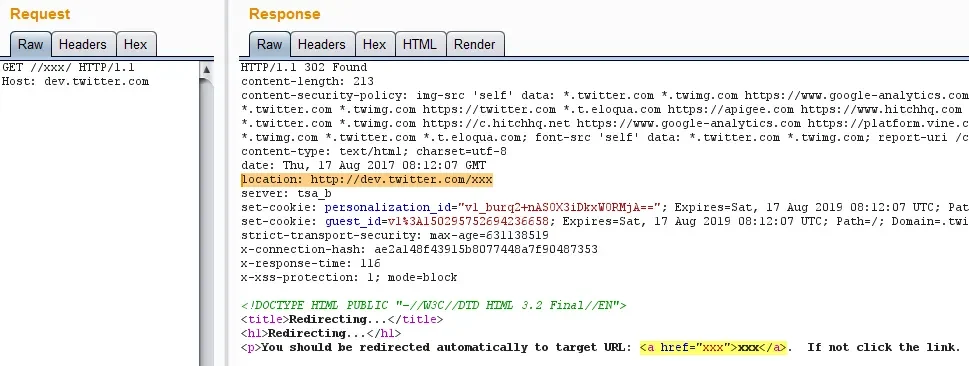
In the returned body, location is populated according to the requested URL, and the requested URI is placed in the href attribute.
Step 2: Try the obvious payload
The first idea is to request:
dev.twiiter.com//javascript:alert('1');/
As expected, the return body contains:
<a href="javascript:alert('1');/"> Xxx</a>
but the returned location is:
location:javascript:alert('1');/
and the browser does not execute the script. The redirect itself blocks the payload.
Step 3: Learn from bobrov's fuzzing
bobrov fuzzed to get around this limitation and succeeded. His fuzzing process is shown below, taken from his blog.
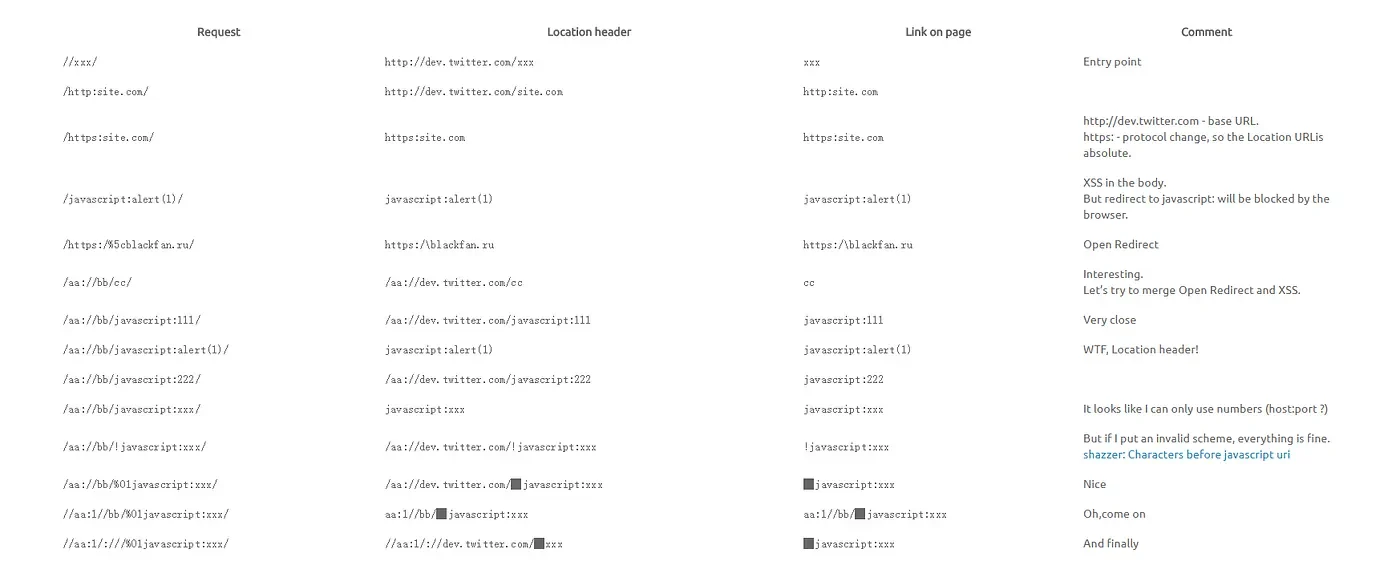
His final payload was:
https://dev.twitter.com//x:1/:///%01javascript:alert(document.cookie)
The server response was:
Location header = //aa :1/:/dev.twitter.com/%01xxx
returned body = <a Href="javascript:alert(document.cookie)">xxx</a>
Step 4: Understand why the payload fires
JavaScript in an href only runs when the a tag is clicked, and the location header is http:////aa:1/:/dev.twitter.com/%01xxx, so the question is whether the browser jumps. The key point is the port: normally a site is accessed on port 80 or 8080, and when the port in the address is 1, the browser does not jump. Because the page stays put, the a tag can be clicked, so the issue can be combined with clickjacking to make a victim trigger the XSS.
Step 5: Reproduce the bypass on the live site
After fuzzing, the researcher's final payload was:
https://dev.twitter.com//web%2f:1/:///%01javascript:alert(1)/
This returned the 1120 USD reward.
Root cause
The server builds the Location header and the href of a link in the 302 response body from the requested URL, and the two are extracted in different ways. That difference is what allows a URL to be crafted so that the href becomes a javascript: URI while the Location header points at a host and port that the browser will not follow. The port 1 trick means the browser does not jump, so the link can be clicked. The original fix for the earlier report no longer held for the trailing-slash variant.
Impact
The payload runs JavaScript when the crafted link is clicked, as shown by the alert. Because the payload requires a click, the researcher suggests combining it with clickjacking to make the victim trigger it. The report does not describe what data or actions the script could reach beyond the alert used as proof.
Fix
Twitter had already fixed the original issue, but that fix no longer held for the trailing-slash variant. The report does not describe the remediation applied to this second issue.
Variants to test
- Append a trailing
/to URLs on other hosts that reflect the request URI into a redirect body, and check whetherlocationandhrefdiverge. A positive result is ahrefcontainingjavascript:while theLocationheader points to a host and port the browser will not follow. - Try the
%01and:1/:///constructs from the payloads above on other 302 endpoints. A positive result is a returned body with an<a href="javascript:...">that can be clicked without the browser navigating away. - Look for concatenated or malformed URLs indexed by search engines, as the researcher did with the
web/sign-inhttps://...link. A positive result is a URL that behaves differently when a/is appended. - Test port
1in the host portion of reflected redirects. A positive result is a page that renders the link without jumping, allowing a clickjacking overlay to trigger it.
What happened, in plain words
A security researcher found a way to make a link on Twitter's developer website, dev.twitter.com, run JavaScript code in a visitor's browser. This kind of bug is called cross-site scripting, or XSS for short. The researcher was paid 1120 USD for reporting it.
The researcher did not start from nothing. Another researcher, bobrov, had already published a write-up about a similar problem on the same site. Twitter had fixed that earlier problem, but the fix no longer held. By reading the old write-up and then poking at the site, Bywalks found that adding a single / character to the end of a URL changed the behaviour. That is the core of this story: an old bug that was patched, and a fix that no longer held.
To follow along you only need a browser and some patience. No special tools, accounts or permissions are described.
The feature involved
When you type an address into your browser and press Enter, the browser asks a web server for that page. The server usually answers with the page itself, but sometimes it answers with a short message that says "the thing you want is over there, go to this other address instead". That message is called a redirect, and the specific status code for it is 302.
On dev.twitter.com, some addresses produced a 302 redirect. The interesting part is what came back in the body of that redirect response: a small HTML link, an <a> tag, whose destination (href) was built from the URL the visitor had requested. In other words, the server took part of what you typed and pasted it into a link on the page it sent back. Whenever a website takes input from the visitor and puts it into a page, that is a place where XSS can live, because the visitor (or an attacker) controls part of the page's content.
Step 1: Understand the original 302 behaviour
The researcher first explains bobrov's earlier finding. When you visit some addresses, the server returns a 302, similar to the picture below.
The picture shows the kind of response the server sends back for these addresses. In the returned body, location is filled in according to the requested URL, and the requested URI is placed in the href attribute. Two things are being built from the same input: the Location header (the instruction telling the browser where to go next) and the href of the link in the page body. Keep that in mind, because the whole bug depends on those two things being built in slightly different ways.
Step 2: Try the obvious payload
The first idea is to ask the server for an address that contains JavaScript instead of a normal web address. The researcher tries:
dev.twiiter.com//javascript:alert('1');/
Line by line, this is one URL. dev.twiiter.com is the host. The double slash // starts the path portion. Then comes javascript:alert('1');/, which is not a normal path but a piece of JavaScript: alert('1') is the browser instruction "show a small pop-up box containing the text 1". The idea is that if the server copies this into the link's href, the link will point at JavaScript code rather than at a web page.
As expected, the return body contains:
<a href="javascript:alert('1');/"> Xxx</a>
This is one HTML line. <a starts a link. href="javascript:alert('1');/" says the link's destination is the JavaScript alert('1');/. > Xxx</a> is the visible text of the link, here Xxx, and </a> closes it. So the server did paste the input into the link, exactly as hoped.
But the returned location is:
location:javascript:alert('1');/
This is the redirect instruction. It tells the browser to go to javascript:alert('1');/. And the browser does not execute the script. Why not? Because the browser treats the redirect as a navigation: it tries to leave the current page and go to the address in Location. The browser does not execute the script, and the report does not explain why. The redirect itself blocks the payload. The link in the body is never clicked, because the browser is busy following the redirect instruction.
Step 3: Learn from bobrov's fuzzing
bobrov did not stop there. He fuzzed, which means he tried many small variations of the URL automatically or semi-automatically, watching for one that behaved differently. Fuzzing is like trying lots of keys on a lock: most do nothing, but one may turn. He succeeded in getting around the limitation. His fuzzing process is shown below, taken from his blog.
His final payload was:
https://dev.twitter.com//x:1/:///%01javascript:alert(document.cookie)
This is again a single URL, but a strange-looking one. https://dev.twitter.com is the normal site. Then //x:1/:/// is a deliberately malformed chunk: x looks like a host name, :1 looks like a port number, and the slashes and colons are arranged to confuse whatever code parses the URL. %01 is a percent-encoded control character (byte value 1), an invisible character that parsers often handle inconsistently. Finally javascript:alert(document.cookie) is the JavaScript payload. document.cookie is the browser's store of cookies for the current site: small pieces of text a site asks the browser to keep and send back on later requests, often used to remember who is logged in. Showing them in an alert box proves the script can read them.
The server response was:
Location header = //aa :1/:/dev.twitter.com/%01xxx
returned body = <a Href="javascript:alert(document.cookie)">xxx</a>
Line by line: the Location header tells the browser to go to //aa :1/:/dev.twitter.com/%01xxx, a malformed address involving host aa, port 1, and the original site name. The returned body contains <a Href="javascript:alert(document.cookie)">xxx</a>, a link whose destination is the JavaScript payload, with xxx as its visible text. Notice the mismatch: the Location header points somewhere odd, while the href in the body points at JavaScript. The two were built from the same input but came out different, and that difference is the opportunity.
Step 4: Understand why the payload fires
JavaScript in an href only runs when the a tag is clicked. A link is not a script that runs on page load; it is something the visitor has to activate. So the question becomes: will the browser jump away because of the Location header, or will it stay on the page long enough for someone to click the link?
The location header is http:////aa:1/:/dev.twitter.com/%01xxx, so the question is whether the browser jumps. The key point is the port. A port is the numbered door on a server that a particular service listens at; the web's usual doors are 80 for plain HTTP and 443 for HTTPS, and 8080 is a common alternative. Normally a site is accessed on port 80 or 8080. When the port in the address is 1, the browser does not jump.
Because the page stays put, the a tag can be clicked. So the issue can be combined with clickjacking: an attacker loads the vulnerable page inside an invisible frame on their own site, positions it so that the victim's click lands on the link, and the victim triggers the XSS without realising. Clickjacking is like putting a transparent sheet over a button so the user thinks they are clicking something harmless.
Step 5: Reproduce the bypass on the live site
Now the researcher's own work. The researcher had been following Twitter security for a while with little success, so turned to Twitter's past vulnerability reports to look for weaknesses in how earlier fixes had been applied. Fixes are often narrow: they block the exact input from the original report and miss close variations. Reading old reports is a way to find those gaps.
After reading bobrov's write-up, the researcher visited dev.twitter.com to check for remaining problems. While collecting information through Google, an interesting link turned up:
https://dev.twitter.com/web/sign-inhttps://dev.twitter.com/basics/adding-international-support-to-your-apps
This looks like two URLs glued together: https://dev.twitter.com/web/sign-in followed immediately by https://dev.twitter.com/basics/adding-international-support-to-your-apps. A normal page address does not look like that, so it suggested the site was doing something odd with URLs, which is exactly the kind of place worth fuzzing.
After a period of testing, the researcher found that adding a / at the end of the URL changed the behaviour, for example when visiting:
https://dev.twitter.com/web/sign-inhttps://dev.twitter.com/http://www.bywalks.com/
This is the glued-together URL with http://www.bywalks.com/ inserted and a trailing slash. The result was:
location=http://www.bywalks.com
href=http://www.bywalks.com
Line by line: the Location header now points at http://www.bywalks.com, and the link's href also points at http://www.bywalks.com. Both were taken from the input, and the trailing slash changed how the server split it up. In other words, Twitter's fix for the original issue no longer held.
After further fuzzing, the researcher's final payload was:
https://dev.twitter.com//web%2f:1/:///%01javascript:alert(1)/
Line by line: https://dev.twitter.com is the site. //web%2f:1/:/// is the malformed chunk, where %2f is the percent-encoded form of /, so web%2f is web/ written in a way that parsers may treat differently from a literal slash. :1 is the port trick again. %01 is the invisible control character. javascript:alert(1) is the payload, and the final / is the trailing slash that made the difference. This returned the 1120 USD reward.
Root cause
The server builds the Location header and the href of a link in the 302 response body from the requested URL, and the two are extracted in different ways. That difference is what allows a URL to be crafted so that the href becomes a javascript: URI while the Location header points at a host and port that the browser will not follow. The port 1 trick keeps the browser on the page so the link can be clicked. The original fix for the earlier report no longer held for the trailing-slash variant.
Impact
An attacker who can get a victim to click the crafted link can run JavaScript in the context of dev.twitter.com. Running in the context of a site means the script is treated as if it came from that site. Because the payload requires a click, the researcher suggests combining it with clickjacking to make the victim trigger it. The report does not describe what data or actions the script could reach beyond the alert used as proof.
Fix
Twitter had already fixed the original issue, but that fix no longer held for the trailing-slash variant.
Variants to test
- Append a trailing
/to URLs on other hosts that reflect the request URI into a redirect body, and check whetherlocationandhrefdiverge. A positive result is ahrefcontainingjavascript:while theLocationheader points to a host and port the browser will not follow. - Try the
%01and:1/:///constructs from the payloads above on other 302 endpoints. A positive result is a returned body with an<a href="javascript:...">that can be clicked without the browser navigating away. - Look for concatenated or malformed URLs indexed by search engines, as the researcher did with the
web/sign-inhttps://...link. A positive result is a URL that behaves differently when a/is appended. - Test port
1in the host portion of reflected redirects. A positive result is a page that renders the link without jumping, allowing a clickjacking overlay to trigger it.
Glossary
- XSS (cross-site scripting): a bug where a website puts visitor-controlled text into a page in a way that lets an attacker run their own JavaScript in other visitors' browsers.
- 302 redirect: a server response that tells the browser "the thing you asked for is at another address, go there instead".
- Location header: the part of a redirect response that names the address the browser should go to next.
- href: the attribute of an HTML link that holds its destination address.
- HTML: the language web pages are written in;
<a>is the tag for a link. - JavaScript: the programming language browsers run;
alert()shows a pop-up box. - Payload: the piece of input an attacker crafts to trigger a bug, here a URL containing JavaScript.
- Fuzzing: trying many small variations of an input to find one that behaves unexpectedly.
- URI / URL: the address of something on the web; URI is the more general term.
- Port: the numbered door on a server where a service listens; 80 and 443 are the usual web ports.
- Cookie: a small piece of text a site asks the browser to store and send back on later requests, often used to keep you logged in.
- document.cookie: the browser's JavaScript-accessible store of cookies for the current page.
- Clickjacking: tricking a user into clicking something on a hidden or disguised page, often by loading it in an invisible frame.
- Percent-encoding: writing a character as
%plus two hex digits, for example%2ffor/and%01for an invisible control character. - Bounty: a payment a company makes to a researcher who reports a security bug responsibly.




