Yet Another .NET deserialization
The C1 CMS SOAP endpoint TreeServiceFacade.GetMultipleChildren accepted an entityTokenType parameter that let an authenticated user choose any .NET assembly as the deserialisation type, and the code then invoked that assembly's Deserialize method via reflection. By selecting BinaryLogFormatter, which uses BinaryFormatter, an attacker could supply a base64-encoded malicious payload and achieve remote code execution on the server.

medium.com
Published on medium.com
This is my second post on white-box analysis but for another technology stack and vulnerability category: .NET deserialization leading to Remote Code Execution. The outcome for this self-paced training was CVE-2019-18211with an outstanding product vendor (friendly/fast communication and quick bugfixes available since…
The full write-up lives on its author's site
It belongs to its author, so we link to it rather than copy it. The other two tabs are our own rewrites, checked against it.
Context
C1 CMS is an open source content management system built on the Microsoft stack. According to the product authors' website, it is one of the top rated open source CMS products worldwide, with more than 85,000 installations across on-premise and cloud deployments. This write-up covers a white-box analysis of the CMS that ended in a .NET deserialisation flaw leading to remote code execution, tracked as CVE-2019-18211. The vendor was responsive: communication was friendly and fast, and a fix was available from 30 October 2019.
The feature at the centre of the finding is the CMS's service layer. C1 CMS makes heavy use of webservice calls based on SOAP requests, and the request structures for each service can be enumerated from the WSDL files that the application serves during normal browsing. The vulnerable path sits in the TreeServiceFacade and its EntityTokenSerializer, which deserializes EntityToken objects referenced by parameters of the GetMultipleChildren(...) method.
Setup
The latest C1 CMS package at the time, v6.6, was installed through the Microsoft Webmatrix installer, giving a running instance to investigate. The instance was analysed dynamically with live debugging using dnSpy.
The standard administrator account was used to create several lower privilege accounts, including users holding the Editor and Developer roles. Those accounts matter later: the exploit was delivered as an Editor, a low privilege user, and the conclusion was that any authenticated user could reach the same result.
Finding it
The approach was bottom-up: search directly for well-known .NET deserialisation issues, meaning user-controlled input that ends up in an insecure deserialisation call. The first observation was that C1 CMS seemed to prefer JSON objects sent through SOAP requests. No unsafe deserialisation was found for those JSON objects, for example through TypeNameHandling settings.
Technically, deserialisation candidates were located simply by looking for Deserialize methods in the loaded .NET assemblies. That search narrowed the focus to two classes: TreeServiceFacade and EntityTokenSerializer.
TreeServiceFacade exposes a method GetMultipleChildren(...) that can be called through a SOAP request. The request carries parameters that reference EntityToken objects, and those tokens are serialised and deserialised in the backend.
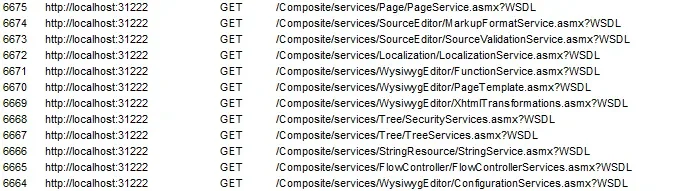
The screenshot shows the SOAP request structures observed in BurpSuite while browsing the application, the same structures that can be enumerated from the WSDL files.
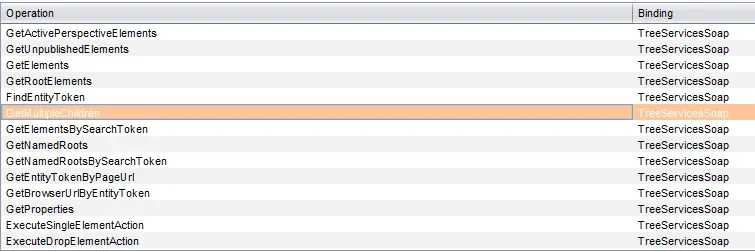
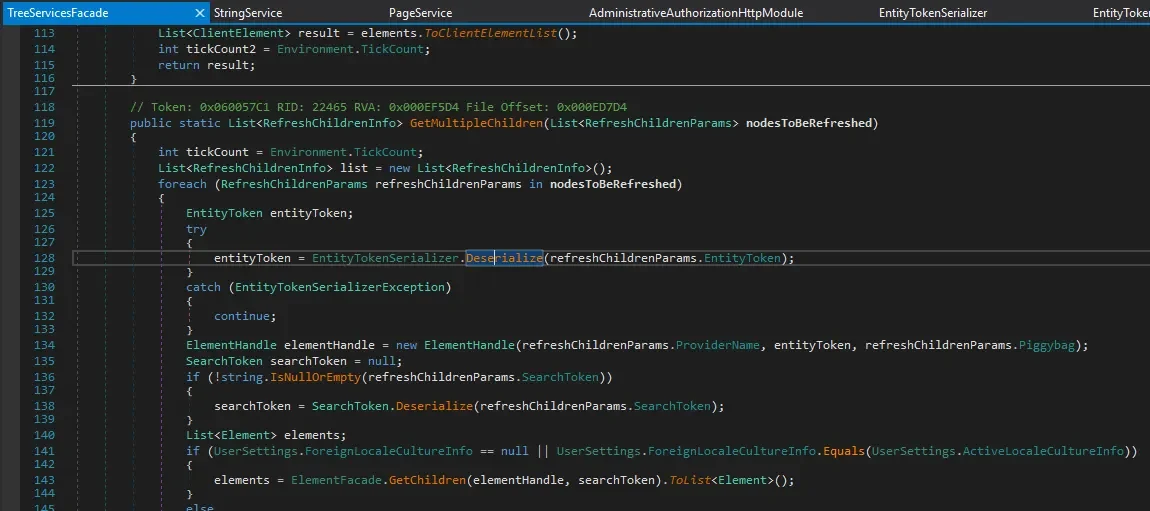
The two screenshots show the GetMultipleChildren(...) SOAP request and the EntityToken parameters it carries into the backend.
What made this interesting was a legacy deserialisation path that is taken when the incoming object is not based on JSON. In EntityTokenSerializer, the serializedEntityToken parameter is parsed with a regular expression:
_keyValuePairRegEx = new Regex(\\s*(?<Key>[^=\\s]*)\\s*=\\s*(?<IsNull>null|(?<Value>[^\\\\\\r\\n]*(\\\\. [^\\\\\\r\\n]*)*))\\s*,*\\s*, RegexOptions.Compiled)
Starting from that regular expression, valid objects could be built by hand. The concrete vulnerability turned out to be in the non-JSON part of EntityTokenSerializer: the entityTokenType parameter lets the caller fully control which .NET assembly is used as the type for deserialisation. The code then searched for a Deserialize method matching that assembly name and invoked it via Reflection.
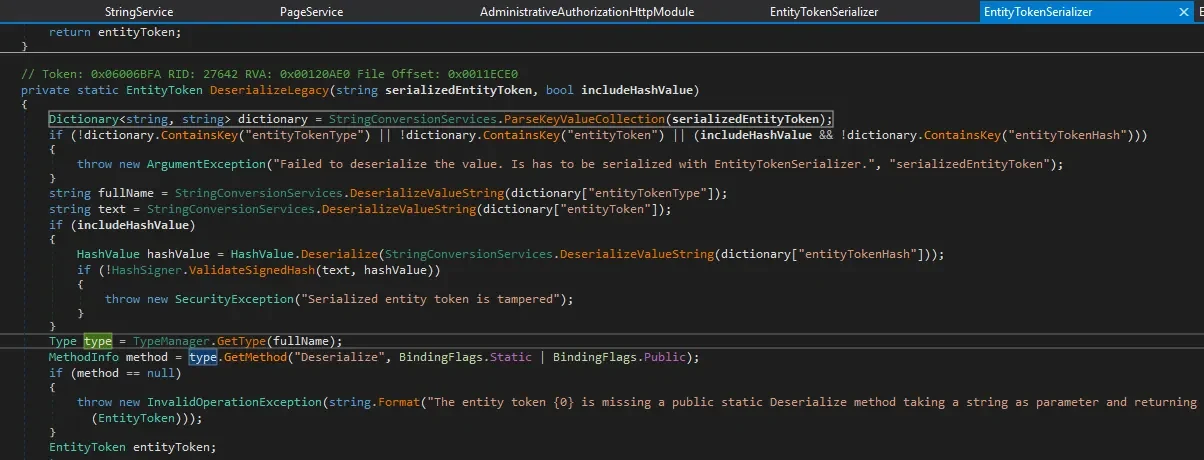
The screenshot shows the code path that resolves the attacker-supplied assembly name and invokes its Deserialize method through Reflection.
The only restriction was that the serialised object had to arrive as a String. Looking for a suitable formatter led to the well-known BinaryFormatter, used under the hood by Microsoft.Practices.EnterpriseLibrary.Logging.Formatters.BinaryLogFormatter. Calling the Deserialize function of that assembly accepts a String parameter, base64 decodes it, and feeds the result into the BinaryFormatter deserialisation call.
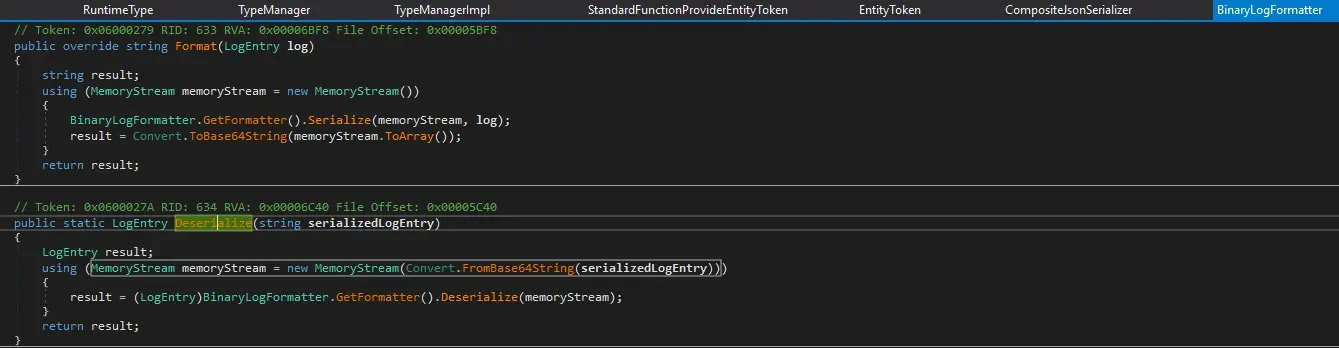
The screenshot shows the BinaryLogFormatter path: a string parameter is base64 decoded and passed to BinaryFormatter.
Exploitation
Step 1: build the payload
All that remained was to create a malicious payload with ysoserial.NET. The proof of concept used the following command:
ysoserial.exe -g TypeConfuseDelegate -f BinaryFormatter -c "cmd.exe /C echo pwned > C:\Users\Public\Downloads\PWNED.txt" -o base64
The gadget chain is TypeConfuseDelegate, the formatter is BinaryFormatter, the command writes a marker file to a public downloads directory, and the output is base64 encoded.
Step 2: deliver the request
The base64 payload is placed in the entityToken parameter, and entityTokenType is set to the formatter assembly that reaches BinaryFormatter:
entityTokenType='Microsoft.Practices.EnterpriseLibrary.Logging.Formatters.BinaryLogFormatter'
entityToken=BINARYFORMATTERPAYLOAD
Delivering that request as a user with the Editor role, a low privilege user, led to remote code execution on the server side.
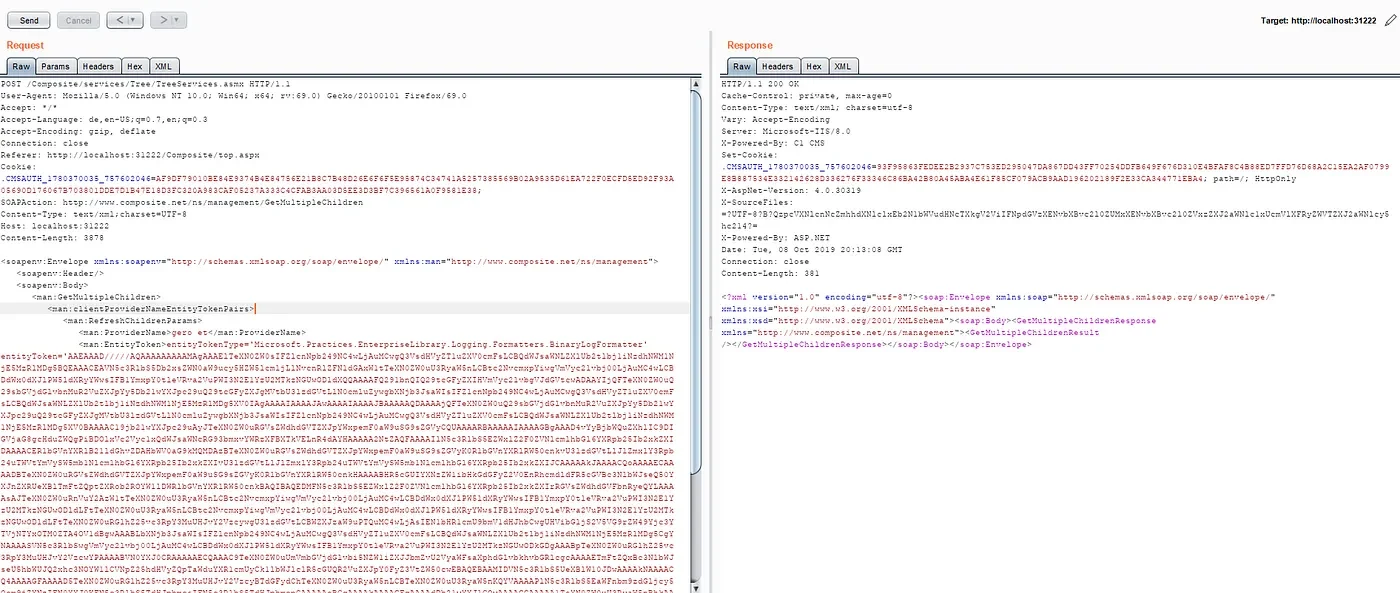
The screenshot shows the request as it was sent, with the two parameters above.
Step 3: confirm the privilege level
In practice the role did not matter. Any authenticated user was able to achieve remote code execution within the CMS console this way.
Root cause
The non-JSON branch of EntityTokenSerializer treats the entityTokenType value as a type selector and then resolves and invokes a Deserialize method on it via Reflection. Because the caller controls that name, the caller also controls which assembly performs the deserialisation. Choosing Microsoft.Practices.EnterpriseLibrary.Logging.Formatters.BinaryLogFormatter routes the attacker's string into BinaryFormatter, which is unsafe for untrusted input: it reconstructs arbitrary .NET types, and with a gadget chain such as TypeConfuseDelegate that reconstruction ends in code execution.
The JSON path was checked for unsafe settings such as TypeNameHandling and nothing was found there, so the legacy non-JSON path is what bypassed the safer handling. The only constraint the code imposed was that the serialised object arrive as a String, which the base64 encoding satisfies.
Impact
An authenticated user, including one holding only the low privilege Editor role, could execute arbitrary code on the server through the CMS console. The proof of concept wrote a file to disk. The report does not describe what the fix changed, only that a bugfix was available from 30 October 2019.
Fix
The report does not state which code change was made. The direction the finding points to is to stop letting user input select the deserialisation type: the entityTokenType value should not be resolved to an arbitrary assembly and invoked via Reflection, and the legacy non-JSON path should not feed attacker-controlled strings into BinaryFormatter. A safe serializer with an allow-list of expected types, or removal of the legacy path, addresses the root cause.
Variants to test
- Enumerate WSDL files on a .NET SOAP application and look for methods that accept serialised object parameters, such as
GetMultipleChildren(...)here. A positive result is a parameter whose value is parsed into a .NET object in the backend. - Look for a type or assembly name parameter next to a serialised blob, as with
entityTokenTypeandentityToken. A positive result is a request where changing the type name changes whichDeserializemethod runs. - Search loaded assemblies for
Deserializemethods and for formatters that wrapBinaryFormatter, such asBinaryLogFormatter. A positive result is a path where a base64 string reachesBinaryFormatter. - Test the non-JSON branch of any serializer that also accepts JSON, since the JSON path may be hardened while the legacy path is not. A positive result is a legacy request that deserializes where the JSON request does not.
- Replay the payload with the lowest privileged authenticated account available. A positive result is code execution from a role that should not have it.
What happened, in plain words
A security researcher looked inside a content management system called C1 CMS and found a way for a logged-in user with very few permissions to make the server run commands of their choosing.
The flaw was in how the CMS turned a piece of text sent by a user back into a program object. The problem was tracked as CVE-2019-18211. The vendor was friendly and fast to communicate with, and a fix was available from 30 October 2019.
This is a beginner-friendly walkthrough of the same investigation: what the product is, how the researcher set up a test copy, how the flaw was found, how it was exploited, and why it worked.
The product
C1 CMS is an open source content management system built on the Microsoft stack. According to the product authors' website, it is one of the top rated open source CMS products worldwide, with more than 85,000 installations across on-premise and cloud deployments.
The feature at the centre of the finding is the CMS's service layer. C1 CMS makes heavy use of webservice calls based on SOAP requests. The request structures for each service can be enumerated from the WSDL files that the application serves during normal browsing. "Enumerated" simply means listed out.
The vulnerable path sits in the TreeServiceFacade and its EntityTokenSerializer, which deserializes EntityToken objects referenced by parameters of the GetMultipleChildren(...) method.
Setting up a test copy
The latest C1 CMS package at the time, v6.6, was installed through the Microsoft Webmatrix installer, giving a running instance to investigate.
The instance was analysed dynamically with live debugging using dnSpy.
The standard administrator account was used to create several lower privilege accounts, including users holding the Editor and Developer roles. Those accounts matter later: the exploit was delivered as an Editor, a low privilege user, and the conclusion was that any authenticated user could reach the same result.
Finding it
The approach was bottom-up: search directly for well-known .NET deserialisation issues, meaning user-controlled input that ends up in an insecure deserialisation call. The first observation was that C1 CMS seemed to prefer JSON objects sent through SOAP requests.
No unsafe deserialisation was found for those JSON objects, for example through TypeNameHandling settings. No unsafe deserialisation was found for those JSON objects.
Technically, deserialisation candidates were located simply by looking for Deserialize methods in the loaded .NET assemblies. That search narrowed the focus to two classes: TreeServiceFacade and EntityTokenSerializer.
TreeServiceFacade exposes a method GetMultipleChildren(...) that can be called through a SOAP request. The request carries parameters that reference EntityToken objects, and those tokens are serialised and deserialised in the backend.
The screenshot shows the SOAP request structures observed in BurpSuite while browsing the application, the same structures that can be enumerated from the WSDL files.
The two screenshots show the GetMultipleChildren(...) SOAP request and the EntityToken parameters it carries into the backend.
What made this interesting was a legacy deserialisation path that is taken when the incoming object is not based on JSON. In EntityTokenSerializer, the serializedEntityToken parameter is parsed with a regular expression:
_keyValuePairRegEx = new Regex(\\s*(?<Key>[^=\\s]*)\\s*=\\s*(?<IsNull>null|(?<Value>[^\\\\\\r\\n]*(\\\\. [^\\\\\\r\\n]*)*))\\s*,*\\s*, RegexOptions.Compiled)
Starting from that regular expression, valid objects could be built by hand. The concrete vulnerability turned out to be in the non-JSON part of EntityTokenSerializer: the entityTokenType parameter lets the caller fully control which .NET assembly is used as the type for deserialisation. The code then searched for a Deserialize method matching that assembly name and invoked it via Reflection.
The screenshot shows the code path that resolves the attacker-supplied assembly name and invokes its Deserialize method through Reflection.
The only restriction was that the serialised object had to arrive as a String. Looking for a suitable formatter led to the well-known BinaryFormatter, used under the hood by Microsoft.Practices.EnterpriseLibrary.Logging.Formatters.BinaryLogFormatter. Calling the Deserialize function of that assembly accepts a String parameter, base64 decodes it, and feeds the result into the BinaryFormatter deserialisation call.
The screenshot shows the BinaryLogFormatter path: a string parameter is base64 decoded and passed to BinaryFormatter.
Exploitation
Step 1: build the payload
All that remained was to create a malicious payload with ysoserial.NET. The proof of concept used the following command:
ysoserial.exe -g TypeConfuseDelegate -f BinaryFormatter -c "cmd.exe /C echo pwned > C:\Users\Public\Downloads\PWNED.txt" -o base64
Line by line:
ysoserial.exeruns the payload generator.-g TypeConfuseDelegatepicks the gadget chain.-f BinaryFormattersays which formatter the payload is built for, matching the vulnerable path found above.-c "cmd.exe /C echo pwned > C:\Users\Public\Downloads\PWNED.txt"is the command to run on the server. The file isPWNED.txtinC:\Users\Public\Downloads. Writing a marker file proves code execution.-o base64makes the tool output the payload as base64 text.
Step 2: deliver the request
The base64 payload is placed in the entityToken parameter, and entityTokenType is set to the formatter assembly that reaches BinaryFormatter:
entityTokenType='Microsoft.Practices.EnterpriseLibrary.Logging.Formatters.BinaryLogFormatter'
entityToken=BINARYFORMATTERPAYLOAD
Delivering that request as a user with the Editor role, a low privilege user, led to remote code execution on the server side.
The screenshot shows the request as it was sent, with the two parameters above.
Step 3: confirm the privilege level
In practice the role did not matter. Any authenticated user was able to achieve remote code execution within the CMS console this way. So the barrier was only "have an account", not "have a powerful account".
Root cause
The non-JSON branch of EntityTokenSerializer treats the entityTokenType value as a type selector and then resolves and invokes a Deserialize method on it via Reflection. Because the caller controls that name, the caller also controls which assembly performs the deserialisation. Choosing Microsoft.Practices.EnterpriseLibrary.Logging.Formatters.BinaryLogFormatter routes the attacker's string into BinaryFormatter, which is unsafe for untrusted input: it reconstructs arbitrary .NET types, and with a gadget chain such as TypeConfuseDelegate that reconstruction ends in code execution.
The JSON path was checked for unsafe settings such as TypeNameHandling and nothing was found there, so the legacy non-JSON path is what bypassed the safer handling. The only constraint the code imposed was that the serialised object arrive as a String, which the base64 encoding satisfies.
Impact
An authenticated user, including one holding only the low privilege Editor role, could execute arbitrary code on the server through the CMS console. The proof of concept wrote a file to disk. The report does not describe what the fix changed, only that a bugfix was available from 30 October 2019.
Fix
The report does not state which code change was made. The direction the finding points to is to stop letting user input select the deserialisation type: the entityTokenType value should not be resolved to an arbitrary assembly and invoked via Reflection, and the legacy non-JSON path should not feed attacker-controlled strings into BinaryFormatter. A safe serializer with an allow-list of expected types, or removal of the legacy path, addresses the root cause.
Variants to test
- Enumerate WSDL files on a .NET SOAP application and look for methods that accept serialised object parameters, such as
GetMultipleChildren(...)here. A positive result is a parameter whose value is parsed into a .NET object in the backend. - Look for a type or assembly name parameter next to a serialised blob, as with
entityTokenTypeandentityToken. A positive result is a request where changing the type name changes whichDeserializemethod runs. - Search loaded assemblies for
Deserializemethods and for formatters that wrapBinaryFormatter, such asBinaryLogFormatter. A positive result is a path where a base64 string reachesBinaryFormatter. - Test the non-JSON branch of any serializer that also accepts JSON, since the JSON path may be hardened while the legacy path is not. A positive result is a legacy request that deserializes where the JSON request does not.
- Replay the payload with the lowest privileged authenticated account available. A positive result is code execution from a role that should not have it.
Glossary
- API: the set of requests a program accepts from other programs; the service counter rather than the public shop floor.
- Assembly: a compiled .NET program file, roughly the .NET equivalent of an executable or a library.
- Authenticated: logged in with a valid account.
- Backend: the server-side code a user never sees, as opposed to the frontend shown in the browser.
- Base64: an encoding that writes arbitrary bytes using ordinary letters, digits and a couple of symbols, so binary data can travel inside a text field.
- BinaryFormatter: an old .NET serializer that records exact types and rebuilds them on deserialisation, which is unsafe with untrusted input.
- BurpSuite: a tool that sits between browser and server and records requests and responses so you can read them.
- Class: a blueprint in code that groups related data and behaviour together.
- CMS (content management system): software that lets people publish website pages without programming, through an admin console.
- CVE: Common Vulnerabilities and Exposures, a public catalogue number given to a security flaw.
- Debugger: a tool that pauses a running program, steps through it instruction by instruction, and shows the values in memory.
- Decompiler: a tool that turns compiled code back into something close to readable source code.
- Deserialisation: turning stored or transmitted text back into a live object in a program's memory.
- dnSpy: a debugger and decompiler for .NET programs.
- Dynamic analysis: watching a program while it runs, rather than reading its code on paper.
- EntityToken: the CMS's internal reference to a piece of content, like a library shelf mark pointing to one book.
- Facade: a class that presents a simple front door to more complicated internal code.
- Formatter: a component that turns objects into a stored or transmitted form and back again.
- Gadget chain: a sequence of ordinary classes that, rebuilt in the right order during deserialisation, ends up running a command.
- JSON: a lightweight text format for data, built from curly braces, square brackets and quoted names.
- Legacy path: older code kept for compatibility, often less carefully guarded than newer code.
- Method: a named block of code that does one job.
- On-premise: software the customer runs on their own servers, as opposed to cloud hosting.
- Open source: software whose code is publicly available.
- Parameter: a named value passed into a method, like a field on a form.
- Payload: the actual data an attacker sends to trigger a flaw.
- Primitive: the basic building block an attacker has obtained, such as the ability to run one command.
- Reflection: a .NET feature that looks up and calls code by name at runtime, so a name supplied in a request can decide which code runs.
- Regex (regular expression): a pattern for matching text, like a very precise search rule.
- Remote code execution (RCE): making the server run commands of the attacker's choosing.
- Role: a named bundle of permissions, such as Editor or Developer.
- Serialisation: turning an object into text so it can be sent or stored.
- SOAP: a standard XML format for webservice messages, saying which method to call and with what arguments.
- String: a piece of text.
- TypeNameHandling: a .NET JSON setting that lets incoming text name the class it should be turned into, which is dangerous with untrusted input.
- Webservice: a way for one program to ask another program to do something over the network.
- WSDL: a machine-readable menu of a SOAP service, listing its methods and the shape of their data.
- XML: a text format built from tags in angle brackets, used by SOAP messages.
- ysoserial.NET: a public tool that builds payloads for known .NET deserialisation weaknesses.




