Your MCP Server Shouldn’t Decide Where Your Credentials Go
The MCP TypeScript SDK trusted the login provider address supplied by an MCP server, so a malicious or compromised server could direct the agent to send its refresh tokens, client secrets and signed JWT assertions to an attacker-controlled login service. The flaw affected SDK versions 1.12.0 to 1.31.0 and 2.x before 2.2.0 and was rated High (CVSS 7.5).

On October 6, a security flaw was found in the official MCP TypeScript SDK. In short: an MCP server could trick your AI agent into sending its login secrets to the wrong place.
The full write-up lives on its author's site
It belongs to its author, so we link to it rather than copy it. The other two tabs are our own rewrites, checked against it.
Context
The target here is the official MCP TypeScript SDK, used by AI agents that act as MCP clients. MCP servers are the tools an agent connects to, and some of those servers require a login. To log in, the agent asks the server one question: who handles your logins? The server replies with the address of a login service, and the agent sends its credentials there.
That is the feature as it is meant to work. The flaw is that the agent believed whatever the server said. A malicious or hacked server could reply with the address of a login service the attacker controls, and the agent would send its secrets straight to the attacker. The author's analogy is a valet who asks a restaurant where to leave your car keys; the restaurant says "with my cousin round the back", and the valet just does it.
The bug is CVE-2026-104850, rated High with a CVSS score of 7.5.
Setup
The affected versions are MCP TypeScript SDK 1.12.0 up to 1.31.0, and 2.x before 2.2.0. The fix is to upgrade to @modelcontextprotocol/sdk 1.31.0 or @modelcontextprotocol/client 2.2.0.
The exposure applies to apps that use the SDK as an MCP client with OAuth login, and that might connect to an MCP server they do not fully trust. The secrets that can leak are refresh tokens, client secrets and signed JWT assertions.
Finding it
The problem is not that AI was tricked by clever prompts. It is an old, well-known security rule being broken: never let the party asking for your password tell you where to send it. Websites learned this years ago with single sign-on. Your app decides which login provider it trusts, in its own settings, and never takes that answer from someone else. The MCP client was taking that answer from the server.
The risk is larger with agents because one agent can hold several logins and connect to dozens of MCP servers. Every untrusted server it talks to is a chance for someone to grab those logins.
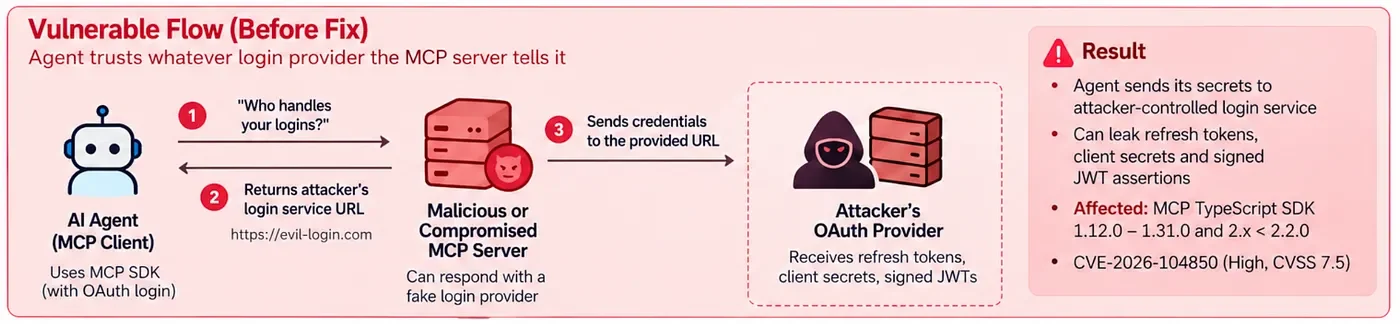
The diagram is captioned Attack Flow.
Exploitation
Step 1: the client asks the server who handles logins
The agent, acting as an MCP client, asks the server which login service it uses. The server replies with the address of a login service.
Step 2: the server names an attacker-controlled login service
A malicious or hacked server answers with the address of a login service the attacker controls, rather than the legitimate one.
Step 3: the client sends its credentials there
Because the client trusted the answer, it sends its secrets to that address. The secrets at risk are refresh tokens, client secrets and signed JWT assertions.
Root cause
The client believed whatever the server said about who handles its logins, instead of deciding that in its own settings. The report frames this as the same class of mistake seen repeatedly in MCP tooling:
- Oct 6, 2026, MCP TypeScript SDK: server could choose where the agent's secrets were sent
- Sep 28, 2026, MCP Python SDK: same problem
- Sep 2026, MCP Rust SDK (rmcp): did not check that the server was who it claimed to be
- Sep 2026, LiteLLM MCP endpoint: accepted a login header without verifying it
The wider picture is no better. A July study of 414 public MCP servers (Exposed by Design) found that 380 of them, about 92%, had no login protection at all. Most of the problems found were basic web security mistakes, not anything specific to AI.
Impact
An attacker who controls or compromises an MCP server can name a login service they control, and the agent would send its refresh tokens, client secrets and signed JWT assertions there. The affected population is apps that use the SDK as an MCP client with OAuth login and that connect to MCP servers they do not fully trust. Because one agent can hold several logins and talk to dozens of servers, each untrusted server is an opportunity to capture those credentials.
Fix
Upgrade to @modelcontextprotocol/sdk 1.31.0 or @modelcontextprotocol/client 2.2.0. If you use the Python SDK, upgrade that too.
Upgrading alone is not the whole answer. The report recommends pinning the issuer in the agent's own settings, for each MCP server it uses, and rejecting any MCP server that points somewhere else. For machine-to-machine logins, the upgrade alone may not protect you until you do this. If a server does not say clearly who handles its logins, do not connect. Keep an allowlist for production agents, with a review, an owner and logging for new servers; development can stay open, but issuer pinning still applies.
If an older version ever connected to an MCP server you do not control, assume its secrets leaked: create new client secrets, revoke refresh tokens and replace signing keys. Give each agent separate credentials for each login service and purpose, prefer short-lived tokens over long-lived secrets in config files, and manage each agent like a user or service account with its own access rules.
In a multi-tenant SaaS, the issuer check works like this:
- At customer onboarding, for each MCP server a tenant's agent will use, store the login provider that issued the agent's credentials for that server: the customer's Entra tenant for internal servers, or the vendor's login service for third-party ones.
- At connect time, read what the MCP server says its login provider is.
- Compare. If it matches the stored value, continue. If not, stop, log it, alert, and send no credentials.
The server can name any login provider it likes. The client just will not follow it.
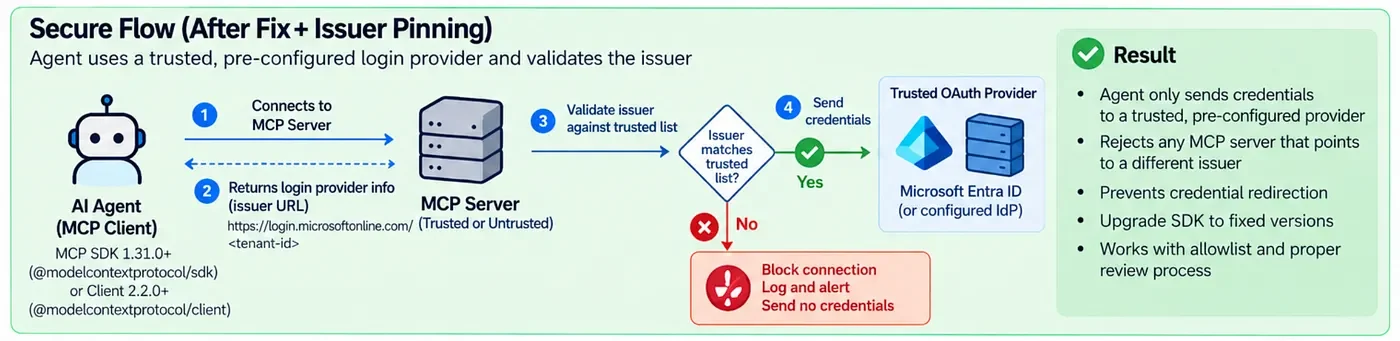
The diagram is captioned Secure Flow.
An agent identity and the issuer check work as a pair. The identity does not stop the redirect: if the client trusts whatever login provider the server names, a dedicated identity just means dedicated credentials get sent to the attacker. That is the issuer check's job. What the identity adds is a smaller blast radius: scoped, short-lived tokens, access policies, and fast revocation if something is compromised. Microsoft now gives every new Copilot Studio agent its own Entra Agent ID, and since July 2026 offers Conditional Access and ID Protection for agents.
Upgrading fixes this bug. Pinning the issuer stops the redirect. Giving agents real identities limits the damage when something slips through.
- Other MCP SDKs and clients. Check whether the client takes the issuer from the server's response or from its own configuration. A positive result is a client that follows a server-supplied login address without comparing it to a stored value.
- Machine-to-machine flows. Test OAuth client-credentials style logins where no human is present. A positive result is a client that sends client secrets or signed JWT assertions to an issuer named only by the server.
- Header-based login on MCP endpoints. Look at endpoints that accept a login header, as in the LiteLLM case. A positive result is an endpoint that accepts the header without verifying it.
- Server identity checks. Test whether the client verifies that the server is who it claims to be, as in the Rust SDK case. A positive result is a client that connects to an impostor server.
- Public MCP servers. Survey exposed servers for missing login protection, as the July study did. A positive result is a server reachable without any authentication.
What happened, in plain words
On October 6, a security flaw was found in the official MCP TypeScript SDK. In short: an MCP server could trick your AI agent into sending its login secrets to the wrong place.
Before the details, a few words on what those things are, because the whole story depends on them.
An AI agent is a program that uses a large language model to decide what to do next, and then does it: it can look things up, call other programs, and string several steps together without a person clicking each one. Think of it as a very eager assistant who will happily follow instructions from the tools it has been given.
MCP stands for Model Context Protocol. It is a shared set of rules that lets an agent talk to outside tools and data sources in a standard way, so the same agent can use many different tools without custom code for each one. An MCP server is one of those tools, wrapped so that an agent can call it. An MCP client is the piece inside the agent that does the calling. The MCP TypeScript SDK is the official toolkit, written in the TypeScript programming language, that developers use to build that client side (and the server side too).
Some MCP servers need a login before they will do anything for you, just as some websites need you to sign in. To log in, the agent asks the server one question: "Who handles your logins?" The server replies with the address of a login service, and the agent sends its credentials there.
A login service (also called an identity provider) is a system whose job is to check who you are and hand out proof that you signed in. When you click "Sign in with Google" on a website, Google is acting as the login service. The website never sees your Google password; it only receives a token from Google.
A credential is anything that proves identity: a password, a client secret, a token. A token is a short string that a login service issues after a successful sign-in, which the app can show later instead of the password. A refresh token is a special, longer-lived token whose only job is to get new short-lived tokens when the old ones expire, so the user does not have to sign in again. A client secret is a password that belongs to an application rather than a person, used when one program logs in to another with no human present. A signed JWT assertion is a small block of data, signed with a cryptographic key, that a program presents to prove it is who it says it is; the signature lets the receiver check that nobody tampered with it.
That is the feature as it is meant to work. The flaw is that the agent believed whatever the server said. A malicious or hacked server could reply with the address of a login service the attacker controls, and the agent would send its secrets straight to the attacker.
The author's analogy is a valet who asks a restaurant where to leave your car keys. The restaurant says "with my cousin round the back", and the valet just does it. The valet did nothing technically wrong; the mistake was trusting an answer from the wrong party.
The details:
- Bug: CVE-2026-104850, rated High (CVSS 7.5)
- Affected: MCP TypeScript SDK 1.12.0 up to 1.31.0, and 2.x before 2.2.0
- What can leak: refresh tokens, client secrets and signed JWT assertions
- Who is at risk: apps that use the SDK as an MCP client with OAuth login, and might connect to an MCP server they don't fully trust
- Fix: upgrade to
@modelcontextprotocol/sdk1.31.0 or@modelcontextprotocol/client2.2.0
A CVE is a public catalogue number for a known security flaw, so that everyone discussing it means the same thing. CVSS is a scoring system from 0 to 10 that tries to express how serious a flaw is; 7.5 is in the "High" band. OAuth is the standard way apps let you sign in through a separate login service without handling your password themselves. A version number like 1.12.0 identifies one particular release of a piece of software; the ranges above say which releases contain the bug and which one fixes it.
Attack Flow
The diagram is captioned Attack Flow.
Why it matters: it's a login bug, not an AI bug
This has nothing to do with AI being tricked by clever prompts. It is an old, well-known security rule being broken: never let the party asking for your password tell you where to send it.
A prompt is the text you give an AI model to steer its answer. Prompt injection, the trick where hidden text makes a model misbehave, is a different problem. Here the model was not fooled at all; the ordinary login code around it simply trusted the wrong source.
Websites learned this years ago with single sign-on. Single sign-on means one login is reused across many services. Your app decides which login provider it trusts, in its own settings. It never takes that answer from someone else. AI agents are now learning the same lesson.
The risk is bigger with agents because one agent can hold several logins and connect to dozens of MCP servers. Every untrusted server it talks to is a chance for someone to grab those logins.
It keeps happening
This is not the first bug of this kind. In the last few weeks, several MCP tools made the same mistake of trusting the other side without checking.
- Oct 6, 2026, MCP TypeScript SDK: server could choose where the agent's secrets were sent
- Sep 28, 2026, MCP Python SDK: same problem
- Sep 2026, MCP Rust SDK (rmcp): didn't check that the server was who it claimed to be
- Sep 2026, LiteLLM MCP endpoint: accepted a login header without verifying it
A header is a small labelled line of information that travels with a web request, alongside the address and the body. Browsers and servers use headers for things like the type of content, cookies, and login details. Accepting a login header without checking it means the server takes the caller's word for who they are.
The bigger picture is no better. A July study of 414 public MCP servers (Exposed by Design) found that 380 of them, about 92%, had no login protection at all. Most of the problems found were basic web security mistakes, not anything specific to AI.
What to do
Today
- Find your MCP clients. List every AI agent, app, IDE plugin or script that uses the MCP SDK and logs in to MCP servers.
- Upgrade. Move to
@modelcontextprotocol/sdk1.31.0 or@modelcontextprotocol/client2.2.0. If you use the Python SDK, upgrade that too. - Change exposed secrets. If an older version ever connected to an MCP server you don't control, assume its secrets leaked. Create new client secrets, revoke refresh tokens and replace signing keys.
An IDE plugin is an add-on for a code editor such as Visual Studio Code. To revoke a token is to tell the login service to cancel it, so that even if someone copied it, it no longer works. A signing key is the secret cryptographic key used to produce and check those signed JWT assertions; if it leaks, an attacker can produce valid-looking assertions, so it has to be replaced.
This week
- Lock the login provider. Set the trusted login service (the "issuer") in your agent's own settings, for each MCP server it uses. Reject any MCP server that points somewhere else. For machine-to-machine logins, the upgrade alone may not protect you until you do this.
- Block, don't guess. If a server doesn't say clearly who handles its logins, don't connect.
- Approve MCP servers before production. Keep an allowlist for production agents. New servers need a review, an owner and logging. Dev can stay open, but issuer pinning still applies.
The issuer is the login service that issued a token; in OAuth, tokens carry the issuer's name so that the receiver can tell where they came from. Pinning means writing that name into your own configuration and refusing anything else, instead of accepting it from the other side. Machine-to-machine means two programs logging in to each other with no person involved, which is where client secrets and signed JWT assertions are used. Production is the live system real users depend on, as opposed to dev, the development environment where experiments are fine. An allowlist is a list of things that are permitted, with everything else refused by default. Logging means recording what happened so you can look back later.
Ongoing
- One secret per job. Give each agent separate credentials for each login service and purpose, so one leak doesn't unlock everything.
- Keep secrets short-lived. Prefer tokens that expire quickly over long-lived secrets in config files.
- Give agents their own identity. Manage each agent like a user or service account, with its own access rules (see below).
A service account is a login that belongs to a program rather than a person, with its own permissions. Short-lived means the token stops working after a short time, so a stolen copy is useful only briefly.
Where the issuer check actually lives
In a multi-tenant SaaS, pinning the issuer works like this:
A multi-tenant SaaS is a service where many separate customers share the same running software, each with their own data kept apart. A tenant is one such customer. Entra is Microsoft's cloud identity service, the one behind Microsoft 365 sign-ins; an Entra tenant is a customer's own space inside it.
- At customer onboarding, for each MCP server a tenant's agent will use, store the login provider that issued the agent's credentials for that server: the customer's Entra tenant for internal servers, or the vendor's login service for third-party ones.
- At connect time, read what the MCP server says its login provider is.
- Compare. If it matches the stored value, continue. If not, stop, log it, alert, and send no credentials.
The server can name any login provider it likes. The client just won't follow it.
Step 1 happens at customer onboarding, when the login provider for each MCP server is stored. Step 2 happens every time the agent connects, because the server's answer can change at any moment and cannot be trusted. Step 3 is the whole defence: the answer is only used as a claim to check, never as an instruction to follow. If it does not match, stop, log it, alert, and send no credentials.
Secure Flow
The diagram is captioned Secure Flow.
The bigger lesson: agents need their own identity
Today, most agents run on borrowed secrets: a password or token sitting in a config file. Whoever tricks the agent into handing them over gets access.
The better approach is to treat each agent like an employee account: its own identity, its own permissions and its own access rules, managed in your identity system.
An agent identity and the issuer check work as a pair. The identity doesn't stop the redirect: if the client trusts whatever login provider the server names, a dedicated identity just means dedicated credentials get sent to the attacker. That's the issuer check's job. What the identity adds is a smaller blast radius: scoped, short-lived tokens, access policies, and fast revocation if something is compromised.
Blast radius is how much damage one compromise can do. Scoped means a token is limited to specific actions or data, so it cannot be used for everything. Access policies are rules saying who may do what, and under which conditions.
This is already happening. Microsoft now gives every new Copilot Studio agent its own Entra Agent ID, and since July 2026 offers Conditional Access and ID Protection for agents.
Copilot Studio is Microsoft's tool for building AI agents. Conditional Access is a Microsoft feature that allows or blocks a sign-in based on conditions such as location or device. ID Protection watches sign-ins for signs of compromise and can react to them.
Bottom line: upgrading fixes this bug. Pinning the issuer stops the redirect. Giving agents real identities limits the damage when something slips through.
If you want to look for the same mistake elsewhere, these are the places the report suggests checking. Each one describes what a positive result looks like, so you know when you have found something.
- Other MCP SDKs and clients. Check whether the client takes the issuer from the server's response or from its own configuration. A positive result is a client that follows a server-supplied login address without comparing it to a stored value.
- Machine-to-machine flows. Test OAuth client-credentials style logins where no human is present. A positive result is a client that sends client secrets or signed JWT assertions to an issuer named only by the server.
- Header-based login on MCP endpoints. Look at endpoints that accept a login header, as in the LiteLLM case. A positive result is an endpoint that accepts the header without verifying it.
- Server identity checks. Test whether the client verifies that the server is who it claims to be, as in the Rust SDK case. A positive result is a client that connects to an impostor server.
- Public MCP servers. Survey exposed servers for missing login protection, as the July study did. A positive result is a server reachable without any authentication.
An endpoint is one specific address on a server that accepts requests, like one door of a large building. Authentication is the act of proving who you are; a server reachable without it lets anyone in.
Glossary
- Access policy: a rule that says who may do what, and under which conditions.
- Agent (AI agent): a program that uses a language model to decide and carry out steps on its own.
- Allowlist: a list of permitted things, with everything else refused by default.
- Authentication: proving who you are to a system.
- Blast radius: how much damage a single compromise can cause.
- Client secret: a password that belongs to an application rather than a person.
- Conditional Access: a Microsoft feature that allows or blocks a sign-in based on conditions such as location or device.
- Copilot Studio: Microsoft's tool for building AI agents.
- Credential: anything that proves identity, such as a password, secret or token.
- CVE: a public catalogue number for a known security flaw.
- CVSS: a 0 to 10 score expressing how serious a flaw is.
- Dev: the development environment, where experiments are acceptable.
- Endpoint: one specific address on a server that accepts requests.
- Entra: Microsoft's cloud identity service, behind Microsoft 365 sign-ins.
- Header: a small labelled line of information sent with a web request or response.
- IDE plugin: an add-on for a code editor.
- ID Protection: a Microsoft feature that watches sign-ins for signs of compromise.
- Issuer: the login service that issued a token.
- JWT assertion: a signed block of data a program presents to prove its identity.
- Logging: recording what happened so it can be reviewed later.
- Login service (identity provider): a system that checks who you are and issues proof of sign-in.
- Machine-to-machine: two programs logging in to each other with no person involved.
- MCP: Model Context Protocol, a shared set of rules for agents to talk to tools and data sources.
- MCP client: the part of an agent that calls MCP servers.
- MCP server: a tool or data source exposed to agents through MCP.
- MCP TypeScript SDK: the official toolkit, in TypeScript, for building MCP clients and servers.
- Multi-tenant SaaS: a service where many separate customers share the same software, each with their own data kept apart.
- OAuth: the standard way apps let you sign in through a separate login service without handling your password.
- Pinning: writing a trusted value into your own configuration and refusing anything else.
- Production: the live system real users depend on.
- Prompt: the text given to an AI model to steer its answer.
- Refresh token: a longer-lived token used to obtain new short-lived tokens without signing in again.
- Revoke: to cancel a token so that it no longer works.
- Scoped: limited to specific actions or data.
- Service account: a login that belongs to a program rather than a person.
- Short-lived: stops working after a short time.
- Signing key: the secret cryptographic key used to produce and check signed assertions.
- Single sign-on: reusing one login across many services.
- Tenant: one customer's separate space inside a shared service.
- Token: a short string issued after sign-in, shown later instead of a password.
- Version number: an identifier for one particular release of software.

