Zip bomb attack
An application accepted ZIP uploads without checking the uncompressed size, so a small ZIP bomb could expand to fill the server's disk. An attacker could upload such a file to cause a denial of service by exhausting storage.
 Published on medium.com
A while ago I encountered an application which had file upload functionality exclusive to zip files. One of my witting seniors told me you can perform a zip bomb attack and so I did.
The full write-up lives on its author's site
It belongs to its author, so we link to it rather than copy it. The other two tabs are our own rewrites, checked against it.
Context
I came across an application that had file upload functionality, but it was exclusive to zip files. The application accepted only zip files, and it also enforced a certain naming convention on the uploaded files. The feature normally lets a user upload a zip archive, which the application then processes on the server side.
A senior colleague told me that a zip bomb attack could be performed against this kind of upload, so I tried it. The attack turned out to be simple to carry out, and this article walks through the process I went through.
Setup
To perform the attack I needed two things:
- A zip bomb, meaning a zip file that unzips to a very large size.
- Two user IDs on the application in question, both of which have access to the same upload functionality.
I called the two users Bob and Alice in the walkthrough below.
Finding it
After learning that the application allows only zip files to be uploaded, and that the files must follow a certain naming convention, I researched how a zip bomb attack is carried out. The first requirement is the bomb itself: a zip file that expands to a huge size when unzipped.
I found such files in David Fifield's article at bamsoftware.com, which explains how to construct a better zip bomb.

The first file, zbsm.zip, is 42 kB in size and unzips to 5.5 GB. The other files in the same set follow the same idea.
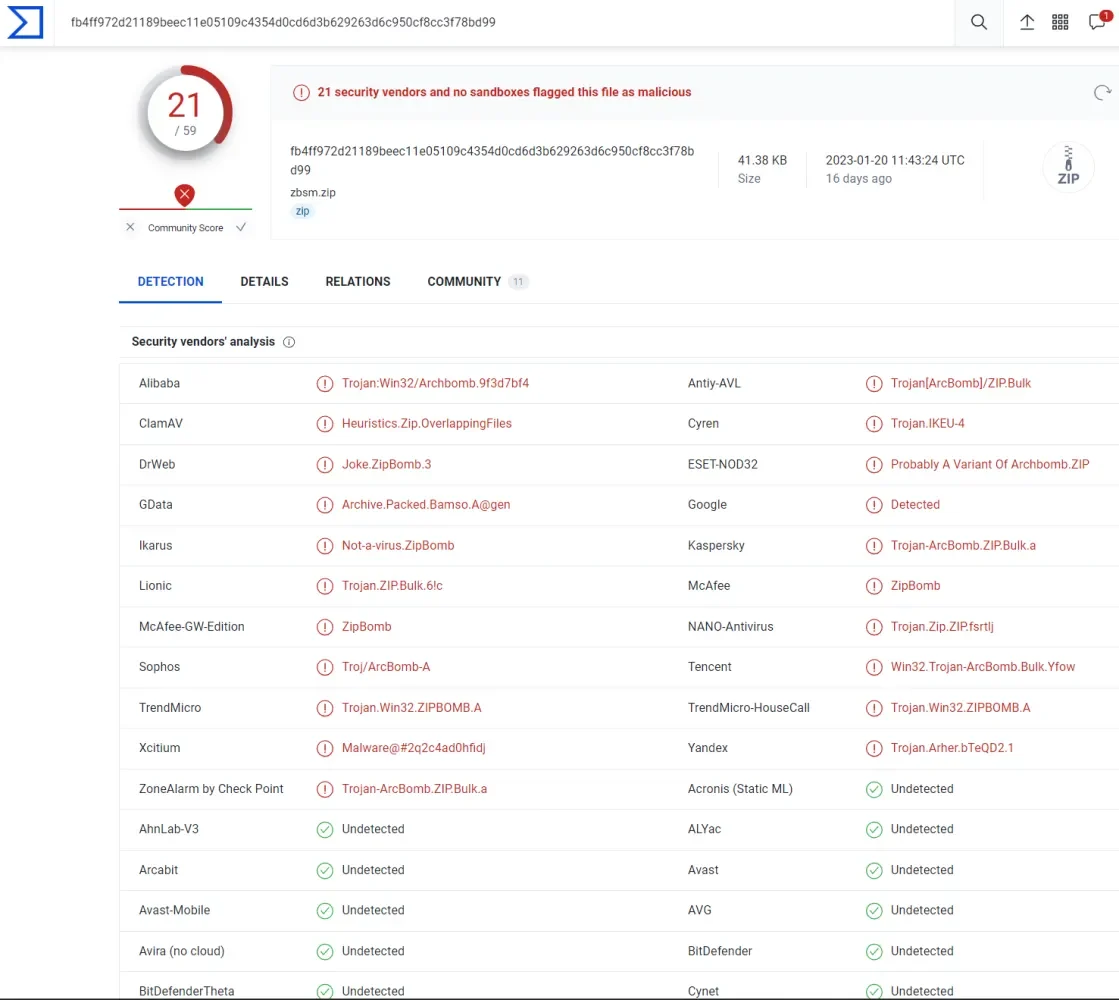
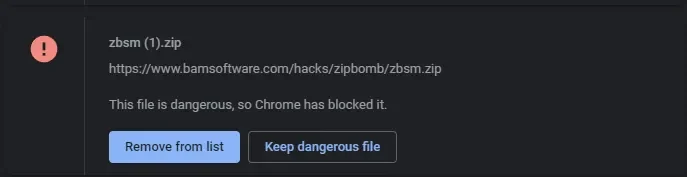
These files are flagged as viruses by most anti-virus programs, which is fair given what they do. All three are also flagged as dangerous files by the Chrome browser. For instance, the scan report for zbsm.zip on VirusTotal shows this.
Chrome displays the corresponding warning as well.
Exploitation
Step 1: Obtain a zip bomb
I downloaded the zip bomb files from the bamsoftware.com article. The smallest one, zbsm.zip, is 42 kB compressed and expands to 5.5 GB. The larger one I actually used, zblg.zip, is 10 MB compressed and expands to 281 TB.
Step 2: Upload with the first user
With one user, Bob, I uploaded the file zblg.zip (10 MB expanding to 281 TB) through the application's upload functionality. The upload got stuck. I stared at the screen for a while, assuming the application had crashed or something similar had happened.
Step 3: Upload with the second user
I then tried uploading the file with the second user, Alice. This time I got an error prompt to the effect of "Disk space is full". It was only then that I understood the first upload had got stuck because there was no storage space left on the server.
The attack worked because the application did not verify the file size before writing the file to disk. Looking back, I should have uploaded the 42 kB file instead of the 10 MB one, which would have avoided the denial of service and the earful from my manager. In my defence, the attack was performed in a UAT environment.
Root cause
The core problem is the missing file size limit. The application did not verify the file size before writing the file to disk.
Impact
The impact is a denial of service. Uploading a file that expands to 281 TB or more will most definitely cause a DoS, which can compromise availability and consequently cause financial loss. In my case the server ran out of disk space, the first upload hung, and the second user's upload failed with a "Disk space is full" error.
The attack requires an account with access to the upload functionality, and in this case two accounts were used.
Fix
The solution depends on a file size check. A check along these lines could be implemented on the server side as mitigation (code and explanation by ChatGPT):
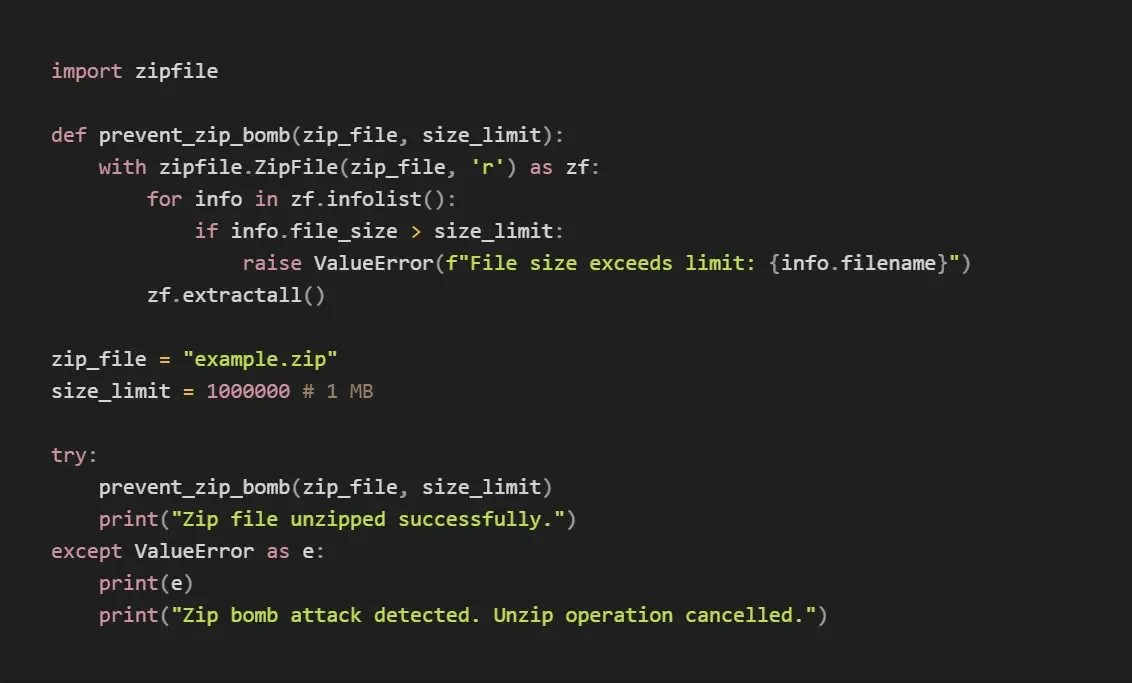
In this code, the prevent_zip_bomb function takes a zip file and a size limit as arguments. The function uses the zipfile module to open the zip file, and then iterates through each file in the archive using the infolist method. The file_size attribute of each ZipInfo object is checked against the size limit, and if any file exceeds the limit, a ValueError is raised to cancel the unzip operation.
So it all boils down to the file size limit.
Variants to test
If you are willing to perform this attack, first take proper authorisation from the management or the concerned authority, and then begin the pen test. Do it mostly with the 42 kB zip: check first whether the application accepts a file whose expanded size is 5.5 GB, and then decide what to do next in coordination with all the concerned parties. Uploading a file of 281 TB or more will most definitely cause a DoS, so keep everyone in the loop.
Concretely, on other targets:
What happened, in plain words
A security tester found a website feature that lets people upload files, but only ZIP files. A colleague told him that this kind of feature can be attacked with a "zip bomb": a tiny ZIP file that, when unpacked, turns into an enormous amount of data. He tried it, and it worked. The server ran out of disk space, and the upload hung. This article explains what he did, step by step, in simple terms.
Background: what is a ZIP file and why uploads matter
A ZIP file is like a box that holds other files in a compressed form. Compression makes files smaller so they take less space and can be sent faster. When you "unzip" the file, the original files come back out, usually at their original size. For example, a text document that is 1 MB might become a 200 KB ZIP file.
Many websites let you upload files, for example to share documents or images. The website receives the file and stores it on its server (a computer that runs the website). If the website does not check the file properly, an attacker can abuse this.
A "zip bomb" is a special ZIP file that is very small when compressed but expands to a huge size when unzipped. Imagine a tiny seed that grows into a giant tree: the seed is easy to carry, but the tree takes up a lot of space. In computing terms, a 42 kilobyte (kB) file can expand to 5.5 gigabytes (GB). A 10 megabyte (MB) file can expand to 281 terabytes (TB), which is enormous.
The application and the feature
The tester found an application (a website or service) that had a file upload feature. This feature accepted only ZIP files, and it also required the files to follow a certain naming convention (for example, a specific pattern in the filename). The feature is meant to let users upload ZIP archives, which the application then processes on the server.
A senior colleague suggested that a zip bomb attack could be performed against this kind of upload. The tester decided to try it.
Step 1: Get a zip bomb
To perform the attack, the tester needed two things:
- A zip bomb: a ZIP file that unzips to a very large size.
- Two user accounts on the application, both with access to the same upload feature. He called them Bob and Alice.
He researched how to perform a zip bomb attack and learned that he first needed the bomb itself. He found files in an article by David Fifield at bamsoftware.com, which explains how to construct a better zip bomb.
The first file, zbsm.zip, is 42 kB in size and unzips to 5.5 GB. The other files in the same set follow the same idea.
These files are flagged as viruses by most anti-virus programs, which is fair given what they do. All three are also flagged as dangerous files by the Chrome browser. For instance, the scan report for zbsm.zip on VirusTotal shows this.
Chrome displays the corresponding warning as well.
Why this step matters
A zip bomb is the core tool for this attack. Without it, there is nothing to upload that will expand to a huge size. The tester downloaded the files from the article. The smallest one, zbsm.zip, is 42 kB compressed and expands to 5.5 GB. The larger one he actually used, zblg.zip, is 10 MB compressed and expands to 281 TB.
Step 2: Upload with the first user (Bob)
With one user, Bob, the tester uploaded the file zblg.zip (10 MB expanding to 281 TB) through the application's upload feature. The upload got stuck. He stared at the screen for a while, assuming the application had crashed or something similar had happened.
Why this step matters
The upload hanging is a sign that something is wrong: the server is trying to handle the file but cannot complete the operation.
Step 3: Upload with the second user (Alice)
He then tried uploading the file with the second user, Alice. This time he got an error prompt to the effect of "Disk space is full". It was only then that he understood the first upload had got stuck because there was no storage space left on the server.
Why this step matters
The error message revealed that the server's disk was full, which explained why the first upload hung.
Root cause: missing file size check
The attack worked because the application did not verify the file size before writing the file to disk. The core problem is the missing file size limit. The application did not verify the file size before writing the file to disk.
Looking back, the tester said he should have uploaded the 42 kB file instead of the 10 MB one, which would have avoided the denial of service and the earful from his manager. In his defence, the attack was performed in a UAT environment (a test environment, not production).
Impact: denial of service
The impact is a denial of service (DoS). This means the service becomes unavailable to legitimate users. Uploading a file that expands to 281 TB or more will most definitely cause a DoS, which can compromise availability and consequently cause financial loss. In this case the server ran out of disk space, the first upload hung, and the second user's upload failed with a "Disk space is full" error.
The attack requires an account with access to the upload feature, and in this case two accounts were used.
Fix: check the file size
The solution depends on a file size check. A check along these lines could be implemented on the server side as mitigation (code and explanation by ChatGPT):
In this code, the prevent_zip_bomb function takes a zip file and a size limit as arguments. The function uses the zipfile module to open the zip file, and then iterates through each file in the archive using the infolist method. The file_size attribute of each ZipInfo object is checked against the size limit, and if any file exceeds the limit, a ValueError is raised to cancel the unzip operation.
So it all boils down to the file size limit.
Variants to test
If you are willing to perform this attack, first take proper authorisation from the management or the concerned authority, and then begin the pen test. Do it mostly with the 42 kB zip: check first whether the application accepts a file whose expanded size is 5.5 GB, and then decide what to do next in coordination with all the concerned parties. Uploading a file of 281 TB or more will most definitely cause a DoS, so keep everyone in the loop.
Concretely, on other targets:
Glossary
- ZIP file: A compressed archive that contains one or more files, often used to save space or bundle files together.
- Zip bomb: A ZIP file that is very small when compressed but expands to a huge size when unzipped, designed to overwhelm a system.
- Compression: The process of reducing the size of data by encoding it more efficiently.
- Unzip: The process of extracting files from a ZIP archive, restoring them to their original form.
- Server: A computer that provides services to other computers, such as hosting a website or storing files.
- Upload: Sending a file from your computer to a server.
- Denial of service (DoS): An attack that makes a service unavailable to legitimate users, often by exhausting its resources.
- Disk space: The storage capacity of a server's hard drive; when it is full, no new files can be written.
- UAT environment: User Acceptance Testing environment; a test environment used to verify that a system works as intended before it goes live.
- Anti-virus program: Software that detects and blocks malicious files or programs.
- VirusTotal: A website that scans files with multiple anti-virus engines and shows the results.
- Pen test: Penetration test; an authorised simulated attack on a system to find security weaknesses.
- Authorisation: Official permission to perform a security test or attack.
- File size limit: A maximum allowed size for uploaded files, enforced by the application.
- Expanded size: The size of a file after it has been uncompressed or unzipped.
- Compressed size: The size of a file in its compressed form, such as inside a ZIP archive.
- ZipInfo object: In Python's zipfile module, an object that holds information about a file inside a ZIP archive, including its uncompressed size.
- ValueError: A Python exception raised when a function receives an argument of the wrong type or value; here used to cancel an operation.
- infolist method: A method of a ZipFile object in Python that returns a list of ZipInfo objects for all files in the archive.
- file_size attribute: An attribute of a ZipInfo object that gives the uncompressed size of the file.
- prevent_zip_bomb function: A hypothetical function (shown in the code) that checks a ZIP file's contents against a size limit to prevent zip bomb attacks.


