Desperate XSS
The application reflected a URL query parameter inside an HTML comment, and a one-time CSRF token prevented simple payload injection. By adding a new parameter with a payload that closed and reopened the comment, the attacker achieved reflected cross-site scripting, allowing script execution in the victim's browser.
 Published on medium.com
This application was quite secure and it had this mechanism wherein one request can be sent only once, this validation I think was done by the URL query parameter “OWASPCSRFTOKEN”. This essentially means you can’t take the request to Repeater and play around with it rather you’re going to have to intercept the request…
The full write-up lives on its author's site
It belongs to its author, so we link to it rather than copy it. The other two tabs are our own rewrites, checked against it.
Context
The target was a web application that the researcher describes as quite secure. The feature that matters here is a per-request validation mechanism: a request can be sent only once, and the researcher believes this validation is performed through the URL query parameter OWASP_CSRFTOKEN. The value of that token is reflected in the response, inside the context of a comment.
That reflection is the whole story. A token that is echoed back into a page, in a context the attacker can influence through the query string, is a candidate for reflected cross-site scripting.
Setup
The report does not describe accounts, roles, software versions or a specific product beyond the application itself. The tooling implied by the narrative is a browser with Developer Tools (the researcher uses the Console in Chrome via Ctrl + Shift + I) and an intercepting proxy, because the payload has to be injected in the Intercept tab rather than by replaying the request from Repeater.
The precondition is the one-time validation: because a request can be sent only once, the researcher cannot take the captured request to Repeater and iterate there. The payload must be placed into the request in real time, while it is intercepted.
Finding it
The researcher noticed that the value of OWASP_CSRFTOKEN was reflected in the response under the context of a comment. A reflected value inside a comment is interesting because the surrounding comment delimiters can potentially be closed and reopened by the attacker, freeing whatever sits between them to be parsed as markup or script.
The first attempt appended a payload to the token value, something to this effect:
.jsp?OWASP_CSRFTOKEN=2F8A-XXXX-XXXX-XXXX/*alert(1)*/
This logged the researcher out of the application. After a few trials and errors, the lesson was clear: disturbing or changing the value of the token will most definitely throw the user out of the application. Changing the value of the token threw the researcher out of the application.
Exploitation
Step 1: keep the token intact and add a second parameter
The idea was to use the ampersand (&) to introduce the payload as a separate query parameter while leaving the token value untouched, something to the below effect:
.jsp?OWASP_CSRFTOKEN=2F8A-XXXX-XXXX-XXXX&/*alert(1)*/
This time the injected payload was reflected and the researcher was not logged out, but the payload did not execute. The researcher suspected blacklisting and tried many different payloads, with no luck. Prepending the payload instead of appending it also failed.
Step 2: a new parameter, prepended to the token
In desperation, the researcher injected a new parameter named xss, gave it the value of the payload, and placed it before OWASP_CSRFTOKEN:
.jsp?xss=*/prompt("XSS")/*&OWASP_CSRFTOKEN=2F8A-XXXX-XXXX-XXXX
This worked, though not straight away. The payload value is */prompt("XSS")/*: the leading */ closes the comment that the application opened around the reflected value, the prompt("XSS") sits outside the comment and is therefore parsed as script, and the trailing /* opens a new comment so that whatever the application appends afterwards is swallowed.
Step 3: pop-ups versus the Console
alert(1) was definitely not working, and the researcher came under the impression that pop-up payloads would simply not work with this application. prompt("XSS") did work, but before that the researcher had used another payload. The alternative found during research was:
console.log(document.domain)
With this payload there is no pop-up. The tester opens the Console in the Developer Tools (Ctrl + Shift + I) in Chrome, and if the domain of the application is shown in the Console, the payload worked.
Step 4: the request, the injection point and the reflection
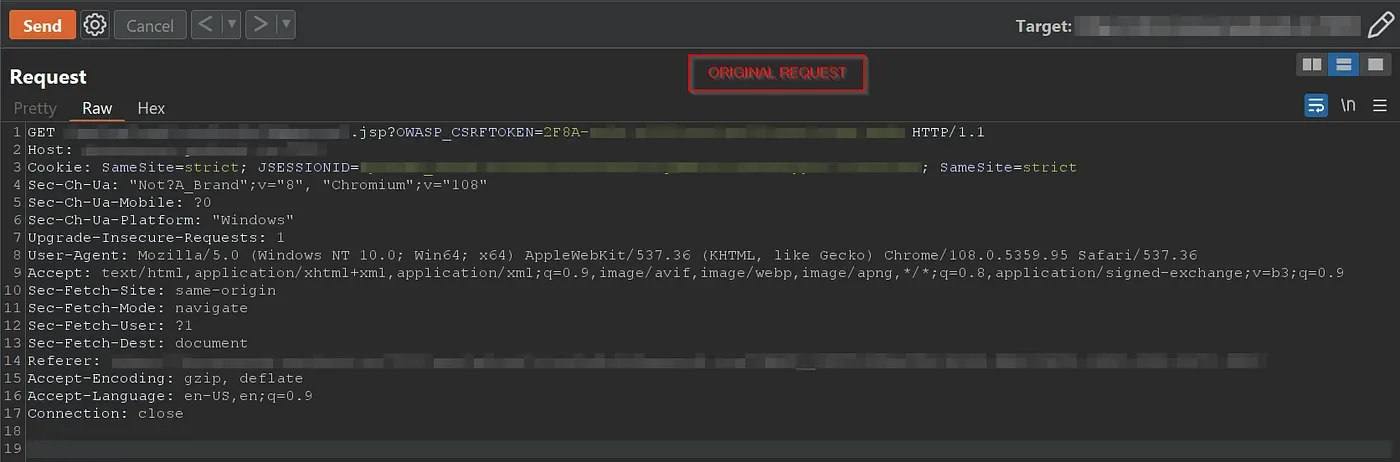
The researcher then restates the steps plainly. First, the original request:
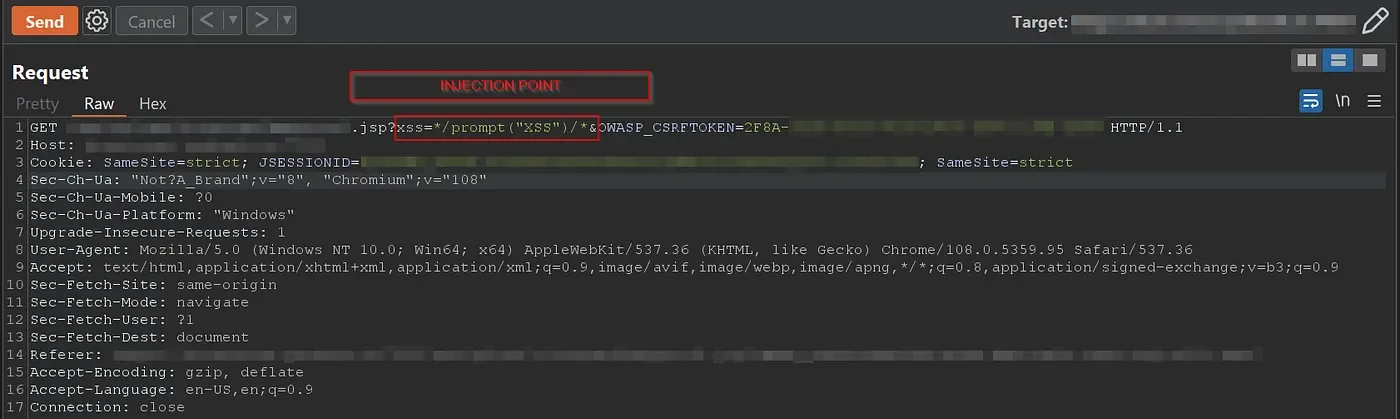
Second, the injection point, marked in the request, where the payload was injected:
Payload: xss=*/prompt("XSS")/*&
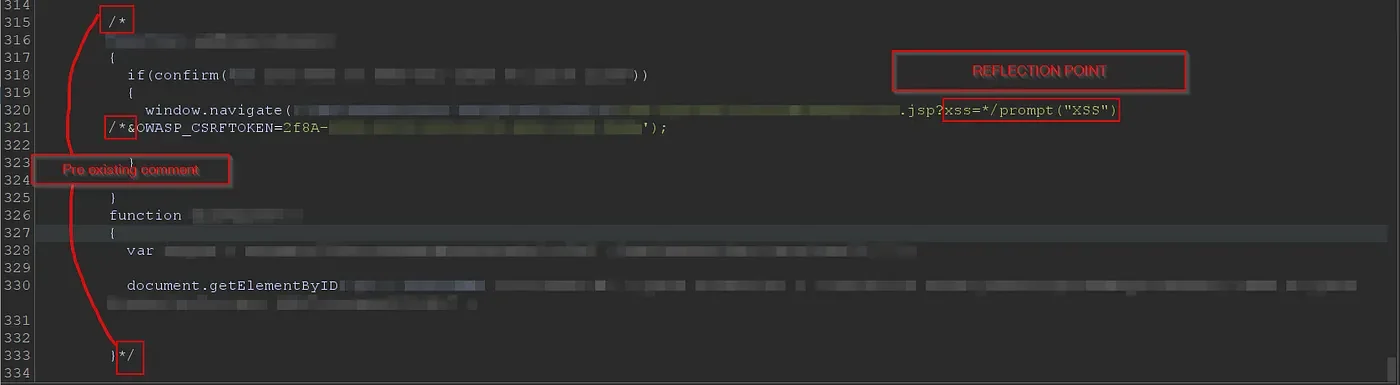
Third, the payload was reflected under the context of a comment. That is why the closing comment symbols (*/) and the opening comment symbols (/*) were needed: they leave the prompt("XSS") uncommented and primed to execute.
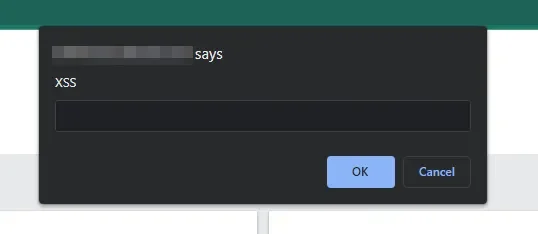
The payload executed, giving a reflected XSS that can be shared with the URL.
Root cause
The application reflected the value of a query parameter into the response inside a comment. Because */ and /* are ordinary characters in a query string, an attacker who controls a reflected parameter can close the comment, place executable content outside it, and reopen a comment to absorb the rest of the page. The payload was delivered through a separate parameter (xss), and the session stayed alive. The report does not show the server-side code, so the exact escaping or encoding mistake is not stated; the reflection into a comment context is the observable cause.
Impact
An attacker can craft a URL that, when opened by a victim, executes script in the context of the application's domain. The researcher notes the payload can be shared with the URL, which is the delivery mechanism for a reflected XSS.
Fix
The fix that follows from the root cause is to stop reflecting user-controlled query values into a comment context, or to encode the characters that can break out of it (* and / in particular) so that the reflected value cannot terminate the comment.
Variants to test
- Tamper with a validated token parameter and observe whether the session ends. A positive result is a logout, which confirms the token is checked and tells you to look for a second, unvalidated parameter.
- Add a new parameter before the validated one, as in
xss=*/prompt("XSS")/*&OWASP_CSRFTOKEN=.... A positive result is the payload reflected and executed while the session stays alive. - Try closing and reopening the comment around the reflection with
*/and/*. A positive result is the content between the delimiters being parsed as script rather than as comment text. - If pop-ups are blocked or filtered, use
console.log(document.domain)and check the Console in Developer Tools. A positive result is the application's domain printed in the Console. - Test both prepending and appending the payload relative to the validated parameter. A positive result is execution in either position.
What happened, in plain words
A security researcher was testing a website and found a way to make the site run code that he chose, just by getting someone to open a specially crafted link. This kind of bug is called reflected cross-site scripting, usually shortened to XSS. The site had a security feature that made testing awkward: it only accepted each request once, so the researcher could not save a request and replay it over and over. He had to work in real time, catching the request as it left the browser and changing it before it reached the server. After several failed attempts, he found that a value he controlled was being copied into the page inside a comment, and that he could break out of that comment and run his own JavaScript. The final trick was to add an extra parameter to the URL, placed before the security token, so the token stayed valid and the session stayed alive.
The application and the feature that mattered
The target was a web application that the researcher describes as quite secure. The feature that matters here is a per-request validation mechanism: a request can be sent only once, and the researcher believes this validation is performed through the URL query parameter OWASP_CSRFTOKEN.
Let us unpack that. A URL query parameter is the part of a web address after the question mark, made of name and value pairs joined by &. In example.com/page?colour=blue&size=large, colour and size are parameter names, and blue and large are their values. A web server reads these values to decide what to send back.
A token is a short string that a server hands to a browser and expects to see again, so it can tell one request apart from another or confirm that a request came from a page it issued. Think of it like a cloakroom ticket: the attendant gives you a numbered ticket, and when you come back with the matching ticket you get your coat. If the number does not match, you get nothing. The name OWASP_CSRFTOKEN suggests it is a defence against cross-site request forgery, a class of attack where another site tricks your browser into sending a request you did not intend. The report does not explain the token's design beyond the one-time behaviour the researcher observed.
The value of that token is reflected in the response, inside the context of a comment. Reflected means the server takes a value from the request and copies it straight back into the page it sends. A comment is text in a page that the browser ignores when it renders or runs the page. In HTML a comment looks like <!-- like this -->. In JavaScript a comment can be written as /* like this */, where /* opens it and */ closes it. Anything between those markers is treated as a note to humans, not as code.
That reflection is the whole story. A token that is echoed back into a page, in a context the attacker can influence through the query string, is a candidate for reflected cross-site scripting. The idea is simple: if you can put characters into the page that end the comment early, whatever you write after that point stops being a comment and starts being treated as part of the page, including as code.
The setup
The report does not describe accounts, roles, software versions or a specific product beyond the application itself. The tooling implied by the narrative is a browser with Developer Tools (the researcher uses the Console in Chrome via Ctrl + Shift + I) and an intercepting proxy, because the payload has to be injected in the Intercept tab rather than by replaying the request from Repeater.
Two of those tools deserve a plain explanation. Developer Tools are the built-in inspection panel in browsers, opened in Chrome with Ctrl + Shift + I. The Console tab inside it shows messages from the page and lets you type JavaScript that runs in the page. An intercepting proxy is a program that sits between your browser and the website, like a postal worker who opens every letter, lets you read and rewrite it, and only then sends it on. In tools such as Burp Suite, the Intercept tab is where you pause a request mid-flight and edit it. Repeater is a different tab in the same tool where you can resend a captured request as many times as you like.
The precondition is the one-time validation: because a request can be sent only once, the researcher cannot take the captured request to Repeater and iterate there. The payload must be placed into the request in real time, while it is intercepted. This is like a form that self-destructs after one submission: you cannot fill in a copy later, you have to get it right while the form is still in your hands.
Finding it
The researcher noticed that the value of OWASP_CSRFTOKEN was reflected in the response under the context of a comment. A reflected value inside a comment is interesting because the surrounding comment delimiters can potentially be closed and reopened by the attacker, freeing whatever sits between them to be parsed as markup or script.
A payload, in this context, is the piece of text an attacker sends hoping the server will mishandle it. The first attempt appended a payload to the token value, something to this effect:
.jsp?OWASP_CSRFTOKEN=2F8A-XXXX-XXXX-XXXX/*alert(1)*/
Line by line: .jsp is the end of the page path, shown as it appeared in the request. ? starts the query string. OWASP_CSRFTOKEN=2F8A-XXXX-XXXX-XXXX is the token parameter with its value; the XXXX parts stand for characters the researcher masked. Then /*alert(1)*/ is glued onto the end of the token value: /* opens a comment, alert(1) is a JavaScript instruction that shows a small pop-up box with the number 1, and */ closes the comment. The hope was that the server would copy the whole thing back and that the */ would end the server's own comment, leaving alert(1) to run.
This logged the researcher out of the application. After a few trials and errors, the lesson was clear: disturbing or changing the value of the token will most definitely throw the user out of the application. Changing the value of the token threw the researcher out of the application. A session is the period during which the server remembers who you are, usually by means of a cookie, a small piece of data the browser stores and sends back with each request. Ending the session is the server's way of saying the ticket did not match.
Exploitation
Step 1: keep the token intact and add a second parameter
The idea was to use the ampersand (&) to introduce the payload as a separate query parameter while leaving the token value untouched, something to the below effect:
.jsp?OWASP_CSRFTOKEN=2F8A-XXXX-XXXX-XXXX&/*alert(1)*/
Here the & separates two parameters. The first is the token, exactly as before, so the server's check should pass. The second has no name and the value /*alert(1)*/. The reasoning is like adding a second line to an address label: the first line is still correct, and you hope the postal system reads the extra line too.
This time the injected payload was reflected and the researcher was not logged out, but the payload did not execute. The researcher suspected blacklisting and tried many different payloads, with no luck. Blacklisting means the server keeps a list of dangerous words or patterns and refuses or removes them. Prepending the payload instead of appending it also failed.
Step 2: a new parameter, prepended to the token
In desperation, the researcher injected a new parameter named xss, gave it the value of the payload, and placed it before OWASP_CSRFTOKEN:
.jsp?xss=*/prompt("XSS")/*&OWASP_CSRFTOKEN=2F8A-XXXX-XXXX-XXXX
This worked, though not straight away. Read the payload value */prompt("XSS")/* from left to right. The leading */ closes the comment that the application opened around the reflected value. The prompt("XSS") sits outside the comment and is therefore parsed as script; prompt is a JavaScript function that shows a dialog box asking the visitor to type something, and here it would display the text XSS. The trailing /* opens a new comment so that whatever the application appends afterwards is swallowed. The &OWASP_CSRFTOKEN=2F8A-XXXX-XXXX-XXXX keeps the original token in place, untouched, so the one-time check still passes.
Think of it as a sentence where someone has put brackets around your words. You write a closing bracket first, then your own sentence, then an opening bracket, so the reader sees your sentence as normal text and the rest as bracketed aside.
Step 3: pop-ups versus the Console
alert(1) was definitely not working, and the researcher came under the impression that pop-up payloads would simply not work with this application. prompt("XSS") did work, but before that the researcher had used another payload. The alternative found during research was:
console.log(document.domain)
This is a single JavaScript instruction. console.log prints whatever is inside the brackets to the browser's Console. document.domain is the address of the current page's site. So the line prints the site's domain name into the Console. With this payload there is no pop-up. The tester opens the Console in the Developer Tools (Ctrl + Shift + I) in Chrome, and if the domain of the application is shown in the Console, the payload worked. This is useful when pop-ups are blocked, filtered or simply not firing, because the Console gives you a quieter way to see whether your code ran.
Step 4: the request, the injection point and the reflection
The researcher then restates the steps plainly. First, the original request:
Second, the injection point, marked in the request, where the payload was injected:
Payload: xss=*/prompt("XSS")/*&
This line names the payload and shows its shape: the parameter xss, an equals sign, the value */prompt("XSS")/*, and a trailing & that would join it to the next parameter. The injection point is simply the place in the request where the tester's text goes in.
Third, the payload was reflected under the context of a comment. That is why the closing comment symbols (*/) and the opening comment symbols (/*) were needed: they leave the prompt("XSS") uncommented and primed to execute.
The payload executed, giving a reflected XSS that can be shared with the URL. Sharing with the URL means the whole attack lives in the address itself: send the link to someone, they open it, and their browser runs the script as if it came from the site.
Why it worked
The application reflected the value of a query parameter into the response inside a comment. Because */ and /* are ordinary characters in a query string, an attacker who controls a reflected parameter can close the comment, place executable content outside it, and reopen a comment to absorb the rest of the page. The payload was delivered through a separate parameter (xss), and the session stayed alive.
Escaping, in this context, means converting characters that have special meaning into harmless equivalents before putting them in a page, so that a < becomes text rather than the start of a tag, and a */ becomes text rather than the end of a comment.
What an attacker could do with it
An attacker can craft a URL that, when opened by a victim, executes script in the context of the application's domain. Running in the site's own context means the browser treats the script as coming from the site itself. The researcher notes the payload can be shared with the URL, which is the delivery mechanism for a reflected XSS.
How to fix it
The fix that follows from the root cause is to stop reflecting user-controlled query values into a comment context, or to encode the characters that can break out of it (* and / in particular) so that the reflected value cannot terminate the comment.
Things worth trying yourself
- Tamper with a validated token parameter and observe whether the session ends. A positive result is a logout, which confirms the token is checked and tells you to look for a second, unvalidated parameter.
- Add a new parameter before the validated one, as in
xss=*/prompt("XSS")/*&OWASP_CSRFTOKEN=.... A positive result is the payload reflected and executed while the session stays alive. - Try closing and reopening the comment around the reflection with
*/and/*. A positive result is the content between the delimiters being parsed as script rather than as comment text. - If pop-ups are blocked or filtered, use
console.log(document.domain)and check the Console in Developer Tools. A positive result is the application's domain printed in the Console. - Test both prepending and appending the payload relative to the validated parameter. A positive result is execution in either position.
Glossary
- Query parameter: a name and value pair in a URL after the
?, joined by&, that the server reads to decide what to send back. - Token: a short string a server gives to a browser and expects back, used to recognise or validate a request.
- CSRF (cross-site request forgery): an attack where another site tricks a logged-in browser into sending a request the user did not intend.
- Reflected value: input from a request that the server copies straight back into the response page.
- Comment: text in a page that the browser ignores, such as
<!-- -->in HTML or/* */in JavaScript. - Comment delimiter: the characters that open or close a comment,
/*and*/in JavaScript. - XSS (cross-site scripting): a bug where an attacker gets their own script to run in another user's browser in the context of a website.
- Reflected XSS: XSS where the malicious input is echoed back by the server in the response to a crafted request, usually delivered as a link.
- Payload: the piece of text an attacker sends, hoping the server or browser will mishandle it into running code.
- JavaScript: the programming language browsers run to make pages interactive.
alert(1): a JavaScript instruction that shows a pop-up box containing the number 1.prompt("XSS"): a JavaScript instruction that shows a dialog asking the visitor to type something, here displaying the text XSS.console.log(...): a JavaScript instruction that prints its argument to the browser's Console.document.domain: a JavaScript property holding the domain name of the current page.- Developer Tools: the inspection panel built into browsers, opened in Chrome with Ctrl + Shift + I.
- Console: the tab in Developer Tools that shows page messages and runs typed JavaScript.
- Intercepting proxy: a tool that sits between browser and server so requests can be paused, read and edited before being sent.
- Intercept tab: the part of such a tool where a request is paused mid-flight for editing.
- Repeater: a tab in the same tool for resending a captured request repeatedly.
- Session: the period during which a server remembers who you are, usually tracked with a cookie.
- Cookie: a small piece of data a browser stores for a site and sends back with requests.
- Blacklisting: blocking or removing input that matches a list of known dangerous words or patterns.
- Escaping / encoding: converting characters with special meaning into harmless equivalents before placing them in a page.
- Domain: the site's name in the address, such as the part before the first slash after
https://.




