Creating malformed URLs via new line character in-between two URLs leads to misrepresented hyperlinks in Tweets/DMs
Twitter's URL rendering process did not properly handle newline characters between two URLs, allowing an attacker to create a hyperlink that appeared to be a single legitimate URL but actually pointed to two separate attacker-controlled domains. This could be used for phishing attacks by tricking users into visiting malicious sites.

- Triaged in 3 days
- Fixed in 3 months
- Paid in 19 days
- Disclosed after 3 months
Summary
When composing a tweet or a direct message it is possible to use a new line character (%0d) to seperate two URLs within the actual hyperlinking process, but not the URL displaying process. The new line character acts as an invisible character that disrupts the actual hyperlinking process, whereas when previewed does not show up. This allows an attacker to create realistic looking phishing URLs via combining attacker.com + %0d + website.com. If an attacker controlled both itter.com and fakewebsite.tw in the below request, they could trick victim's into browsing to, what they think would be, fakewebsite.twitter.com.
fakewebsite.tw + %0d + itter.com
These two URLs, when put together and displayed, would look like the following on a tweet or a direct message:
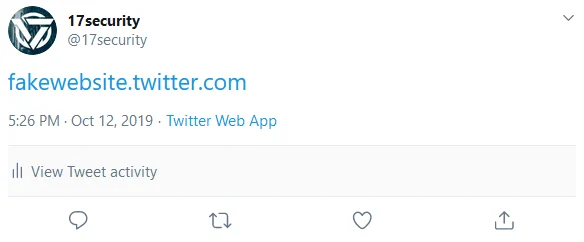
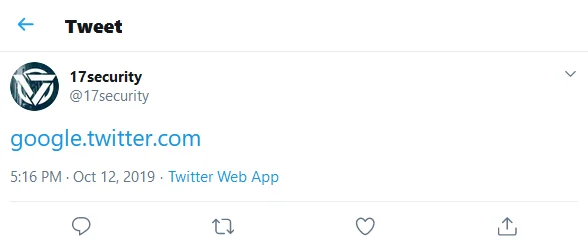
But, after being actually clicked, would take you to the following URLs:


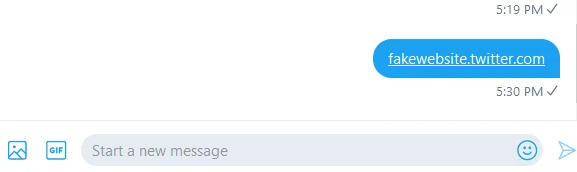
This is also possible to do in direct messages, as so...
Description
I don't think this falls under any real classification of issues other than "CRLF injection", but even then, it's definitely not the right category. This is simply abusing Twitter's URL composing process to create fake hyperlinks. Overall I think this is a neat issue that I think would definitely be exploited by bad actors.
Steps To Reproduce:
1.) Open either (1) direct messages, or (2) composing a tweet
2.) Type out fakewebsite.twitter.com, click enter, and intercept the request with Burp Suite
3.) Modify the status or text parameter (depending on if you're tweeting or DMing) to be fakewebsite.tw%0ditter.com like so...
POST /1.1/dm/new.json HTTP/1.1
Host: api.twitter.com

text=fakewebsite.tw%0ditter.com&cards_platform=Web-12&include_cards=1&include_composer_source=true&include_ext_alt_text=true&include_reply_count=1&tweet_mode=extended&dm_users=false&include_groups=true&include_inbox_timelines=true&include_ext_media_color=true&conversation_id=██████&recipient_ids=false&request_id=&ext=mediaColor,altText,mediaStats,highlightedLabel,cameraMoment
4.) Observe the URL is displayed as fakewebsite.twitter.com but is actually a hyperlink to both fakewebsite.tw and itter.com.
Impact
This could be exploited as a targeted attack or mass phishing attack towards Twitter (the ongoing cryptocurrency scams) by abusing the integrity of Twitter's URL rendering service to create legitimate looking URLs. Although Twitter cannot control the content that is displayed on the other URL, it is possible to control the way URLs are displayed before presenting them to the user.
Attachments
Not written yet. The AI write-up for this report has not been written yet. The Original tab links to the source.
How it worked
Root cause
Likely the URL parser and the display logic handled newline characters differently, so the displayed URL did not match the actual hyperlink targets.
Impact
This could be exploited as a targeted or mass phishing attack by abusing the integrity of Twitter's URL rendering to create legitimate-looking URLs.
What the attacker needed
Ability to send tweets or DMs; intercept and modify requests (e.g., with a proxy)
How it was found
- Open direct messages or the tweet composer.
- Type a URL and intercept the request with a proxy.
- Modify the status or text parameter to include a newline character between two URLs.
- Observe that the displayed URL differs from the actual hyperlinks.
Explained by bugbounty.wiki with AI from the original and checked against quotes from it; it can still be wrong. Read the original before relying on a detail.
Not written yet. The AI write-up for this report has not been written yet. The Original tab links to the source.
When you type a web address in a tweet, Twitter turns it into a clickable link. The researcher found that by inserting a hidden newline character between two web addresses, Twitter would show them as one address but link to two different ones. This could trick people into clicking a link that looks safe but actually goes to a scam site.
What is Open redirect?
A trusted site forwards users to any address an attacker picks; rarely paid alone, often the missing link in a chain.






