HTTP 401 response injection on "amp.twimg.com/amplify-web-player/prod/source.html" through "image_src" parameter
The image_src parameter on amp.twimg.com accepted arbitrary image URLs, allowing an attacker to supply a URL that returns a 401 Unauthorized response. This caused the browser to show a credential prompt that could send the victim's credentials to the attacker's server.
The image_src parameter on amp.twimg.com accepts images from any arbitrary host, therefore, enabling attackers to supply image destinations that respond with a "HTTP 401 Unauthorized" response.
Description
HTTP 401 attacks occur when there is no whitelisting or proxying images and/or pages that are autoloaded into the page. The issue with these attacks is that (1) users are prompted to enter credentials that are sent to a potentially attacker owned host, and (2) information disclosure concerning the IP address/browser details of the user.
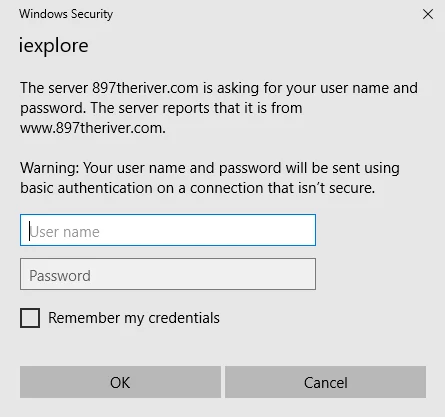
Here is an example prompt displayed when a user runs this with internet explorer. The website could be changed to something more succeptible, e.x. "twitler.com".
Load the following page on the current Firefox, internet explorer, or Safari version.
Modify the "image_src" parameter to a page ran by yourself with a 401 response (e.x. http://897theriver.com/admin).
Load the page
Impact
Since the victim is not expecting the "401 Unauthorized" prompt that forwards credentials to an attacker, he/she will most likely enter their credentials expecting the panel to be owned by Twitter (kind of like iframing a login panel on an XSS). If this were any less severe it would be most likely categorized as "having too much user interaction", but since it is very in your face, enter credentials I decided to report it.
This attack could easily be used to gather data and steal accounts.
Remediation
Proxy/whitelist images included on the page. An example script would only allow images from a certain host and/or load the images into twimg (twimg.com/proxy.php?image=remote), then display them to the user.
The original report as published on HackerOne, by zlz. Images and videos are our own copies; raw HTML is shown as text. View it on HackerOne.
Written with AI from the full original report and checked against it passage by passage; anything it could not back up was removed or toned down. The original is the record. 5 min read.
Context
The target is the Amplify web player hosted on amp.twimg.com, specifically the page amp.twimg.com/amplify-web-player/prod/source.html. Amplify is the Twitter card and embedded media player surface, and this page takes a number of query string parameters that control what it loads. One of them, image_src, tells the player where to fetch an image from.
The report is about what happens when that parameter is not restricted to trusted hosts. The player will happily point at an image URL on any arbitrary host, and if that host answers with HTTP 401 Unauthorized, the browser reacts to the response rather than to the page.
Setup
The researcher needed nothing beyond a browser. The steps say to load the page on the current Firefox, Internet Explorer or Safari version, and the screenshot shows the prompt in Internet Explorer. The attacker side is simply a page under the attacker's control that returns a 401 status, in the example http://897theriver.com/admin. No accounts, roles or special tooling are described.
Finding it
The observation is that image_src accepts images from any arbitrary host. There is no whitelisting and no proxying of the images or pages that get autoloaded into the player page. That means the destination of an autoloaded resource is attacker-controlled, and the browser's handling of the response is therefore attacker-influenced too.
A 401 response is special because browsers do not render it silently. They present a native credential prompt, and the credentials typed into it are sent to the host that issued the challenge, which in this case is the attacker's host. The researcher frames the problem as two consequences: users are prompted to enter credentials that go to a potentially attacker-owned host, and there is information disclosure about the user's IP address and browser details.
The screenshot shows the credential prompt as displayed when the payload is opened in Internet Explorer. The researcher notes that the website name in the prompt could be changed to something more convincing, giving twitler.com as an example.
The page is source.html on amp.twimg.com. The image_src parameter points at https://897theriver.com/admin, a page controlled by the researcher that responds with 401. The URL also contains player_swf_url, page and url parameters; the report does not explain them.
Step 2: load the page in a browser
The steps given are:
Load the following page on the current Firefox, Internet Explorer, or Safari version.
Modify the image_src parameter to a page run by yourself with a 401 response (for example http://897theriver.com/admin).
Load the page.
When the page loads, the browser shows a credential prompt, and credentials entered are sent to the attacker-owned host.
Root cause
The design mistake is that image_src is trusted to name any host, with no whitelist and no proxy in front of it. Because the resource is autoloaded into the page, the browser's own response handling, including the 401 credential prompt, is applied to whatever the attacker chose. There is no whitelisting and no proxying of the images or pages loaded into the page.
Impact
The victim does not expect a 401 prompt on a Twitter-owned page, so they are likely to enter credentials believing the panel belongs to Twitter, in the same way a login panel framed through XSS would be believed. The credentials then go to the attacker's host. The report also notes disclosure of the user's IP address and browser details to that host.
The researcher is explicit about the trade-off: a less severe framing would be dismissed as requiring too much user interaction, but because the prompt is in your face and asks directly for credentials, it was reported. The stated conclusion is that the attack could easily be used to gather data and steal accounts. The report does not give a CVSS score or a bounty amount.
Fix
The recommendation is to proxy or whitelist the images included on the page. An example approach would only allow images from a certain host, and/or load the images into twimg, for example through twimg.com/proxy.php?image=remote, and then display them to the user.
Variants to test
Point an image or media parameter at a host you control that returns 401 and see whether the browser raises a credential prompt on the trusted page. A positive result is the native dialog appearing while the page is on the trusted host.
Try the same with other autoloaded resource parameters, not just images, since the report's concern covers images and pages loaded into the page. A positive result is any autoloaded resource whose host you control producing a browser-level prompt or other response-driven behaviour.
Use a host name that resembles the target brand, as the report suggests with twitler.com, and check whether the prompt text makes the origin look plausible. A positive result is a prompt whose displayed host is easy to mistake for the real service.
Check whether the parameter accepts arbitrary hosts, since the absence of a whitelist is the precondition for everything else. A positive result is the player contacting a host unrelated to the platform.
Hunting notes
This kind of bug hides in embed and player endpoints that take a URL for a resource they load automatically: image sources, media sources, thumbnails and similar parameters. During recon, look for player or card pages on a separate host from the main site, and read their query parameters for anything that names a remote resource. The signal is a parameter whose value is a full URL to a third-party host and which the page fetches without a proxy.
The researcher made the impact legible by showing the actual browser prompt in Internet Explorer and by explaining why a victim would trust it: the page is on a Twitter host, the prompt asks for credentials, and the host name can be made to look convincing.
Written with AI from the full original report and checked against it passage by passage; anything it could not back up was removed or toned down. The original is the record. 7 min read.
What happened, in plain words
A page on Twitter's amp.twimg.com domain had a setting called image_src that told it where to load an image from. That setting accepted any web address, including one controlled by an attacker. If the attacker's address answered with a special "HTTP 401 Unauthorized" response, the browser would pop up a login box asking for a username and password. Because the page was on a Twitter domain, a victim might think the login box belonged to Twitter and type their credentials, which would then be sent to the attacker's server. The researcher showed this with a proof of concept and suggested a fix: only allow images from trusted hosts, or load them through a proxy.
Context
The target is the Amplify web player, a page at amp.twimg.com/amplify-web-player/prod/source.html. Amplify is the part of Twitter that shows cards and embedded media (like videos or images inside a tweet). The page reads several parameters from the URL's query string (the part after the ?). One of these parameters, image_src, tells the player where to fetch an image.
The report is about what happens when that parameter is not restricted to trusted hosts. The player will happily point at an image URL on any host, and if that host answers with HTTP 401 Unauthorized, the browser reacts to that response rather than to the page itself.
Setup
The researcher needed only a browser. The steps say to load the page on the current Firefox, Internet Explorer or Safari version, and the screenshot shows the prompt in Internet Explorer. The attacker side is simply a page under the attacker's control that returns a 401 status, in the example http://897theriver.com/admin. No accounts, roles or special tooling are described.
Finding it
The observation is that image_src accepts images from any arbitrary host. There is no whitelisting (an allowlist of permitted hosts) and no proxying (fetching the image through a trusted server) of the images or pages that get automatically loaded into the player page. That means the destination of an automatically loaded resource is attacker-controlled, and the browser's handling of the response is therefore attacker-influenced too.
A 401 response is special because browsers do not render it silently. They present a native credential prompt (a login box drawn by the browser, not by the website), and the credentials typed into it are sent to the host that issued the challenge, which in this case is the attacker's host. The researcher frames the problem as two consequences: users are prompted to enter credentials that go to a potentially attacker-owned host, and there is information disclosure about the user's IP address and browser details.
The screenshot shows the credential prompt as displayed when the payload is opened in Internet Explorer. The researcher notes that the website name in the prompt could be changed to something more convincing, giving twitler.com as an example.
https://amp.twimg.com/amplify-web-player/prod/source.html is the page on Twitter's server that runs the Amplify player.
? starts the query string, which contains parameters separated by &.
url=n/a sets a parameter called url to the value n/a (not applicable). The report does not explain what this parameter does.
image_src=https://897theriver.com/admin tells the player to load an image from https://897theriver.com/admin, a page controlled by the researcher that responds with 401.
player_swf_url=https://897theriver.com/admin is another parameter in the URL. The report does not explain what it does.
page=amplify_card sets the page parameter to amplify_card.
Step 2: load the page in a browser
The steps given are:
Load the following page on the current Firefox, Internet Explorer, or Safari version.
Modify the image_src parameter to a page run by yourself with a 401 response (for example http://897theriver.com/admin).
Load the page.
When the page loads, the browser shows a credential prompt, and credentials entered are sent to the attacker-owned host.
Root cause
The design mistake is that image_src is trusted to name any host, with no whitelist and no proxy in front of it. Because the resource is automatically loaded into the page, the browser's own response handling, including the 401 credential prompt, is applied to whatever the attacker chose. There is no whitelisting and no proxying of the images or pages loaded into the page.
Impact
The victim does not expect a 401 prompt on a Twitter-owned page, so they are likely to enter credentials believing the panel belongs to Twitter, in the same way a login panel framed through XSS (cross-site scripting) would be believed. The credentials then go to the attacker's host. The report also notes disclosure of the user's IP address and browser details to that host.
The researcher is explicit about the trade-off: a less severe framing would be dismissed as requiring too much user interaction, but because the prompt is in your face and asks directly for credentials, it was reported. The stated conclusion is that the attack could easily be used to gather data and steal accounts.
Fix
The recommendation is to proxy or whitelist the images included on the page. An example approach would only allow images from a certain host, and/or load the images into twimg, for example through twimg.com/proxy.php?image=remote, and then display them to the user.
Variants to test
Point an image or media parameter at a host you control that returns 401 and see whether the browser raises a credential prompt on the trusted page. A positive result is the native dialog appearing while the page is on the trusted host.
Try the same with other automatically loaded resource parameters, not just images, since the report's concern covers images and pages loaded into the page. A positive result is any automatically loaded resource whose host you control producing a browser-level prompt or other response-driven behaviour.
Use a host name that resembles the target brand, as the report suggests with twitler.com, and check whether the prompt text makes the origin look plausible. A positive result is a prompt whose displayed host is easy to mistake for the real service.
Check whether the parameter accepts arbitrary hosts, since the absence of a whitelist is the precondition for everything else. A positive result is the player contacting a host unrelated to the platform.
Hunting notes
This kind of bug hides in embed and player endpoints that take a URL for a resource they load automatically: image sources, media sources, thumbnails and similar parameters. During reconnaissance, look for player or card pages on a separate host from the main site, and read their query parameters for anything that names a remote resource. The signal is a parameter whose value is a full URL to a third-party host and which the page fetches without a proxy.
The researcher made the impact legible by showing the actual browser prompt in Internet Explorer and by explaining why a victim would trust it: the page is on a Twitter host, the prompt asks for credentials, and the host name can be made to look convincing.
Glossary
HTTP 401 Unauthorized: an HTTP status code meaning the server requires authentication; browsers typically respond by showing a login prompt.
Whitelisting: allowing only a specific list of trusted items (here, hosts) and blocking everything else.
Query string: the part of a URL after the ?, containing parameters and their values.
Parameter: a named value in a query string, like image_src=https://example.com.
Autoloaded resource: content (image, script, etc.) that a page loads automatically without user action.
Information disclosure: unintentionally revealing information (like IP address or browser details) to someone who should not have it.
IP address: a numeric label assigned to a device on a network, which can reveal approximate location or network identity.
Browser details: information about the browser and system, often sent in the User-Agent header.
XSS (cross-site scripting): a vulnerability where an attacker injects malicious scripts into a trusted website.
CVSS score: a standardized score (0-10) indicating the severity of a security vulnerability.
Bounty: a monetary reward paid by some organizations for responsibly disclosed security bugs.
Reconnaissance: the information-gathering phase of security testing.
Origin: the combination of scheme (http/https), host, and port that identifies a website; used for security boundaries.
Native credential prompt: a login dialog generated by the browser itself, not by the webpage.
Amplify: Twitter's system for embedding media and cards in tweets.
Player: a web component that plays media (video, audio) or displays interactive content.
Card: a Twitter feature that attaches rich media (images, videos, summaries) to tweets.